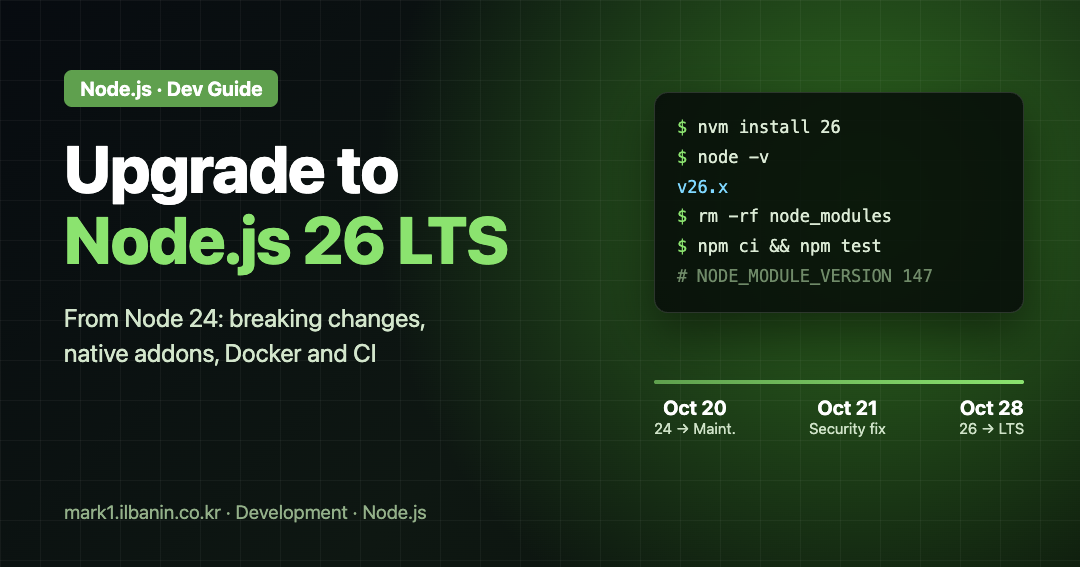
To upgrade to Node.js 26, run nvm install 26 and nvm use 26, then run rm -rf node_modules && npm ci and your tests. Node.js 26 "Lithium" became Active LTS on October 28, 2026 with version 26.13.0, and it gets fixes until April 30, 2029. Node 24 stays supported until April 30, 2028, so move when your tests pass, not because of the date.
Updated: October 31, 2026
This guide is a practical checklist for application developers and the people who run Node.js on servers, in Docker and in CI. Every date and breaking change below comes from the official Node.js release notes and the Node.js Release working group schedule, checked on October 31, 2026.
Check your current Node.js version first
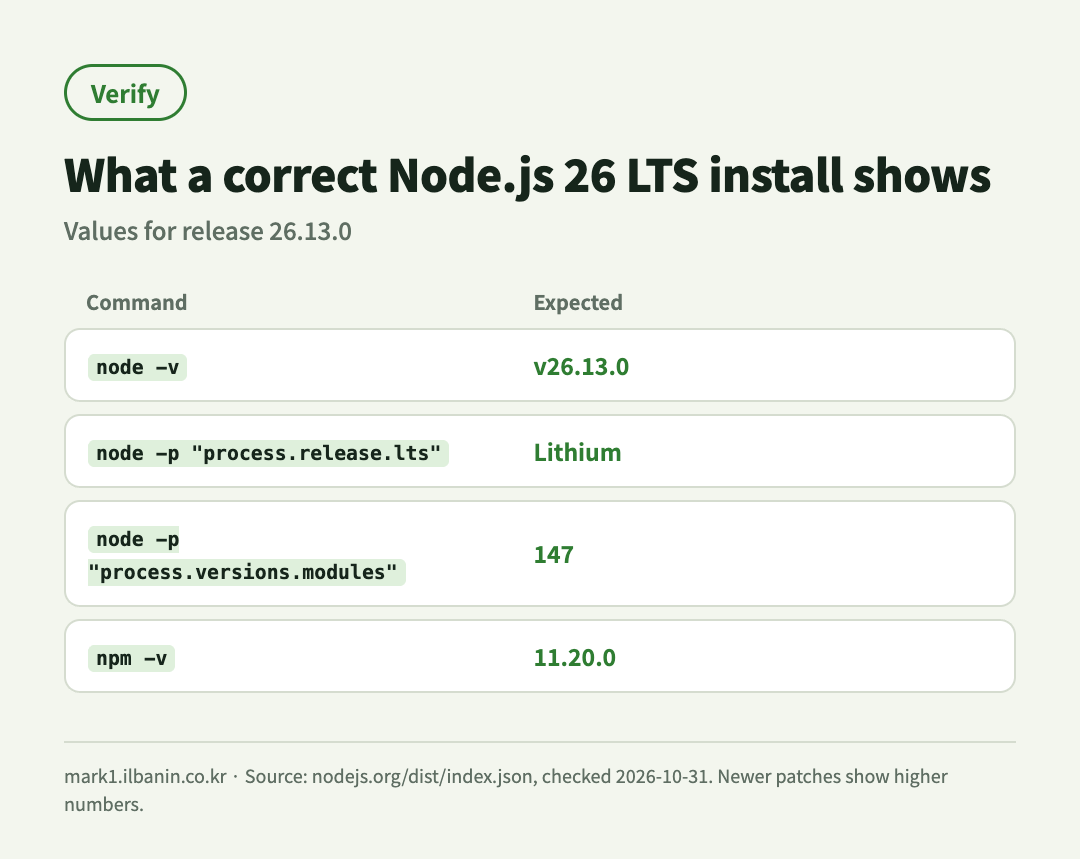
Run these four commands before you change anything, and again after the upgrade:
node -v
node -p "process.release.lts"
node -p "process.versions.modules"
npm -v
process.release.lts prints the LTS codename. If it prints undefined, you are on a non-LTS build, such as 26.12.x or 25.x. On Windows, run where.exe node to see which install is first on your PATH. On macOS and Linux, use which -a node.
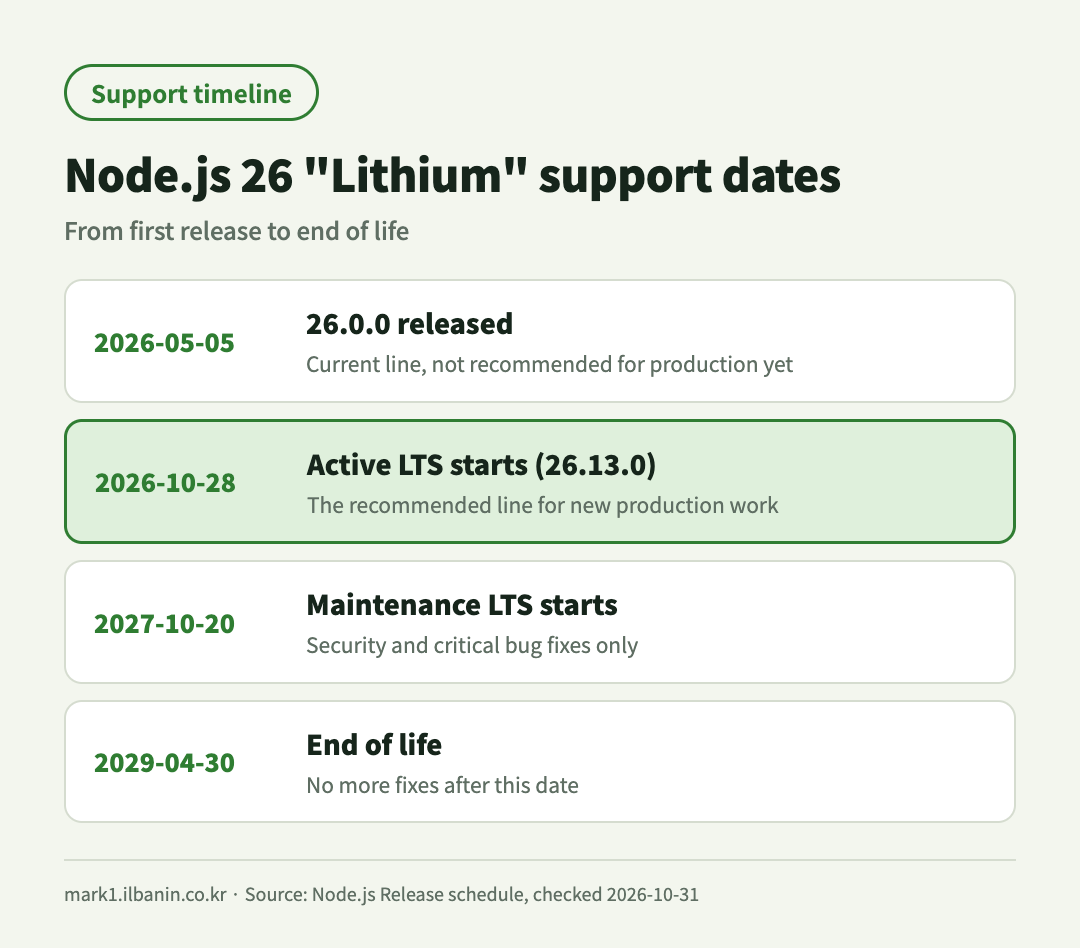
Node.js release schedule: LTS dates and end of life
Node.js 26.0.0 shipped on May 5, 2026 as the Current line. Version 26.13.0 moved it to LTS on October 28, 2026. The release notes say nothing changed from 26.12.1 apart from metadata such as process.release, so this is a status change and not a code change.
| Line | Status on Oct 31, 2026 | Latest | Maintenance from | End of life |
|---|---|---|---|---|
| 26.x "Lithium" | Active LTS | 26.13.0 | 2027-10-20 | 2029-04-30 |
| 24.x "Krypton" | Maintenance LTS | 24.22.2 | 2026-10-20 | 2028-04-30 |
| 22.x "Jod" | Maintenance LTS | 22.23.4 | 2025-10-21 | 2027-04-30 |
| 25.x | End of life | 25.9.0 | 2026-04-01 | 2026-06-01 |
| 20.x "Iron" | End of life | 20.20.2 | 2024-10-22 | 2026-04-30 |
Maintenance LTS means the line still gets security fixes and critical bug fixes, but not new features. Future dates in this table can change with at least 14 days of notice, so check the release schedule before you commit to one.
Which versions have the October 2026 security fixes
The October 2026 security releases fixed four high-severity issues, including a Brotli decoder out-of-bounds write. The fixed versions are 26.12.1, 24.22.1 and 22.23.4. If your node -v shows anything lower on those lines, update even if you are not moving to Node 26 yet.
Node.js 26 is the last release on the old schedule
From the 27.x line, Node.js moves to one major release per year, and every release becomes LTS. The first Node 27 alpha appeared in late October 2026. The schedule lists 27.0.0 for April 22, 2027, LTS for October 20, 2027 and end of life for April 30, 2030. The official announcement says that if you already upgrade only to LTS versions, "little changes beyond version numbering." Alpha builds are not meant for production.
What changed in Node.js 26: features worth knowing
The 26.0.0 release notes highlight three changes.
- Temporal is on by default. The modern date and time API now works without a flag.
- V8 14.6 (Chromium 146). It adds
Map.prototype.getOrInsert(),getOrInsertComputed()(also onWeakMap) andIterator.concat(). - Undici 8.0.2. Undici is the HTTP client behind the global
fetch(). A major version bump here deserves a test run of every outbound HTTP call.
A quick way to try the new APIs after installing Node 26:
node -e 'console.log(Temporal.Now.plainDateISO().toString())'
node -e 'const m = new Map(); console.log(m.getOrInsert("hits", 0))'
Later 26.x minor releases added more. Version 26.12.0, for example, marked the config file as stable and made most ES modules load synchronously.
Node.js 26 breaking changes to check before you upgrade
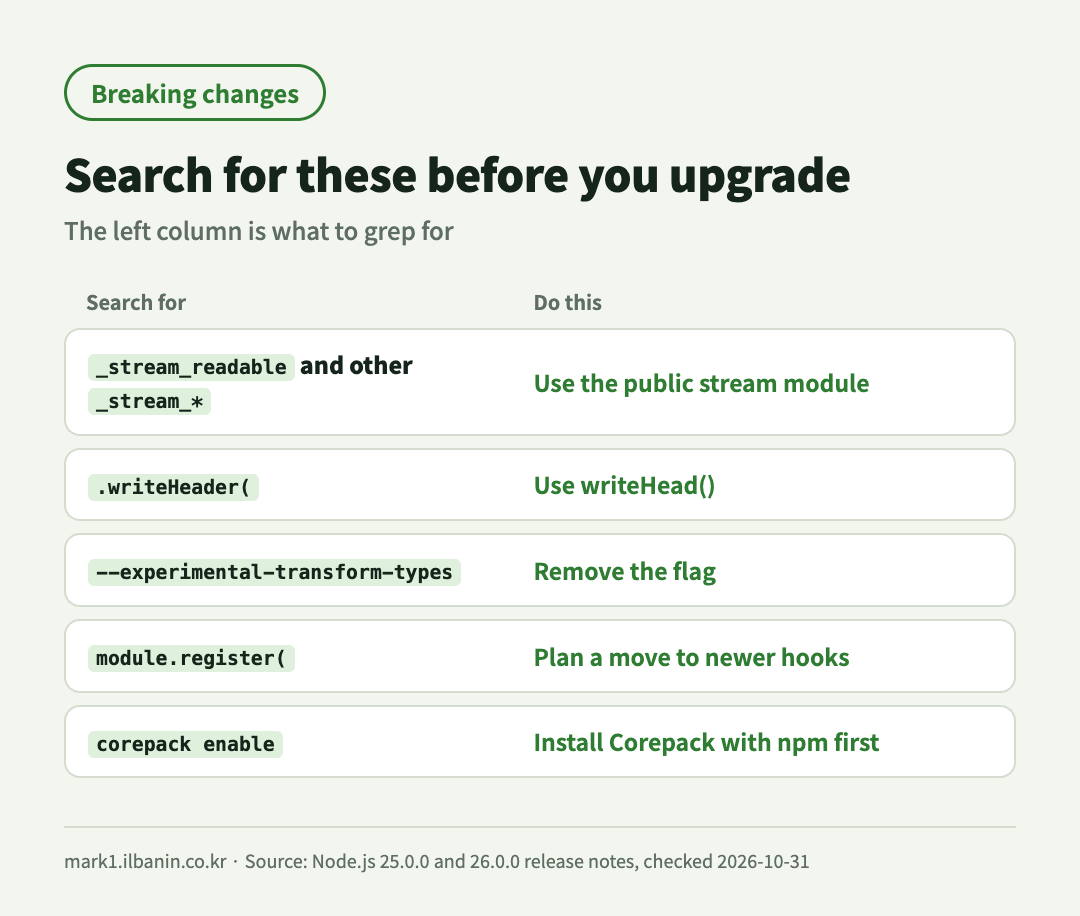
These are the semver-major changes from the 26.0.0 release notes that most often affect real applications. The first column is what to search for.
| Change in Node 26 | What breaks | Fix |
|---|---|---|
_stream_readable, _stream_writable and other _stream_* modules removed | require('_stream_readable') throws | Use the public stream module, or update the dependency |
http.Server.prototype.writeHeader() removed | Calls to writeHeader() fail | Use writeHead() |
--experimental-transform-types removed | Scripts or NODE_OPTIONS with the flag fail to start | Remove the flag |
NODE_MODULE_VERSION is now 147 | Native addons built for Node 24 refuse to load | Reinstall or rebuild node_modules |
module.register() runtime-deprecated | Warnings in logs | Plan a move to the newer module hooks |
localStorage returns undefined without a storage file | Code that assumes the global exists | Guard the access, or configure a storage file |
Two more items from the notes deserve a look:
- Extensionless files in
"type": "module"packages. The documented exception that treated extensionless files in such packages as CommonJS was removed. Check CLI scripts without a.jsor.cjsextension. - Building from source now needs GCC 13.2 or newer, and Python 3.9 is no longer supported for the build. This only matters if you compile Node yourself.
Two changes arrived in Node 25, so you meet them for the first time when you come from an LTS line:
- Corepack is no longer bundled. Node 26 has no
corepackexecutable. If your build runscorepack enable, install it first withnpm install -g corepack. - Official Linux binaries link against libatomic. Minimal servers and custom container images may need the library installed separately.
How to upgrade to Node.js 26 step by step
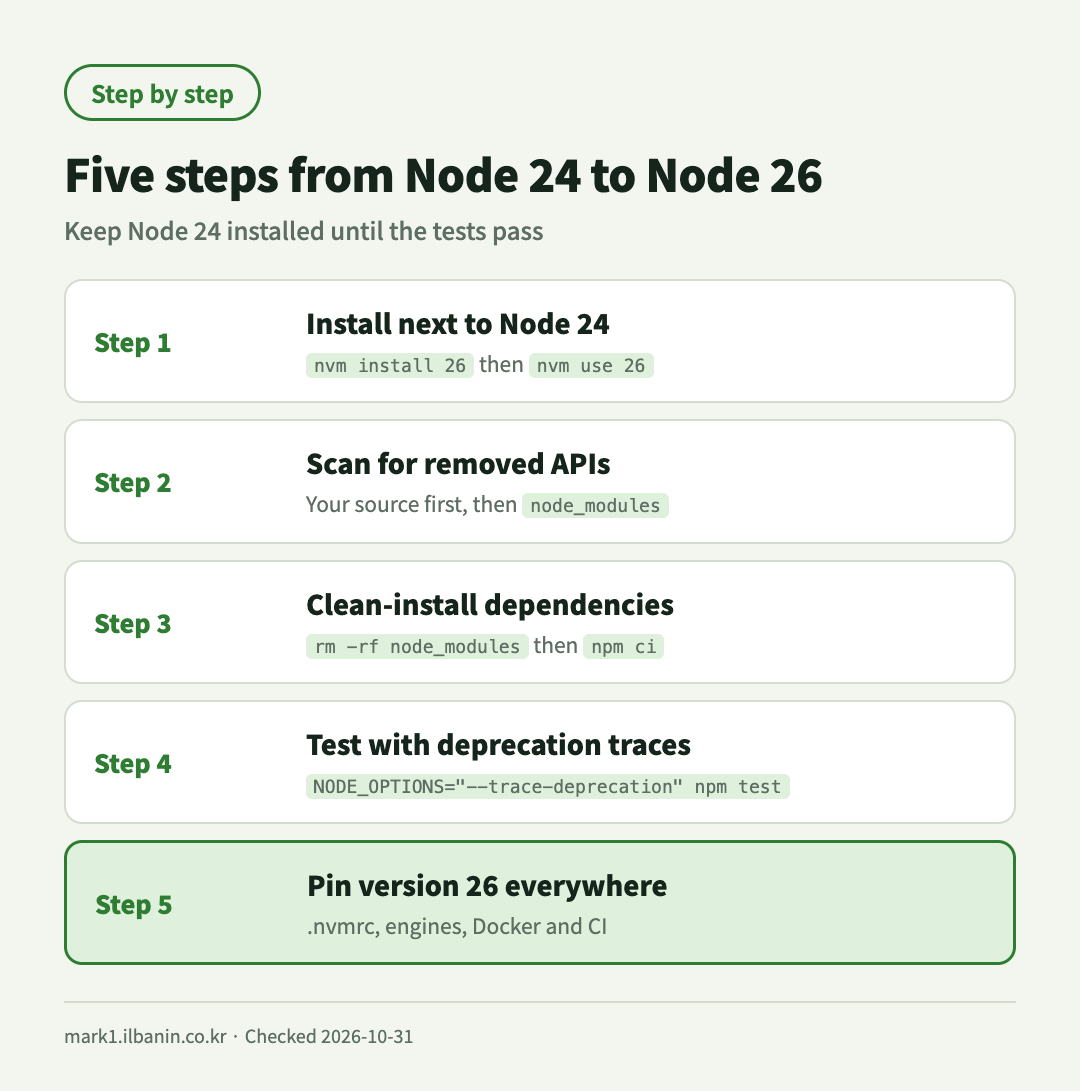
The flow below works for a laptop, a VPS and a CI pipeline. The key idea: keep Node 24 installed until Node 26 passes your tests.
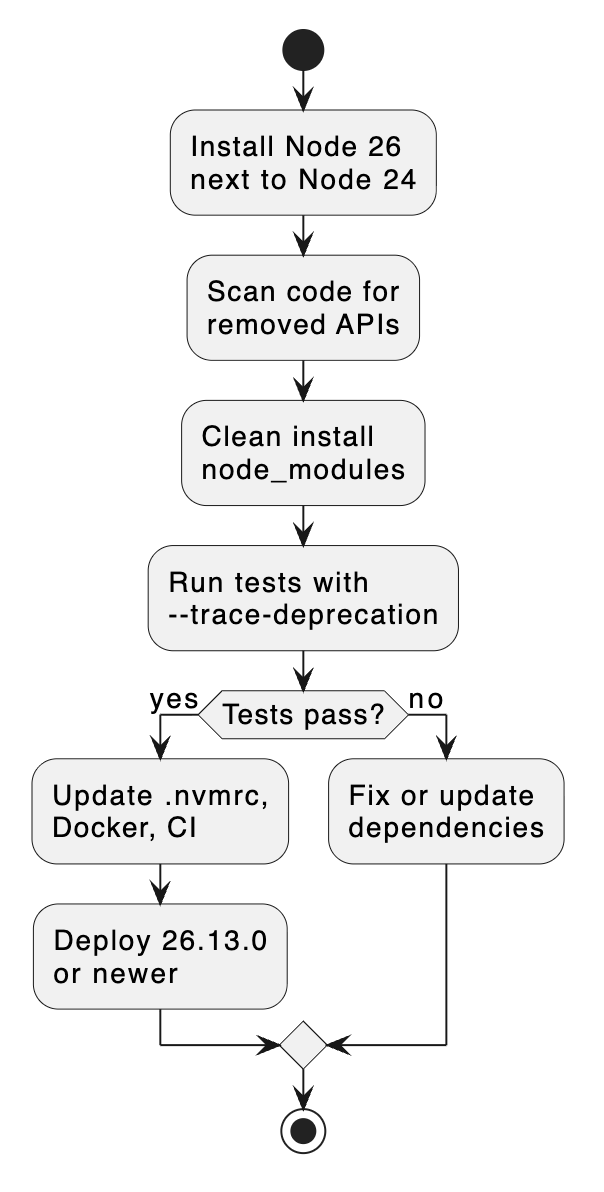
View PlantUML source
@startuml
skinparam shadowing false
skinparam defaultFontSize 14
start
:Install Node 26\nnext to Node 24;
:Scan code for\nremoved APIs;
:Clean install\nnode_modules;
:Run tests with\n--trace-deprecation;
if (Tests pass?) then (yes)
  :Update .nvmrc,\nDocker, CI;
  :Deploy 26.13.0\nor newer;
else (no)
  :Fix or update\ndependencies;
endif
stop
@enduml
Step 1: Install Node 26 alongside Node 24
With nvm (macOS, Linux, WSL):
nvm install 26
nvm use 26
node -v
To copy your global npm packages across at install time, use nvm install 26 --reinstall-packages-from=24. Keep Node 24 as the default until you finish testing. Switch back any time with nvm use 24. With fnm the commands are similar: fnm install 26 and fnm use 26.
With Homebrew, the node formula is now 26.13.0, and node@24 remains available if you need to stay:
brew update
brew upgrade node
On Windows, use nvm-windows with the full version number:
nvm install 26.13.0
nvm use 26.13.0
Without a version manager, use the winget LTS package. Confirm the result with node -v, because winget listings can lag behind a new release:
winget install -e --id OpenJS.NodeJS.LTSOn Ubuntu and Debian servers without a version manager, NodeSource publishes a Node 26 repository. Read the script before you pipe it to a shell:
curl -fsSL https://deb.nodesource.com/setup_26.x | sudo -E bash -
sudo apt install -y nodejs
Step 2: Scan your code for removed APIs
Run this from the project root. It searches your own source, not node_modules:
grep -rnE "_stream_(wrap|readable|writable|duplex|transform|passthrough)|\.writeHeader\(|module\.register\(|experimental-transform-types|corepack|localStorage" \
  --include="*.js" --include="*.mjs" --include="*.cjs" --include="*.ts" \
  --include="*.json" --include="Dockerfile" --include="*.yml" \
  --exclude-dir=node_modules .
Then check whether any installed dependency still loads the old internal stream modules:
grep -rlE "require\(['\"]_stream_" node_modules --include="*.js" | head -20If a package shows up, run npm ls <package> to see what pulls it in, and look for a newer version first.
Step 3: Clean-install dependencies
Native addons (for example database drivers, image libraries or bcrypt) are compiled for one NODE_MODULE_VERSION. Node 24 uses 137 and Node 26 uses 147, so modules built under Node 24 fail to load. Do a clean install under Node 26:
rm -rf node_modules
npm ci
The same applies to Docker: do not reuse a node_modules layer that was built with Node 24. If npm prints an EBADENGINE warning, a package has not declared support for Node 26 yet. It is a warning unless you set engine-strict, but check that package's changelog and test it closely.
Step 4: Run tests and surface deprecations
Run your test suite with deprecation traces on, so runtime deprecations such as module.register() show where they come from:
NODE_OPTIONS="--trace-deprecation" npm testTo make CI fail on any deprecation while you clean up, use --throw-deprecation instead. Pay extra attention to tests that call external APIs with fetch(), because of the Undici 8 upgrade.
Step 5: Pin Node 26 everywhere
Once tests pass, update every place that decides the Node version.
echo "26" > .nvmrc
nvm alias default 26
In package.json, declare the supported range so installs warn on old runtimes:
{
  "engines": {
    "node": ">=26"
  }
}
In a Dockerfile, change the base image tag. The lts-slim tag also points to 26 today, but it will move to the next LTS line later, so a numbered tag is the safer pin:
FROM node:26-slimIn GitHub Actions, the official actions/setup-node action takes the major version:
- uses: actions/setup-node@v7
  with:
    node-version: 26
A matrix with both 24 and 26 is a good bridge while some services still run Node 24.
8 common Node.js 26 upgrade errors and how to fix them
The messages below follow standard Node.js and shell output. Exact wording and paths can differ on your system.
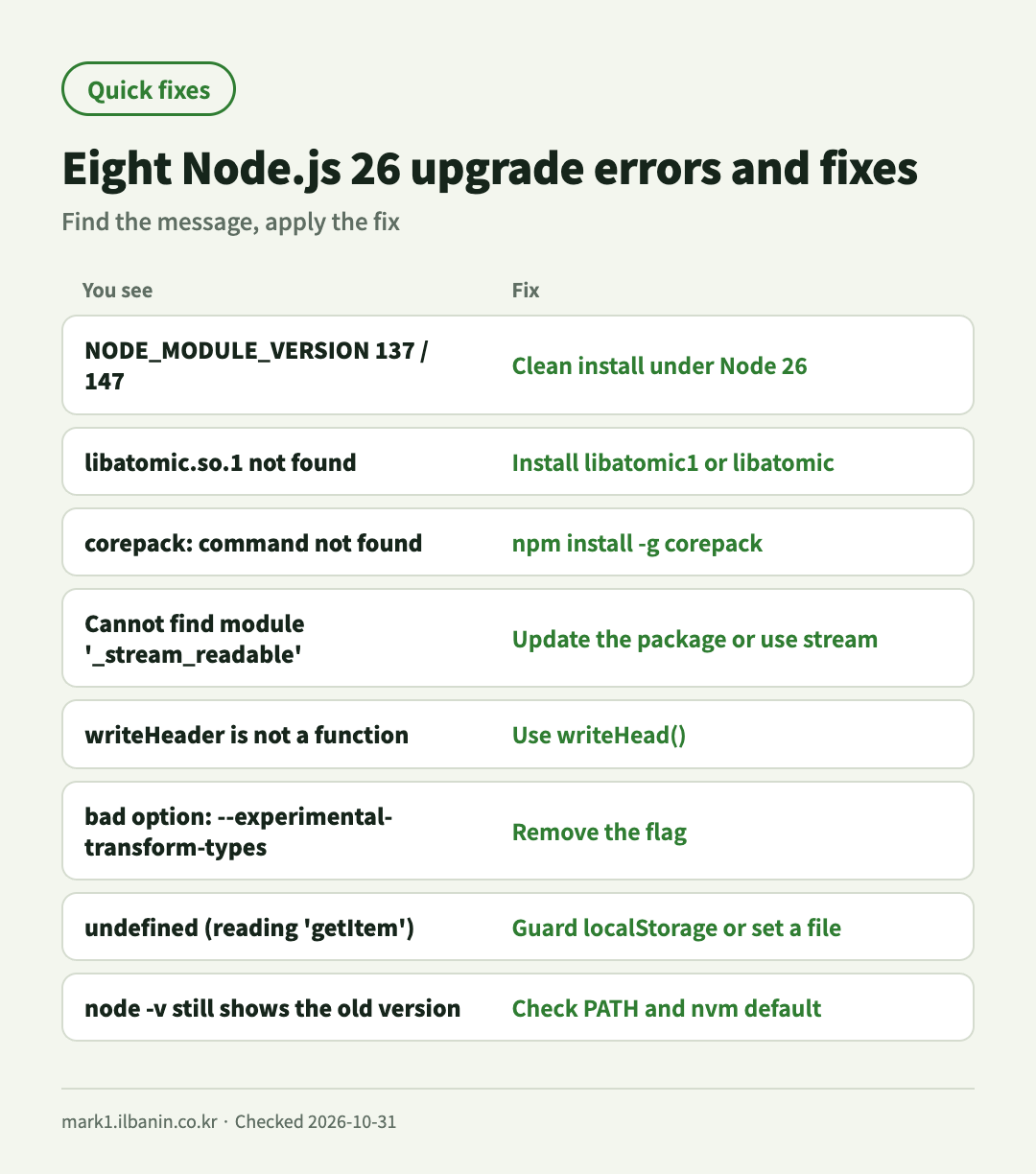
1. "compiled against a different Node.js version" (ERR_DLOPEN_FAILED)
was compiled against a different Node.js version using
NODE_MODULE_VERSION 137. This version of Node.js requires
NODE_MODULE_VERSION 147.
A native addon still has a build for Node 24. Run rm -rf node_modules && npm ci under Node 26, and rebuild any Docker layer that holds old modules. If the install then fails, the package may not support Node 26 yet, so update it to a release that does.
2. "libatomic.so.1: cannot open shared object file"
node: error while loading shared libraries: libatomic.so.1:
cannot open shared object file: No such file or directory
The official Linux binaries have linked against libatomic since Node 25. Install the library for your distribution. In a custom container image, add the same line to the Dockerfile.
On Debian and Ubuntu:
sudo apt install -y libatomic1On RHEL and Fedora:
sudo dnf install -y libatomic3. "corepack: command not found"
Node.js stopped distributing Corepack from version 25. Install it yourself, or install pnpm or Yarn directly. In Docker and CI, add this before any pnpm or Yarn command:
npm install -g corepack
corepack enable
4. "Cannot find module '_stream_readable'"
The _stream_* modules are gone in Node 26. In your own code, import from node:stream. If the stack trace points into node_modules, update that package.
5. "res.writeHeader is not a function"
This legacy alias was removed. Replace writeHeader() with writeHead(). The arguments stay the same.
6. "bad option: –experimental-transform-types"
node: bad option: --experimental-transform-typesRemove the flag from scripts, Dockerfiles and NODE_OPTIONS. In NODE_OPTIONS, the message can read "is not allowed in NODE_OPTIONS" instead. Search all of those places, because the flag often sits outside the code. TypeScript that relied on the flag, such as code with enum, now needs a build step or a third-party runner.
7. "Cannot read properties of undefined (reading 'getItem')"
localStorage is undefined when Node has no storage file. Guard the access, or pass a file at startup:
node --localstorage-file=./app-storage.db app.jsIn code, the guard is short: globalThis.localStorage?.getItem("key").
8. node -v still shows the old version
Another install comes first on your PATH, or the shell has not picked up the change. Run which -a node and nvm alias default 26, then open a new terminal. Services started by systemd or cron do not load your shell profile, so they can keep running the old Node. Use nvm which 26 to get the absolute path, and put that path in the service file.
Upgrading Node.js on a Linux server
On servers, the safest path is the same side-by-side approach. If you run apps with a process manager, restart them only after node -v shows 26 for the user that runs the service.
If you are also planning an OS upgrade, do one change at a time. Our guide on how to upgrade to Ubuntu 26.10 from 26.04 LTS covers the OS side. Upgrading Ubuntu and Node in the same maintenance window makes failures much harder to trace.
Automation tools that run on Node.js need their own check. If you self-host something like n8n, or run CLI tools from scheduled jobs as in our Claude Code headless with n8n on macOS setup, confirm the tool's supported Node versions in its own docs before you switch the system Node.
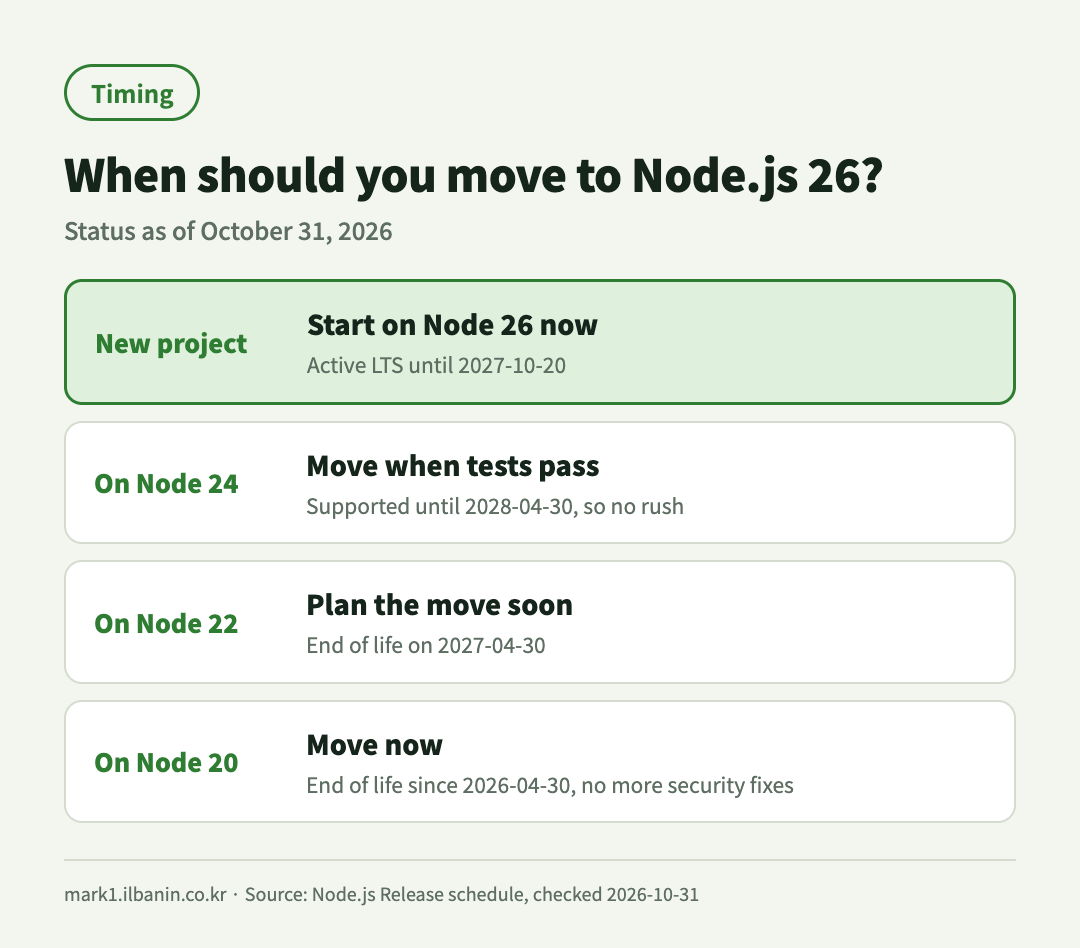
When to move production to Node 26
| Your situation | Recommended timing |
|---|---|
| New project | Start on Node 26 now |
| App on Node 24, tests pass on 26 | Move in your next release window; 26.13.0 includes the October security fixes |
| App on Node 22 | Plan the move soon; 22.x reaches end of life on 2027-04-30 |
| App on Node 20 | Move now; 20.x has been end of life since 2026-04-30 |
| Blocked by a native addon | Stay on Node 24 (supported to 2028-04-30) and track the addon |
FAQ
Is Node.js 26 LTS now? Yes. Node.js 26 became Active LTS on October 28, 2026 with version 26.13.0, codename "Lithium." Maintenance starts on October 20, 2027, and end of life is April 30, 2029.
Do I have to leave Node.js 24 right away? No. Node 24 entered Maintenance LTS on October 20, 2026 and keeps getting security fixes until April 30, 2028. Upgrade when your tests pass, and make sure you run at least 24.22.1 in the meantime.
Can I upgrade straight from Node 22 or Node 20 to Node 26? Yes, you can install Node 26 directly, with no need to pass through each version. Read the breaking changes for every major version you skip, and do a clean install. Node 20 and Node 22 addons are built for older module versions, so they need the same rebuild.
Does upgrading Node.js also upgrade npm? Each Node release bundles its own npm, and 26.13.0 ships npm 11.20.0. With a version manager, global packages stay with the old version, so reinstall them or use --reinstall-packages-from=24 with nvm.
Should I use Node.js 25 or Node.js 27 instead? No for production. Node 25 reached end of life on June 1, 2026 and gets no more fixes. Node 27 is an alpha, and the Node.js project says alpha releases are not intended for production use. Library maintainers can test it in CI.
Summary
To upgrade to Node.js 26, install it next to Node 24, search for the removed _stream_* modules, writeHeader() and --experimental-transform-types, clean-install node_modules, install Corepack yourself if you need it, and run tests with deprecation traces. Then pin version 26 in .nvmrc, engines, Docker and CI, and roll out 26.13.0 or newer.
Information current as of October 31, 2026. Future dates come from the Node.js Release working group schedule and can change, so check it before a production rollout.
References
- Node.js 26.13.0 "Lithium" (LTS) release notes — nodejs.org, checked 2026-10-31
- Node.js 26.0.0 release notes — nodejs.org, checked 2026-10-31
- Node.js release schedule — Node.js Release working group, checked 2026-10-31
- Node.js previous releases — nodejs.org, checked 2026-10-31
- Node.js release index — nodejs.org, checked 2026-10-31
- October 2026 security releases — nodejs.org, checked 2026-10-31
- Evolving the Node.js Release Schedule — nodejs.org, checked 2026-10-31
- Node.js 26.12.0 release notes — nodejs.org, checked 2026-10-31
- Node.js 25.0.0 release notes — nodejs.org, checked 2026-10-31
- Official Node.js Docker images — Docker Hub, checked 2026-10-31
- Homebrew node formula — Homebrew, checked 2026-10-31
- NodeSource distributions — NodeSource, checked 2026-10-31
- actions/setup-node — GitHub, checked 2026-10-31
9 thoughts on “Node 26 LTS Upgrade: Node 24 to 26 Breaking Changes, Fixes”