Heroku-22 end of life is now hitting deploys. Since November 1, 2026, the first build of each Heroku-22 app in every 30-day window fails with a deprecation error. Retrigger that build to ship today, then move the app to Heroku-24 or Heroku-26 with heroku stack:set before builds stop for good on May 1, 2027.
Written 2026-11-02. Facts come from Heroku's Dev Center, the Heroku-22 End-of-Life FAQ and the stack pages, all checked that day. I did not run the commands below against a live Heroku app. The Heroku CLI commands come from Heroku's documentation, with app names replaced by placeholders, and the two grep checks are my own additions.
If a git push heroku main failed for you this week with a stack warning, nothing is broken in your code. Heroku is failing builds on purpose so teams notice the deadline. The failures get more frequent each quarter, so a fix now saves you a lot of surprise red builds later.
What changed on November 1 for Heroku-22 apps
Heroku deprecated Heroku-22 on May 20, 2026. The stack runs on Ubuntu 22.04, and Heroku ties stack support to Ubuntu's standard support, which ends in April 2027. The Heroku-22 End-of-Life FAQ sets out a staged rollout of build failures before then.
| Date | What happens | Your build |
|---|---|---|
| Nov 1, 2026 | First build per 30 days fails | Retrigger works |
| Feb 1, 2027 | First build per 7 days fails | Retrigger works |
| Apr 1, 2027 | First build per 24 hours fails | Retrigger works |
| Apr 30, 2027 | End of life, no security updates | App keeps running |
| May 1, 2027 | All builds blocked | Upgrade required |
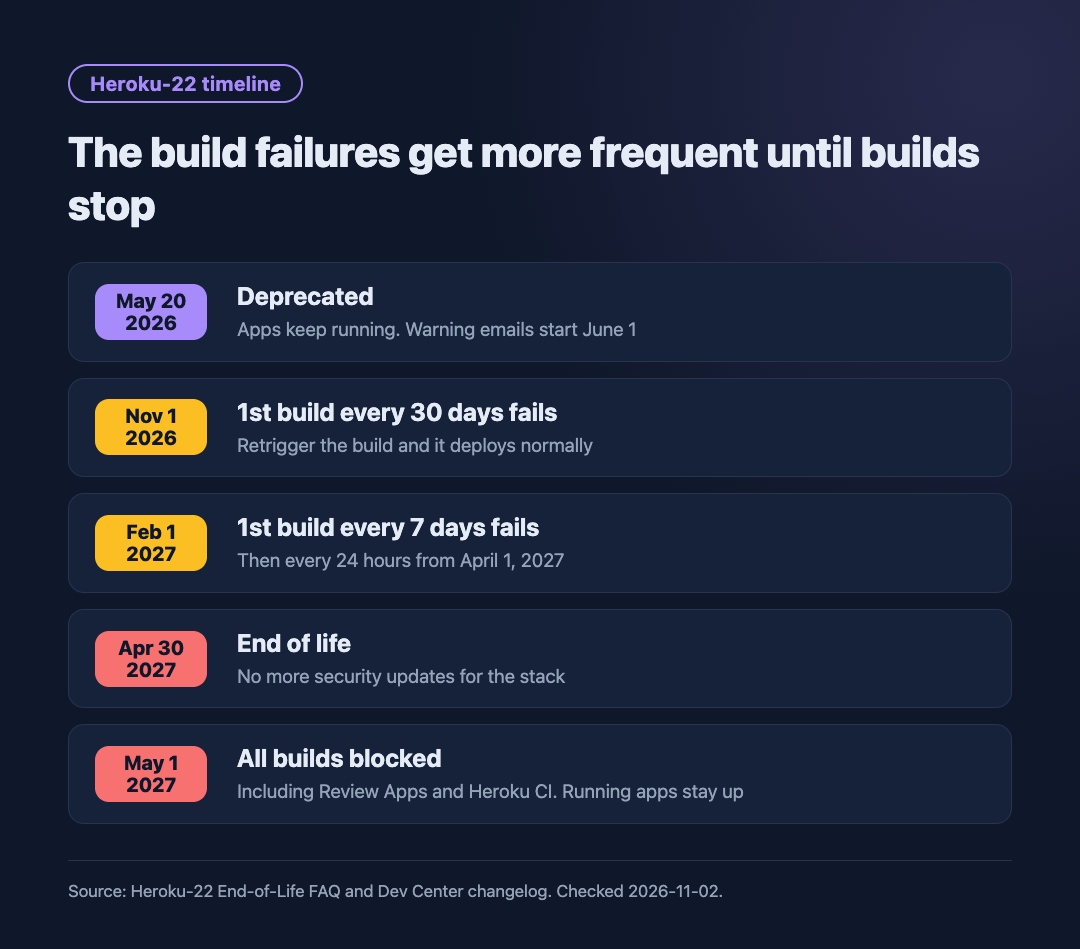
Two points from the FAQ matter most. First, the failure happens "at the start of the build", so nothing gets half-deployed. Second, Heroku says to "retrigger the build that failed with a deprecation error to deploy code as normal". That's the quick fix for today's deploy. It doesn't fix the stack.
Running apps are not shut down at end of life. But from April 30, 2027 the OS layer gets no security patches, and from May 1, 2027 you can't deploy a code fix at all. Review Apps and Heroku CI lose builds on the same day. Heroku also says it won't grant extensions, even for enterprise customers.
How to check which apps run on Heroku-22
Start with an inventory. Heroku's deprecation notice gives two commands that list every app on the stack:
heroku plugins:install @heroku-cli/plugin-apps-table
heroku apps:table --filter="STACK=heroku-22"
For a team, add the team name:
heroku apps:table --filter="STACK=heroku-22" --team=<TEAM_NAME>To check a single app, look for the Stack line in the app info, or open the app's Settings page in the dashboard:
heroku apps:info -a <APP_NAME>The FAQ points out that Heroku CI apps (names with -ci-) may be hidden in the dashboard but show up in the CLI list. Don't skip them.
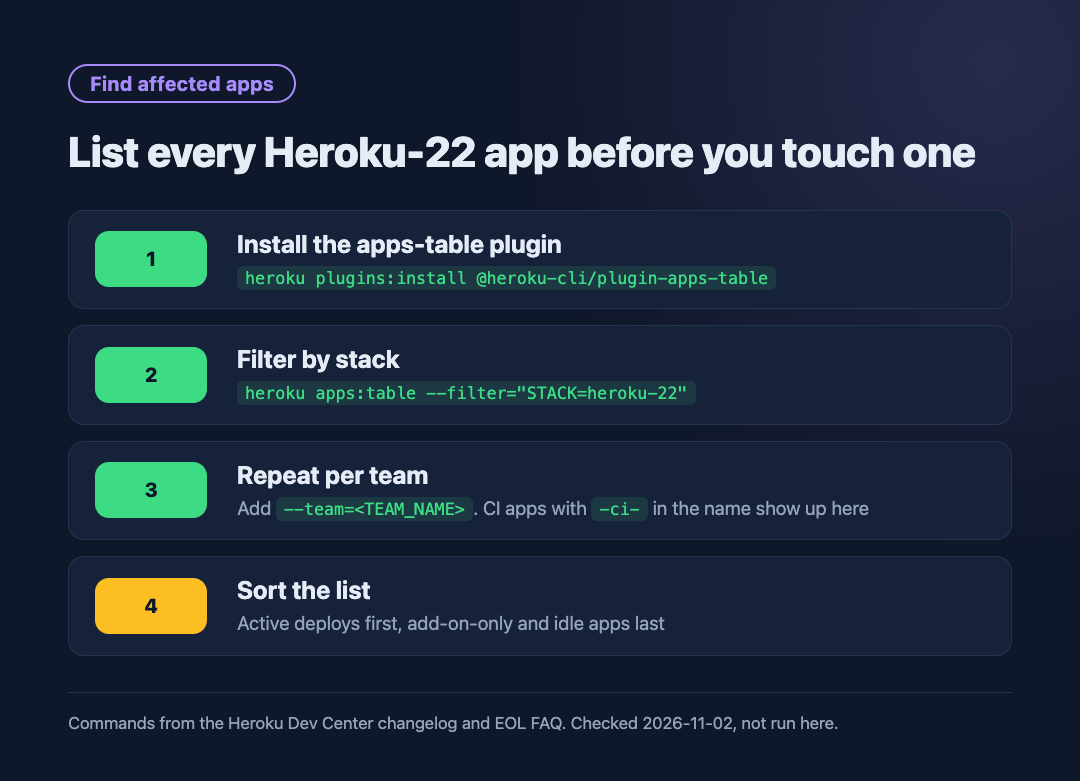
Sort the list by how often you deploy. Apps you push to weekly will hit the failing build first. Add-on-only apps and apps you never deploy are easy wins, covered in the special cases below.
Choose Heroku-24 or Heroku-26
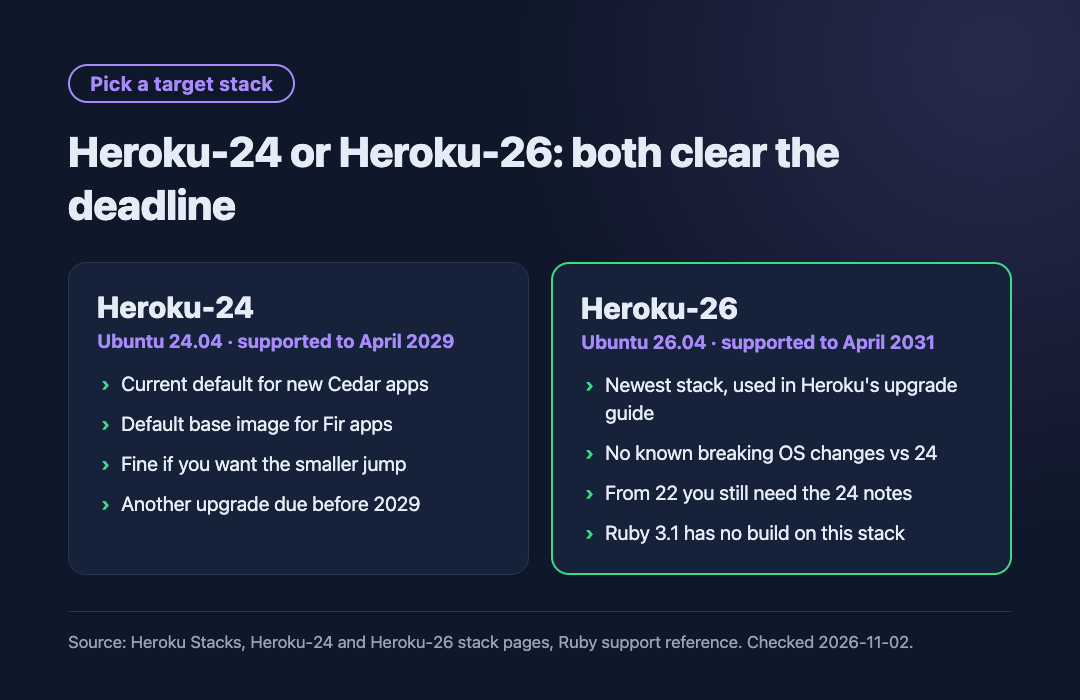
Both stacks clear the deadline. The difference is how long you get before the next forced move.
| Stack | Base OS | Supported through | Status |
|---|---|---|---|
| Heroku-26 | Ubuntu 26.04 | April 2031 | Supported, newest |
| Heroku-24 | Ubuntu 24.04 | April 2029 | Default for new apps |
| Heroku-22 | Ubuntu 22.04 | April 2027 | Deprecated |
Heroku's upgrade guide uses Heroku-26 in every example and tells you to upgrade to the latest stack. The Heroku-26 page says there are "currently no known breaking OS changes" from Heroku-24 to Heroku-26. So the work from 22 to 26 is about the same as 22 to 24, and you get two more years.
My recommendation: go to Heroku-26 unless a dependency you rely on hasn't been tested there. One example from Heroku's own docs: the Ruby support reference lists no Ruby 3.1 build for Heroku-26, while Heroku-24 still has 3.1.7. Ruby 3.1 is already end of life, so the real fix is a Ruby upgrade, but Heroku-24 buys time if you can't do both at once.
If you use Cloud Native Buildpacks (Fir apps), this upgrade path doesn't apply. Those apps always have the stack value cnb, and you set the base image in project.toml, for example builder = "heroku/builder:26".
Heroku-24 breaking changes to check first
Skipping from 22 to 26 means you still cross the Heroku-24 changes. Heroku's guide says to review the notes for every stack you skip. The Heroku-24 stack page lists these:
| Change on Heroku-24 | Who it hits | Fix |
|---|---|---|
| Git is build-time only | Apps that call git at run time | APT buildpack with git in Aptfile |
| System Python is build-time only | Run-time scripts using system python | Add the Python buildpack |
US/* time zones removed | Apps using US/Central etc. | Use America/Chicago style names |
| Fewer locales | Apps using non-US en_* locales | heroku-buildpack-locale |
| Chrome buildpack replaced | Headless browser tests or scrapers | Chrome for Testing buildpack |
| OpenJDK default changed | Java apps with no pinned version | Pin the Java version |
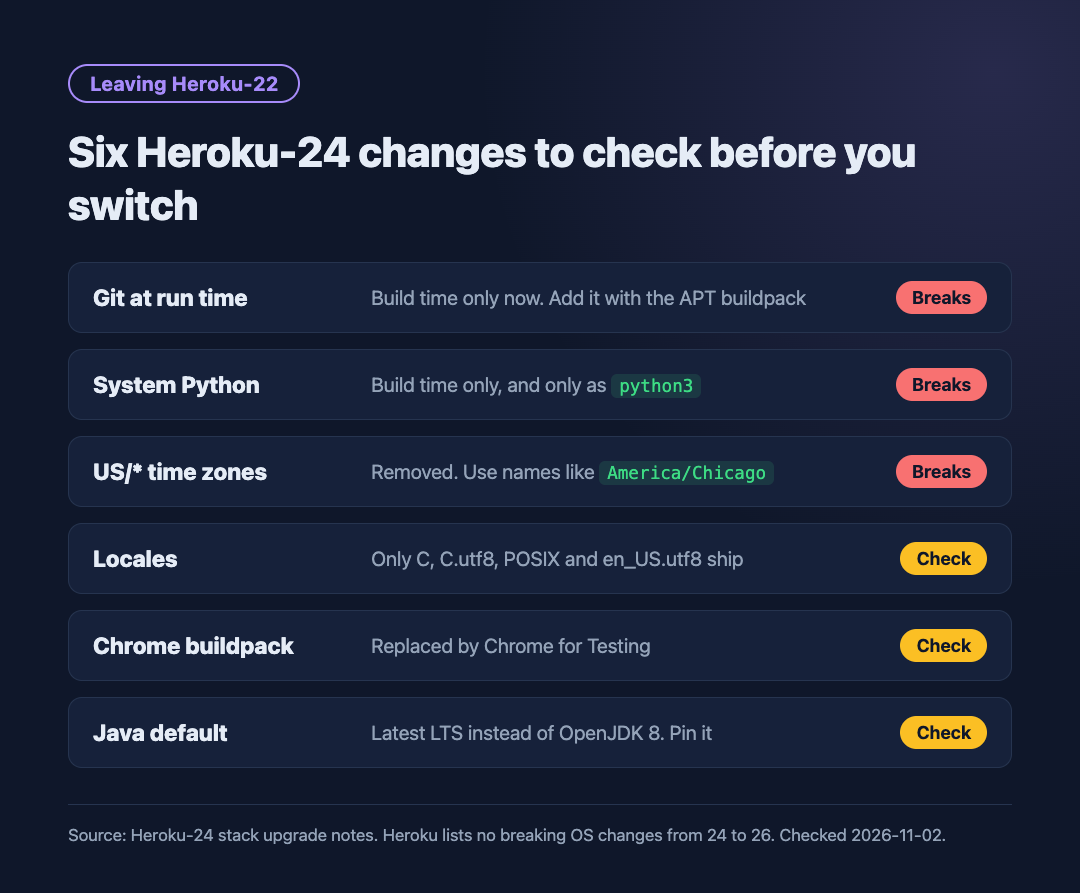
A quick search finds the most common ones. Run this from your repo root:
grep -rnE "US/(Alaska|Central|Eastern|Hawaii|Mountain|Pacific)" --exclude-dir=node_modules --exclude-dir=.git .
grep -nwE "git|python|python3" Procfile
heroku buildpacks -a <APP_NAME>
The first line finds old time zone names. The second shows whether a process type calls git or python at run time. Also check any scripts those processes call. The third command lists your buildpacks. Look for the old Chrome buildpack and for URLs ending in #<ref>. Heroku says pinned buildpacks don't receive compatibility fixes, so unpin them before the upgrade.
Also check your language version. Heroku's Python support page lists 3.12 to 3.15 as supported, with 3.10 and 3.11 deprecated. Once Heroku removes a version, you must move to a supported one before any further build, on any stack. If you're also bumping a Node runtime in the same change, see how to upgrade to Node.js 26 LTS for the version checks.
Upgrade the Heroku-22 stack step by step
Test on a copy first, then upgrade production. Heroku recommends a Review App for the test.
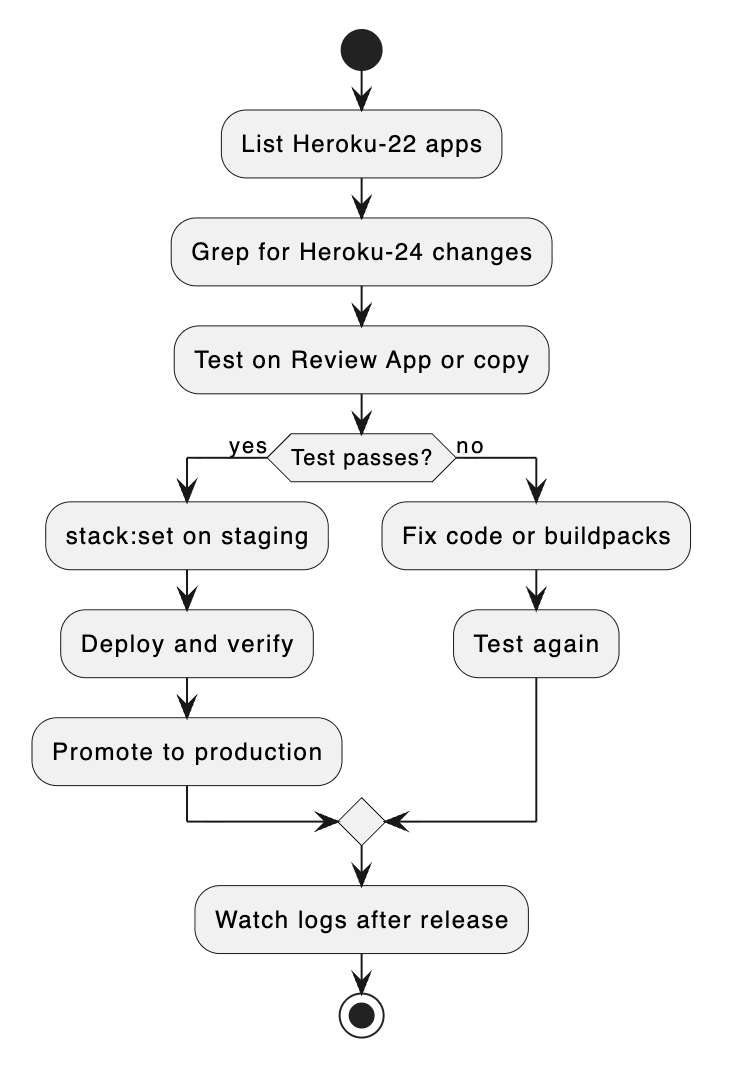
View PlantUML source
@startuml
start
:List Heroku-22 apps;
:Grep for Heroku-24 changes;
:Test on Review App or copy;
if (Test passes?) then (yes)
  :stack:set on staging;
  :Deploy and verify;
  :Promote to production;
else (no)
  :Fix code or buildpacks;
  :Test again;
endif
:Watch logs after release;
stop
@enduml
Option 1: Test with a Review App
Set the stack in app.json on a branch and open a pull request. New Review Apps and Heroku CI runs then build on Heroku-26.
{
  "stack": "heroku-26"
}
This setting doesn't change an existing app. It only applies to newly created Review Apps, CI test apps and Heroku Button apps. Keep it in app.json after the upgrade so CI matches production.
Option 2: Test with a copy of the app
Create a test app on the new stack, copy add-ons and config vars, and deploy:
heroku create --remote heroku-26 --stack heroku-26 <APP_NAME>-heroku-26
heroku addons --remote heroku
heroku addons:create --remote heroku-26 <ADD_ON>
heroku config --shell --remote heroku
heroku config:set --remote heroku-26 <NAME>=<VALUE>
git push heroku-26 main
heroku logs --tail --remote heroku-26
Don't point the copy at your production database unless you mean to. Delete the copy when you're done with heroku apps:destroy --remote heroku-26.
Switch production
For a single app, set the stack and push a build. The change applies on the next build, so an empty commit is enough:
heroku stack:set heroku-26 -a <APP_NAME>
git commit --allow-empty -m "Upgrade to heroku-26"
git push heroku main
In the dashboard, open the app's Settings and click Upgrade Stack. It also applies on the next deploy.
If you use a pipeline, don't run stack:set on production. Heroku says promotion overwrites the target app's stack with the source app's stack. Upgrade staging, verify it, then promote. If you deploy with GitHub Actions, the same idea applies: change the stack on staging first. Our GitHub Actions lockfile guide covers keeping that workflow reproducible.
Special cases
- Add-on-only apps: a new stack takes effect immediately with no deploy. Upgrading clears the dashboard banner and doesn't affect add-ons.
- Deployed but unused apps: Heroku suggests deploying a single empty file with the
heroku-community/nullbuildpack. - Container stack apps:
stack:setdoesn't apply. Heroku says you pick and maintain the base image. If your Dockerfile startsFROM heroku/heroku:22, move it toheroku/heroku:26(runtime) orheroku/heroku:26-build(with compilers). Those images run as the non-rootherokuuser, so addUSER rootonly where a step must write outside/home/herokuor/tmp.
If something goes wrong after the upgrade
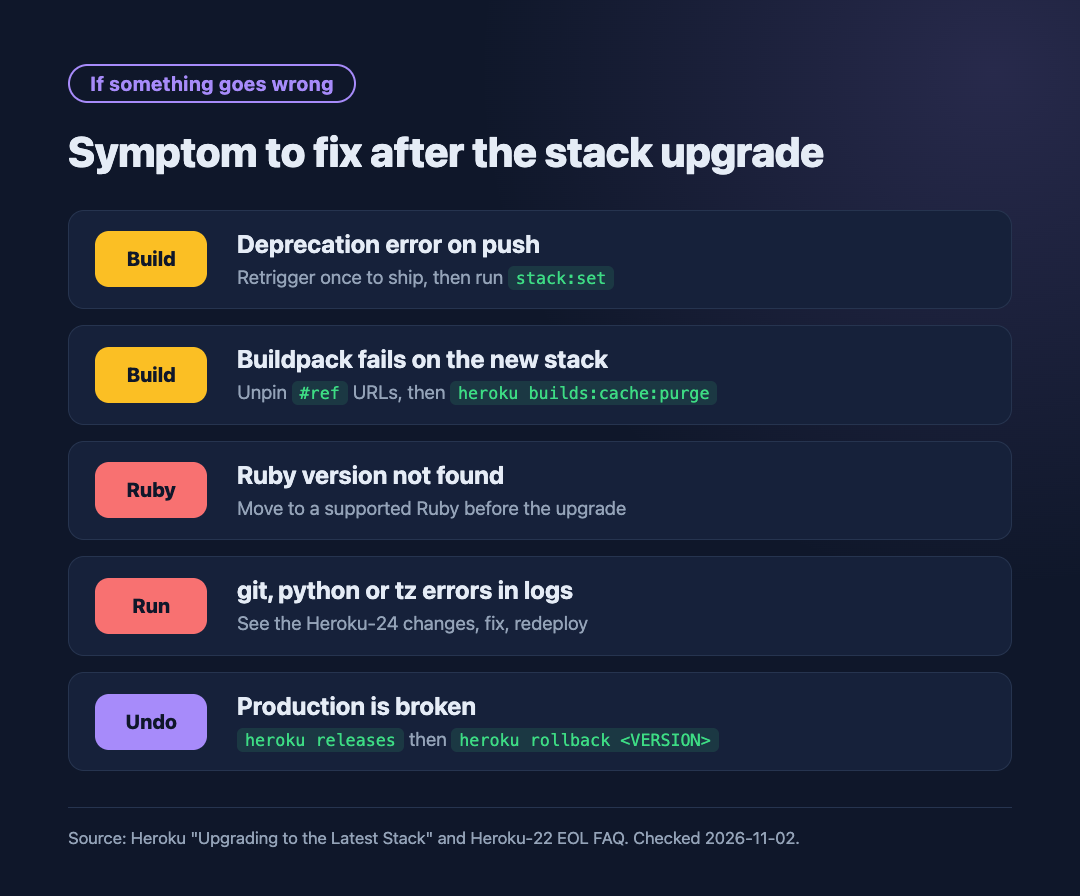
| Symptom | Likely cause | Fix |
|---|---|---|
| Deprecation error at build start | Still on Heroku-22 | Retrigger, then stack:set |
| Third-party buildpack fails | Stale cache or pinned URL | Unpin, purge cache, rebuild |
| Ruby or Python version error | Version not built for the stack | Move to a supported version |
git or python not found at run time | Heroku-24 change | APT or Python buildpack |
| Wrong times in logs or jobs | US/* zone removed | Use America/... names |
To purge the build cache, Heroku gives these commands:
heroku plugins:install @heroku-cli/heroku-builds
heroku builds:cache:purge -a <APP_NAME>
To undo the upgrade, roll back to the last release that ran on the old stack:
heroku releases -a <APP_NAME>
heroku rollback <VERSION> -a <APP_NAME>
The FAQ confirms that rolling back to a Heroku-22 release stays possible. After end of life, you must use rollback rather than heroku stack:set heroku-22. Treat a rollback as a pause, not a fix, because the next push lands back on the failing schedule.
If you also run your own Ubuntu servers, the same 22.04 clock applies there. Our guide on upgrading to Ubuntu 26.10 shows the release-upgrade checks for self-managed hosts.
FAQ
Will my Heroku-22 app go offline on November 1, 2026? No. Only builds are affected. Running dynos keep running, and even after end of life on April 30, 2027, Heroku says existing apps keep running at your own risk.
Is it safe to just retrigger failed builds until April? It works until May 1, 2027, per the FAQ. But the failures come every 7 days from February and every 24 hours from April 1, 2027. A single stack:set is less work than retrying builds for six months.
Should I pick Heroku-24 or Heroku-26? Heroku-26 for most apps. It's supported through April 2031, and Heroku lists no known breaking OS changes over Heroku-24. Pick Heroku-24 only if a runtime or package you need isn't available on 26 yet.
Can I get an extension past May 1, 2027? No. The FAQ says Heroku won't extend the build deadline, including for enterprise customers.
Do Fir or Docker apps need this upgrade? Not through stack:set. Fir apps use the cnb stack and pick the base image in project.toml. Container stack apps use whatever base image your Dockerfile names.
What to do next
Run the apps-table command today, upgrade staging to Heroku-26, and promote once your tests pass. Do the busiest apps first, since they'll hit the failing build most often. Next time a stack is deprecated, put the dates in your team calendar on day one.
References
All checked on 2026-11-02.