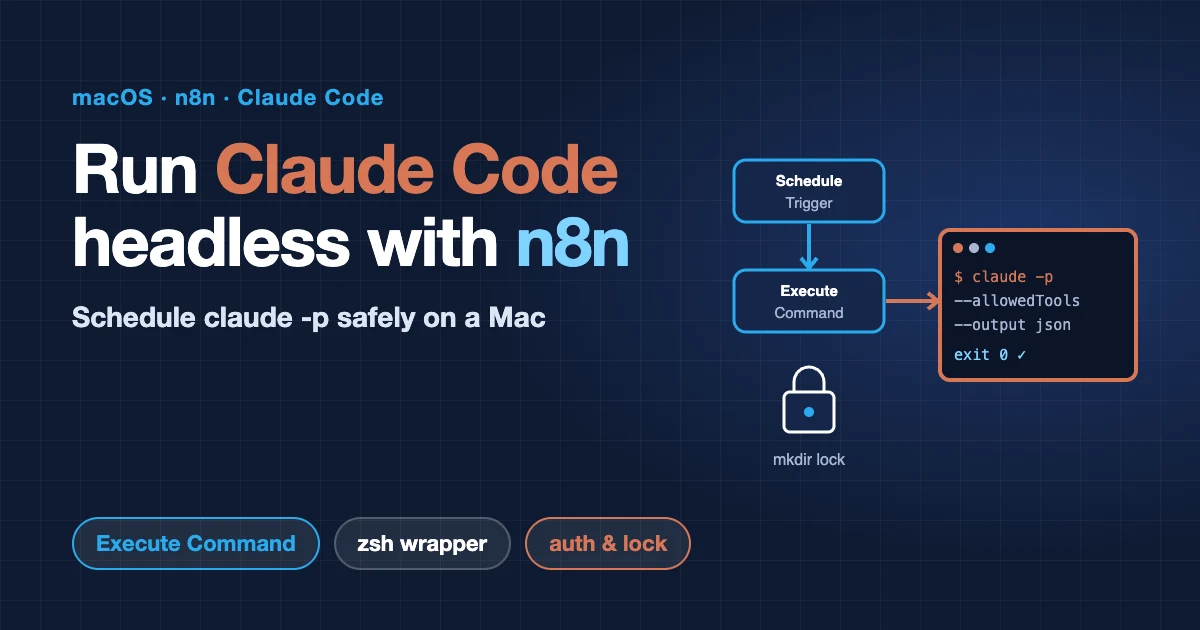
To run Claude Code headless with n8n on macOS, let a Schedule Trigger start an Execute Command node that calls a zsh script, and have that script run claude -p "<prompt>" with an explicit --allowedTools list. n8n must run natively on the Mac (not in Docker), and on n8n 2.0 or later you first have to re-enable the Execute Command node through NODES_EXCLUDE. Add a lock so runs never overlap, and pick an auth method that works without a person at the keyboard.
This guide is based on the setup I run every day on an iMac, checked against the official Claude Code and n8n docs on 2026-10-18.
How the pieces fit together on a Mac
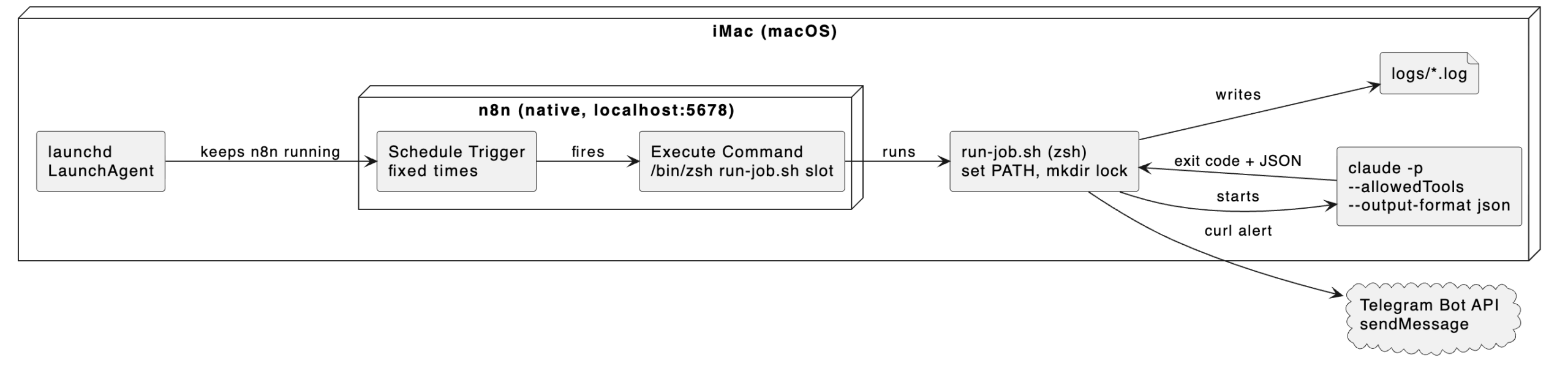
The whole chain has five parts. Each one does a single job, which makes failures easy to locate.
- launchd keeps n8n running. In my setup n8n runs directly on macOS as a LaunchAgent (a per-user background job that macOS loads at login), with the editor at
localhost:5678. - Schedule Trigger fires the workflow at fixed times.
- Execute Command runs one line:
/bin/zsh /Users/<you>/automation/run-job.sh <slot>. - The zsh wrapper sets PATH, takes a lock, runs
claude -p, and writes a log. - Notification: the script reports the result. Mine sends a short message to my phone through a Telegram bot with
curl(sendMessage); any webhook works the same way.
PlantUML source
@startuml
left to right direction
skinparam shadowing false

node "iMac (macOS)" {
  rectangle "launchd\nLaunchAgent" as LD
  node "n8n (native, localhost:5678)" {
    rectangle "Schedule Trigger\nfixed times" as ST
    rectangle "Execute Command\n/bin/zsh run-job.sh slot" as EC
  }
  rectangle "run-job.sh (zsh)\nset PATH, mkdir lock" as SH
  rectangle "claude -p\n--allowedTools\n--output-format json" as CL
  file "logs/*.log" as LOG
}
cloud "Telegram Bot API\nsendMessage" as TG

LD --> ST : keeps n8n running
ST --> EC : fires
EC --> SH : runs
SH --> CL : starts
CL --> SH : exit code + JSON
SH --> LOG : writes
SH --> TG : curl alert
@enduml
Headless mode (also called print mode) means Claude Code runs without the interactive UI: you pass -p (or --print) with a prompt, it does the work, prints the result and exits. The docs state that it exits with code 0 on success and a non-zero code on failure, so a shell script can react to the result.
Why n8n instead of Claude Code’s own schedulers?
Claude Code ships three schedulers of its own, and they may be enough for a single prompt. The table compares them with an n8n setup, using the Claude Code scheduled-tasks docs as of 2026-10-18.
| Option | Where it runs | Minimum interval | Main catch |
|---|---|---|---|
| Cloud Routines | Anthropic’s cloud | 1 hour | Fresh clone, no local files |
| Desktop scheduled tasks | Your machine | 1 minute | Desktop app must be open and the Mac awake |
/loop | An open session | 1 minute | Recurring tasks expire after 7 days |
n8n + claude -p | Your Mac, via n8n | Set in Schedule Trigger | You maintain the script, auth and lock |
n8n becomes useful when the AI step is one part of a longer workflow: steps before and after the run, branching, alerts, and other n8n nodes in the same place.
Step 1: Check the prerequisites
You need three things before building the workflow.
- Claude Code on the Mac. The setup docs list macOS 13.0+ and 4 GB+ RAM. The native installer is
curl -fsSL https://claude.ai/install.sh | bash, and it places the launcher at~/.local/bin/claude. - n8n running natively, not in Docker. The n8n docs state that in Docker, Execute Command runs inside the n8n container, not on the host, so a containerised n8n cannot see a
claudeinstalled on your Mac. The npm install needs Node.js 20.19 to 24.x; note that n8n’s own npm page describes that install as meant for local development and testing. - A working directory for the script, prompts and logs, for example
~/automation.
Run claude once in Terminal and confirm it works interactively before you automate anything.
Step 2: Enable the Execute Command node on n8n 2.x
The Execute Command node is disabled by default from n8n 2.0 (released 2025-12-08) because it can run any shell command on the host. If the node does not appear in the node panel, this is the reason.
The switch is the NODES_EXCLUDE environment variable. Its default value excludes two nodes:
["n8n-nodes-base.executeCommand", "n8n-nodes-base.localFileTrigger"]To load every node, the n8n docs say to set:
NODES_EXCLUDE="[]"You can also keep a list that blocks other nodes but leaves out n8n-nodes-base.executeCommand. If n8n runs as a LaunchAgent, put the variable in the plist’s EnvironmentVariables dictionary, then restart n8n. The node is self-hosted only; it does not exist on n8n Cloud.
Two things I would avoid: N8N_NODES_INCLUDE (an n8n maintainer closed GitHub issue #23439 pointing to NODES_EXCLUDE="[]" instead) and N8N_ENABLE_EXECUTE_COMMAND, which appears in community posts but not in the official docs.
Step 3: Write the zsh wrapper script
Keep the n8n node to a single line and put all logic in a script. That way you can test the script from Terminal with exactly the same command n8n uses.
The example below is a shortened, sanitised version of the pattern my script follows. Lines marked optional are additions from the docs that my own script does not use.
#!/bin/zsh
# run-job.sh  -- called by n8n: /bin/zsh /Users/<you>/automation/run-job.sh <slot>
set -u
# n8n does not inherit your login shell PATH, so set it here
export PATH="$HOME/.local/bin:/opt/homebrew/bin:/usr/bin:/bin:/usr/sbin:/sbin"

SLOT="${1:-default}"
BASE="$HOME/automation"
LOCK="$BASE/logs/.run.lock"
LOG="$BASE/logs/$(date +%Y%m%d-%H%M)-$SLOT.log"
mkdir -p "$BASE/logs" && cd "$BASE" || exit 1

# 1) Overlap lock: mkdir either creates the directory or fails
if ! mkdir "$LOCK" 2>/dev/null; then
  OLD_PID=$(cat "$LOCK/pid" 2>/dev/null)
  if [[ -n "$OLD_PID" ]] && kill -0 "$OLD_PID" 2>/dev/null; then
    echo "Run $OLD_PID still active, skipping" >> "$LOG"; exit 0
  fi
  rm -rf "$LOCK"                      # stale lock: that PID is dead
  mkdir "$LOCK" || exit 1
fi
echo $$ > "$LOCK/pid"
trap 'rm -rf "$LOCK"' EXIT

# 2) optional: stop early if Claude Code is not logged in
claude auth status > /dev/null 2>&1 || { echo "Not logged in" >> "$LOG"; exit 2; }

# 3) Headless run with an explicit tool allowlist
claude -p "$(cat "prompts/$SLOT.md")" \
  --allowedTools "Read,Write,Edit,Glob,Grep,WebSearch,WebFetch,Bash(node scripts/check-links.mjs *)" \
  --max-turns 40 \
  --output-format json > "logs/last-$SLOT.json" 2>> "$LOG"   # --max-turns: optional
STATUS=$?

jq -r '.result' "logs/last-$SLOT.json" >> "$LOG" 2>/dev/null  # needs jq installed
echo "exit=$STATUS" >> "$LOG"
# send a short alert here (curl to your bot or webhook)
exit $STATUS
What each part does:
- PATH line. In my setup, the n8n process does not inherit the PATH from my login shell, so
claudeandnodeare not found unless the script sets PATH at the top. I include~/.local/binand the folder that holds mynodebinary. - Lock. POSIX
mkdirfails when the directory already exists, so creating the lock and checking for it happen in one step. The PID written inside lets the next run tell a live run from a crashed one. macOS has noflockcommand, which is why this pattern is common on Macs. --allowedTools. These are permission rules.Bash(node scripts/check-links.mjs *)allows only commands that start with that text; the docs note that the space before*matters. My real list is the same shape: the file tools,WebSearch,WebFetch, and a few Bash rules each limited to one Node script.--output-format json. The JSON output containsresult,session_idand an estimatedtotal_cost_usd. The docs say the cost is a client-side estimate that can differ from your bill.- Exit code. Pass Claude Code’s exit code back out so a failed run is never reported as success.
Writing output to a file has a second benefit: n8n’s docs list stdout maxBuffer length exceeded as an Execute Command error when a command prints too much.
Handling usage limits on a subscription
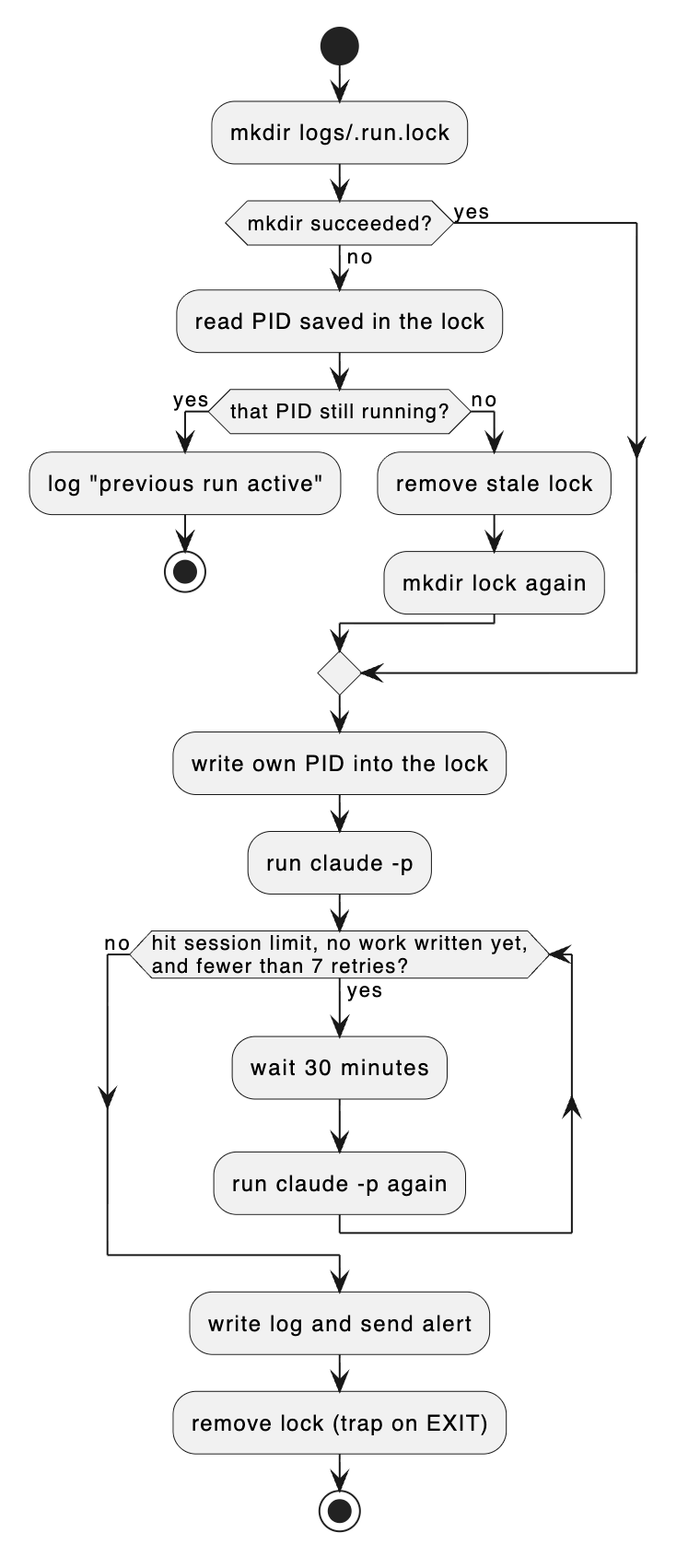
My setup authenticates with a Claude subscription login. When a run stops because it hit the subscription usage limit (the output says it "hit your session limit"), the script waits 30 minutes and tries again, up to 7 times. It retries only if the run had not written any work yet, so a half-finished run is never repeated on top of itself. The short example above leaves this loop out; the diagram below shows the full flow of my script, from the lock to the retry loop.
PlantUML source
@startuml
start
:mkdir logs/.run.lock;
if (mkdir succeeded?) then (yes)
else (no)
  :read PID saved in the lock;
  if (that PID still running?) then (yes)
    :log "previous run active";
    stop
  else (no)
    :remove stale lock;
    :mkdir lock again;
  endif
endif
:write own PID into the lock;
:run claude -p;
while (hit session limit, no work written yet,\nand fewer than 7 retries?) is (yes)
  :wait 30 minutes;
  :run claude -p again;
endwhile (no)
:write log and send alert;
:remove lock (trap on EXIT);
stop
@enduml
How claude -p usage counts against a subscription has changed during 2026. The Claude Help Center article on using the Agent SDK with a Claude plan carries notes dated 2026-06-15 and 2026-10-07, so check that page for the current rules instead of relying on any number in a blog post.
Step 4: Build the n8n workflow
The scheduled workflow needs only two nodes.
- Add a Schedule Trigger. Interval mode (Days, Hours, Minutes) is the simplest choice. Add more than one rule if you need several fixed times.
- Add an Execute Command node with the command:
/bin/zsh /Users/<you>/automation/run-job.sh morning- Save and publish the workflow. The n8n docs warn that a workflow with a Schedule Trigger must be saved and published to run.
- Check the timezone. The Schedule Trigger uses the workflow timezone, or else the instance timezone, and
GENERIC_TIMEZONEdefaults toAmerica/New_Yorkon self-hosted n8n.
Calling /bin/zsh explicitly removes any doubt about which shell runs the script. n8n’s node page says it uses the host’s default shell (zsh on macOS), while its troubleshooting page shows errors as /bin/sh: ... not found.
For one-off jobs I keep a second workflow: Manual Trigger → Execute Command → adhoc.sh. Long jobs are started in the background so the node returns at once:
nohup /bin/zsh /Users/<you>/automation/adhoc.sh > /Users/<you>/automation/logs/adhoc.log 2>&1 &Step 5: Choose an auth method for unattended runs
claude -p needs credentials that work with nobody at the keyboard. The Claude Code authentication docs (checked 2026-10-18) describe three options that fit a Mac.
| Method | How to set it | Works with --bare | Notes |
|---|---|---|---|
| Subscription login | Log in once with /login; stored in macOS Keychain | No | What I use. Warns 3 days before expiry, then fails with Login expired |
| Long-lived OAuth token | claude setup-token, then set CLAUDE_CODE_OAUTH_TOKEN | No | Valid 1 year; Pro, Max, Team or Enterprise; model requests only |
| API key | Set ANTHROPIC_API_KEY | Yes | Always used in -p mode when present, even if you have a subscription |
Three details matter here.
- The
--baretrap.--bareskips hooks, skills, plugins, MCP servers, auto memory and CLAUDE.md, so scripted calls start faster. In bare mode Claude Code never reads OAuth credentials or the Keychain, and it does not readCLAUDE_CODE_OAUTH_TOKEN; it needsANTHROPIC_API_KEYor anapiKeyHelper. The docs also say bare "will become the default for-pin a future release", so a subscription-based job may need attention when that happens. - A stray API key wins. If
ANTHROPIC_API_KEYis set anywhere in the job’s environment, it takes priority over your subscription. The docs warn this can cause failures if that key’s organisation is disabled or expired. - Keychain access from a background job is not documented for every case (for example, right after a reboot before you log in).
claude doctorwarns when the Keychain is not writable. If you see auth failures only in scheduled runs,CLAUDE_CODE_OAUTH_TOKENis the documented option for scripts.
Troubleshooting: common errors and fixes
claude: command not found or /bin/sh: claude: not found
The n8n process cannot see the install folder. Set PATH at the top of the script, or call $HOME/.local/bin/claude directly. n8n’s docs give the same fix: make sure the command is in the PATH of the user running n8n.
Execute Command node is missing
You are on n8n 2.0 or later with the default NODES_EXCLUDE. See Step 2.
n8n in Docker cannot run Claude Code
Commands run inside the container. Install n8n natively on the Mac, or install Claude Code inside the container.
Two runs at once
n8n’s concurrency limit (N8N_CONCURRENCY_PRODUCTION_LIMIT) is disabled by default, and the docs do not describe a per-workflow overlap guard. Use the script lock from Step 3.
The run stops or hangsEXECUTIONS_TIMEOUT is disabled by default (-1). Use --max-turns, or --max-budget-usd on an API key. A run stopped with SIGTERM exits with code 143 and records no result, so log that code separately.
A scheduled time was skipped
The Schedule Trigger’s default is "Don’t Run Missed Executions". Keep n8n running and the Mac awake at the scheduled times.
Tool calls are silently refused
A -p run with nobody to answer denies anything that would normally prompt. Add the missing tool to --allowedTools. On v2.1.259 or later, --permission-prompts none is documented for scheduled jobs.
Security notes
- Least privilege. List only the tools the job needs, and scope Bash rules to specific commands. The docs also describe
--permission-mode dontAsk, which denies everything outside your allow rules. - Skip-permissions only in a sandbox. The permission-modes docs list running fully unattended with
--dangerously-skip-permissionsas requiring a container, VM or sandbox, run as a non-root user. Do not use it on a Mac that holds your personal files. - Keep secrets out of the workflow. The Execute Command text is saved with the workflow, so keep tokens and keys in the environment (the LaunchAgent plist, or a file only your user can read) and refer to placeholders such as
<YOUR_BOT_TOKEN>in anything you share. - Lock down the n8n editor. Execute Command can run anything as the n8n user.
N8N_LISTEN_ADDRESSdefaults to::, so check whether port 5678 is reachable from your network and restrict it if you do not need remote access.
If this setup runs on n8n 2.x, check the n8n Migration Report: 7 steps to fix workflows for n8n 3.0 before you upgrade, and retest the Execute Command node this setup depends on.
FAQ
Why is the Execute Command node missing in n8n?
From n8n 2.0 the node is excluded by default through NODES_EXCLUDE. Set NODES_EXCLUDE="[]", or a list without n8n-nodes-base.executeCommand, and restart n8n.
Can I use my Claude Pro or Max subscription for scheduled claude -p runs?
Yes for authentication: a subscription login works, and claude setup-token creates a one-year CLAUDE_CODE_OAUTH_TOKEN for scripts. Neither works with --bare. For how usage is counted, check the Claude Help Center article linked below, which changed twice in 2026.
Can n8n running in Docker use Claude Code installed on my Mac?
No. In Docker, the Execute Command node runs commands inside the container, so it cannot reach a claude binary on the host.
Should I use --dangerously-skip-permissions in a scheduled job?
Only inside a container, VM or sandbox, as the docs require. On a normal Mac, use an explicit --allowedTools list, optionally with --permission-mode dontAsk.
How do I stop overlapping runs?
Use a lock in the wrapper script. A mkdir lock directory with the PID inside works on macOS without extra tools, and the PID check clears locks left by crashed runs.
Summary
The working pattern is native n8n on the Mac, Execute Command unlocked via NODES_EXCLUDE, a zsh wrapper that sets PATH and takes a lock, and claude -p with a narrow --allowedTools list and an auth method that does not depend on --bare. Test the script from Terminal first, then let n8n call the same line.
A follow-up post will cover running n8n itself as a LaunchAgent on macOS.
Information checked against official documentation on 2026-10-18.
References
- Claude Code docs – Run Claude Code programmatically (headless) (checked 2026-10-18)
- Claude Code docs – CLI reference (checked 2026-10-18)
- Claude Code docs – Authentication (checked 2026-10-18)
- Claude Code docs – Permission modes (checked 2026-10-18)
- Claude Code docs – Advanced setup (checked 2026-10-18)
- Claude Code docs – Troubleshoot installation and login (checked 2026-10-18)
- Claude Code docs – Run prompts on a schedule (checked 2026-10-18)
- Claude Code docs – Desktop scheduled tasks (checked 2026-10-18)
- Claude Help Center – Use the Claude Agent SDK with your Claude plan (checked 2026-10-18)
- n8n docs – Execute Command (checked 2026-10-18)
- n8n docs – Execute Command common issues (checked 2026-10-18)
- n8n docs – Nodes environment variables (checked 2026-10-18)
- n8n docs – Schedule Trigger (checked 2026-10-18)
- n8n docs – Timezone environment variables (checked 2026-10-18)
- n8n docs – Executions environment variables (checked 2026-10-18)
- n8n docs – Control concurrency (checked 2026-10-18)
- n8n docs – Deployment environment variables (checked 2026-10-18)
- n8n docs – Install with npm (checked 2026-10-18)
- GitHub – n8n@2.0.0 release notes (checked 2026-10-18)
- GitHub – n8n issue #23439 (checked 2026-10-18)
- Apple – Creating Launch Daemons and Agents (archive) (checked 2026-10-18)
- POSIX – mkdir utility (checked 2026-10-18)
- Telegram Bot API – sendMessage (checked 2026-10-18)
- Flavio Copes – Prevent overlapping runs on macOS (checked 2026-10-18)
10 thoughts on “Run Claude Code Headless with n8n on macOS: Setup, Auth and Locking”