A TanStack AI 1.0 migration is mostly renames, not new concepts: run the official codemod, move every stable @tanstack/ai* package to 1.0 in one step, then fix what the type checker reports. The changes that break apps are threadId (now required on client and server), body becoming forwardedProps, tool approvals moving to interrupts, and the removal of the prebuilt *-ui chat components. Migrate any saved chats before you deploy, because a clean type check does not convert stored data.
Written 2026-10-29. Package names, commands and API names were checked against the TanStack AI 1.0 announcement (October 23, 2026), the official v1 upgrade guide and the npm registry on that date. TanStack AI moves fast, so re-check the linked docs before a production upgrade.
What changed in TanStack AI 1.0
TanStack released TanStack AI 1.0 on October 23, 2026. All 76 packages went stable together, and npm now lists 1.0.0 as the latest tag for @tanstack/ai. The team says 1.0 "has no new concepts": every API that 0.x had marked deprecated was removed, and each replacement already shipped in a 0.x release.
That matters for planning. If you kept your 0.x app free of deprecation warnings, most of the work is mechanical. If you ignored them, expect a longer list of type errors.
| Area | Alpha (Dec 2025) | 1.0 (Oct 2026) |
|---|---|---|
| Provider adapters | 4 | 23, plus openaiCompatible |
| UI frameworks | React, Solid, vanilla JS | 9, including Vue, Svelte, Angular, Preact |
| Coding agents | None | Claude Code, Codex, OpenCode, Grok Build, any ACP agent |
| Sandbox providers | None | 11 |
The one big exception is the new agent harness. It is still experimental and stays on 0.x versions, so do not bump it with the rest.
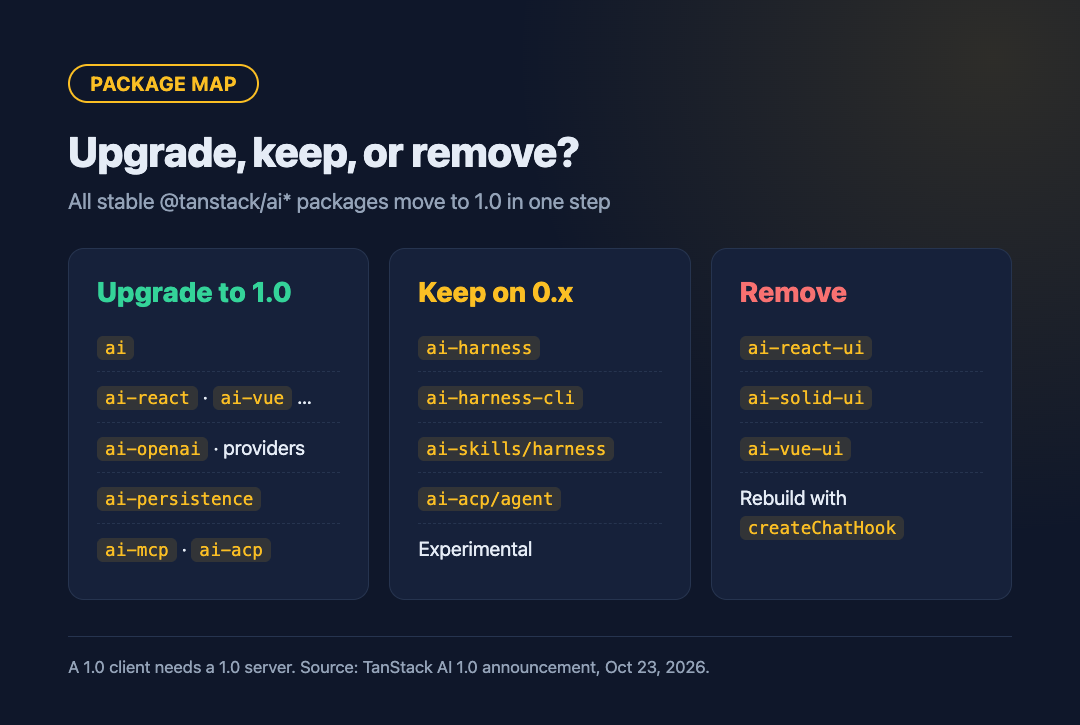
| Package group | Examples | What to do |
|---|---|---|
| Stable | @tanstack/ai, @tanstack/ai-react, @tanstack/ai-openai, @tanstack/ai-persistence, @tanstack/ai-mcp, @tanstack/ai-acp | Upgrade all to 1.0 together |
| Experimental | @tanstack/ai-harness, @tanstack/ai-harness-cli, @tanstack/ai-skills/harness, @tanstack/ai-acp/agent | Stay on 0.x |
| Removed | @tanstack/ai-react-ui, @tanstack/ai-solid-ui, @tanstack/ai-vue-ui | Uninstall, rebuild UI with createChatHook |
Before you start the TanStack AI 1.0 migration
Do these three things first. They keep the upgrade reversible.
- Work on a branch and commit your lockfile. If the upgrade goes badly, you can roll back with one
git checkout. - List every TanStack AI package your project uses, so none stays behind on 0.x.
- Check for stored data. Do you persist chats, runs or artifacts in a database,
localStorageor a sandbox? If yes, read the saved-data section below before deploying.
git checkout -b tanstack-ai-1-0
npm ls --depth=0 | grep "@tanstack/ai"
A 1.0 client needs a 1.0 server. If your frontend and backend live in different repos or deploy separately, plan to ship both at the same time. A half-upgraded stack is the most likely cause of broken streams.
If you are also moving runtimes, finish that first and upgrade one thing at a time. Our Node.js 26 LTS upgrade checklist covers the runtime side.
Step 1: Run the TanStack AI codemod
The official codemod handles the most common renames. Preview it first with --dry --print, then run it for real:
Preview (nothing is written):
npx jscodeshift --dry --print \
  --parser=tsx \
  -t https://raw.githubusercontent.com/TanStack/ai/main/codemods/ag-ui-compliance/transform.ts \
  "src/**/*.{ts,tsx}"
Apply the changes:
npx jscodeshift \
  --parser=tsx \
  -t https://raw.githubusercontent.com/TanStack/ai/main/codemods/ag-ui-compliance/transform.ts \
  "src/**/*.{ts,tsx}"
What the codemod changes:
body→forwardedPropsinuseChat,new ChatClientandclient.updateOptions- Svelte
updateBody→updateForwardedProps conversationId→threadIdinchat()(the key only, not the value)
What it does not change, so you must fix these by hand:
- reads of
body.dataon the server - the value you pass to
threadId bodyinsidecreateChatHook,useAppChatoverrides and AngularinjectChat- files that call the hooks through a barrel re-export
Running a remote transform script executes code from GitHub on your machine. Read the transform file first if your security policy requires it, or pin it to a specific commit instead of main.
Step 2: Upgrade all stable packages to 1.0 together
The upgrade guide does not give an install command, so use your package manager's normal syntax. Upgrade everything stable in one command, and remove the three UI packages:
With npm:
npm install @tanstack/ai@^1 @tanstack/ai-react@^1 @tanstack/ai-openai@^1
npm uninstall @tanstack/ai-react-ui
With pnpm:
pnpm add @tanstack/ai@^1 @tanstack/ai-react@^1 @tanstack/ai-openai@^1
pnpm remove @tanstack/ai-react-ui
Swap in your own framework and provider packages, for example @tanstack/ai-vue or @tanstack/ai-anthropic. Leave @tanstack/ai-harness and @tanstack/ai-harness-cli on their current 0.x versions.
If your project runs on npm 12 and an install now stops on blocked lifecycle scripts, see how to approve npm 12 install scripts.
Step 3: Fix TanStack AI 1.0 breaking changes in the browser
Run your type checker (npx tsc --noEmit or your framework's equivalent) and work through the errors. These are the browser-side changes you will meet most often.
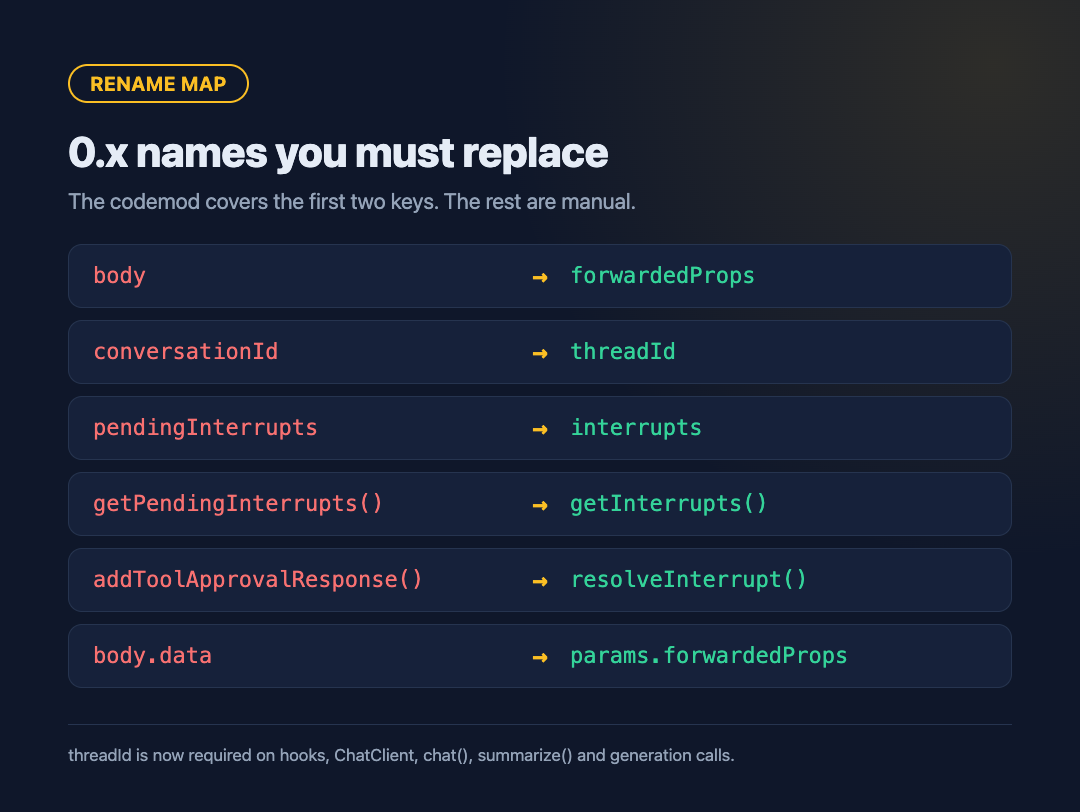
| 0.x | 1.0 | Where |
|---|---|---|
body | forwardedProps | useChat, ChatClient, createChatHook |
pendingInterrupts | interrupts | chat hooks |
getPendingInterrupts() | getInterrupts() | ChatClient |
interrupt.error | interrupt.errors[0] | interrupts |
addToolApprovalResponse() | interrupt.resolveInterrupt(true | false) | tool approvals |
threadId is now required
Every chat hook, generation hook, ChatClient and createChatHook hook call needs a threadId. Use a stable id, such as a conversation id from your database. Do not generate a random one on each render, or every render starts a new thread.
import { useChat, fetchServerSentEvents } from "@tanstack/ai-react";

const { messages, sendMessage } = useChat({
  connection: fetchServerSentEvents("/api/chat"),
  threadId: "support-chat",            // stable id, not crypto.randomUUID() per render
  forwardedProps: { provider: "openai" }, // was: body
});
Two smaller rules come with it. Custom connection adapters receive a run context with threadId as the fourth argument of connect() and send(). On Octane, generation hooks take threadId instead of id.
Keep body in three places: the connection adapter option, the per-call sendMessage option and the generation hooks. The rename only covers the chat-level options.
Tool approvals move to interrupts
addToolApprovalResponse() is gone. A tool marked needsApproval: true now pauses the run and shows up in the interrupts array. You answer it on the interrupt itself:
const { interrupts, resuming } = useChat({
  threadId: "account-42",
  connection: fetchServerSentEvents("/api/chat"),
  tools: [transferTool] as const,
});

{interrupts.map((interrupt) =>
  interrupt.kind === "tool-approval" && interrupt.toolName === "transfer" ? (
    <div key={interrupt.id}>
      <p>Send {interrupt.originalArgs.amount} to {interrupt.originalArgs.recipient}?</p>
      <button disabled={!interrupt.canResolve || resuming}
              onClick={() => interrupt.resolveInterrupt(true)}>Approve</button>
      <button disabled={!interrupt.canResolve || resuming}
              onClick={() => interrupt.resolveInterrupt(false)}>Reject</button>
    </div>
  ) : null
)}
To answer several at once, use the root helpers resolveInterrupts(...) and cancelInterrupts. Nothing goes to the server until every pending item has an answer. Interrupts saved by a 0.x server show up as kind: 'unbound' with canResolve: false, and they cannot be resumed.
Client tools need identical schemas
A client tool now runs only if the server and browser definitions match exactly, including outputSchema. The safe pattern is to define the tool once with toolDefinition() in a shared file, then attach .server() on the server and use the same object on the client.
Prebuilt chat components are gone
Chat, ChatMessages, ChatMessage, ChatInput, ToolApproval and useChatContext were removed. Build the UI with createChatHook from @tanstack/ai-react/ui (or the Solid and Vue equivalents) and supply your own layout, message and input components. TextPart and ThinkingPart are still there. Budget real time for this step if you leaned on the old components, because the codemod cannot do it for you.
Step 4: Update your server routes
On the server, conversationId becomes threadId, and it is required on chat(), summarize() and the generation functions. Read it from the parsed request, not from forwardedProps:
import { chat, chatParamsFromRequest, toServerSentEventsResponse } from "@tanstack/ai";
import { openaiText } from "@tanstack/ai-openai";

export async function POST(request: Request) {
  const params = await chatParamsFromRequest(request);
  const provider = params.forwardedProps.provider; // was: body.data?.provider

  const stream = chat({
    adapter: openaiText("gpt-6.1-sol"),
    messages: params.messages,
    threadId: params.threadId,   // was: conversationId
    runId: params.runId,
  });

  return toServerSentEventsResponse(stream);
}
Extra client fields now arrive only in forwardedProps, and aguiContext replaces context. Middleware reads ctx.threadId. In generation routes, generationParamsFromRequest() throws if the body has no threadId or runId, which is a quick way to find clients you forgot to upgrade. The model id in the example comes from the official quick start; for model choice and pricing, see our GPT-6.1 Terra API migration guide.
Other server changes worth a search:
- Usage:
durationSecondsandunitsBilledare removed. Readbilled, which hasunitandquantity. - Token counts:
promptTokenson the Anthropic, Bedrock and Claude Code adapters now includes cache reads and writes. If you added cache tokens yourself, remove that code or you will double count. - Video:
getVideoUrl()is replaced bygetVideo(). In app code, usegetVideoJobStatus({ adapter, jobId }). - Types:
startAssistantMessage()becomesprepareAssistantMessage(), andtoolNamebecomestoolCallNamein the renamed server types.
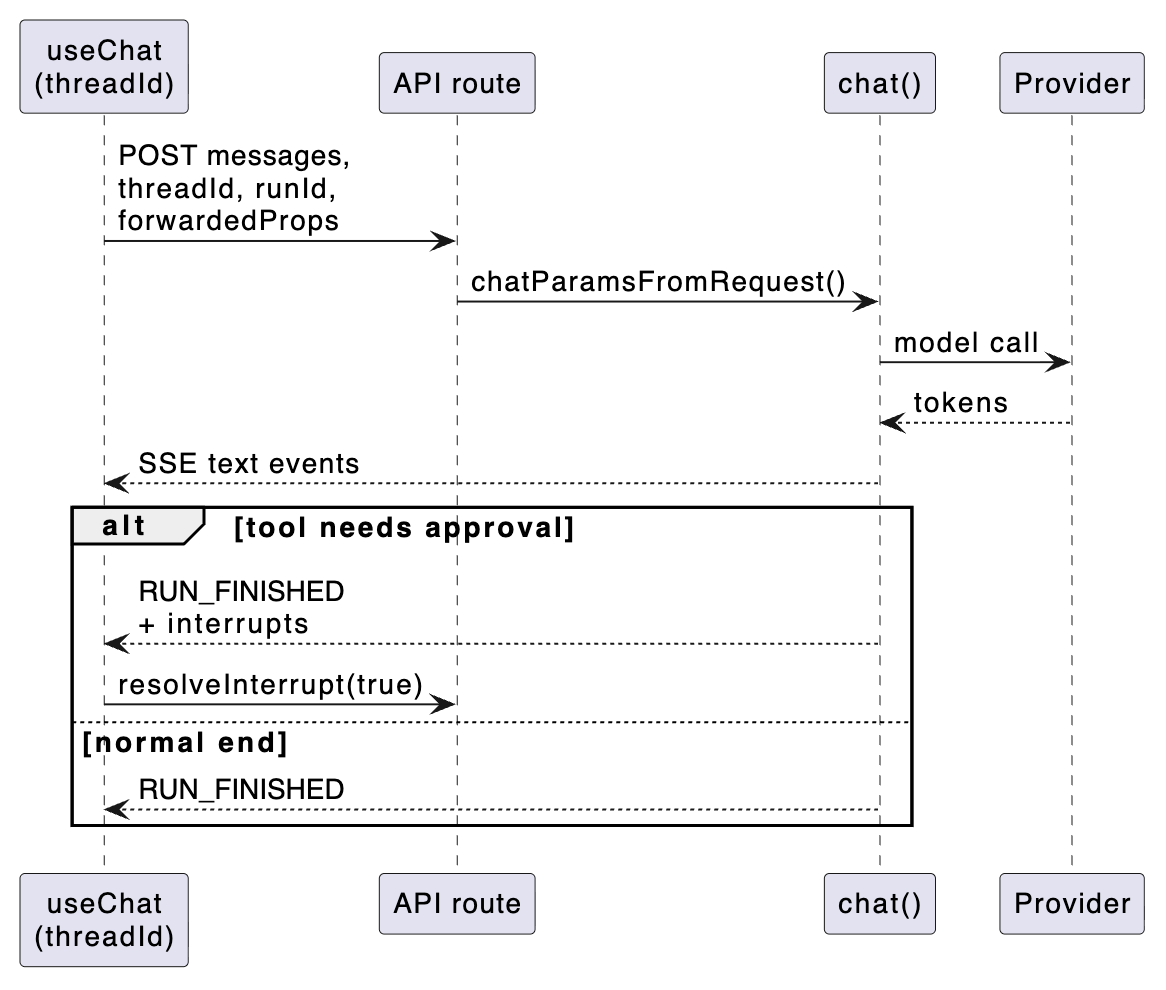
View PlantUML source
@startuml
skinparam shadowing false
skinparam defaultFontSize 14
participant "useChat\n(threadId)" as C
participant "API route" as S
participant "chat()" as A
participant "Provider" as P
C -> S : POST messages,\nthreadId, runId,\nforwardedProps
S -> A : chatParamsFromRequest()
A -> P : model call
P --> A : tokens
A --> C : SSE text events
alt tool needs approval
  A --> C : RUN_FINISHED\n+ interrupts
  C -> S : resolveInterrupt(true)
else normal end
  A --> C : RUN_FINISHED
end
@enduml
Custom stream servers
If you wrote your own streaming endpoint instead of using toServerSentEventsResponse(), update the wire format. The 1.0 client follows the AG-UI event rules:
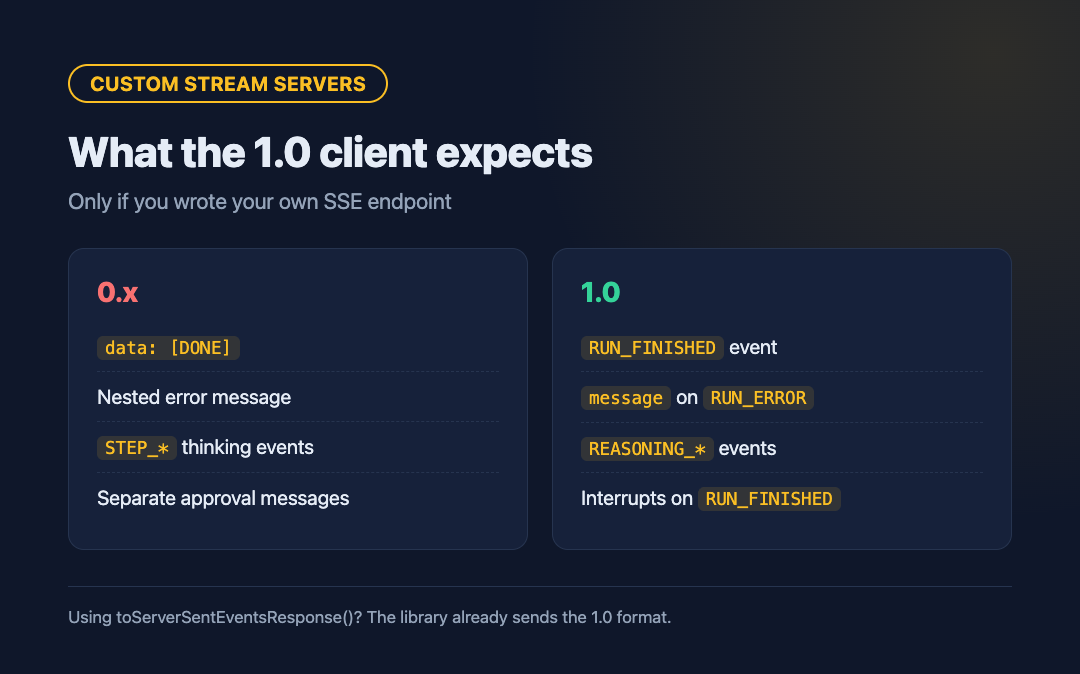
| 0.x server sends | 1.0 server sends |
|---|---|
data: [DONE] | a RUN_FINISHED event |
| nested error message | message at the top level of RUN_ERROR |
STEP_* thinking events | REASONING_* events |
| separate approval messages | interrupts on RUN_FINISHED |
Step 5: Migrate saved data before deploying
This is the step people skip, and it fails only in production. The type checker cannot see what is in your database.
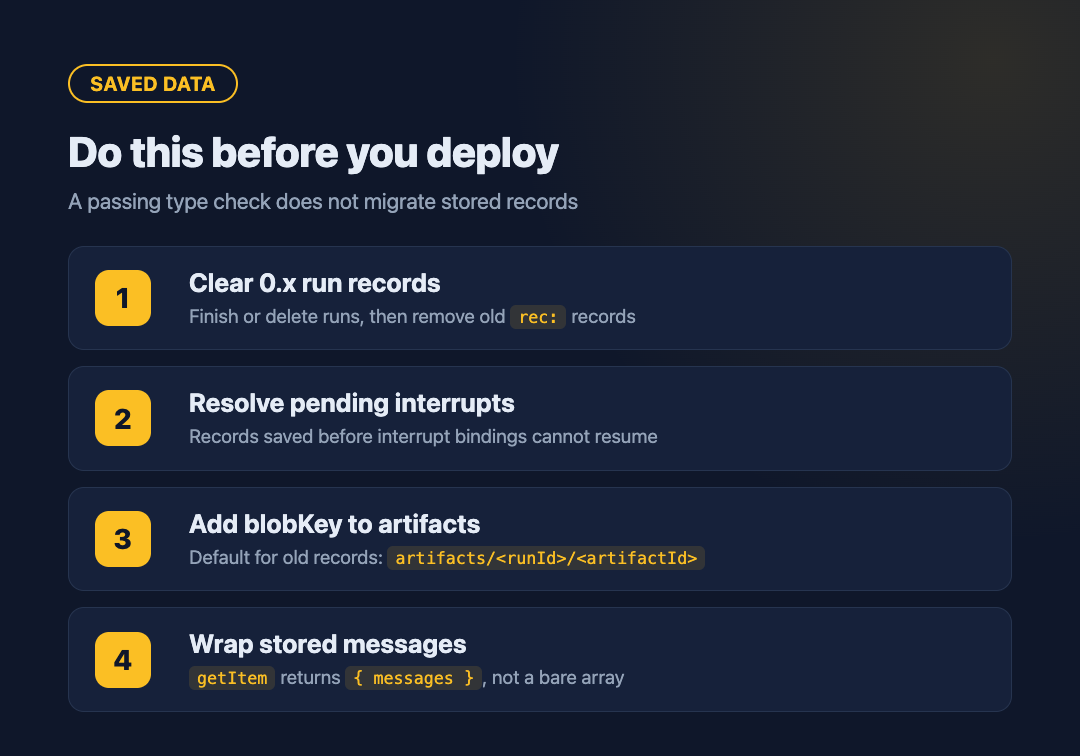
- Run records: finish or delete in-progress runs, then clear old
rec:records. The Cloudflare sandbox cannot read the 0.x run-log layout, andmigrateStoredRunRecordwas removed. - Pending interrupts: resolve or drop them. Records saved before interrupt bindings cannot resume.
- Artifacts: add
blobKeyto every artifact record, because it is now required. For 0.x records without one, useartifacts/<runId>/<artifactId>. Custom stores must save it.resolveArtifactBlobKey()was removed. - Client persistence:
getItemmust return{ messages }(plus an optionalresume), not a bare array.
A small shim covers old localStorage data:
getItem: (id) => {
  const saved = JSON.parse(localStorage.getItem(id) ?? "null");
  return Array.isArray(saved) ? { messages: saved } : saved;
},
In sandbox code, FileEvent is now SandboxFileEvent.
TanStack AI 1.0 done check
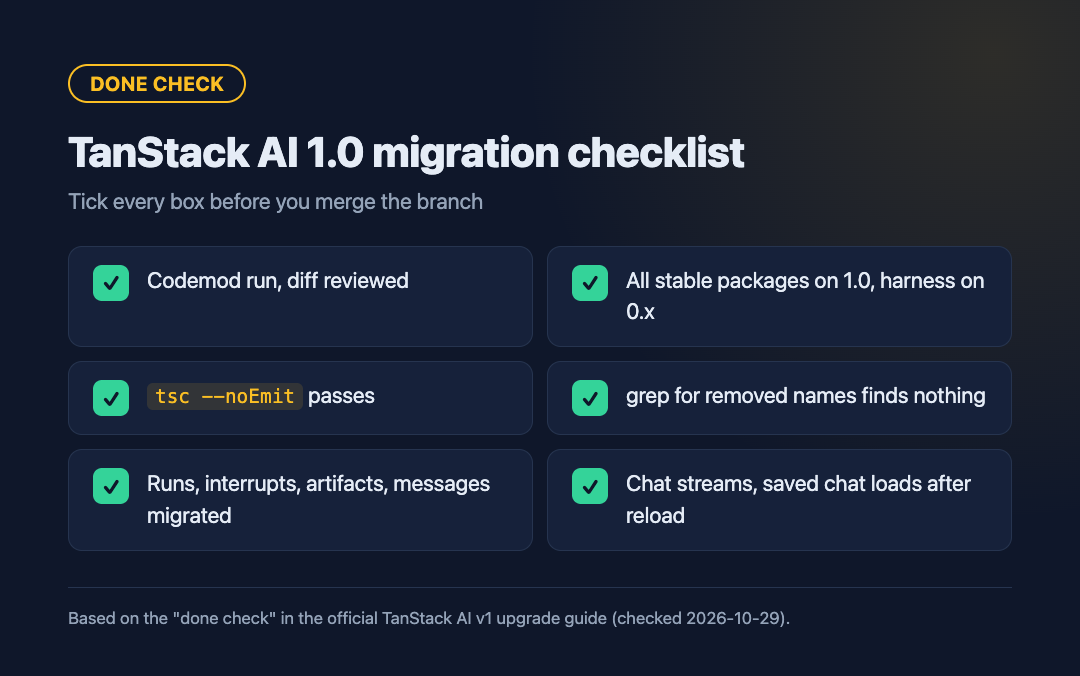
The upgrade guide ends with a simple check. Run your type checker, then search for names that no longer exist:
npx tsc --noEmit
grep -rnE "pendingInterrupts|resumeInterrupts\(|addToolApprovalResponse|conversationId|getVideoUrl|durationSeconds|unitsBilled|body\.data" src
Zero matches is the goal. Then test two things by hand: a chat streams a reply, and a saved chat still loads after a page reload.
Common errors after the upgrade
| Symptom | Likely cause | Fix |
|---|---|---|
Type error: threadId is missing | Hook or chat() call without it | Pass a stable id on both sides |
| Server can't see your custom field | Still reading body.data | Read params.forwardedProps |
| Stream never ends in the UI | Custom server still sends [DONE] | End with RUN_FINISHED |
| Approval buttons do nothing | Old interrupt from a 0.x server | Shows as unbound; drop it and retry |
| Client tool never runs | Schemas differ between server and client | Share one toolDefinition() |
| Token cost looks doubled | Manual cache tokens added on top | Remove the extra addition |
FAQ
Is TanStack AI 1.0 production ready? The core APIs are, according to the 1.0 announcement: "The core APIs are stable and ready for production." The agent harness (@tanstack/ai-harness and related entry points) is still experimental and stays on 0.x.
Can I upgrade only the client or only the server? No. The guide says a 1.0 client needs a 1.0 server. Upgrade every stable @tanstack/ai* package together and deploy both sides at the same time.
Does the codemod do the whole TanStack AI 1.0 migration? No. It renames body, updateBody and conversationId keys. You still need to fix body.data reads, threadId values, tool approvals, the removed UI components, custom stream servers and stored data.
What replaces @tanstack/ai-react-ui? Nothing directly. Build your chat UI with createChatHook from @tanstack/ai-react/ui and your own components. TextPart and ThinkingPart are still exported.
Do I need to migrate data if I never store chats? If you keep chats only in memory, there is nothing to migrate. If you use client persistence, server run records, interrupts or artifacts, follow the four saved-data steps before you deploy.
References
- TanStack AI v1 upgrade guide — official, checked 2026-10-29
- TanStack AI 1.0: Still Your AI, Still Your Way — TanStack blog, October 23, 2026, checked 2026-10-29
- TanStack AI quick start — official, checked 2026-10-29
- Tool approval with interrupts — official, checked 2026-10-29
- Interrupts overview — official, checked 2026-10-29
- @tanstack/ai on the npm registry —
latesttag 1.0.0, checked 2026-10-29