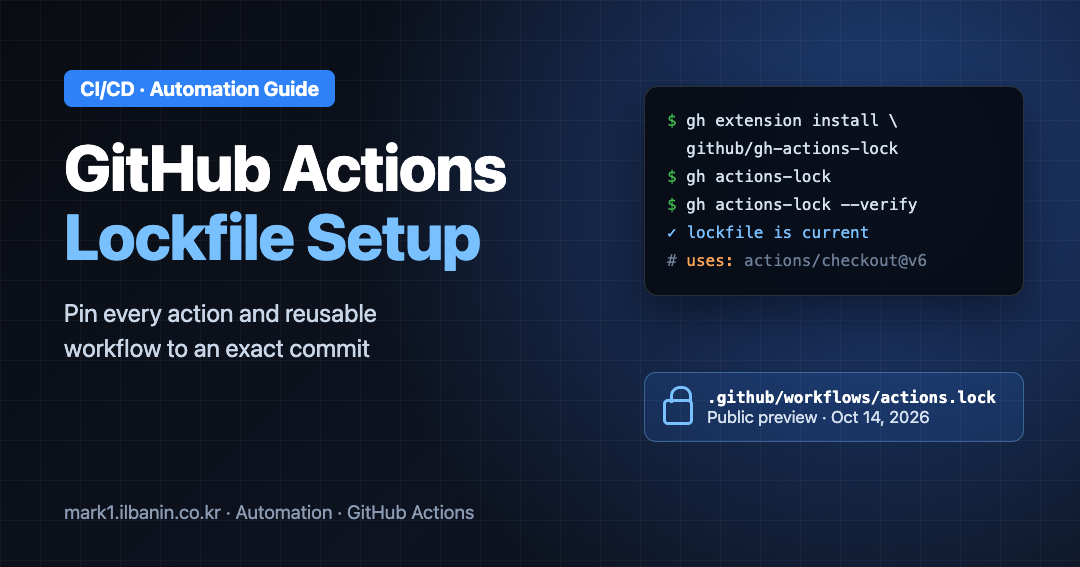
A GitHub Actions lockfile pins every action, transitive action and reusable workflow your workflows use to an exact commit, so a moved tag can no longer change what runs in CI. GitHub released workflow dependency lockfiles as a public preview on October 14, 2026. You create the file with one CLI command, gh actions-lock, commit .github/workflows/actions.lock, and add a --verify check on pull requests.
This guide walks through the full setup for one repository: installing the extension, onboarding a single workflow first, reviewing what changes, keeping the file current, and turning on enforcement. Every command and behavior below comes from the GitHub changelog, GitHub Docs and the github/gh-actions-lock README, checked on October 19, 2026. The feature is in preview, so flags and the file format can still change.
What a GitHub Actions lockfile does (and does not do)
When a workflow says uses: actions/checkout@v6, the runner resolves v6 at run time. Tags and branches can move. If an upstream repository is compromised, or a maintainer retags a release, your next run executes code you never reviewed. Pinning full commit SHAs in every uses: line fixes that, but it makes workflow files hard to read and it does not cover the actions that your actions call.
A lockfile moves the pinning into one generated file:
- Location:
.github/workflows/actions.lock, one per repository. - Coverage: actions, their transitive action dependencies, and reusable workflows called from your workflows.
- Run-time effect: for an onboarded workflow, the runner executes the locked commit, and allowed-actions policies check that commit.
- Identity check: each entry records the numeric
owner_idandrepo_idof the source repository. GitHub Actions compares them at run time, so a renamed or replaced repository behind the same name is blocked.
The GitHub Docs page describes two top-level sections in the file:
| Section or field | What it holds |
|---|---|
workflows | Each onboarded workflow path and the action references it uses |
dependencies → ref | The tag or branch written in the workflow |
dependencies → commit | The commit that ref resolved to — this is what runs |
dependencies → owner_id, repo_id | Numeric IDs used to confirm the source repository |
The file header says not to edit it by hand. Always change the workflow and regenerate.
What it does not do: a lockfile does not tell you whether a dependency is safe. GitHub's announcement says this directly — review dependencies before you lock them. A lockfile also covers only workflows in its own repository. Dependencies inside a reusable workflow are covered by the lockfile of the repository where that reusable workflow is defined.
Lockfile vs SHA pinning vs tag pinning
| Approach | Readable workflows | Covers transitive actions | Records repo identity |
|---|---|---|---|
Tag (@v6) | Yes | No | No |
Full SHA in uses: | No | No | No |
| Workflow lockfile | Yes | Yes (not inside reusable workflow calls) | Yes |
GitHub Docs states that repositories that adopt a lockfile no longer need full-SHA pins in workflow files. During a staged rollout, though, the enforcement guide recommends keeping the "Require actions to be pinned to a full-length commit SHA" protection on until lockfiles are in place.
Before you start: requirements and limits
- Plans: GitHub Free, Team, Enterprise Cloud and Enterprise Cloud with data residency (per the October 14 changelog).
- Not supported: GitHub Enterprise Server.
- Tooling: the GitHub CLI (
gh), logged in with access to the repository. - Status: public preview. The extension README says it is pre-1.0 and that the lockfile format, flags and behavior may change between releases.
GitHub also suggests two pre-checks. First, make sure each uses: reference points to a supported, current version, because you are about to freeze it. Second, enable Dependabot version updates for GitHub Actions before you generate the lockfile, so updates arrive as reviewable pull requests later.
If Dependabot is not set up yet, this is the minimal .github/dependabot.yml for actions:
version: 2
updates:
  - package-ecosystem: "github-actions"
    directory: "/"
    schedule:
      interval: "weekly"
How to set up a GitHub Actions lockfile step by step
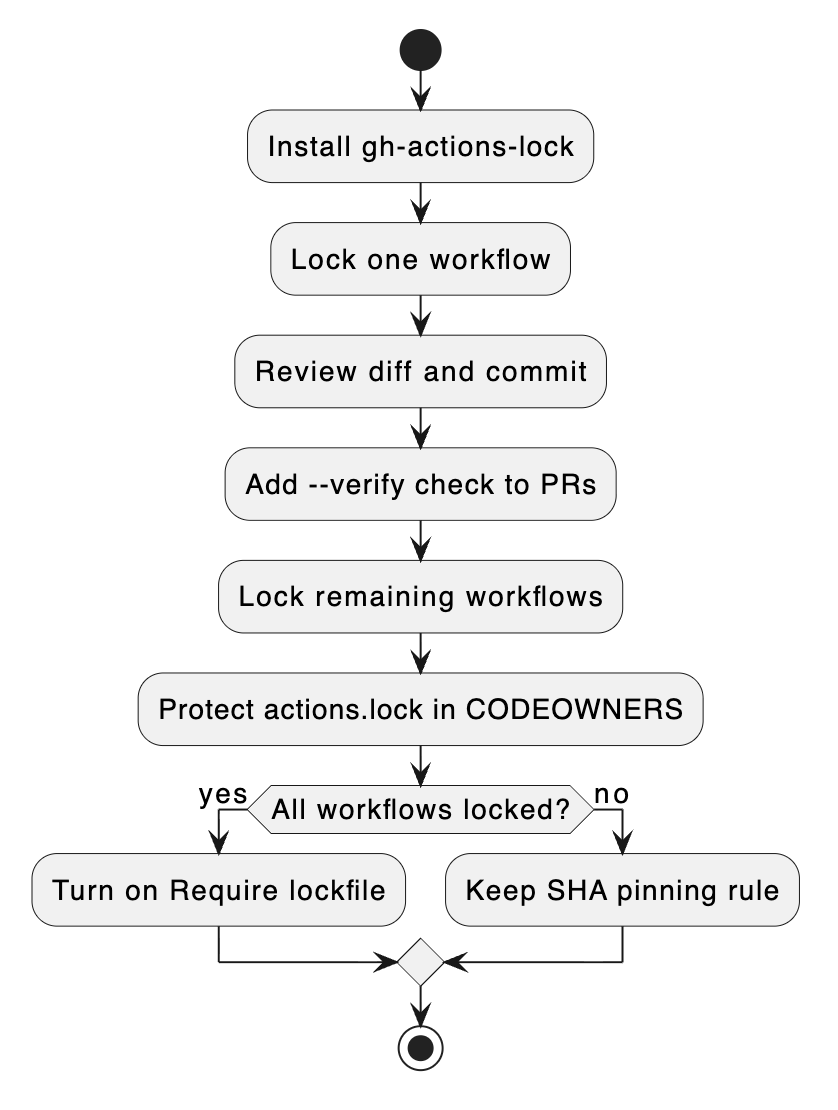
View PlantUML source
@startuml
skinparam shadowing false
skinparam defaultFontSize 14
start
:Install gh-actions-lock;
:Lock one workflow;
:Review diff and commit;
:Add --verify check to PRs;
:Lock remaining workflows;
:Protect actions.lock in CODEOWNERS;
if (All workflows locked?) then (yes)
  :Turn on Require lockfile;
else (no)
  :Keep SHA pinning rule;
endif
stop
@enduml
Step 1: Install the gh-actions-lock extension
gh extension install github/gh-actions-lock
gh actions-lock --help
To update it later:
gh extension upgrade gh-actions-lockStep 2: Onboard one workflow first
You can onboard all workflows at once, but starting with one keeps the first diff small. Run this from the repository root and pass the workflow path:
gh actions-lock .github/workflows/ci.ymlWhen you are ready for the rest, run it with no arguments. It scans every file in .github/workflows/:
gh actions-lockTwo behaviors from the README are worth knowing. A run is all-or-nothing: if it hits an error it cannot fix, it changes no workflow and no lockfile entry. And only a full-directory run prunes entries for deleted workflows. A scoped run with a path never prunes.
Step 3: Review the diff before you commit
The extension edits your workflow files as well as creating actions.lock. Expect three kinds of change:
- More specific version refs. A short tag becomes the exact version it resolved to. It still points at the same commit.
- uses: octo-org/deploy-action@v3
+ uses: octo-org/deploy-action@v3.1.0- Local actions rewritten.
uses: ./…becomesuses: $/…in workflows and in in-repositoryaction.ymlfiles. A$/reference always resolves to the commit that is running, so it needs no lockfile entry. A trailing@refon a$/path is rejected. To keep./paths untouched, use--no-migrate-local-actions.
steps:
- uses: $/.github/actions/setup-build- New lockfile entries with
ref,commit,owner_idandrepo_idfor every direct and transitive dependency.
Then commit both:
git add .github/workflows/
git commit -m "ci: lock GitHub Actions dependencies"
Check your allowed-actions list. If your repository or organization allowlist contains tag-pinned entries such as actions/checkout@v6, they no longer match once runs use locked SHAs. GitHub Docs says to switch those entries to a wildcard or a full commit SHA.
Step 4: Fail pull requests when the lockfile is stale
gh actions-lock --verify writes nothing. It checks that every reference has an entry, and that a commit locked under a branch or partial version (such as main or v4) is still in that ref's history. It exits with an error when the lockfile is stale, so you can make it a required status check.
GitHub keeps ready-to-copy CI workflows in the gh-actions-lock repository. If you prefer to write your own, a minimal version looks like this. It assumes the GitHub CLI that is preinstalled on GitHub-hosted runners, and it is an example rather than an official template:
name: Verify actions lockfile
on:
  pull_request:

permissions:
  contents: read

jobs:
  verify:
    runs-on: ubuntu-latest
    steps:
      - uses: actions/checkout@v6
      - name: Install gh-actions-lock
        run: gh extension install github/gh-actions-lock
        env:
          GH_TOKEN: ${{ github.token }}
      - name: Verify lockfile is current
        run: gh actions-lock --verify
        env:
          GH_TOKEN: ${{ github.token }}
If your workflows use actions from private repositories, the default github.token may not be able to read them. In that case, pass a token that has read access, stored as a secret such as <YOUR_READONLY_TOKEN>.
For a fast local check before you push, there is an offline mode. It only confirms that entries exist and does not re-verify pins against GitHub, so keep --verify in CI:
gh actions-lock --verify-localStep 5: Make lockfile changes reviewable
A lockfile is only a control if someone reads its changes. GitHub's enforcement guide recommends adding the file to CODEOWNERS and requiring code owner approval. Add this line to .github/CODEOWNERS:
/.github/workflows/actions.lock @<YOUR_ORG>/<YOUR_SECURITY_TEAM>When you review a lockfile diff:
- A changed
commitis new code your workflows will run. Treat it like any dependency bump. - A changed
owner_idorrepo_idis rare. It means a different repository now sits behind the same name. Investigate before you merge.
Keeping the lockfile current: relock, Dependabot and errors
Normal runs are "sticky." They only resolve references that are not yet in the lockfile, and they re-check every existing pin, including transitive ones. Branch pins do not advance on their own. Re-run the tool when you add a workflow, or add or remove a uses: line:
gh actions-lockWhen a branch or partial-version ref such as main or v3 has moved for a legitimate reason, relock it:
gh actions-lock --relockIf the commit you locked is no longer reachable upstream (for example after a force-push or a deleted branch), --relock still fails on purpose. Check the upstream history first. Only then accept the new commit:
gh actions-lock --relock --accept-moved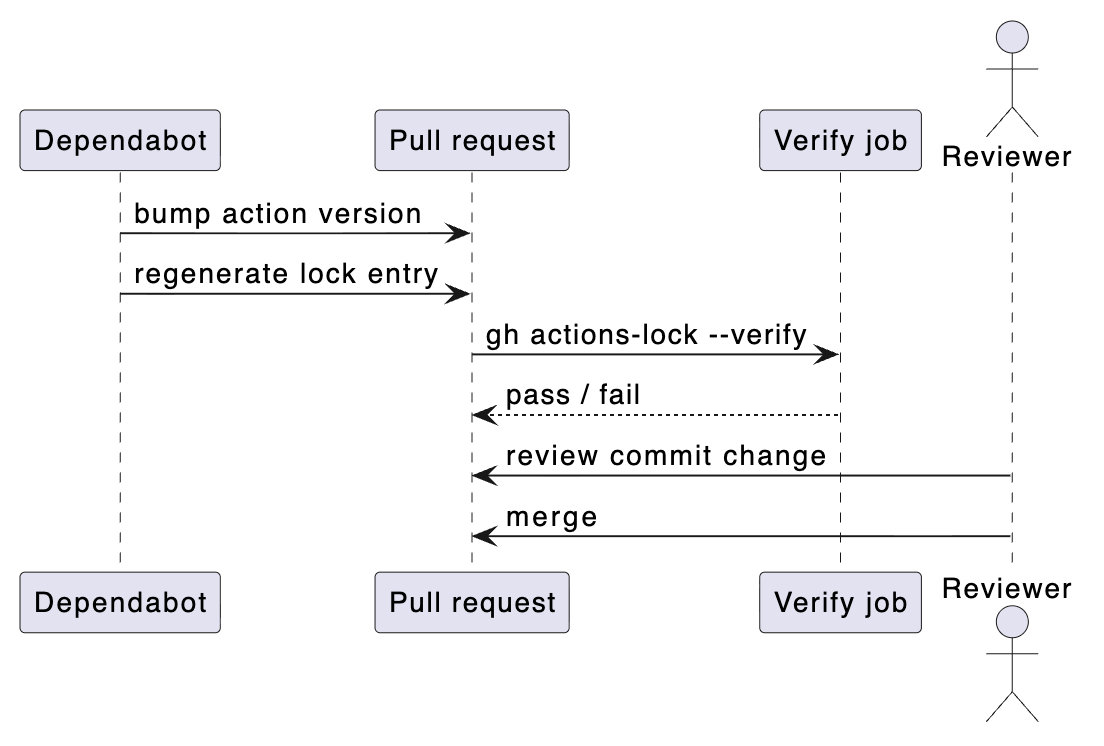
View PlantUML source
@startuml
skinparam shadowing false
skinparam defaultFontSize 14
participant "Dependabot" as D
participant "Pull request" as PR
participant "Verify job" as V
actor "Reviewer" as R
D -> PR : bump action version
D -> PR : regenerate lock entry
PR -> V : gh actions-lock --verify
V --> PR : pass / fail
R -> PR : review commit change
R -> PR : merge
@enduml
Dependabot regenerates the matching lockfile entry in the same pull request when it bumps an action in an onboarded workflow. It does not onboard workflows. If it bumps a dependency in a workflow with no lockfile entry, it reports that onboarding is required, and you run gh actions-lock for that workflow yourself.
Common GitHub Actions lockfile errors and fixes
| Symptom | Fix |
|---|---|
| Workflow skipped: local path actions not supported | A uses: ./… path did not resolve. Paths resolve from the repository root, not the workflow's folder. Fix it and re-run. |
| A tag now points to a different commit | Check upstream history. If the move is legitimate, run gh actions-lock --relock. |
--relock fails: commit unreachable | After checking upstream, run gh actions-lock --relock --accept-moved. |
| Tag-pinned allowlist entries stop matching | Use a wildcard or a full commit SHA in the allowlist. |
| Dependabot says onboarding is required | Run gh actions-lock for that workflow. |
Enforce lockfiles with the Require lockfile policy
The Require lockfile protection blocks runs of targeted workflows that have action dependencies but are not onboarded to the repository's lockfile. Repository, organization and enterprise admins can set it up, and it is also in public preview.
- Open Settings for the repository or organization.
- In the sidebar, under Actions, click Policies.
- Create a policy, name it, and choose the target workflows or repositories.
- Configure the Require lockfile protection.
- Choose the enforcement status. Active blocks violating runs. Evaluate only records runs that would have been blocked, and GitHub Docs says it is available on GitHub Enterprise Cloud only.
- Check Policy insights for blocked or would-be-blocked runs.
GitHub's guidance is clear on the order: do not switch the policy to Active until every targeted workflow is locked and you have a way to keep lockfiles current. If you automate lockfile updates with a workflow, that workflow needs contents: write, and your branch protection or rulesets must allow GitHub Actions to push to those branches.
If you run Claude Code or other agents from scheduled jobs, as in our guide to running Claude Code headless with n8n on macOS, the same idea applies: pin what the automation runs, and review changes to the pins.
FAQ
Do I still need to pin actions to full commit SHAs? Not in the workflow file, once the workflow is onboarded. GitHub Docs says lockfiles replace SHA pinning for those repositories. Keep the SHA-pinning policy on during rollout, and remove it only after every workflow is locked.
Does the lockfile cover actions used inside a reusable workflow from another repository? No. Your lockfile pins the reusable workflow call itself. The dependencies inside it are covered by the lockfile in the repository that defines the reusable workflow.
Will Dependabot keep the lockfile updated for me? For onboarded workflows, yes. Dependabot updates the version and the lockfile entry in one pull request. It will not onboard a new workflow, so run gh actions-lock whenever you add one.
Can I use workflow lockfiles on GitHub Enterprise Server? No. As of October 19, 2026, the extension supports github.com plans and GitHub Enterprise Cloud with data residency, but not GitHub Enterprise Server.
Is a lockfile enough to stop supply chain attacks on CI? No. It stops a moved tag from silently changing what runs. It does not judge whether the code you locked is safe. Review new dependencies and every commit change, and keep job permissions as narrow as possible.
Summary: lock one workflow today
Install gh-actions-lock, lock your main CI workflow with gh actions-lock .github/workflows/ci.yml, review and commit the diff, and add gh actions-lock --verify as a required check. Expand to the rest of the repository, protect actions.lock with CODEOWNERS, and only then turn on the Require lockfile policy.
If you are updating CI images and runtimes at the same time, see our Node.js 26 LTS upgrade checklist, which covers Docker and setup-node changes.
Written on October 19, 2026. The feature is in public preview; check the official docs below for changes after this date.
References
- GitHub Changelog, "GitHub Actions workflow lockfiles in public preview" (Oct 14, 2026) — github.blog (checked Oct 19, 2026)
- GitHub Docs, Workflow dependency lockfiles — docs.github.com (checked Oct 19, 2026)
- GitHub Docs, Locking action dependencies in a repository's workflows — docs.github.com (checked Oct 19, 2026)
- GitHub Docs, Enforcing lockfiles for action dependencies — docs.github.com (checked Oct 19, 2026)
- GitHub Docs, Governing execution of GitHub Actions workflows — docs.github.com (checked Oct 19, 2026)
- github/gh-actions-lock README — github.com (checked Oct 19, 2026)
8 thoughts on “GitHub Actions Lockfile: How to Lock Workflow Dependencies”