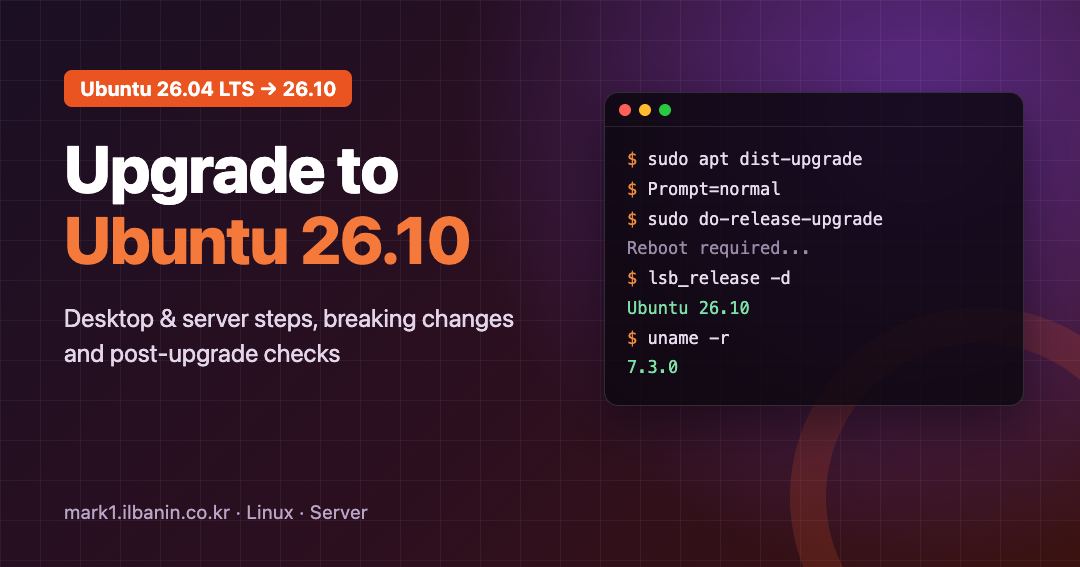
To upgrade Ubuntu 26.04 LTS to 26.10, set the release upgrader to follow interim releases (Prompt=normal), fully update the system, and run sudo do-release-upgrade. Ubuntu 26.10 "Stonking Stingray" was released on October 15, 2026 and is supported for 9 months, until July 2027. Before you run the upgrade, check three things: TPM-backed full-disk encryption, old /etc/init.d scripts, and OpenSSH packages in rc state.
This guide covers both desktop and server (SSH) upgrades, the changes in 26.10 that can break an existing setup, and what to verify after the reboot. All facts come from the official Ubuntu release notes and upgrade guides, checked on October 18, 2026.
1. Should you upgrade? 26.04 LTS vs 26.10 at a glance
Stay on 26.04 LTS if the machine is a production server. Move to 26.10 if you want Linux 7.3, GNOME 51 and the newest toolchain, and you are fine upgrading again within 9 months.
| Item | Ubuntu 26.04 LTS | Ubuntu 26.10 |
|---|---|---|
| Release type | Long-term support | Interim |
| Support | Years of updates | 9 months (to July 2027) |
| Kernel / desktop | Older stack | Linux 7.3, GNOME 51 |
| Best for | Servers, stable desktops | Developers, new hardware |
An interim release is a short-lived release between two LTS versions. Its job is to ship new software early, not to stay put for years.
Ubuntu only supports sequential upgrades. You go from one interim release to the next, or from one LTS to the next LTS. So the path to 26.10 starts on 26.04 LTS. A machine on an older release has to reach 26.04 first.
What is new in the 26.10 toolchain
The release notes list these core versions:
| Component | Version in 26.10 |
|---|---|
| Linux kernel | 7.3 |
| systemd | 261.3 |
| Python | 3.14.7 |
| GCC | 15.2.0 |
| OpenSSL | 4.0.3 |
| Rust | 1.97.1 |
| LLVM | 22.1.8 |
| OpenJDK | 25.0.4 |
Other highlights: Rust-based core utilities for every command, D-Bus switched from dbus-daemon to dbus-broker, an opt-in local speech-to-text feature called Myna, and deeper Microsoft Entra ID sign-in support.
2. Breaking changes: five things to check before upgrading
Most upgrades go through without trouble. These five changes are the ones most likely to affect a system that has been customized.
| Change in 26.10 | What can break | Who should care |
|---|---|---|
| TPM-backed FDE | Upgrade from 26.04 is blocked at release | Laptops with TPM disk encryption |
systemd-sysv-generator removed | Services that only exist as /etc/init.d scripts stop starting | Old servers, vendor software |
| OpenSSH split into two packages | Purging an rc-state package can break SSH config | Any server you reach over SSH |
| Rust coreutils for all commands | Scripts that rely on GNU-only quirks of cp, mv, rm | Shell-script heavy setups |
| OpenSSL 4 drops engines | Code using OpenSSL engines needs the PKCS#11 provider | HSM and smart-card users |
TPM-backed full-disk encryption: wait
The release notes are clear: systems running under TPM-backed full-disk encryption cannot upgrade from 26.04 LTS to 26.10 at release. Canonical expects to enable that path during the 26.10 lifecycle.
If you chose TPM-backed encryption when you installed 26.04, stay on 26.04 for now. Passphrase-based LUKS encryption is a different setup and is not covered by this note.
Old init.d scripts: convert them to systemd units
In 26.10, systemd no longer creates services from /etc/init.d scripts at runtime. On 26.04, the generator still writes those wrapper units to /run/systemd/generator.late/. List them before you upgrade:
ls /run/systemd/generator.late/*.service 2>/dev/nullEvery file in that list is a service that depends on the removed generator. Write a native unit for each one. A minimal example for a hypothetical myapp daemon, saved as /etc/systemd/system/myapp.service:
[Unit]
Description=My legacy app
After=network-online.target
Wants=network-online.target

[Service]
ExecStart=/opt/myapp/bin/myapp --config /etc/myapp.conf
Restart=on-failure
User=myapp

[Install]
WantedBy=multi-user.target
Then enable it and confirm it runs before you start the upgrade:
sudo systemctl daemon-reload
sudo systemctl enable --now myapp.service
systemctl status myapp.service
OpenSSH packages in rc state: do not purge
OpenSSH is now split into openssh (without GSSAPI) and openssh-gssapi (with Kerberos support). The release notes warn: do not purge an OpenSSH package that is in rc state until a fix is released. Purging it can break the configuration of its counterpart package, and on a remote server that can mean losing SSH access.
rc means the package was removed but its config files are still on disk. Check for them:
dpkg -l | awk '/^rc/ && /openssh/'If this prints anything, leave those packages alone. Do not run apt purge on them and do not run a blanket cleanup that purges all rc packages.
3. Pre-upgrade checklist: back up and fully update
Start with a backup of your user data to external storage. For a server, take a VM snapshot or a full backup of /etc, application data and databases.
Then check which release you are on:
lsb_release --descriptionThe release upgrader requires that all current updates are installed. The Ubuntu Server guide uses this command, which also pulls in phased updates (updates Ubuntu rolls out to a share of machines at a time):
sudo apt update
sudo apt dist-upgrade -o APT::Get::Always-Include-Phased-Updates=true
Check whether the updates need a reboot, and reboot if the file exists:
ls /run/reboot-required && sudo systemctl rebootFinally, note your third-party repositories. The upgrader disables PPAs and other third-party sources during the upgrade, so you will need this list afterwards:
ls /etc/apt/sources.list.d/4. Step 1: switch from LTS-only to "any new version"
A fresh 26.04 LTS install only offers the next LTS release. You have to tell it to offer interim releases too.
Desktop (GUI): open Software & Updates (package software-properties-gtk), go to the Updates tab, and set Notify me of a new Ubuntu version to For any new version. Close the window.
Desktop or server (terminal): set Prompt=normal in /etc/update-manager/release-upgrades:
sudo sed -i 's/^Prompt=.*/Prompt=normal/' /etc/update-manager/release-upgrades
grep ^Prompt /etc/update-manager/release-upgrades
The second command should print Prompt=normal. The other values are lts (LTS releases only) and never.
You can test whether a new release is offered without starting anything:
do-release-upgrade -cAccording to the desktop upgrade guide, upgrades to a new interim release become available a few days after the official release date. If -c reports no new release yet, wait a day or two and try again. Do not use -d: that flag targets the development release and is not recommended for production.
5. Step 2: run the upgrade on desktop or server
The flow is the same on both. Only the front end differs.
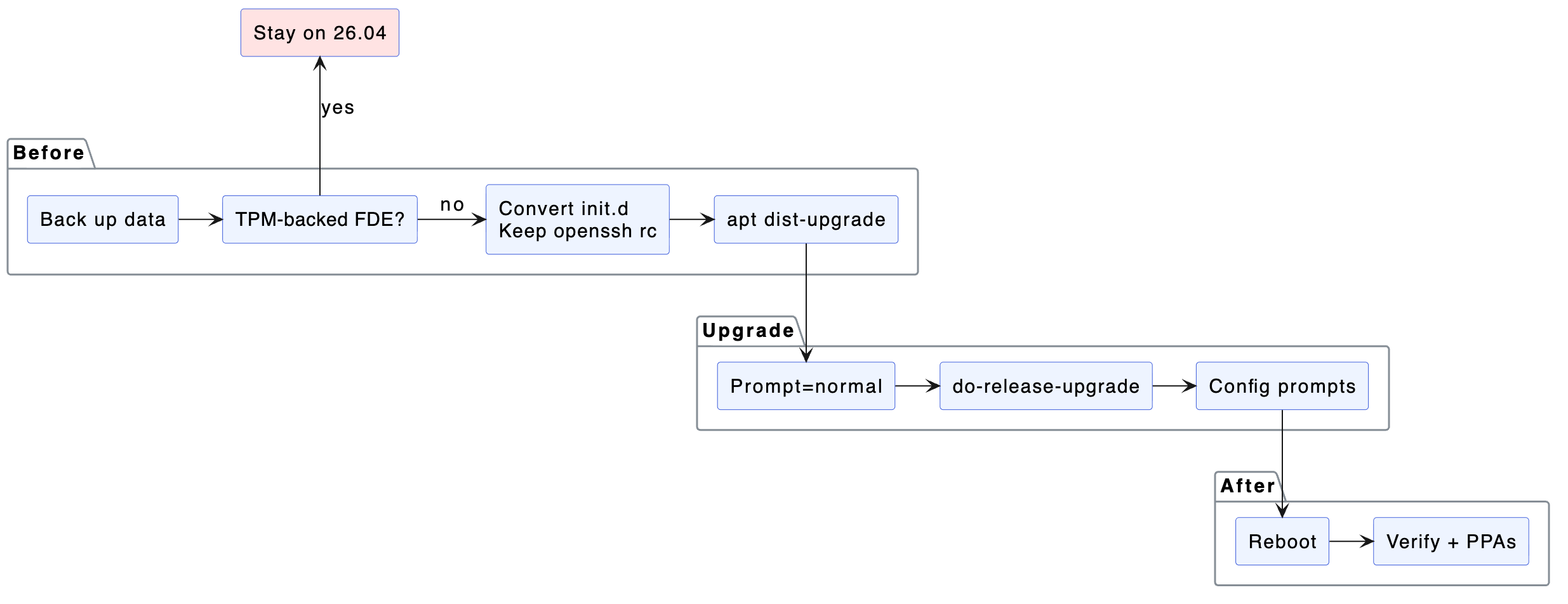
View PlantUML source
@startuml
skinparam defaultFontSize 15
skinparam rectangleBackgroundColor #EEF4FF
skinparam rectangleBorderColor #3B5BDB
skinparam packageBorderColor #868E96
package "Before" {
  rectangle "Back up data" as A
  rectangle "TPM-backed FDE?" as B
  rectangle "Convert init.d\nKeep openssh rc" as C
  rectangle "apt dist-upgrade" as D
}
package "Upgrade" {
  rectangle "Prompt=normal" as E
  rectangle "do-release-upgrade" as F
  rectangle "Config prompts" as G
}
package "After" {
  rectangle "Reboot" as H
  rectangle "Verify + PPAs" as I
}
rectangle "Stay on 26.04" as X #FFE3E3
A -right-> B
B -right-> C : no
B -up-> X : yes
C -right-> D
D -down-> E
E -right-> F
F -right-> G
G -down-> H
H -right-> I
@enduml
Desktop: Software Updater
Open Software Updater, or start it from a terminal:
update-managerWhen it offers Ubuntu 26.10, click Upgrade and follow the prompts. The download and install can take a while, so plug in a laptop before you start.
Server over SSH: use tmux
On a server, run the upgrade inside tmux (or screen) so a dropped connection does not stop it:
sudo apt install tmux
tmux new -s upgrade
sudo do-release-upgrade
If your SSH session drops, reconnect and run tmux attach -t upgrade to get back to the upgrader.
Answering the config file prompts
The upgrader stops when a config file you edited also changed in the new package. The Ubuntu Server guide suggests looking at the differences before you decide.
| Key | Action | When to use it |
|---|---|---|
D | Show the differences | Always first |
Y or I | Install the package maintainer's version | You never meant to customize it |
N or O | Keep your current version | The file holds your real settings |
Keeping your version is the safer default for files like sshd_config, haproxy.cfg or php.ini. You can compare against the new version later; it is usually saved next to the original with a .dpkg-dist suffix.
At the end, the upgrader asks to remove obsolete packages and then to reboot. Accept both.
6. Step 3: verify the upgrade and fix what moved
After the reboot, confirm the release and kernel:
lsb_release --description
uname -r
You should see Ubuntu 26.10 and a 7.3 kernel. Then look for failed services:
systemctl --failedRe-enable third-party repositories
Open the Other Software tab in Software & Updates, or check /etc/apt/sources.list.d/ against the list you saved. Re-enable each source only after its vendor publishes packages for 26.10. Some PPAs take days or weeks to add a new release.
If a script breaks on Rust coreutils
In 26.10, the last GNU holdouts (cp, mv and rm) also moved to the Rust uutils implementation. If a script misbehaves, first confirm which implementation runs:
cp --version | head -1Ubuntu ships provider packages for both implementations (coreutils-from-uutils is the default, coreutils-from-gnu brings back GNU). The release notes point to Ubuntu's rust-coreutils page for switching. Treat switching as a stopgap and report the incompatibility upstream.
Server packages with changed defaults
Read the release notes for any server software you run. Two examples that change behavior after the upgrade:
- HAProxy 3.4.2: the default balancing algorithm changes from
roundrobintorandom, and theprogramsection is removed - Postfix 3.11.7: BerkeleyDB map types (
hash:,btree:) are deprecated, so plan a move to another map format
If HAProxy must keep round-robin balancing, set balance roundrobin explicitly in your backends.
7. Going back to LTS: plan the next upgrade now
There is no supported downgrade from 26.10 to 26.04. Once you upgrade, you stay on the interim track until the next LTS.
Ubuntu only lets you switch back to LTS-only notifications from an interim release that directly precedes an LTS, or from an actual LTS. Since 26.10 ends in July 2027, plan on upgrading to 27.04 before then. If you want to stay on 26.04 LTS, test 26.10 in a VM or on a spare machine first.
Frequently asked questions
Why does do-release-upgrade say "No new release found"? Either the prompt setting is still lts, or the upgrade is not enabled for your machine yet. Check grep ^Prompt /etc/update-manager/release-upgrades, then run do-release-upgrade -c. Interim upgrades open a few days after release day, and TPM-backed FDE systems are blocked for now.
Can I upgrade from Ubuntu 24.04 directly to 26.10? No. Ubuntu supports only sequential upgrades. Upgrade 24.04 LTS to 26.04 LTS first, check that everything works, and then upgrade to 26.10.
Is Ubuntu 26.10 safe for a production server? It is a supported release, but only for 9 months. Most production servers are better on 26.04 LTS, which gets updates for years without a forced release upgrade.
Will my NVIDIA driver still work after the upgrade? Ubuntu 26.10 ships prebuilt modules for the 580 and 615 driver series, and 615 uses open kernel modules only (Turing GPUs and newer). Older GPUs that need a legacy driver series should stay on 26.04 or confirm driver support first.
Do I need an Ubuntu Pro subscription to upgrade? No. Canonical states that upgrades to the latest version of Ubuntu are free of charge.
Summary
Upgrade to Ubuntu 26.10 if you want the new kernel, GNOME 51 and the 2026 toolchain on a desktop or a test box. Check TPM encryption, /etc/init.d services and OpenSSH rc packages first, set Prompt=normal, and run sudo do-release-upgrade inside tmux on servers.
If you automate a home server with cron jobs or tools like n8n, run the upgrade on a snapshot first and check every scheduled job after the reboot.
Information current as of October 18, 2026. Upgrade availability can change during the 26.10 lifecycle, so check the release notes before you start.
References
- Ubuntu 26.10 release notes — Ubuntu documentation, checked 2026-10-18
- Ubuntu 26.10 (Stonking Stingray) released — Ubuntu Discourse announcement, checked 2026-10-18
- Upgrade your release (Ubuntu Server) — Ubuntu Server documentation, checked 2026-10-18
- Upgrade Ubuntu Desktop — Ubuntu Desktop documentation, checked 2026-10-18
- Switch between an LTS and interim release — Ubuntu Desktop documentation, checked 2026-10-18
- do-release-upgrade manual page — Ubuntu Manpages, checked 2026-10-18
- Canonical releases Ubuntu 26.10 Stonking Stingray — Canonical blog, checked 2026-10-18
8 thoughts on “How to Upgrade Ubuntu 26.04 to 26.10 (Desktop and Server)”