Docker log rotation is now on by default for new Linux containers in Docker Desktop 4.94 and later, because Desktop switched its default logging driver from json-file to local. Docker Engine on Linux servers still defaults to json-file, which never rotates unless you set max-size. This guide shows how to check which driver you have, set rotation limits in daemon.json or Compose, and fix scripts that broke after the switch.
Written 2026-10-25. Versions, defaults and issue status were checked against Docker's official docs and GitHub on that date.
What changed in Docker Desktop 4.94
Docker Desktop 4.94.0 shipped on October 5, 2026. Its release notes list one line that matters for disk usage: "Changed the default logging driver for new Linux containers to local to enable automatic log rotation and reduce disk usage."
Three details are easy to miss:
- Desktop only. Docker Engine's own docs still say "The default logging driver is
json-file." A plainapt install docker-ceserver is not affected. - New containers only. Docker's docs state: "Existing containers don't use the new logging configuration automatically." A container created on 4.93 keeps
json-fileuntil you re-create it. - Same
docker logs. Both drivers can be read withdocker logsanddocker compose logs. Only the on-disk format changes.
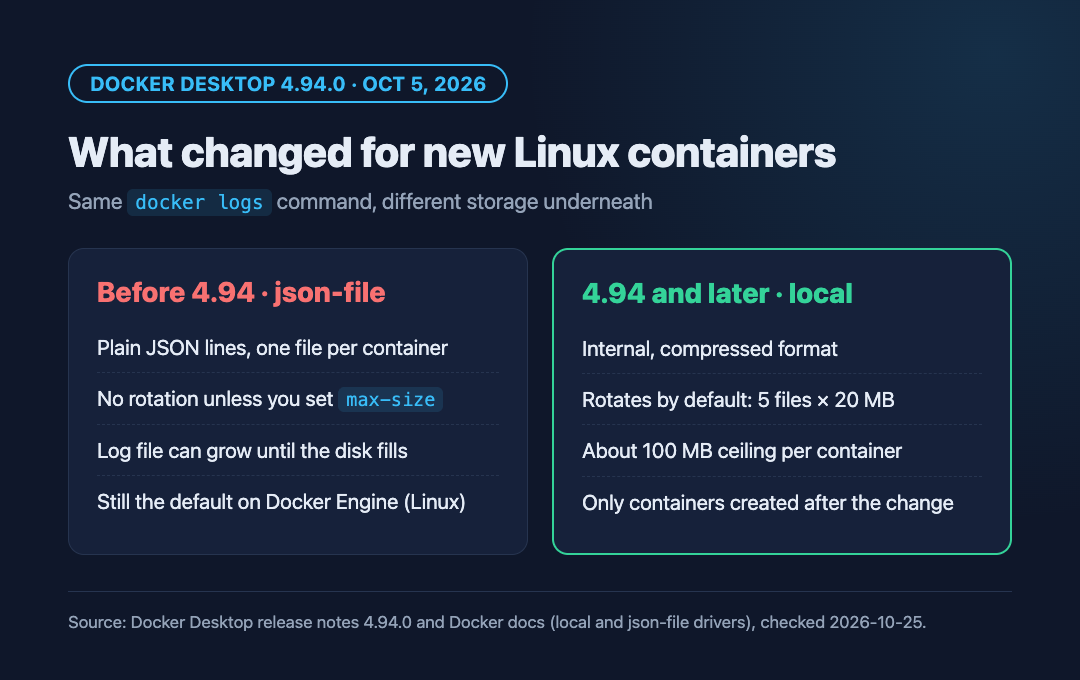
| json-file | local | |
|---|---|---|
| Default on | Docker Engine (Linux) | Docker Desktop 4.94+ |
| Rotation by default | No (max-size unlimited) | Yes |
| Default limits | 1 file, no size cap | 5 files × 20 MB |
| Compression | Off (compress=false) | On |
If you run containers on a laptop, the new default protects you from a chatty container filling your Docker disk image. On servers, you still need to set limits yourself.
Docker log rotation limits: the disk math
Rotation caps each container's log at roughly max-size × max-file. The local driver keeps "about 100MB of log messages per container" according to Docker's docs: 5 files of 20 MB, with rotated files compressed.
With json-file and no options, max-size is unlimited and max-file has no effect, so a single file grows forever. That is the classic "Docker filled my disk" problem.
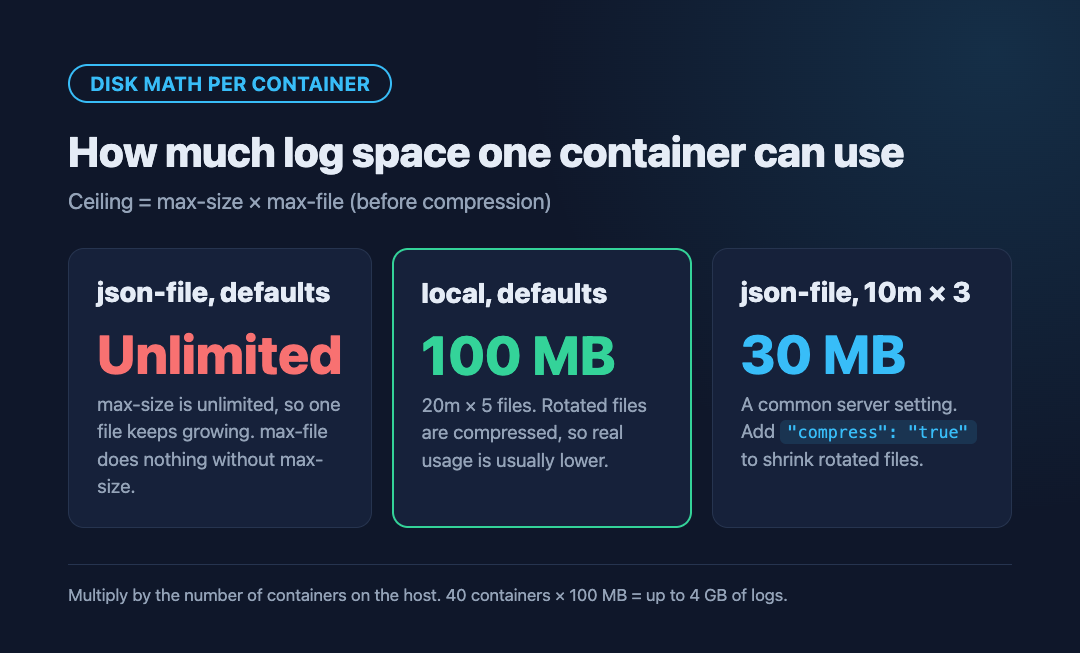
Remember to multiply by the number of containers. A host with 40 containers on local defaults can keep up to about 4 GB of logs before compression.
Check which logging driver you are using
Start with the daemon default. This is what new containers get when they don't set a driver themselves:
docker info --format '{{.LoggingDriver}}'Then check what existing containers actually use. This lists every container with its driver and options:
docker ps -aq | xargs docker inspect \
  --format '{{.Name}}  {{.HostConfig.LogConfig.Type}}  {{.HostConfig.LogConfig.Config}}'
Look for lines like /myapp json-file map[]. An empty map[] on json-file means no rotation at all.
On a Linux host, you can see how big a json-file log already is:
sudo du -h "$(docker inspect --format '{{.LogPath}}' <CONTAINER>)"To test what a brand-new container gets on Docker Desktop, create a throwaway one and inspect it:
docker run -d --name logtest alpine sh -c 'echo hello; sleep 60'
docker inspect -f '{{.HostConfig.LogConfig.Type}}' logtest
docker rm -f logtest
On Docker Desktop 4.94 or later with no custom log-driver in your Engine settings, this should print local.
Set Docker log rotation for every container (daemon.json)
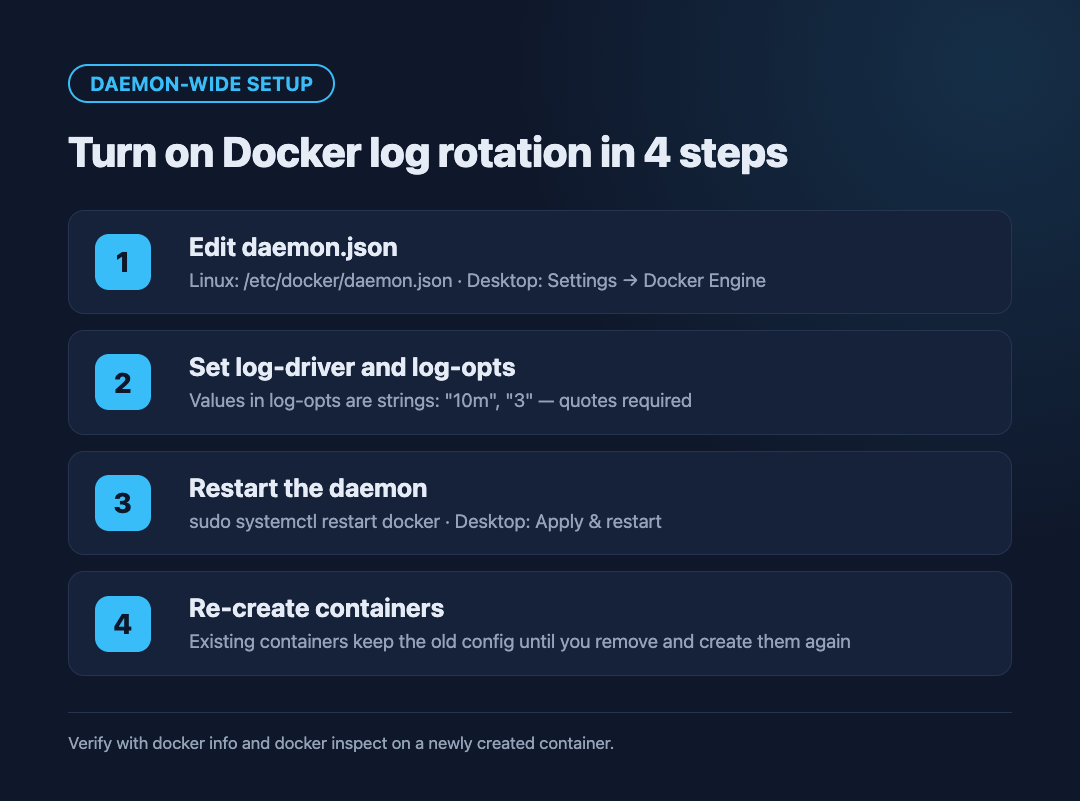
The daemon-wide setting lives in daemon.json. On Linux it is /etc/docker/daemon.json. On Docker Desktop, open Settings → Docker Engine and edit the JSON there.
Option 1: switch servers to the local driver
This matches what Docker Desktop now does, with explicit limits:
{
  "log-driver": "local",
  "log-opts": {
    "max-size": "20m",
    "max-file": "5"
  }
}
Option 2: keep json-file and add limits
Keep json-file if a log shipper, Kubernetes node agent or script reads the JSON files on disk:
{
  "log-driver": "json-file",
  "log-opts": {
    "max-size": "10m",
    "max-file": "3",
    "compress": "true"
  }
}
Docker's docs say values under log-opts must be strings, so write "3", not a bare 3.
Restart and re-create
On Linux:
sudo systemctl restart docker
docker info --format '{{.LoggingDriver}}'
On Docker Desktop, click Apply & restart, or run docker desktop restart.
Then re-create long-running containers so they pick up the new settings. With Compose:
docker compose up -d --force-recreateIf you manage a self-hosted app such as n8n with Docker, schedule the re-create during the same window as your next image update. Our n8n security update guide walks through a safe pull-and-recreate routine.
Set log rotation per service in Docker Compose
Daemon defaults differ between your laptop (Desktop, local) and your server (Engine, json-file). Pinning the driver in compose.yaml makes behavior identical everywhere:
services:
  api:
    image: <YOUR_IMAGE>
    logging:
      driver: local
      options:
        max-size: "20m"
        max-file: "5"

  worker:
    image: <YOUR_IMAGE>
    logging:
      driver: json-file
      options:
        max-size: "10m"
        max-file: "3"
For a single container, use flags. Quote local in shell scripts, since Docker's docs note it is a reserved word in bash:
docker run -d --log-driver "local" --log-opt max-size=10m --log-opt max-file=3 <YOUR_IMAGE>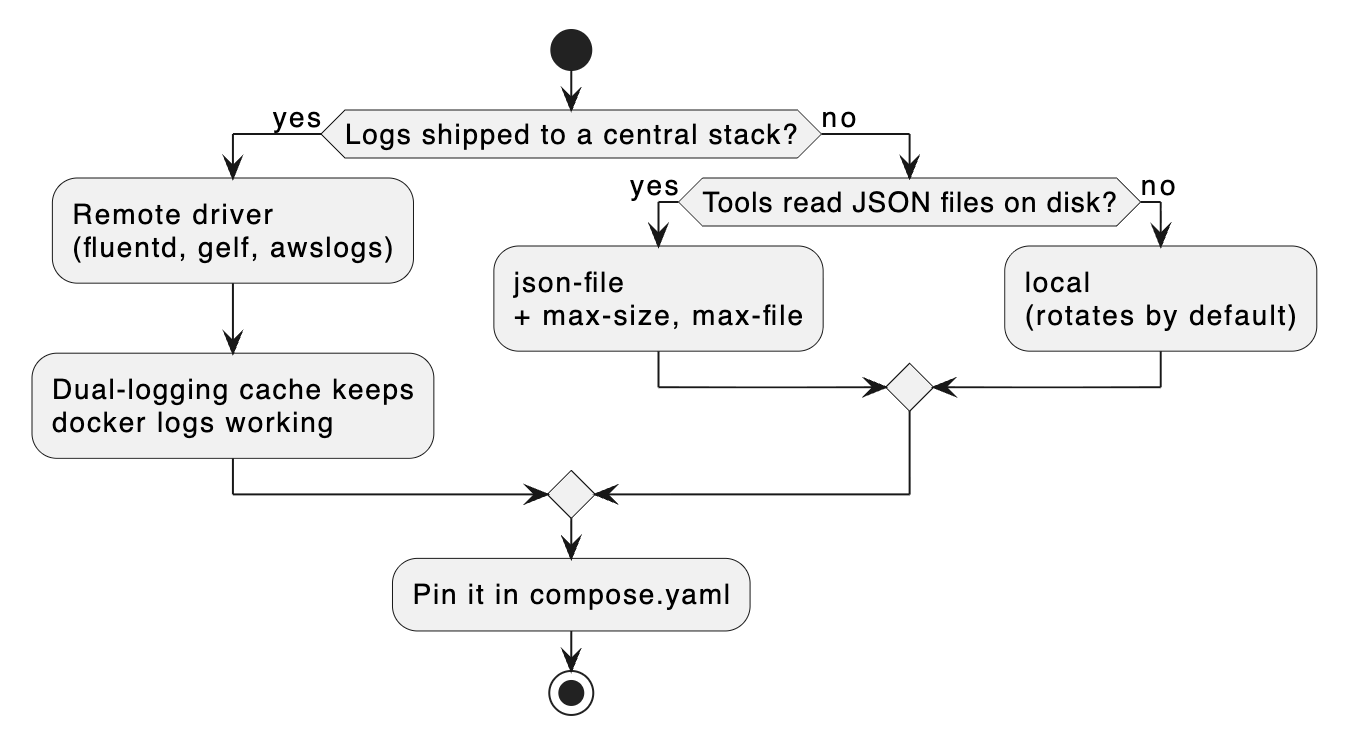
View PlantUML source
@startuml
skinparam shadowing false
skinparam defaultFontSize 14
start
if (Logs shipped to a central stack?) then (yes)
  :Remote driver
  (fluentd, gelf, awslogs);
  :Dual-logging cache keeps
  docker logs working;
else (no)
  if (Tools read JSON files on disk?) then (yes)
    :json-file
    + max-size, max-file;
  else (no)
    :local
    (rotates by default);
  endif
endif
:Pin it in compose.yaml;
stop
@enduml
Fix scripts that broke after the switch to local
The most visible breakage is in the Python Docker SDK. GitHub issue docker/docker-py#3455, opened October 13, 2026, reports that containers.run() returns None instead of the container output when the container uses the local driver. The SDK only reads output for json-file and journald, a check that dates back to 2017.
The DataHub CLI hit this directly: datahub docker quickstart failed with AttributeError: 'NoneType' object has no attribute 'decode' on Docker Desktop 4.94. DataHub fixed it the same day by pinning json-file for its temporary container.
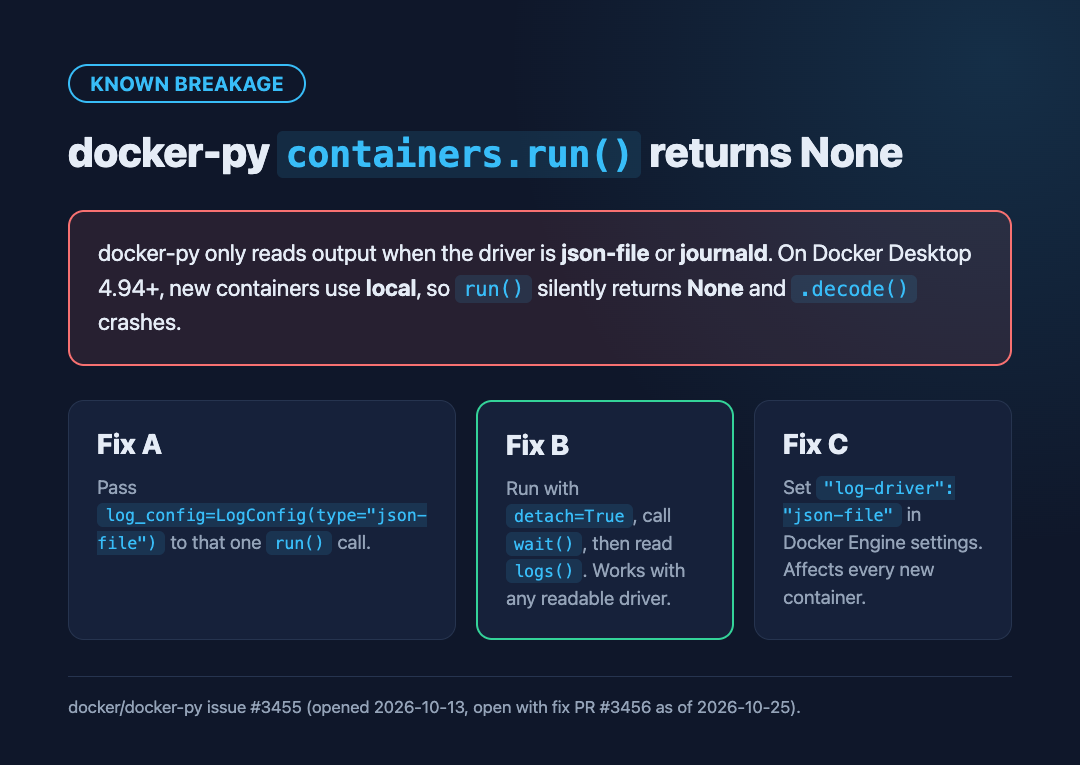
Pick one of these fixes:
import docker
from docker.types import LogConfig

client = docker.from_env()


def fix_a():
    # Fix A: force json-file for this one container
    return client.containers.run(
        "alpine:latest", "echo hello", remove=True,
        log_config=LogConfig(type="json-file"),
    )


def fix_b():
    # Fix B: driver-independent — run detached, wait, then read logs
    c = client.containers.run("alpine:latest", "echo hello", detach=True)
    c.wait()
    out = c.logs()
    c.remove()
    return out
Fix C is the global one: set "log-driver": "json-file" in Docker Desktop's Engine settings. It restores the old behavior for every new container, but you also lose default rotation, so add max-size and max-file as shown above.
As of October 25, 2026, the docker-py issue is still open, with fix PR #3456 proposing to add local to the list. Until a release ships, Fix B is the safest choice for code you maintain.
Pick the right logging driver
Docker's logging docs recommend local for most situations and keep json-file as the default for backward compatibility and Kubernetes runtimes.
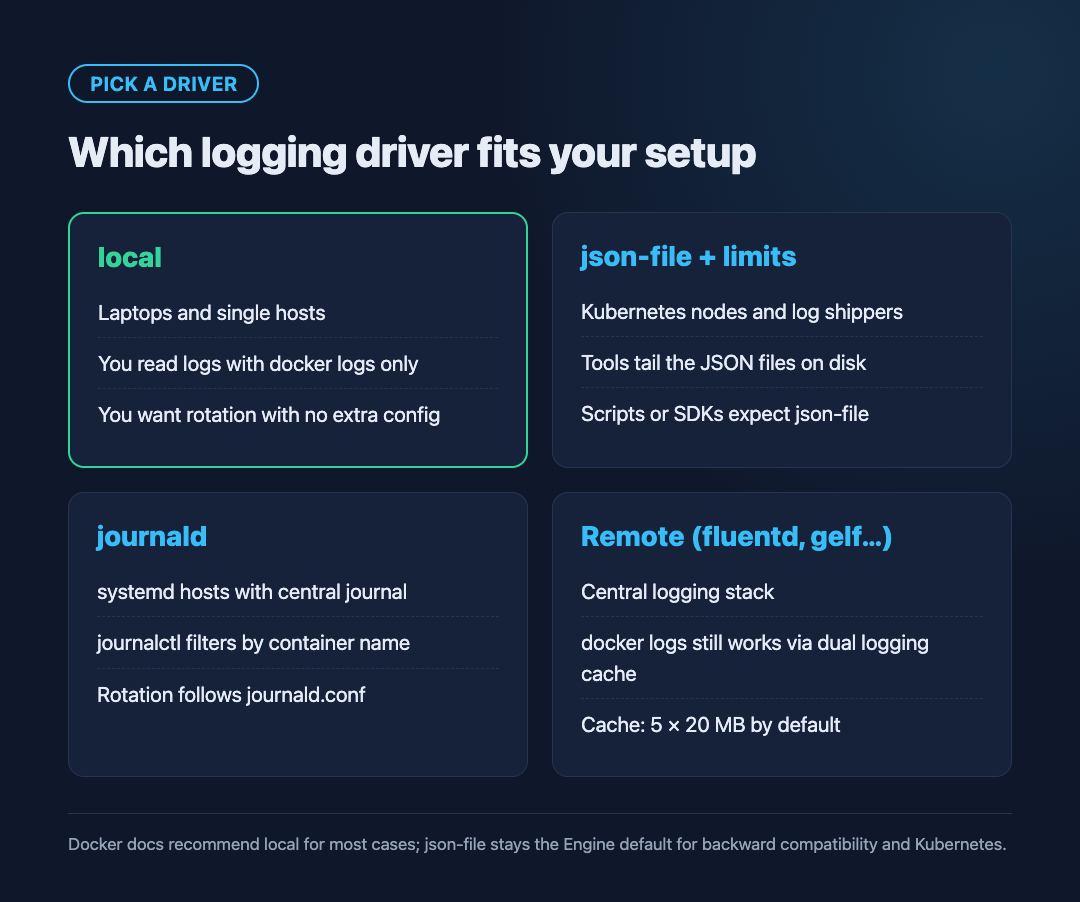
| Driver | Best for | Rotation | docker logs |
|---|---|---|---|
| local | Laptops, single hosts | Built in | Yes |
| json-file | Log shippers, K8s nodes | Only with max-size | Yes |
| journald | systemd hosts | journald settings | Yes |
| fluentd, gelf, awslogs | Central logging | Remote side | Via cache |
Remote drivers don't support reading by themselves. Docker's dual logging feature keeps a local cache so docker logs still works, by default 5 files of 20 MB per container (cache-max-size, cache-max-file).
If you're preparing a fresh server, apply these settings right after install. The Ubuntu 26.10 upgrade guide is a good moment to add daemon.json to your server checklist.
Docker log rotation checklist
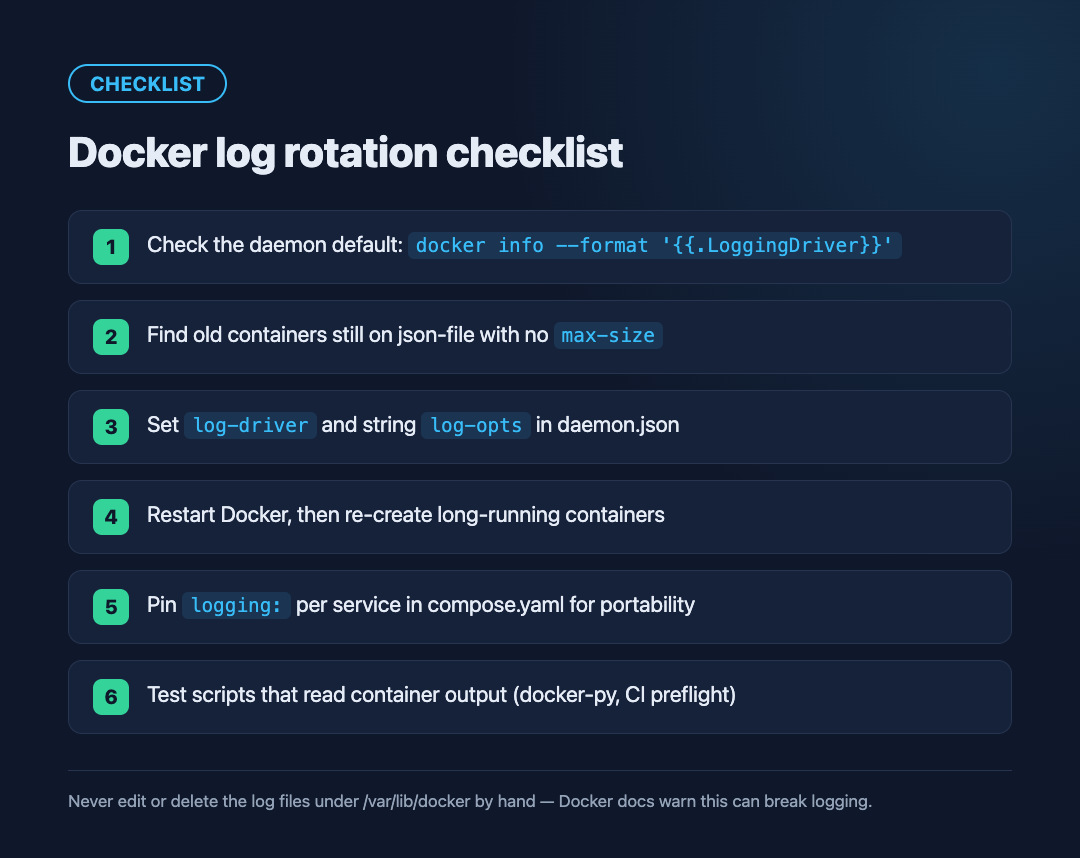
- Run
docker info --format '{{.LoggingDriver}}'on each host. - List containers still on
json-filewith empty options. - Set
log-driverand stringlog-optsindaemon.json. - Restart Docker and re-create long-running containers.
- Pin
logging:per service incompose.yaml. - Test any script or SDK call that reads container output.
Don't delete or truncate files under /var/lib/docker/containers by hand. Docker's docs warn that the log files are meant only for the daemon, and touching them with outside tools can break logging.
FAQ
Does Docker rotate logs by default? It depends on the driver. The local driver rotates by default (5 × 20 MB). The json-file driver, still the Docker Engine default on Linux, does not rotate unless you set max-size.
Will changing daemon.json shrink logs of running containers? No. New log settings apply only to containers created after the daemon restart. Re-create the container (for example docker compose up -d --force-recreate) to apply them.
Can I still use docker logs with the local driver? Yes. Docker's docs list local among the drivers that docker logs reads natively, and docker compose logs works the same way. What you lose is direct access to plain JSON files on disk.
Why does my Python script get None from containers.run()? docker-py only returns output for json-file and journald. On Docker Desktop 4.94+ new containers use local. Use detach=True plus logs(), or pass a json-file log config.
Should Kubernetes nodes use the local driver? Docker's docs keep json-file as the default partly for Kubernetes runtimes. If node-level agents read container log files, keep json-file and add size limits.
References
- Docker Desktop release notes (4.94.0, Oct 5, 2026) — checked 2026-10-25
- Configure logging drivers — Docker Docs — checked 2026-10-25
- Local file logging driver — Docker Docs — checked 2026-10-25
- JSON File logging driver — Docker Docs — checked 2026-10-25
- Dual logging — Docker Docs — checked 2026-10-25
- Compose file reference: logging — checked 2026-10-25
- docker/docker-py issue #3455 — checked 2026-10-25
- datahub-project/datahub issue #20399 — checked 2026-10-25
Next, if your Docker hosts run Node.js apps, see how to upgrade to Node.js 26 LTS before rebuilding your images.
6 thoughts on “Docker Log Rotation: Set Up local and json-file Limits”