The Cursor Agent SDK lets you define an AI agent as a folder of Markdown and TypeScript, test it locally with evals, and deploy it to Cursor's hosting or your own server. To build a PR review bot, install @grok/agent-sdk (not the @cursor/agent-sdk name in the launch post), run agent-sdk init, add a GitHub channel and two tools, check it with agent-sdk eval, then ship it with agent-sdk deploy. This guide walks through each step with a small bot that sizes a pull request and posts one comment.
Written 2026-10-29. Commands, file names and APIs were checked against the Cursor changelog and blog post (October 20, 2026), the Agent SDK docs at cursor.com/docs/agent-sdk and the npm registry on October 29, 2026. The code below follows the patterns in the official quickstart; adapt and test it on a repository you control before you point it at real work.
What the Cursor Agent SDK is
Cursor announced the Agent SDK on October 20, 2026, and called it generally available. It is the same harness Cursor uses for its own managed agents, such as Bugbot, Security Review and Rollouts. The SDK's own changelog marks version 0.3.0 (October 23) as the GA release, and npm listed 0.5.0 as latest on October 29.
An agent is a normal project. The prompt is a Markdown file. Each tool the model can call is one TypeScript file. Channels decide where the agent hears events: GitHub, GitLab or Bitbucket pull requests and CI, Slack, webhooks or a cron schedule. You keep the whole thing in Git, review it like code and gate changes with evals.
The docs place it next to two other Cursor options:
| Option | You write | Hosting | Best for |
|---|---|---|---|
| Cursor Automations | Prompt, model, trigger in the dashboard | Cursor | Simple scheduled or event jobs |
| Grok Bot | Instructions, skills, tools in the app | Cursor | No-code agents |
| Agent SDK | Markdown + TypeScript project | Cursor or your server | Agents you want to version, test and review |
If you already run coding agents from scripts, the SDK fills the gap between "a prompt in a cron job" and "a service you maintain". For the script approach, see how to run Claude Code headless with n8n on macOS.
Install the Cursor Agent SDK (package name gotcha)
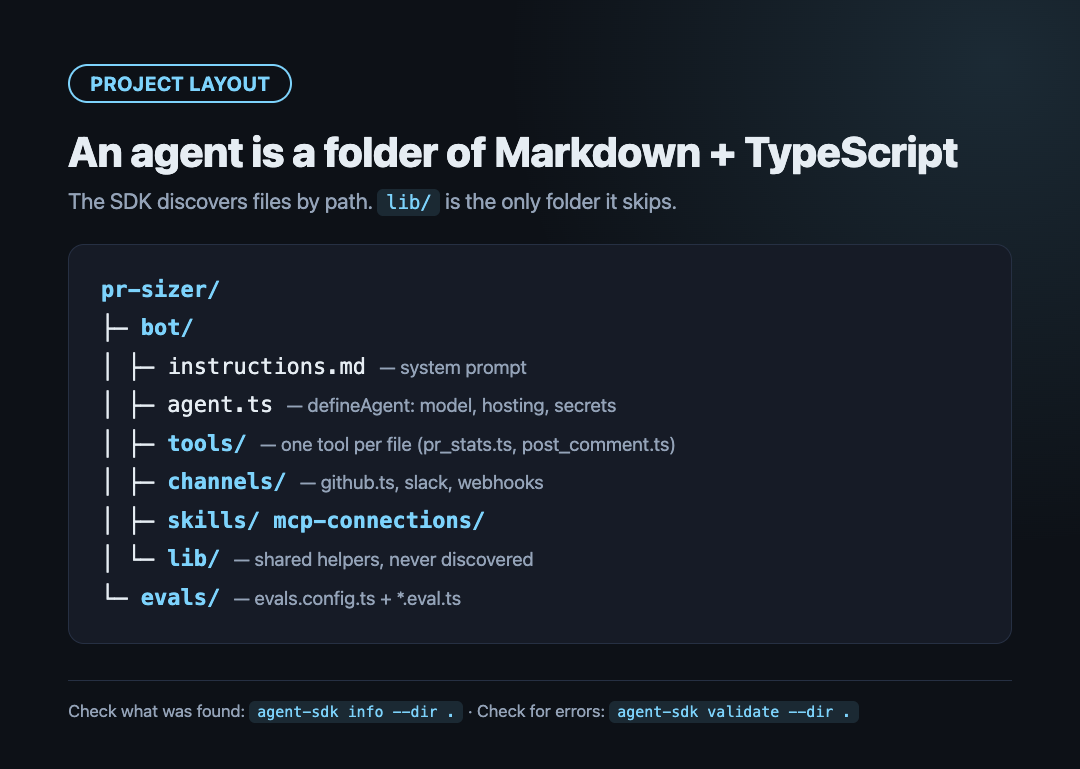
The launch post and changelog show npx @cursor/agent-sdk init ./my-bot. On October 29, 2026, that package name returned 404 on the npm registry. The docs and npm use a different scope:
| Name | Where you see it | Status on 2026-10-29 |
|---|---|---|
@cursor/agent-sdk | Changelog, launch blog, third-party posts | Not on npm (404) |
@grok/agent-sdk | Agent SDK docs, quickstart | On npm, latest = 0.5.0 |
@cursor/bdk | Docs note: earlier package name | Old name; do not start new projects on it |
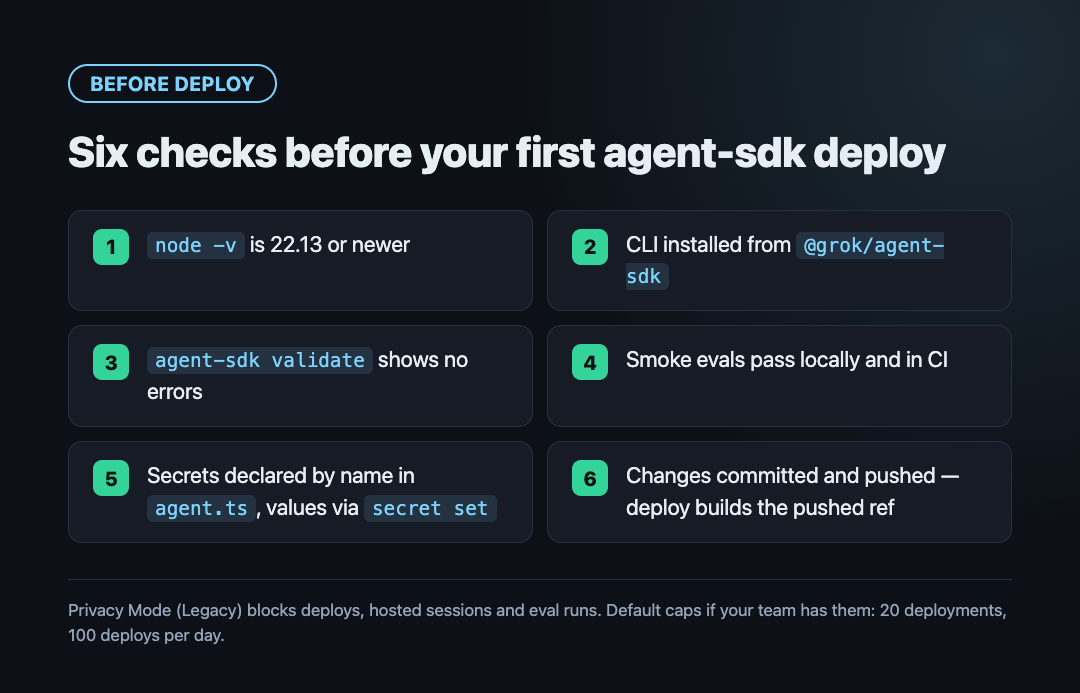
The @grok/agent-sdk package lists https://github.com/cursor/cursor as its repository, cursor.com as its homepage and two binaries, agent-sdk and bdk. It needs Node.js 22.13 or newer. Bun is not supported.
node -v            # must be v22.13.0 or newer
npm install --global @grok/agent-sdk
agent-sdk --version
agent-sdk login    # opens the browser and stores a Cursor credential
If you are still on an older Node line, upgrade first. Our Node.js 26 LTS upgrade checklist covers the common breakages.
For CI or a server, skip the browser login and set CURSOR_API_KEY (or CURSOR_API_KEY_FILE) instead.
Scaffold a PR review bot project
Create the project and start the local playground:
agent-sdk init ./pr-sizer
cd pr-sizer
agent-sdk dev
agent-sdk dev runs serve --dev and prints a local URL with a chat playground. After you edit agent files, press Enter in that terminal to reload.
You can also start from a template with --template. The review templates page lists security-reviewer, thermo-review, thermo-quality-review, triage-linear, triage-jira and triage:
agent-sdk init ./security-reviewer --template security-reviewer --var repos=<OWNER>/<REPO>The repositories in repos must already be connected to Cursor and share one owner.
The folders that matter
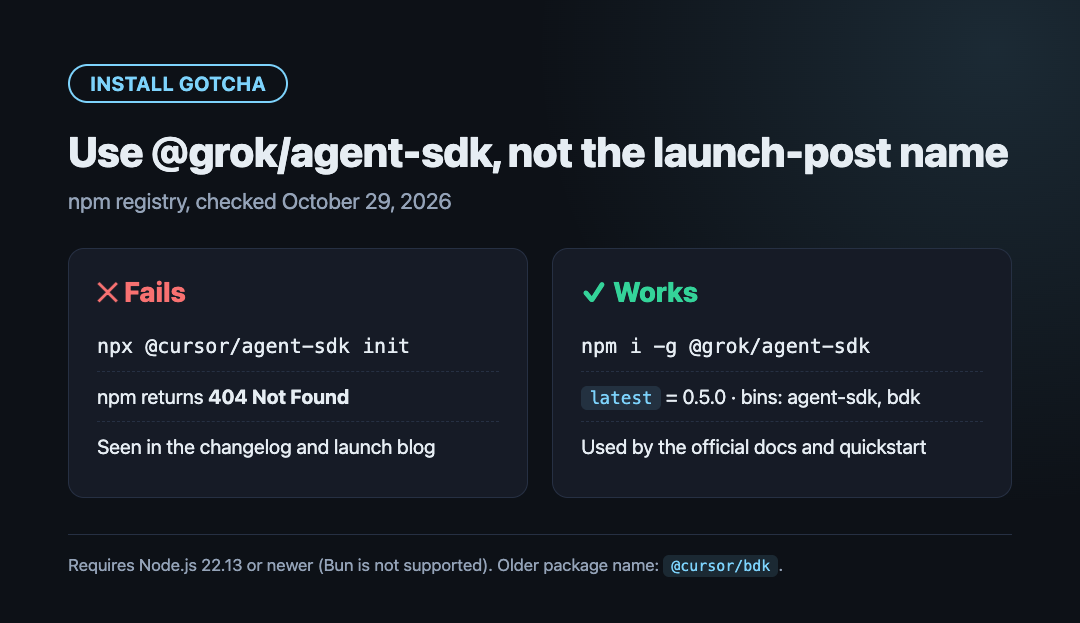
Agent code lives under bot/. Evals sit next to it in evals/.
| Path | Purpose |
|---|---|
bot/instructions.md | System prompt (required on the root agent) |
bot/agent.ts | defineAgent config: model, hosting, secrets |
bot/tools/*.ts | One tool per file; file name = tool name |
bot/channels/*.ts | Where events come in (GitHub, Slack, webhooks) |
bot/skills/, bot/mcp-connections/ | On-demand procedures and MCP servers |
bot/lib/ | Shared helpers; never auto-discovered |
evals/*.eval.ts | Test suites, plus evals/evals.config.ts |
Run agent-sdk info --dir . at any time to see what the SDK discovered, and agent-sdk validate --dir . to get errors and warnings.
Write the instructions and tools
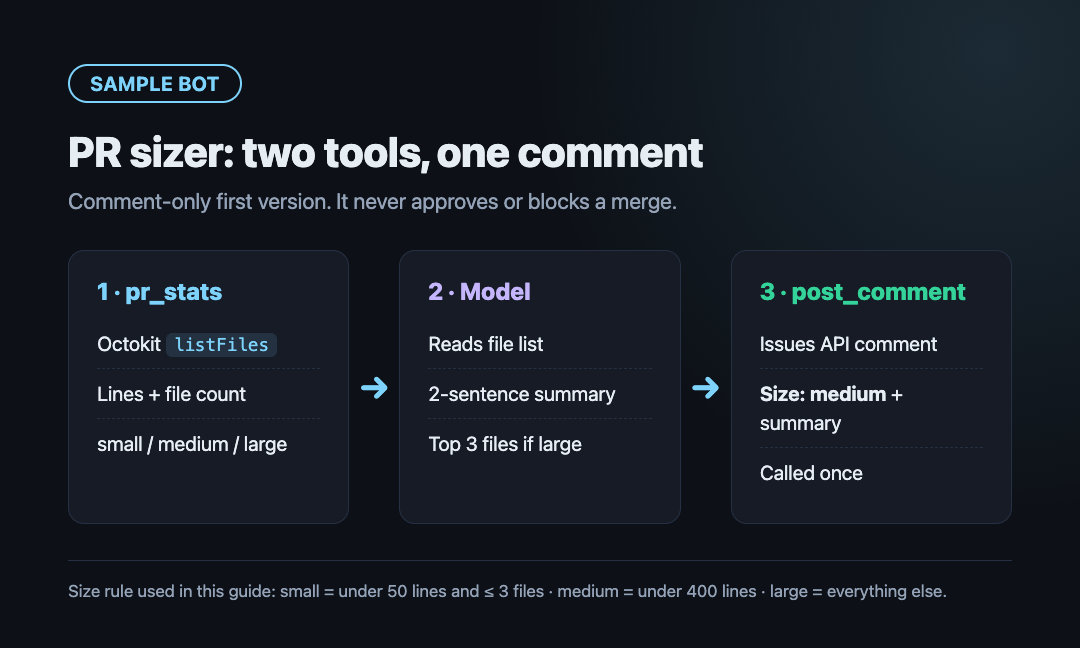
The sample bot does one job: measure a pull request and post a single comment with a size label and a short summary. It never approves anything, which keeps the first version safe.
bot/instructions.md
You are the PR sizer bot.

When you get a pull request URL:

1. Call `pr_stats` first. Never guess size from the title.
2. Read the file list and write a two-sentence summary of what changed.
3. Call `post_comment` once with:
   - the size label (small, medium or large)
   - the summary
   - for large PRs, the three files a reviewer should open first

Do not approve or request changes. Do not comment on draft PRs.
bot/lib/github.ts
A shared helper that turns a PR URL into the fields Octokit expects. Files in lib/ are imported, not discovered.
export function parsePrUrl(url: string) {
  const m = url.match(/github\.com\/([^/]+)\/([^/]+)\/pull\/(\d+)/);
  if (!m) throw new Error(`Not a GitHub pull request URL: ${url}`);
  return { owner: m[1], repo: m[2], pull_number: Number(m[3]) };
}
bot/tools/pr_stats.ts
Tools use defineTool from @grok/agent-sdk/tools with a description, an optional Zod inputSchema and an execute function. ctx.host.github.getOctokit() returns a GitHub client authorized through your Cursor account.
import { defineTool } from "@grok/agent-sdk/tools";
import { z } from "zod";
import { parsePrUrl } from "../lib/github.js";

export default defineTool({
  description: "Return changed files, line counts and a size class for a pull request.",
  inputSchema: z.object({ prUrl: z.string().url() }),
  async execute({ prUrl }, ctx) {
    const octokit = await ctx.host.github.getOctokit();
    const { owner, repo, pull_number } = parsePrUrl(prUrl);
    const { data: files } = await octokit.rest.pulls.listFiles({
      owner, repo, pull_number, per_page: 100,
    });
    const lines = files.reduce((n, f) => n + f.additions + f.deletions, 0);
    const size =
      lines < 50 && files.length <= 3 ? "small" : lines < 400 ? "medium" : "large";
    return {
      size,
      lines,
      fileCount: files.length,
      files: files.slice(0, 30).map((f) => ({ name: f.filename, changes: f.changes })),
    };
  },
});
This reads the first 100 files only. That is enough for a size label; page through listFiles if you need exact counts on huge PRs.
bot/tools/post_comment.ts
import { defineTool } from "@grok/agent-sdk/tools";
import { z } from "zod";
import { parsePrUrl } from "../lib/github.js";

export default defineTool({
  description: "Post one comment on the pull request with the size label and summary.",
  inputSchema: z.object({
    prUrl: z.string().url(),
    size: z.enum(["small", "medium", "large"]),
    body: z.string().max(2000),
  }),
  async execute({ prUrl, size, body }, ctx) {
    const octokit = await ctx.host.github.getOctokit();
    const { owner, repo, pull_number } = parsePrUrl(prUrl);
    await octokit.rest.issues.createComment({
      owner, repo, issue_number: pull_number,
      body: `**Size: ${size}**\n\n${body}`,
    });
    return { posted: true, size };
  },
});
A PR comment goes through the Issues API, so issue_number takes the PR number.
Connect the GitHub channel
A channel file turns events into agent sessions. GitHub events route through your Cursor account, so you do not need a public webhook URL.
// bot/channels/github.ts
import { defaultGitHubAuth, githubChannel } from "@grok/agent-sdk/channels/github";

const ACTIONS = new Set(["opened", "reopened", "ready_for_review"]);

export default githubChannel({
  botName: "pr-sizer",
  cursorAccount: { repos: ["<OWNER>/<REPO>"] },
  onPullRequest: (ctx, pr) => {
    if (!ACTIONS.has(pr.action) || pr.draft) return null;
    return {
      auth: defaultGitHubAuth(ctx),
      title: `Size ${ctx.repository.fullName}#${pr.number}`,
      context: [`Size and summarize ${pr.url}.`],
    };
  },
});
Returning null skips the event. Follow-ups on the same PR resume the same session, so the agent keeps its earlier tool calls in context.
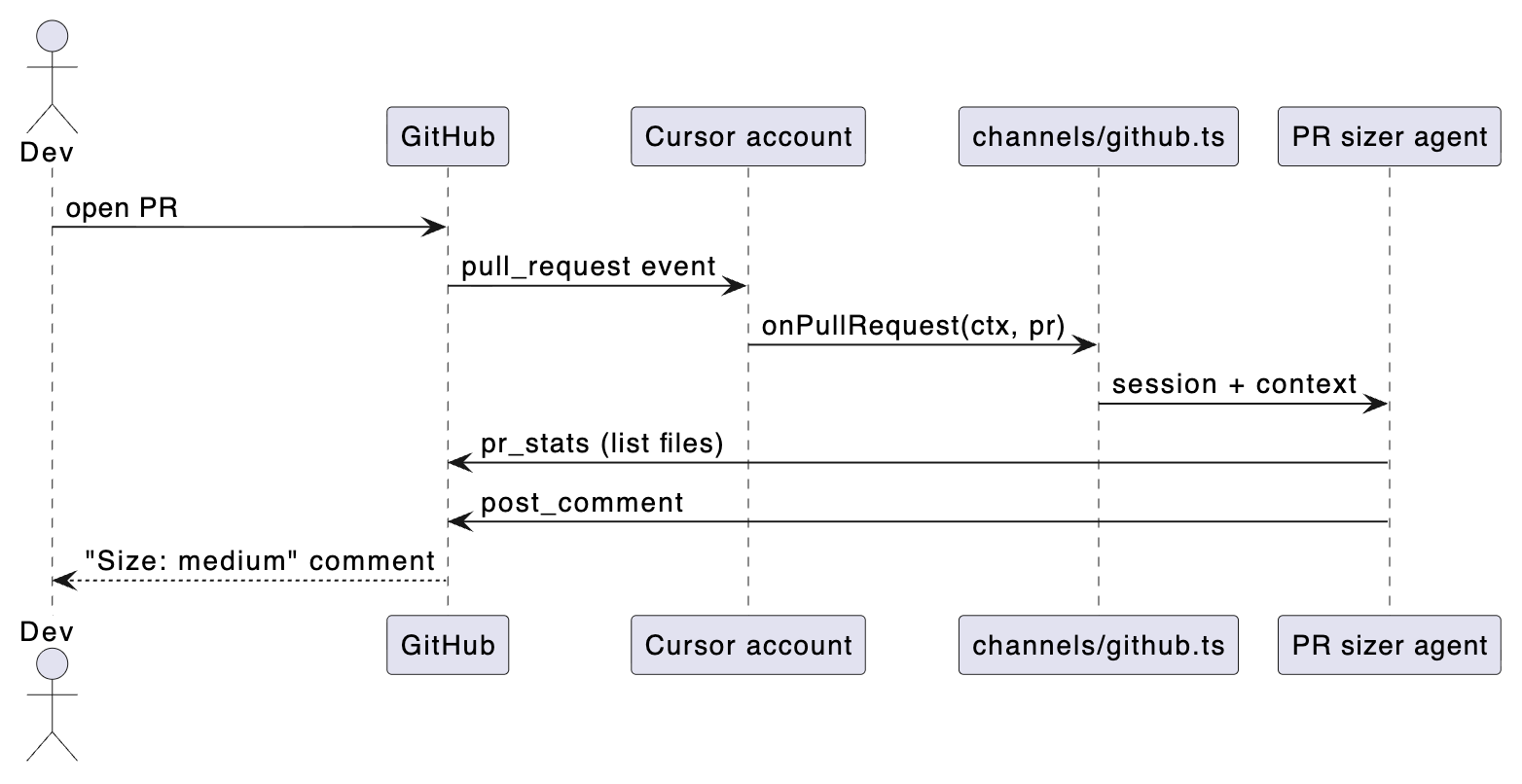
View PlantUML source
@startuml
skinparam shadowing false
skinparam defaultFontSize 14
actor Dev
participant GitHub
participant "Cursor account" as Cursor
participant "channels/github.ts" as Ch
participant "PR sizer agent" as Agent
Dev -> GitHub : open PR
GitHub -> Cursor : pull_request event
Cursor -> Ch : onPullRequest(ctx, pr)
Ch -> Agent : session + context
Agent -> GitHub : pr_stats (list files)
Agent -> GitHub : post_comment
GitHub --> Dev : "Size: medium" comment
@enduml
Test locally: tool calls, runs and PR replay
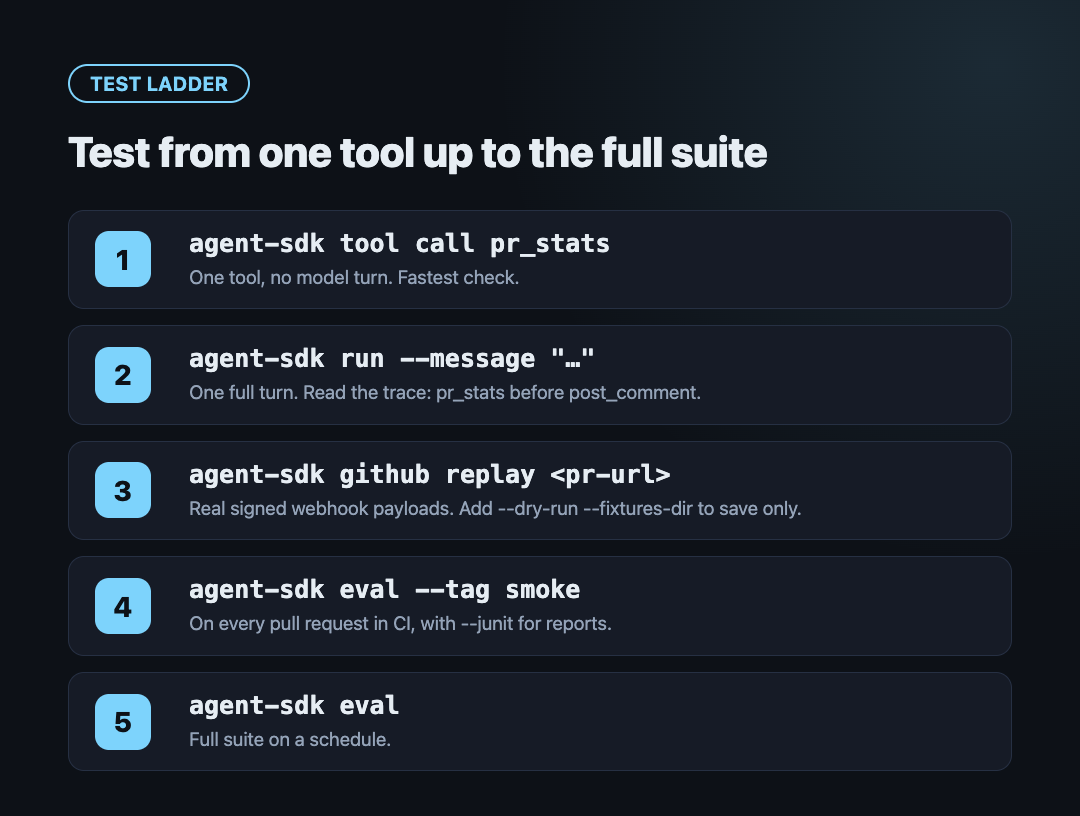
Test from the smallest piece outward. Use a public PR or a test repository where a comment does no harm.
- Call one tool with no model turn:
agent-sdk tool call pr_stats --dir . \
--input '{"prUrl":"https://github.com/<OWNER>/<REPO>/pull/<NUMBER>"}'- Run one full agent turn and watch the trace:
agent-sdk run --dir . --message "Size https://github.com/<OWNER>/<REPO>/pull/<NUMBER>"- Replay a real PR as signed GitHub webhook payloads:
agent-sdk github replay https://github.com/<OWNER>/<REPO>/pull/<NUMBER> --dir . --action openedStep 3 posts a real comment, because post_comment runs for real. To save the payloads as eval fixtures without sending them, add --dry-run --fixtures-dir fixtures/.
agent-sdk run prints a trace path. Read it with agent-sdk session get --file <trace-path> and check that pr_stats ran before post_comment.
Gate changes with Cursor Agent SDK evals
An eval sends a fixed message and asserts on what the agent did: which tools ran, with what input, and the shape of the reply. Every eval project needs evals/evals.config.ts.
// evals/evals.config.ts
import { defineEvalConfig } from "@grok/agent-sdk/evals";

export default defineEvalConfig({ maxConcurrency: 10 });
// evals/sizing.eval.ts
import { defineEval, includes } from "@grok/agent-sdk/evals";
export default defineEval({
tags: ["smoke"],
async test(t) {
await t.send("Size https://github.com/<OWNER>/<REPO>/pull/<NUMBER>");
t.succeeded();
t.calledTool("pr_stats");
t.check(t.reply, includes(/small|medium|large/i));
},
});agent-sdk eval --dir . --list
agent-sdk eval --dir . --tag smokeIn CI, store CURSOR_API_KEY as a secret and write a JUnit report:
agent-sdk eval --dir . --json --no-stream \
  --junit reports/evals.xml \
  --artifacts reports/evals \
  > reports/evals.json
The docs suggest running the smoke tag on every pull request and the full suite on a schedule. If your repository uses rulesets, make the eval job a required status check; see how to migrate branch protection to rulesets.
Deploy the agent: hosted or self-hosted
agent-sdk deploy builds the pushed Git ref, not your working tree. Commit and push first.
git add -A && git commit -m "pr-sizer: first version" && git push
agent-sdk validate
agent-sdk deploy
agent-sdk deployment get <SLUG>
agent-sdk logs --prod --slug <SLUG>
The deploy assigns a URL and runs the agent on Cursor's infrastructure. You manage it in the Deployed Agents dashboard. By default a deployment watches only its source repository; to listen to other repos, pass --cursor-events-repo on every deploy, because each redeploy replaces the list.
Secrets for hosted agents
Declare secret names in bot/agent.ts and set values from the CLI. Commit names only.
// bot/agent.ts
import { defineAgent } from "@grok/agent-sdk";

export default defineAgent({
  hosting: {
    egressDomains: ["api.example.com"],
    secretNames: ["EXAMPLE_API_KEY"],
  },
});
agent-sdk secret set <SLUG> EXAMPLE_API_KEY # prompts for the value
agent-sdk secret list <SLUG>Do not pass NAME=VALUE on the command line, do not use names that start with CURSOR_, and read the secret inside the tool that needs it rather than at module load.
Self-hosting with agent-sdk serve
Each agent runs as one Node process. One serve process can host every agent in a directory:
export CURSOR_API_KEY="<YOUR_CURSOR_API_KEY>"
export AGENT_SDK_BEARER_TOKEN="$(openssl rand -hex 32)"

agent-sdk serve \
  --dir /srv/agents \
  --host 127.0.0.1 \
  --port 3000 \
  --state-root /var/lib/agent-sdk \
  --bearer-token "$AGENT_SDK_BEARER_TOKEN"
Put TLS or an authenticating proxy in front, keep --state-root on a backed-up volume, and run schedules in only one process (--no-schedules on the others). If you run agents on Windows desktops instead, Microsoft Execution Containers are another way to sandbox them.
Hosted (agent-sdk deploy) | Self-hosted (agent-sdk serve) | |
|---|---|---|
| Source | Pushed Git ref | Local directory |
| Secrets | agent-sdk secret set | Your env or secret store |
| Auth | Cursor dashboard roles | --bearer-token + proxy |
| Default caps | 20 deployments, 100 deploys/day (if your team has caps) | Your hardware |
Managed hosting works with Privacy Mode but refuses deploys, hosted sessions and eval runs under Privacy Mode (Legacy). Cursor's docs did not publish separate Agent SDK pricing as of October 29, 2026; check your team's usage dashboard before you turn on busy channels.
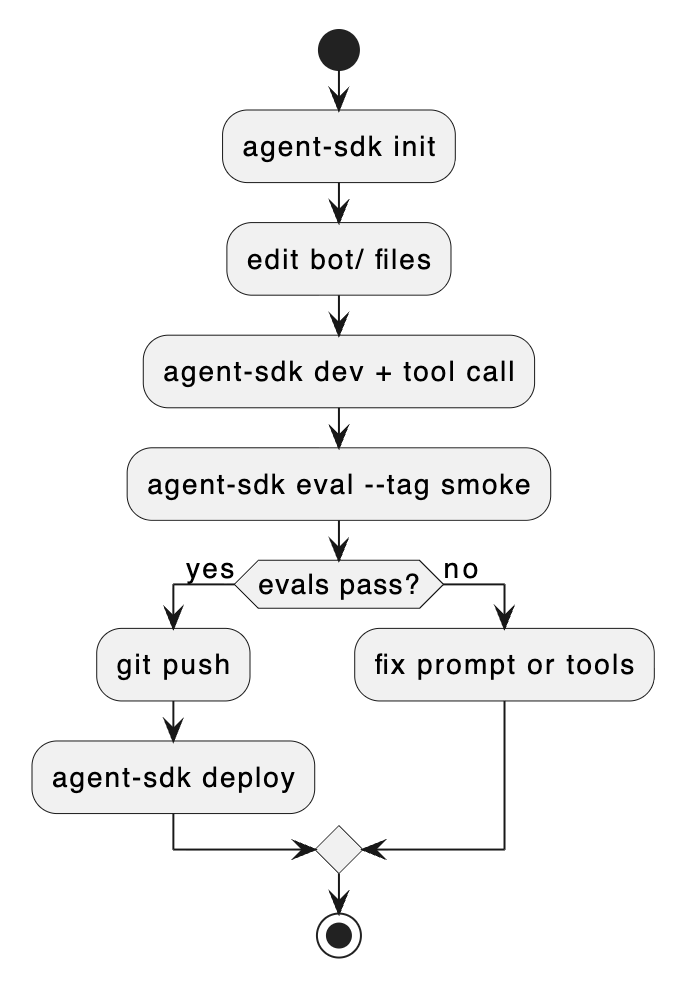
View PlantUML source
@startuml
skinparam shadowing false
skinparam defaultFontSize 14
start
:agent-sdk init;
:edit bot/ files;
:agent-sdk dev + tool call;
:agent-sdk eval --tag smoke;
if (evals pass?) then (yes)
  :git push;
  :agent-sdk deploy;
else (no)
  :fix prompt or tools;
endif
stop
@enduml
Troubleshooting common Agent SDK errors
| Symptom | Fix |
|---|---|
npx @cursor/agent-sdk returns 404 | Install @grok/agent-sdk |
NGHTTP2_FRAME_SIZE_ERROR on reads | Run under Node 22.13+, not Bun |
| Missing API key | agent-sdk login, or set CURSOR_API_KEY |
| Local changes not live after deploy | Commit, push, deploy again |
Replies quote an unrelated AGENTS.md | Set defineAgent({ local: { cwd } }) |
github forward gets 401 | GITHUB_TOKEN= GH_TOKEN= agent-sdk github forward |
409 on a follow-up | Refresh the rotating continuationToken |
| Hosted schedule never fires | Check the file is in bot/schedules/ on the deployed ref |
When in doubt, start with agent-sdk validate --dir . and agent-sdk info --dir . --json, then read the session trace.
FAQ
Is the Cursor Agent SDK free? The SDK package is on npm, but agents call models through your Cursor account. Cursor's Agent SDK docs did not list separate pricing on October 29, 2026, so check your plan and usage dashboard.
Why is the package called @grok/agent-sdk? That is the name the docs and npm use; the npm entry points to Cursor's repository and homepage. The @cursor/agent-sdk name in the launch post was not published on npm when we checked.
Can the agent run without Cursor hosting? Yes. agent-sdk serve runs one or more agents as a Node process on your own server. You still need a CURSOR_API_KEY for the model calls.
Does it work with GitLab or Bitbucket? Yes. Channels support pull request, comment and CI events from GitHub, GitLab and Bitbucket, plus Slack, webhooks and cron schedules. The CLI has gitlab replay and bitbucket replay too.
How is this different from the Cursor SDK (@cursor/sdk)? The Cursor SDK starts Cursor's cloud coding agents from your code. The Agent SDK is for building your own agent with its own prompt, tools, channels and evals.
Next steps
Start with a comment-only bot like this one, collect a few real PRs as eval fixtures with --dry-run --fixtures-dir, and only then add tools that change state. If you prefer local models in the terminal instead of a hosted agent, see how to set up Copilot CLI with Ollama.
References
- Cursor Docs: Agent SDK overview (checked 2026-10-29)
- Cursor Docs: Agent SDK quickstart (checked 2026-10-29)
- Cursor Docs: Agent SDK CLI reference (checked 2026-10-29)
- Cursor Docs: Agent SDK evals (checked 2026-10-29)
- Cursor Docs: Agent SDK deployment (checked 2026-10-29)
- Cursor Docs: Agent SDK troubleshooting (checked 2026-10-29)
- Cursor Changelog: Agent SDK, October 20, 2026 (checked 2026-10-29)
- Cursor Blog: Introducing the Agent SDK (checked 2026-10-29)
- npm registry: @grok/agent-sdk (checked 2026-10-29)
1 thought on “Cursor Agent SDK Tutorial: Build and Deploy a PR Review Bot”