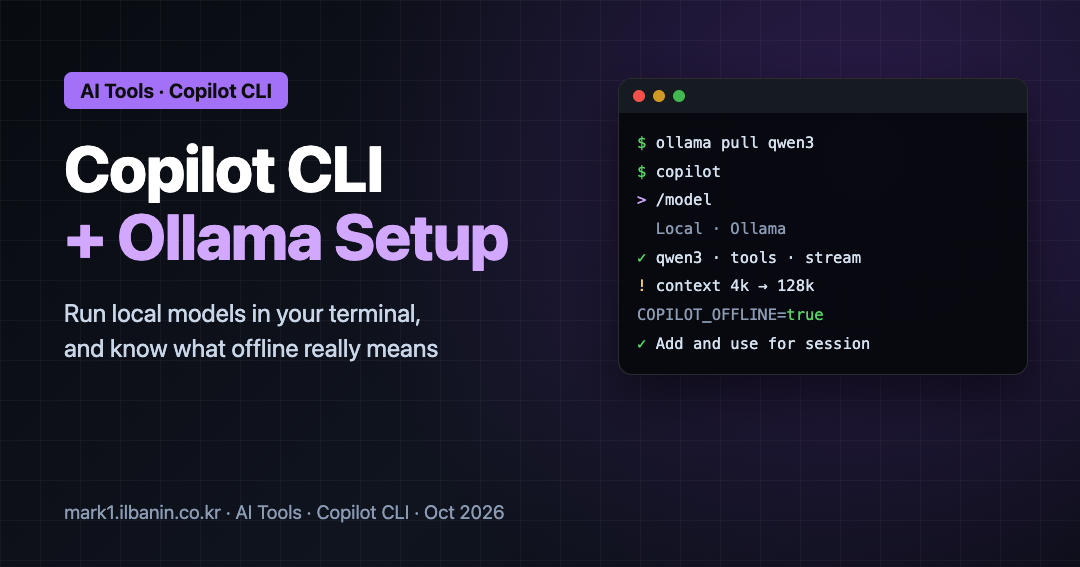
A Copilot CLI Ollama setup comes down to this: update GitHub Copilot CLI to 1.0.94 or later, start Ollama with a tool-calling model already pulled, then run /model and add the local model from the picker. For a scripted setup, set COPILOT_PROVIDER_BASE_URL=http://localhost:11434 and COPILOT_MODEL before you start copilot. Picking a local model does not make the CLI offline on its own. You also need COPILOT_OFFLINE=true if you want it to stop talking to GitHub.
GitHub announced local model discovery for Copilot CLI on October 7, 2026. This guide covers both setup paths, the model and context-length requirements, and the privacy settings that are easy to get wrong. Everything here comes from GitHub's changelog and Copilot CLI docs and from Ollama's documentation, checked on October 24, 2026. I did not benchmark any models for this post, and speed and answer quality depend on your hardware and the model you pick.
What changed: Copilot CLI local model discovery
Before this release, you could already plug your own provider into Copilot CLI with environment variables. GitHub calls this BYOK (bring your own key). What is new is that the /model picker now finds models from a running local Ollama instance. They show up next to your configured models and the cloud models GitHub hosts.
| Item | Detail (as of Oct 24, 2026) |
|---|---|
| Announced | Oct 7, 2026, GitHub changelog |
| Minimum CLI version | 1.0.94-0 |
| Latest stable CLI | 1.0.103 (Oct 22, 2026) |
| Runtime | A running Ollama instance with the model already pulled |
| Model must support | Tool calling and streaming |
| Recommended context | 128k tokens or more (GitHub docs) |
Discovery does not install Ollama or download models for you. It also does not add anything without asking. You pick a discovered model, review its provider and endpoint, then choose Add and use for this session or Add without switching. You do not need to restart the CLI.
Prerequisites
- A GitHub Copilot subscription. GitHub's install guide lists an active Copilot plan as a prerequisite for Copilot CLI. Copilot CLI must also not be disabled by your organization or enterprise policy.
- Node.js 22 or later if you install with npm.
- Ollama installed and running, with at least one model pulled.
- Enough memory for the model and a large context window. More on this below.
Step 1: Install or update Copilot CLI
Use one of the official install methods:
npm install -g @github/copilot                     # npm, all platforms (Node.js 22+)
brew install --cask copilot-cli                    # Homebrew, macOS and Linux
curl -fsSL https://gh.io/copilot-install | bash    # install script, macOS and Linux
winget install GitHub.Copilot # WinGet, WindowsIf you already have it, update it and check the version:
copilot update
copilot version
You need 1.0.94 or later for the /model discovery. Environment-variable BYOK works without discovery, but recent releases also fixed how local providers interact with the Auto model choice. Staying current is the simple option.
Step 2: Pull a tool-calling model in Ollama
Copilot CLI is an agent. It reads files, runs commands and edits code through tools. A model without tool calling cannot do that, and the CLI returns an error. Pick a model that lists tool support on its Ollama model page. Ollama's tool-calling docs use qwen3 in their examples, so this guide uses it as a placeholder. Swap in any tool-capable model you prefer.
ollama pull qwen3
ollama show qwen3      # check that the capabilities include tools
ollama list            # confirm the exact model name and tag
Use the exact name from ollama list, including the tag if it has one (for example qwen3:latest).
Step 3: Raise the Ollama context length
This step is the one people miss. Ollama sets the default context length from your GPU memory:
| VRAM | Default context |
|---|---|
| Under 24 GiB | 4k tokens |
| 24 to 48 GiB | 32k tokens |
| 48 GiB or more | 256k tokens |
GitHub recommends at least 128k tokens for Copilot CLI, and Ollama recommends at least 64k for agents and coding tools. On a typical laptop, the 4k default is far too small for an agent that reads several files per turn.
Set it in the Ollama app's settings (the context length slider), or start the server with an environment variable:
OLLAMA_CONTEXT_LENGTH=131072 ollama serveThen load the model and check what you got:
ollama psThe CONTEXT column shows the allocated context. The PROCESSOR column shows the CPU/GPU split. If a large context pushes part of the model onto the CPU, responses slow down a lot. In that case, try a smaller model or a context closer to 64k.
Step 4 (option A): Add the Ollama model with /model
This is the interactive path and the one the October 7 changelog describes.
First, make sure Ollama is running (ollama ps or ollama list responds). Then start the CLI in your project folder:
cd ~/projects/my-app
copilot
Type /model. Local Ollama models appear in the list with your other models. Select one, check the provider and endpoint it shows, and choose Add and use for this session or Add without switching.
If the CLI cannot reach Ollama, the picker shows the connection error and an explanation instead of the model list.
By default, /model changes the model for the current session only. To keep it, use the scope flags from the CLI reference:
/model --global <MODEL>   # default for future sessions
/model --repo <MODEL>     # pin in this repository's settings
Step 4 (option B): Configure Ollama with environment variables
Use this path for scripts, dev containers or a shared shell profile. GitHub's BYOK docs give this Ollama example:
export COPILOT_PROVIDER_BASE_URL=http://localhost:11434
export COPILOT_MODEL=qwen3
copilot
You do not need COPILOT_PROVIDER_API_KEY for a local Ollama server. COPILOT_PROVIDER_TYPE defaults to openai, which covers Ollama, vLLM, Foundry Local and other OpenAI Chat Completions-compatible servers. You can also pass the model per run with copilot --model=qwen3.
Ollama serves its OpenAI-compatible API under /v1 (http://localhost:11434/v1/). GitHub's example uses the bare host. If you get a 404 or "not found" error with the bare host, try the /v1 URL. That fix comes from Ollama's docs, not GitHub's.
The same variables work for remote and other providers, which is handy if you switch between a local model and an API. GitHub's docs list these:
| Variable | Use |
|---|---|
COPILOT_PROVIDER_BASE_URL | Provider endpoint (required) |
COPILOT_MODEL | Model name (required, or use --model) |
COPILOT_PROVIDER_TYPE | openai (default), azure or anthropic |
COPILOT_PROVIDER_API_KEY | API key for hosted providers |
COPILOT_PROVIDER_MAX_PROMPT_TOKENS | Cap prompt size per request |
COPILOT_PROVIDER_MAX_OUTPUT_TOKENS | Cap response size |
For more examples, run copilot help providers. If you already call hosted models through an OpenAI-compatible API, the same pattern applies. See our DeepSeek V4.1 Flash API guide for one example of that kind of endpoint.
Copilot CLI Ollama privacy: local model vs offline mode
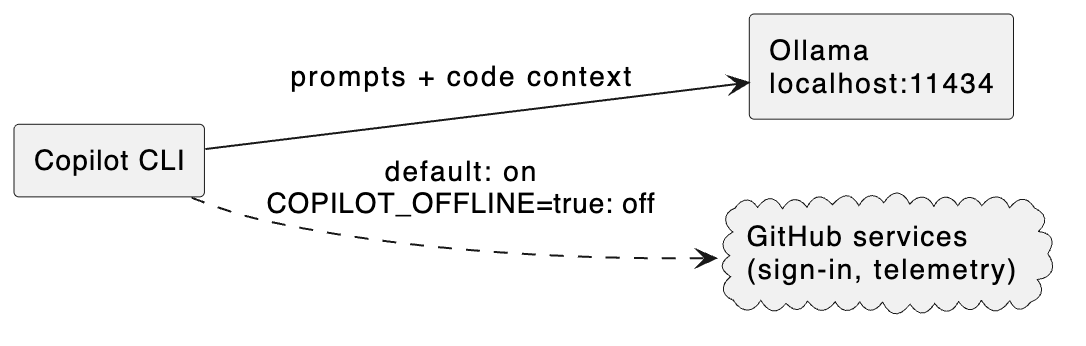
This is the part to read twice. A local model keeps inference on your machine. It does not stop the CLI from talking to GitHub.
View PlantUML source
@startuml
skinparam shadowing false
skinparam defaultFontSize 14
left to right direction
rectangle "Copilot CLI" as cli
rectangle "Ollama\nlocalhost:11434" as ollama
cloud "GitHub services\n(sign-in, telemetry)" as gh
cli --> ollama : prompts + code context
cli ..> gh : default: on\nCOPILOT_OFFLINE=true: off
@enduml| Setting | Inference | Contacts GitHub | Network isolated |
|---|---|---|---|
| Cloud model | GitHub-hosted | Yes | No |
| Ollama model | Your machine | Yes (telemetry stays on) | No |
Ollama + COPILOT_OFFLINE=true | Your machine | No | Yes, if Ollama is local |
| Remote provider + offline | Provider's servers | No | No, prompts still leave |
To turn on offline mode, set your provider variables first, then:
export COPILOT_OFFLINE=true
copilot
GitHub's docs are clear that offline mode only gives full isolation when the provider is also local or inside the same isolated network. If COPILOT_PROVIDER_BASE_URL points to a remote server, prompts and code context still go over the network.
If you want to limit what the agent itself can touch, look at Copilot's local sandboxing. GitHub made it generally available on the same day (October 7, 2026) for Copilot CLI, the Copilot app and VS Code Agent Host sessions. It restricts file, network and credential access for commands the agent runs, whatever model you use.
Troubleshooting Copilot CLI with Ollama
| Symptom | Likely cause | Fix |
|---|---|---|
No Ollama models in /model | CLI older than 1.0.94, or Ollama not running | copilot update; start Ollama |
| Connection error in the picker | Wrong host or port | Check that ollama list works on localhost:11434 |
| Error about tools | Model lacks tool calling | Pick a model with tools support |
| Agent forgets files mid-task | Context too small (4k default) | Raise OLLAMA_CONTEXT_LENGTH, check ollama ps |
| Very slow replies | Model spilled onto CPU | Smaller model or smaller context |
| 404 with env vars | Endpoint path | Try http://localhost:11434/v1 |
FAQ
Is Copilot CLI with Ollama free? Ollama and open-weight models cost nothing to run locally. Copilot CLI's install docs still list an active GitHub Copilot subscription as a prerequisite. Check your plan before you count on it as a free setup.
Does a local model keep my code off GitHub's servers? The prompts and code context go to Ollama on your machine. The CLI still contacts GitHub, including telemetry, unless you also set COPILOT_OFFLINE=true.
Which Ollama model should I use? Any model that supports tool calling and streaming and fits in your memory with a large context window. GitHub recommends 128k tokens of context. The best choice depends on your GPU, so try two or three and compare on a real task in your repo.
Can I switch back to a cloud model mid-session? Yes. Run /model again and pick a GitHub-hosted model. Session-scoped changes do not touch your saved default.
Does this work in the GitHub Copilot app too? The app has its own model provider settings under Settings > Model providers. GitHub documents it separately from the CLI.
Summary
Copilot CLI and Ollama work together in a few minutes. Update the CLI to 1.0.94 or later, pull a tool-calling model, raise Ollama's context length, then add the model with /model or the COPILOT_PROVIDER_* variables. Remember that a local model is not offline mode. Set COPILOT_OFFLINE=true when your code must not leave the machine. If you run coding agents unattended, our guide to running Claude Code headless with n8n covers authentication and locking for that kind of setup.
Written on October 24, 2026. Version numbers, options and requirements come from the sources below as of that date. Copilot CLI ships new versions almost daily, so check the changelog if you read this later.
References
- GitHub Changelog, "Discover local models in GitHub Copilot CLI" (Oct 7, 2026) — github.blog (checked Oct 24, 2026)
- GitHub Docs, Using your own LLM models in Copilot CLI (BYOK) — docs.github.com (checked Oct 24, 2026)
- GitHub Docs, Installing GitHub Copilot CLI — docs.github.com (checked Oct 24, 2026)
- GitHub Docs, Copilot CLI command reference — docs.github.com (checked Oct 24, 2026)
- GitHub Changelog, "Local sandboxing for GitHub Copilot now generally available" (Oct 7, 2026) — github.blog (checked Oct 24, 2026)
- GitHub, copilot-cli releases — github.com (checked Oct 24, 2026)
- Ollama Docs, Context length — docs.ollama.com (checked Oct 24, 2026)
- Ollama Docs, OpenAI compatibility — docs.ollama.com (checked Oct 24, 2026)
- Ollama Docs, Tool calling — docs.ollama.com (checked Oct 24, 2026)
3 thoughts on “Copilot CLI Ollama Setup: Run Local Models in Your Terminal”