Plan your llama.cpp 1.0 upgrade before you run it: v1.0.0 (released November 13, 2026 with ggml 1.0.0) is the first release under a strict semantic versioning promise, and it ships real breaking changes. If you run llama-server on a non-loopback address with tools or MCP and no API key, it now refuses to start; private image URLs are blocked by default; and code that links libllama loses 35 deprecated functions, clip.h and --defrag-thold. This guide shows how to check what you run, upgrade on each platform, fix each break, and roll back.
Written November 16, 2026. All facts were checked that day against the llama.cpp v1.0.0 release notes, the linked pull requests and the Hugging Face announcement. Nothing here was run on our own machines; commands are standard package-manager and git usage, so read the output before you rely on it.
What changed in llama.cpp 1.0
The Hugging Face post frames 1.0.0 mostly as a policy change. From now on, both projects bump the major version for "a breaking change to the public C API in ./include", the minor version for backward-compatible features, backend updates and model support, and the patch version for fixes with no API change. Nightly build tags (b12433 and so on) still appear several times a day; v1.0.0 is the stable tag on top of them.
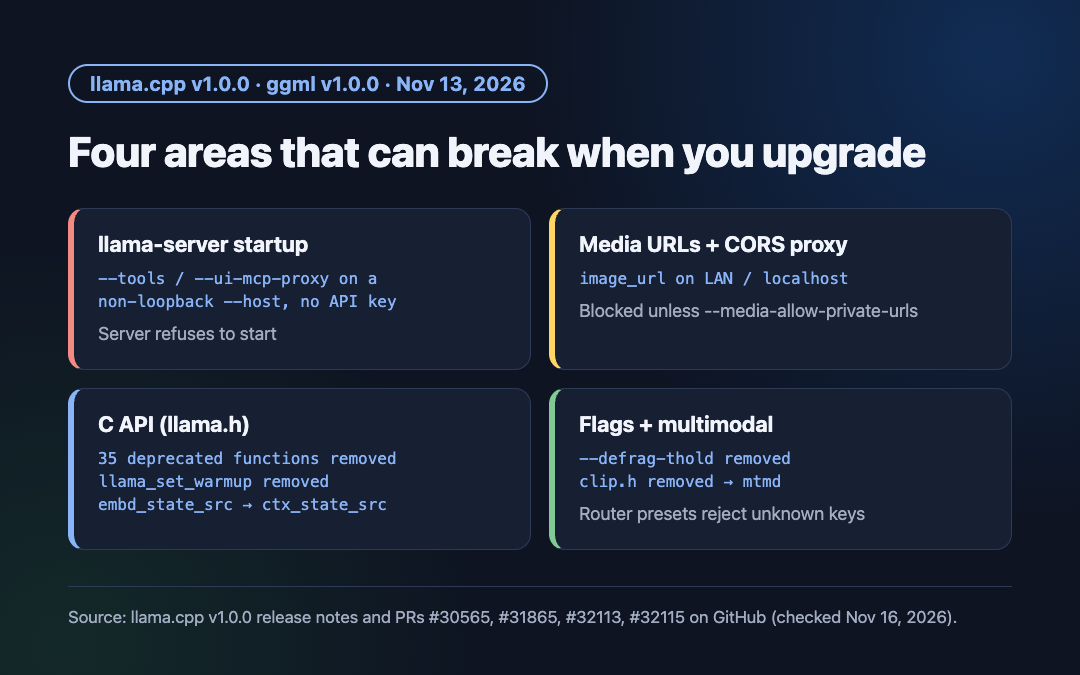
The release itself also removes old APIs and tightens the server. These are the parts that can break an existing setup:
| Area | What changed | Who notices |
|---|---|---|
| Server startup | Tools or MCP proxy on a non-loopback --host without an API key is refused | Home-lab and LAN servers |
| Outbound URLs | Media URLs and the Web UI CORS proxy can no longer reach private addresses | Anyone loading images from a NAS or local MCP |
| C API | 35 deprecated functions, llama_set_warmup, defrag_thold removed; one rename | Apps and bindings that link libllama |
| Multimodal | clip.h removed, merged into mtmd | Vision or audio integrations |
New things you get in the same release include an OpenAI-compatible /v1/audio/speech endpoint, a host-memory MoE expert cache (moe_cache_size, moe_cache_cpu_share in llama_context_params), FP8 KV cache support and new models such as Kimi-K3.1-Pro. Those are additive and do not need any action.
Check which llama.cpp version you run
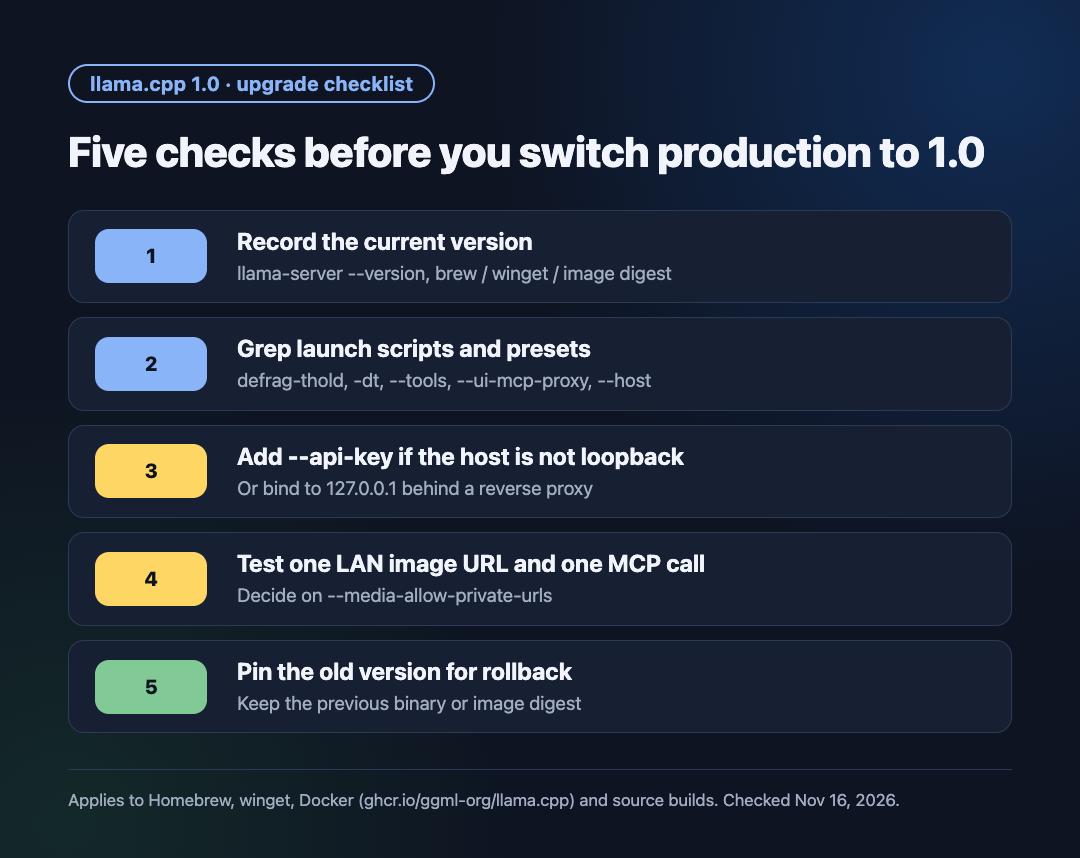
Start by recording what you have, so you know what to roll back to.
| Install method | Command |
|---|---|
| Any install | llama-server --version |
| Homebrew (macOS, Linux) | brew list --versions llama.cpp |
| winget (Windows) | winget list llama.cpp |
| conda-forge | conda list llama.cpp |
| Source checkout | git -C ~/src/llama.cpp describe --tags |
For Docker, write down the image digest you run today; you will need it to roll back:
docker image inspect ghcr.io/ggml-org/llama.cpp:server --format '{{index .RepoDigests 0}}'How to read the result:
- Homebrew shows
1.0.0, orgit describestarts withv1.0.0: you are already on 1.0. Go straight to the fixes below if something stopped working. - A plain build number (for example
b12100) from before November 13, 2026, or a Homebrew/conda version below 1.0.0: you are on the old behavior. Upgrade only after the checks in this guide. - A nightly
b12359or later: the v1.0.0 release page links nightlyb12359, so builds from that point on should already contain the 1.0 changes. Treat them as 1.0.
Then search your launch scripts, systemd units, Compose files and router presets for the flags that changed:
grep -rnE -- '--defrag-thold|(^|[^a-z])-dt |defrag-thold|--tools|--ui-mcp-proxy|--webui-mcp-proxy|--host|--api-key|--cors-origins' \
  /etc/systemd/system/ ~/llama/ docker-compose.yml models-preset.* 2>/dev/null
If you build against the C API, search your code too:
grep -rnE 'llama_set_embd_state_src|llama_set_warmup|defrag_thold|clip\.h|llama-ext\.h' src/ include/Any hit means you have work to do before you upgrade.
Upgrade llama.cpp to 1.0 on each platform
| Install method | Upgrade command | Rollback option |
|---|---|---|
| Homebrew | brew update && brew upgrade llama.cpp | Keep a copy of the old binary; brew pin to hold |
| winget | winget upgrade llama.cpp | winget install llama.cpp --version <OLD_VERSION> |
| conda-forge | conda update -c conda-forge llama.cpp | conda install -c conda-forge llama.cpp=<OLD_VERSION> |
| Docker | docker pull ghcr.io/ggml-org/llama.cpp:server | Run the old image by digest |
| Source | git checkout v1.0.0 and rebuild | git checkout <OLD_TAG> and rebuild |
If you are not ready, hold the package first. On Homebrew, brew pin llama.cpp stops brew upgrade from touching it. On Docker, stop using the moving server tag in production and pin the digest you recorded:
services:
  llama:
    image: ghcr.io/ggml-org/llama.cpp:server@sha256:<YOUR_CURRENT_DIGEST>
The Docker docs list variant tags (server, server-cuda, server-cuda13, server-rocm, server-vulkan, server-intel, server-openvino and others) but do not document version-specific tags, so a digest is the reliable way to pin.
A source build of the stable tag looks like this:
cd ~/src/llama.cpp
git fetch --tags
git checkout v1.0.0
cmake -B build -DCMAKE_BUILD_TYPE=Release
cmake --build build --config Release -j
./build/bin/llama-server --version
Add your backend option (for example -DGGML_CUDA=ON or -DGGML_VULKAN=ON) exactly as you did for the old build.
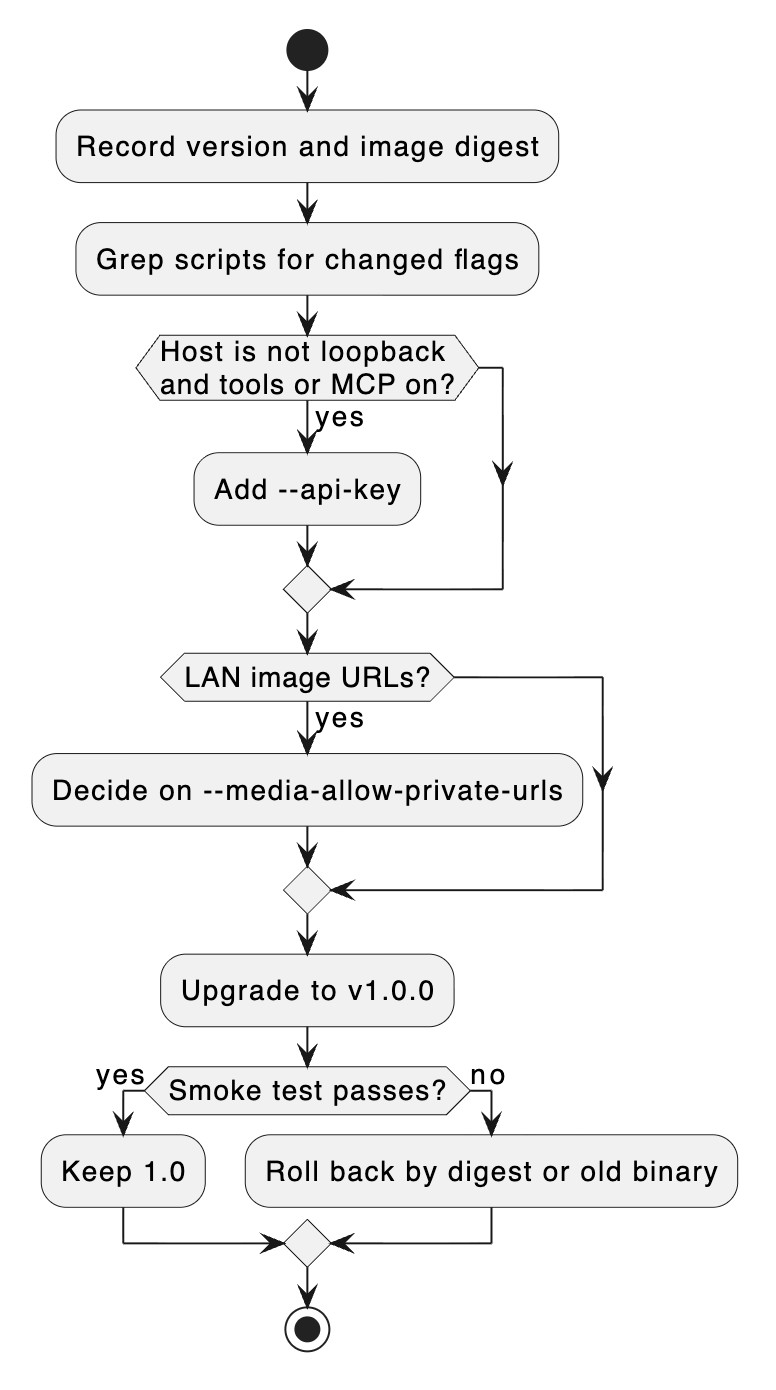
View PlantUML source
@startuml
skinparam shadowing false
skinparam defaultFontSize 14
start
:Record version and image digest;
:Grep scripts for changed flags;
if (Host is not loopback\nand tools or MCP on?) then (yes)
  :Add --api-key;
endif
if (LAN image URLs?) then (yes)
  :Decide on --media-allow-private-urls;
endif
:Upgrade to v1.0.0;
if (Smoke test passes?) then (yes)
  :Keep 1.0;
else (no)
  :Roll back by digest or old binary;
endif
stop
@enduml
Fix llama-server 1.0 startup and tool errors
Tools or MCP on a LAN address now need an API key
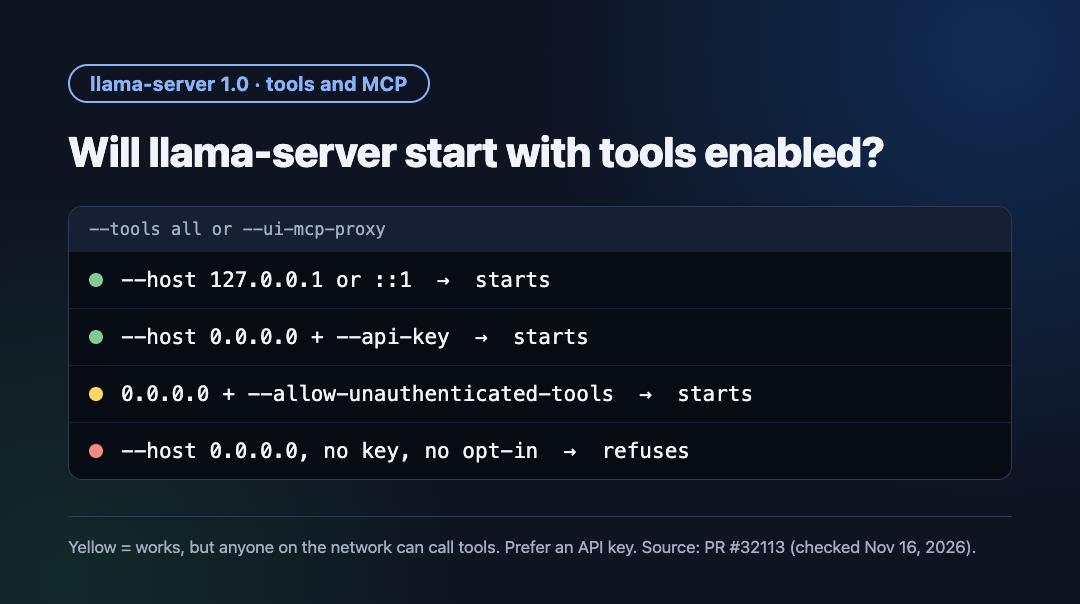
PR #32113 changed this: "Enabling tools or MCP with --host (non-loopback) without API key is refused with an error." In practice, --tools all or --ui-mcp-proxy on 0.0.0.0 or a LAN IP with no key stops the server at startup. Loopback (127.0.0.1, ::1) still starts, and so does any setup with an API key.
The recommended fix is an API key:
llama-server -m /models/<YOUR_MODEL>.gguf \
  --host 0.0.0.0 --port 8080 \
  --api-key <YOUR_API_KEY> \
  --tools all
Clients then send Authorization: Bearer <YOUR_API_KEY>:
curl http://<SERVER_IP>:8080/v1/models \
  -H "Authorization: Bearer <YOUR_API_KEY>"
If every client sits on the same machine, the simpler fix is to bind to loopback (--host 127.0.0.1) and put a reverse proxy with authentication in front for remote access.
The escape hatch is --allow-unauthenticated-tools. It restores the old behavior, which means anyone who can reach the port can make the server run its tools. Use it only on an isolated network, and treat it as a temporary bridge, not a fix.
Router mode has one more catch from the same PR review: tools enabled only in a preset stay disabled on the router, and the reviewer found no way around that. Enable tools where the router itself is started, with a key.
–defrag-thold is gone
--defrag-thold (-dt) and the defrag_thold field were removed in PR #30565. A reviewer notes the flag "was already a no-op" on the server, so removing it changes nothing about memory use. The problem is startup: the router "refuses unknown keys in --models-preset", so a preset that still sets defrag-thold stops with option 'defrag-thold' not recognized. Delete the key from presets and the flag from every launch script your grep found.
CORS origins now check the port
--cors-origins now validates the port strictly. A browser app on another local port gets a 403 unless its exact origin, port included, is listed:
llama-server ... --cors-origins http://localhost:5173Fix blocked image URLs and the MCP proxy
PR #32115 stops llama-server from fetching private addresses on behalf of a request. Before 1.0, both the CORS proxy and media URLs could reach any local address; the maintainers expected users to sandbox the server. Now:
- Media URLs in chat requests (
image_urlpointing atlocalhost, a NAS or any LAN host) are refused unless you start the server with--media-allow-private-urls. In review, a public URL that redirected to127.0.0.1was refused as well. - The Web UI CORS proxy reaches public addresses only. A reviewer reported that
--ui-mcp-proxyaccess to an MCP server on127.0.0.1stopped working, and the author said there is "no escape hatch". The suggested workaround is to enable CORS on the MCP server itself so the browser can call it directly. HF_TOKENis now sent only to huggingface.co hosts (PR #31730).
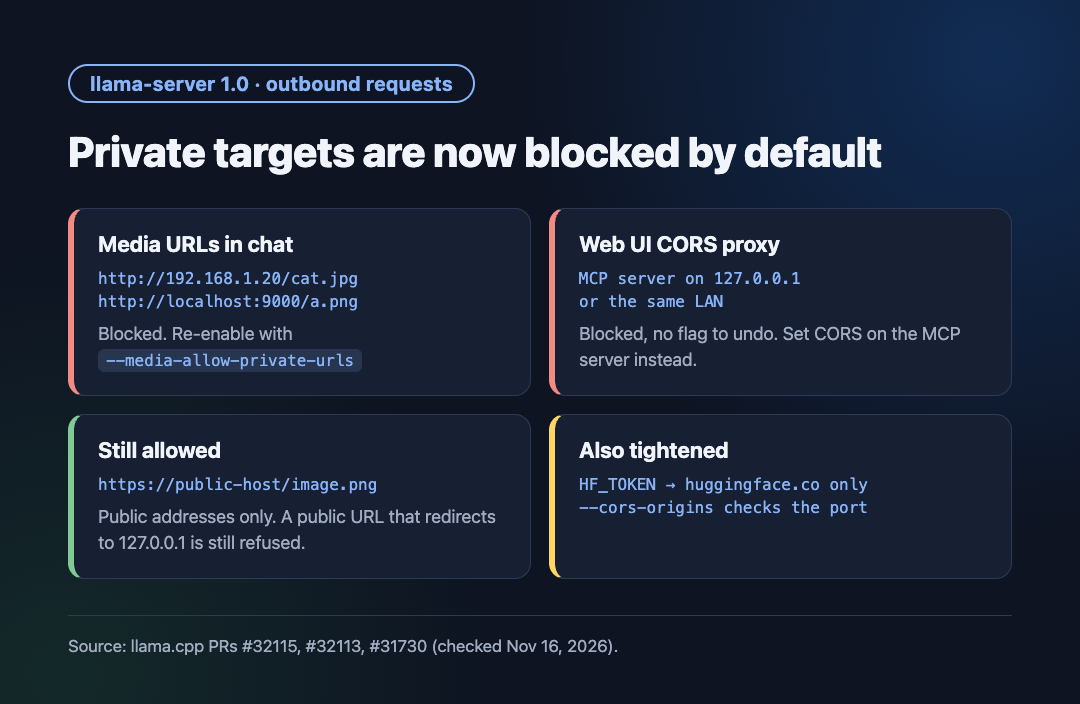
If your pipeline sends images from a local file server, turn the flag on only where it is needed:
llama-server -m /models/<YOUR_VISION_MODEL>.gguf --mmproj /models/<YOUR_MMPROJ>.gguf \
  --host 127.0.0.1 --port 8080 \
  --media-allow-private-urls
The side effect is the one the PR was written to prevent: any client that can reach the server can make it fetch internal URLs. Pair the flag with --api-key or a loopback bind. The other option is to send images as base64 data in the request instead of a URL, which avoids server-side fetching entirely.
Migrate code that links libllama 1.0
This section matters only if you compile against llama.h or mtmd.h, directly or through a binding.
| Old code | 1.0 replacement | Source |
|---|---|---|
llama_set_embd_state_src(...) | llama_set_ctx_state_src(...), parameter src is now ctx_src | PR #30565 |
#include "llama-ext.h" for NextN / draft-model functions | The 18 functions now live in llama.h | PR #30565 |
llama_set_warmup(...) | Removed, no replacement stated | PR #30565 |
params.defrag_thold = ... | Delete the line | PR #30565 |
#include "clip.h" | Use the mtmd.h / mtmd-helper.h API | PR #31865 |
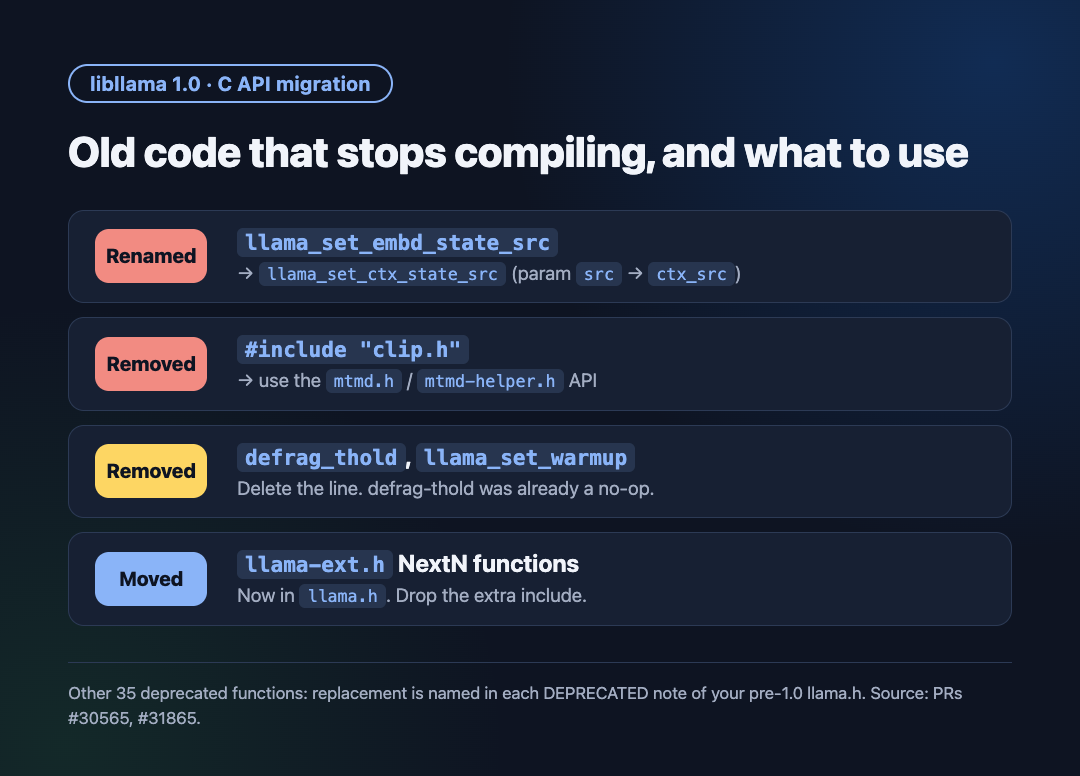
For the other deprecated functions, the release notes do not list replacements one by one. The maintainers point to the DEPRECATED notes in pre-1.0 headers, which name the function to use instead. Before you upgrade, compile your project once against the old llama.h with deprecation warnings visible:
cmake -B build -DCMAKE_C_FLAGS="-Wdeprecated-declarations" -DCMAKE_CXX_FLAGS="-Wdeprecated-declarations"
cmake --build build 2>&1 | grep -i deprecated
Each warning names the replacement. Fix them on the old version, confirm it still builds, then move to v1.0.0.
If you use a binding (Python, Go, Rust, Node), do not swap the shared library under it. Wait for the binding's own release that targets llama.cpp 1.0 and read its changelog. Multimodal projects should also note that model loading is stricter: 1.0 requires the projector and patch-embedding tensors and a 2×2 spatial merge at load (PRs #32129, #32130), so a malformed mmproj file that loaded before can now fail.
Troubleshooting after the upgrade
| Symptom | Likely cause | Fix |
|---|---|---|
| Server exits right after start with tools on | Non-loopback host, no key | Add --api-key or bind to 127.0.0.1 |
Router stops: option 'defrag-thold' not recognized | Old preset key | Remove defrag-thold from the preset |
| Image requests fail, public images work | Private media URL blocked | --media-allow-private-urls with a key, or send base64 |
| Web UI cannot reach a local MCP server | CORS proxy is public-only now | Enable CORS on the MCP server |
| Browser app gets 403 | Port not in --cors-origins | List the full origin with its port |
Build error: clip.h not found | Header removed | Port the code to mtmd.h |
To roll back, start the old binary you kept or the image you pinned by digest, then check llama-server --version again. On Homebrew there is no one-line downgrade, which is why keeping a copy of the old llama-server binary (or pinning before you upgrade) is worth the minute it takes.
Should you upgrade llama.cpp now?
| Your setup | Decision |
|---|---|
Server on 0.0.0.0 or a LAN IP with tools or MCP and no API key | Add a key now; the 1.0 defaults close a real exposure. Then upgrade. |
| Server fetching images from a NAS or localhost | Upgrade this week, after testing --media-allow-private-urls |
App or binding linked to libllama | Upgrade this week, after fixing deprecation warnings |
Local CLI use (llama-cli, llama-server on 127.0.0.1, no tools) | Little impact; upgrade whenever you like |
| Using llama.cpp only through another app | Not affected directly; wait for that app's update |
If you want local models without managing llama.cpp yourself, our guides to running local models in Copilot CLI with Ollama and Ollama text to speech on a Mac cover a more managed setup. If you run llama-server in Docker for weeks at a time, also set up Docker log rotation so its logs do not fill the disk.
FAQ
Is llama.cpp 1.0 a security release? No CVEs are listed for it. The server changes are hardening: the PR author wrote that "none of those are actually vulnerability". Still, a tool-enabled server on a LAN without a key lets anyone on that network run its tools, so fixing that is worth doing whether or not you upgrade.
Will my GGUF models still load in llama.cpp 1.0? The release notes list no general GGUF format change. The stricter checks apply to multimodal projector files (projector and patch-embedding tensors, 2×2 merge). If a vision model fails to load, re-download its mmproj file from the model's official repository.
Do nightly builds still exist after 1.0? Yes. Build tags such as b12430 to b12433 were published on November 16, 2026. Stable semantic versions sit on top of them; under the new policy, a future break in ./include means 2.0.0.
Does --allow-unauthenticated-tools have any downside? Yes. It brings back the old exposure: anyone who can reach the port can trigger tool calls. Prefer --api-key, or bind to loopback.
Where do I find the replacement for a removed function? In the DEPRECATED note next to that function in your current, pre-1.0 llama.h. Compile with deprecation warnings before upgrading and each warning names the replacement.
Upgrading is the easy half. The next step is to put llama-server behind a proper reverse proxy with authentication, so tools and media options stay safe as your setup grows.
References
- llama.cpp v1.0.0 release notes — GitHub, checked November 16, 2026
- llama.cpp v1.0.0: A stronger foundation for the local AI ecosystem — Hugging Face blog, November 13, 2026, checked November 16, 2026
- PR #32113: tools/MCP on non-loopback hosts, CORS port checks — checked November 16, 2026
- PR #32115: private URL blocking for media and CORS proxy — checked November 16, 2026
- PR #30565: removed deprecated functions and defrag-thold — checked November 16, 2026
- PR #32120: blocking browser access to router child instances — checked November 16, 2026
- llama.cpp install docs and Docker docs — checked November 16, 2026
- Homebrew llama.cpp formula — version 1.0.0, checked November 16, 2026