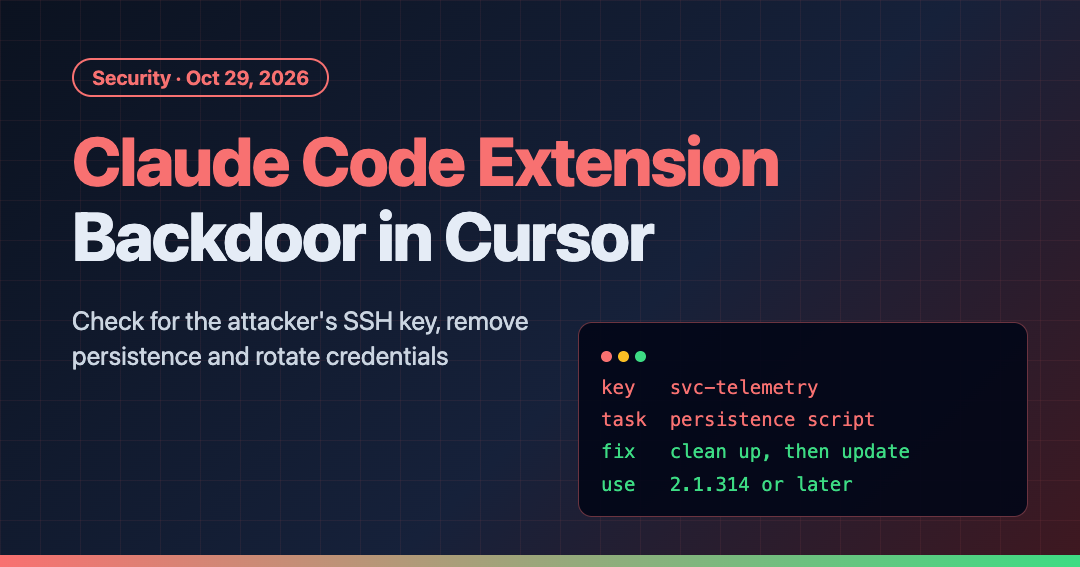
A Claude Code extension backdoor reached Cursor's extension marketplace on October 29, 2026, in tampered builds labeled 2.1.312 and 2.1.313. Run the key check below on any machine that uses the extension in Cursor. If it finds svc-telemetry, run Cursor's cleanup script and rotate your credentials, because updating or uninstalling the extension does not remove the backdoor.
Written 2026-11-01. Facts come from Cursor's security notice, Phorion's analysis and the reports listed at the end, all checked that day. I did not run the commands or cleanup scripts in this guide, and I did not analyze the malware sample. An automated review of both Cursor scripts found local changes only and no downloads.
What happened in the Claude Code extension backdoor incident
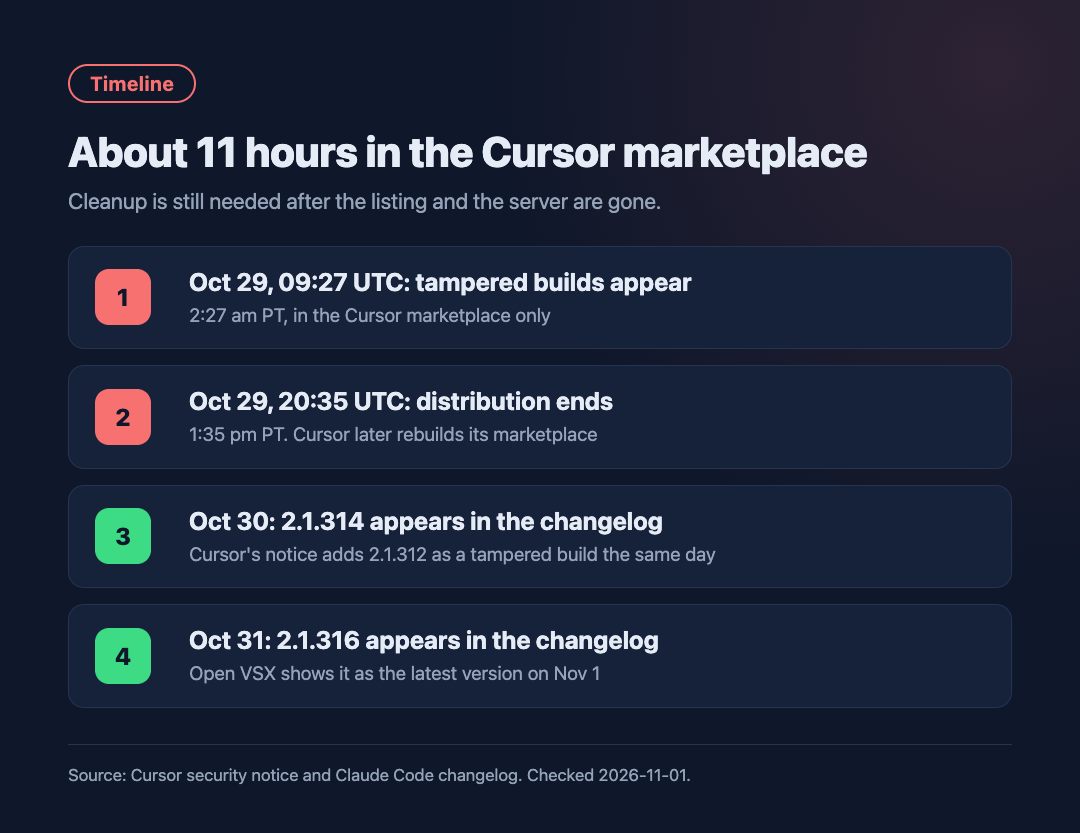
Cursor's security notice says modified builds of Anthropic.claude-code were available in the Cursor marketplace for about 11 hours. The notice says Anthropic did not develop them. Cursor removed them, rebuilt its marketplace and worked with the hosting provider to take the attacker's server offline.
| Time | Event |
|---|---|
| Oct 29, 2:27 am PT (09:27 UTC) | Tampered builds become available |
| Oct 29, 1:35 pm PT (20:35 UTC) | Distribution ends |
| Oct 30 | Anthropic's changelog lists 2.1.314 |
| Oct 30, 11:30 am PT | Cursor adds 2.1.312 to its notice and updates the indicators |
| Oct 31 | Anthropic's changelog lists 2.1.316 |
Cursor said at most 5,000 users were potentially affected, according to GovInfoSecurity. The same report quotes Anthropic saying that an attacker used access to Cursor's marketplace and that it had no part in building, publishing or hosting the build. Cursor has not explained how the attacker got in, so the root cause is still unknown as of November 1.
What the tampered extension does
Phorion's analysis says the injected code runs as soon as the editor loads extension.js. You don't need to open Claude or send a prompt. The code then does four things:
- Adds an attacker's public key, labeled
svc-telemetry, toauthorized_keys. - Tries to turn on the local SSH service and opens a reverse tunnel to
134.209.82.225. - Installs a LaunchAgent on macOS, or a scheduled task or Startup script on Windows, that retries the tunnel about every 60 seconds.
- Sends host details to the attacker, including your username, Git email, public IP and up to 40 environment variable names. Phorion says it does not send the values.
Who is affected
| Where you got the extension | Status | What to do |
|---|---|---|
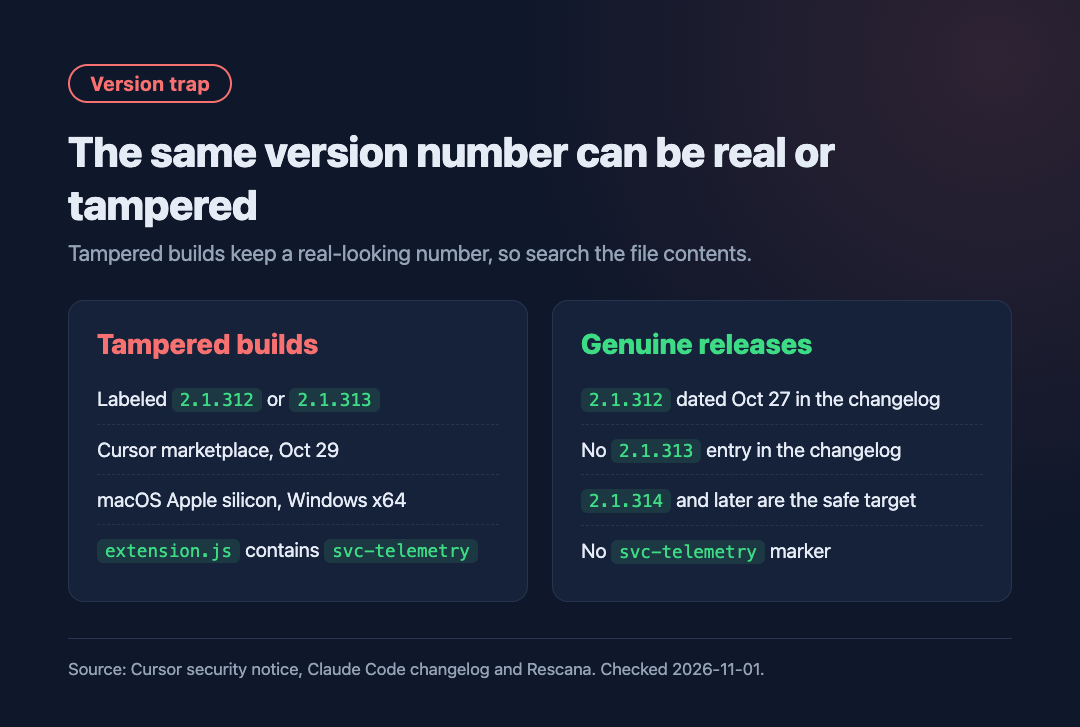
| Cursor marketplace, macOS Apple silicon or Windows x64 | Tampered builds confirmed | Run every check below |
| Cursor marketplace, Linux | No Linux build named, but Linux indicators are listed | Run the key and file checks |
| Visual Studio Marketplace | Cursor has no evidence of impact | Keep updating as usual |
| Open VSX | Early reports conflicted; later research names Cursor as the source | Keep updating as usual |
| npm package for the CLI | OpenSourceMalware says it is not malicious, per Rescana | Keep updating as usual |
I queried the Open VSX API on November 1. It lists 2.1.316, 2.1.314 and 2.1.312, with no 2.1.313.
How to check for the Claude Code extension backdoor
Run these steps in order. Stop at the first positive result and go to the triage section.
Step 1: Look for the attacker's SSH key
These are Cursor's own checks. The first works on macOS and also fits Linux, because the key goes in the same file.
grep -qs svc-telemetry ~/.ssh/authorized_keys && echo "svc-telemetry key found" || echo "No key found; machine not impacted"$files = "$HOME\.ssh\authorized_keys", "C:\ProgramData\ssh\administrators_authorized_keys" | Where-Object { Test-Path $_ }
if ($files -and (Select-String svc-telemetry $files)) { "svc-telemetry key found" } else { "No key found; machine not impacted" }The unauthorized key has the fingerprint SHA256:0Z6R+DF64Do2nwQic8a7kkfDLNNk4IiK+2U2Rci4htk. To compare it, or to spot any other key you don't recognize, list the file's fingerprints:
ssh-keygen -lf ~/.ssh/authorized_keysStep 2: Search installed extensions by content
Cursor's scripts match on the svc-telemetry string in extension.js, because a tampered build keeps a real version number. You can run the same kind of search:
find ~ -maxdepth 4 -type f -path '*/extensions/anthropic.claude-code-*/extension.js' -exec grep -l svc-telemetry {} +Get-ChildItem "$HOME\.cursor\extensions" -Directory -Filter "anthropic.claude-code-*" | ForEach-Object { Select-String -List -Path "$($_.FullName)\extension.js" -Pattern svc-telemetry }An empty result doesn't settle it. An update may have replaced the tampered folder while the persistence files stayed behind, so continue to step 3.
Step 3: Look for persistence files and tunnels
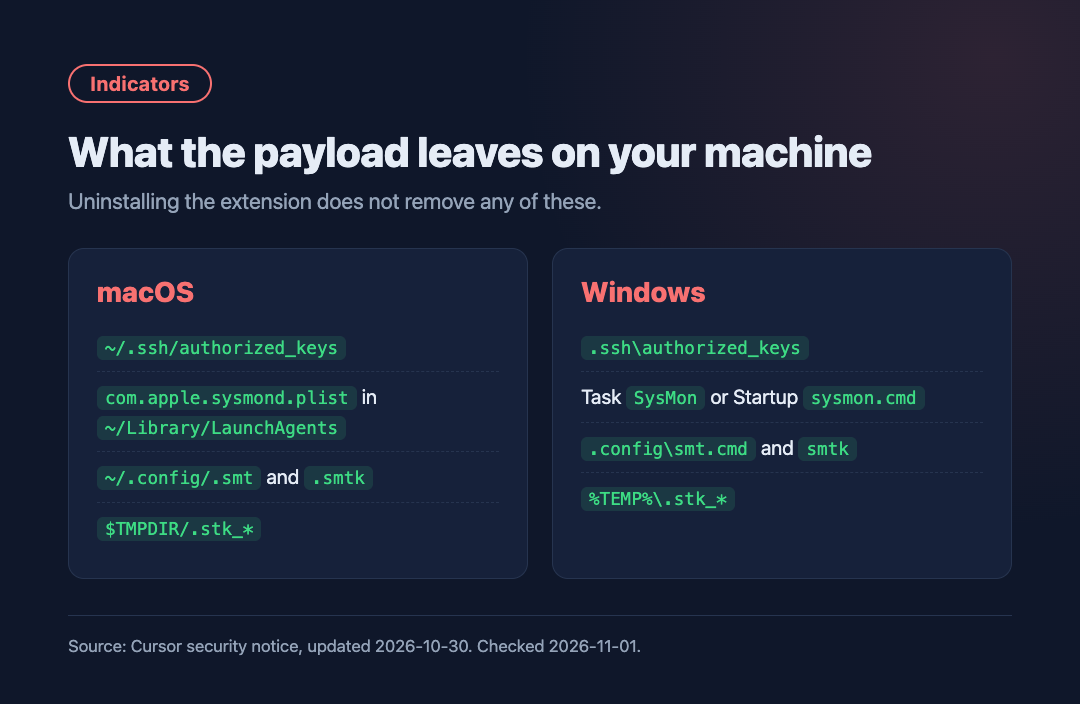
The commands below use the file and process indicators from Cursor's notice. Any match counts as a positive result, even if step 1 came back clean.
macOS:
ls -la ~/Library/LaunchAgents/com.apple.sysmond.plist ~/.config/.smt ~/.config/.smtk 2>/dev/null
find "${TMPDIR:-/tmp}" /tmp -maxdepth 1 -name '.stk_*' 2>/dev/null
pgrep -fl '\.stk_[0-9a-f]{10}|\.config/\.smt'
The LaunchAgent name imitates an Apple service. Only the copy at this exact path in your home folder is the indicator.
Linux:
ls -la ~/.config/.smt ~/.config/.smtk 2>/dev/null
crontab -l 2>/dev/null | grep '\.config/\.smt'
find /tmp -maxdepth 1 -name '.stk_*' 2>/dev/null
pgrep -fl '\.stk_[0-9a-f]{10}|\.config/\.smt'
Windows (PowerShell):
Test-Path "$env:USERPROFILE\.config\smt.cmd", "$env:USERPROFILE\.config\smtk", "$env:APPDATA\Microsoft\Windows\Start Menu\Programs\Startup\sysmon.cmd"
Get-ChildItem "$env:TEMP" -Force -Filter ".stk_*"
Get-ScheduledTask -TaskName SysMon -ErrorAction SilentlyContinue | ForEach-Object { $_.Actions | Format-List Execute, Arguments }
Get-CimInstance Win32_Process | Where-Object { $_.CommandLine -match '\.stk_[0-9a-f]{10}|\.config\\smt|Startup\\sysmon\.cmd' } | Select-Object ProcessId, CommandLine
A task named SysMon can be legitimate. Cursor's script treats it as malicious only when its action points to \.config\smt.cmd, so read the action before you act.
Step 4: Check whether anyone could log in
The tunnel forwards to your local SSH port, so an open port 22 matters. Phorion notes that an attacker's logins would appear in SSH logs as coming from 127.0.0.1 or ::1 with the svc-telemetry key.
On macOS and Linux, test the port:
nc -z 127.0.0.1 22 && echo "port 22 is open" || echo "port 22 is closed"On Linux, also review local logins since the incident:
journalctl -u ssh -u sshd --since 2026-10-29 | grep -E 'Accepted .* from (127\.0\.0\.1|::1)'On Windows, check the service and the port:
Get-Service sshd -ErrorAction SilentlyContinue
Test-NetConnection 127.0.0.1 -Port 22 | Select-Object TcpTestSucceeded
On a managed fleet, also search network logs for 134.209.82.225 on TCP 22 and TCP 8099. Lookups to ifconfig.me or api.ipify.org prove nothing alone, since Cursor lists both as legitimate services.
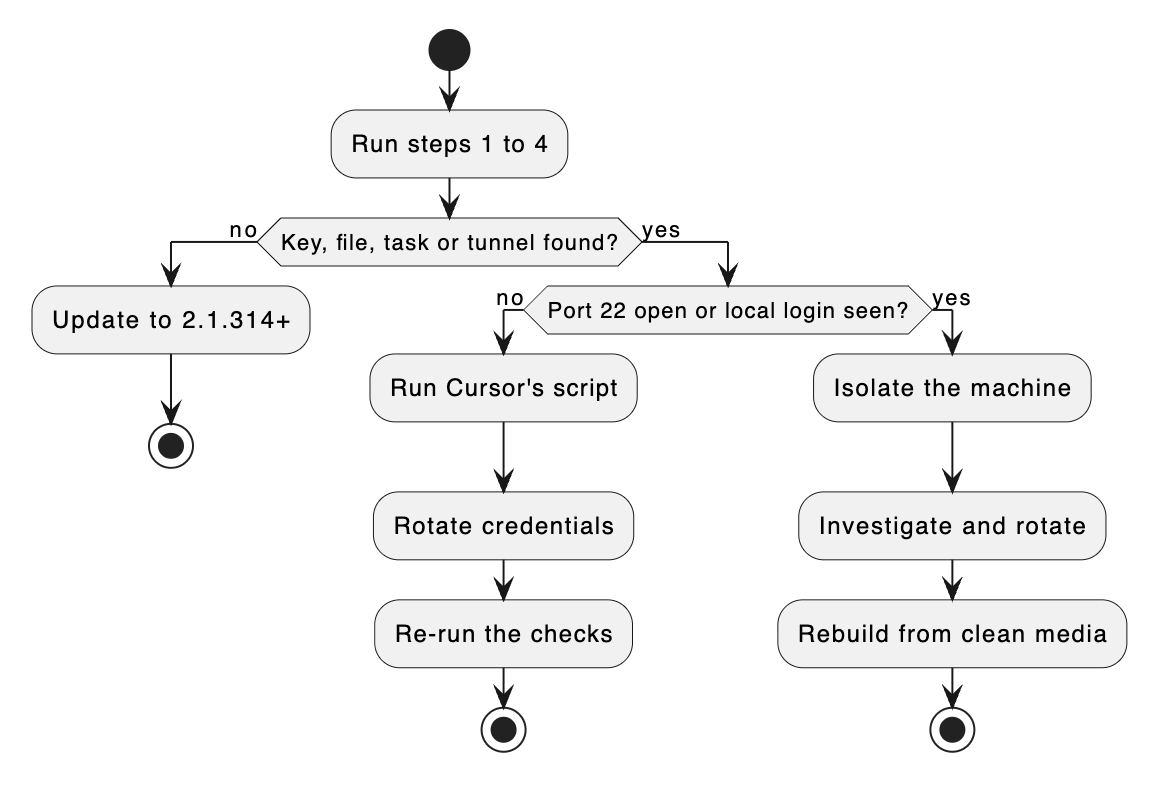
Triage: how serious is your result?
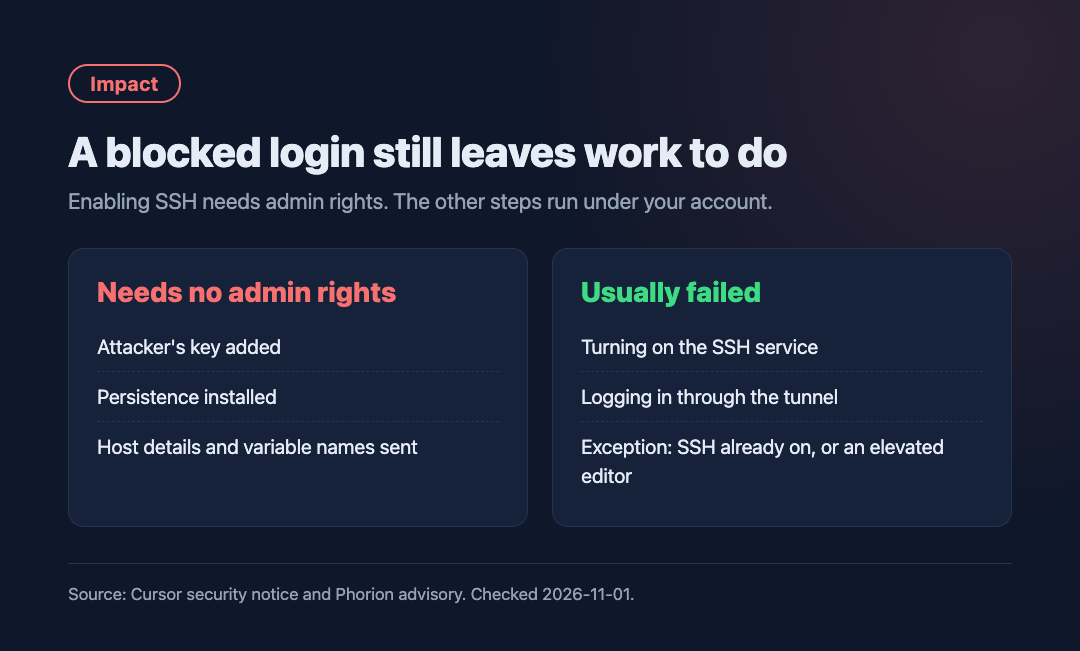
Cursor says the attacker probably couldn't log in on most hosts, because enabling SSH needs admin rights. It still asks you to clean up every affected host, because the key, the persistence and the data transfer can succeed without those rights.
Phorion found a bug that often skips the enable step on macOS. BleepingComputer reports that the Windows SSH setup calls /bin/sh, which standard Windows installs don't have. Neither bug helps you if SSH was already on.
View PlantUML source
@startuml
skinparam shadowing false
start
:Run steps 1 to 4;
if (Key, file, task or tunnel found?) then (no)
  :Update to 2.1.314+;
  stop
else (yes)
  if (Port 22 open or local login seen?) then (no)
    :Run Cursor's script;
    :Rotate credentials;
    :Re-run the checks;
    stop
  else (yes)
    :Isolate the machine;
    :Investigate and rotate;
    :Rebuild from clean media;
    stop
  endif
endif
@enduml
The rebuild branch is my recommendation for the worst case. Cursor's wording is to assess whether to rebuild, and your security team may decide differently.
How to remove the backdoor with Cursor's scripts
Close your editors first. Save the scripts, read them, then run them. Exit code 0 means the machine is clean or the backdoor was removed. Exit code 1 means something remains.
macOS: run as the affected user, not as root.
curl -fsSLO https://cursor.com/static/security/claude-code-extension/remediate-macos.sh
less remediate-macos.sh
bash remediate-macos.sh; echo "exit code: $?"
Windows: open PowerShell with Run as Administrator.
Invoke-WebRequest https://cursor.com/static/security/claude-code-extension/remediate-windows.ps1 -OutFile remediate-windows.ps1
notepad .\remediate-windows.ps1
powershell -ExecutionPolicy Bypass -File .\remediate-windows.ps1; "exit code: $LASTEXITCODE"
Both scripts stop the tunnel, remove persistence, delete tampered extension folders and take the attacker's key out of authorized_keys. If you need forensic evidence, copy the files or image the disk first, because the scripts delete them.
Manual cleanup on Linux
Cursor publishes no Linux script, so use its indicators and Phorion's remediation list:
pkill -f '\.stk_[0-9a-f]{10}|\.config/\.smt'
crontab -e        # delete the @reboot line that runs ~/.config/.smt
rm -f ~/.config/.smt ~/.config/.smtk
find /tmp -maxdepth 1 -name '.stk_*' -delete
nano ~/.ssh/authorized_keys        # delete only the svc-telemetry key
Remove the key in an editor, not with a line-deleting command. Cursor's script comments warn that the attacker's key may share a line with one of your real keys. Phorion also warns that the Linux crontab logic can wipe existing user cron jobs on repeat runs, so compare your crontab with a backup.
Update the extension
Install 2.1.314 or later from your editor's Extensions view, then run steps 1 to 3 again. Open VSX listed 2.1.316 as the latest version on November 1. I couldn't query the Cursor marketplace listing directly, so confirm the version your editor shows.
GovInfoSecurity quotes researcher Kevin Beaumont saying the replacement versions don't remove earlier backdoors. Treat the update as the last step, after the cleanup.
Rotate credentials from a clean machine
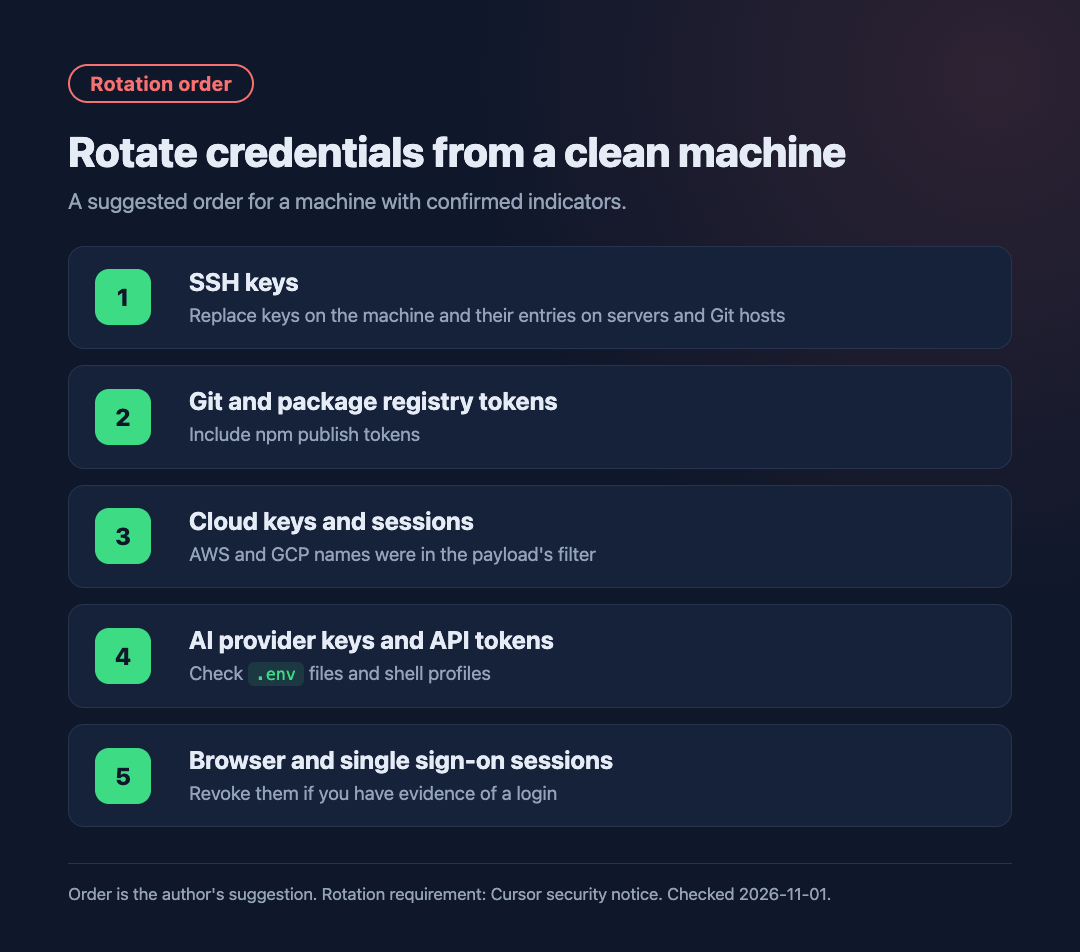
The script doesn't touch your secrets. Cursor tells affected users to rotate credentials and sessions reachable from the host, and to do it from a trusted system. Variable names alone don't reveal secrets, but they tell an attacker where to look.
Start with the credentials that match the payload's filter: KEY, TOKEN, SECRET, PASS, AWS and GCP. This order is my suggestion:
- SSH keys stored on the machine, plus their entries on servers and Git hosts.
- Git host tokens and package registry tokens, such as npm publish tokens.
- Cloud keys and active cloud sessions.
- AI provider keys and API tokens in
.envfiles and shell profiles. - Browser and single sign-on sessions, if you have evidence of a login.
If you publish packages, also review recent releases from that machine. npm staged publishing adds a human approval step that makes a stolen publish token less useful.
Reduce the risk from the next extension attack
These steps limit damage but can't stop a tampered update on their own:
- Control updates. VS Code installs extension updates automatically, and the same page describes how to turn that off. Confirm the behavior in your own fork, and weigh it against slower security fixes.
- Allow-list extensions. The VS Code setting
extensions.allowedblocks anything you haven't listed. Check that your editor honors it before you rely on it. - Limit local privileges. Don't run your editor as administrator, and avoid passwordless
sudo. Both conditions helped this payload get further. - Keep SSH off. Leave Remote Login or OpenSSH Server disabled on laptops that don't need it.
- Move secrets out of your shell profile. A secrets manager exposes less to any extension running under your account.
Editor security has been busy this month. See our guide to the EMBRACE flaws in AI coding tools for a separate set of embedded browser risks.
If the cleanup goes wrong
| Problem | Likely cause | Fix |
|---|---|---|
| Script exits with code 1 | A locked folder, a live process or a leftover key | Close all editors, run it again, then read the report |
| The key comes back | Persistence or a tampered extension is still active | Re-run steps 2 and 3, then remove what they find |
| An SSH login stops working | Your real key shared a line with the attacker's key | Add your public key to authorized_keys again |
| Claude Code disappears from the editor | The script deleted the tampered folder | Install 2.1.314 or later again |
| Cron jobs are missing on Linux | The payload's crontab logic overwrote them | Restore them from your backup or config management |
FAQ
Is the official Claude Code extension safe to use?
No public evidence says otherwise as of November 1. Cursor reports no evidence that other versions or the official distribution were affected, but the root cause is still unexplained. Stay on 2.1.314 or later and check Cursor's notice for changes.
I have version 2.1.312 installed. Am I infected?
Not necessarily. Version 2.1.312 is also a genuine release on the other marketplaces, as Rescana notes. Use the content search in step 2 and the file checks in step 3 to decide.
Does uninstalling the extension remove the backdoor?
No. Cursor and Phorion both say the persistence scripts run on their own, so they keep going after you uninstall. Run the cleanup script or remove each item by hand.
The attacker's server is offline. Do I still need to clean up?
Yes. Cursor asks you to follow the steps regardless. The key and persistence stay on your machine until you remove them, and your host details may already have been sent.
I only use the Claude Code CLI. Should I worry?
No report ties the CLI to this incident. The published builds were extension packages from the Cursor marketplace. If you also ran the extension in Cursor on October 29, run the checks.
References
Checked 2026-11-01.
- Cursor: Security notice on Anthropic.claude-code 2.1.312 and 2.1.313
- Cursor: macOS cleanup script
- Cursor: Windows cleanup script
- Claude Code changelog
- Claude Code docs: VS Code extension
- Open VSX API: Anthropic.claude-code
- VS Code docs: Extension Marketplace
- Phorion: Claude Code extension advisory
- oss-security: Original report, October 30
- BleepingComputer: Malicious Claude Code extension on Cursor planted SSH backdoors
- GovInfoSecurity: Cursor confirms extension compromise
- OX Security: Malicious Claude Code extension analysis
- Rescana: Trojanized Claude Code 2.1.312 and 2.1.313
1 thought on “Claude Code Extension Backdoor: Find and Remove It in Cursor”