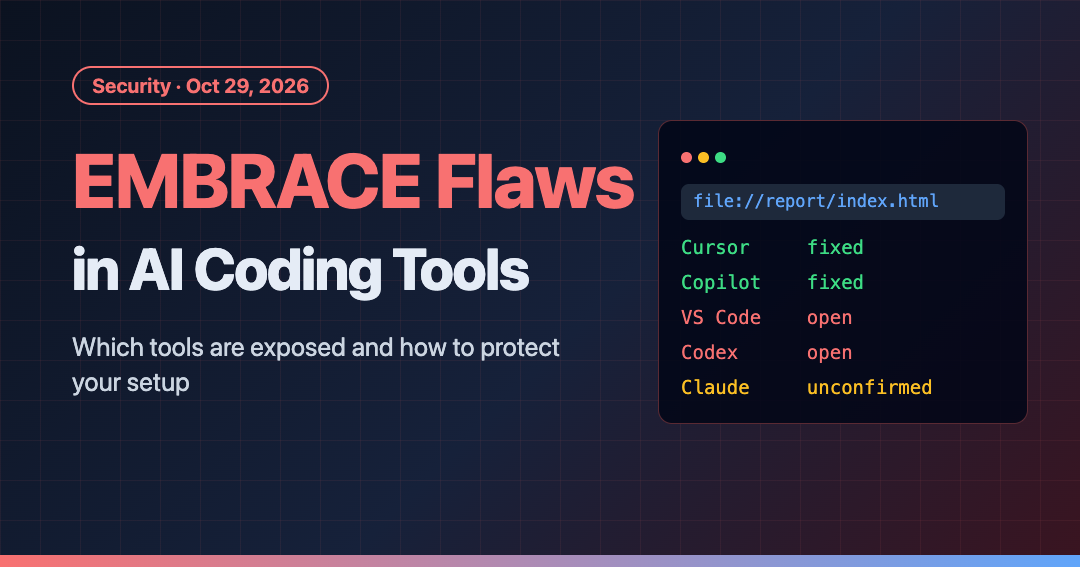
EMBRACE flaws let a malicious page abuse the built-in browser in five AI coding tools. Cursor and the GitHub Copilot app have fixes, so update them. Codex and VS Code had no fix when the research came out on October 29, 2026, so don't open untrusted local HTML in them.
Written 2026-10-31. Facts come from the Forever Security write-ups, The Register and vendor docs, checked that day. I ran the two grep searches and the find search in this post on sample files. I did not reproduce the attacks, apply the settings or run the git, version, token and SSH commands.
What changed: EMBRACE flaws in five AI coding tools
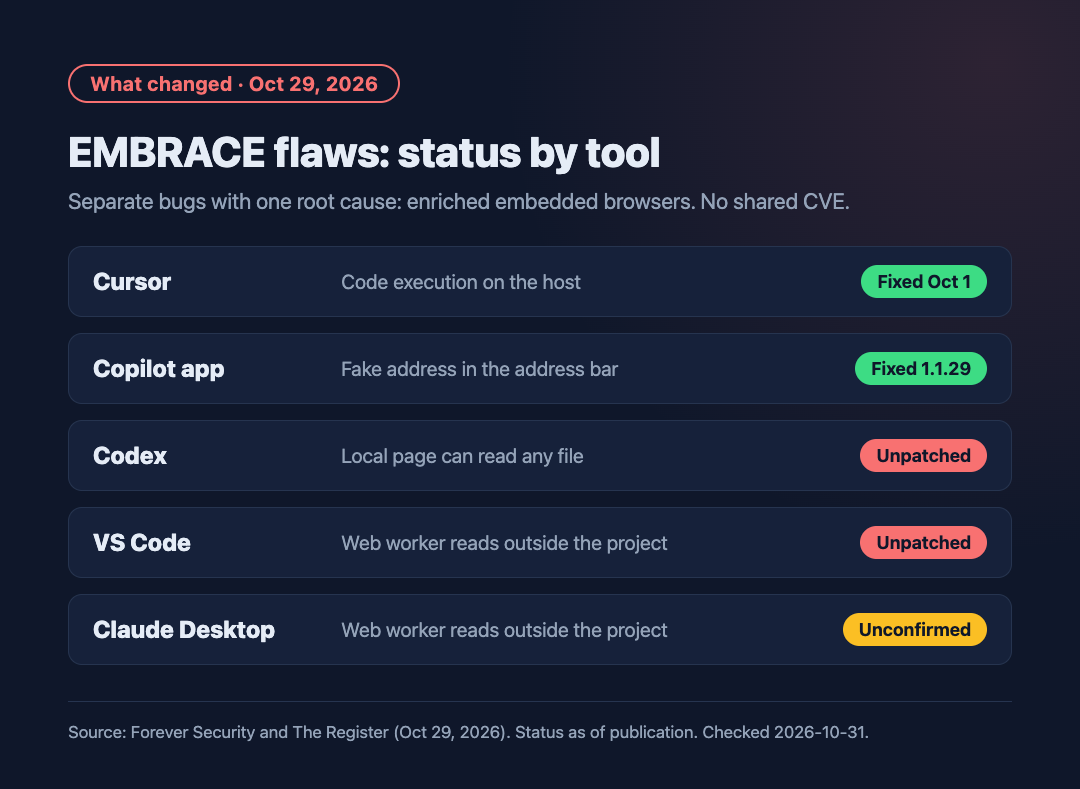
Forever Security researcher Gal Weizman published the findings on October 29. EMBRACE stands for "embedded browser". It is a class of bugs, not one bug, so there is no shared CVE or universal patch.
| Tool | Impact | Status (Oct 29) |
|---|---|---|
| Cursor | Code execution on the host | Fixed Oct 1, no advisory or build number |
| GitHub Copilot app | Fake address in the address bar | Fixed in 1.1.29, Oct 13 |
| Codex | Read any local file | Unpatched, OpenAI is "working to address it" |
| VS Code | Read any local file | Unpatched, report declined by Microsoft |
| Claude Desktop | Read any local file | Fix not confirmed in any source I found |
Microsoft and Anthropic both treated Forever's report as outside their security boundary, citing Workspace Trust. A day after Forever's July 23 report, Noma Security reported the same Claude Desktop flaw, and Anthropic accepted that one, according to Forever. Anthropic and Microsoft did not answer The Register's questions.
Are the EMBRACE flaws being exploited?
No source reports these five flaws being used in real attacks. The Register doesn't mention any, and Forever's only line on it is a general statement that isn't tied to these products.
Keep one caveat in mind. All the technical evidence comes from Forever, which sells monitoring tools for AI assistants. I found no vendor write-up that confirms or disputes the details.
How the attack reaches your files
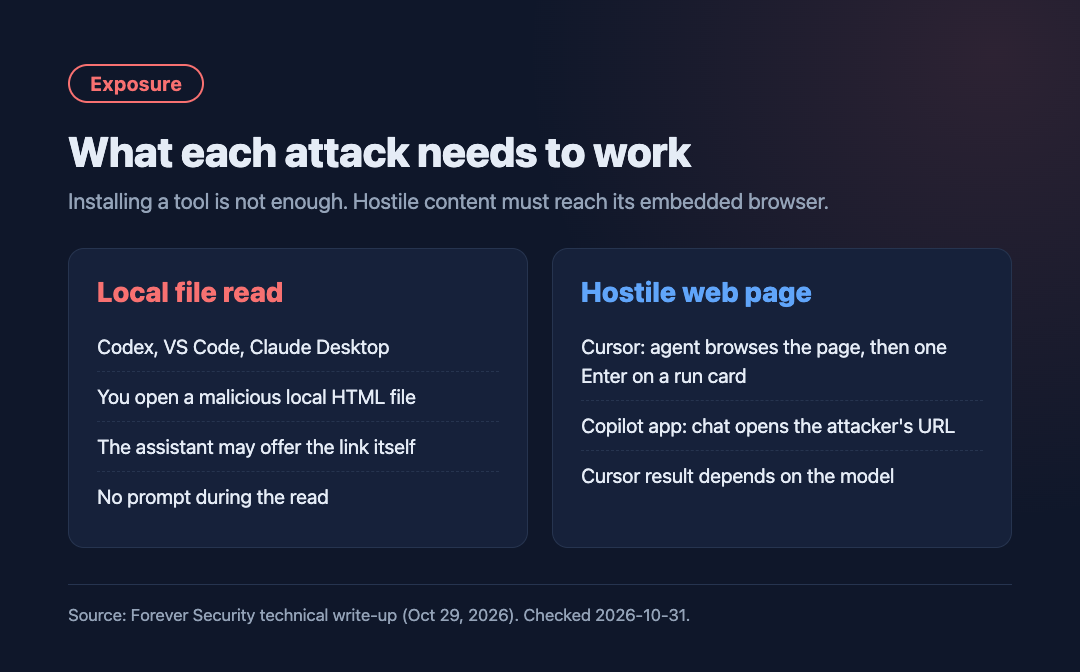
Each attack needs content to reach the embedded browser, and the conditions differ by tool:
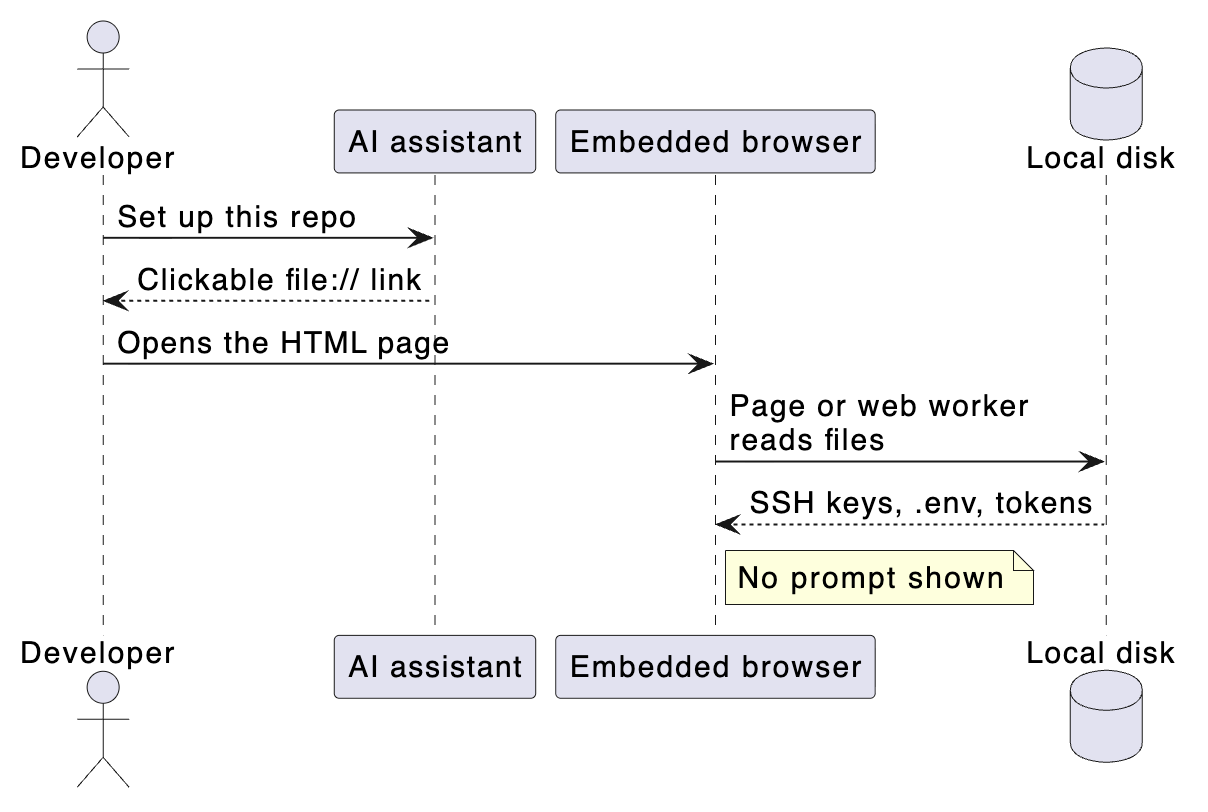
- Codex, VS Code, Claude Desktop: you open a malicious local HTML file. In Forever's demo, the assistant itself offered a clickable
file://link after being asked to set up the project from its README. - Cursor: the agent browses a hostile page and you press Enter once on a run card. Forever calls success "probabilistic" and model-dependent.
- Copilot app: the chat opens an attacker's URL, and the page then reports a false address.
View PlantUML source
@startuml
skinparam shadowing false
skinparam defaultFontSize 15
actor Developer as D
participant "AI assistant" as A
participant "Embedded browser" as B
database "Local disk" as F
D -> A : Set up this repo
A --> D : Clickable file:// link
D -> B : Opens the HTML page
B -> F : Page or web worker\nreads files
F --> B : SSH keys, .env, tokens
note right of B : No prompt shown
@enduml
The read is silent. In VS Code and Claude Desktop, the project-folder check runs in the top page but not in a web worker, which is a script running on a background thread. Codex has no such check on the page at all. Forever's sweep collected SSH keys, .env files, npm tokens and the hosts file.
Check whether your setup is exposed
Start by finding which of these tools you have and which version. On macOS, read the version from the app bundle:
defaults read "/Applications/Cursor.app/Contents/Info.plist" CFBundleShortVersionString
defaults read "/Applications/Visual Studio Code.app/Contents/Info.plist" CFBundleShortVersionString
defaults read "/Applications/<APP_NAME>.app/Contents/Info.plist" CFBundleShortVersionString
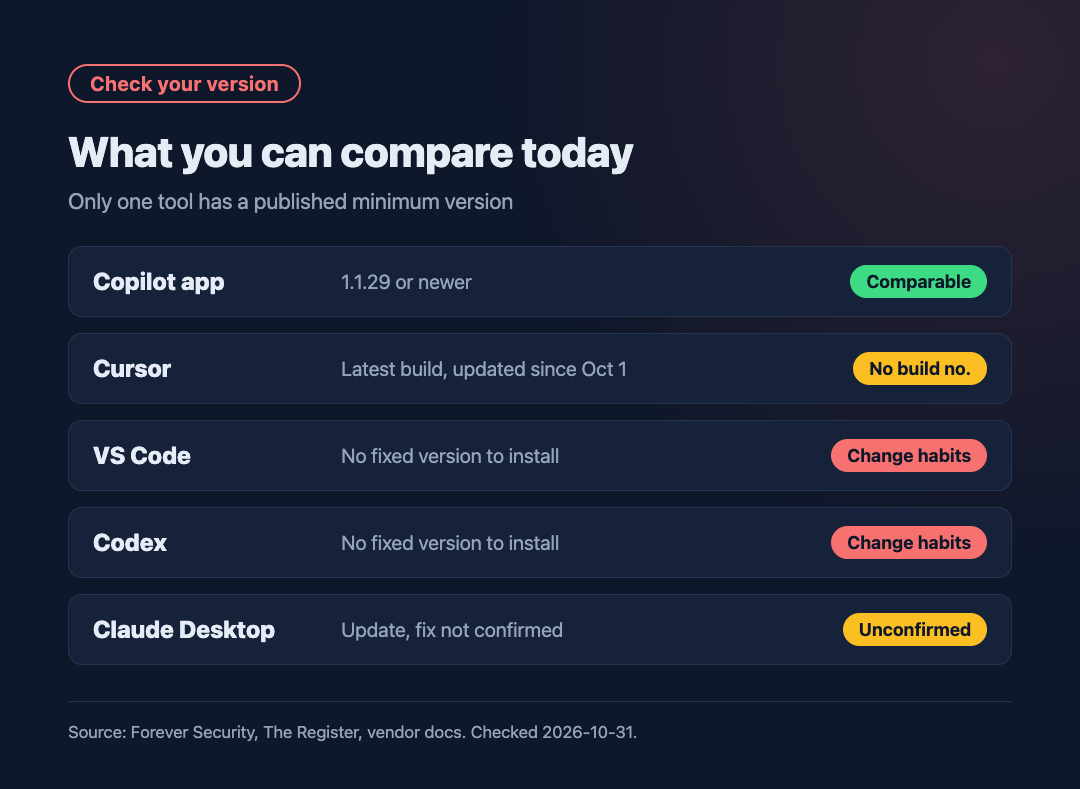
On Windows, use winget list and look for the same names. Only the Copilot app gives you a number to compare against:
| Tool | What to compare | You are exposed if |
|---|---|---|
| Copilot app | 1.1.29 or newer | You run an older build |
| Cursor | Latest build, no minimum published | You haven't updated since Oct 1 |
| VS Code | No fixed version | You open untrusted local HTML in it |
| Codex | No fixed version | You open untrusted pages in the app's browser |
| Claude Desktop | Fix not confirmed | You open untrusted HTML in the Browser pane |
OpenAI's docs say the built-in browser is part of the desktop app and isn't available in the Codex CLI or IDE extension. Claude Code in the terminal isn't on Forever's list either.
How to protect yourself from EMBRACE flaws, tool by tool
Cursor: update and tighten run mode
Update to the latest build. Then open Settings > Agents > Approvals & Execution and avoid Run Everything, which has no sandbox, classifier or prompts. Cursor's docs call Auto-review the recommended default.
Those docs also list Browser Protection, which stops the agent running browser tools automatically, and External-File Protection. On Cursor 3.23 or later, you can set Read access to Workspace so reads outside the project need approval.
GitHub Copilot app: confirm 1.1.29 or newer
Get the newest build from the github/app releases. The public changelog's 1.1.29 entry doesn't mention an address bar fix, so the 1.1.29 claim rests on Forever's testing.
VS Code: keep unfamiliar folders in Restricted Mode
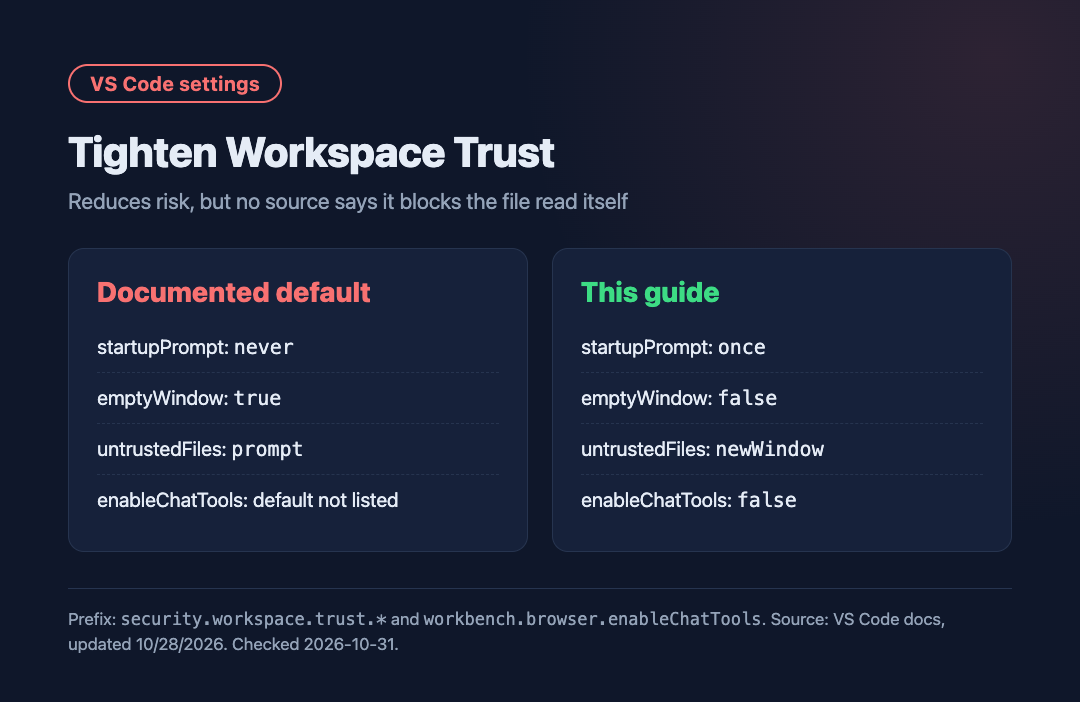
Microsoft treats Workspace Trust as the boundary, so use it. Open your user settings.json and add:
{
  "security.workspace.trust.enabled": true,
  "security.workspace.trust.startupPrompt": "once",
  "security.workspace.trust.emptyWindow": false,
  "security.workspace.trust.untrustedFiles": "newWindow",
  "workbench.browser.enableChatTools": false
}
Run Workspaces: Manage Workspace Trust from the Command Palette and remove folders you no longer need to trust. Restricted Mode stops agents, terminals, tasks and debugging in that folder. In untrusted workspaces, the integrated browser also uses throwaway storage.
Here is the limit: neither Microsoft's docs nor Forever says Restricted Mode blocks the file read itself. Treat it as risk reduction and still don't choose Open in Integrated Browser for HTML you don't trust.
VS Code's docs also say those open actions need a local file:// URL and aren't available for remote workspaces. Reviewing unknown repos over SSH or in a dev container should remove that menu path and keep the page away from your local disk. For agents you run on Windows, Microsoft Execution Containers add another layer of isolation.
Codex: avoid untrusted file-backed pages
There is no patch to install yet. The built-in browser ships with the desktop app and installs automatically, so check the changelog for a fix. OpenAI's docs don't describe a personal setting that blocks local pages, so the safe habit is to open unknown HTML somewhere else, such as a VM. Admins can use managed browser controls.
Claude Desktop: update and turn off Browser tools if needed
Use Claude > Check for Updates… on macOS or Help > Check for Updates… on Windows. If you work with repos you don't trust, turn off Browser tools under Settings > Code (or Settings > Claude Code) until Anthropic confirms a fix. In local sessions, clicking an HTML path in the chat opens it in the Browser pane, so check the path before you click.
All tools: scan a repo before you open it
Run these from the repo root in a normal terminal, before any assistant touches it. In order, they list tracked HTML and web archive files, find background workers and file:// access in pages and scripts, and find docs that push you toward a local file link:
git ls-files '*.html' '*.htm' '*.mhtml' '*.mht'

grep -RInE 'new Worker|importScripts|file://' --include='*.html' --include='*.htm' --include='*.js' --exclude-dir=node_modules --exclude-dir=.git .

grep -RIn 'file://' --include='*.md' --exclude-dir=node_modules .
A hit isn't proof of an attack, because plenty of normal pages use workers. A clean result isn't proof of safety either, since code can be obfuscated. Use the scan to decide which repos to review in isolation.
If you already opened untrusted HTML: rotate secrets
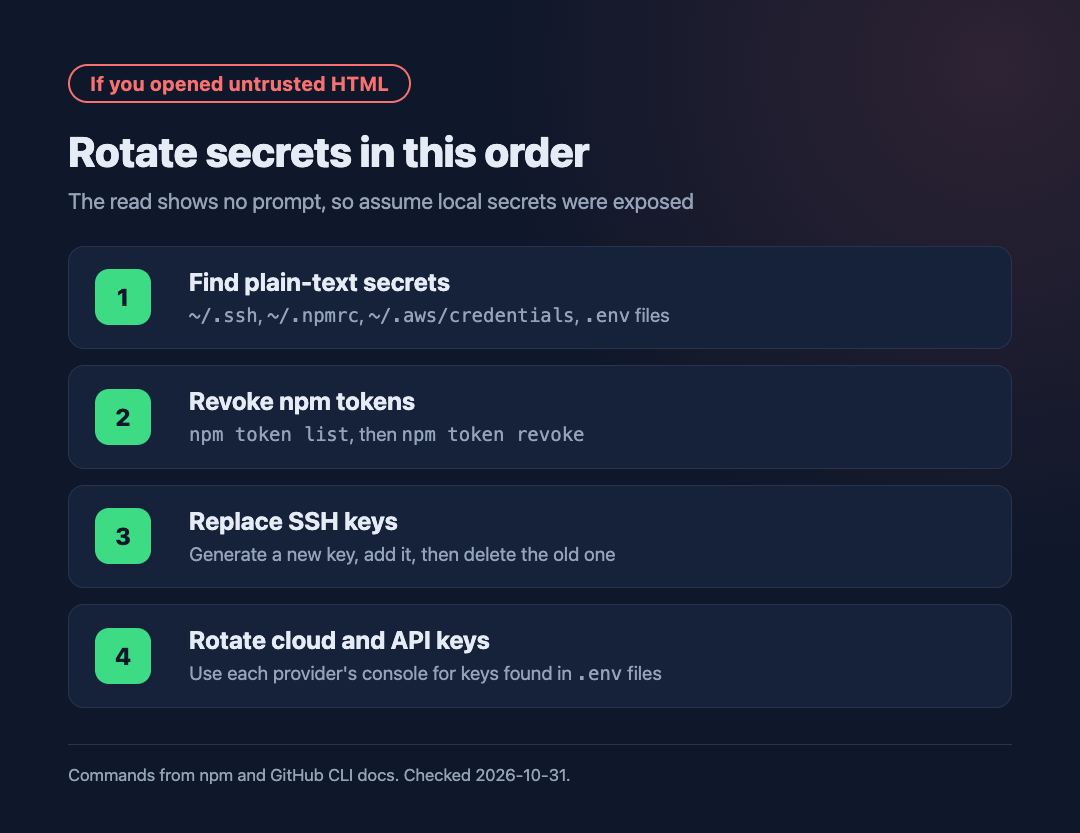
The read leaves no prompt, and none of these sources describes a log you could check. If you opened an untrusted page in an affected tool, assume local secrets were exposed. Start by finding plain-text credentials:
ls -la ~/.ssh ~/.npmrc ~/.aws/credentials
find ~ -maxdepth 4 -type f -name '.env*' -not -path '*/node_modules/*'
Then replace them. Revoke npm tokens and swap your SSH key:
npm token list
npm token revoke <TOKEN_ID>

ssh-keygen -t ed25519 -C "<YOUR_EMAIL>" -f ~/.ssh/id_ed25519_new
gh ssh-key list
gh ssh-key add ~/.ssh/id_ed25519_new.pub --title "<NEW_KEY_NAME>"
gh ssh-key delete <OLD_KEY_ID>
Rotate cloud keys and API keys from each .env file in their provider consoles too. To limit what a stolen token can publish, npm staged publishing adds a 2FA approval step before a release goes live.
If something breaks after these changes
| Symptom | Likely cause | Fix |
|---|---|---|
| Agents won't run in a folder | Restricted Mode | Trust the folder only if you trust its authors |
| No Don't Trust button | Trust inherited from a parent folder | Remove the parent in the trust editor |
enableChatTools won't change | Your organization manages it | Ask your admin |
| No preview in Claude Desktop | Browser tools is off | Turn it on again for trusted projects |
| Cursor asks for approval on Linux | Sandbox needs kernel 6.2+ with Landlock v3 | Update the kernel or keep approving |
If Cursor's Auto-review stops working on a team plan, check that Claude 4.5 Haiku is still allowed. Cursor's docs say it is the classifier fallback, and blocking it can disable the mode.
FAQ
Do the EMBRACE flaws have CVE numbers? No. None of the five had a CVE in the coverage I checked, so vulnerability scanners keyed to CVEs may not flag them. Check tools and versions yourself.
Does just installing VS Code or Codex leak my files? No. The demonstrated file read requires rendering a malicious local HTML page in the embedded browser. Forever warns against relying on "a user would have to click something", because the assistant can offer the link itself.
Should I uninstall these tools? Not based on this research. Update what has a fix, and keep unknown HTML out of the embedded browser. Teams handling sensitive code can also review unfamiliar repos in a VM or dev container.
Is Claude Code in the terminal affected? It isn't on Forever's list, which names Claude Desktop. That only means it wasn't reported here, not that it was audited and cleared.
How will I know when Codex and VS Code are fixed? Watch the OpenAI changelog and the VS Code release notes. Microsoft declined the report, so a VS Code fix may never be announced under this name.
For a closer look at how an agent's own tooling is wired together, the Cursor Agent SDK guide is a good next read.
References
All checked 2026-10-31.
- VS Code docs: Workspace Trust
- VS Code docs: Integrated browser
- Cursor docs: Run modes
- OpenAI docs: Browser in the desktop app
- Claude Code docs: Desktop application
- GitHub: Copilot app changelog
- npm docs: npm token
- GitHub CLI manual: gh ssh-key
- Forever Security: EMBRACE overview
- Forever Security: EMBRACE technical write-up
- The Register: bugs in 5 AI developer tools (Oct 29, 2026)
2 thoughts on “EMBRACE Flaws in AI Coding Tools: How to Protect Your Setup”