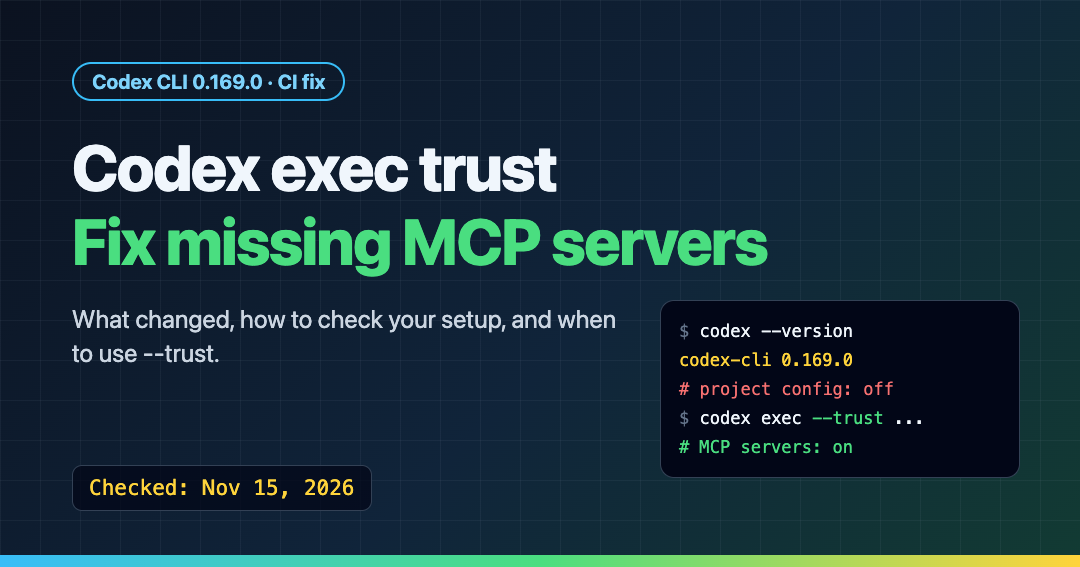
Codex exec trust changed in Codex CLI 0.169.0. In a directory Codex does not trust, codex exec now keeps project configuration (.codex/config.toml) and MCP servers turned off, even when you pass --sandbox workspace-write. If a CI job or script lost its MCP tools or project settings after an upgrade, add the new --trust flag on repositories you control. On untrusted code, such as pull requests from forks, move the settings into user-level config instead.
Written November 15, 2026. Facts checked on November 15, 2026 (KST) against the Codex 0.169.0 release notes, pull request #60041, the Codex non-interactive mode guide, the configuration reference, the advanced configuration guide and the openai/codex-action README. The commands, example output and workflow snippets below are my own examples, not OpenAI templates. I have not timed or benchmarked anything here.
What changed in codex exec trust handling
OpenAI published Codex CLI 0.169.0 on GitHub on November 13, 2026. Most of the release is terminal UI work (side-chat tabs, a diagnostic ZIP on Ctrl+S, Windows sandbox fixes). The one line that can break automation is this:
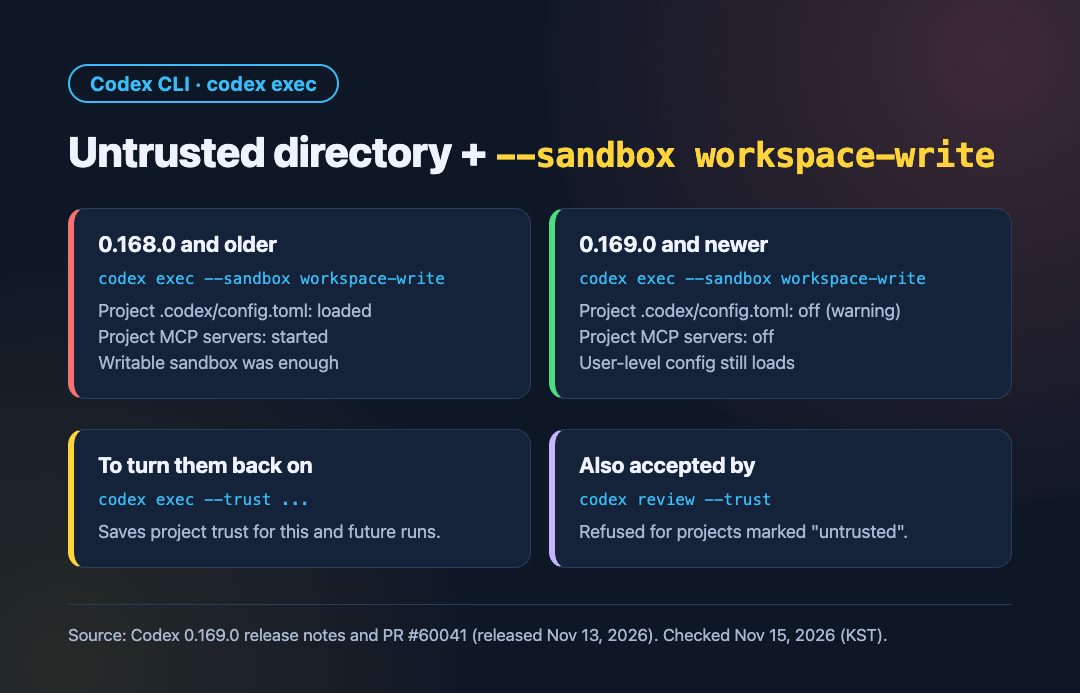
codex execkeeps project configuration and MCP servers disabled in untrusted directories, even with--sandbox workspace-write. Use--trustwithcodex execorcodex reviewto explicitly save project trust.
According to the description of pull request #60041, the change also:
- warns when project configuration is disabled,
- adds
--trusttocodex execandcodex review, which saves project trust "for the current and future chats, including MCP commands outside the sandbox", - keeps that trust grant even when you run with
--ephemeral, - refuses to run with
--truston a project that is explicitly marked untrusted, - rejects
--trustcombined with--ignore-user-config.
Why project trust matters
Codex reads settings in layers. User settings live in ~/.codex/config.toml (or $CODEX_HOME/config.toml). A repository can add its own .codex/config.toml, and Codex "walks from the project root to your current working directory and loads every .codex/config.toml it finds." The configuration reference is clear about the gate: "Codex loads project-scoped config files only when you trust the project." Untrusted projects also skip project-local hooks and rules.
Before 0.169.0, choosing a writable sandbox in codex exec was enough to bring those project layers and their MCP servers in. That matters because a repository you just cloned, or a fork's pull request, can ship its own .codex/ folder. MCP servers start local processes, and the PR text notes that trust covers "MCP commands outside the sandbox". Splitting "may write files" from "may run this repo's config" closes that gap.
Who is affected
| Setup | Affected? | Why |
|---|---|---|
Interactive codex on your own repo | Usually no | You already accepted trust in the TUI |
codex exec on a laptop, trusted repo | No | Trust is already saved |
CI runner with a fresh CODEX_HOME | Yes | No saved trust, so project config is skipped |
| CI on fork pull requests | Yes, and that is intended | Do not add --trust here |
| MCP servers only in user config | No | User and system layers still load |
Check your Codex version and project trust
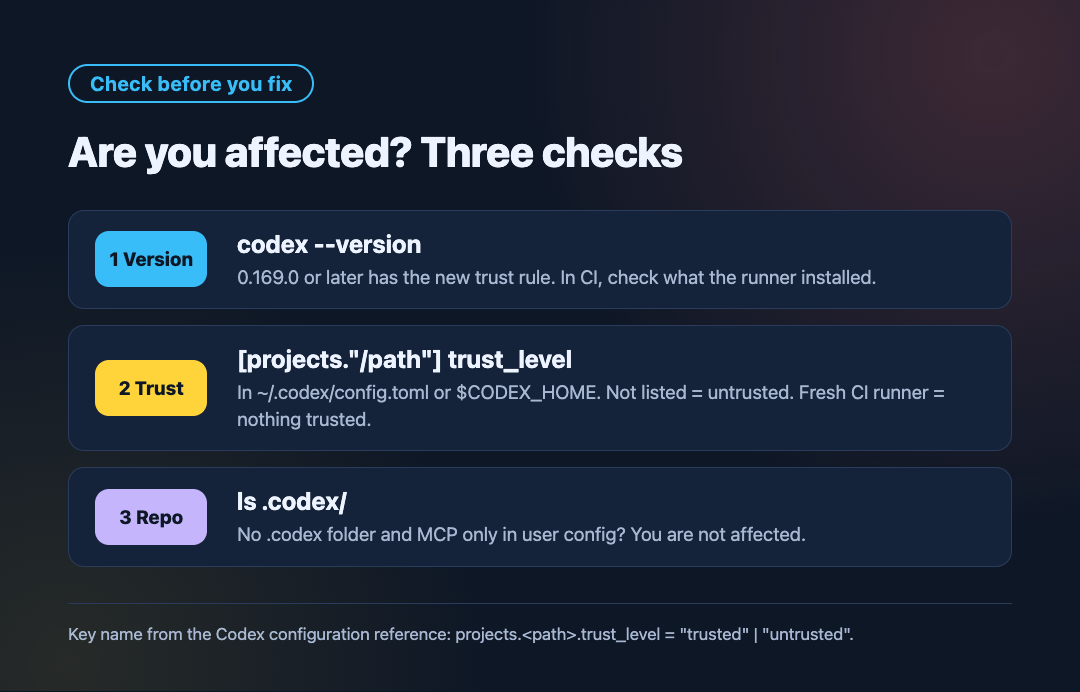
Two things decide whether you are affected: the installed Codex version, and whether the directory you run in is trusted.
1. Check the installed version
On any platform:
codex --versionExample output:
codex-cli 0.169.0Any version 0.169.0 or later has the new behavior. If you installed with npm or Homebrew, you can also ask the package manager:
npm ls -g @openai/codex            # npm global install
brew list --cask --versions codex  # Homebrew cask
In CI, check the version you install. An unpinned npm i -g @openai/codex picked up 0.169.0 as soon as it was published. The codex-version input of openai/codex-action is empty by default, so it may also have moved to the new version.
2. Check which projects are trusted
The configuration reference documents one key for this: projects.<path>.trust_level, with the values "trusted" or "untrusted", stored in your user-level config. List the entries on macOS or Linux:
grep -n -A1 '^\[projects\.' "${CODEX_HOME:-$HOME/.codex}/config.toml"Example output:
14:[projects."/home/dev/repos/api"]
15-trust_level = "trusted"
18:[projects."/home/dev/repos/forked-lib"]
19-trust_level = "untrusted"
On Windows PowerShell:
Select-String -Path "$env:USERPROFILE\.codex\config.toml" -Pattern '^\[projects\.' -Context 0,1How to read it:
- Directory listed as
"trusted":codex execloads its project config and MCP servers as before. - Directory not listed: it is untrusted. Project config and MCP servers are skipped in
codex execfrom 0.169.0 on. - Directory listed as
"untrusted": it stays off, and--trustis refused until you change that entry.
On a CI runner the file often does not exist at all. That means nothing is trusted.
3. Check if the repo has project config
ls -la .codex/ 2>/dev/null && cat .codex/config.tomlIf there is no .codex/ folder and your MCP servers are defined in user config, this change does not touch you. Codex treats the directory that contains .git as the project root by default, so run the check from the repo root.
How to fix codex exec trust in CI and scripts
Pick the fix by asking one question: do you control the code in the working directory?
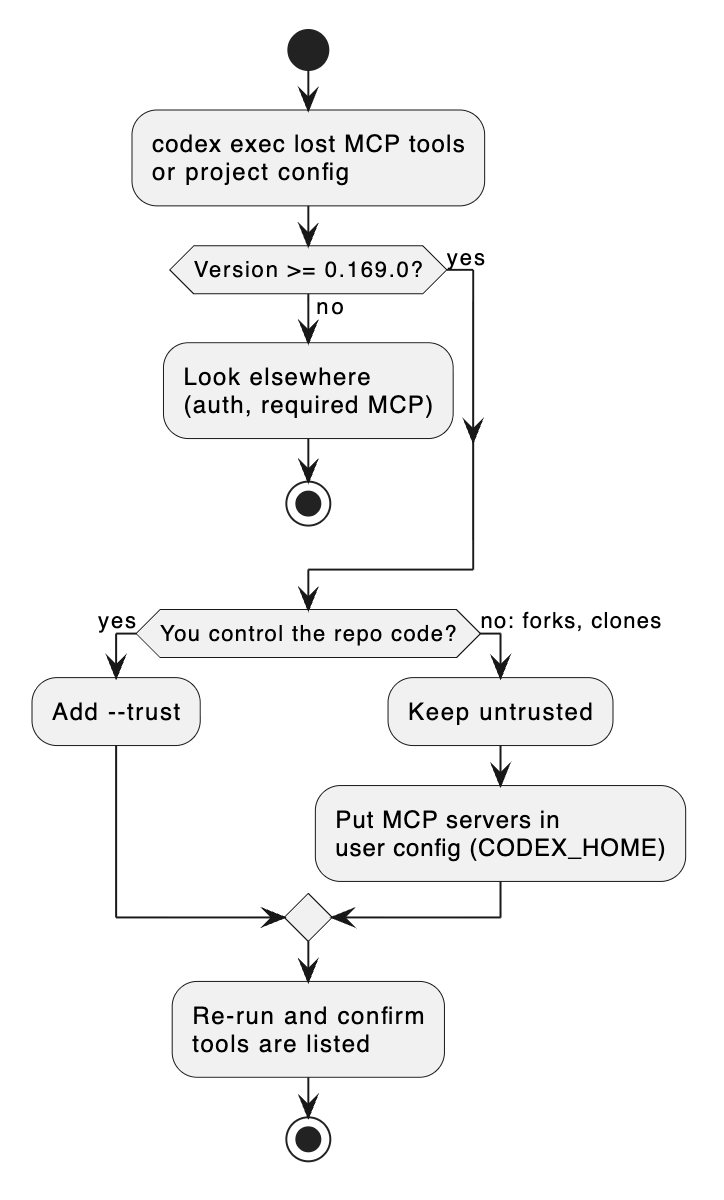
View PlantUML source
@startuml
start
:codex exec lost MCP tools\nor project config;
if (Version >= 0.169.0?) then (no)
  :Look elsewhere\n(auth, required MCP);
  stop
else (yes)
endif
if (You control the repo code?) then (yes)
  :Add --trust;
else (no: forks, clones)
  :Keep untrusted;
  :Put MCP servers in\nuser config (CODEX_HOME);
endif
:Re-run and confirm\ntools are listed;
stop
@enduml
Fix 1: add –trust for repositories you control
This is the direct fix the release notes give. On a laptop or a self-hosted runner that only builds your own branches:
codex exec --trust --sandbox workspace-write "Run the tests and fix the first failure"--trust saves the trust grant, so later runs in the same directory under the same Codex home do not need it again. On ephemeral CI runners nothing persists, so keep the flag in the command.
The same flag works for reviews:
codex review --trustIn a GitHub Actions job that installs the CLI itself, pin the version and set the API key only on the step that needs it. The non-interactive guide warns against setting CODEX_API_KEY or OPENAI_API_KEY as a job-level environment variable.
jobs:
  codex-fix:
    runs-on: ubuntu-latest
    permissions:
      contents: read
    steps:
      - uses: actions/checkout@v4
      - run: npm i -g @openai/codex@0.169.0
      - name: Run Codex
        run: codex exec --trust --sandbox workspace-write "Fix the failing unit test"
        env:
          CODEX_API_KEY: ${{ secrets.<YOUR_OPENAI_KEY_SECRET> }}
Only do this when the checked-out code is your own branch. If you need a refresher on why pull_request_target plus a fork checkout is dangerous, see our pull_request_target brownout guide.
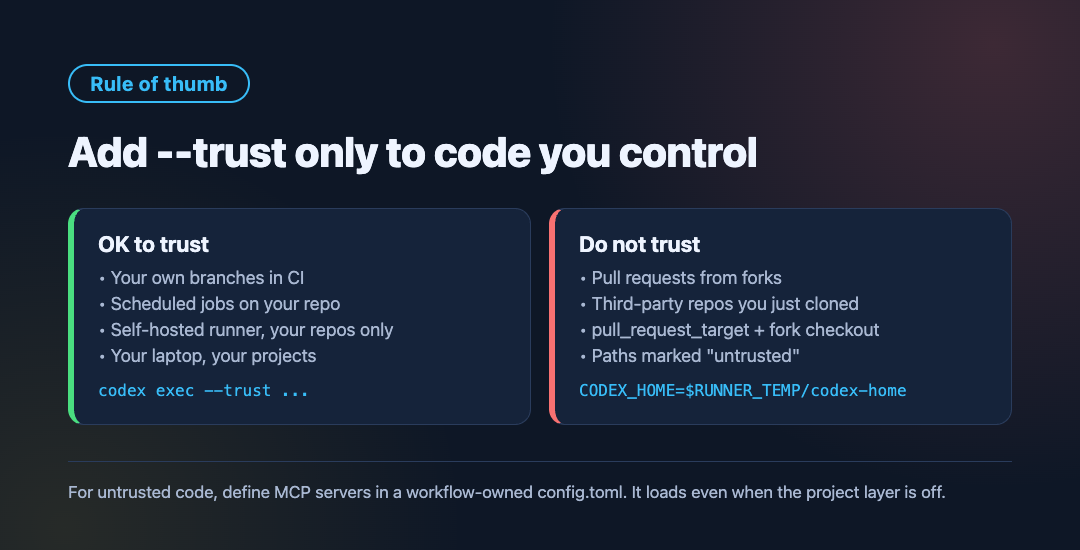
Fix 2: move MCP servers to user-level config for untrusted code
When the code is not yours, do not trust it. Instead, define the MCP servers you need in the user layer, which still loads in untrusted projects. In CI, point CODEX_HOME at a folder your workflow creates, not at a path inside the checkout:
export CODEX_HOME="$RUNNER_TEMP/codex-home"
mkdir -p "$CODEX_HOME"
cat > "$CODEX_HOME/config.toml" <<'EOF'
[mcp_servers.docs]
command = "npx"
args = ["-y", "<YOUR_MCP_PACKAGE>"]
EOF

codex exec --sandbox read-only "Summarize what this pull request changes"
The project's own .codex/config.toml, hooks and rules stay off. Your MCP server comes from configuration you wrote, not from the pull request. The codex-action README makes the same point: codex-home/config.toml is trusted workflow configuration and "must not come from an untrusted checkout."
Before you add MCP servers, make sure they are maintained. Several reference servers were archived in 2025; our guide on finding and replacing deprecated MCP servers has a checklist.
Fix 3: openai/codex-action users
The action builds its own codex exec command and accepts extra arguments through codex-args, so on your own branches you can pass the flag there:
- uses: openai/codex-action@v1
  with:
    openai-api-key: ${{ secrets.<YOUR_OPENAI_KEY_SECRET> }}
    prompt-file: .github/codex/prompts/fix.md
    codex-version: "0.169.0"
    codex-args: '["--trust"]'
The README says protected runs reject overrides that change trust. If your run is protected, or it handles fork pull requests, use the codex-home input with a workflow-owned config.toml (Fix 2) instead of --trust.
Confirm the fix worked
Run a short task that needs the MCP tool and read the output:
codex exec --trust "List the MCP tools you can call, by server name"If your server's tool names show up in the answer, the project layer and its servers loaded. You should also no longer see the warning that project configuration is disabled. For servers that must be present, set required = true on them. The non-interactive guide says codex exec then exits with an error if a required server fails to start, instead of continuing without it. A loud failure in CI is better than a run that silently skips its tools.
Can't upgrade your workflow yet? Temporary options
OpenAI does not document a setting that restores the old behavior. Your short-term options are:
| Option | How | Side effect |
|---|---|---|
| Pin the previous version | npm i -g @openai/codex@0.168.0 or codex-version: "0.168.0" | Reopens the gap the change closed. Untrusted repos can again load their config with workspace-write |
| Pre-seed trust on a runner you own | Add [projects."/path"] with trust_level = "trusted" to the runner's config.toml | Every job in that path is trusted, including ones you forget about |
| Run without MCP for now | Leave the job as is and accept fewer tools | Lower-quality results, but no new risk |
Pinning is the least effort, but treat it as a stop-gap of days, not months. You also lose the 0.169.0 fixes. If you run Codex next to other agents in automation, the same thinking applies to them; see running Claude Code headless with n8n for a lock-and-auth setup that keeps secrets out of shared environments.
Troubleshooting after the change
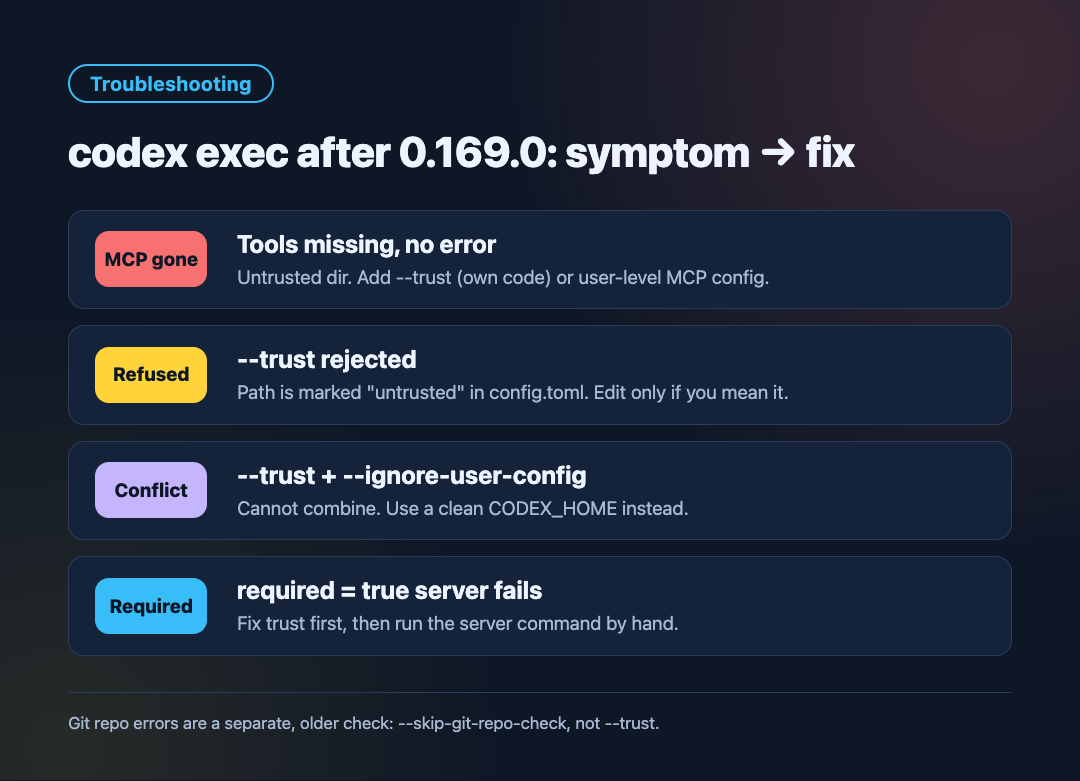
MCP tools disappeared, no error. You are on 0.169.0+ in an untrusted directory. Apply Fix 1 or Fix 2. Check codex --version on the runner, not on your laptop.
--trust is refused. The project is explicitly marked trust_level = "untrusted" in your user config. Per PR #60041, Codex refuses to override that. Edit or delete the entry only if you really want to trust that path.
--trust conflicts with --ignore-user-config. The two cannot be combined. Trust is stored in user config, so ignoring user config and saving trust at the same time does not work. Drop one of them. In CI, a clean CODEX_HOME usually replaces --ignore-user-config.
The job now fails on a required MCP server. A server marked required = true now fails to start because its project config is off. Fix the trust first. If it still fails, run the server's command by hand to see its own error.
Codex refuses to run outside a Git repository. That is the older Git check, which predates this release. The non-interactive guide says Codex requires a Git repo "to prevent destructive changes"; --skip-git-repo-check overrides that. It is not the same as --trust, and it does not load project config.
Rolling back
If a release blocks you and the options above do not fit, go back one version and file an issue:
npm i -g @openai/codex@0.168.0
codex --version
The Homebrew cask tracks the latest release only, so switch to the npm install if you need an older version.
Remove the pin as soon as your workflow uses --trust or user-level MCP config.
Codex exec trust: what to do this week
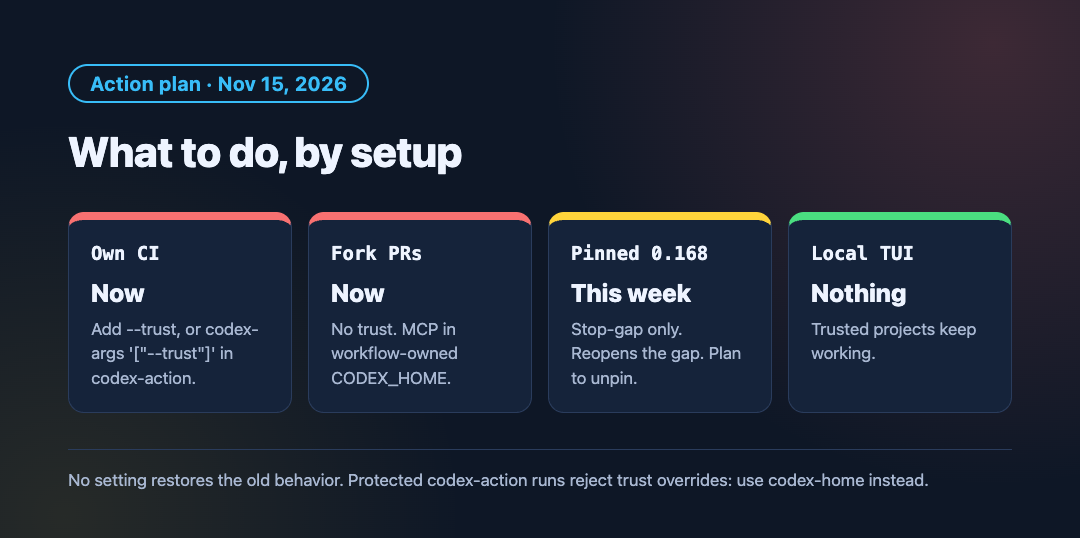
| Your setup | Action | When |
|---|---|---|
| CI on your own branches with project MCP servers | Add --trust (or codex-args) | Now |
| CI on fork pull requests | Move MCP to workflow-owned CODEX_HOME | Now |
| Pinned to 0.168.0 or older | Plan the change, then unpin | This week |
| Local interactive use on your repos | Nothing | No impact |
No .codex/ folder, MCP only in user config | Nothing | No impact |
FAQ
Does –trust give Codex more sandbox permissions? No. The sandbox is still set by --sandbox (read-only by default in codex exec). --trust decides whether the project's own .codex/ config and MCP servers load. MCP servers can run outside the sandbox, which is why trust is a separate decision.
Do I need –trust every time? Not on the same machine. It saves trust for current and future runs, and the grant survives --ephemeral. Fresh CI runners start with an empty config, so keep the flag in the command there.
Is this a security vulnerability fix? The release notes list it as a behavior change, and no CVE or advisory is attached as of November 15, 2026. It does close a path where an untrusted repository's config could load just because the sandbox allowed writes.
Does this affect the interactive codex command? The release notes only name codex exec and codex review. In the interactive TUI you are asked about trust when you open a new project, as before.
Where is trust stored? In user-level config, under projects.<path>.trust_level, with "trusted" or "untrusted". That is ~/.codex/config.toml, or $CODEX_HOME/config.toml if you set CODEX_HOME.
References
- Codex 0.169.0 release notes (GitHub, openai/codex) — checked Nov 15, 2026
- Pull request #60041: explicit project trust for exec runs — checked Nov 15, 2026
- Codex non-interactive mode guide — checked Nov 15, 2026
- Codex configuration reference — checked Nov 15, 2026
- Codex advanced configuration — checked Nov 15, 2026
- openai/codex-action README — checked Nov 15, 2026
- openai/codex README (install methods) — checked Nov 15, 2026