rsync 3.5.2, released November 4, 2026, fixes CVE-2026-119741, a denial-of-service bug that lets anyone pulling from a public rsync daemon module pin your server's CPU. If you run rsyncd on port 873, update to 3.5.2 (or your distro's patched package) and restart the daemon today. Everyone else can take it in the normal update cycle; this guide shows how to check your version, update on each platform, and harden the daemon until a package arrives.
Written November 5, 2026. Facts checked against the rsync NEWS file, the rsync GitHub repository, and the Debian and Ubuntu security trackers on November 5, 2026. The commands are standard rsync, package-manager and systemd commands; they were not run on a test machine for this post, so read the output on your own system.
What changed in rsync 3.5.2
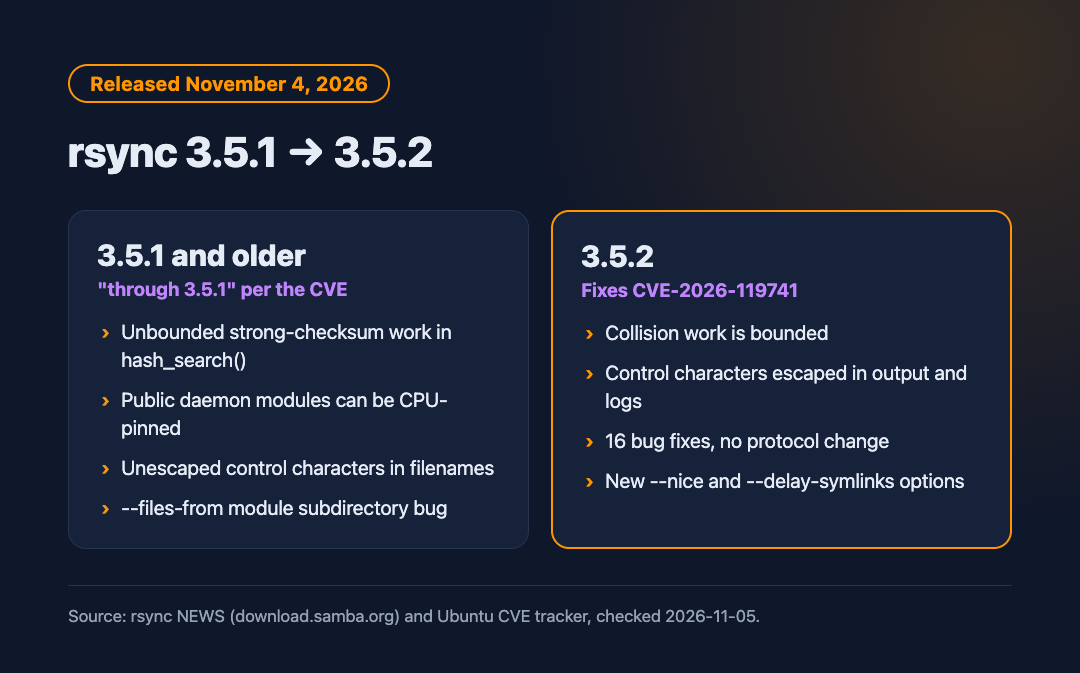
rsync 3.5.2 is a maintenance release on top of 3.5.1 (September 21, 2026). It carries one CVE fix, 15 other bug fixes and three small enhancements. The protocol number does not change, so a 3.5.2 machine still talks to older peers the same way.
The security fix: CVE-2026-119741
| Field | Value |
|---|---|
| CVE | CVE-2026-119741 |
| Affected | rsync through 3.5.1 |
| Fixed in | rsync 3.5.2 (upstream commit a7404a9) |
| Impact | CPU exhaustion on the sending side (denial of service) |
| CVSS (Ubuntu tracker) | 3.1: 7.5 High · 4.0: 8.7 High |
| Ubuntu priority | Medium |
The bug is in hash_search() in match.c, the delta-transfer code that looks for matching blocks. The receiving side sends block checksums to the sender. A malicious receiver can send weak checksums that collide with the sender's rolling window at offset after offset. Before 3.5.2, the sender then computed an expensive strong checksum at every one of those offsets, with no upper limit.
The CVE text names the realistic attack: an unauthenticated client pulls from a public daemon module and opens several connections at once. Each connection gets its own sender process, so the server's CPU fills up. It does not leak data or run code; the damage is availability.
The fix (pull request #1132, merged October 20, 2026) does two things. It removes duplicate entries from the checksum chain after one of them fails the strong check, and after four consecutive one-byte offsets hit weak-checksum collisions without a match, it jumps a full block instead of checking every byte.
Other fixes worth knowing
The 3.5.2 NEWS entry also lists these changes:
| Change | Who notices |
|---|---|
| Control characters in filenames and errors are escaped on stdout, stderr and logs | Anyone reading rsync logs in a terminal |
--files-from pulls from a daemon module subdirectory no longer read files from the module root | Daemon users with module filters |
Interrupted --append / --inplace runs no longer write the last 256 KiB twice | Large resumable transfers |
Forward-DNS names in hosts allow / hosts deny now work for IPv6 peers | Daemons with hostname ACLs |
Uploads through rrsync to an existing file work again | Restricted SSH upload setups |
New --nice and --delay-symlinks options | Optional |
Human-readable sizes use three significant digits and KiB-style units | Scripts that parse output |
The --files-from fix is a quiet one with security flavor: the old behavior could send, or delete with --remove-source-files, a same-named file that the module filter meant to exclude.
Is your rsync setup exposed?
Exposure depends on how rsync runs, not just on the version number. The CVE scenario needs a client that can act as the receiver and pull from your machine.
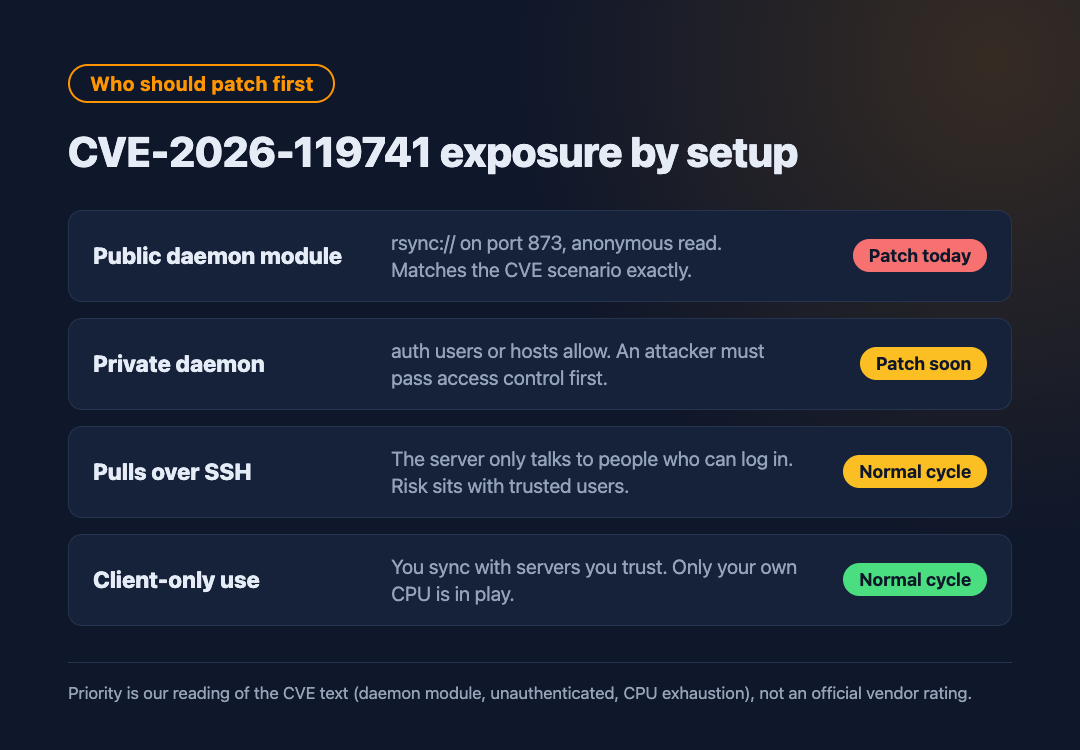
| Setup | How an attacker reaches it | Suggested timing |
|---|---|---|
| Public daemon module (anonymous read on port 873) | Anyone on the internet | Patch today |
Daemon with auth users or hosts allow | Only after passing access control | Patch this week |
Pulls over SSH (rsync user@host:/path .) | Only people who can log in | Normal update cycle |
| Client-only (you push to or pull from trusted servers) | A server you chose to trust | Normal update cycle |
The timing column is our reading of the CVE description, not an official rating. If you mirror Linux distributions, host public datasets, or run a backup target that accepts anonymous reads, you are in the first row.
Check your rsync version
Run this on every machine that serves files with rsync:
rsync --version | head -n 1The first line shows the version and protocol, for example rsync version 3.5.1 protocol version 33. Then see whether the daemon is running and listening:
systemctl status rsync rsyncd 2>/dev/null | grep -E 'Loaded|Active'
ss -ltnp | grep ':873'
Debian and Ubuntu name the unit rsync.service; Arch and Fedora use rsyncd.service. To list modules a client can see:
rsync rsync://<YOUR_SERVER>/If that prints module names without asking for a password, at least one module allows anonymous listing.
Distro version numbers can mislead
Distributions often backport the patch into an older version string. A Debian or Ubuntu package that still says 3.2.7 can be fixed. Check the tracker for your release instead of comparing numbers. As of November 5, 2026, this is what the trackers list:
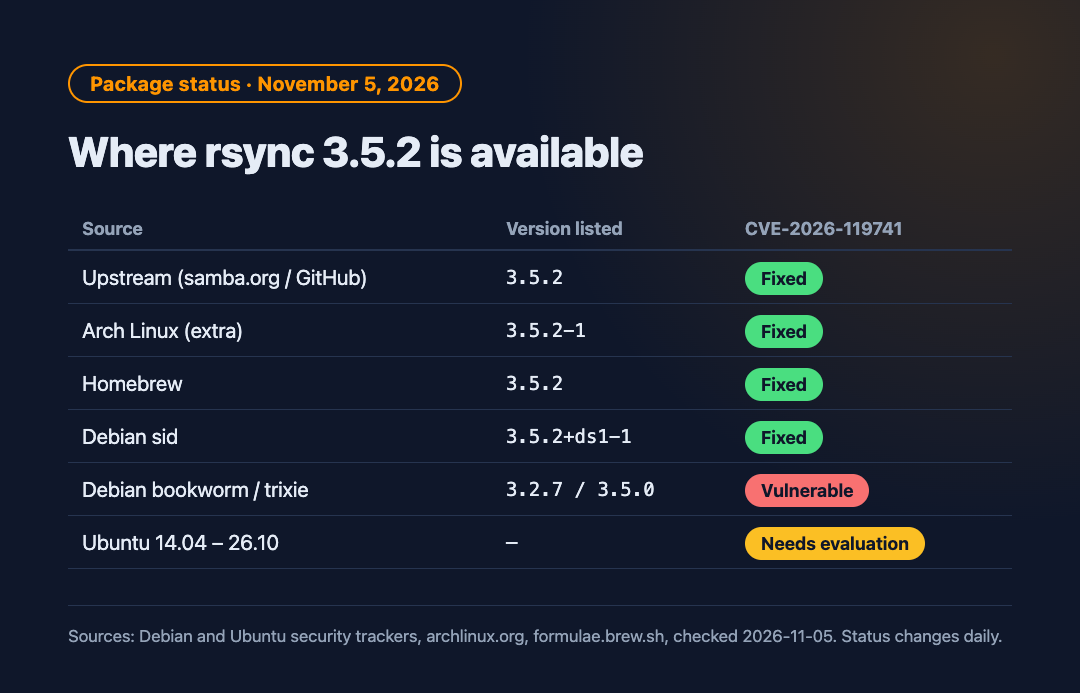
| Source | Version | CVE-2026-119741 |
|---|---|---|
| Upstream | 3.5.2 | Fixed |
| Arch Linux (extra) | 3.5.2-1 | Fixed |
| Homebrew | 3.5.2 | Fixed |
| Debian sid | 3.5.2+ds1-1 | Fixed |
| Debian bookworm / trixie | 3.2.7-1+deb12u6 / 3.5.0+ds1-0+deb13u1 | Vulnerable |
| Ubuntu 14.04 through 26.10 | — | Needs evaluation |
On Debian and Ubuntu, show the installed package version with:
dpkg -l rsync | tail -n 1
apt changelog rsync | grep -m1 -i 'CVE-2026-119741'
When the second command prints a line, your installed package's changelog mentions the fix.
How to update to rsync 3.5.2
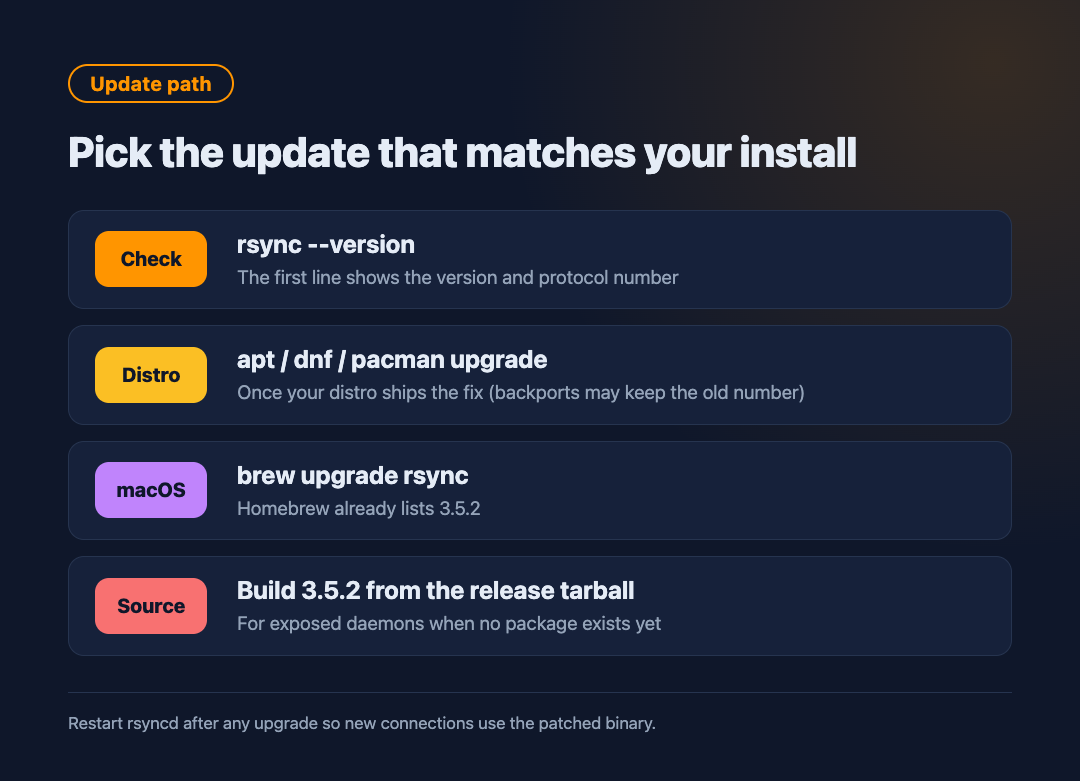
Pick the path that matches how rsync got onto the machine.
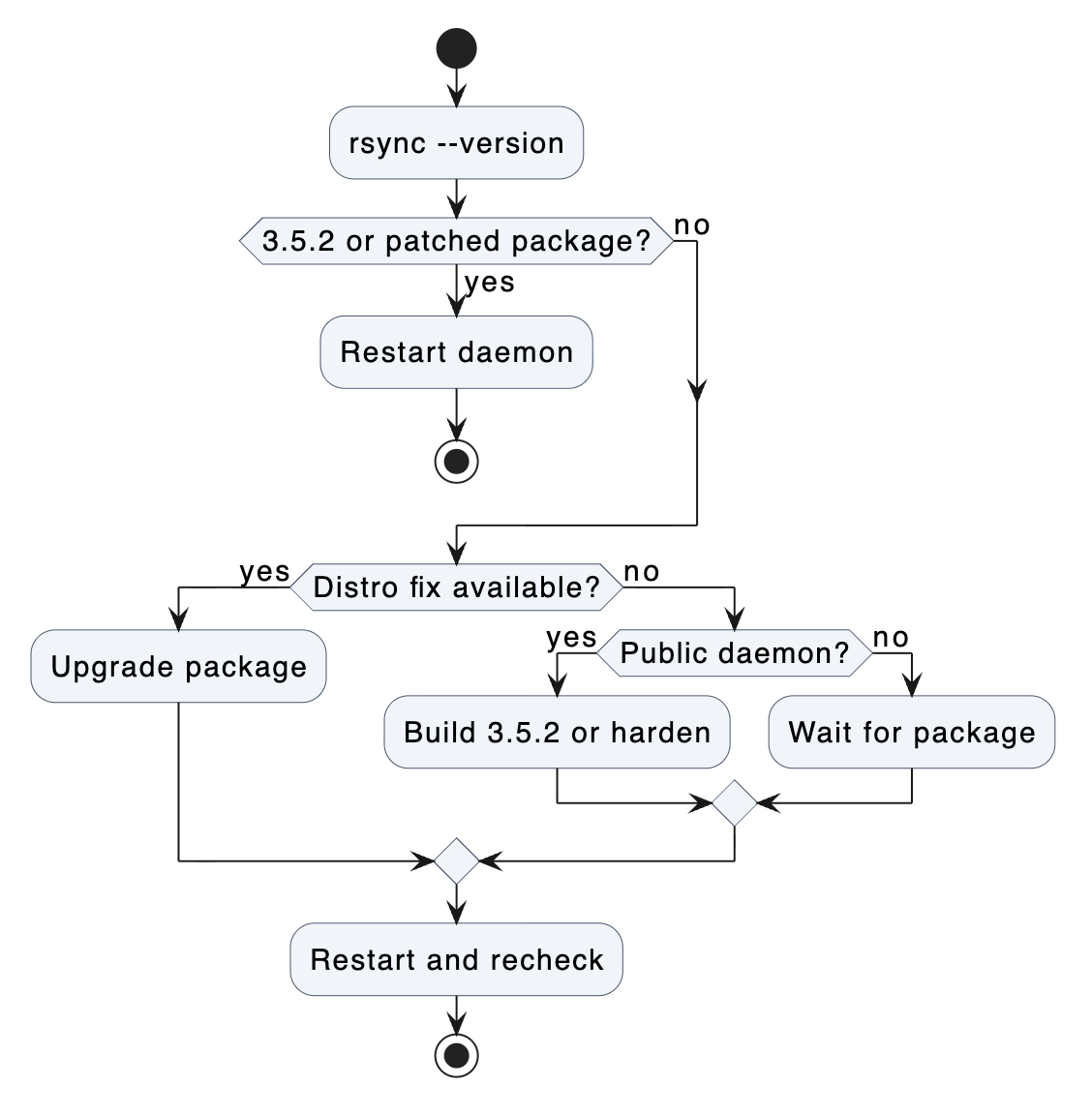
View PlantUML source
@startuml
skinparam defaultFontSize 15
skinparam ActivityBorderColor #475569
skinparam ActivityBackgroundColor #F1F5F9
start
:rsync --version;
if (3.5.2 or patched package?) then (yes)
  :Restart daemon;
  stop
else (no)
endif
if (Distro fix available?) then (yes)
  :Upgrade package;
else (no)
  if (Public daemon?) then (yes)
    :Build 3.5.2 or harden;
  else (no)
    :Wait for package;
  endif
endif
:Restart and recheck;
stop
@enduml
Arch Linux
Arch already ships 3.5.2-1 (updated November 3, 2026, 21:31 UTC):
sudo pacman -Syu
rsync --version | head -n 1
Debian and Ubuntu
Install the security update as soon as your release gets one. The command is the same either way:
sudo apt update
sudo apt install --only-upgrade rsync
Until the tracker shows a fix for your release, this only refreshes to whatever is current. Debian sid users get 3.5.2+ds1-1 now. For an exposed daemon on a stable release, use the hardening steps below while you wait. If you are moving servers between Ubuntu releases anyway, our Ubuntu 26.10 upgrade guide covers the release upgrade itself.
Fedora, RHEL and derivatives
sudo dnf upgrade --refresh rsyncCheck your vendor's advisory page for CVE-2026-119741 to confirm the package includes the fix; we did not find a Fedora or Red Hat status on November 5.
macOS with Homebrew
brew update
brew upgrade rsync
$(brew --prefix)/bin/rsync --version | head -n 1
The rsync that ships in macOS is Apple's own build, not the Samba project's 3.x line, and the CVE text covers "rsync through 3.5.1". The Homebrew copy is the one this update applies to.
Build from source
Only do this for exposed daemons when no package exists yet. Download the tarball and its signature from the official site:
cd /tmp
curl -O https://download.samba.org/pub/rsync/src/rsync-3.5.2.tar.gz
curl -O https://download.samba.org/pub/rsync/src/rsync-3.5.2.tar.gz.asc
gpg --verify rsync-3.5.2.tar.gz.asc rsync-3.5.2.tar.gz
tar xzf rsync-3.5.2.tar.gz && cd rsync-3.5.2
./configure
make
sudo make install
/usr/local/bin/rsync --version | head -n 1
gpg --verify needs the rsync release key in your keyring first. The default prefix is /usr/local, so point your daemon unit's ExecStart at /usr/local/bin/rsync or it will keep running the old binary. ./configure stops and tells you if optional libraries such as xxhash, zstd or lz4 are missing; install their -dev packages or follow its suggestions.
Restart the daemon
A running daemon keeps the old code in memory. Restart it after any upgrade:
sudo systemctl restart rsync      # Debian, Ubuntu
sudo systemctl restart rsyncd     # Arch, Fedora
Harden the rsync daemon until you can patch
These settings do not remove the bug, but they shrink how much damage one attacker can do. They are useful even after you update.
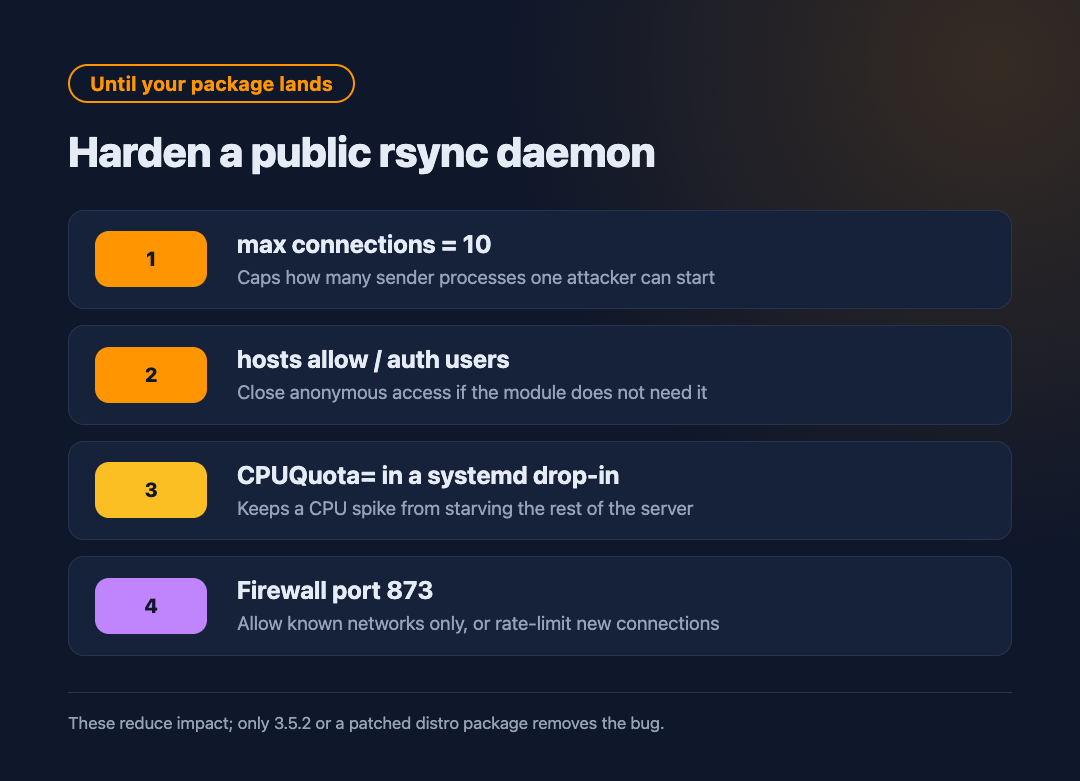
1. Cap connections per module. In /etc/rsyncd.conf:
[public]
    path = /srv/public
    read only = yes
    max connections = 10
    lock file = /run/rsyncd.lock
Each connection is one sender process, so this limits how many CPU-burning processes an attacker can start at once.
2. Close anonymous access where it is not needed.
[backups]
    path = /srv/backups
    read only = yes
    hosts allow = 10.0.0.0/8 192.168.0.0/16
    auth users = <YOUR_RSYNC_USER>
    secrets file = /etc/rsyncd.secrets
3. Put a CPU ceiling on the service.
sudo systemctl edit rsyncAdd:
[Service]
CPUQuota=50%
Then sudo systemctl daemon-reload && sudo systemctl restart rsync. Use rsyncd as the unit name on Arch and Fedora.
4. Firewall port 873. If only known networks need the daemon, allow just them. With ufw:
sudo ufw allow from 192.168.0.0/16 to any port 873 proto tcp
sudo ufw deny 873/tcp
SSH-based rsync does not use port 873 at all, so this does not affect rsync -e ssh transfers. If the server also runs OpenSSH, our OpenSSH 10.6 upgrade checklist covers that side.
If something breaks after the rsync update
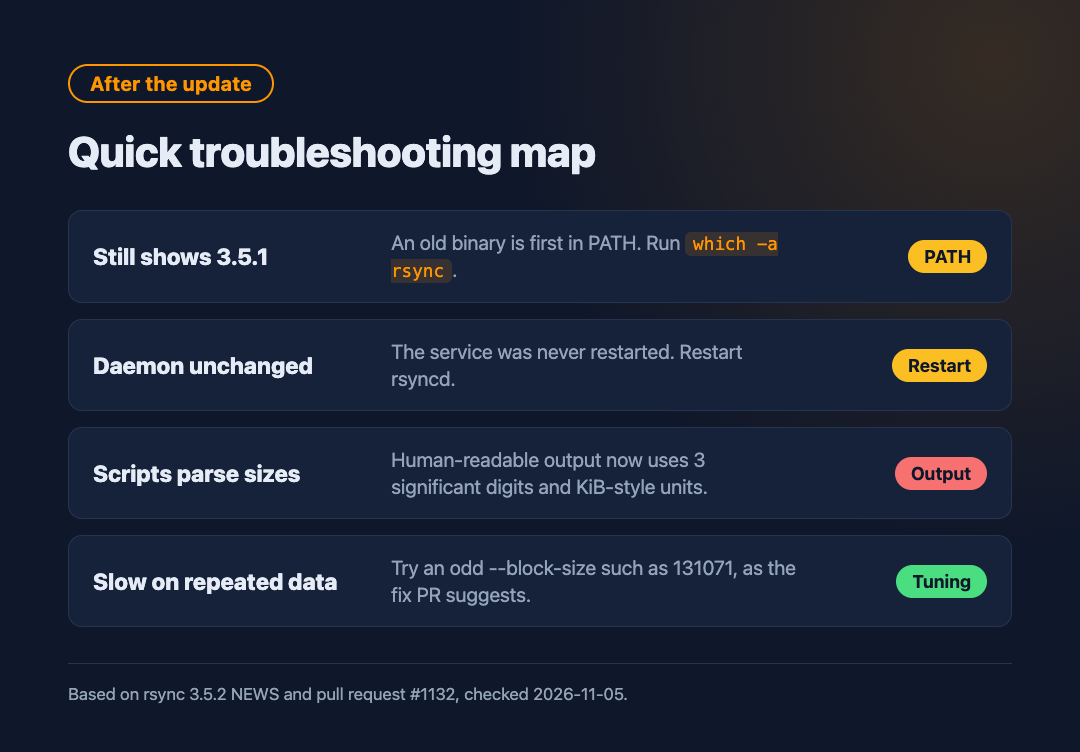
| Symptom | Likely cause | Fix |
|---|---|---|
rsync --version still says 3.5.1 | An older binary comes first in PATH | which -a rsync, then fix PATH or the unit's ExecStart |
| Daemon still vulnerable after upgrade | Service not restarted | systemctl restart rsync (or rsyncd) |
| Monitoring script fails to parse sizes | -h output now uses three significant digits and KiB-style suffixes | Use --no-human-readable or update the parser |
| Odd characters in logs look different | Control characters are now escaped | Expected; update log filters if they matched raw bytes |
| Slower transfers on files with long repeated runs | The new collision skip can turn some matches into literal data | Try an odd block size, e.g. --block-size=131071, as the fix PR suggests |
If you need the previous version back on a distro, reinstall the older package from your package cache, but remember that brings CVE-2026-119741 back. On a public daemon, keep the hardening settings in place if you roll back.
FAQ
Is CVE-2026-119741 being exploited? We found no report of exploitation as of November 5, 2026. Ubuntu rates it Medium priority with a CVSS 3.1 score of 7.5. That can change; check the CVE trackers linked below.
Do I need to update rsync on my laptop? If you only use rsync as a client against servers you trust, there is no rush. Install the update with your normal patches.
Does rsync over SSH need the fix? The CVE describes the public daemon case. The same sender code runs over SSH, but there an attacker first needs a login. Patch it with your normal cycle unless untrusted users can log in.
My distro still shows rsync 3.2.7. Am I vulnerable? Maybe not. Distros backport fixes without changing the version. Debian listed bookworm as vulnerable on November 5, and Ubuntu was still evaluating. Check the tracker for your release rather than the number.
What is the new --nice option? It lowers CPU and I/O priority for the local and remote rsync processes. Daemon clients and rrsync users cannot use it to raise server-side priority. See man rsync on 3.5.2 for the exact syntax.
Summary
Run rsync --version on every server, patch public daemon modules first, and restart the daemon after the upgrade. Where no package exists yet, cap connections, close anonymous access and limit CPU. For other server-side fixes this month, see our CVE-2026-98432 Linux kernel patch guide.
References
- rsync NEWS, 3.5.2 entry (4 Nov 2026) — rsync project, checked 2026-11-05
- RsyncProject/rsync releases — GitHub, checked 2026-11-05
- Pull request #1132: bound hash_search collision work — GitHub, checked 2026-11-05
- rsyncd.conf manual — rsync project, checked 2026-11-05
- CVE-2026-119741 — Ubuntu security tracker, checked 2026-11-05
- CVE-2026-119741 — Debian security tracker, checked 2026-11-05
- rsync package — Arch Linux, checked 2026-11-05
- rsync formula — Homebrew, checked 2026-11-05
- Rsync 3.5.2 fixes security vulnerability — Linuxiac, checked 2026-11-05