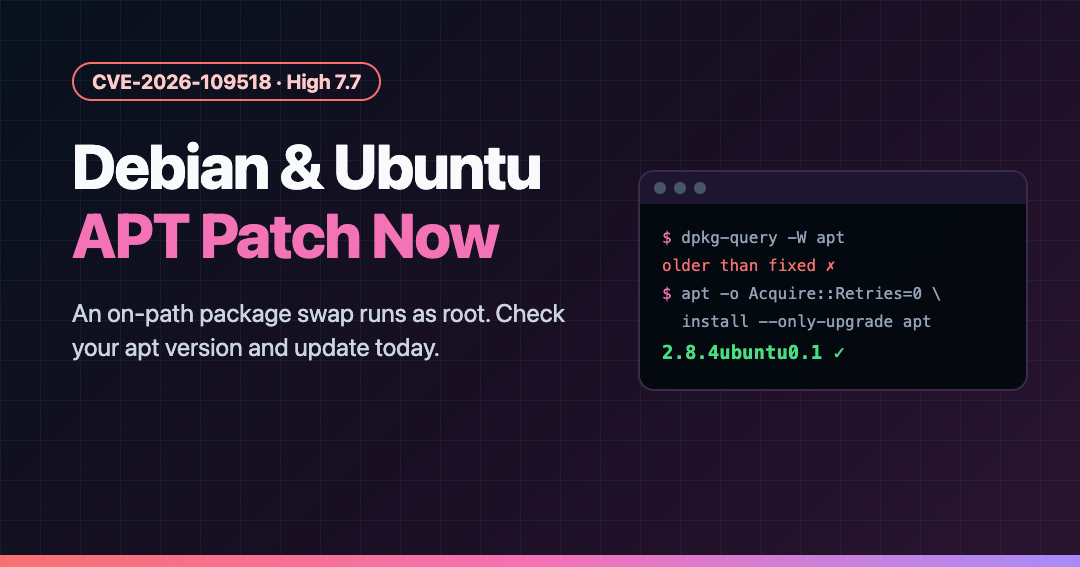
APT CVE-2026-109518 is a High-severity bug in the package manager on Debian, Ubuntu and their derivatives. An attacker on the download path, such as a malicious mirror or proxy, can swap a package after APT has verified it, and the swapped package then runs as root. Fixed APT versions shipped on November 4, 2026. Update the apt package now. On Debian 12 and 13 and on Ubuntu 22.04 LTS or newer, retries are on by default, so a default install is exposed.
Written November 6, 2026. Facts checked on November 6, 2026 against Ubuntu security notice USN-8996-1, the Ubuntu CVE page, Debian advisories DSA-6607-1 and DLA-4880-1, and the Debian security tracker. The commands are standard apt, dpkg and apt-config commands. They were not run on a test fleet for this post, so check the output on your own systems.
What changed: APT CVE-2026-109518 in short
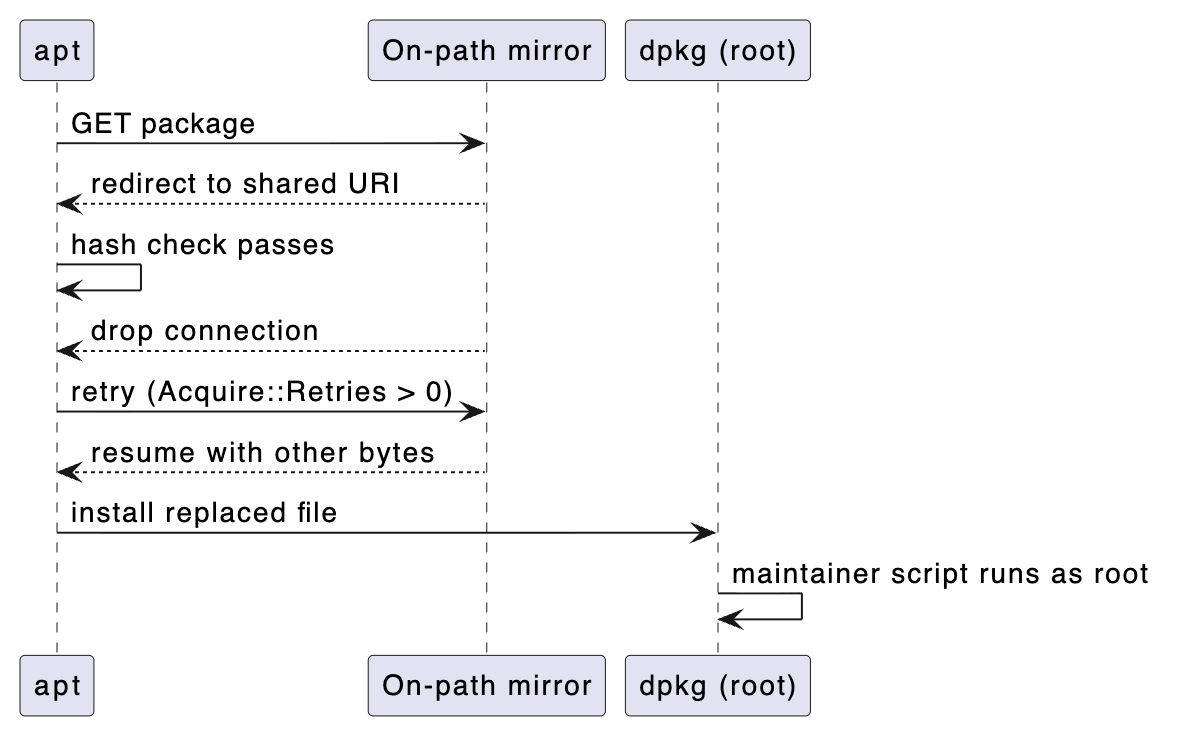
Max Justicz found the bug. Debian's advisory says APT "can merge two different package downloads after an HTTP redirect gives them the same URI." When APT then resumes an interrupted download, it mishandles the file on disk. Ubuntu describes the cause as improper hard-link handling during redirects and retries. The result is the same either way: the file APT checked is not the file dpkg installs.
Package signatures do not save you here. APT checks the hash, then the attacker replaces the content. That is why the impact is root code execution, not just a failed install.
| Field | Value |
|---|---|
| CVE | CVE-2026-109518 |
| Severity | High, CVSS 4.0 score 7.7 (Ubuntu priority High) |
| Weakness | CWE-62 hard link, CWE-367 TOCTOU race |
| Attacker | On-path: malicious mirror, proxy or network |
| Published | November 4, 2026 (USN-8996-1, DSA-6607-1, DLA-4880-1) |
The CVSS vector is AV:N/AC:L/AT:P/PR:N/UI:P. In plain words: no account needed, but the attacker must sit on the path, and someone on the machine must start a package install or upgrade. A cron job or unattended-upgrades run counts as that trigger.
When APT CVE-2026-109518 can be exploited
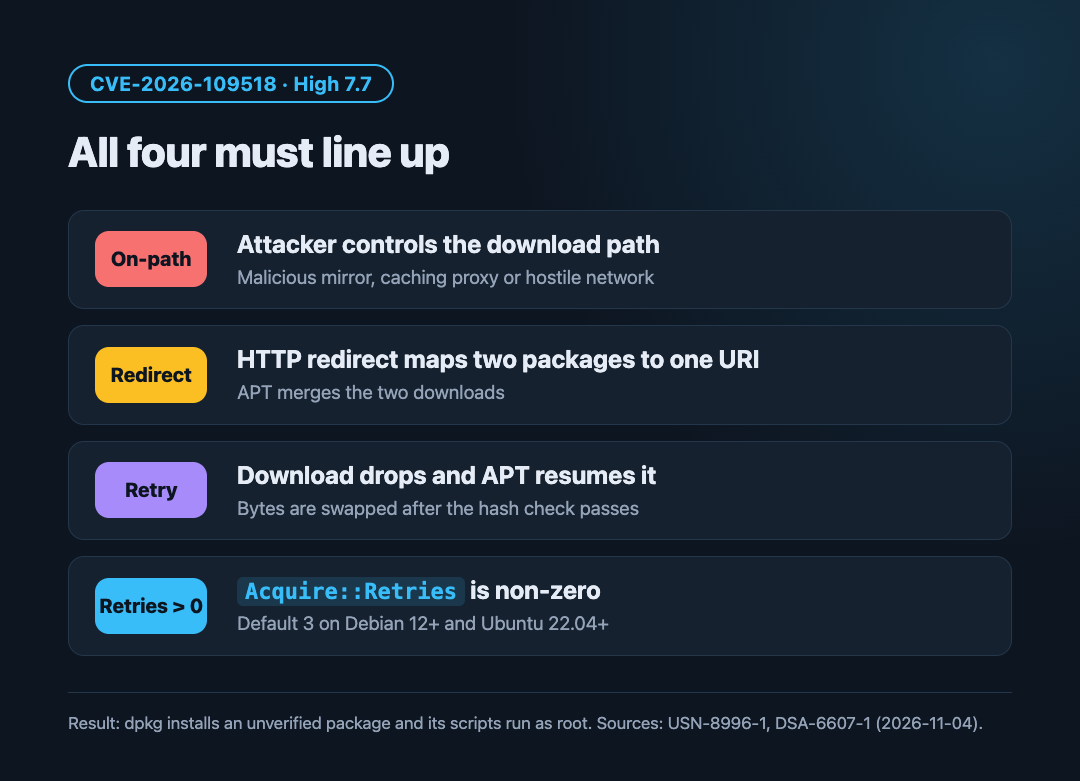
The bug only works when APT retries downloads. That depends on Acquire::Retries. The default became 3 in Debian 12 (bookworm) and Ubuntu 22.04 LTS. Older releases default to 0 and are not affected unless someone turned retries on.
View PlantUML source
@startuml
skinparam shadowing false
skinparam defaultFontSize 14
participant "apt" as A
participant "On-path mirror" as M
participant "dpkg (root)" as D
A -> M : GET package
M --> A : redirect to shared URI
A -> A : hash check passes
M --> A : drop connection
A -> M : retry (Acquire::Retries > 0)
M --> A : resume with other bytes
A -> D : install replaced file
D -> D : maintainer script runs as root
@enduml
Who is realistically at risk:
- Servers and CI runners that pull from plain
http://mirrors, or through a shared caching proxy such as apt-cacher-ng or a corporate proxy. - Laptops that run
apt upgradeon hotel, café or conference Wi-Fi. - Docker builds that run
apt-get installon Debian or Ubuntu base images.
No public exploitation reports had appeared as of November 6, 2026. Because the fix is a normal package update, there is little reason to wait.
Fixed APT versions for Debian and Ubuntu
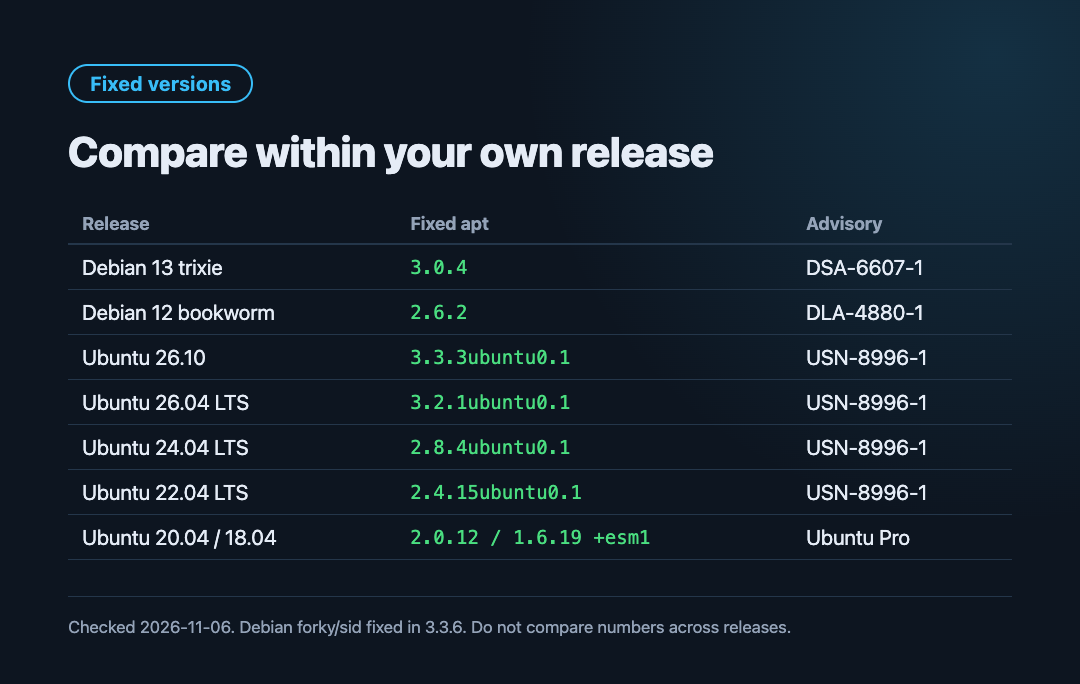
Compare your version with the fixed version for your own release. Do not compare numbers across releases. A 24.04 machine on 2.8.4ubuntu0.1 is patched, even though 3.0.4 is a bigger number.
| Release | Fixed apt version | Advisory |
|---|---|---|
| Debian 13 trixie | 3.0.4 | DSA-6607-1 |
| Debian 12 bookworm | 2.6.2 | DLA-4880-1 (LTS) |
| Debian forky / sid | 3.3.6 | tracker |
| Ubuntu 26.10 | 3.3.3ubuntu0.1 | USN-8996-1 |
| Ubuntu 26.04 LTS | 3.2.1ubuntu0.1 | USN-8996-1 |
| Ubuntu 24.04 LTS | 2.8.4ubuntu0.1 | USN-8996-1 |
| Ubuntu 22.04 LTS | 2.4.15ubuntu0.1 | USN-8996-1 |
| Ubuntu 20.04 LTS | 2.0.12+esm1 | Ubuntu Pro |
| Ubuntu 18.04 LTS | 1.6.19+esm1 | Ubuntu Pro |
Ubuntu 16.04 and 14.04 get fixes through Ubuntu Pro with the Legacy Support add-on. The Debian and Ubuntu updates also fix several out-of-bounds access bugs that the advisories do not detail. Derivatives such as Linux Mint, Pop!_OS and Raspberry Pi OS take APT from their base release, so watch for their own updates too.
Check your environment
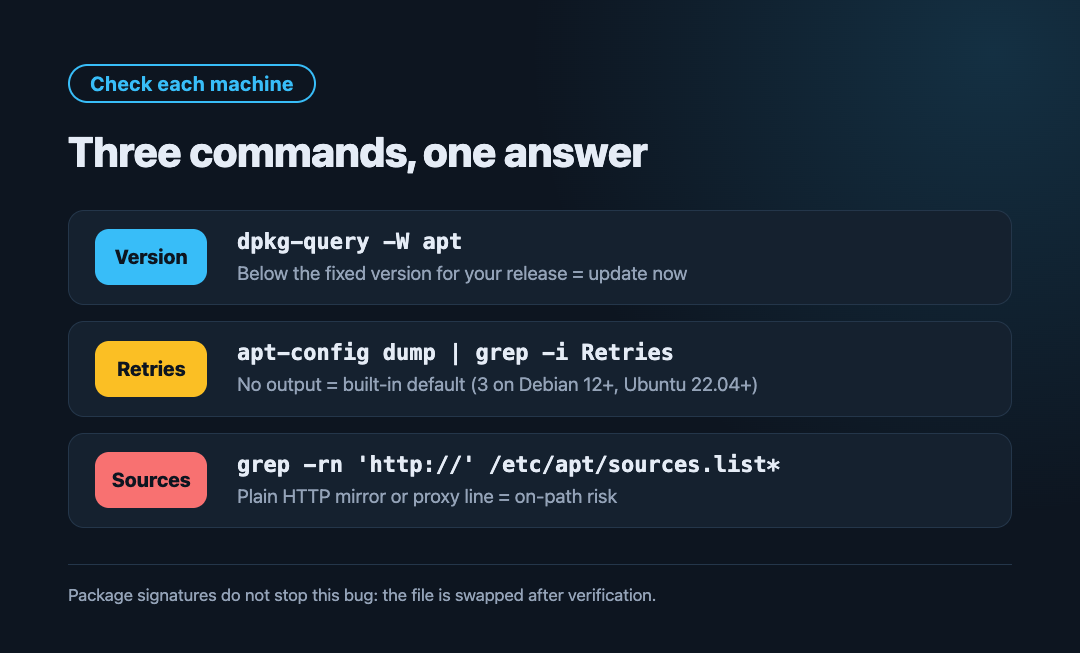
Three questions decide your exposure: which APT version is installed, whether retries are on, and whether your sources use plain HTTP.
1. Installed APT version
dpkg-query -W -f='${Version}\n' apt
. /etc/os-release && echo "$PRETTY_NAME"
Then compare against the table. dpkg --compare-versions does the math for you. Replace the fixed version with the one for your release:
FIXED="2.8.4ubuntu0.1"   # Ubuntu 24.04 example
dpkg --compare-versions "$(dpkg-query -W -f='${Version}' apt)" ge "$FIXED" \
  && echo "apt is patched" || echo "apt needs the update"
2. Is Acquire::Retries non-zero?
apt-config dump | grep -i 'Acquire::Retries'No output means the built-in default applies, which is 3 on Debian 12+ and Ubuntu 22.04+. Search for custom settings too:
grep -rni 'Retries' /etc/apt/apt.conf /etc/apt/apt.conf.d/ 2>/dev/null3. Do your sources use plain HTTP?
grep -rn 'http://' /etc/apt/sources.list /etc/apt/sources.list.d/ 2>/dev/null
grep -rni 'proxy' /etc/apt/apt.conf.d/ 2>/dev/null
Hits for http:// or a proxy line mean an on-path attacker has something to work with. Plain HTTP mirrors are still common, because APT relies on signatures instead of transport security. This bug is a case where that is not enough.
How to update APT safely
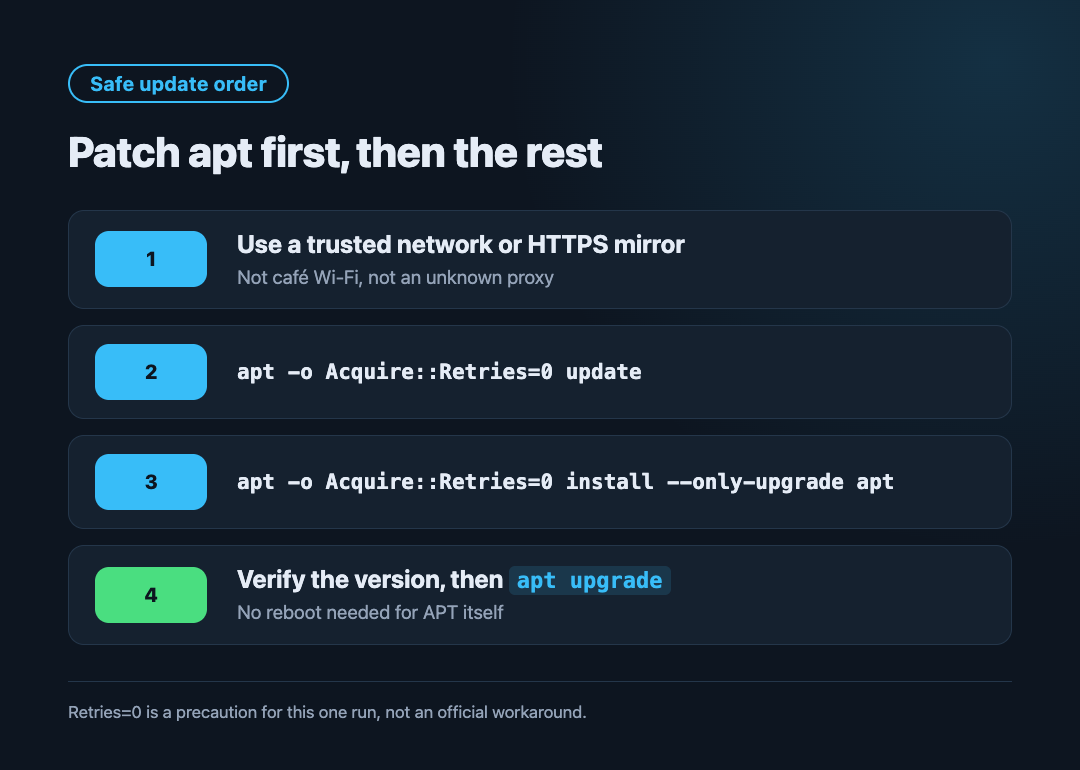
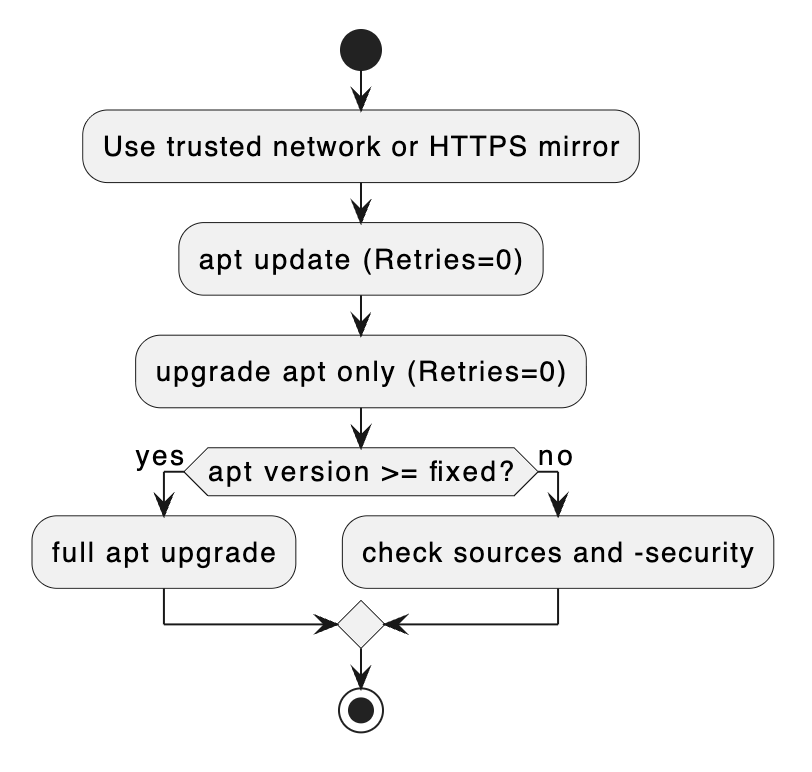
You fix APT with APT, so the update itself goes over the vulnerable code path. Two cheap precautions cut that risk: run the update from a network you trust, and turn retries off for this one command.
View PlantUML source
@startuml
skinparam shadowing false
skinparam defaultFontSize 14
start
:Use trusted network or HTTPS mirror;
:apt update (Retries=0);
:upgrade apt only (Retries=0);
if (apt version >= fixed?) then (yes)
  :full apt upgrade;
else (no)
  :check sources and -security;
endif
stop
@enduml
Debian and Ubuntu: update one machine
sudo apt -o Acquire::Retries=0 update
sudo apt -o Acquire::Retries=0 install --only-upgrade apt
dpkg-query -W -f='${Version}\n' apt
sudo apt upgrade
install --only-upgrade apt pulls in the matching libapt-pkg and apt-utils packages. Once APT is patched, the full apt upgrade can use retries again. The -o Acquire::Retries=0 flag is our precaution based on the condition in the advisory. It is not an official workaround, and it does not replace the update.
On Debian 12, the fix comes from the LTS security archive. Your sources need the bookworm-security line, usually deb.debian.org/debian-security bookworm-security main.
Many servers: Ansible example
- hosts: debian_ubuntu
  become: true
  tasks:
    - name: Update apt itself with retries off
      ansible.builtin.shell: |
        apt-get -o Acquire::Retries=0 update
        DEBIAN_FRONTEND=noninteractive apt-get -o Acquire::Retries=0 \
          install -y --only-upgrade apt
    - name: Show apt version
      ansible.builtin.command: dpkg-query -W -f='${Version}' apt
      register: aptver
      changed_when: false
    - ansible.builtin.debug:
        var: aptver.stdout
The ansible.builtin.apt module works too, but it uses your normal retry setting. A shell task keeps the -o Acquire::Retries=0 option explicit.
Unattended upgrades
apt ships through the security pocket, so unattended-upgrades with its default origins should install it within a day. Confirm it rather than assume it:
grep -i ' apt' /var/log/unattended-upgrades/unattended-upgrades.log | tail -5
zgrep -h ' upgrade apt:' /var/log/dpkg.log* | tail -3
Should I switch mirrors to HTTPS?
It is a good hardening step. An HTTPS mirror makes on-path tampering much harder, because the attacker can no longer forge redirects or resumed bytes. On Debian, deb.debian.org serves HTTPS. Change http:// to https:// in the source line and run sudo apt update to test. Ubuntu mirrors vary, so test yours first. If you also need a release upgrade, see How to upgrade to Ubuntu 26.10 from 26.04 LTS.
Containers and CI images
A container that runs apt-get install during a build uses the APT inside its base image, not the host's. Patch the host, and rebuild the images too.
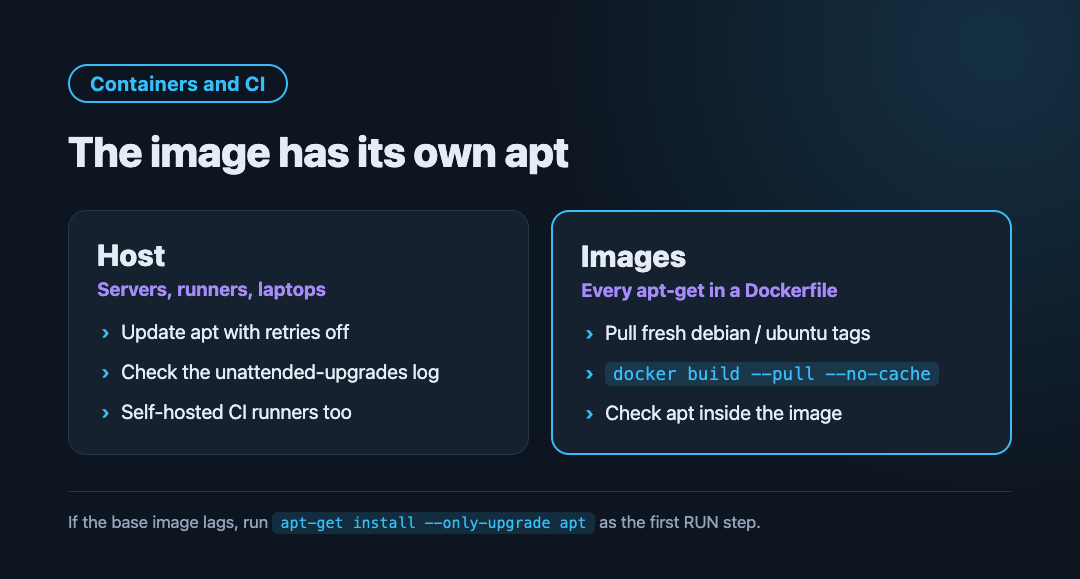
docker pull debian:trixie && docker pull ubuntu:24.04
docker run --rm ubuntu:24.04 dpkg-query -W -f='${Version}\n' apt
docker build --pull --no-cache -t <YOUR_IMAGE>:<TAG> .
If the official base image has not caught up yet, add the update as the first RUN in your Dockerfile:
FROM ubuntu:24.04
RUN apt-get -o Acquire::Retries=0 update \
 && apt-get -o Acquire::Retries=0 install -y --only-upgrade apt \
 && rm -rf /var/lib/apt/lists/*
Self-hosted CI runners on Debian or Ubuntu need the host update as well. Ephemeral cloud runners usually get it when the provider refreshes the runner image, so check the image version notes before you assume it is done.
If something goes wrong
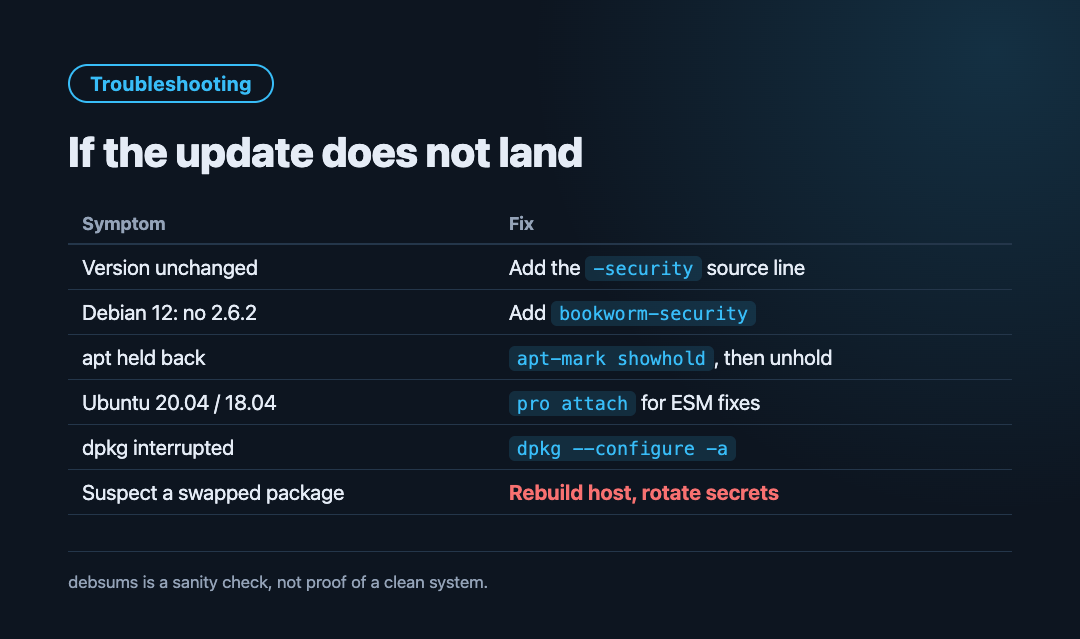
| Problem | Likely cause | Fix |
|---|---|---|
| Version did not change | No -security source | Add the security line, run apt update |
| Debian 12 finds no 2.6.2 | No bookworm-security line | Add it from debian-security |
apt is held back | apt-mark hold or pinning | apt-mark showhold, then unhold |
| Ubuntu 20.04 sees no fix | Fix is in ESM | sudo pro attach <YOUR_TOKEN> |
"dpkg was interrupted" or broken dependencies
Finish the old run first:
sudo dpkg --configure -a
sudo apt -o Acquire::Retries=0 -f install
You suspect a package was swapped
Look for installs that ran through an untrusted mirror or proxy before you patched. debsums checks installed files against the package's own checksum list:
sudo apt install debsums
sudo debsums -s 2>&1 | head
debsums is a sanity check, not proof. A malicious package can ship its own matching checksums, and its maintainer script may already have run as root. If you have real evidence of tampering, treat the host as compromised: rebuild it from a clean image and rotate any secrets it held. The same playbook from our Linux kernel CVE-2026-98432 patch guide applies.
FAQ
Is APT CVE-2026-109518 being exploited? We found no public reports of attacks as of November 6, 2026. The attacker needs an on-path position, which limits mass attacks, but malicious mirrors and shared proxies are realistic.
I only use HTTPS mirrors. Am I safe? Much safer, because a network attacker cannot forge the redirect or the resumed bytes. A malicious mirror or proxy that terminates TLS can still try. Update APT anyway.
Does setting Acquire::Retries to 0 fix it? The advisories say the bug only applies when retries are non-zero, so 0 blocks this path. But it does not fix the out-of-bounds bugs patched in the same update, and it makes flaky downloads fail. Use it as a short-term measure, not instead of the update.
Do I need to reboot? No. APT is not a running service. The next apt command uses the new code.
What about Debian 11 bullseye? The Debian tracker page did not list bullseye on November 6, 2026. Its default Acquire::Retries is 0, so a default install is not exposed. Check the tracker if you enabled retries.
Summary
Run dpkg-query -W apt on every Debian and Ubuntu machine and compare it with the fixed version for that release: 3.0.4 on Debian 13, 2.6.2 on Debian 12, and 2.8.4ubuntu0.1 on Ubuntu 24.04. Update APT first with retries off, from a trusted network, then run your normal upgrade and rebuild your container images. While you are patching, check that your SSH servers are current too. See OpenSSH 10.6p2: fix the Alpine Linux password bypass.
References
- USN-8996-1: APT vulnerability — Ubuntu security notice, checked 2026-11-06
- CVE-2026-109518 — Ubuntu CVE page with CVSS and per-release status, checked 2026-11-06
- DSA-6607-1 apt — Debian security advisory (trixie), checked 2026-11-06
- DLA-4880-1 apt — Debian LTS advisory (bookworm), checked 2026-11-06
- CVE-2026-109518 in the Debian security tracker — checked 2026-11-06
- apt source package in the Debian security tracker — checked 2026-11-06
- Debian security FAQ — how to receive security updates, checked 2026-11-06
- Debian and Ubuntu fix APT security flaw — Cyberpress, checked 2026-11-06
3 thoughts on “APT CVE-2026-109518: Patch apt on Debian and Ubuntu Now”