The Trigger.dev breach of November 1, 2026 exposed root API keys, and with them the environment variables, for 0.66% of Trigger.dev Cloud customers. If you got an impact email on November 1 or 2, or see a banner in your dashboard, treat every secret in the affected environments as stolen: create new Trigger.dev keys, rotate each third-party credential at its provider, then revoke the old ones. If you got no notice and you self-host, Trigger.dev says you were not affected.
Written November 9, 2026. Facts checked on November 9, 2026 (KST) against Trigger.dev's incident report (published November 6, 2026), its first disclosure post and status page entry from November 1, and the Trigger.dev API keys and environment variables docs. I was not one of the affected customers and have not run this rotation on a real breached account. The scripts below are my own examples, not Trigger.dev's — test them on a non-production environment first.
What happened in the Trigger.dev breach
Trigger.dev is a hosted platform for background jobs and AI workflows written in TypeScript. On November 1, 2026, it got infrastructure alerts for unusual activity and found that an attacker had obtained customer root API keys for some environments. A root key gives full access to an environment's settings, so the attacker could read that environment's variables.
Trigger.dev has not said how the attacker got in. Its report says it will share the attack vector "when it is responsible to do so".
| Date (UTC) | Event |
|---|---|
| Nov 1, 2026 | Alerts for anomalous activity; attack blocked |
| Nov 1, ~21:36 | First email to impacted customers |
| Nov 1, 22:50 | Status page disclosure posted |
| Nov 2, ~20:27 | Second email to impacted customers |
| Nov 6, 12:27 | Full incident report published |
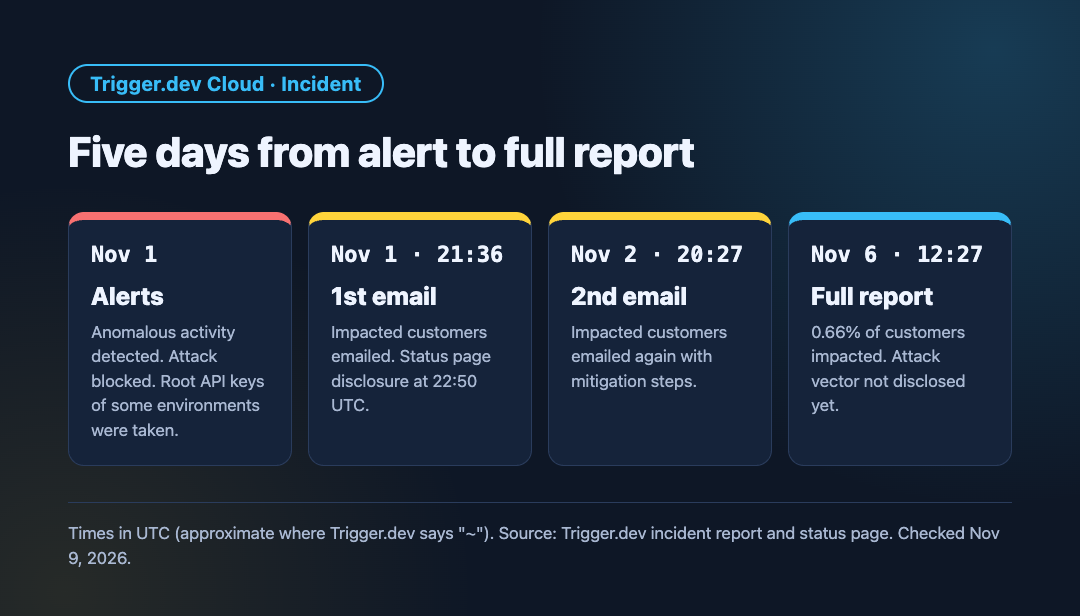
Trigger.dev says it removed the attacker's access, rotated its own internal secrets, reviewed API logs across all customer environments, revoked the API keys of every impacted environment, and notified law enforcement. Because the old keys are already revoked, affected apps that still use them will fail to trigger tasks until you replace them.
What was exposed, and what was not
The report separates what the attacker reached from what it found no evidence of.
| Item | Status | Rotate? |
|---|---|---|
| Root API keys (impacted envs) | Obtained | Already revoked — create new |
| Environment variables | Readable via root key | Yes, all of them |
| Runs, deployments, schedules metadata | Listed in some envs | No secret, but review |
| Webhook signing secrets | Not exposed | Not needed |
| Dashboard accounts, other data | No evidence of access | — |
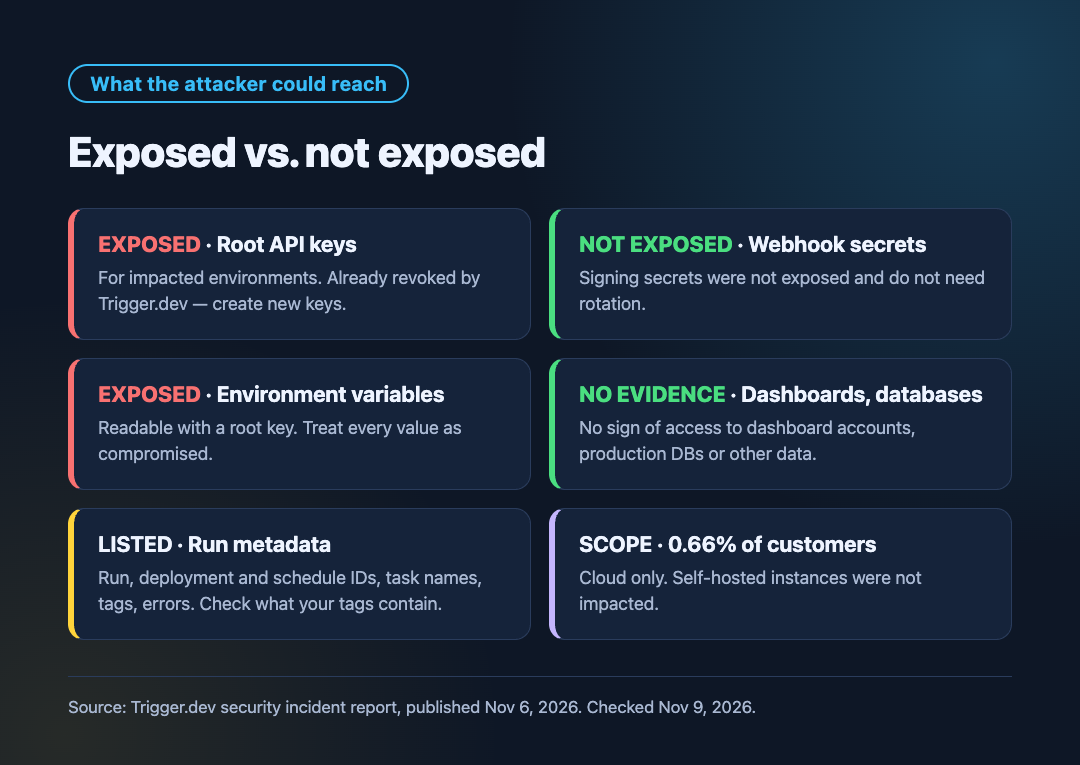
The run metadata includes run IDs, task names, idempotency keys, tags, run status, deployment errors and schedule external IDs. None of that is a credential, but tags or metadata sometimes carry customer IDs or emails, so check what your own tasks put there.
Trigger.dev stores environment variables encrypted at rest and decrypts them just in time for a run. That did not help here: the attacker used valid root keys, which are allowed to read variables.
Were you affected by the Trigger.dev breach?
Trigger.dev's answer is short: if you did not receive an impact notification, you were not affected. Check three places.
- Email. Search the inbox of every org owner for mail from Trigger.dev sent on November 1 or November 2, 2026.
- Dashboard banner. Sign in to cloud.trigger.dev and look for an incident banner on your organization.
- Self-hosting. Self-hosted instances were not impacted. Trigger.dev still recommends single-tenant mode: set
WHITELISTED_EMAILSso only accounts you control can sign up.
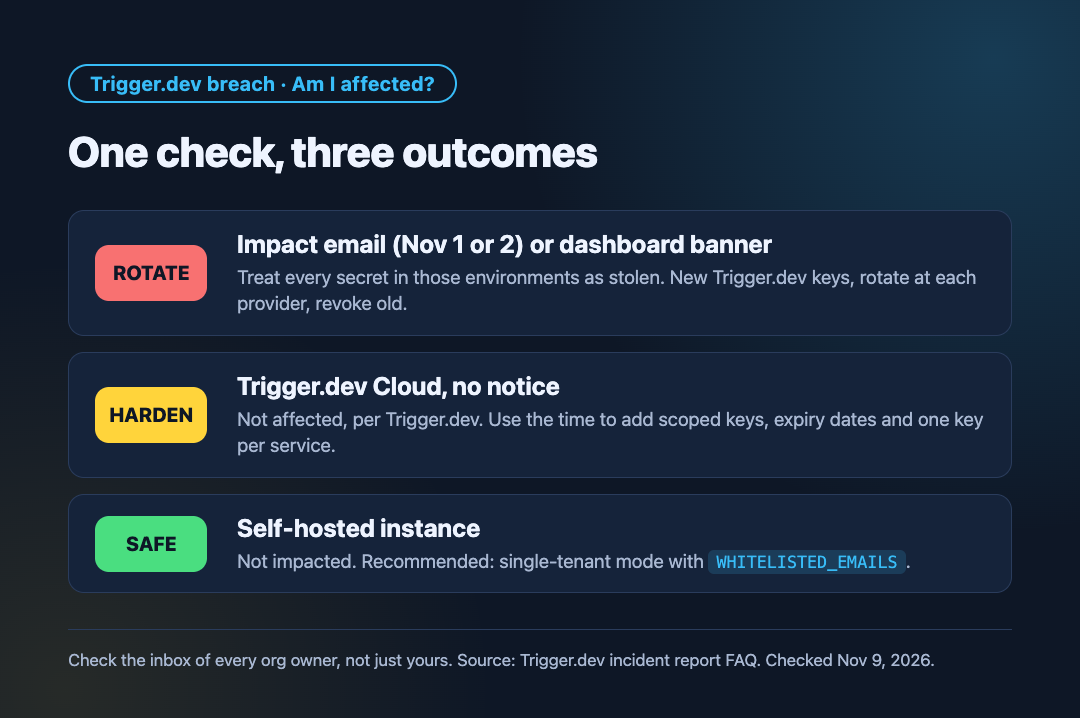
If you are not affected, you do not need to rotate anything. The hardening steps later in this guide are still worth an hour.
How to rotate secrets after the Trigger.dev breach
The order matters. Create replacements before you revoke, so production keeps running, and rotate keys that reach outside Trigger.dev before anything else.
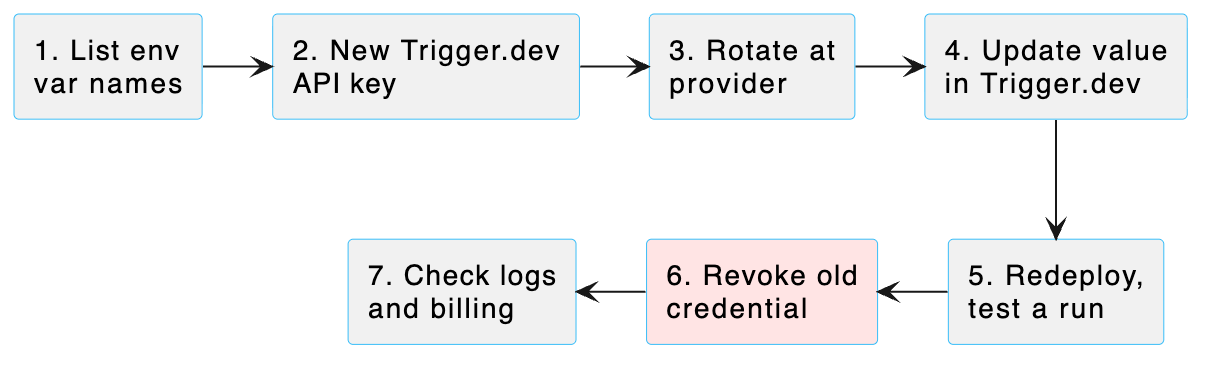
View PlantUML source
@startuml
skinparam shadowing false
skinparam defaultFontSize 14
skinparam rectangleBorderColor #38BDF8
rectangle "1. List env\nvar names" as a
rectangle "2. New Trigger.dev\nAPI key" as b
rectangle "3. Rotate at\nprovider" as c
rectangle "4. Update value\nin Trigger.dev" as d
rectangle "5. Redeploy,\ntest a run" as e
rectangle "6. Revoke old\ncredential" as f #FFE4E4
rectangle "7. Check logs\nand billing" as g
a -right-> b
b -right-> c
c -right-> d
d -down-> e
e -left-> f
f -left-> g
@enduml
Step 1: List the variable names in each affected environment
You need a full inventory before you can rotate. The dashboard's Environment Variables page shows the names. For a project with many variables, the SDK's envvars.list() is faster. This script prints names only, never values:
// list-env-names.ts — run with: npx tsx list-env-names.ts
import { configure, envvars } from "@trigger.dev/sdk";

configure({ accessToken: process.env.TRIGGER_ACCESS_TOKEN }); // tr_pat_... personal access token

const projectRef = "<YOUR_PROJECT_REF>"; // proj_...
for (const env of ["dev", "staging", "prod"] as const) {
  const vars = await envvars.list(projectRef, env);
  console.log(`\n[${env}] ${vars.length} variables`);
  for (const v of vars) console.log(" -", v.name);
}
Paste the names into a spreadsheet with four columns: name, provider, owner, rotated (yes/no). Skip the environments that were not named in your impact email.
Step 2: Create new Trigger.dev API keys
The old keys of impacted environments are already revoked. Follow the steps in your impact email first; Trigger.dev's docs describe the general flow:
- Select the project and environment, then open API keys.
- Click New API key, give it a name (one per service, for example
web-backend-prod) and, if your plan allows, the narrowest access preset. - Copy the key right away. The full value is shown only once.
- Put it in your backend's secret store as
TRIGGER_SECRET_KEY, then redeploy the backend.
For example, on Vercel you would replace the variable and redeploy:
vercel env rm TRIGGER_SECRET_KEY production
vercel env add TRIGGER_SECRET_KEY production   # paste tr_prod_sk_<NEW_KEY> when prompted
vercel deploy --prod
If you deploy tasks from CI with TRIGGER_ACCESS_TOKEN, check that token too and replace it if it lived anywhere near the affected environment.
Step 3: Rotate third-party secrets, outside-reaching keys first
Rotate at the provider, not in Trigger.dev. Changing the value in Trigger.dev alone does not stop an attacker who already has the old one.
| Priority | Secret type | Why first |
|---|---|---|
| 1 | Cloud (AWS, GCP, Azure) | Full infrastructure access |
| 2 | Payment (Stripe etc.) | Direct money risk |
| 3 | AI provider keys | Abused for paid usage |
| 4 | Databases | Data theft |
| 5 | SaaS tokens, SMTP, webhooks out | Spam, data access |
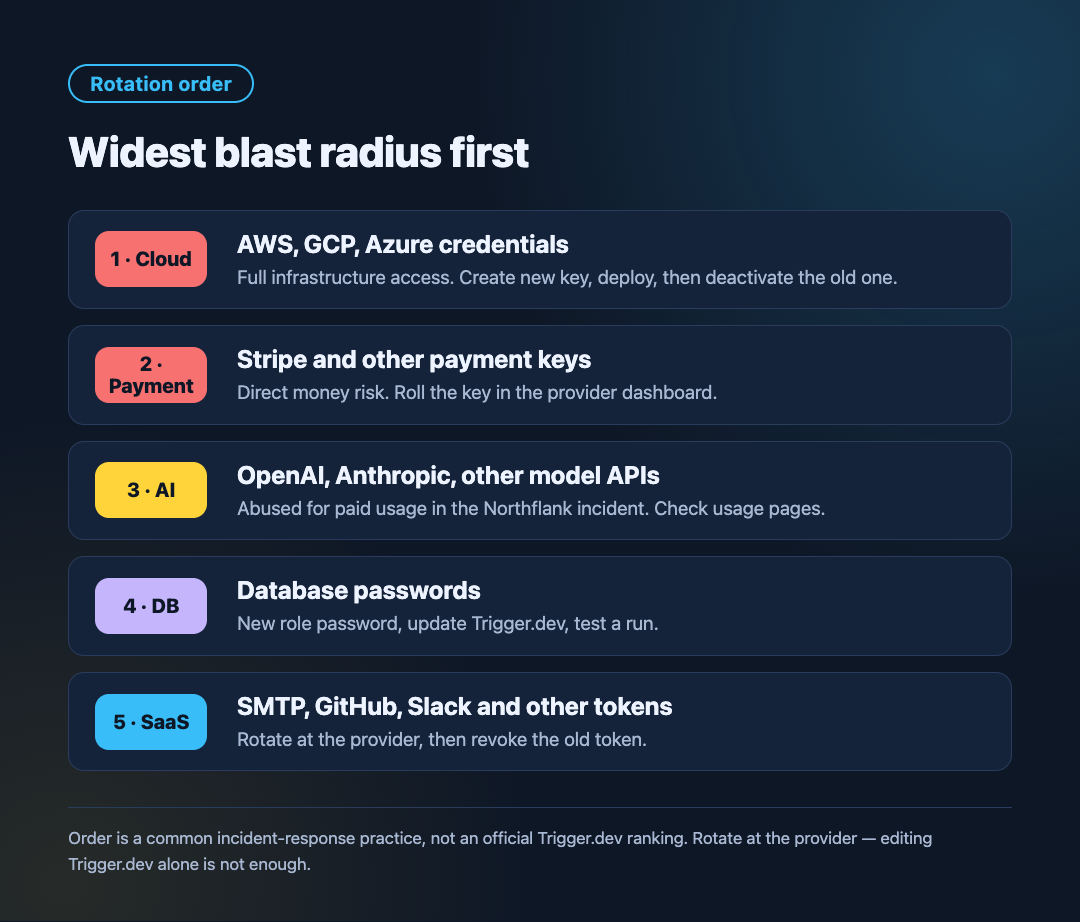
This order is common incident-response practice, not an official Trigger.dev ranking. Adjust it if, for example, your database holds the most sensitive data you own.
AI keys are not a guess. In the similar Northflank incident disclosed two days earlier (October 30), customers reported unauthorized use of AI API keys stored on that platform. Two common rotations look like this. For an AWS IAM user key, create the new key first, deploy it, then deactivate and delete the old one:
aws iam create-access-key --user-name <IAM_USER>
aws iam update-access-key --user-name <IAM_USER> --access-key-id <OLD_KEY_ID> --status Inactive
aws iam delete-access-key --user-name <IAM_USER> --access-key-id <OLD_KEY_ID>
-- PostgreSQL: set a new password for the role your tasks use
ALTER ROLE app_worker WITH PASSWORD '<NEW_STRONG_PASSWORD>';For Stripe, OpenAI, Anthropic and similar dashboards, create a new key, deploy it, then delete or roll the old key in that provider's API keys page.
Step 4: Update Trigger.dev and redeploy
Put each new value into Trigger.dev. The dashboard edit menu works for a few variables. For many, use envvars.update():
import { configure, envvars } from "@trigger.dev/sdk";

configure({ accessToken: process.env.TRIGGER_ACCESS_TOKEN });

await envvars.update("<YOUR_PROJECT_REF>", "prod", "OPENAI_API_KEY", {
  value: process.env.NEW_OPENAI_API_KEY!, // read from your shell, not hard-coded
});
Variables are injected when a run starts, so new runs pick up the new value. Trigger one test run per critical task and confirm it succeeds before Step 5.
Step 5: Revoke old credentials and check usage
Only now delete or deactivate every old credential at its provider. Then look back at least to November 1, 2026 in each provider's logs and billing: AWS CloudTrail, your database connection logs, and the usage pages of your AI providers. Unexpected spikes are the clearest sign that a key was used.
The same pattern applied after the LiteLLM 1.107.0 compromise, where AI keys were the main target.
Harden your Trigger.dev setup after the breach
Rotation fixes this incident. These settings shrink the next one. Most of them come from Trigger.dev's API keys docs and the product changes listed in the incident report.
| Control | What it does | Source |
|---|---|---|
| Scoped access presets | Key can only trigger, observe or deploy | API keys docs |
| One key per service | Revoke one service without downtime | API keys docs |
| Key expiration dates | Temporary keys die automatically | API keys docs |
| IP allowlist (new) | Scoped key only works from your IPs | Nov 6 report |
| Workload identity (OIDC) | No long-lived cloud keys in env vars | API keys docs |
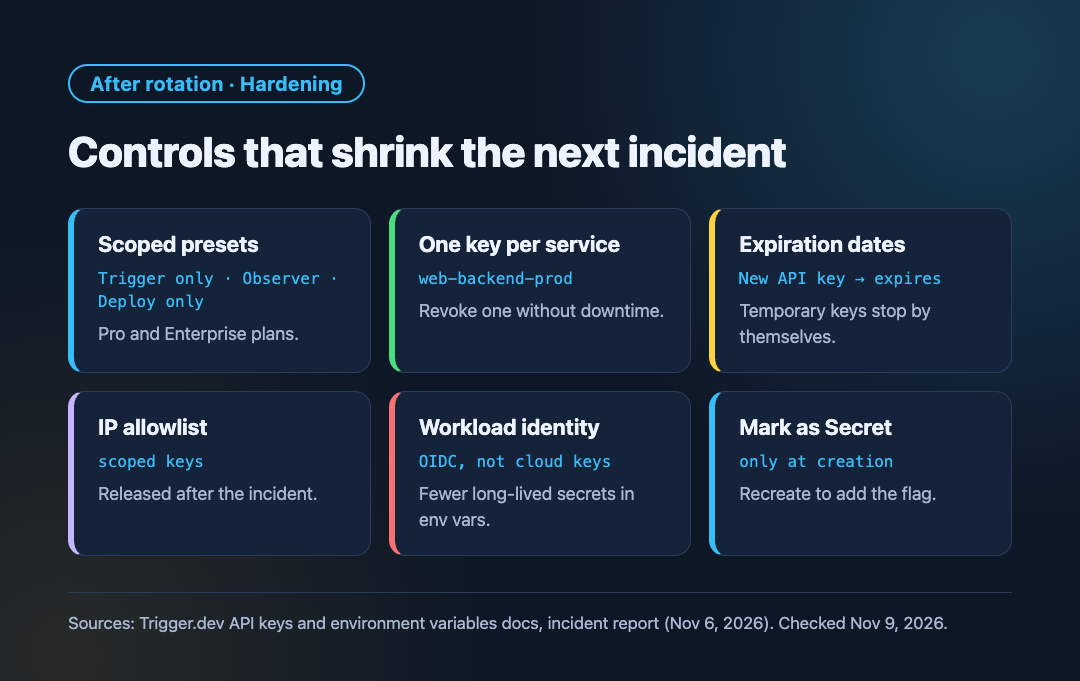
A few details from the docs worth knowing:
- Presets (Pro and Enterprise): options include Trigger only, Task operator, Observer, Deploy only and Variables only. A web backend that only starts runs rarely needs more than Trigger only. Free and Hobby plans offer only No restrictions, and self-hosted instances support only No restrictions keys.
- Cloud access: Trigger.dev recommends workload identity for AWS and other cloud access from deployed tasks, instead of storing cloud keys as variables.
- Secret flag: mark sensitive variables as Secret when you create them; the value is then hidden in the dashboard. You cannot add the flag later — delete and recreate the variable instead.
- Central source:
syncEnvVarsintrigger.config.tspulls variables from your own secret manager at deploy time, so the next rotation happens in one place. If you already run a similar pipeline, the approach in GitHub Actions lockfile is a good companion for locking down CI itself.
If something breaks after rotation
| Symptom | Likely cause | Fix |
|---|---|---|
| 401 when triggering tasks | Backend still uses revoked key | Set new TRIGGER_SECRET_KEY, redeploy |
| Runs fail on missing variable | Variable deleted instead of updated | Re-add it with the new value |
| Runs fail on provider auth | Old value still in Trigger.dev | Update with envvars.update(), rerun |
trigger deploy fails in CI | Old TRIGGER_ACCESS_TOKEN | Create a new token, update CI secret |
| No Edit option in dashboard | Editing not enabled for your org yet | Delete and recreate the variable |
Revoking a key does not revoke public access tokens it already created. Those last up to 30 days (15 minutes by default), so a short default lifetime limits the window.
If you are stuck, Trigger.dev asks impacted customers to email help@trigger.dev from their account address; it says incident support is prioritized.
FAQ
Do I need to rotate webhook signing secrets? No. Trigger.dev's report says webhook signing secrets were not exposed and do not need rotation.
I'm on Trigger.dev Cloud but got no email. Should I rotate anyway? Trigger.dev says customers who did not receive an impact notification were not affected. Rotation is optional; adding scoped keys and expiration dates is the better use of your time.
Was self-hosted Trigger.dev affected? No. The report says self-hosters were not impacted. It recommends setting WHITELISTED_EMAILS to accounts you control.
How did the attacker get the root API keys? Not disclosed as of November 9, 2026. Trigger.dev says it will share the attack vector later. Watch its blog and status page for an update.
Is this related to the Northflank breach? Nothing published links them. Both incidents, two days apart, led to the same advice: assume platform-stored environment variables are compromised and rotate at the provider. A similar lesson came from the Docker Desktop 4.97.0 token log leak.
Start with the impact email check today. If you were affected, rotate cloud and payment keys first, and keep the old ones alive only until the new ones are deployed.
References
- Trigger.dev: Security incident report: Sunday November 1st (published November 6, 2026; checked November 9, 2026)
- Trigger.dev: Security Disclosure: Sunday November 1st (checked November 9, 2026)
- Trigger.dev status: Security Disclosure incident page (checked November 9, 2026)
- Trigger.dev Docs: API keys (checked November 9, 2026)
- Trigger.dev Docs: Environment variables (checked November 9, 2026)
- Trigger.dev Docs: Management API — update environment variable (checked November 9, 2026)
- AWS Docs: Manage access keys for IAM users (checked November 9, 2026)
- BleepingComputer: Northflank security breach leads to abuse of customers' AI API keys (checked November 9, 2026)
1 thought on “Trigger.dev Breach: Check Impact and Rotate Your Secrets Now”