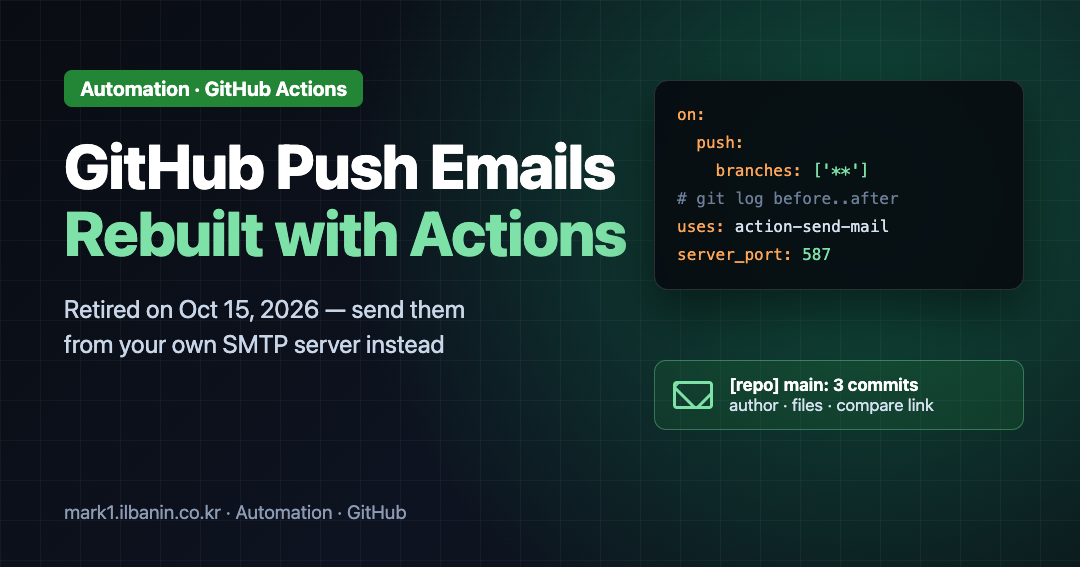
GitHub push email notifications are gone: since October 15, 2026, GitHub.com no longer sends the per-repository emails that listed every pushed commit. To get them back, add a GitHub Actions workflow that runs on push, builds the commit list with git log, and sends it through your own SMTP server. The workflow below needs three secrets and two variables.
This guide shows a copy-ready workflow, how to store SMTP credentials, how it handles new branches, force pushes and deleted branches, and the limits you should know. Facts come from the GitHub Changelog, GitHub Docs and the dawidd6/action-send-mail repository, checked on October 21, 2026.
What changed with GitHub push email notifications
The old feature lived under Settings → Integrations → Email notifications in each repository. An admin entered up to two addresses, and every push produced an email with the repository name, branch, commit SHA (linked to the diff), author, date, changed files and commit message.
GitHub's October 15, 2026 changelog entry says these emails are no longer sent. The reason given is spam and abuse: recipients never had to consent, so the feature could push unwanted mail through GitHub's email system. GitHub's suggested replacement is a workflow triggered by push events that sends mail through your own SMTP server or email provider. The entry ships no sample workflow, so here is one.
| Old push emails | Actions workflow (this guide) | |
|---|---|---|
| Who sends | GitHub's mail servers | Your SMTP server or provider |
| Recipients | Up to 2 addresses | Any list you set |
| Content | Fixed format | Anything you script |
| Cost | Free | Uses Actions minutes on private repos |
The changelog does not mention GitHub Enterprise Server. The GHES 3.17 docs still describe the setting as of October 21, 2026, so check your instance's release notes if you run GHES.
How the replacement workflow works
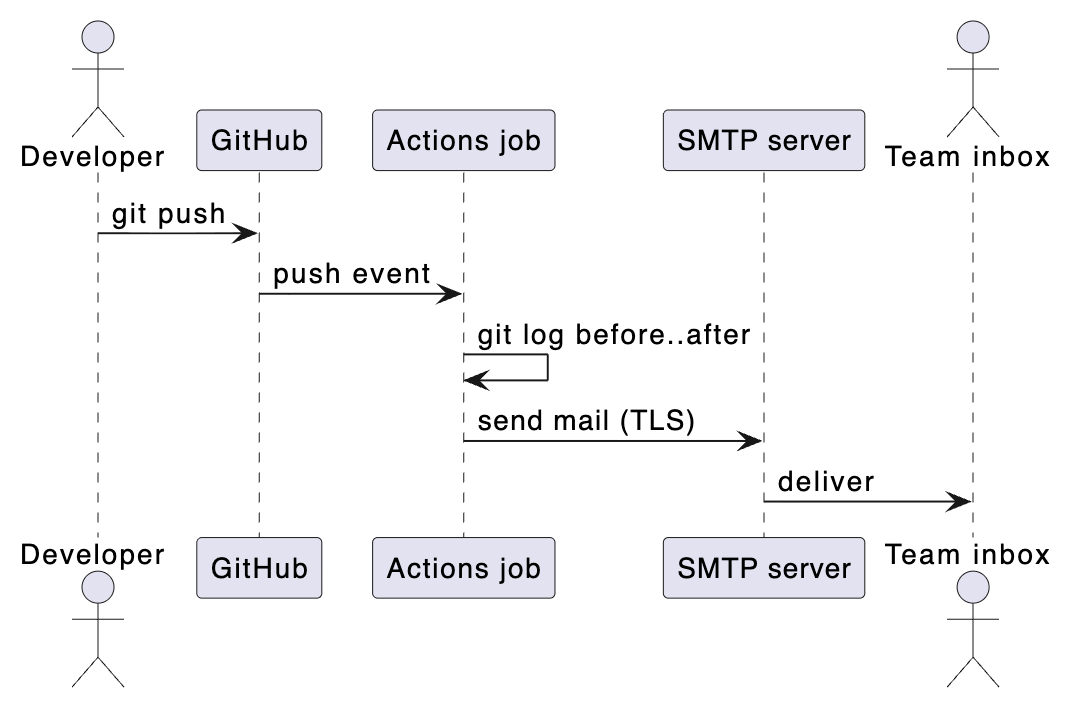
View PlantUML source
@startuml
skinparam shadowing false
skinparam defaultFontSize 14
actor Developer as D
participant "GitHub" as G
participant "Actions job" as A
participant "SMTP server" as S
actor "Team inbox" as T
D -> G : git push
G -> A : push event
A -> A : git log before..after
A -> S : send mail (TLS)
S -> T : deliver
@enduml
Every push event payload carries before (the old tip), after (the new tip), compare (a diff URL), forced, created, deleted and pusher. The job checks out full history, lists the commits between before and after, writes a plain-text message, and hands it to an SMTP action.
Step 1: Store SMTP credentials as secrets
You need an SMTP account that allows sending from your address. Most providers publish a host and port 587 with STARTTLS. With Gmail, the action's README says not to use your normal password: turn on 2-Step Verification and create an App password instead.
Save the credentials as repository secrets, and the addresses as variables. With the GitHub CLI:
gh secret set SMTP_HOST --body "smtp.example.com"
gh secret set SMTP_USERNAME --body "<YOUR_SMTP_USERNAME>"
gh secret set SMTP_PASSWORD   # paste <YOUR_SMTP_PASSWORD> when prompted
gh variable set PUSH_EMAIL_TO --body "dev-team@example.com"
gh variable set PUSH_EMAIL_FROM --body "github-bot@example.com"
Typing the password at the prompt keeps it out of your shell history. You can also add all five in the web UI under Settings → Secrets and variables → Actions.
Step 2: Add the GitHub push email notification workflow
Create .github/workflows/push-email.yml:
name: Push email notification

on:
  push:
    branches: ['**']

permissions:
  contents: read

jobs:
  email:
    # Skip branch deletions: there are no new commits to report
    if: ${{ !github.event.deleted }}
    runs-on: ubuntu-latest
    steps:
      - uses: actions/checkout@v7
        with:
          fetch-depth: 0

      - name: Build message
        id: msg
        env:
          BEFORE: ${{ github.event.before }}
          AFTER: ${{ github.event.after }}
          COMPARE: ${{ github.event.compare }}
          FORCED: ${{ github.event.forced }}
          PUSHER: ${{ github.event.pusher.name }}
          REPO: ${{ github.repository }}
          BRANCH: ${{ github.ref_name }}
        run: |
          ZERO=0000000000000000000000000000000000000000
          if [ "$BEFORE" = "$ZERO" ] || ! git cat-file -e "$BEFORE^{commit}" 2>/dev/null; then
            RANGE="-1 $AFTER"        # new branch or old tip gone: show the tip only
          else
            RANGE="$BEFORE..$AFTER"
          fi
          COUNT=$(git rev-list --count $RANGE)
          {
            echo "Repository: $REPO"
            echo "Branch:     $BRANCH"
            echo "Pushed by:  $PUSHER"
            if [ "$FORCED" = "true" ]; then echo "Force push: yes"; fi
            echo "Compare:    $COMPARE"
            echo
            for sha in $(git rev-list --reverse --max-count=50 $RANGE); do
              git show -s --format='Commit: %H%nAuthor: %an <%ae>%nDate:   %aI%n%n    %s%n' "$sha"
              git diff-tree --no-commit-id --name-status -r --root "$sha"
              echo
            done
            if [ "$COUNT" -gt 50 ]; then echo "... $COUNT commits in total, showing the first 50"; fi
          } > push-mail.txt
          FIRST=$(git log -1 --format=%s "$AFTER" | cut -c1-80)
          echo "subject=[$REPO] $BRANCH: $FIRST" >> "$GITHUB_OUTPUT"

      - name: Send email
        uses: dawidd6/action-send-mail@v22
        with:
          server_address: ${{ secrets.SMTP_HOST }}
          server_port: 587
          require_tls: true
          username: ${{ secrets.SMTP_USERNAME }}
          password: ${{ secrets.SMTP_PASSWORD }}
          subject: ${{ steps.msg.outputs.subject }}
          to: ${{ vars.PUSH_EMAIL_TO }}
          from: 'GitHub Push Bot <${{ vars.PUSH_EMAIL_FROM }}>'
          body: file://push-mail.txt
Commit it to the default branch and push. That push is the first test: a run should appear in the Actions tab, followed by an email in the inbox. If the send step fails, its log shows the SMTP error.
Why the workflow is written this way
- Event values go through
env, never straight intorun:. Branch names and commit messages are attacker-controlled text. Putting${{ github.event.head_commit.message }}directly into a shell script is a classic script injection. Here the shell only sees environment variables. fetch-depth: 0gives the job full history, sogit log before..afterworks. The Actions push payload also omits the per-commitadded,removedandmodifiedlists, sogit diff-treebuilds the changed-file list instead.require_tls: truewith port 587 stops the action from falling back to plain text if STARTTLS is not offered. This input arrived in v21 of the action. For port 465, drop it;secureturns on automatically for 465.permissions: contents: readis all the job needs.
Pin the third-party action
dawidd6/action-send-mail is a community action, and it receives your SMTP password. v22 (released September 15, 2026, running on Node 24) was the latest tag on October 21, 2026. Pin it to a full commit SHA, or lock it with the new workflow lockfile; our guide to the GitHub Actions lockfile shows how. One breaking change to know: since v20 the action reads its proxy from SMTP_PROXY, not HTTP_PROXY.
How the workflow handles edge cases
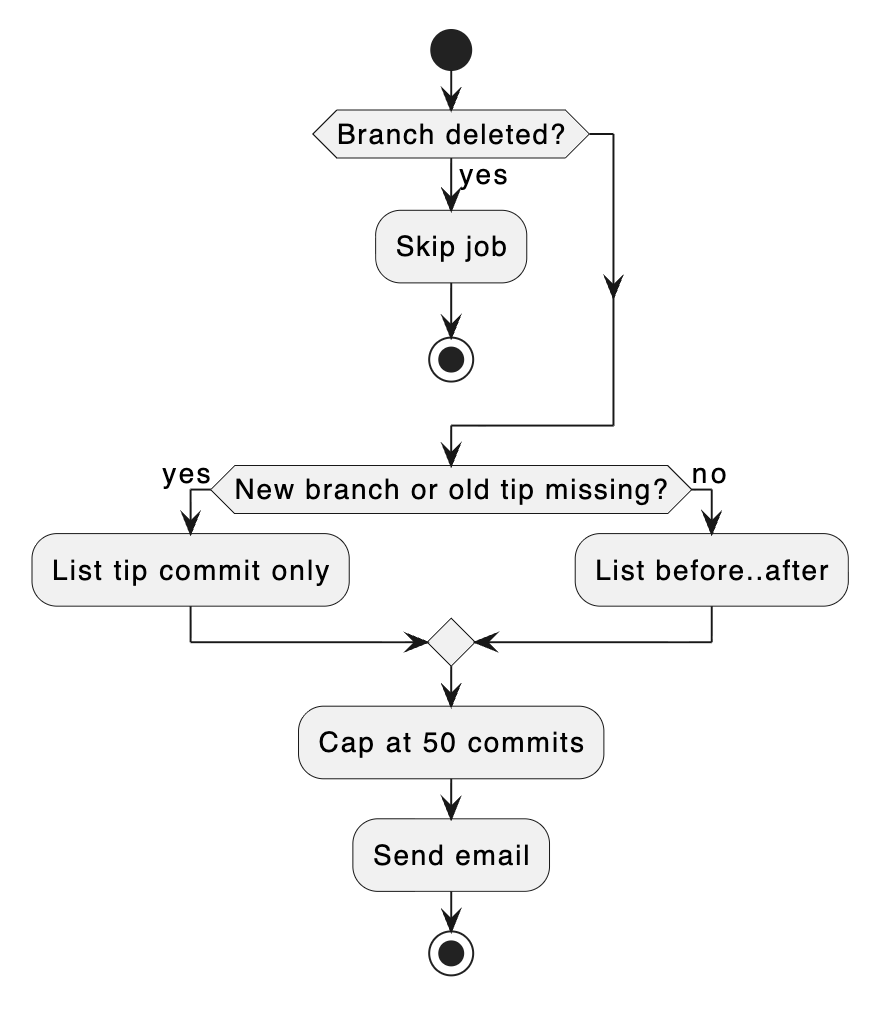
View PlantUML source
@startuml
skinparam shadowing false
skinparam defaultFontSize 14
start
if (Branch deleted?) then (yes)
  :Skip job;
  stop
endif
if (New branch or old tip missing?) then (yes)
  :List tip commit only;
else (no)
  :List before..after;
endif
:Cap at 50 commits;
:Send email;
stop
@enduml| Push type | What the email shows |
|---|---|
| Normal push | Every new commit, oldest first |
| New branch | The tip commit (before is all zeros) |
| Force push | Commits in before..after if the old tip still exists; otherwise the tip only, marked "Force push: yes" |
| Branch deleted | No email (job skipped) |
Showing only the tip commit for a new branch is a choice. If you want every commit not yet on main, change the range to origin/main..$AFTER in that branch of the if.
Limits of a push-triggered email workflow
These come from GitHub Docs and apply to any push workflow, not just this one:
- Pushes made with
GITHUB_TOKENdo not trigger it. GitHub Docs: events triggered by theGITHUB_TOKENwill not create a new workflow run. If a bot workflow pushes commits with the default token, you get no email for them. - Mass pushes can be skipped. No push event is created when more than 5,000 branches are pushed at once, or for tags when more than three tags are pushed at once.
- Large pushes. The webhook payload's
commitsarray holds at most 2,048 commits. This workflow reads history withgitinstead, and caps the email at 50. - Path and branch filters. Add
paths:orbranches:underon.pushif you only want mail formainor for certain folders. When you combine both, both must match.
If you do not want Actions minutes or SMTP in the loop, the other route is a repository webhook for the push event pointing at a service you run. That is more work but keeps mail logic off GitHub's runners. For broader automation pipelines, our guide to running Claude Code headless with n8n on macOS shows how an n8n workflow can receive events and run scripts.
Option B: send the push email with curl only
To avoid a third-party action entirely, the curl preinstalled on Ubuntu runners can speak SMTP. Replace the Send email step with:
      - name: Send email with curl
        env:
          SMTP_HOST: ${{ secrets.SMTP_HOST }}
          SMTP_USER: ${{ secrets.SMTP_USERNAME }}
          SMTP_PASS: ${{ secrets.SMTP_PASSWORD }}
          MAIL_FROM: ${{ vars.PUSH_EMAIL_FROM }}
          MAIL_TO: ${{ vars.PUSH_EMAIL_TO }}
          SUBJECT: ${{ steps.msg.outputs.subject }}
        run: |
          {
            echo "From: GitHub Push Bot <$MAIL_FROM>"
            echo "To: $MAIL_TO"
            echo "Subject: $SUBJECT"
            echo "Content-Type: text/plain; charset=UTF-8"
            echo
            cat push-mail.txt
          } > mail.eml
          curl --ssl-reqd --url "smtp://$SMTP_HOST:587" \
            --user "$SMTP_USER:$SMTP_PASS" \
            --mail-from "$MAIL_FROM" --mail-rcpt "$MAIL_TO" \
            --upload-file mail.eml
This version expects a single address in PUSH_EMAIL_TO; add one --mail-rcpt per extra recipient. --ssl-reqd makes curl fail rather than send without TLS. A non-ASCII subject line would need MIME encoding, which the action handles for you.
Moving notifications to webhooks? The same signature-check pattern applies elsewhere: Make event subscriptions with signed webhooks shows how to verify the signature header before trusting a delivery.
FAQ
Can I turn GitHub push email notifications back on in repository settings? No. As of October 15, 2026, GitHub.com no longer sends them, and the changelog points to a push-triggered Actions workflow as the replacement.
Do GitHub's regular notifications cover pushes? Not in the same way. Watching a repository gets you notifications for activity such as issues, pull requests and releases, not a per-push commit list. A workflow or webhook is the way to get one email per push.
Will this workflow email me about pushes from Dependabot or other bots? Pushes made with a personal access token or a GitHub App token trigger it. Pushes made with a workflow's own GITHUB_TOKEN do not. Dependabot pushes do trigger it, but those runs get Dependabot secrets instead of Actions secrets, so add the three SMTP secrets under Secrets and variables → Dependabot too if you want those emails.
Does it cost anything? The SMTP side depends on your provider. On the GitHub side, each run is a short job; on private repositories it counts against your plan's Actions minutes.
Is it safe to put my SMTP password in a workflow? Store it only as an Actions secret, as shown above. Never write it in the YAML. Pin the mail action to a commit SHA or a lockfile, because that code can read the secret.
Summary
Save three SMTP secrets and two address variables, add push-email.yml, and push once to test. You get one email per push with the commit list, authors and changed files, sent from your own mail server. Next, pin the mail action with a workflow lockfile so the code that handles your password cannot change silently.
Written on October 21, 2026. Check the official sources below for changes after this date.
References
- GitHub Changelog, "Email notifications for repository push events have been retired" (Oct 15, 2026) — github.blog (checked Oct 21, 2026)
- GitHub Docs, Events that trigger workflows: push — docs.github.com (checked Oct 21, 2026)
- GitHub Docs, Webhook events and payloads: push — docs.github.com (checked Oct 21, 2026)
- GitHub Docs, Triggering a workflow (GITHUB_TOKEN note) — docs.github.com (checked Oct 21, 2026)
- GitHub Docs (Enterprise Server 3.17), About email notifications for pushes to your repository — docs.github.com (checked Oct 21, 2026)
- dawidd6/action-send-mail README and releases — github.com (checked Oct 21, 2026)
- actions/checkout releases — github.com (checked Oct 21, 2026)
1 thought on “GitHub Push Email Notifications: Replace Them with Actions”