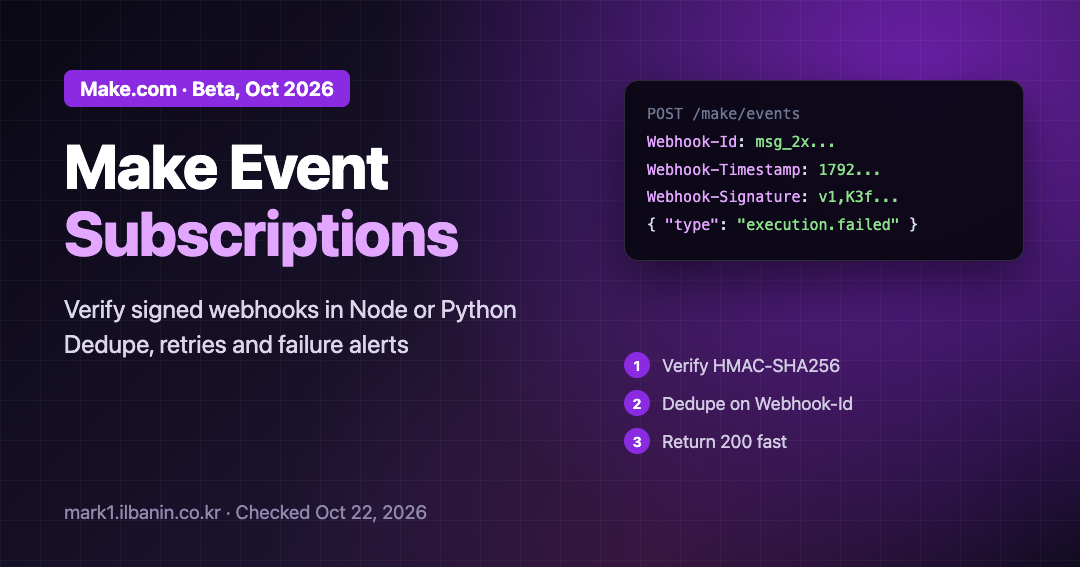
Make event subscriptions, released in beta on October 8, 2026, push signed POST requests to your own HTTPS endpoint when something happens in your Make organization, such as a failed scenario run or a new scenario. To use them, you build a small receiver that verifies the Webhook-Signature header and dedupes on Webhook-Id. Then you create the subscription under Org > Utilities > Event subscriptions. The feature needs a Teams plan (3 subscriptions per organization) or an Enterprise plan (unlimited).
This guide covers the receiver code (Node.js and plain Python), the setup clicks in Make, a local signature test, and how the retry schedule affects your design. Everything below comes from Make's help center and developer docs, checked on October 22, 2026. The feature is still in beta, so details can change.
What Make event subscriptions send
An event subscription replaces the old pattern of running a polling scenario that checks for errors. Make sends one POST request per event to a public HTTPS URL you control. Your system can then forward it to an incident tool, a chat channel or a log store.
| Item | Value (Oct 22, 2026) |
|---|---|
| Status | Beta, released Oct 8, 2026 |
| Plans | Teams (3 per org), Enterprise (unlimited) |
| Who can manage | Owner and Admin roles; custom roles on Enterprise |
| Endpoint | Public HTTPS, accepts POST, no redirects |
| Signing | Standard Webhooks format, secret starts with whsec_ |
| Delivery | At least once, order not guaranteed |
A deactivated subscription still counts toward the Teams limit of three. Delete it to free the slot.
Event types you can subscribe to
All event types are at schema version 1 today. Scenario-level events need you to pick the teams to monitor.
| Event | Level | Fires when |
|---|---|---|
execution.failed | Scenario | A run reports an error or warning |
scenario.created | Scenario | A scenario is created |
scenario.updated | Scenario | A scenario is updated (no field diff) |
scenario.activated / scenario.deactivated | Scenario | Scheduling is turned on or off |
scenario.restored | Scenario | A scenario comes back from trash |
scenario.settings_updated | Scenario | A supported setting changes value |
team.created | Organization | A non-personal team is created |
custom_role.created / updated / deleted | Organization | A custom role changes |
If you choose All events, the subscription also gets event types that Make adds later. Your receiver must handle types it does not know yet. More on that below.
Payload and headers
The body is a small envelope. This is the documented execution.failed example:
{
  "type": "execution.failed",
  "timestamp": "2026-09-30T12:00:00.000Z",
  "version": 1,
  "data": {
    "execution_id": "exec-123",
    "organization_id": 100,
    "team_id": 7,
    "scenario_id": 999,
    "app_name": "HTTP",
    "module_name": "Make a request",
    "exception_type": "RuntimeError",
    "message": "Something went wrong",
    "status": "error",
    "trigger": { "type": "manual", "user_id": 42 }
  }
}
The body has no event ID. The ID lives in the headers:
| Header | What it holds | Use it for |
|---|---|---|
Webhook-Id | Same value across retries and manual resends | Deduplication key |
Webhook-Timestamp | Attempt time, Unix seconds (changes per attempt) | Replay window check |
Webhook-Signature | One or more v1,<base64> values, space-separated | Signature check |
Webhook-Topic | Event type (not signed) | Optional; route on body type |
How the signed webhook flow works
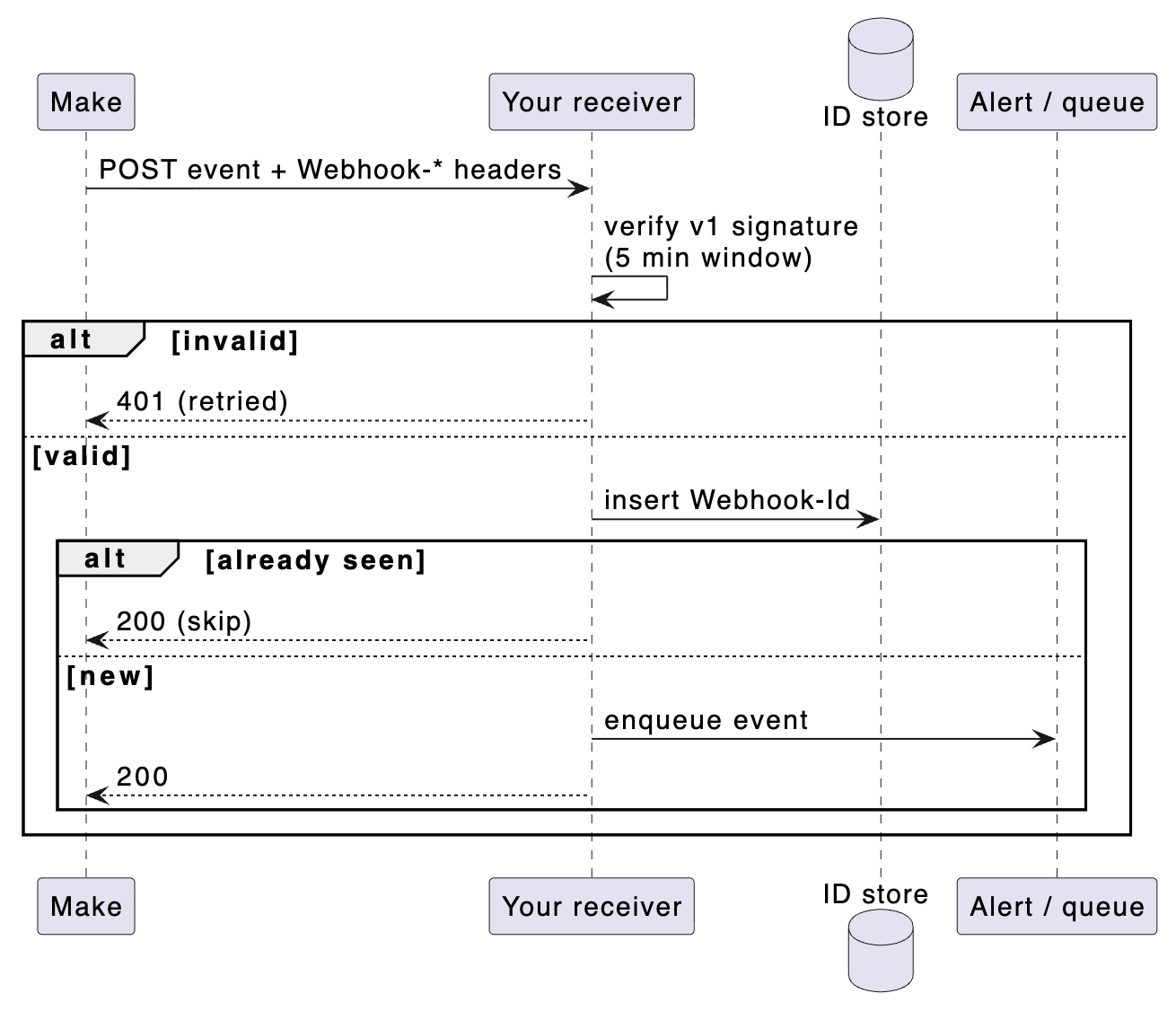
View PlantUML source
@startuml
skinparam shadowing false
skinparam defaultFontSize 15
participant "Make" as M
participant "Your receiver" as R
database "ID store" as D
participant "Alert / queue" as Q
M -> R : POST event + Webhook-* headers
R -> R : verify v1 signature\n(5 min window)
alt invalid
  R --> M : 401 (retried)
else valid
  R -> D : insert Webhook-Id
  alt already seen
    R --> M : 200 (skip)
  else new
    R -> Q : enqueue event
    R --> M : 200
  end
end
@enduml
Make stops retrying once it gets 200, 202 or 204. Any 3xx, 4xx, 5xx, timeout, DNS, connection or TLS failure counts as a failed attempt.
Step 1: Build a receiver that verifies Make signatures
The signed content is <Webhook-Id>.<Webhook-Timestamp>.<raw body>. The key is the signing secret with the whsec_ prefix removed, Base64-decoded. The signature is HMAC-SHA256 over that content, encoded as standard Base64. Always use the raw request body. If you parse JSON first and re-serialize it, the signature will not match.
Option A: Node.js with the Standard Webhooks library
Make deliveries follow the Standard Webhooks spec, so you can use its reference library. The JavaScript version strips the whsec_ prefix for you, reads the three webhook-* headers case-insensitively, and rejects timestamps more than 300 seconds from now.
npm install express standardwebhooks// server.mjs
import express from "express";
import { Webhook } from "standardwebhooks";
const app = express();
const wh = new Webhook(process.env.MAKE_SIGNING_SECRET); // "whsec_..."
const seen = new Set(); // demo only: use Redis or a database in production
app.post("/make/events", express.raw({ type: "*/*" }), (req, res) => {
let event;
try {
event = wh.verify(req.body, req.headers); // raw Buffer, not parsed JSON
} catch {
return res.status(401).end();
}
const id = req.headers["webhook-id"];
if (seen.has(id)) return res.status(200).end(); // retry or resend
seen.add(id);
switch (`${event.type}@${event.version}`) {
case "execution.failed@1":
console.log("Scenario failed:", event.data.scenario_id, event.data.message);
break;
default:
console.log("Ignoring unknown event:", event.type, event.version);
}
res.status(200).end();
});
app.listen(3000);Run it with the secret in an environment variable:
MAKE_SIGNING_SECRET='<YOUR_WHSEC_SECRET>' node server.mjsThe in-memory Set is only for a first test. Make's docs say a process-local cache is not enough: use shared, durable storage, and make the check-and-insert step atomic. A unique index on Webhook-Id in your database is a simple way to do that.
Option B: Python with only the standard library
If you do not want a dependency, the algorithm fits in one function. This follows Make's documented steps: require all three headers, check a 5-minute window, compare each v1 entry in constant time.
import base64, hashlib, hmac, os, time

SECRET = os.environ["MAKE_SIGNING_SECRET"]  # "whsec_..."
KEY = base64.b64decode(SECRET.removeprefix("whsec_"))

def verify_make_signature(headers: dict, raw_body: bytes) -> bool:
    """headers: lowercase header names -> values."""
    msg_id = headers.get("webhook-id")
    ts = headers.get("webhook-timestamp")
    sig_header = headers.get("webhook-signature")
    if not (msg_id and ts and sig_header):
        return False
    try:
        if abs(time.time() - int(ts)) > 300:
            return False
    except ValueError:
        return False
    signed = f"{msg_id}.{ts}.".encode() + raw_body
    expected = base64.b64encode(hmac.new(KEY, signed, hashlib.sha256).digest()).decode()
    for entry in sig_header.split(" "):
        version, _, sig = entry.partition(",")
        if version == "v1" and hmac.compare_digest(sig, expected):
            return True
    return False
Call it from any framework that gives you the raw body bytes, such as await request.body() in FastAPI or request.get_data() in Flask.
Test the signature check locally
You can sign a fake event yourself and send it to your receiver before Make is involved. This tests your code only, not Make's delivery path.
SECRET='<YOUR_WHSEC_SECRET>'
ID="msg_local_test_1"
TS=$(date +%s)
BODY='{"type":"scenario.created","timestamp":"2026-10-22T11:00:00.000Z","version":1,"data":{"scenario_id":999,"user_id":42,"team_id":7,"organization_id":100}}'

KEY_HEX=$(printf '%s' "${SECRET#whsec_}" | base64 -d | xxd -p -c 256)
SIG=$(printf '%s' "$ID.$TS.$BODY" | openssl dgst -sha256 -mac HMAC -macopt hexkey:$KEY_HEX -binary | base64)

curl -i http://localhost:3000/make/events \
  -H "Content-Type: application/json" \
  -H "Webhook-Id: $ID" \
  -H "Webhook-Timestamp: $TS" \
  -H "Webhook-Signature: v1,$SIG" \
  --data-raw "$BODY"
Expect 200 the first time. Send the same command again with the same ID and the receiver should log nothing new. Change one character in BODY and you should get 401. On older macOS, use base64 -D instead of base64 -d.
Step 2: Create the event subscription in Make
Make can only deliver to a public HTTPS URL. For a first test from a laptop, expose port 3000 through an HTTPS tunnel, and point the subscription straight at the final URL, since redirects fail.
- In Make, click Org in the left sidebar.
- Under Utilities, click Event subscriptions.
- Click Create event subscription and enter a Name.
- Under URL, enter your HTTPS endpoint, for example
https://<YOUR_HOST>/make/events. - Click Send test event to send a sample payload.
- Under Subscribed events, pick All events or specific events. For scenario-level events, pick the team(s) to watch.
- Click Create.
- Open the subscription, go to Event subscription details, copy the Signing secret, and store it in your secret manager or environment.
Subscriptions are active as soon as you create them. If your receiver is not ready, switch the subscription off until it is. Make does not queue events for inactive subscriptions, so anything that happens while it is off is lost.
To trigger a real event, create a test scenario in a monitored team. That should produce scenario.created and also exercises Make's signing path.
Step 3: Handle retries, duplicates and event order
Make retries a rejected delivery up to 10 times. The delay doubles each time:
| Retry | Wait before it | Retry | Wait before it |
|---|---|---|---|
| 1 | 30 s | 6 | 16 min |
| 2 | 1 min | 7 | 32 min |
| 3 | 2 min | 8 | 1 h 4 min |
| 4 | 4 min | 9 | 2 h 8 min |
| 5 | 8 min | 10 | 4 h 16 min |
If every attempt fails at once, the last retry lands about 8.5 hours after the first attempt. After that the delivery is marked Failed and the subscription shows Failing until you fix the endpoint. You cannot change this schedule.
Three design rules follow from Make's docs:
- Dedupe on
Webhook-Id, not on time. Each retry gets a fresh timestamp and signature but the same ID. Keep IDs as long as a duplicate action would hurt; Make sets no retention window. - Do not trust arrival order. An old retry can arrive after a newer event. Use version checks or conditional writes so stale events cannot overwrite newer state.
- Answer fast, process later. Once Make gets a
2xx, it treats the event as delivered. Write the event to a queue or table first, then do the slow work, so a crash after the200does not lose it.
Unknown event types
With All events, new types will show up without warning. Make recommends: verify the signature, do not act on the event, log the type and version without sensitive data, and still return 2xx. Returning 4xx or 5xx makes Make retry an event your code will never handle.
Troubleshoot Make event subscription deliveries
Each subscription has a Logs tab with event type, team, status, response code and time. Opening a delivery shows the payload and every retry response. Match these to your own logs using Webhook-Id.
| What you see | Likely cause |
|---|---|
| No delivery in Logs | Subscription inactive, wrong event or team selected, action never happened |
| DNS, TLS or connection error | Wrong URL, bad certificate, firewall, endpoint not public |
3xx | URL redirects; use the final HTTPS URL |
401 / 4xx | Signature check (parsed body, wrong secret, clock drift), missing headers |
5xx or timeout | Receiver down or doing slow work before answering |
2xx but nothing happened | Your processing failed after acknowledging; Make will not retry |
To recover from a failing endpoint, follow Make's order: deactivate the subscription, review the delivery in Logs, fix your side, reactivate it, then click Retry. The retry reuses the original Webhook-Id, so your dedupe check protects you if the first copy was already processed.
Where this fits in your automation stack
If you already push alerts from automation tools, this pattern will look familiar. The same "verify, dedupe, then act" receiver works for other signed webhooks. For a related setup, see how to replace GitHub push email notifications with Actions. If you self-host n8n as your receiver or alert router, patch it first with our n8n security update guide for the October 2026 advisories.
FAQ
Are Make event subscriptions available on the Free, Core or Pro plans? No. As of October 22, 2026, Make lists them for Teams (3 per organization) and Enterprise (unlimited) only. Check Make's help center for changes while the feature is in beta.
Do I have to verify the signature? Make calls verification optional but recommended. Without it, anyone who finds your URL can post fake failure alerts into your incident tool. Verification takes a few lines with the Standard Webhooks library.
Why does my signature check fail even with the right secret? The most common cause is verifying parsed JSON instead of the raw body. Also check that you removed the whsec_ prefix before Base64-decoding the key, and that your server clock is within 5 minutes of real time.
Can I receive Make events inside another Make scenario? Make's docs only require a public HTTPS endpoint that accepts POST. They do not describe using a Make webhook as the target or how to check the signature there, so a small external receiver is the documented path.
Does a manual Retry send a new event? No. It resends the same event with the same Webhook-Id. If your receiver already accepted it, the dedupe check should return 200 without acting again.
Summary
Build the receiver first, test it with a locally signed request, then create the subscription and copy the signing secret. Keep three rules: verify the raw body, dedupe on Webhook-Id, and return 2xx quickly. Next, pick one event, usually execution.failed, and route it to the channel your team already watches.
Written October 22, 2026. All facts checked against Make's official documentation on October 22, 2026. Event subscriptions are in beta, so check the docs before production use.
References
- Make Help Center: Introducing event subscriptions (checked Oct 22, 2026)
- Make Help Center: Event subscriptions (checked Oct 22, 2026)
- Make Developer Hub: Verify signatures (checked Oct 22, 2026)
- Make Developer Hub: Receive events (checked Oct 22, 2026)
- Make Developer Hub: Event types (checked Oct 22, 2026)
- Make Developer Hub: Retries, duplicates and ordering (checked Oct 22, 2026)
- Make Developer Hub: Test and diagnose deliveries (checked Oct 22, 2026)
- Standard Webhooks specification and libraries (checked Oct 22, 2026)