Deprecated MCP servers from the archived @modelcontextprotocol collection are still being installed by AI coding agents, and they will never get security fixes. Search your MCP config files for those package names, replace each one with the service owner's maintained server (or remove it), and add a denylist so your agent cannot quietly put them back.
This guide was written on November 5, 2026, after Glow Labs published its "MCPhantom" research (November 2–3, 2026). Every command below works without a security product. Package names, archive dates and deprecation messages were checked against the MCP GitHub repositories and the npm registry on the same day.
What MCPhantom found about deprecated MCP servers
Glow Labs reviewed real AI coding sessions and found agents installing MCP servers that Anthropic's MCP team archived in May 2025. In 98% of the sessions it looked at, the agent picked the package name itself, most likely from training data. In the other 2%, the user asked for the old package by name.
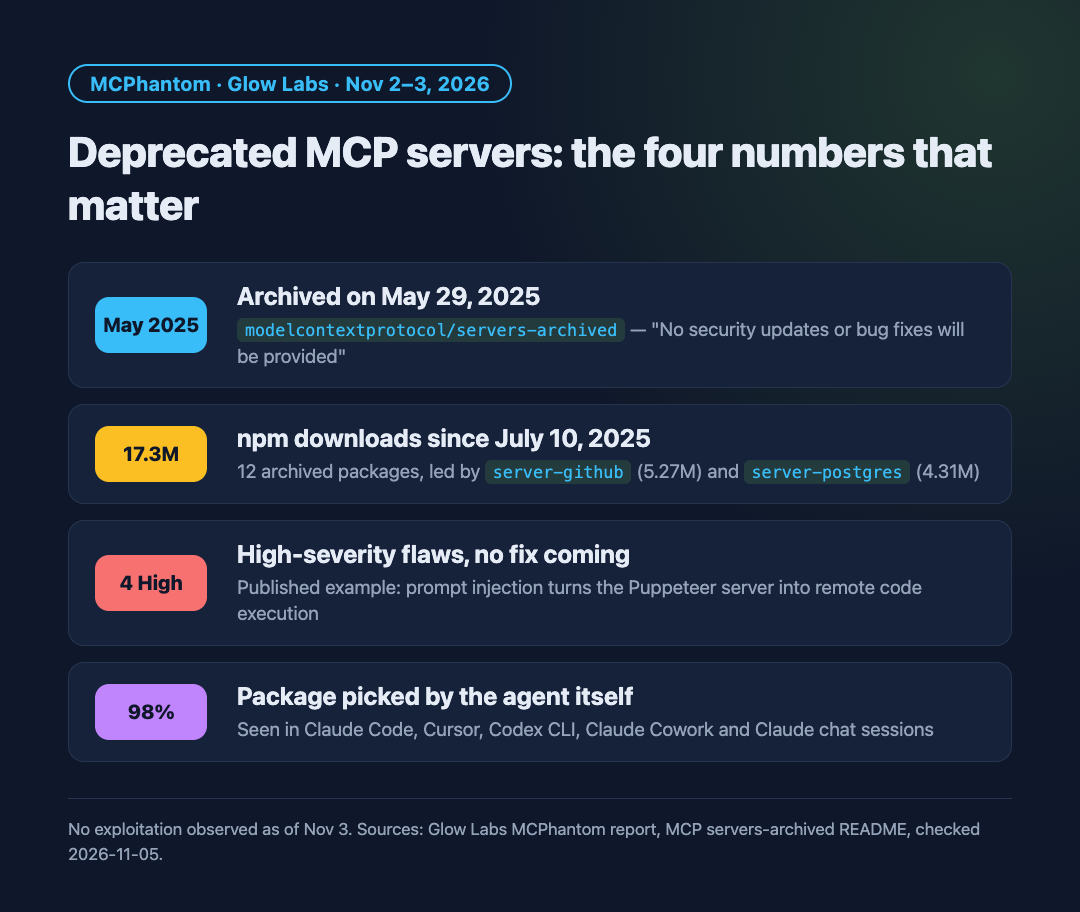
| Item | What the research and repos say |
|---|---|
| Archive date | modelcontextprotocol/servers-archived was archived on May 29, 2025 |
| Maintainer statement | "No security updates or bug fixes will be provided" |
| Downloads | 17,352,267 npm downloads of 12 archived packages since July 10, 2025 |
| Vulnerabilities | Four high-severity issues; the published one is an RCE in the Puppeteer server |
| Agents seen doing it | Claude Code, Cursor, Codex CLI, Claude Cowork and Claude chat |
| Exploitation | None observed as of the November 3 report |
The Puppeteer bug is the clearest example. According to Glow, a prompt injection on a web page can make the agent launch an arbitrary process instead of a browser. Because you approved "browsing," the harness allows it. Glow reported the issue on July 30, 2026, and reported all four flaws to Anthropic's CNA between October 4 and 11. The reports were closed because the archive is unmaintained.
Two details make this easy to miss:
- No manifest. An MCP server launched with
npx -ynever appears inpackage.json, so dependency scanners do not see it. - No CVE. The flaws have no CVE IDs, so vulnerability feeds stay quiet.
Glow also describes one session where the agent saw the npm deprecation notice, installed the package anyway, and did not tell the user. Do not assume a warning will stop it.
This is the same class of problem as the EMBRACE flaws in AI coding tools: the agent's choices run with your permissions, so they need the same review as any other code you install.
Which deprecated MCP servers to look for
The list below is the 12 npm packages Glow counted, with the replacement status from the current modelcontextprotocol/servers README. The archive also lists Git, SQLite and Sentry. The main repository still maintains a Git server, so for Git, just make sure you run a current release rather than an old pinned copy.
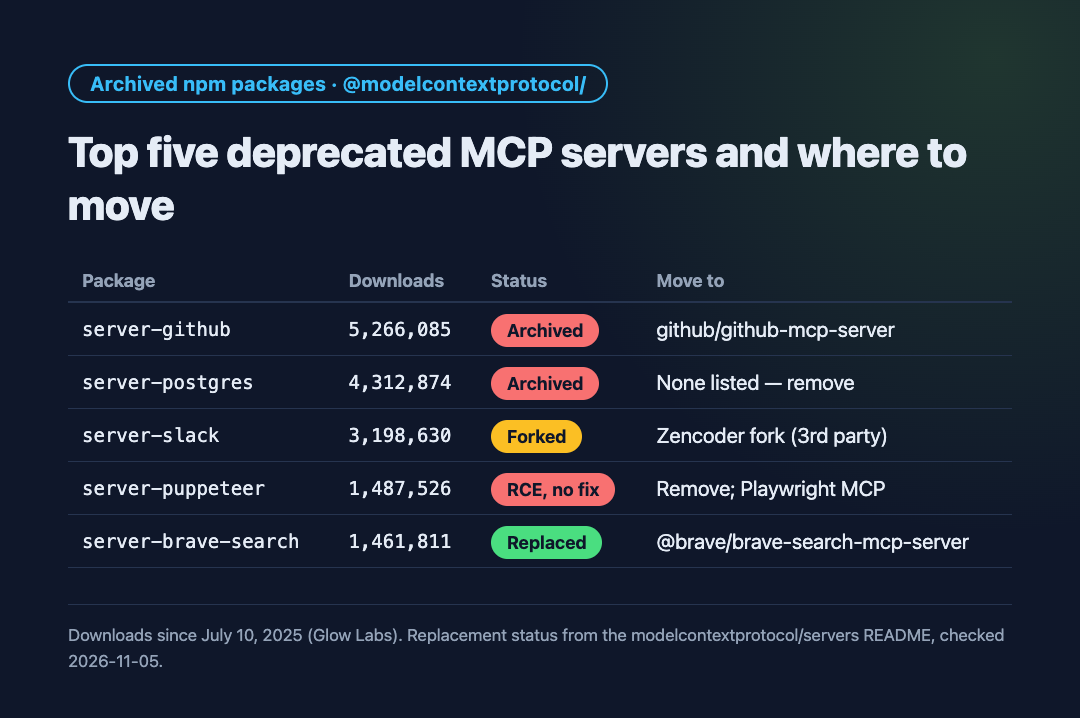
npm package (@modelcontextprotocol/…) | Downloads since Jul 2025 | Maintained option |
|---|---|---|
server-github | 5,266,085 | GitHub's own github/github-mcp-server |
server-postgres | 4,312,874 | None listed by the MCP project |
server-slack | 3,198,630 | Fork maintained by Zencoder (third party) |
server-puppeteer | 1,487,526 | None listed; Microsoft's @playwright/mcp is a separate tool |
server-brave-search | 1,461,811 | Brave's own @brave/brave-search-mcp-server |
server-google-maps | 814,615 | None listed |
server-gitlab | 273,296 | None listed |
server-gdrive | 247,891 | None listed |
server-redis | 131,160 | Redis's own redis/mcp-redis |
create-server | 122,534 | Use an official MCP SDK instead |
server-aws-kb-retrieval | 23,028 | None listed |
server-everart | 12,817 | None listed |
Download counts come from the Glow write-up. "None listed" means the MCP project does not point to a replacement. It does not mean no vendor server exists. Check the vendor's own documentation before you trust a third-party package with the same name.
On November 5, 2026, the npm registry shows this deprecation message on server-github (2025.4.8) and server-puppeteer (2025.5.12): "Archived and unmaintained; no security guarantees." Deprecated packages still install through npx, so the message is a signal, not a block.
How to check your setup for deprecated MCP servers
MCP servers live in each tool's config file, not in your project's dependencies. Check every file below on every machine where you use an AI coding agent.
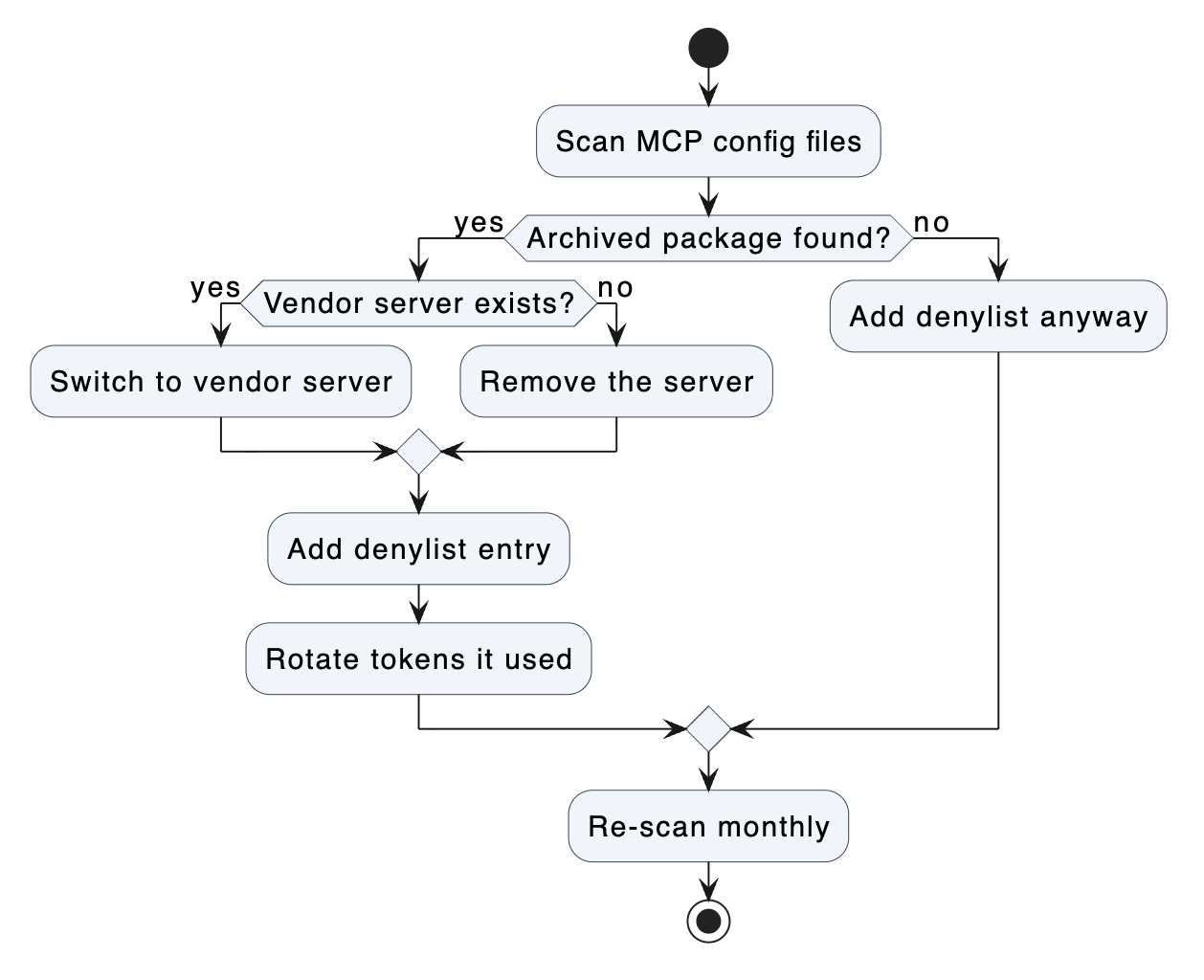
View PlantUML source
@startuml
skinparam shadowing false
skinparam defaultFontSize 15
skinparam ActivityBackgroundColor #F1F5F9
skinparam ActivityBorderColor #334155
start
:Scan MCP config files;
if (Archived package found?) then (yes)
  if (Vendor server exists?) then (yes)
    :Switch to vendor server;
  else (no)
    :Remove the server;
  endif
  :Add denylist entry;
  :Rotate tokens it used;
else (no)
  :Add denylist anyway;
endif
:Re-scan monthly;
stop
@enduml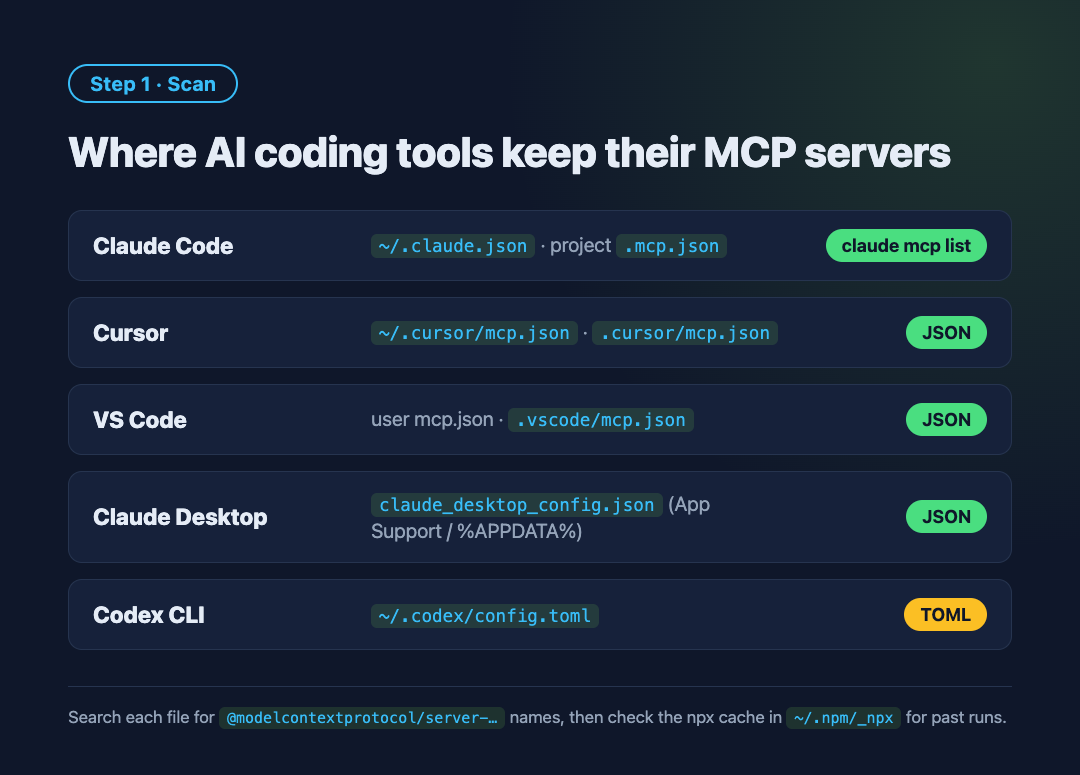
| Tool | User-level file | Project-level file |
|---|---|---|
| Claude Code | ~/.claude.json | .mcp.json |
| Cursor | ~/.cursor/mcp.json | .cursor/mcp.json |
| VS Code (Copilot) | user mcp.json via MCP: Open User Configuration | .vscode/mcp.json |
| Claude Desktop | ~/Library/Application Support/Claude/claude_desktop_config.json (macOS), %APPDATA%\Claude\claude_desktop_config.json (Windows) | — |
| Codex CLI | ~/.codex/config.toml | — |
Scan config files on macOS and Linux
Run this from your home directory, then again from each repository root so the project-level files are included:
PATTERN='@modelcontextprotocol/(server-(github|postgres|slack|puppeteer|brave-search|google-maps|gitlab|gdrive|redis|aws-kb-retrieval|everart)|create-server)|mcp-server-(sqlite|sentry)'

for f in ~/.claude.json .mcp.json ~/.cursor/mcp.json .cursor/mcp.json \
         .vscode/mcp.json ~/.codex/config.toml \
         "$HOME/Library/Application Support/Claude/claude_desktop_config.json" \
         "$HOME/.config/Claude/claude_desktop_config.json"; do
  [ -f "$f" ] && grep -HnE "$PATTERN" "$f"
done
No output means no match in those files. To sweep every repository under a folder at once:
grep -rnE --include='mcp.json' --include='.mcp.json' "$PATTERN" ~/code 2>/dev/nullReplace ~/code with the folder that holds your repositories.
Scan on Windows (PowerShell)
$pattern = '@modelcontextprotocol/(server-(github|postgres|slack|puppeteer|brave-search|google-maps|gitlab|gdrive|redis|aws-kb-retrieval|everart)|create-server)|mcp-server-(sqlite|sentry)'
$files = @("$HOME\.claude.json", ".mcp.json", "$HOME\.cursor\mcp.json", ".cursor\mcp.json",
           ".vscode\mcp.json", "$HOME\.codex\config.toml", "$env:APPDATA\Claude\claude_desktop_config.json")
$files | Where-Object { Test-Path $_ } | ForEach-Object { Select-String -Path $_ -Pattern $pattern }
Check what ran in the past
A server may have been removed from config but still sit in the npx cache. This lists archived server packages that npx downloaded on this machine (the cache can hold current servers such as server-filesystem too, so compare against the table above):
ls -d ~/.npm/_npx/*/node_modules/@modelcontextprotocol/server-* \
      ~/.npm/_npx/*/node_modules/@modelcontextprotocol/create-server 2>/dev/null
In Claude Code, claude mcp list prints the configured servers and their commands. For any package you are unsure about, ask npm directly:
npm view @modelcontextprotocol/server-github deprecatedAny text in the output means the package is deprecated. Empty output means it is not marked, which still does not prove it is maintained.
Replace deprecated MCP servers with maintained ones
Remove the old entry first, then add the replacement. In Claude Code the old one goes with claude mcp remove <name>, adding --scope project or --scope user if that is where it was added. In other tools, delete the block from the file you found in the scan.
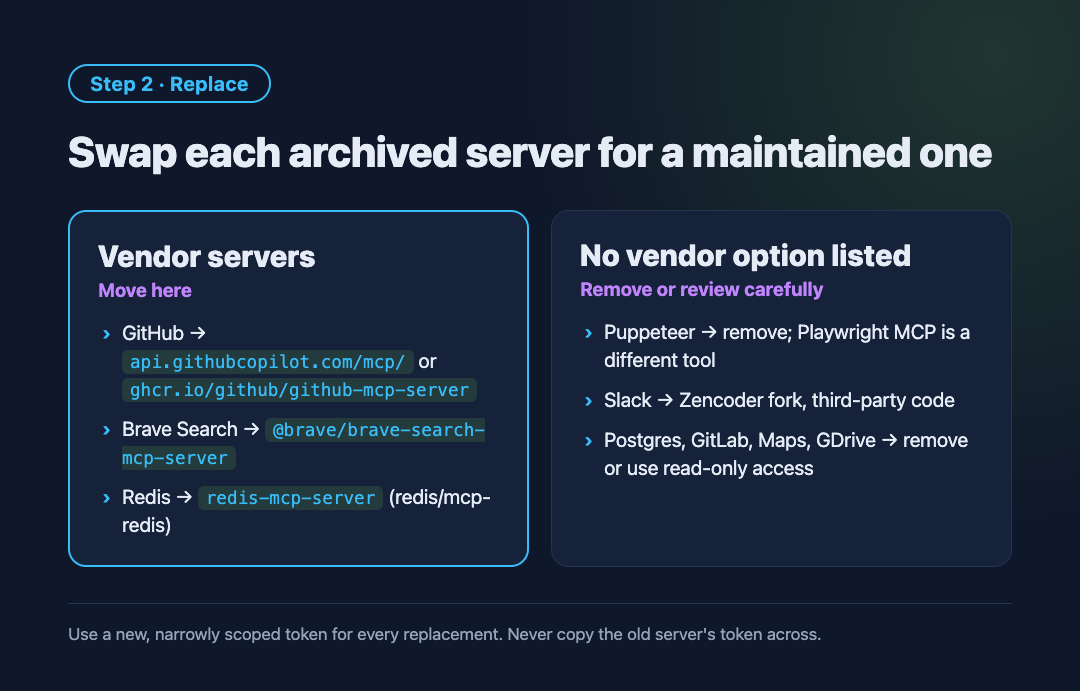
GitHub: use GitHub's official server
GitHub hosts its own remote MCP server at https://api.githubcopilot.com/mcp/. For Claude Code, GitHub's install guide gives this command (run it in your terminal, not inside Claude Code):
claude mcp add-json github '{"type":"http","url":"https://api.githubcopilot.com/mcp","headers":{"Authorization":"Bearer <YOUR_GITHUB_PAT>"}}'If you prefer a local server, run GitHub's Docker image:
claude mcp add github -e GITHUB_PERSONAL_ACCESS_TOKEN=<YOUR_GITHUB_PAT> -- \
  docker run -i --rm -e GITHUB_PERSONAL_ACCESS_TOKEN ghcr.io/github/github-mcp-server
For VS Code, the remote server needs only a URL and signs in with OAuth:
{
  "servers": {
    "github": {
      "type": "http",
      "url": "https://api.githubcopilot.com/mcp/"
    }
  }
}
Create a new fine-grained token with only the repositories and permissions you need. Do not reuse the token the old server had.
Brave Search and Redis: use the vendors' servers
Brave publishes @brave/brave-search-mcp-server, and the MCP README marks the old package as replaced by it. Redis publishes an official server in redis/mcp-redis, run from PyPI:
{
  "mcpServers": {
    "redis": {
      "command": "uvx",
      "args": ["--from", "redis-mcp-server@latest", "redis-mcp-server", "--url", "redis://localhost:6379/0"]
    }
  }
}
Slack: a third-party fork
The MCP README says the Slack server is "now maintained by Zencoder" at zencoderai/slack-mcp-server. That is a company outside Slack. Review it as you would any third-party code with access to your workspace, or check whether Slack's own developer documentation offers a server you prefer.
Puppeteer: replace, do not patch
No fix is coming for the Puppeteer server RCE. If you need browser automation, Microsoft's Playwright MCP is actively maintained:
claude mcp add playwright npx @playwright/mcp@latestIt is a different server with different tool names, so update any prompts or skills that call the old Puppeteer tools. It still drives a real browser from untrusted pages, so keep tool approvals on.
Postgres, GitLab, Google Maps and the rest
The MCP project lists no replacement for these. Remove them unless you have found a server the vendor maintains. If you must keep a database server running while you look, connect it with a read-only database user so an injected prompt cannot write or drop data.
Stop AI agents from installing deprecated MCP servers again
Removing the servers fixes today. A denylist fixes next week, when the agent "helpfully" sets up GitHub access again from memory.
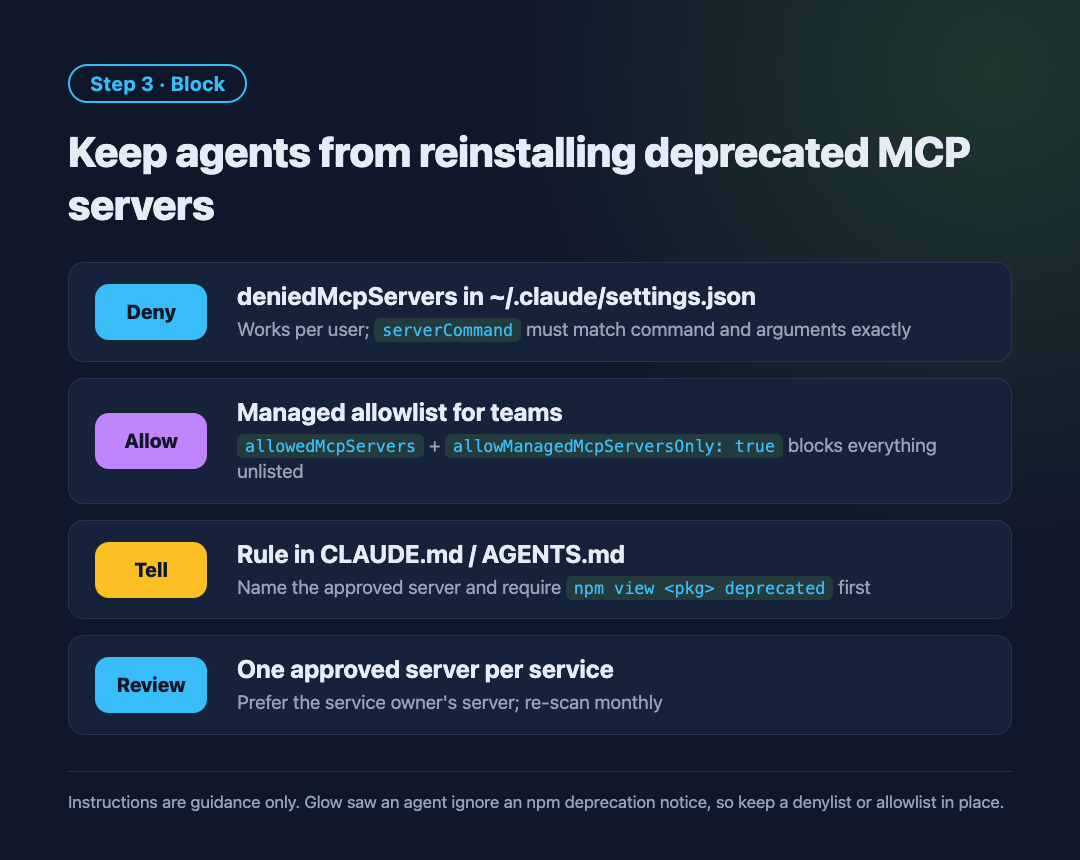
Add a denylist in Claude Code
Claude Code merges deniedMcpServers from every settings scope, so a personal entry in ~/.claude/settings.json works without admin rights:
{
  "deniedMcpServers": [
    { "serverCommand": ["npx", "-y", "@modelcontextprotocol/server-github"] },
    { "serverCommand": ["npx", "-y", "@modelcontextprotocol/server-puppeteer"] },
    { "serverCommand": ["npx", "-y", "@modelcontextprotocol/server-slack"] },
    { "serverCommand": ["npx", "-y", "@modelcontextprotocol/server-postgres"] },
    { "serverCommand": ["npx", "-y", "@modelcontextprotocol/server-brave-search"] }
  ]
}
serverCommand must match the command and arguments exactly. An entry for npx -y …/server-github does not block npx …/server-github@latest. A denylist is a safety net for the common forms, not a full block.
For a team, the stronger pattern is an allowlist in managed settings: allowedMcpServers plus allowManagedMcpServersOnly: true. Then only the URLs and commands you approved can load, and every other server is refused with "not allowed by enterprise policy." The Claude Code managed MCP docs show the file paths for macOS, Linux and Windows.
Tell the agent what to use
Add one rule to the instructions file your agent reads (CLAUDE.md, AGENTS.md or Cursor rules):
## MCP servers
- Never install packages from @modelcontextprotocol/server-* except filesystem, fetch, git, memory, time, sequential-thinking and everything.
- For GitHub use https://api.githubcopilot.com/mcp/ only.
- Before adding any MCP server, run `npm view <package> deprecated` and stop if it prints anything.
This is guidance, not enforcement. Glow's research shows models can ignore deprecation notices, so keep the denylist and keep MCP installs behind your approval.
Approve one server per service
Glow's advice for security teams is short: approve one server per service, prefer the service owner's own server, and add npm deprecation status to your approval checklist. Re-run the scan from the previous section once a month or after onboarding a new tool.
If you run Claude Code unattended, for example headless from n8n, lock the server list in a project .mcp.json checked into the repository so a run cannot add servers on its own.
If you already used a deprecated MCP server
Finding an old server in config does not mean you were attacked. Glow had not seen exploitation as of November 3. It does mean the server had your tokens and ran with your user account.
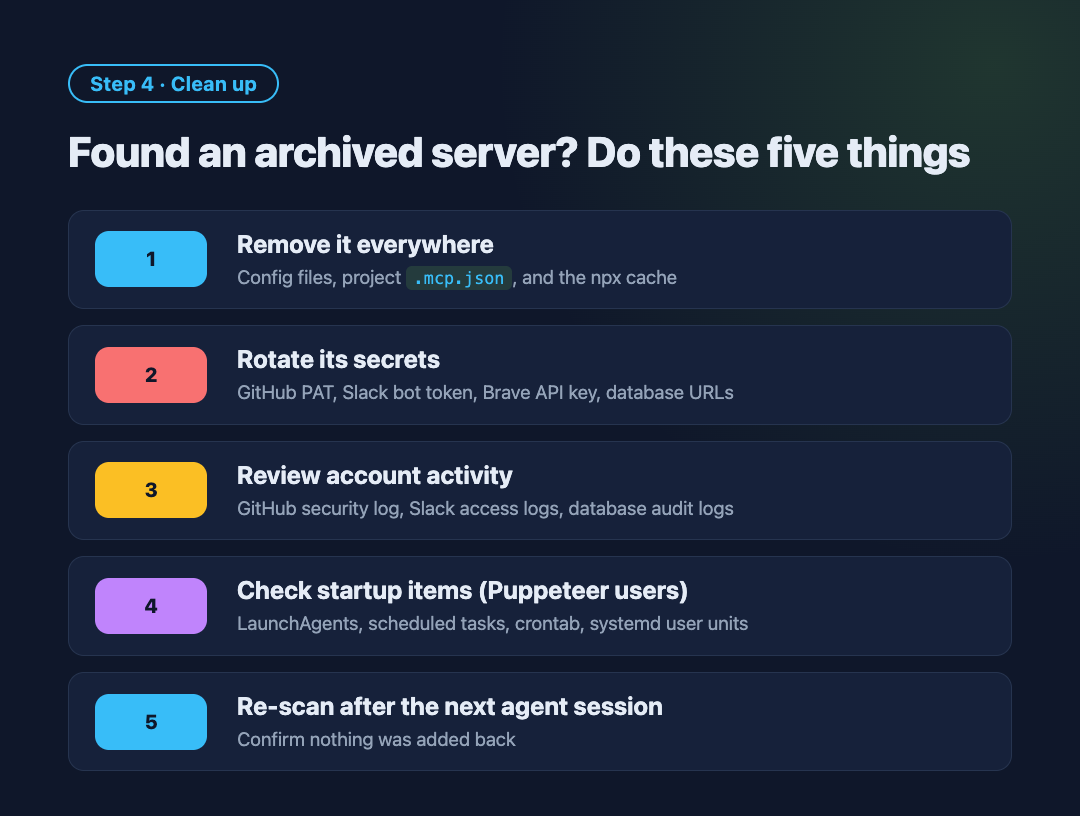
- Remove the server from every config file and from the npx cache:
rm -rf ~/.npm/_npxclears all cached npx packages, and they download again when needed. - Rotate every secret in its
envblock. Common ones areGITHUB_PERSONAL_ACCESS_TOKEN,SLACK_BOT_TOKEN,BRAVE_API_KEYand database connection strings passed as arguments. - Review account activity for the period the server was configured: GitHub's security log, Slack access logs, database audit logs.
- Puppeteer users: look for startup items you did not create (LaunchAgents on macOS, scheduled tasks on Windows, crontab and systemd user units on Linux). The Claude Code extension backdoor clean-up guide lists where to look on each OS.
- Re-scan with the script above to confirm nothing reappeared after the agent's next session.
| Symptom after the switch | Likely cause | Fix |
|---|---|---|
| GitHub tools return 401 | Token missing or wrong header | Re-run the add command with a new PAT; check Bearer prefix |
| Old server comes back next day | Agent re-added it, or a project .mcp.json still lists it | Add the denylist; fix the repo file and commit |
claude mcp add says "explicitly blocked by enterprise policy" | Your denylist or your company's managed settings caught it | Working as intended; use the approved server |
| Skills fail with unknown tool names | New server uses different tool names | Update prompts and skills to the new names |
FAQ
Are all @modelcontextprotocol servers deprecated? No. Filesystem, Fetch, Git, Memory, Sequential Thinking, Time and Everything are still maintained in the main modelcontextprotocol/servers repository. Only the servers moved to servers-archived are unmaintained.
Is there a CVE I can track for the Puppeteer server bug? Not that Glow reported. The flaws have no CVE IDs, which is one reason scanners miss them. Treat the archive notice itself as the advisory.
Does pinning an old version make an archived server safe? No. Pinning stops surprise changes, but the known flaws stay unfixed in every version.
Why does my agent keep choosing the old GitHub server? Glow found that in 98% of cases the agent filled in the package name from what it learned in training. Give it the exact server in your instructions file and block the old command with a denylist.
Is the Zencoder Slack server official? It is the fork the MCP README points to, but Zencoder is not Slack. Review its code and permissions before you give it a workspace token.
Summary
Deprecated MCP servers keep getting installed because AI agents remember old package names. Run the config scan on each machine, switch GitHub, Brave Search and Redis to the vendors' own servers, drop Puppeteer and the others that have no maintained option, then add a denylist and an instructions rule so the agent cannot bring them back. If one was already running, rotate the tokens it held.
Next, review which tools your agent may call without asking. The EMBRACE guide covers approval settings for the major AI coding tools.
References
- servers-archived README — modelcontextprotocol on GitHub (checked 2026-11-05)
- Model Context Protocol servers README — modelcontextprotocol on GitHub (checked 2026-11-05)
- Control MCP server access for your organization — Claude Code docs (checked 2026-11-05)
- Connect Claude Code to tools via MCP — Claude Code docs (checked 2026-11-05)
- GitHub MCP Server — github/github-mcp-server (checked 2026-11-05)
- Install GitHub MCP Server in Claude — GitHub docs (checked 2026-11-05)
- Playwright MCP — microsoft/playwright-mcp (checked 2026-11-05)
- Redis MCP Server — redis/mcp-redis (checked 2026-11-05)
- npm registry entry for @modelcontextprotocol/server-github (checked 2026-11-05)
- MCPhantom: AI coding agents are installing vulnerable deprecated MCP servers — Glow Labs (checked 2026-11-05)
- AI coding agents are installing MCP servers that will never be patched — Help Net Security (checked 2026-11-05)
1 thought on “Deprecated MCP Servers: Find and Replace Them After MCPhantom”