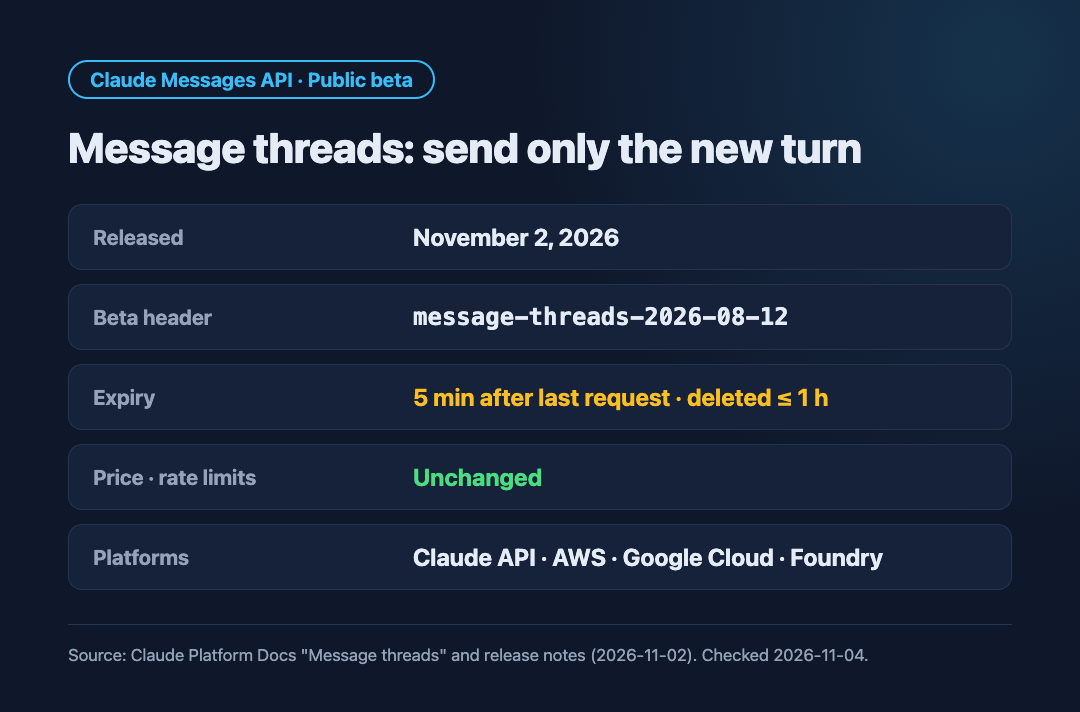
Claude message threads let a Messages API app send the full conversation once, then send only the new messages and the previous response id on each later turn. Anthropic released the feature in public beta on November 2, 2026, behind the beta header message-threads-2026-08-12. The goal is smaller requests and a lower, steadier time to first token in long agent loops. Pricing and rate limits stay the same. The catch: a thread is best-effort and expires 5 minutes after its last request, so your app must keep its own copy of the conversation and be able to replay it.
Written 2026-11-04. Facts come from the Claude Platform docs page "Message threads" and the Claude Platform release notes (entry dated November 2, 2026), both checked on 2026-11-04. The SDK and cURL request shapes follow the docs. The replay loop further down is my own sketch of the pattern the docs describe, and I have not run it against the beta. Test it before you ship it.
This guide covers what changes, what to check before you turn threads on, the SDK and raw HTTP setup, and how to recover from the errors you will hit.
What Claude message threads change
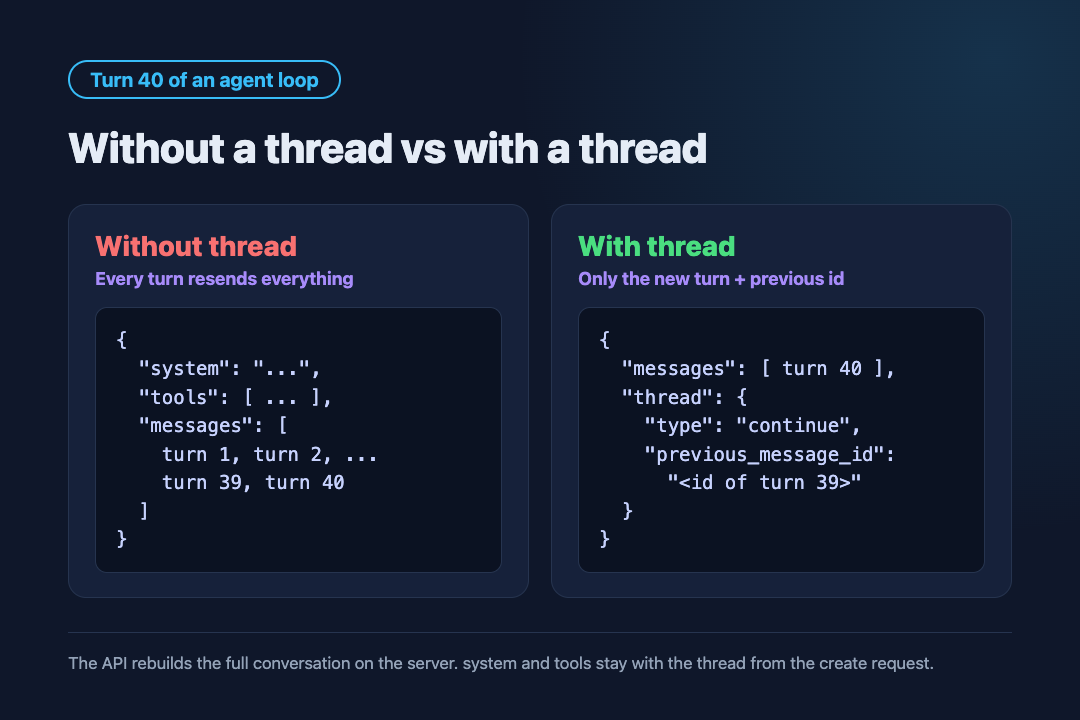
Without a thread, every turn of an agent loop uploads the whole conversation again. The API validates and tokenizes all of it again. On a 500K-token coding session, that is a lot of work before the first token comes back.
With a thread, the first request is a normal Messages call plus "thread": {"type": "create"}. The API keeps that conversation, including Claude's reply, under the response id. The next request sends only the new messages plus "thread": {"type": "continue", "previous_message_id": "<id>"}. The API rebuilds the full conversation on the server before it calls the model. The response is an ordinary message.
| Item | Value |
|---|---|
| Status | Public beta, released 2026-11-02 |
| Beta header | anthropic-beta: message-threads-2026-08-12 |
| Expiry | 5 minutes after the last request; deleted no more than 1 hour after last use |
| Price and rate limits | Unchanged |
| Platforms | Claude API, Claude Platform on AWS, Claude Models on Google Cloud (Anthropic managed), Claude in Microsoft Foundry |
How much faster is it? The docs only promise "a lower time to first token" and give no figure. Coverage of Anthropic's launch posts (for example Unite.AI on November 2) reports that Anthropic measured about a 35% lower median time to first token on 500K to 1M token requests with threads on by default for most Claude Code users. That is Anthropic's own number. I found no independent benchmark yet, so measure your own workload.
Message threads are not the same thing as session threads in Claude Managed Agents. If you use Managed Agents, nothing here changes your sessions.
Check your setup before you turn on Claude message threads
Run through these checks first. Each one maps to a hard error or a silent fallback in the docs.
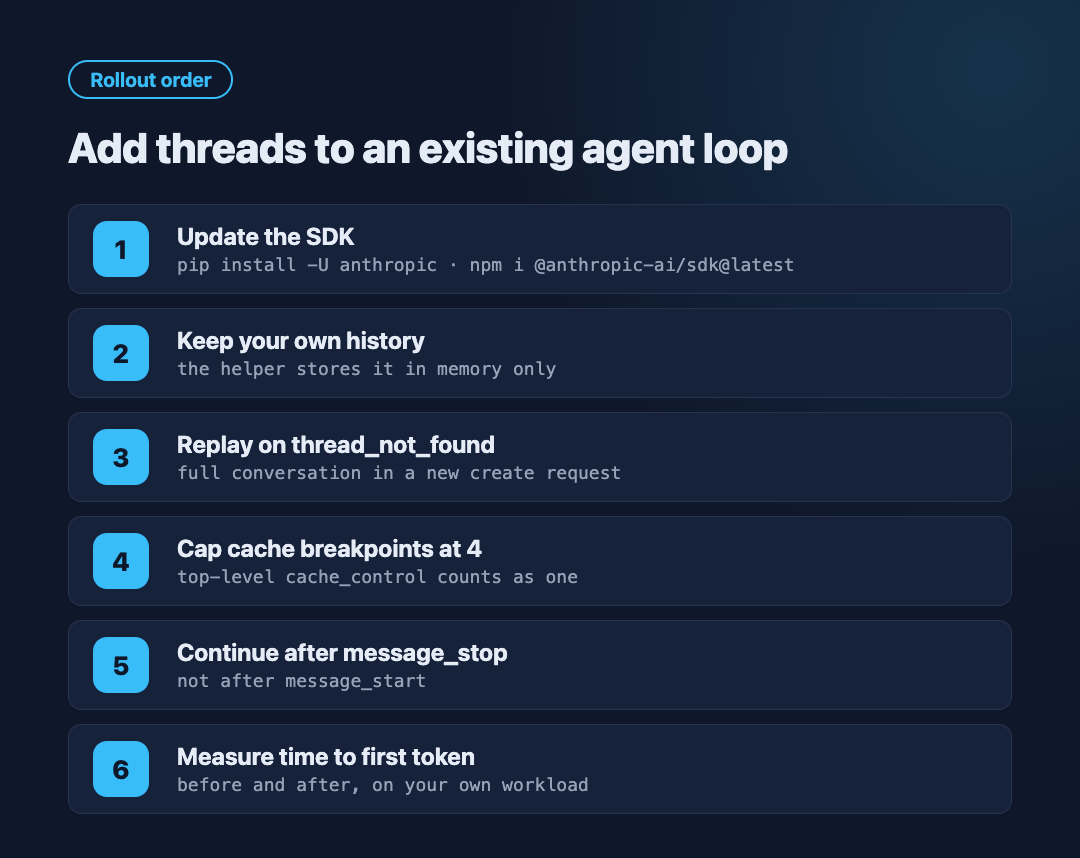
- SDK version. The thread helper is new. Check what you have and update before you try
client.beta.messages.thread(...).
pip show anthropic | grep -i version     # Python
pip install -U anthropic

npm ls @anthropic-ai/sdk                 # Node.js / TypeScript
npm install @anthropic-ai/sdk@latest
If your SDK has no thread helper after the update, you can still send the thread field yourself (see the cURL section below).
- Organization settings. Threads are rejected for organizations with HIPAA readiness or Inference hooks turned on. Message threads are also not ZDR eligible. If your organization relies on zero data retention, threads would hold conversations in server memory (encrypted under a server-managed key, never written to durable storage, deleted within an hour of last use). Decide with whoever owns your data policy before you enable it.
- Features you use. Threads do not work with Message Batches, token counting, compaction on demand, or most context editing (only
clear_thinking_20251015withkeep: "all"is allowed). If your loop depends on one of these, keep that path unthreaded. - Models. The docs list beta support on every current model, from Claude Fable 5.1, Opus 5.5, Sonnet 5.5 and Haiku 5.5 back to Sonnet 4.5. Older models outside that list should not get the
threadfield. - One key per thread. A thread belongs to the API key, workspace and organization that created it. A request from a different key returns 404. If you rotate keys across a worker pool, pin each conversation to one key.
If you build agents that run for many turns, such as Claude Code running headless from n8n, these checks decide whether threads help or just add a failure mode.
Use Claude message threads with the SDK helper
The simplest path is the SDK thread helper. You create it with the same fields as a Messages request. It adds the beta header, creates the thread on the first turn, continues it after that, and replays once on its own when a continue request fails.
import anthropic

client = anthropic.Anthropic()  # reads ANTHROPIC_API_KEY

thread = client.beta.messages.thread(   # sends no request yet
    model="claude-opus-5-5",
    max_tokens=1024,
    cache_control={"type": "ephemeral"},  # optional: cache each turn
    system="You are a support agent for Acme. Keep replies short.",
)

thread.send({"role": "user", "content": "Hi! I have a question about an order."})  # turn 1: create

second = thread.send(  # turn 2: continue, sends only the new message
    {"role": "user", "content": "How long does standard shipping usually take?"}
)

for block in second.content:
    if block.type == "text":
        print(block.text)
The TypeScript version has the same shape:
import Anthropic from "@anthropic-ai/sdk";

const client = new Anthropic();

const thread = client.beta.messages.thread({
  model: "claude-opus-5-5",
  max_tokens: 1024,
  cache_control: { type: "ephemeral" },
  system: "You are a support agent for Acme. Keep replies short.",
});

await thread.send({ role: "user", content: "Hi! I have a question about an order." });
const second = await thread.send({
  role: "user",
  content: "How long does standard shipping usually take?",
});
Useful helper members: thread.messages (the full conversation), thread.previous_message_id (TypeScript: previousMessageId), thread.append(...) to stage messages without sending, thread.fork() to copy the conversation into an independent thread, and thread.tool_runner() for a tool loop. The SDK's beta tool runner already uses a thread by default; pass thread=False (TypeScript: thread: false) to turn that off.
The helper keeps the conversation in memory only. If a conversation has to outlive your process, for example a job queue worker that restarts, store your own copy.
Send the thread field yourself with cURL
If you call the API directly, add the thread field and the beta header to every request of the thread. Put your key in an environment variable, never in the script.
Turn 1 sends the full conversation and creates the thread:
export ANTHROPIC_API_KEY="<YOUR_API_KEY>"

curl -sS --fail-with-body https://api.anthropic.com/v1/messages \
  -H "x-api-key: $ANTHROPIC_API_KEY" \
  -H "anthropic-version: 2026-10-21" \
  -H "anthropic-beta: message-threads-2026-08-12" \
  -H "content-type: application/json" \
  -d '{
    "model": "claude-opus-5-5",
    "max_tokens": 1024,
    "cache_control": {"type": "ephemeral"},
    "system": "You are a support agent for Acme. Keep replies short.",
    "messages": [{"role": "user", "content": "Hi! I have a question about an order."}],
    "thread": {"type": "create"}
  }'
Turn 2 sends only the new message plus the id from the turn 1 response. Leave out system and tools; the thread keeps them.
curl -sS --fail-with-body https://api.anthropic.com/v1/messages \
  -H "x-api-key: $ANTHROPIC_API_KEY" \
  -H "anthropic-version: 2026-10-21" \
  -H "anthropic-beta: message-threads-2026-08-12" \
  -H "content-type: application/json" \
  -d '{
    "model": "claude-opus-5-5",
    "max_tokens": 1024,
    "cache_control": {"type": "ephemeral"},
    "messages": [{"role": "user", "content": "How long does standard shipping usually take?"}],
    "thread": {"type": "continue", "previous_message_id": "<PREVIOUS_MESSAGE_ID>"}
  }'
What to send on each turn
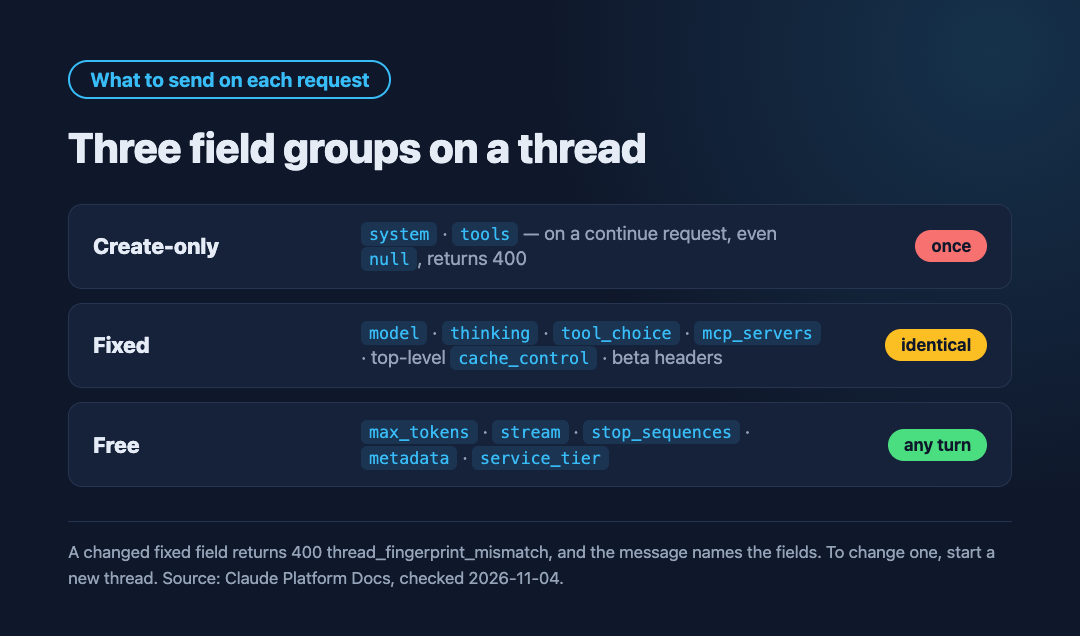
This is where most first attempts break. The docs split request fields into three groups.
| Group | Fields | Rule |
|---|---|---|
| Create-only | system, tools | Create request only. Sending either on a continue request, even as null, returns 400. |
| Fixed | model, tool_choice, thinking, mcp_servers, context_management, output_config, container skills, top-level cache_control, the set of beta headers | Same value on every request. A change returns 400 thread_fingerprint_mismatch. |
| Free | max_tokens, stop_sequences, stream, metadata, service_tier | Can change every turn. |
Three more rules from the docs:
- Send only new messages. The API does not compare them with what it stored. A message you send again can show up twice, and a continue request that starts with the previous response returns an error.
- Each response
idcan be continued once. The thread is append-only. To edit or branch an earlier turn, start a new thread with a create request. - MCP servers and containers are not stored. Send
mcp_serversandcontaineron every request that uses them. The MCP authorization token may change between requests; the rest ofmcp_serversmay not.
To change a fixed or create-only field, such as switching models mid-conversation, start a new thread with the full conversation. On Claude Fable 5.1, Mythos 5.1, Opus 5.5, Sonnet 5.5 and Haiku 5.5, changing system or tools also invalidates earlier thinking blocks, so leave those blocks out of the new create request.
Tool results and pause_turn
After a tool_use response, the next continue request carries the tool_result blocks as a user message. If a response stops with stop_reason: "pause_turn", resume it with a continue request from that response's id and an empty "messages": []. Do not send a new user message while the turn is paused; the API rejects it.
Prompt caching on a thread
A thread does not cache anything by itself. Prompt caching works as usual, and the top-level cache_control in the examples above asks the API to cache the last cacheable block of each request. Two limits matter:
- A request with
threadcan carry at most 4cache_controlbreakpoints. The top-level one counts. Breakpoints onsystemandtoolsfrom the create request count again on every continue request. One too many returns 400thread_unsupported_request. - You cannot move or remove a breakpoint after you send it. When you replay, strip breakpoints from earlier messages and keep one on the last block.
If you are already tuning token costs, as in the GPT-6.1 Terra migration guide, note that threads do not lower the per-token price. The savings come from caching, which you still configure yourself.
Streaming with a message thread
Threads work with streaming. The response id arrives in the message_start event, but only continue from it after message_stop. A continue request sent earlier can return 404.
If the stream of a continue request drops before message_stop, send the same continue request again. If that retry returns thread_already_continued or thread_continue_in_flight, replay the full conversation in a new create request. The server may have finished and stored the response after your connection dropped, which is why the retry can be rejected. Replaying is always safe. The SDK helper does not retry a dropped stream for you.
Fix Claude message thread errors
All of these errors come back before the model runs. The request uses no tokens, and the thread and its expiry do not change.
| Status | error_code | What it means | Fix |
|---|---|---|---|
| 404 | thread_not_found | The API can't continue the thread | Replay the full conversation in a new create request |
| 400 | thread_fingerprint_mismatch | A fixed field changed | Keep fixed fields identical, or start a new thread |
| 400 | thread_already_continued | That response id was already continued | Continue from the latest id, or replay |
| 400 | thread_continue_in_flight | Another continue from that id is still running | Wait for it, or replay |
| 400 | thread_unsupported_request | Unsupported feature or org setting | Remove the feature, or send without thread |
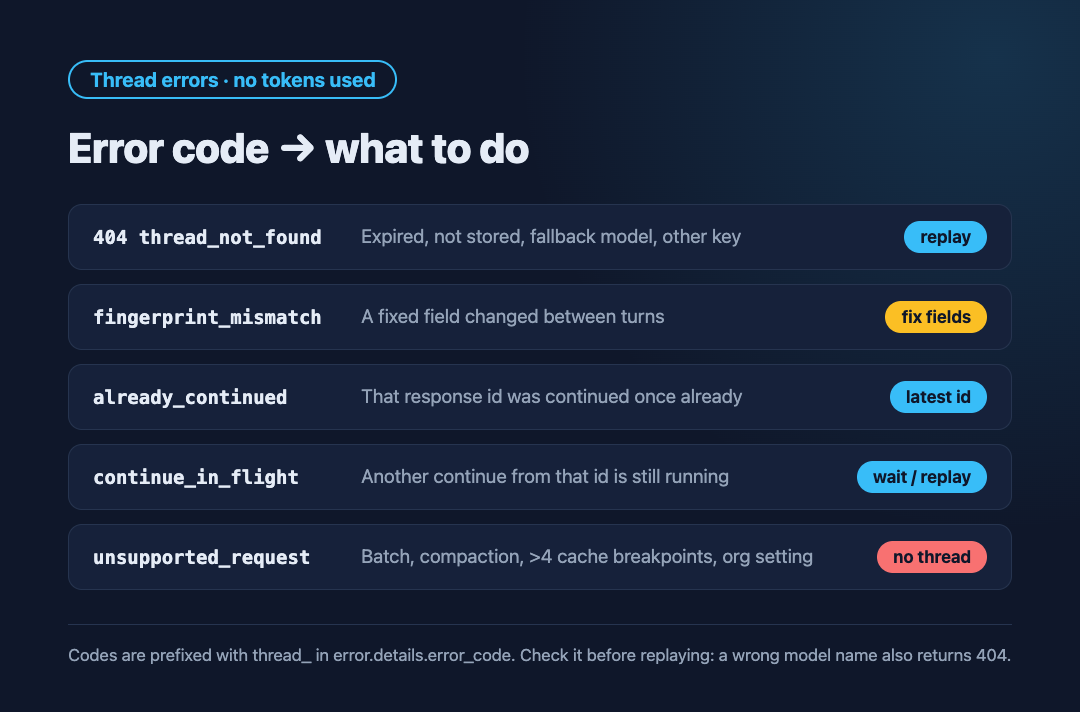
thread_not_found does not say why. The docs list these causes: the thread expired; the API served the previous turn but did not store it (for example, a response that ends in a tool call cut off by max_tokens); a fallback model wrote the previous response; the previous response is still generating; the request came from a different organization, workspace, user or key; or the new messages add something the stored conversation can't take, such as the first image in a conversation that had none.
A request for a model that doesn't exist also returns 404. Check error.details.error_code before you replay, or you will loop forever on a typo.
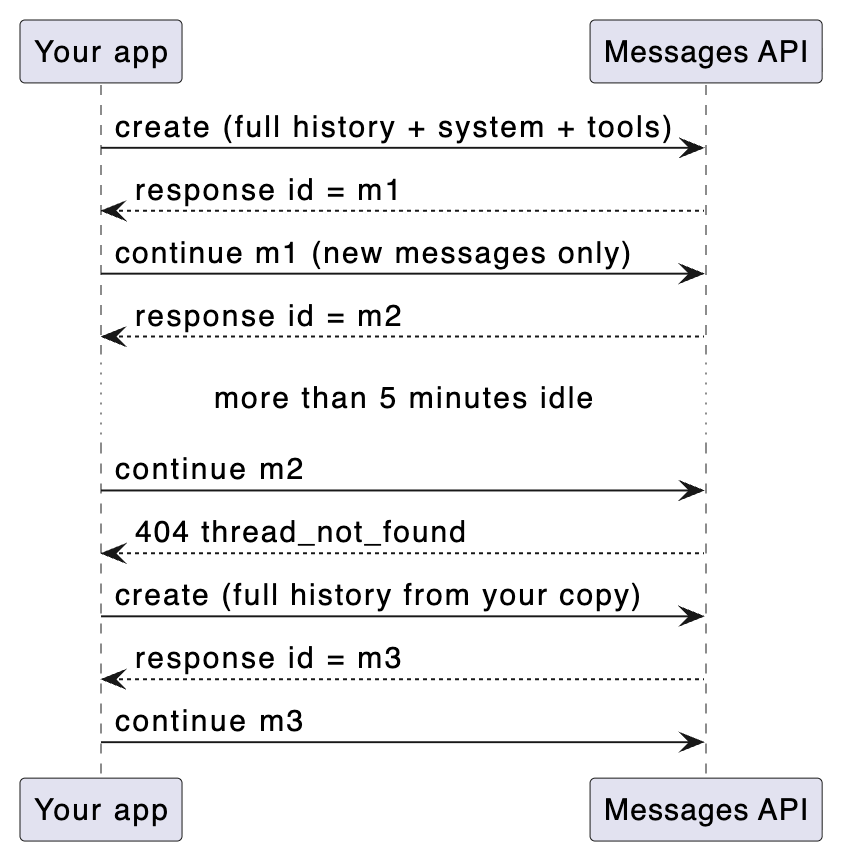
View PlantUML source
@startuml
skinparam defaultFontSize 15
skinparam shadowing false
participant "Your app" as A
participant "Messages API" as M
A -> M : create (full history + system + tools)
M --> A : response id = m1
A -> M : continue m1 (new messages only)
M --> A : response id = m2
... more than 5 minutes idle ...
A -> M : continue m2
M --> A : 404 thread_not_found
A -> M : create (full history from your copy)
M --> A : response id = m3
A -> M : continue m3
@enduml
A manual replay loop
If you don't use the helper, keep the conversation yourself and replay on the right errors. This is a sketch of the pattern, not code from the docs. It assumes the Python SDK raises NotFoundError and BadRequestError with the parsed error body on .body.
import anthropic

client = anthropic.Anthropic()
BETA = ["message-threads-2026-08-12"]
FIXED = dict(model="claude-opus-5-5", cache_control={"type": "ephemeral"})
SYSTEM = "You are a support agent for Acme. Keep replies short."
REPLAY_CODES = {"thread_not_found", "thread_already_continued", "thread_continue_in_flight"}

history = []        # your source of truth
last_id = None      # response id to continue from

def error_code(exc):
    body = exc.body if isinstance(exc.body, dict) else {}
    return body.get("error", {}).get("details", {}).get("error_code")

def create(messages):
    return client.beta.messages.create(
        **FIXED, max_tokens=1024, system=SYSTEM,
        messages=messages, thread={"type": "create"}, betas=BETA)

def turn(new_messages):
    global last_id
    history.extend(new_messages)
    try:
        if last_id is None:
            resp = create(history)
        else:
            resp = client.beta.messages.create(
                **FIXED, max_tokens=1024, messages=new_messages,
                thread={"type": "continue", "previous_message_id": last_id},
                betas=BETA)
    except (anthropic.NotFoundError, anthropic.BadRequestError) as exc:
        if error_code(exc) not in REPLAY_CODES:
            raise           # e.g. wrong model name, fingerprint mismatch
        resp = create(history)   # replay from your own copy
    history.append({"role": "assistant", "content": resp.content})
    last_id = None if resp.stop_reason == "refusal" else resp.id
    return resp
The refusal line follows the docs: after stop_reason: "refusal", don't continue the thread. Start a new one that leaves out or rephrases the turn that caused it. In a real app you would also drop that turn from history. If a replay is followed by another thread_not_found, the API may be unable to store that conversation at all (very large ones, for example). Send it without thread. The SDK helper does this when you create it with unsupported_request_behavior="continue_unthreaded".
Fallback models
If you use server-side fallback, send fallbacks on every request of the thread or on none. A thread keeps one model, so the API does not store a turn that a fallback model wrote. After each response, look for a fallback_message entry in usage.iterations. If it is there, you can't continue from that id; send the full conversation in a new create request. The helper does this on the next turn without waiting for a 404.
When not to use Claude message threads
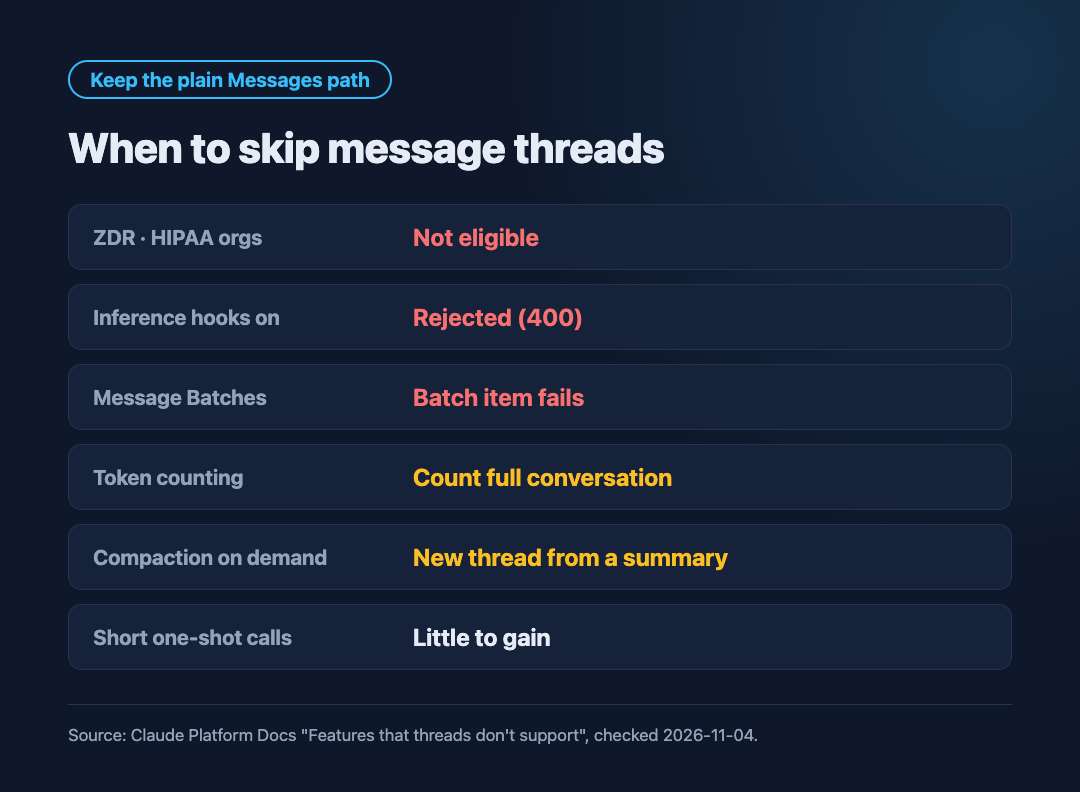
- Short, one-shot calls. A two-turn chat doesn't resend much. The gain shows up as the conversation grows.
- Batch jobs. Message Batches reject
thread. - Compaction on demand. Not available with threads. To compact, write a summary in your code and start a new thread from it.
- ZDR or HIPAA workloads. Not eligible.
- Long idle gaps. If users come back after lunch, every return is a replay. That still works, but you get no speedup on that turn.
Keep the plain request path working in any case. Threads are a beta, and the docs tell you to build the replay path from day one. If you have moved models recently, for example from the Gemini 3.x to Gemini 4 Argon API, the same habit applies: keep one request path you can always fall back to.
FAQ
Do Claude message threads cost less? No. The docs say threads do not change pricing or rate limits. The benefit is smaller requests and a lower time to first token. Lower token costs still come from prompt caching, which you configure yourself.
Can I list, read or delete a thread? No. There is no API to list, read or delete a thread. It expires 5 minutes after the last request, and the API deletes it no more than 1 hour after last use.
Can I switch models in the middle of a thread? No. model is a fixed field, so a change returns thread_fingerprint_mismatch. Start a new thread with the full conversation and the new model.
Do I still need to store the conversation? Yes. Your app stays the source of truth. No response tells you whether the API stored that turn; you find out on the next continue request. Without your own copy, you can't replay.
Does this change Claude Code? According to launch coverage of Anthropic's posts, threads are already on by default for most Claude Code users. You don't need to configure anything there. This guide is for apps that call the Messages API directly.
References
- Message threads — Claude Platform Docs, checked 2026-11-04
- Claude Platform release notes — entry dated 2026-11-02, checked 2026-11-04
- Prompt caching — Claude Platform Docs, checked 2026-11-04
- Streaming — Claude Platform Docs, checked 2026-11-04
- Refusals and fallback — Claude Platform Docs, checked 2026-11-04
- Anthropic Launches Message Threads Beta for Long-Running Agents — Unite.AI, 2026-11-02, checked 2026-11-04 (source for the 35% figure attributed to Anthropic)
1 thought on “Claude Message Threads: Setup, Errors and Replay Guide”