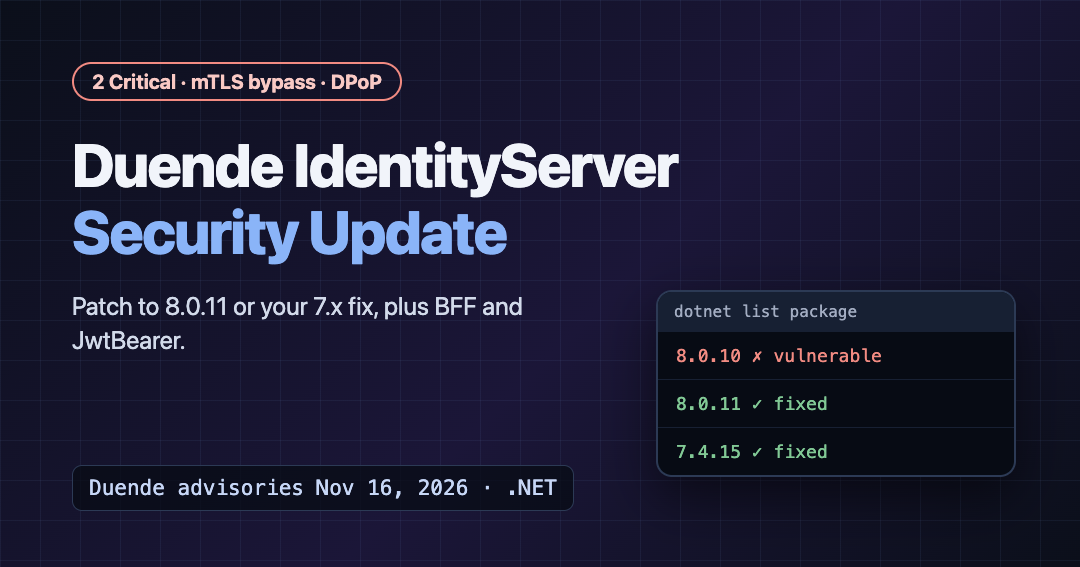
The Duende IdentityServer security update from November 16, 2026 fixes 12 advisories across IdentityServer, BFF and two ASP.NET Core authentication packages. Two are Critical: an mTLS client authentication bypass (CVSS 9.1) and a DPoP key confusion bug (CVSS 9.4). Update Duende.IdentityServer to 8.0.11 (or 7.4.15, 7.3.6, 7.2.6, 7.1.4, 7.0.11 on the 7.x lines), Duende.BFF to the patched release on your line, and Duende.AspNetCore.Authentication.JwtBearer to 1.0.3.
Written November 17, 2026, 13:30 KST (04:30 UTC). Facts checked on November 17, 2026 against Duende's "Security Updates – November 16, 2026" post, the GitHub security advisories in the DuendeSoftware/products and DuendeSoftware/foss repositories, and the NuGet package pages. None of the advisories had a CVE ID when I checked. I have not run these commands against a production IdentityServer for this post. The dotnet commands are standard .NET SDK commands, and the mitigations come from the advisories.
What the Duende IdentityServer security update fixes
Duende found most of these issues in an internal security review. The table lists the ones most teams need to look at first. Each row only applies if you use the feature in the "You are exposed if" column.
| Advisory | Package | Score | You are exposed if |
|---|---|---|---|
| mTLS bypass (GHSA-mv65-jhg4-3qh6) | IdentityServer 7.0–8.0 | 9.1 Critical | mTLS client auth and unvalidated or self-signed client certs |
| DPoP key confusion (GHSA-qqfr-626g-64rp) | IdentityServer 7.0–8.0 | 9.4 Critical | RSA DPoP keys, or RSA JsonWebKey client secrets |
| Static asset SSRF (GHSA-6gxg-chg2-rm9v) | BFF 4.x | 8.6 High | A frontend sets StaticAssetsUrl |
| Introspection scheme mix-up (GHSA-84rm-mhfq-f476) | OAuth2Introspection ≤ 7.0.2 | 8.1 High | Two or more introspection schemes, or a shared cache |
| DPoP key confusion (GHSA-rhcf-m7hh-vpm7) | JwtBearer < 1.0.3 | 7.7 High | API accepts DPoP tokens from RSA keys |
| SAML DoS (GHSA-wcc6-7mjx-g6j5) | IdentityServer 8.0 | 7.5 High | Any SAML feature enabled |
| Session fixation (GHSA-4xw7-58r7-8h6h, GHSA-x394-gwr7-4885) | IdentityServer, BFF | 6.4 / 6.7 | Server-side sessions |
The other advisories cover SAML service provider checks in 8.0 (subject confirmation, logout from a different identity provider, changed RelayState) and weak id_token_hint validation (CVSS 4.6) that allows a silent sign-out and a redirect to a registered post-logout URI.
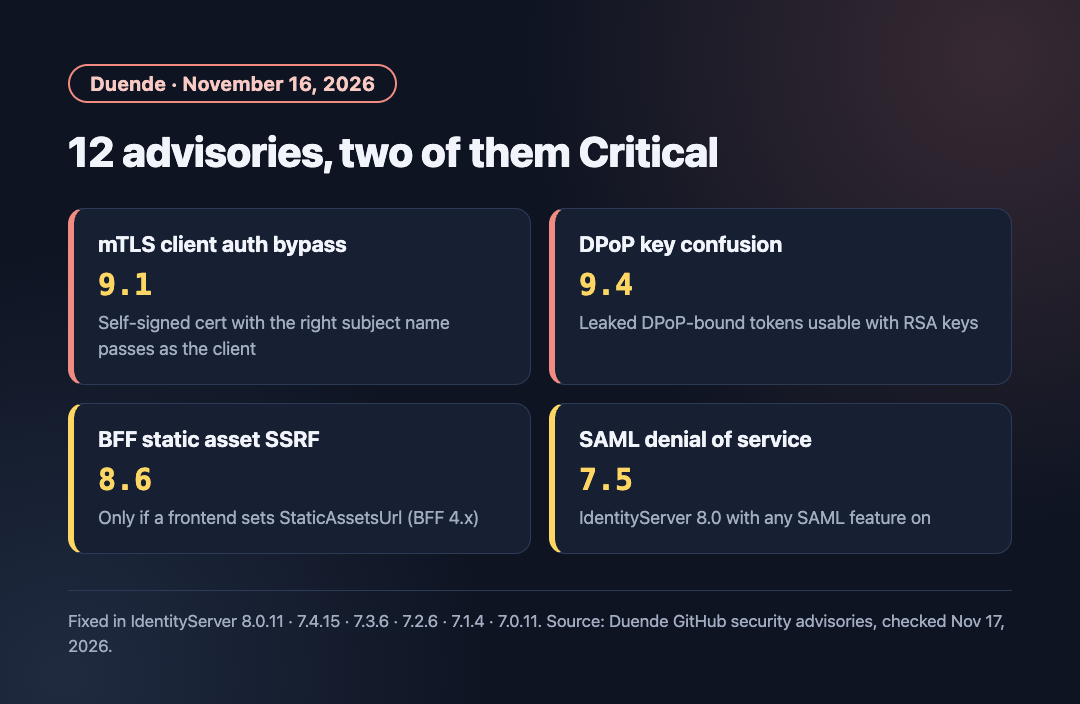
The two Critical bugs share a pattern. IdentityServer accepted a credential that looked right but was not fully checked. With mTLS, a self-signed certificate with the right subject name could pass as a client. With DPoP, an RSA proof that carried extra X.509 members in its jwk header was not bound to the right key. That let someone holding a leaked DPoP-bound token use it.
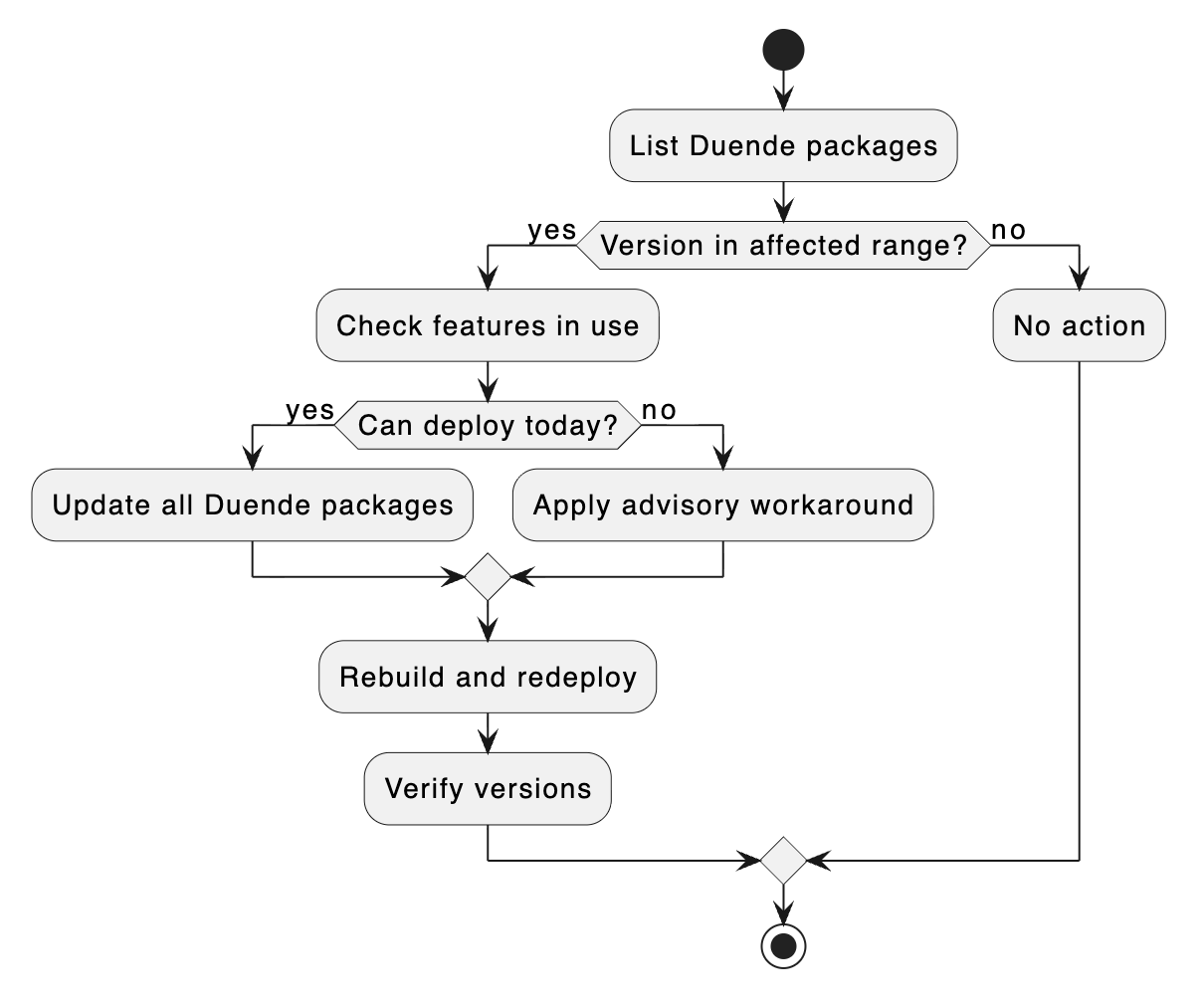
View PlantUML source
@startuml
skinparam shadowing false
skinparam defaultFontSize 14
start
:List Duende packages;
if (Version in affected range?) then (yes)
  :Check features in use;
  if (Can deploy today?) then (yes)
    :Update all Duende packages;
  else (no)
    :Apply advisory workaround;
  endif
  :Rebuild and redeploy;
  :Verify versions;
else (no)
  :No action;
endif
stop
@enduml
Check your Duende package versions
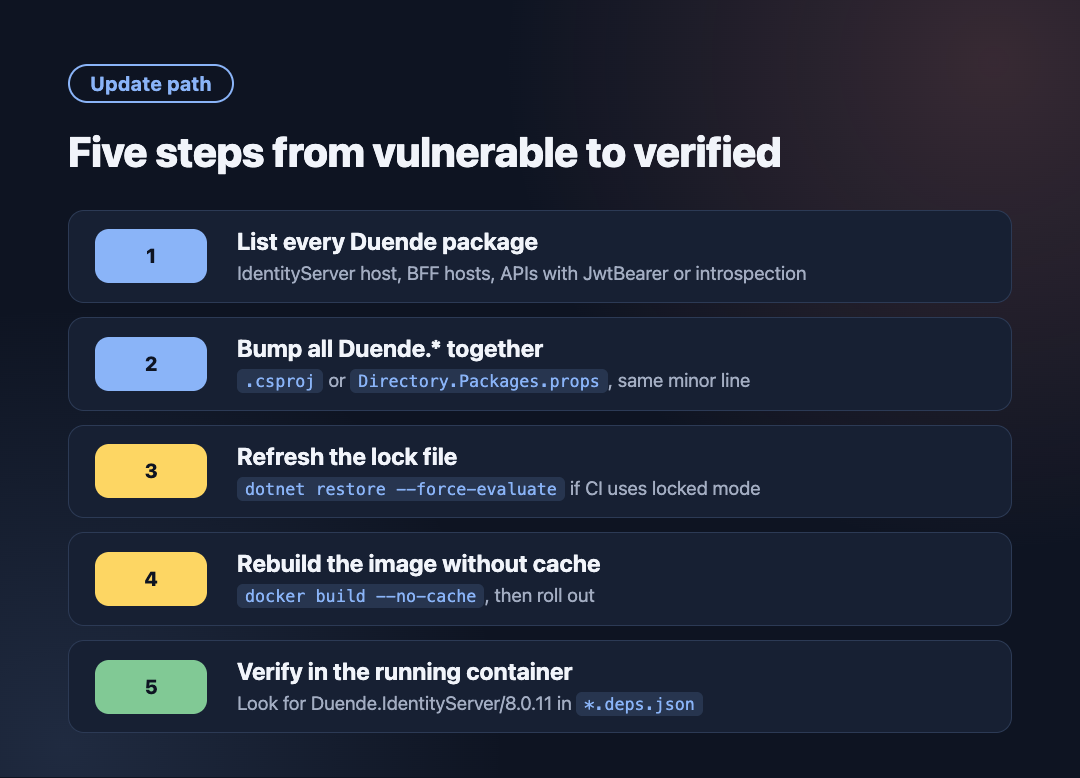
Start with the package versions in every project that references Duende code. That includes the IdentityServer host, BFF hosts and any API that uses Duende's JWT bearer or introspection handlers.
With the .NET CLI (Linux, macOS, Windows)
Run this in the solution folder:
dotnet list package --include-transitive | grep -i duendeOn Windows PowerShell, use Select-String instead of grep:
dotnet list package --include-transitive | Select-String -Pattern "Duende"Example output for a vulnerable host:
   > Duende.IdentityServer                    8.0.10      8.0.10
   > Duende.IdentityServer.EntityFramework    8.0.10      8.0.10
Do not rely on dotnet list package --vulnerable alone right now. It reads the GitHub Advisory Database, and the global advisory pages for these IDs returned "not found" when I checked on November 17. The advisories exist in Duende's repository security tabs, but they may not show up in the vulnerability scan yet.
Without building (CI, containers, many repos)
If you can't restore the solution, search the project files and lock files directly:
grep -rn --include=*.csproj --include=Directory.Packages.props --include=packages.lock.json "Duende\." .For a container that is already built, the package versions are in the *.deps.json file next to the app DLL:
docker run --rm --entrypoint sh <YOUR_IMAGE> -c 'grep -o "Duende[^\"]*/[0-9.]*" /app/*.deps.json | sort -u'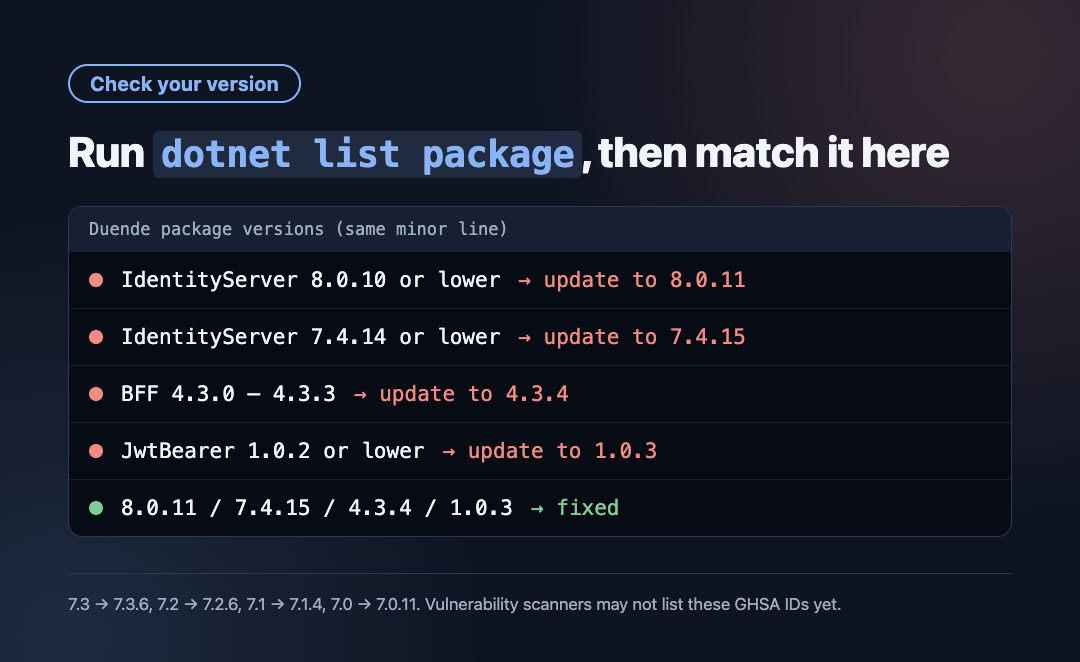
Which version is fixed
| Package | Fixed versions |
|---|---|
| Duende.IdentityServer | 8.0.11, 7.4.15, 7.3.6, 7.2.6, 7.1.4, 7.0.11 |
| Duende.BFF / Duende.BFF.Yarp | 4.3.4, 4.2.2, 4.1.4, 4.0.5, 3.1.3, 3.0.2, 2.3.2, 2.2.2 |
| Duende.AspNetCore.Authentication.JwtBearer | 1.0.3 |
| Duende.AspNetCore.Authentication.OAuth2Introspection | 7.0.3 on NuGet (see note) |
Your version is vulnerable if it is lower than the fixed version on the same minor line. For example, 7.4.14 is vulnerable and 7.4.15 is fixed. The OAuth2Introspection advisory listed "≤ 7.0.2" as affected but no patched version when I read it. NuGet shows 7.0.3 published on November 16, and it marks 7.0.2 and older as deprecated with "has critical bugs". Read the 7.0.3 release notes before you rely on it.
The 8.1.0-preview builds are not listed as fixed in any advisory. Keep production on 8.0.11.
How to update Duende IdentityServer to 8.0.11
Update every Duende.IdentityServer.* package together. Mixing versions such as Duende.IdentityServer 8.0.11 with Duende.IdentityServer.EntityFramework 8.0.10 is a common cause of restore warnings.
Project references (PackageReference)
dotnet add package Duende.IdentityServer --version 8.0.11
dotnet add package Duende.IdentityServer.EntityFramework --version 8.0.11   # only if you use it
dotnet restore
dotnet build -c Release
On the 7.4 line, use --version 7.4.15 instead. Stay on your current minor line for the security fix, and plan the major upgrade separately.
Central Package Management
If the solution has a Directory.Packages.props, change the versions there. dotnet add package would otherwise write to the wrong place.
<ItemGroup>
  <PackageVersion Include="Duende.IdentityServer" Version="8.0.11" />
  <PackageVersion Include="Duende.IdentityServer.EntityFramework" Version="8.0.11" />
  <PackageVersion Include="Duende.BFF" Version="4.3.4" />
  <PackageVersion Include="Duende.AspNetCore.Authentication.JwtBearer" Version="1.0.3" />
</ItemGroup>
If you use packages.lock.json with locked mode in CI, refresh the lock file once:
dotnet restore --force-evaluateDocker and Kubernetes
A package bump does nothing until the image is rebuilt. Rebuild without cache so the restore layer picks up the new versions, then roll out:
docker build --no-cache -t <YOUR_REGISTRY>/identity:2026-11-17 .
docker push <YOUR_REGISTRY>/identity:2026-11-17
kubectl set image deployment/<YOUR_DEPLOYMENT> identity=<YOUR_REGISTRY>/identity:2026-11-17
kubectl rollout status deployment/<YOUR_DEPLOYMENT>
Verify the fix is live
Run the version check again, then check the running container, not just the repository:
dotnet list package | grep -i duende
docker run --rm --entrypoint sh <YOUR_REGISTRY>/identity:2026-11-17 -c 'grep -o "Duende.IdentityServer/[0-9.]*" /app/*.deps.json | sort -u'
You want to see Duende.IdentityServer/8.0.11 (or your 7.x fixed version) in the output.
If you are moving the host to IdentityServer 8.x and still run .NET 8, note that the 8.0.11 package on NuGet ships a net10.0 build only. The .NET 8 end of support guide covers the runtime move.
Can't deploy today? Advisory workarounds
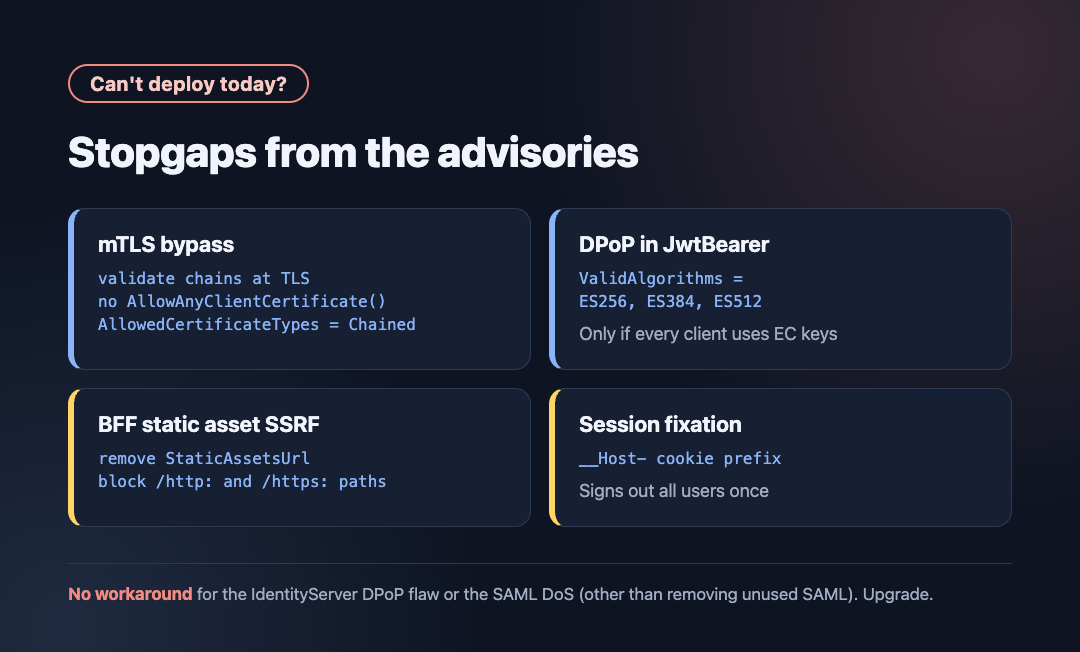
The advisories list workarounds for most issues. They are stopgaps, and some have side effects.
| Issue | Workaround from the advisory | Side effect |
|---|---|---|
| mTLS bypass | Validate client cert chains at the TLS layer, remove AllowAnyClientCertificate(), set AllowedCertificateTypes to Chained | Clients using self-signed certs stop working |
| DPoP (IdentityServer) | None listed. Upgrade | — |
| DPoP (JwtBearer) | Allow only ES256/384/512 if all clients use EC keys | RSA DPoP clients are rejected |
| BFF static asset SSRF | Remove StaticAssetsUrl, or block paths starting with /http: or /https: at the proxy | Dev setups that proxy a local frontend need another approach |
| SAML DoS | None that keeps SAML on. Remove unused SAML calls | SAML sign-in unavailable |
| Session fixation | Use a __Host- cookie name, keep untrusted content off the parent domain | Renaming the cookie signs out all users |
| Introspection mix-up | Distinct CacheKeyPrefix per scheme and app | Does not cover concurrent requests |
For the mTLS issue, the strongest stopgap is to validate the chain where TLS terminates. In Kestrel that means not accepting any certificate blindly:
builder.WebHost.ConfigureKestrel(k =>
{
    k.ConfigureHttpsDefaults(https =>
    {
        https.ClientCertificateMode = ClientCertificateMode.AllowCertificate;
        // Do NOT call https.AllowAnyClientCertificate();
    });
});

builder.Services.AddAuthentication()
    .AddCertificate(o => o.AllowedCertificateTypes = CertificateTypes.Chained);
For the JwtBearer DPoP issue, the advisory names the setting to change: DPoPOptions.ProofTokenValidationParameters.ValidAlgorithms. A sketch using the options pattern looks like this. Match it to how your app already configures DPoPOptions:
builder.Services.ConfigureDPoPTokensForScheme(JwtBearerDefaults.AuthenticationScheme);

// Sketch: allow only EC algorithms for DPoP proofs on this scheme
builder.Services.Configure<DPoPOptions>(JwtBearerDefaults.AuthenticationScheme, o =>
{
    o.ProofTokenValidationParameters.ValidAlgorithms = new[] { "ES256", "ES384", "ES512" };
});
Only use it if you know every client signs DPoP proofs with EC keys. Otherwise, legitimate RSA clients get 401 responses.
Custom code is a special case. Upgrading does not fix a class derived from DefaultDPoPProofValidator that overrides ValidateSignatureAsync, or a custom IServerSideTicketStore or BFF IServerTicketStore with its own RenewAsync. The advisories describe what that code must change. If you are tracking which repositories still lag behind, the Dependabot alerts pause guide shows how to find inactive repos that won't get automatic pull requests.
Check for exploitation of the BFF SSRF
The BFF static asset advisory includes a log check. If a vulnerable frontend with StaticAssetsUrl was reachable from untrusted networks, search the BFF and reverse proxy access logs for GET requests with a URL scheme in the path:
grep -Ei 'GET /(https?:|https?%3a)' /var/log/nginx/access.log*If you find matches, review what the BFF host could reach, such as internal services or cloud metadata endpoints. Rotate any credentials it could read, and revoke affected sessions.
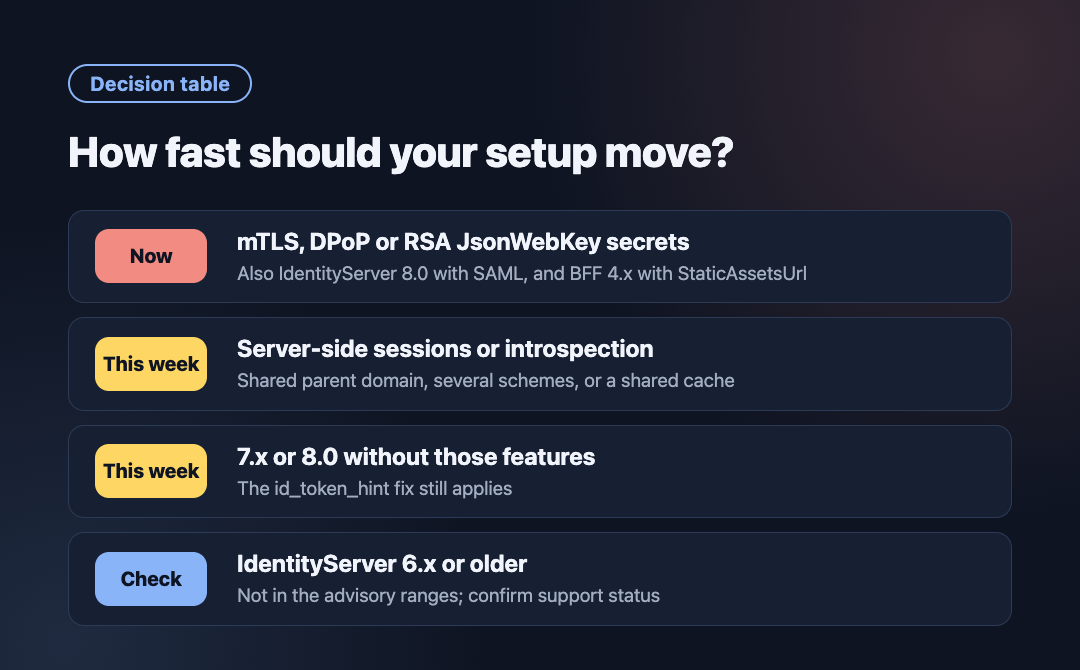
Should you update now? Decision table
| Your setup | Action |
|---|---|
IdentityServer with mTLS, DPoP or RSA JsonWebKey secrets | Update now |
| IdentityServer 8.0 with any SAML feature | Update now |
BFF 4.x with StaticAssetsUrl set | Update now |
| Server-side sessions on a shared parent domain | Update this week |
| Introspection with several schemes or a shared cache | Update this week |
| IdentityServer 7.x or 8.0 with none of the above features | Update this week (id_token_hint fix) |
| IdentityServer 6.x or older | Not in the advisory ranges. Check Duende's support status before assuming you are safe |
If the update causes problems
Users are signed out after the upgrade. This is expected for some. The session fixation fix signs out a user who signs in on a browser that still holds another user's session. They must sign in again.
BFF static assets return 502. After the fix, redirects from the static assets server return 502. Static asset requests also use a new named client, Duende.Bff.StaticAssetsProxyClient. Move custom headers, certificates or handlers you set through BffOptions.StaticAssetsClientName or BffOptions.BackchannelHttpHandler to that client, and don't follow redirects in custom handlers.
BFF users must sign in again after token renewal. Patched BFF releases strip Set-Cookie and Clear-Site-Data from proxied responses. Duende says BffOptions.RemoveCookieHeadersFromProxiedResponses = false restores the old behavior. Only do that if you trust every proxied API, because it reopens the cookie-planting issue.
SAML sign-in fails with deep or unusual messages. 8.0.11 rejects SAML messages nested deeper than MaxXmlNestingDepth (default 32), rejects DTDs in the service provider, and drops XML processing instructions. Raise the depth in SamlOptions only if a known identity provider needs it.
Restore fails with NU1202 or a downgrade warning. NU1202 means the target framework doesn't match the package. Stay on your current minor line, which keeps your framework. A downgrade warning usually means one Duende.* package is still on the old version.
To roll back, revert the version change in the .csproj or Directory.Packages.props and redeploy the previous image tag. Rolling back reopens every issue above. If you must roll back, apply the workarounds from the earlier table.
FAQ
Do I need to update if I don't use mTLS or DPoP? Yes, but it is less urgent. The id_token_hint fix applies to all 7.0–8.0 hosts, and session fixation applies to any host with server-side sessions. Plan the update this week.
Is there a CVE for these Duende advisories? Not when I checked on November 17, 2026. The advisories say GitHub has a backlog in issuing CVE IDs. Track them by GHSA ID for now.
Can I jump from 7.4 to 8.0.11 to get the fix? You can, but you don't need to. 7.4.15 has the same fixes for the 7.x issues. A major upgrade brings breaking changes, so do it separately from an urgent patch.
Does the BFF need the update if I only use IdentityServer? No. BFF advisories apply only to apps that reference Duende.BFF or Duende.BFF.Yarp. Check each frontend host separately.
Why doesn't my vulnerability scanner flag these packages? Scanners that read the GitHub Advisory Database may not list the advisories yet. Check versions manually with the commands above until they appear.
For more .NET runtime planning, see the upgrade to .NET 11 guide. It covers the next framework step once your identity stack is patched.
References
- Duende Software, "Security Updates – November 16, 2026": duendesoftware.com (checked November 17, 2026)
- GHSA-mv65-jhg4-3qh6, mTLS client authentication bypass: github.com/DuendeSoftware/products (checked November 17, 2026)
- GHSA-qqfr-626g-64rp, DPoP proof key confusion in IdentityServer: github.com/DuendeSoftware/products (checked November 17, 2026)
- GHSA-4xw7-58r7-8h6h, server-side session fixation: github.com/DuendeSoftware/products (checked November 17, 2026)
- GHSA-wcc6-7mjx-g6j5, SAML denial of service: github.com/DuendeSoftware/products (checked November 17, 2026)
- GHSA-hmrv-xfgm-wgh2, SAML subject confirmation: github.com/DuendeSoftware/products (checked November 17, 2026)
- GHSA-478v-p4g7-f7g4, id_token_hint validation: github.com/DuendeSoftware/products (checked November 17, 2026)
- GHSA-x394-gwr7-4885, BFF cookie planting and session reuse: github.com/DuendeSoftware/products (checked November 17, 2026)
- GHSA-6gxg-chg2-rm9v, BFF static asset SSRF: github.com/DuendeSoftware/products (checked November 17, 2026)
- GHSA-rhcf-m7hh-vpm7, DPoP key confusion in JwtBearer: github.com/DuendeSoftware/products (checked November 17, 2026)
- GHSA-84rm-mhfq-f476, OAuth2Introspection scheme mix-up: github.com/DuendeSoftware/foss (checked November 17, 2026)
- NuGet, Duende.IdentityServer versions: nuget.org (checked November 17, 2026)
- NuGet, Duende.AspNetCore.Authentication.OAuth2Introspection versions: nuget.org (checked November 17, 2026)
- Microsoft Learn, dotnet list package: learn.microsoft.com (checked November 17, 2026)