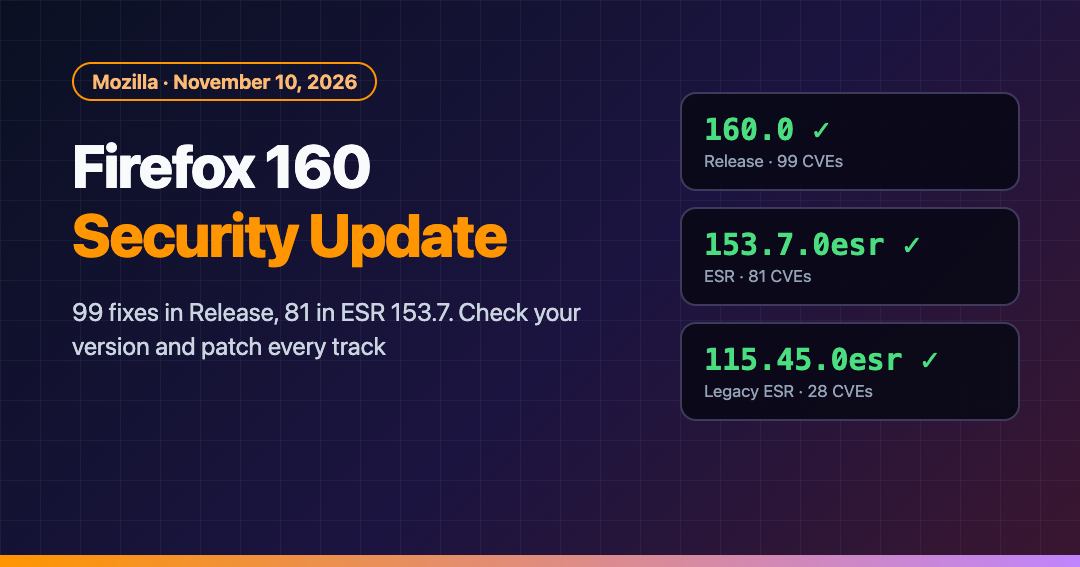
The Firefox 160 security update, released by Mozilla on November 10, 2026, fixes 99 vulnerabilities (57 rated High). The same day, Mozilla shipped Firefox ESR 153.7 (81 fixes) and ESR 115.45 (28 fixes). Whichever track you run, you need the new build now: check your version, update through the channel that installed Firefox, and confirm the version string afterwards. This guide walks through all three tracks on Windows, macOS and Linux, plus managed fleets.
Written November 13, 2026. Facts checked against Mozilla's security advisories (MFSA 2026-125, 126 and 127), the Firefox 160 and ESR 153.7 release notes and the Debian security tracker on November 13, 2026. The commands are standard OS and package-manager commands; they were not run on a test machine for this post, so compare the output with your own system.
What the November 10 Firefox 160 security update fixes
Mozilla released three desktop Firefox builds in one batch. None of the advisories rates a bug Critical, and none says a bug is being exploited. The volume is still unusual: 208 CVE entries across the three advisories, with plenty of overlap between them.
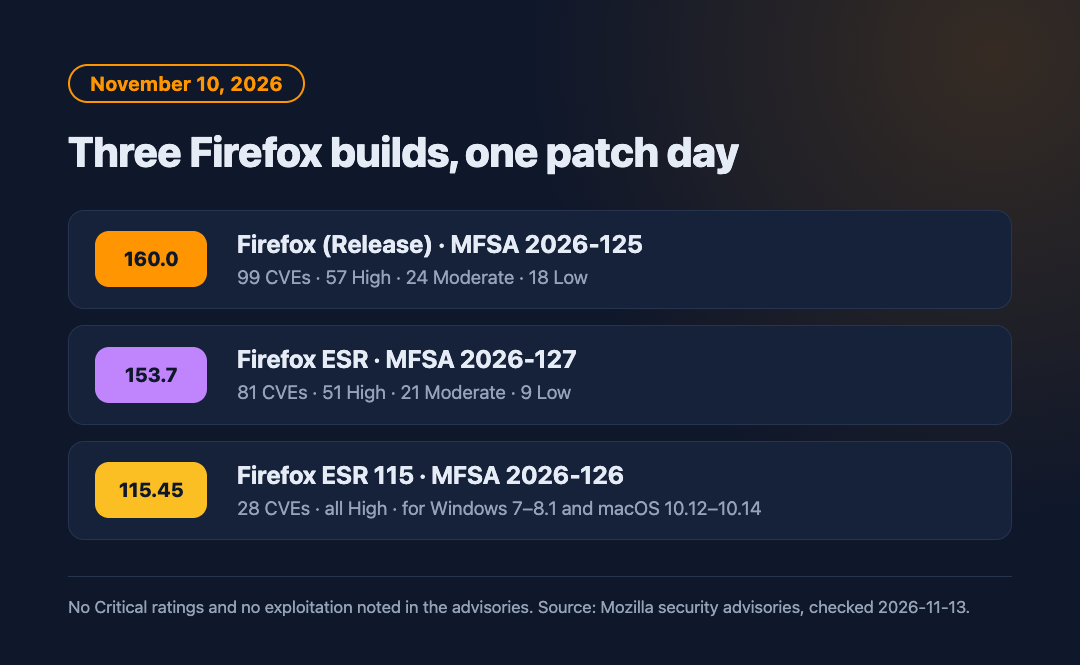
| Build | Advisory | CVEs | High / Moderate / Low |
|---|---|---|---|
| Firefox 160 | MFSA 2026-125 | 99 | 57 / 24 / 18 |
| Firefox ESR 153.7 | MFSA 2026-127 | 81 | 51 / 21 / 9 |
| Firefox ESR 115.45 | MFSA 2026-126 | 28 | 28 / 0 / 0 |
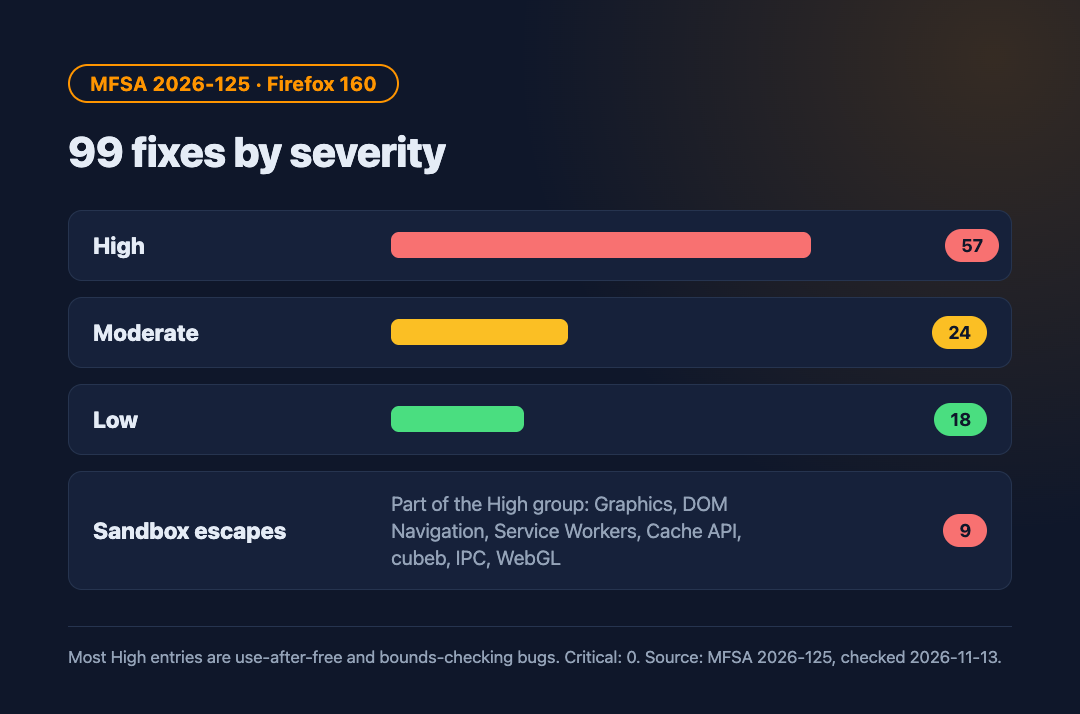
The High entries in MFSA 2026-125 are mostly use-after-free and bounds-checking bugs in the DOM, layout, CSS, graphics and JavaScript garbage collector. Nine of them are described as sandbox escapes (for example CVE-2026-124853 in Graphics: Text and CVE-2026-124903 in IPC). A sandbox escape is the step an attacker needs after compromising a web content process, so these are the bugs that matter most even without a public exploit.
Thunderbird got the matching fixes in Thunderbird 160 (MFSA 2026-128) and 153.7 (MFSA 2026-129). Firefox for iOS 160.0 had its own advisory a day earlier (MFSA 2026-124, November 9).
Firefox 160 also brings features: a playback speed control in Picture-in-Picture, an early "Mini Window" for pinning part of a page, a "Never allow" button for protocol handler prompts, and WebGL on Apple's Metal API on macOS. It fixes a multi-second freeze when signing in to intranet sites with NTLM or Kerberos. Those features matter for troubleshooting later.
Check your Firefox version
First find out which track you are on. Release builds show a plain number (160.0). ESR builds end in esr (153.7.0esr).
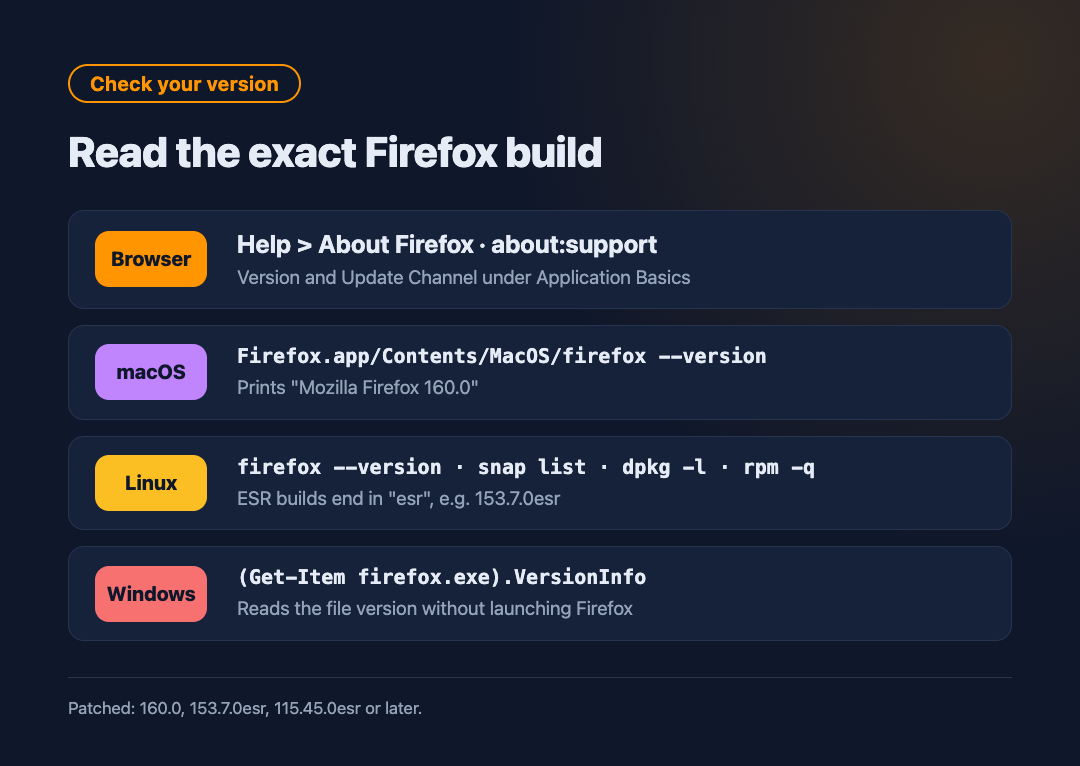
In the browser: menu (☰) > Help > About Firefox. Opening this window also starts an update check. Or open about:support and read Version and Update Channel under Application Basics.
macOS:
/Applications/Firefox.app/Contents/MacOS/firefox --versionExample output: Mozilla Firefox 160.0.
Linux (any install type):
firefox --version                 # e.g. Mozilla Firefox 153.7.0esr
snap list firefox                 # Snap: version and channel
flatpak info org.mozilla.firefox  # Flatpak
dpkg -l firefox firefox-esr       # Debian/Ubuntu .deb packages
rpm -q firefox                    # Fedora, RHEL and clones
Windows PowerShell (default install path, no browser launch):
(Get-Item "C:\Program Files\Mozilla Firefox\firefox.exe").VersionInfo.ProductVersionIs your version vulnerable?
| Your version | Status |
|---|---|
| Release below 160.0 | Vulnerable, update to 160.0 |
| ESR 153.x below 153.7 | Vulnerable, update to 153.7 |
| ESR 115.x below 115.45 | Vulnerable, update to 115.45 |
| 160.0, 153.7.0esr or 115.45.0esr and later | Patched |
If you still see an ESR 140 build (for example Debian trixie's 140.15.0esr before the security update), you are on an old ESR line. Debian's security update moves it to 153.7.
How to install the Firefox 160 security update
Firefox updates through whatever installed it. The built-in updater handles the firefox.com installers. Package managers handle everything else, and the "Restart to update" button will not appear for them.
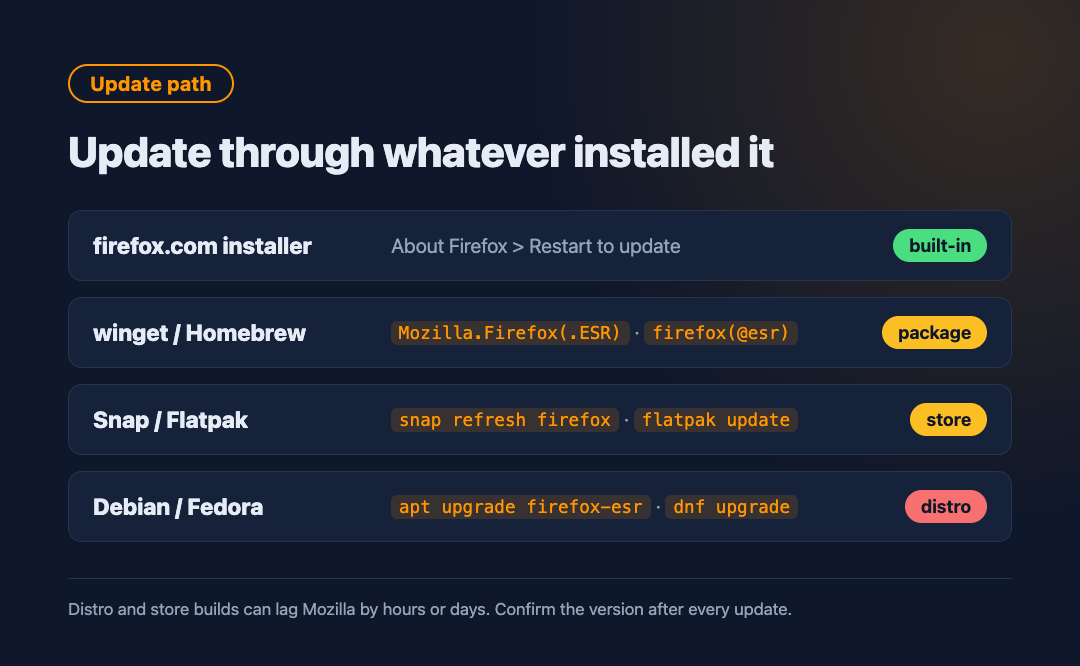
| Install type | Release (160) | ESR (153.7) |
|---|---|---|
| firefox.com installer | Help > About Firefox > Restart | Same |
| winget | winget upgrade --id Mozilla.Firefox | winget upgrade --id Mozilla.Firefox.ESR |
| Homebrew | brew upgrade --cask firefox | brew upgrade --cask firefox@esr |
| Snap | sudo snap refresh firefox | sudo snap refresh firefox --channel=esr/stable |
| Flatpak | flatpak update org.mozilla.firefox | — |
| Debian security | — | sudo apt update && sudo apt install --only-upgrade firefox-esr |
| Fedora | sudo dnf upgrade --refresh firefox | — |
Windows and macOS (built-in updater)
- Open Help > About Firefox and let the download finish.
- Click Restart to update Firefox. Session restore brings tabs back if it is on.
- Reopen About Firefox and confirm
160.0(or153.7.0esr) and "Firefox is up to date".
Linux distributions
Distribution packages are built by the distro, not Mozilla, so check the distro's own advisory first. As of November 13, 2026, Debian's tracker lists:
| Debian release | Fixed firefox-esr version | Advisory |
|---|---|---|
| 13 trixie | 153.7.0esr-1~deb13u1 | DSA-6622-1 |
| 12 bookworm (LTS) | 153.7.0esr-1~deb12u1 | DLA-4896-1 |
| sid | 153.7.0esr-1 (and firefox 160.0-1) | — |
After apt finishes, confirm the result:
apt policy firefox-esr | head -3
firefox --version   # expect 153.7.0esr
On Ubuntu, Firefox ships as a Snap by default. If snap refresh says "All snaps up to date" and the version is still old, the store has not published the build yet. Run it again later in the day.
Managed fleets and policies
Open about:policies on a client. If DisableAppUpdate is true, or AppAutoUpdate is false, users cannot patch themselves and your deployment tool has to push the MSI or package. If you pin ESR clients with the AppUpdatePin policy, a pin like "153." still lets 153.7 install:
{
  "policies": {
    "AppUpdatePin": "153."
  }
}
The file lives in distribution/policies.json inside the Firefox install folder on Windows and macOS, or in /etc/firefox/policies/policies.json on Linux. To find unpatched machines, collect the PowerShell line above (Windows) or firefox --version (macOS, Linux) through your management tool and flag anything below the fixed versions.
Here is the whole flow:
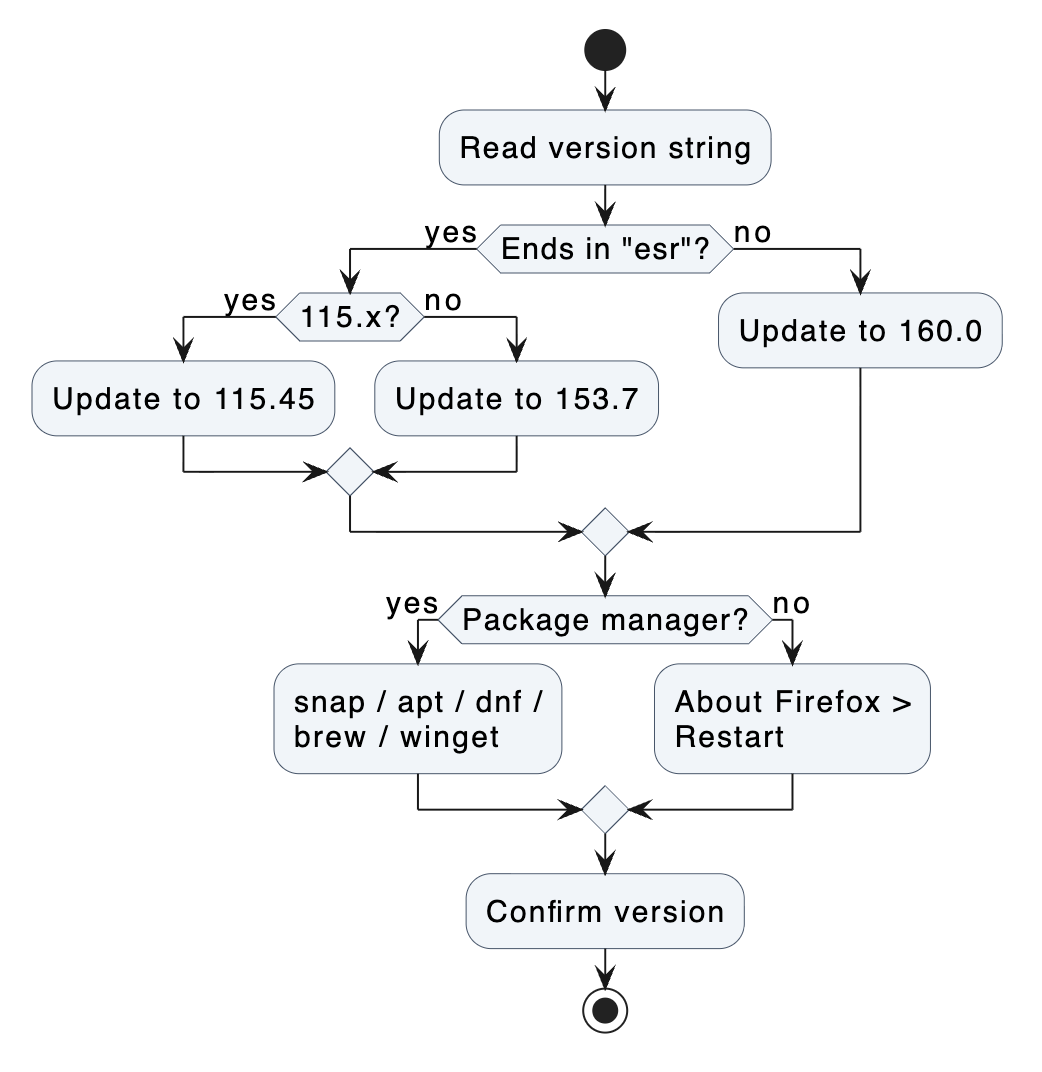
View PlantUML source
@startuml
skinparam defaultFontSize 15
skinparam ActivityBorderColor #475569
skinparam ActivityBackgroundColor #F1F5F9
start
:Read version string;
if (Ends in "esr"?) then (yes)
  if (115.x?) then (yes)
    :Update to 115.45;
  else (no)
    :Update to 153.7;
  endif
else (no)
  :Update to 160.0;
endif
if (Package manager?) then (yes)
  :snap / apt / dnf /
  brew / winget;
else (no)
  :About Firefox >
  Restart;
endif
:Confirm version;
stop
@enduml
Can't update Firefox right now?
Mozilla's advisories list no workaround or mitigation for these bugs. The fix is the new build. If a machine cannot take it today, reduce exposure while you schedule the update:
- Use a patched browser for general browsing on that machine until Firefox is updated. Keep the old Firefox only for the internal app that needs it.
- Do not turn off the sandbox or content process isolation to work around compatibility problems. Nine of the High bugs are sandbox escapes; the sandbox is part of the defence.
- Move unsupported machines to ESR. Firefox 160 no longer runs on Windows 8.1 or earlier, or macOS 10.14 or earlier. Mozilla points those systems to ESR 115, and ESR 115.45 is its fix. Press reports from July 2026 say ESR 115 support for those systems runs to March 2027, so plan the OS upgrade now.
Firefox 160 problems after updating
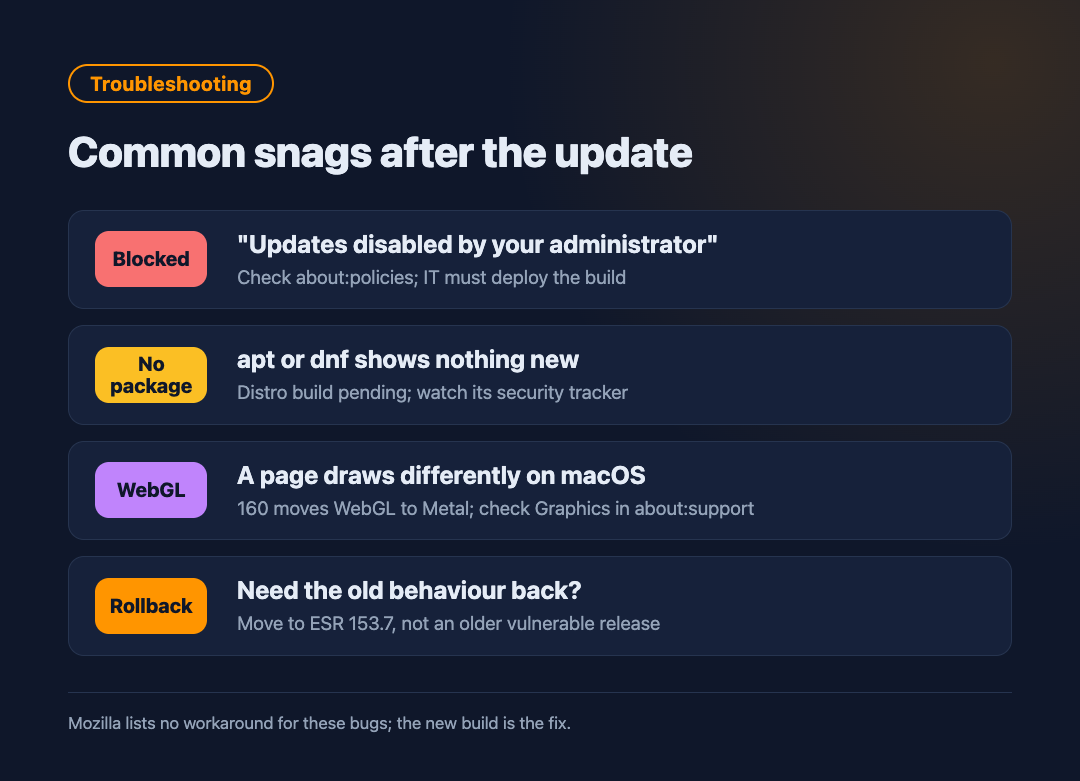
| Symptom | Likely cause | Fix |
|---|---|---|
| "Updates disabled by your system administrator" | Enterprise policy | Check about:policies; IT deploys the build |
| apt or dnf shows no new Firefox | Distro has not built it yet | Check the distro tracker; update when it lands |
| A WebGL page draws differently on macOS | WebGL now uses Metal in 160 | Check Graphics in about:support; report it on Bugzilla; use ESR 153.7 if blocking |
| "You've launched an older version of Firefox" | You downgraded with a newer profile | Go back to 160 (see below) |
Rolling back
Mozilla does not offer a supported downgrade, and an old build is vulnerable to every bug listed above. If a business app breaks on 160, move that machine to ESR 153.7 instead of an older release build. ESR 153.7 has the matching security fixes without the new 160 features.
If you install an older build anyway, Firefox's profile downgrade protection refuses to open a profile last used by a newer version and offers a new profile instead. The -allow-downgrade command-line flag skips that check, but Mozilla does not recommend it because older builds may not read newer profile data correctly. Back up the profile folder (shown in about:support > Profile Folder) before trying it.
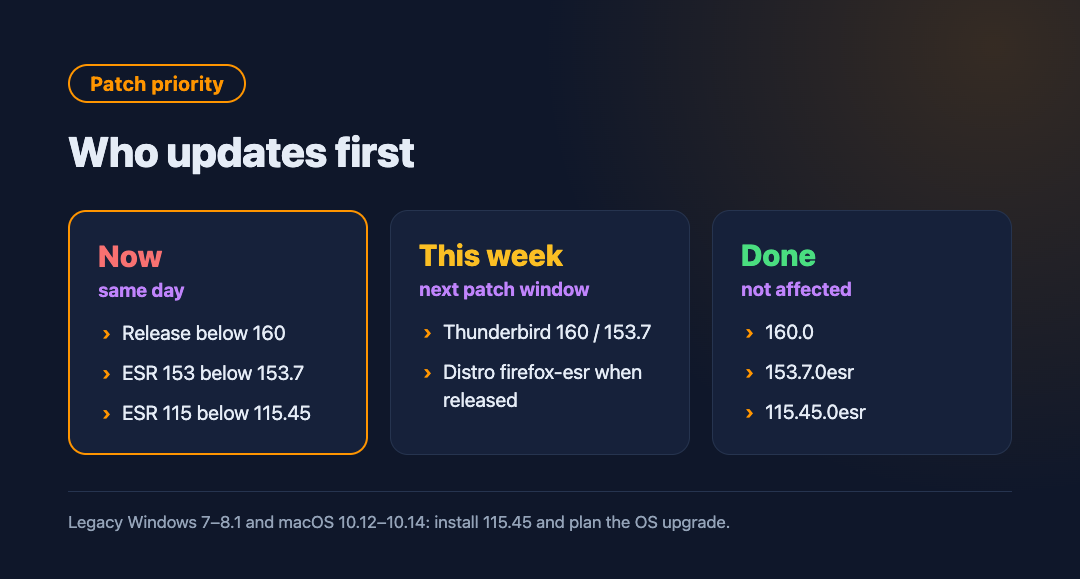
Which Firefox needs the update first?
| Environment | Priority |
|---|---|
| Release Firefox below 160 on any desktop | Update now |
| ESR 153.x below 153.7 in a managed fleet | Update now (or within this week's patch window if you stage) |
| ESR 115.x on Windows 7/8.1 or old macOS | Update to 115.45 now; plan the OS upgrade |
Debian/Ubuntu .deb firefox-esr | Update as soon as your release's advisory is out |
| Thunderbird 160 / 153.x | Update this week (MFSA 2026-128, 129) |
| Already 160.0, 153.7.0esr or 115.45.0esr | Not affected |
Browsers are usually the most exposed software on a desktop, so patch them on the same day. For the previous Firefox point release, see Firefox 159.0.1 Security Update: Patch CVE-2026-120572 Now. The same check-update-confirm routine for Chrome is in Chrome 156 Security Update: Patch to 156.0.8078.79 Now, and this week's Windows patch is covered in KB5132061 Windows 11 Update: Install It and Fix What Breaks.
FAQ
Is any Firefox 160 vulnerability being exploited? The three advisories do not say so, and none of the 208 entries is rated Critical. When Mozilla knows of attacks, it normally says so in the advisory text. Patch anyway: 57 High bugs in one release is a large window if you wait.
I'm on Firefox 159.0.1. Do I still need 160? Yes. 159.0.1 fixed one bug (CVE-2026-120572). The 99 bugs in MFSA 2026-125 are fixed only in 160.0.
Should I switch from Release to ESR to avoid feature changes? Only if you manage machines that need a stable feature set. ESR 153.7 has the security fixes without the 160 features. Home users are better off on Release, which gets fixes and features together.
Will the update remove my tabs, passwords or extensions? No. Updates replace program files only. Your profile folder stays. Tabs come back after the restart when session restore is on.
Does this update cover Thunderbird? Not directly. Thunderbird has its own builds: update to Thunderbird 160 or 153.7 through Help > About Thunderbird or your package manager.
Next, check your installed extensions in about:addons. A patched browser running an abandoned extension is still a risk.
References
- Mozilla Foundation Security Advisory 2026-125 (Firefox 160) — Mozilla, announced 2026-11-10, checked 2026-11-13
- Mozilla Foundation Security Advisory 2026-127 (Firefox ESR 153.7) — Mozilla, announced 2026-11-10, checked 2026-11-13
- Mozilla Foundation Security Advisory 2026-126 (Firefox ESR 115.45) — Mozilla, announced 2026-11-10, checked 2026-11-13
- Firefox 160.0 release notes — Mozilla, released 2026-11-10, checked 2026-11-13
- Firefox ESR 153.7.0 release notes — Mozilla, released 2026-11-10, checked 2026-11-13
- Mozilla security advisories index — Mozilla, includes MFSA 2026-124, 128 and 129, checked 2026-11-13
- Firefox enterprise policy templates — Mozilla, AppUpdatePin, DisableAppUpdate and AppAutoUpdate, checked 2026-11-13
- Debian security tracker: firefox-esr — Debian, DSA-6622-1 and DLA-4896-1, checked 2026-11-13
- Mozilla extends ESR 115 support for Windows 7 to 2027 — Neowin (press report), checked 2026-11-13
1 thought on “Firefox 160 Security Update: Patch 99 CVEs and ESR 153.7”