The uBlock Origin security update you need is version 1.76.4. Any build at 1.75.2 or older is open to a one-click universal XSS (GHSA-cmqw-9r2w-6wv2): a malicious page could drive the element picker and plant a trusted filter that runs its JavaScript on the next sites you visit. Store installs on Firefox and Edge update on their own. Distro packages (Debian, Ubuntu) and Tails need manual action. This guide shows how to check your version, update or replace the package, clean up any planted filters, and what to do if you can't update yet.
Written November 19, 2026. Versions and store listings checked on November 19, 2026 (KST).
What changed in the uBlock Origin security update
The uBlock Origin maintainer published advisory GHSA-cmqw-9r2w-6wv2 ("Universal XSS from website-driven element picker") on November 15, 2026. GitHub rates it High. It has no CVE ID and no CVSS score. A researcher reported it by email on November 1.
The short version of the attack, taken from the advisory:
- A website could load uBlock Origin's element picker in an iframe and control it.
- One click anywhere on the page was enough for the attacker to add arbitrary trusted filters.
- The chain needed a filter using a
prevent-xhrorprevent-fetchscriptlet that answers with a web-accessible resource. Through that, the page could learn the extension's internal UUID and, on MV2 Chromium, the resource secret. - Picker filters are treated as trusted until the next recompile. A trusted filter can inject scriptlets, so the attacker's code runs on other sites you visit.
The fix landed across several releases. The advisory lists 1.75.4 as the patched version, and the newer releases harden the same area further:
| Version | Date (2026) | Security-relevant change |
|---|---|---|
| 1.75.2 | Nov 2 | Avoid tainted XHR methods in scriptlets (still vulnerable) |
| 1.75.4 | Nov 3 | Picker launches only with a verified secret token (patched) |
| 1.76.0 | Nov 8 | Picker validates new filters; war: filters disabled for now |
| 1.76.4 | Nov 15 | "Remaining reported security issues" addressed (current stable) |
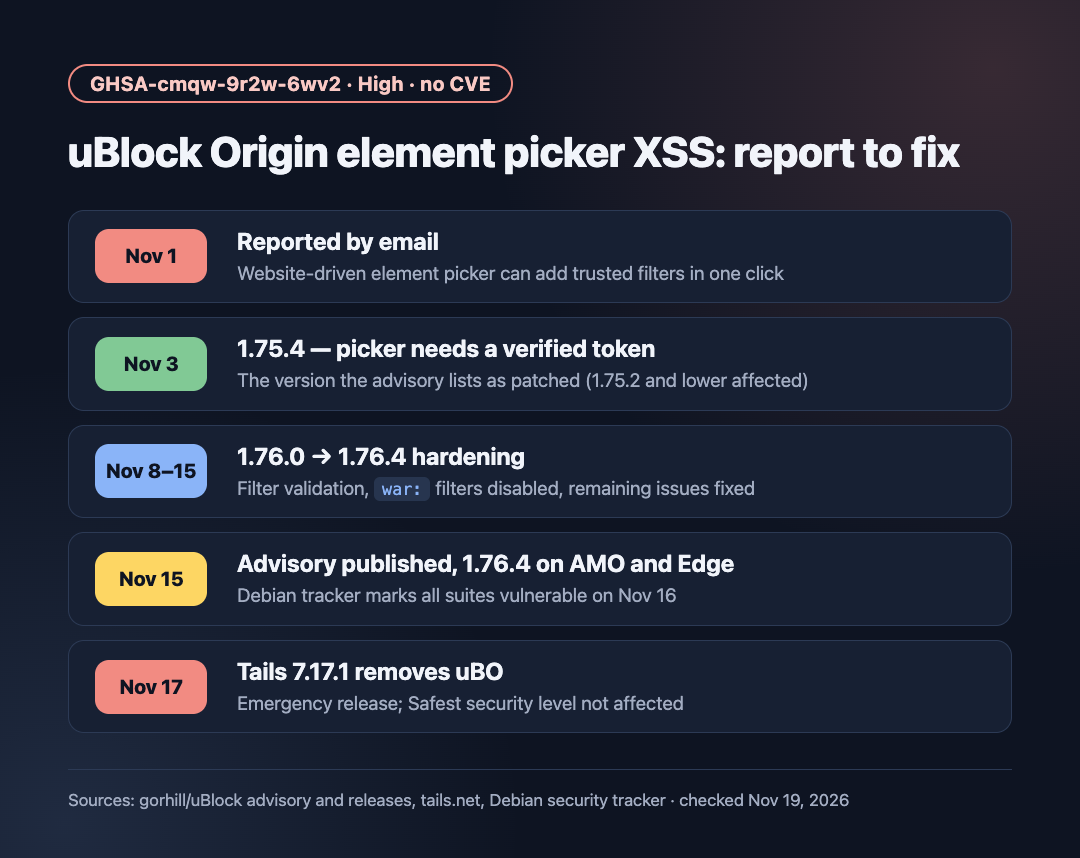
Tails, the amnesic Linux distribution, shipped Tails 7.17.1 on November 17 as an emergency release that removes uBlock Origin from its Tor Browser for now. Tails says the attack is "relatively easy" for a website, is not known to have been used in practice, and does not work at Tor Browser's Safest security level. Debian's security tracker lists the issue as TEMP-1154169-DFA33F and marks bookworm, trixie, forky and sid as vulnerable (checked Nov 19).
Who is affected: browser, store and package
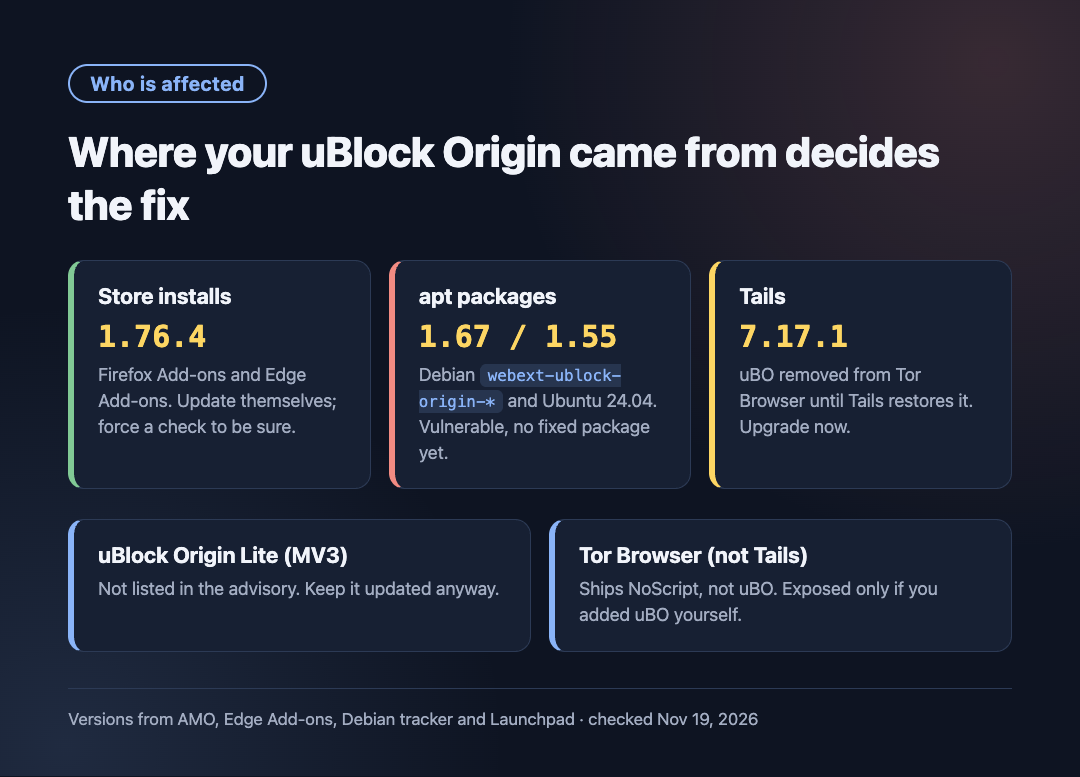
The risk depends on where your copy of uBlock Origin came from, because only store installs update themselves.
| Where uBO came from | Version on Nov 19 | Updates itself? | Status |
|---|---|---|---|
| Firefox Add-ons (AMO) | 1.76.4 (Nov 15) | Yes | Fixed once updated |
| Microsoft Edge Add-ons | 1.76.4 (Nov 15) | Yes | Fixed once updated |
Debian webext-ublock-origin-* | 1.67.0 | Via apt only | Vulnerable |
| Ubuntu 24.04 package | 1.55.0 | Via apt only | Vulnerable |
| Tails 7.17 and older | Bundled | Via Tails upgrade | Upgrade to 7.17.1 |
Two notes on scope:
- Chrome. Current Chrome no longer runs Manifest V2 extensions, so classic uBlock Origin is not on the Chrome Web Store. Most Chrome users run uBlock Origin Lite (MV3), which the advisory does not list. If you sideloaded the MV2
.crxinto a Chromium build that still allows MV2, treat it like any other install and check the version. - Tor Browser outside Tails. Tor Browser ships NoScript, not uBlock Origin. You are only exposed if you added uBO yourself.
Check your uBlock Origin version
In the browser
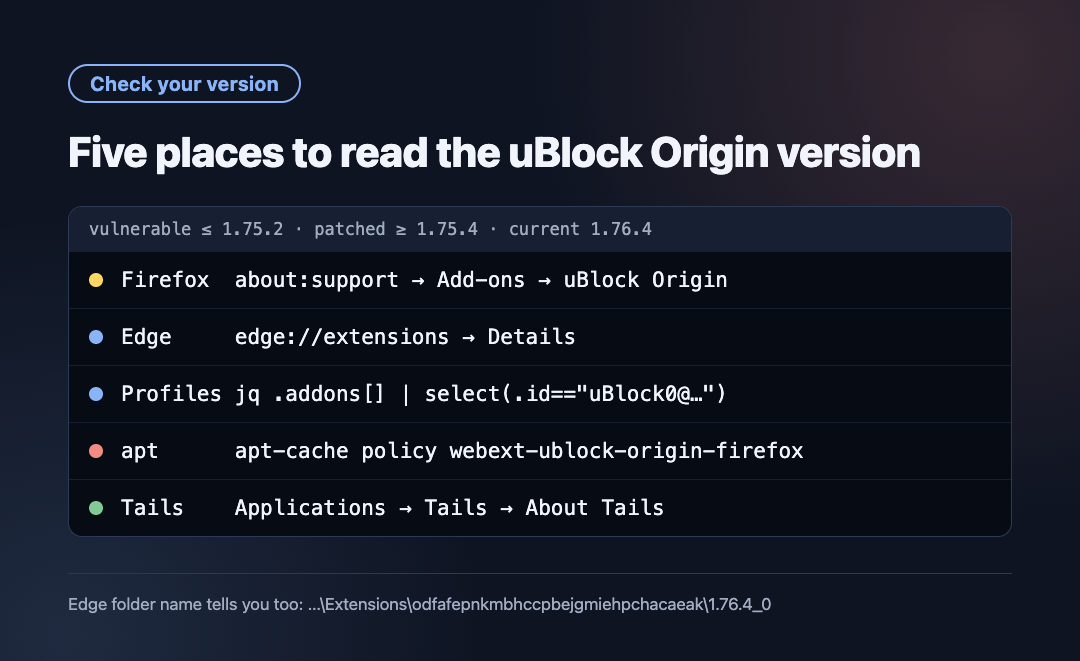
- Firefox: open
about:supportand scroll to Add-ons. The row "uBlock Origin" shows the version and the IDuBlock0@raymondhill.net. You can also useabout:addons> uBlock Origin. - Edge: open
edge://extensions, then Details on uBlock Origin. The version is listed there. - Chromium (sideloaded MV2): open
chrome://extensions, turn on Developer mode, and read the version on the card.
Rule of thumb: 1.75.2 or lower = vulnerable. 1.75.4 or higher = patched. 1.76.4 = current.
From the command line (Firefox profiles)
Firefox stores add-on metadata in extensions.json inside each profile. This loop prints the uBO version for every profile on Linux (classic and XDG paths) or macOS (needs jq):
for f in ~/.mozilla/firefox/*/extensions.json \
         ~/.config/mozilla/firefox/*/extensions.json \
         ~/Library/Application\ Support/Firefox/Profiles/*/extensions.json; do
  [ -f "$f" ] || continue
  printf '%s: ' "$f"
  jq -r '.addons[] | select(.id=="uBlock0@raymondhill.net") | .version' "$f"
done
Sample output (illustrative):
/home/<USER>/.mozilla/firefox/abcd1234.default-release/extensions.json: 1.76.4
/home/<USER>/.mozilla/firefox/wxyz9876.work/extensions.json: 1.75.2
The second profile in that example still needs an update.
On Windows, PowerShell does the same without extra tools:
Get-ChildItem "$env:APPDATA\Mozilla\Firefox\Profiles\*\extensions.json" | ForEach-Object {
  $j = Get-Content $_.FullName -Raw | ConvertFrom-Json
  $v = ($j.addons | Where-Object id -eq 'uBlock0@raymondhill.net').version
  "{0}: {1}" -f $_.Directory.Name, $v
}
Edge on Windows
Each installed version gets its own folder under the extension ID odfafepnkmbhccpbejgmiehpchacaeak:
Get-ChildItem "$env:LOCALAPPDATA\Microsoft\Edge\User Data\*\Extensions\odfafepnkmbhccpbejgmiehpchacaeak" -Directory |
  Get-ChildItem -Directory | Select-Object FullName
A folder named 1.76.4_0 means you are current.
Debian and Ubuntu packages
apt-cache policy webext-ublock-origin-firefox webext-ublock-origin-chromium
dpkg -l | grep -i ublock
If Installed: shows anything other than (none), you have the packaged copy, which is 1.67.0 on current Debian releases and 1.55.0 on Ubuntu 24.04.
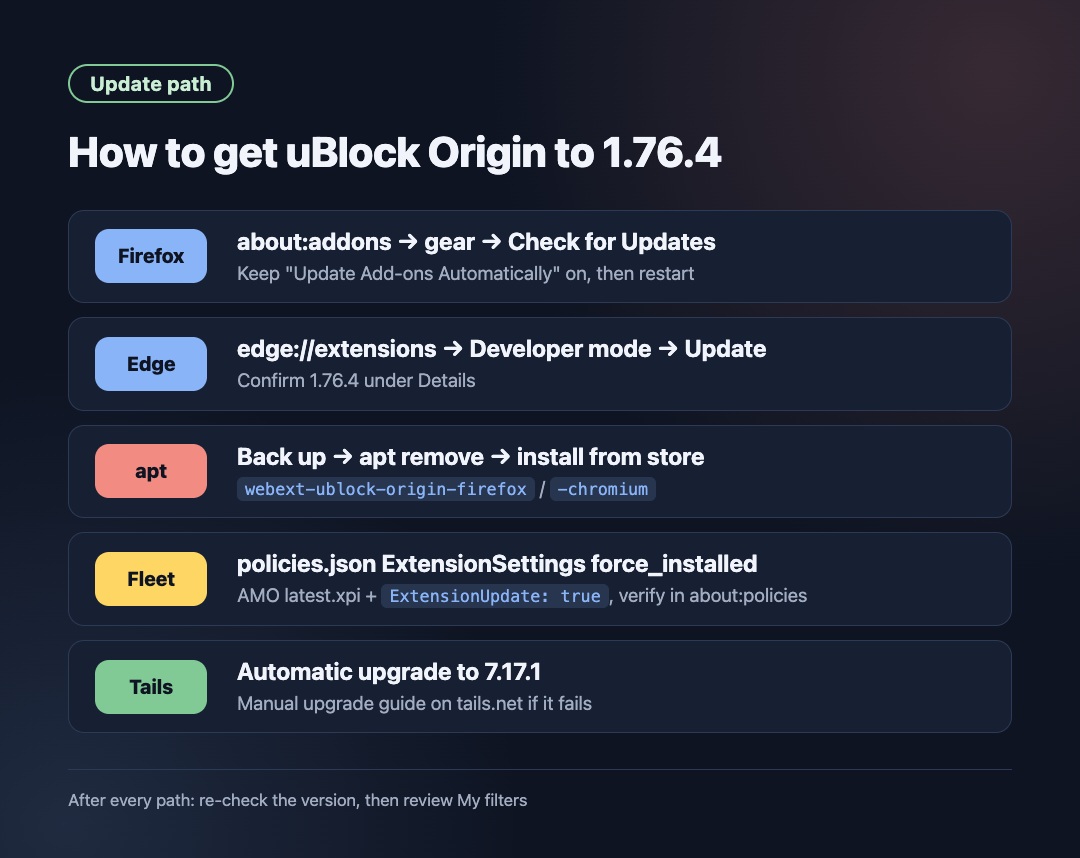
How to update uBlock Origin to 1.76.4
Firefox and Edge (store installs)
Stores push updates automatically, but you can force it now:
- Firefox:
about:addons> gear icon > Check for Updates. Then confirm 1.76.4 inabout:support. - Edge:
edge://extensions> turn on Developer mode > Update. Confirm in Details. - Restart the browser so every tab runs the new code.
Firefox's add-on updates must be enabled for this to work. If Update Add-ons Automatically is off in the gear menu, turn it back on or update by hand each time.
Debian and Ubuntu: replace the package
No fixed package was published as of November 19. The practical fix is to remove the packaged copy and install uBO from the browser store, which updates itself:
sudo apt remove webext-ublock-origin-firefox webext-ublock-origin-chromiumThen restart Firefox and install uBO from Firefox Add-ons.
Export your settings first (Dashboard > Settings > Back up to file) if you rely on custom filters. After installing from AMO, use Restore from file, and then review the restored "My filters" list (see the cleanup section below) before trusting it.
If you prefer to keep the distro package, watch the Debian tracker entry and update with sudo apt update && sudo apt upgrade once a fixed version appears. Until then, the package stays vulnerable.
Managed fleets: Firefox enterprise policy
Admins can force the AMO build on every machine with policies.json (in the Firefox distribution folder) or the equivalent Group Policy:
{
  "policies": {
    "ExtensionSettings": {
      "uBlock0@raymondhill.net": {
        "installation_mode": "force_installed",
        "install_url": "https://addons.mozilla.org/firefox/downloads/latest/ublock-origin/latest.xpi"
      }
    },
    "ExtensionUpdate": true
  }
}
ExtensionUpdate: true keeps automatic add-on updates on. Check about:policies on a client to confirm the policy loaded.
Tails
- Accept the automatic upgrade to Tails 7.17.1 when it appears after you connect to Tor (supported from Tails 7.0 or later).
- If the automatic upgrade fails, follow the manual upgrade guide on tails.net.
- Confirm the version under Applications > Tails > About Tails.
After the upgrade, Tor Browser in Tails has no ad blocker until the Tails team restores uBO. Tails also notes that restarting Tails deletes any malicious uBO configuration the flaw could have inserted.
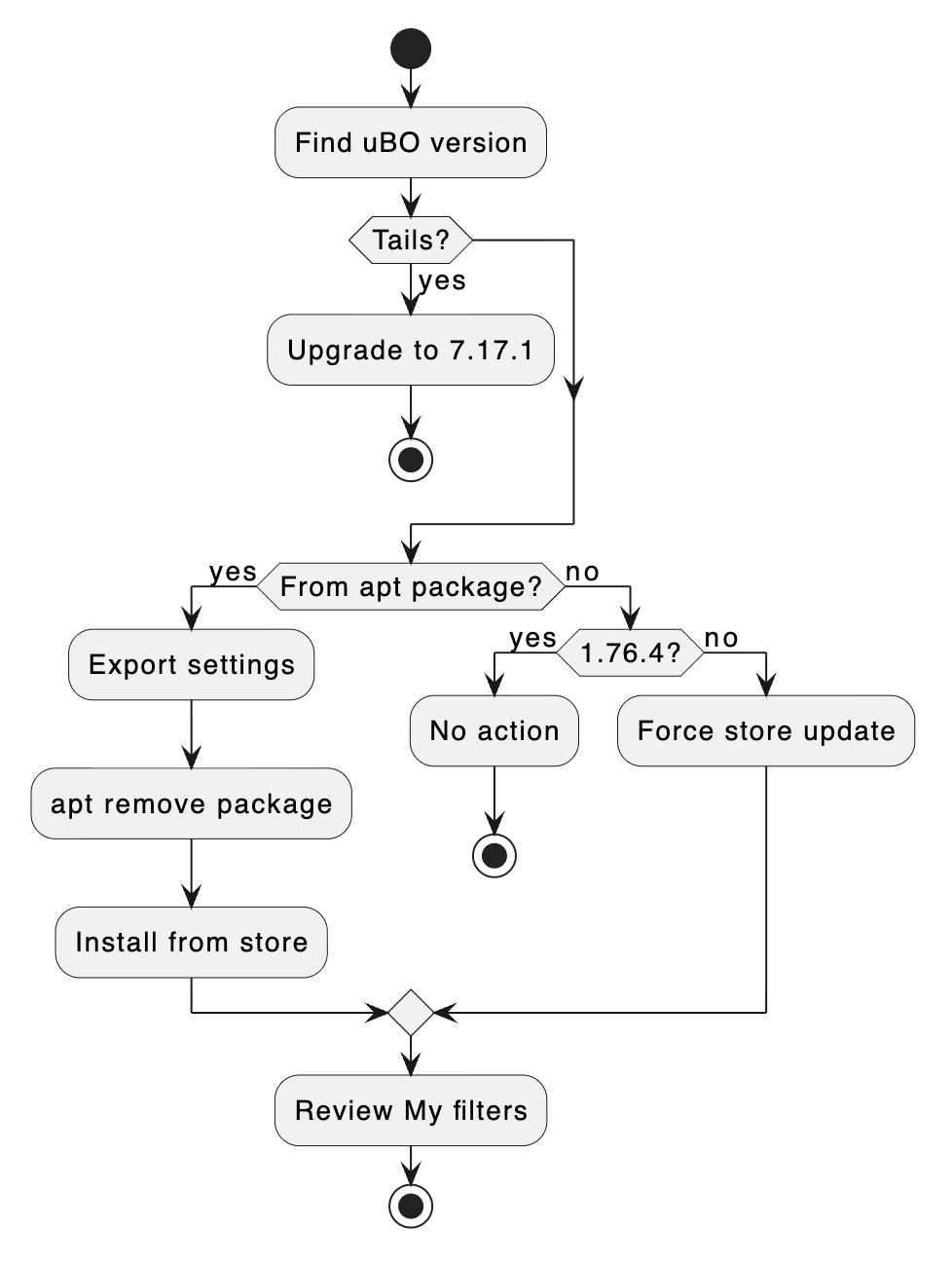
View PlantUML source
@startuml
skinparam shadowing false
skinparam defaultFontSize 14
start
:Find uBO version;
if (Tails?) then (yes)
  :Upgrade to 7.17.1;
  stop
endif
if (From apt package?) then (yes)
  :Export settings;
  :apt remove package;
  :Install from store;
else (no)
  if (1.76.4?) then (yes)
    :No action;
    stop
  else (no)
    :Force store update;
  endif
endif
:Review My filters;
stop
@enduml
If you can't update right now
The advisory lists no official workaround. These steps reduce exposure but are not a substitute for the patch:
| Option | Source | Side effect |
|---|---|---|
| Disable uBO until you update | General practice | No ad or tracker blocking |
| Tor Browser Safest level | Tails 7.17.1 notes | JavaScript off; many sites break |
| Don't use the element picker on untrusted pages | Writer's note, not official | None |
| Avoid untrusted sites | Tails / news coverage | Hard to do in practice |
Disabling is the only option here that fully removes the extension from the picture. In Firefox, toggle uBO off in about:addons; in Edge, use the switch in edge://extensions.
Check for planted filters after updating
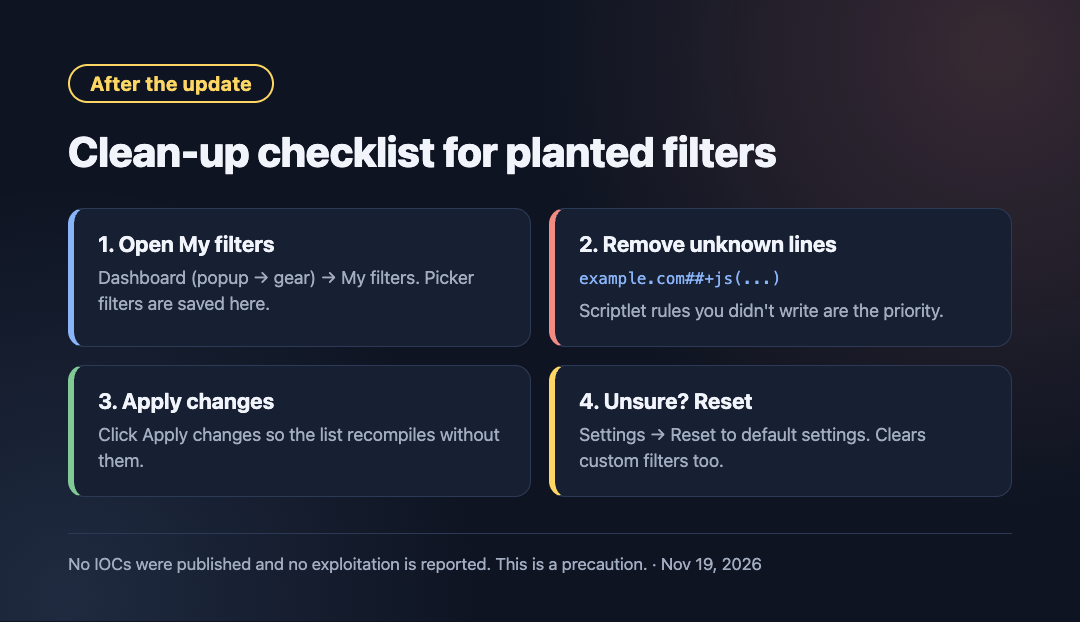
Updating closes the hole, but it does not remove a filter an attacker may already have added. Filters created with the element picker are saved in My filters, so look there:
- Open the uBO dashboard (popup > gear icon) > My filters.
- Read every line. Delete anything you did not add yourself, especially scriptlet rules containing
##+js(. - Click Apply changes.
- If you are unsure, go to Settings > Reset to default settings. This clears custom filters and settings.
No indicators of compromise were published with the advisory, and Tails says the attack is not known to have been used. This review is a precaution, not evidence of an attack.
Decision table: update now or later
| Your setup | Action |
|---|---|
| uBO 1.75.2 or lower (any browser) | Update now |
Debian/Ubuntu webext-ublock-origin-* package | Replace now with the store build |
| Tails 7.17 or older | Upgrade now to 7.17.1 |
| uBO 1.75.4 to 1.76.2 | This week: move to 1.76.4 |
| uBO 1.76.4 | No action |
| uBO Lite only, or Tor Browser without uBO | Not listed in the advisory |
Troubleshooting after the update
Element picker does not open. Since 1.75.4 the picker only launches with a verified token, and 1.76.2 added a delay. Reload the page and try again from the popup. The 1.76.5 betas (Nov 16–18) list "more reliable element picker launch," so a stable fix is on the way.
A filter that used war: or redirect resources stopped working. Release 1.76.0 disabled war: filters "for the time being." Expect some cosmetic or anti-adblock rules to behave differently until upstream re-enables them. Don't roll back to get them back.
Firefox still shows 1.67.0 after you installed from AMO. The Debian package may still be present. Run apt-cache policy webext-ublock-origin-firefox, remove it, restart Firefox, and check about:support again.
Rolling back. Older versions remain on AMO's version history page, but every version before 1.75.4 is vulnerable. If 1.76.4 breaks a site, disable uBO on that site (power button in the popup) instead of downgrading.
Browser updates and extension updates are separate. While you're patching, also check that the browser itself is current; see our Firefox 160 security update guide. If you run Tor relays, the Tor 0.4.9.17 relay update from this week is a separate, server-side fix.
FAQ
Does this uBlock Origin security update apply to uBlock Origin Lite? The advisory names uBlock Origin (MV2 on Firefox, and MV2 Chromium for the secret exposure). uBlock Origin Lite is not listed. Keep Lite updated anyway through the Chrome Web Store.
Is there a CVE for the uBlock Origin XSS? No CVE was assigned as of November 19, 2026. Track it as GHSA-cmqw-9r2w-6wv2 on GitHub or TEMP-1154169-DFA33F in the Debian security tracker.
Was it exploited in the wild? Neither the advisory nor Tails reports exploitation. Tails calls the attack "relatively easy" for a website to perform.
Why did Tails remove uBO instead of updating it? Tails chose to drop the extension in 7.17.1 and says it will restore uBlock Origin as soon as possible. Its notes don't give a date.
Is the patched version 1.75.4 or 1.76.4? The advisory lists 1.75.4 as patched. Later releases (1.76.0 to 1.76.4) add more hardening, and 1.76.4 is what the stores ship now, so update to 1.76.4.
References
- GHSA-cmqw-9r2w-6wv2: Universal XSS from website-driven element picker (gorhill/uBlock, checked Nov 19, 2026)
- uBlock Origin releases (GitHub, checked Nov 19, 2026)
- uBlock Origin on Firefox Add-ons (1.76.4, file created Nov 15, 2026; checked Nov 19, 2026)
- Tails news: Tails 7.17.1 (tails.net, checked Nov 19, 2026)
- Debian security tracker: ublock-origin (checked Nov 19, 2026)
- Debian package tracker: ublock-origin (checked Nov 19, 2026)
- Firefox enterprise policies: ExtensionSettings (Mozilla, checked Nov 19, 2026)
- Tails 7.17.1 removes uBlock Origin over critical one-click XSS flaw (Warp2Search, Nov 17, 2026)