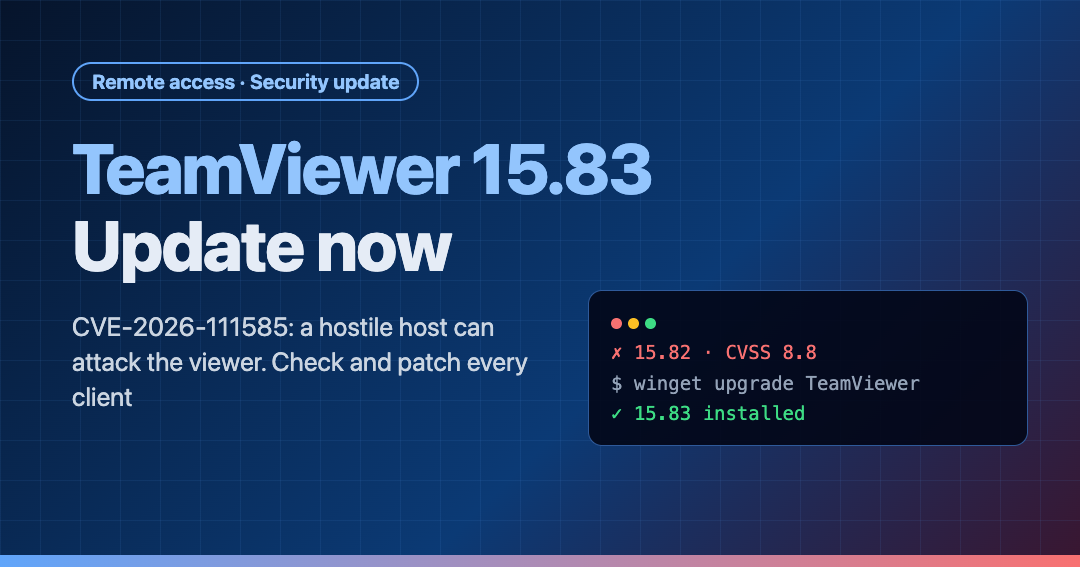
TeamViewer 15.83 fixes a flaw that lets a malicious remote computer attack the person who connects to it. Update every TeamViewer Full Client, Portable copy and Android Remote Control app to 15.83 or later, and update Host too. There is no workaround, so the update is the fix.
Written 2026-11-02. Facts come from TeamViewer's security bulletins TV-2026-1011 and TV-2026-1012 (issued October 27, updated October 28, 2026) and the CVE record, all checked that day. I did not run the commands below on a live machine. The version-check and package commands are standard OS tools, not commands from TeamViewer's bulletin, and paths are the default install locations.
This normally flows the other way. You worry about who can connect into your machine. CVE-2026-111585 flips that. If you open a session to a host that an attacker controls or has compromised, that host can send screen data that crashes your viewer or, on some platforms, runs code with your viewer's privileges. Help desks and anyone who connects to strangers' PCs are the obvious targets. On November 1, 2026 Pakistan's National CERT issued a public warning telling users to update now, which is why this is showing up in news feeds this week.
What changed in TeamViewer 15.83
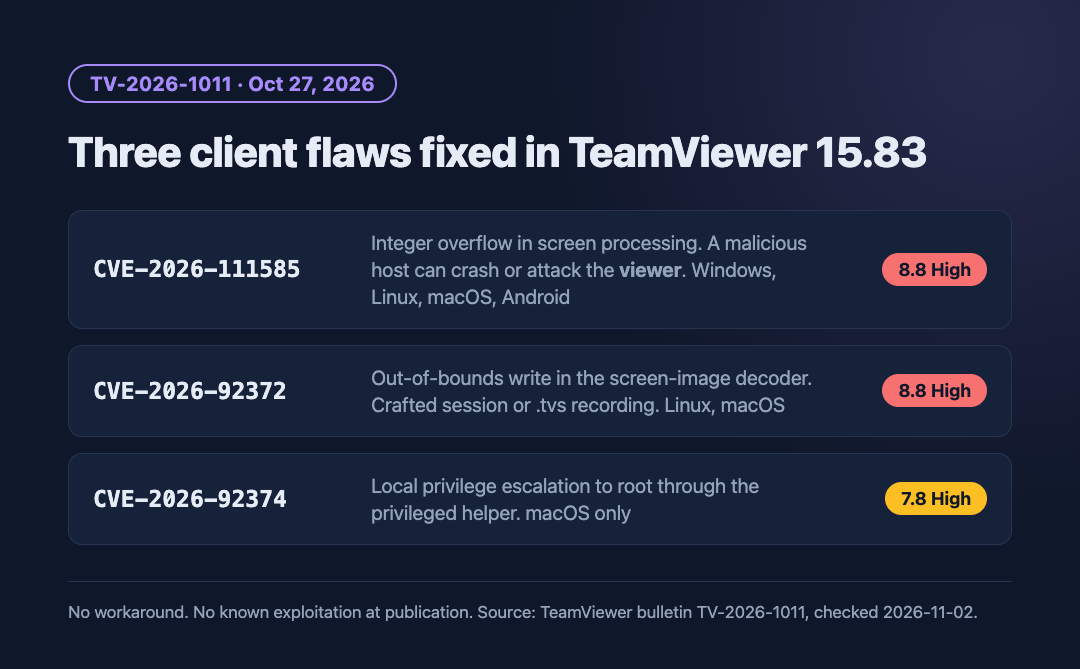
TeamViewer published bulletin TV-2026-1011 on October 27, 2026. It rates the bulletin "Important" with a top CVSS score of 8.8 and fixes three client flaws:
| CVE | What it is | Platforms | CVSS 3.1 |
|---|---|---|---|
| CVE-2026-111585 | Integer overflow in screen processing, a hostile host attacks the viewer | Windows, Linux, macOS, Android | 8.8 |
| CVE-2026-92372 | Out-of-bounds write in the screen-image decoder, also via a crafted .tvs recording | Linux, macOS | 8.8 |
| CVE-2026-92374 | Race condition in the privileged helper, local user gets root | macOS | 7.8 |
Three details from the bulletin matter for planning:
- User interaction is required. For CVE-2026-111585, someone has to start a session to the attacker's host. For CVE-2026-92372, it's a session or opening a crafted
.tvssession recording. - No known exploitation. TeamViewer said it was "not aware of any active exploitation in the wild" at publication. I found no report of attacks as of November 2, 2026.
- No workaround. The bulletin lists updating to 15.83 or later as the only fix.
A companion bulletin, TV-2026-1012, fixes six local privilege escalation bugs (CVSS up to 7.8) in the Remote Management add-ons. One of them, CVE-2026-92375, sits in the Full Client and Host IPC on every OS before 15.83. So even a Windows Host install that isn't hit by the viewer bug still needs 15.83.
Which TeamViewer products are affected
The bulletin names TeamViewer Remote, Tensor and ONE. In practice that means these installs:
- Full Client and Portable before 15.83 on Windows, Linux and macOS
- Host before 15.83 on Linux and macOS (CVE-2026-92372, CVE-2026-92374), and on all three OSes through CVE-2026-92375
- TeamViewer Remote Control for Android before 15.83
- Legacy lines 15.64, 14.7 and 13.2
The bulletins don't mention iOS or QuickSupport, so I can't tell you whether they're affected. Update them anyway when your store offers a new build.
How to check your TeamViewer version
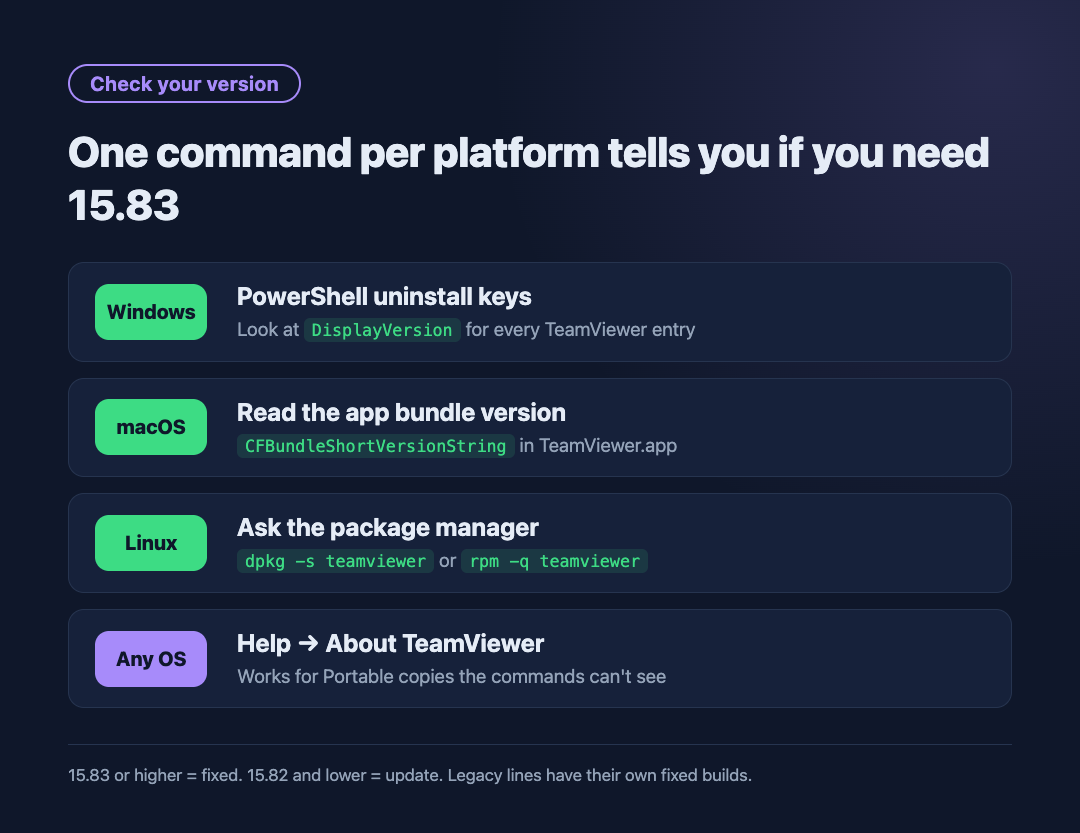
The quickest check on any OS is Help → About TeamViewer inside the app. That's also the only way to see the version of a Portable copy, since it doesn't register as an installed program.
For installed copies, these commands print the version without opening the app.
Windows (PowerShell):
Get-ItemProperty HKLM:\Software\Microsoft\Windows\CurrentVersion\Uninstall\*, `
  HKLM:\Software\WOW6432Node\Microsoft\Windows\CurrentVersion\Uninstall\* |
  Where-Object DisplayName -like "TeamViewer*" |
  Select-Object DisplayName, DisplayVersion
macOS (Terminal):
defaults read /Applications/TeamViewer.app/Contents/Info CFBundleShortVersionStringHost installs may use a different app name, so list them first and swap the name into the command above:
ls /Applications | grep -i teamviewerLinux (Debian, Ubuntu, Mint):
dpkg -s teamviewer | grep '^Version'Linux (Fedora, RHEL, openSUSE):
rpm -q teamviewerIf the version starts with 15.83 or higher, you're on the fixed build. If it's 15.82 or lower, update. Legacy versions (15.64, 14.7, 13.2) need the specific builds in the next section.
Fixed versions for every TeamViewer line
| Version line | Platforms | Fixed build |
|---|---|---|
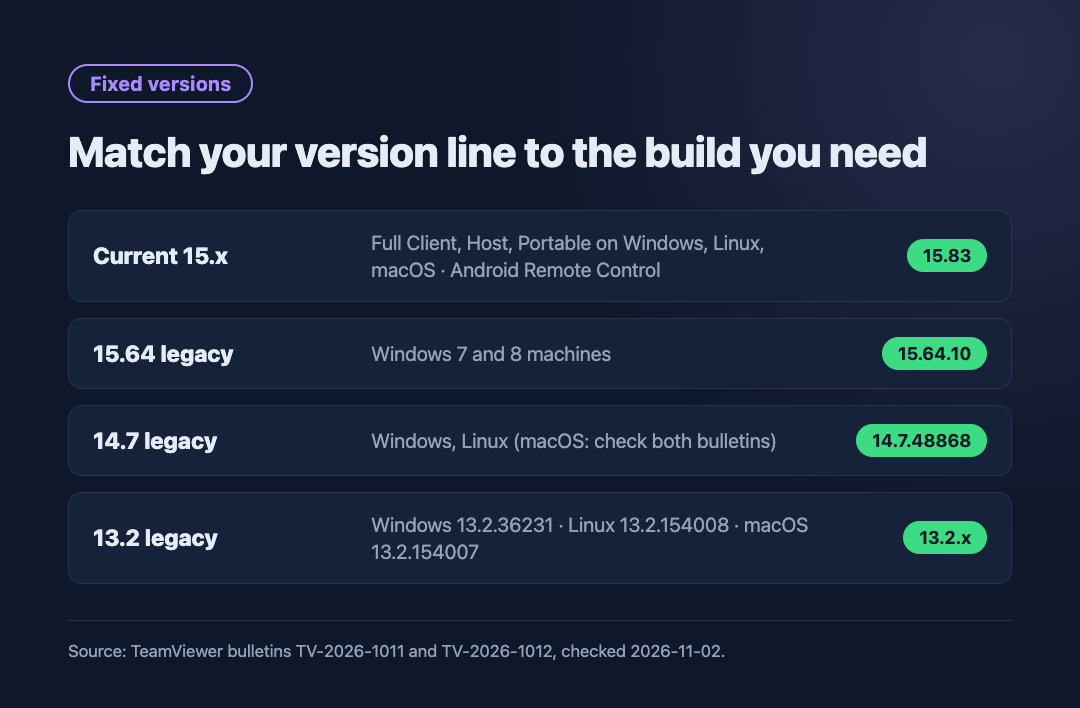
| Current 15.x | Windows, Linux, macOS, Android | 15.83 |
| 15.64 legacy | Windows 7 and 8 | 15.64.10 |
| 14.7 legacy | Windows, Linux, macOS | 14.7.48868 |
| 13.2 legacy | Windows / Linux / macOS | 13.2.36231 / 13.2.154008 / 13.2.154007 |
One mismatch to know about: TV-2026-1011 lists 14.7.48868 for macOS, while TV-2026-1012 lists 14.7.259386 for 14.7 on macOS. If you're stuck on 14.7 on a Mac, take the newest 14.7 build TeamViewer offers and check that it's at least the one in each bulletin.
How to update to TeamViewer 15.83
Inside the app, Help → Check for new version downloads the latest build where your installer supports it. If that's blocked or you manage many machines, use the commands below.
Windows with winget:
winget list --name TeamViewer
winget upgrade --id <ID_FROM_WINGET_LIST>
Use the exact package ID that winget list shows. If winget doesn't track your install, download the current installer from teamviewer.com/download and run it over the old version.
macOS: If you installed with Homebrew:
brew upgrade --cask teamviewerOtherwise use the in-app updater or the download page. Check the version again afterwards, because the macOS-only root bug (CVE-2026-92374) lives in the privileged helper, which the installer replaces.
Linux (Debian/Ubuntu family):
sudo apt update
sudo apt install --only-upgrade teamviewer
Linux (Fedora/RHEL family):
sudo dnf upgrade teamviewerThese only work if TeamViewer's package repository is configured on the machine. If apt or dnf says you already have the newest version but it's still below 15.83, download the .deb or .rpm from TeamViewer's download page and install that.
Android: Open Google Play, search for TeamViewer Remote Control and tap Update. If you sideloaded the APK, the bulletin says 15.83 is available as an APK too.
Portable copies: There's nothing to update in place. Delete the old portable folder and download a fresh copy. Portable versions on USB sticks and shared drives are the ones teams forget, so search for them:
Get-ChildItem -Path C:\ -Filter "TeamViewer*.exe" -Recurse -ErrorAction SilentlyContinue |
  Select-Object FullName, @{n='Version';e={$_.VersionInfo.ProductVersion}}
Remote Management add-ons
TV-2026-1012 says the add-on components update automatically. The fixed versions are Monitoring 26.10.1 and Patch Management 26.9.1 (24.12.5 for client 14.7). Confirm them in your management console after the client update.
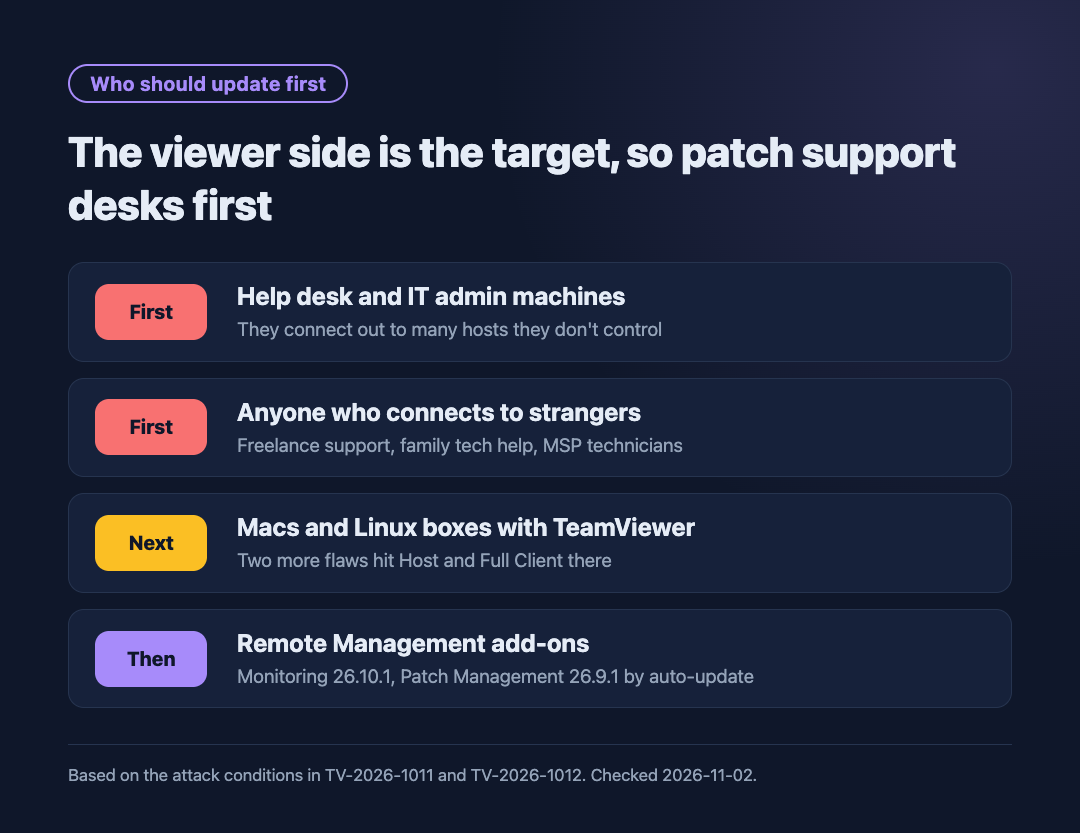
Who should update TeamViewer first
The viewer side is the target of the worst bug, so the order is the reverse of a normal server patch:
- Support desks, IT admins and MSP technicians. They open sessions to machines they don't control every day.
- Anyone who connects to strangers. Freelance support, people who help family members, and anyone who was asked to "connect to my PC" by a contact they don't know.
- Macs and Linux machines with TeamViewer installed, Host included, because two more flaws apply there.
- Everything else, including Windows Host installs (CVE-2026-92375) and the Remote Management add-ons.
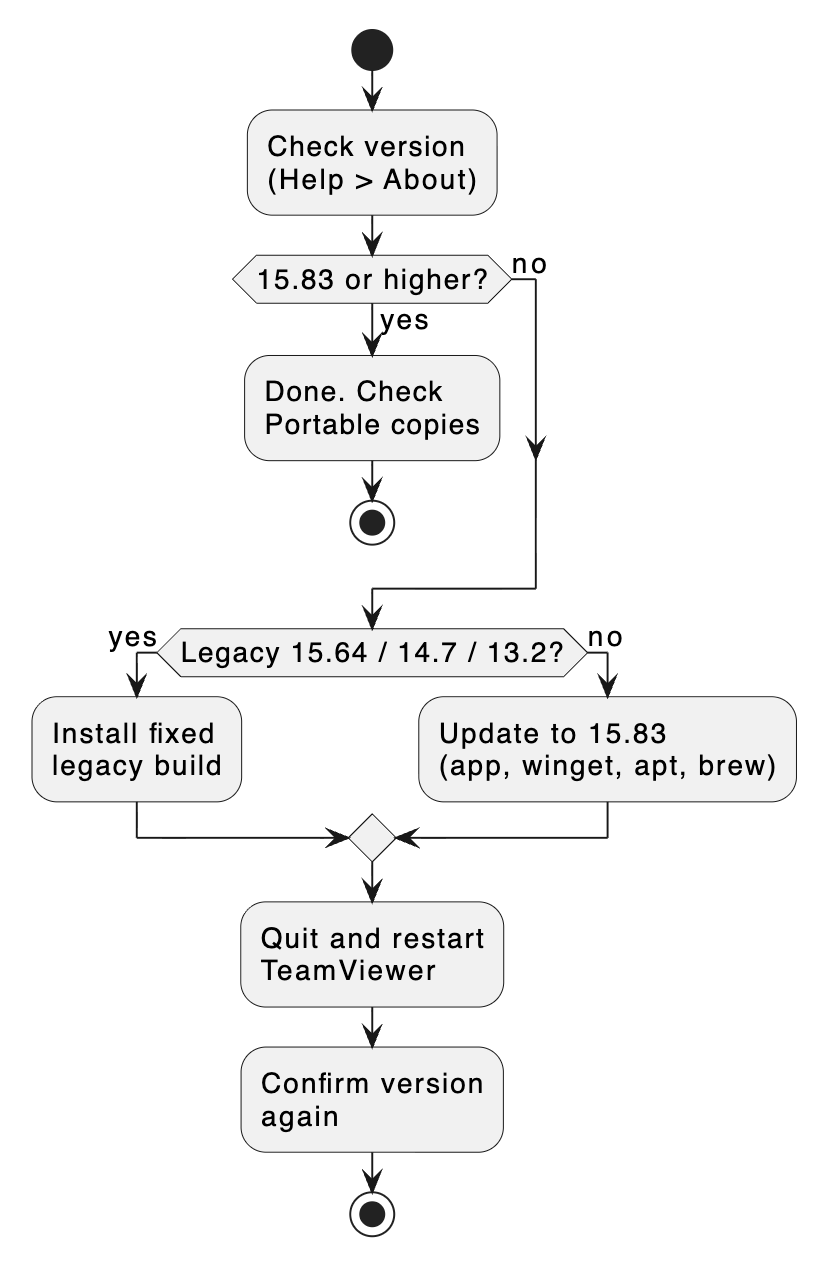
View PlantUML source
@startuml
skinparam shadowing false
skinparam defaultFontSize 14
start
:Check version
(Help > About);
if (15.83 or higher?) then (yes)
  :Done. Check
  Portable copies;
  stop
else (no)
endif
if (Legacy 15.64 / 14.7 / 13.2?) then (yes)
  :Install fixed
  legacy build;
else (no)
  :Update to 15.83
  (app, winget, apt, brew);
endif
:Quit and restart
TeamViewer;
:Confirm version
again;
stop
@enduml
Until every viewer is updated, the practical risk reduction is simple: only start sessions to people and devices you can verify. That matches the advice in the National CERT warning. It doesn't fix the bug, but the bug needs you to connect first.
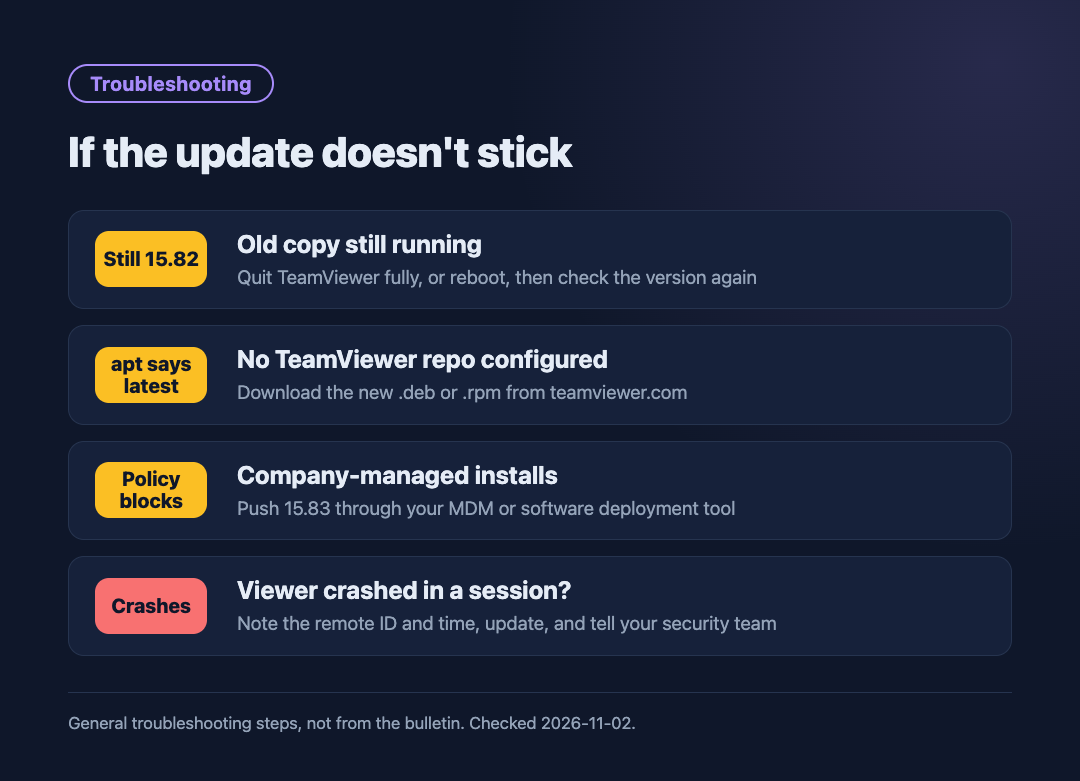
If the TeamViewer update doesn't work
| Symptom | Likely cause | Fix |
|---|---|---|
| Version still shows 15.82 after updating | Old process still running | Quit TeamViewer from the tray or menu bar, or reboot, then check again |
apt or dnf says it's already newest | No TeamViewer repo configured | Install the new .deb or .rpm from the download page |
| Users can't update | Company-managed install or policy | Push 15.83 through your MDM or software deployment tool |
| "Check for new version" is missing | Managed or custom module | Ask your admin, or use the download page if you own the device |
| The viewer crashed during a session | Could be unrelated, could be a hostile host | Note the remote ID and time, update, and report it to your security team |
There are no published indicators of compromise for these CVEs. Repeated viewer crashes on support machines during sessions, and sessions to first-seen TeamViewer IDs, are worth a look, but they are hunting ideas, not confirmed signs of attack.
If you're running a broader patch cycle this week, the same check-version-then-update routine works for the Chrome 156 security update and the Docker Desktop 4.97.0 token log fix.
FAQ
Is CVE-2026-111585 being exploited? Not as far as TeamViewer knows. The bulletin says it was not aware of active exploitation at publication, and I found no attack reports as of November 2, 2026. Patch anyway, because there's no workaround.
Does TeamViewer update itself automatically? It depends on your install and settings. Many installs offer updates in the app, but managed and Portable copies often don't. Don't assume. Check the version after updating.
I only receive connections with TeamViewer Host. Do I need 15.83? Yes. Host on Linux and macOS is affected by CVE-2026-92372 and CVE-2026-92374, and Host on all three OSes is affected by the IPC flaw CVE-2026-92375 in TV-2026-1012.
Is it safe to open a .tvs session recording? Only from a source you trust, and only after updating to 15.83 on Linux and macOS. CVE-2026-92372 can be triggered by a crafted recording.
Are iOS and QuickSupport affected? The bulletins don't list them. Install updates when the App Store or TeamViewer offers them, and watch the TeamViewer Trust Center for changes.
What to do next
Check the version on every machine that runs TeamViewer, starting with support and admin machines, and get them to 15.83 today. Then hunt down Portable copies and legacy installs, which won't update on their own.
References
All checked on 2026-11-02.
- TeamViewer Security Bulletin TV-2026-1011: Vulnerabilities in TeamViewer Clients
- TeamViewer Security Bulletin TV-2026-1012: Remote Management Add-ons
- TeamViewer download page
- CVE-2026-111585 record (CVE.org)
- ProPakistani: National CERT warns TeamViewer users to update now (Nov 1, 2026)
- Rescana: TeamViewer CVE-2026-111585 analysis (Oct 31, 2026)