The Java4Shell fix (CVE-2026-114938) is out from Oracle, Amazon Corretto and, platform by platform, Eclipse Temurin, but Ubuntu, Debian stable and RHEL packages were still unpatched when I checked on November 19, 2026. If your Java 17+ service runs on an x86-64 CPU with AVX-512 VBMI, either move it to a fixed build now or start it with -XX:-UseBASE64Intrinsics until your distro or base image catches up. This guide shows how to find every affected JVM on Linux hosts and in Docker images, which fixed build to pull, and how to rebuild and verify.
Written on November 19, 2026. Vendor status changes by the hour this week, so each status line below carries the date I checked it.
What Java4Shell is, in one minute
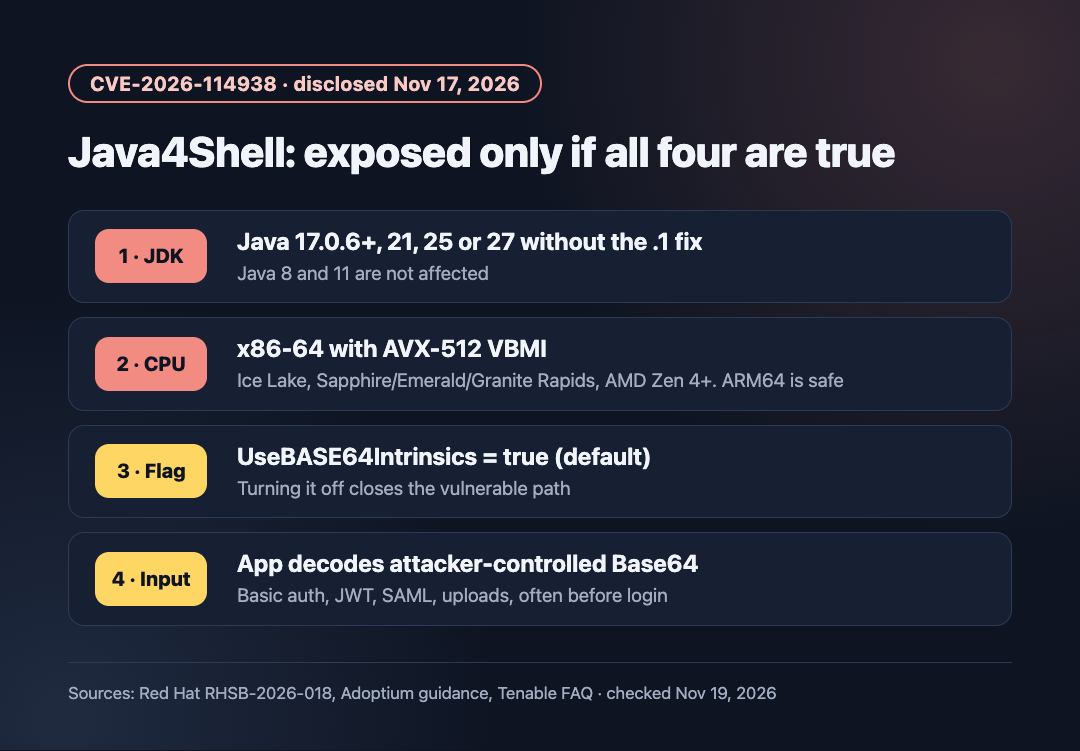
CVE-2026-114938 is a memory corruption bug in the HotSpot fast path for java.util.Base64 decoding. On x86-64 CPUs that support AVX-512 VBMI, a crafted Base64 string can write past a heap buffer. Calif, who found it, showed memory disclosure and remote code execution against real applications. The OpenJDK Vulnerability Group published its advisory on November 17, 2026.
| Item | Value |
|---|---|
| Affected lines | OpenJDK 17 (17.0.6 and later), 21, 25, 27 |
| Not affected | Java 8 and 11, ARM64 (Graviton, Apple silicon), x86-64 without AVX-512 VBMI |
| Severity | Oracle CVSS 3.1: 8.1 · Red Hat: 9.8 Critical · Calif CVSS 4.0: 9.2 |
| Trigger | App decodes attacker-controlled Base64 (Basic auth, JWT, SAML, uploads) |
Calif lists Keycloak, Jira, Confluence, Artifactory, Jenkins and PingFederate as exploitable before login in default setups. If you run Jenkins, also check that you applied the Jenkins 2.588 security update from last month, because this fix lives in the JVM, not in Jenkins.
As of November 18, GreyNoise reported exploitation attempts but no confirmed success, and the flaw was not on the CISA KEV list (Tenable FAQ).
Check if a server or container is exposed to Java4Shell
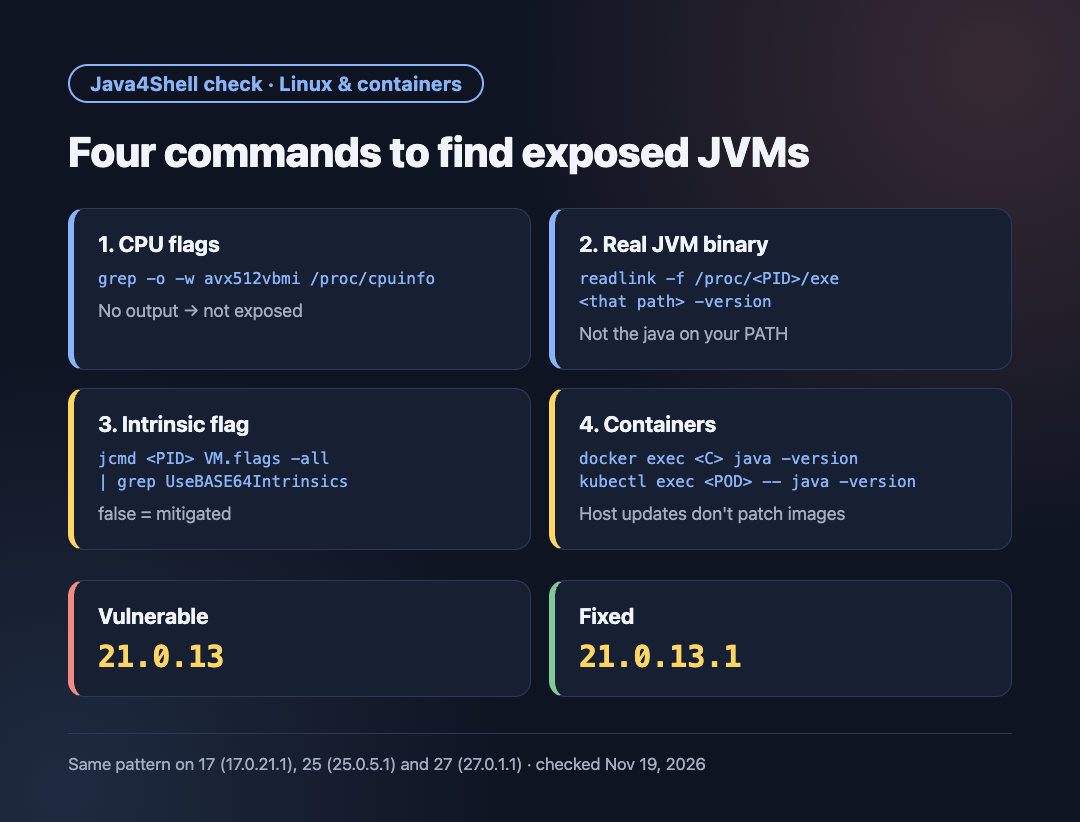
Work through the four conditions in order. If any one is false, that JVM is not exposed.
1. Does the CPU have AVX-512 VBMI?
On a Linux host or inside a container (containers see the host CPU flags), print the four flags the vulnerable path needs. All four must appear:
grep -o -w -E 'avx512f|avx512bw|avx512vbmi|bmi2' /proc/cpuinfo | sort -uIf avx512vbmi is missing, that machine is not exposed. Red Hat's bulletin names common cloud families that do have it, for example AWS C6i/M6i/R6i and C7i/M7i/R7a, GCP C3/C3D/C4/C4D/N4/N4D, and Azure Dsv5/Dsv6/Dasv6/Dasv7. Treat that list as a hint and run the check on your own hosts, since autoscaling groups often mix CPU generations.
On macOS, Apple silicon is ARM64 and not affected. On an Intel Mac, run sysctl -a | grep -i avx512vbmi.
2. Which Java version is each process really using?
The java on your PATH is often not the one your service runs. Check the binary behind each running JVM:
for pid in $(pgrep -f 'java'); do
  exe=$(readlink -f /proc/$pid/exe)
  echo "PID $pid -> $exe"
  "$exe" -version 2>&1 | head -2
done
Then look for bundled runtimes that are not running right now (installers for Jira, Confluence, IDE servers and agents ship their own JRE):
sudo find / -xdev -type f -path '*/bin/java' 2>/dev/nullRead the version like this:
| Line | Vulnerable | Fixed (Oracle / OpenJDK numbering) |
|---|---|---|
| 17 | 17.0.6 to 17.0.21 | 17.0.21.1 or later |
| 21 | 21.0.13 and earlier | 21.0.13.1 or later |
| 25 | 25.0.5 and earlier | 25.0.5.1 or later |
| 27 | 27.0.1 and earlier | 27.0.1.1 or later |
The fixed builds add a fourth number. A plain 21.0.13 is still vulnerable. Corretto uses five numbers, so its fixed 21 build is 21.0.13.1.2.
3. Is the Base64 intrinsic switched on?
The first command shows the default for a java binary. The second reads a running JVM and must run as the same user as the process:
java -XX:+PrintFlagsFinal -version 2>/dev/null | grep -F UseBASE64Intrinsics
jcmd <PID> VM.flags -all | grep -F UseBASE64Intrinsics
true is the default. After you apply the mitigation below, the running JVM must show bool UseBASE64Intrinsics = false, as Red Hat's bulletin describes.
4. Docker and Kubernetes images
Check the JVM inside each running container:
docker ps --format '{{.Names}}\t{{.Image}}'
docker exec <CONTAINER> java -version
For an image that is not running:
docker run --rm --entrypoint java <IMAGE>:<TAG> -versionIn Kubernetes, list the images first, then exec into one pod per image:
kubectl get pods -A -o jsonpath='{range .items[*]}{.metadata.namespace}{"\t"}{.metadata.name}{"\t"}{.spec.containers[*].image}{"\n"}{end}'
kubectl exec -n <NAMESPACE> <POD> -- java -version
Distroless and jlink images may not have java on the PATH. In that case read the JAVA_VERSION env var with docker image inspect <IMAGE> --format '{{json .Config.Env}}', or check the base image you built from.
Java4Shell fix status by vendor (checked November 19, 2026)
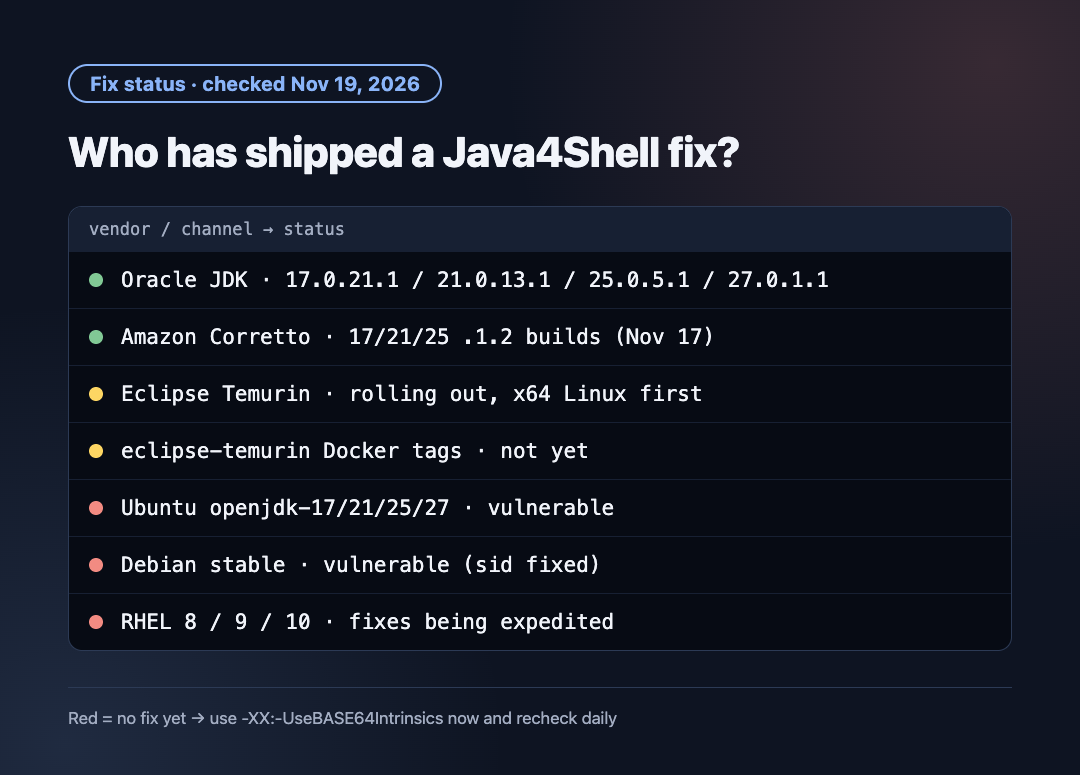
This is the part that decides your next step. "Fixed build available" means you can patch today. "No fix yet" means you mitigate today and patch later.
| Vendor / channel | Fixed builds | Status on Nov 19 |
|---|---|---|
| Oracle JDK | 17.0.21.1, 21.0.13.1, 25.0.5.1, 27.0.1.1 | Available |
| Amazon Corretto | 17.0.21.1.2, 21.0.13.1.2, 25.0.5.1.2 | On GitHub, dated Nov 17 |
| Eclipse Temurin | 17.0.21.1+2, 21.0.13.1+2, 25.0.5.1+2, 27.0.1.1+4 | Rolling out, x64 Linux first |
eclipse-temurin Docker images | Same builds | Not yet published (Nov 18 tracker) |
Ubuntu openjdk-17/21/25/27 | None listed | Vulnerable on 18.04 to 26.10 |
Debian openjdk-17/21/25 | sid only | bookworm, trixie, forky vulnerable |
| RHEL 8, 9, 10 OpenJDK | None listed | Red Hat "expediting fixes" |
A few notes on that table:
- Oracle also fixed GraalVM for JDK 17.0.21.1 and 21.0.13.1. Java 8 is not affected except the Enterprise Performance Pack, fixed in 8u513-perf.
- Corretto: the GitHub releases pages for corretto-17, corretto-21 and corretto-25 show the
.1.2builds as Latest with a 17 Nov date. I did not find a Corretto changelog line that names the CVE, so confirm the version string, not the announcement. - Temurin: Adoptium's November 18 guidance lists the fixed builds and says binaries "are published as testing completes". Its tracking issue (adoptium/temurin #326) showed x64 Linux done for all four lines and other platforms pending. It also says container images follow only after all binaries of a JDK version are published.
- Azul Zulu fixed builds are out per Tenable, but I could not confirm the version numbers from Azul directly.
- Ubuntu rates it High ("This is an RCE").
openjdk-8is not affected andopenjdk-ltsis listed as not affected.
Patch Java4Shell in Docker images
Most production Java now runs in containers, and a host apt upgrade does nothing for them. You need a new image.
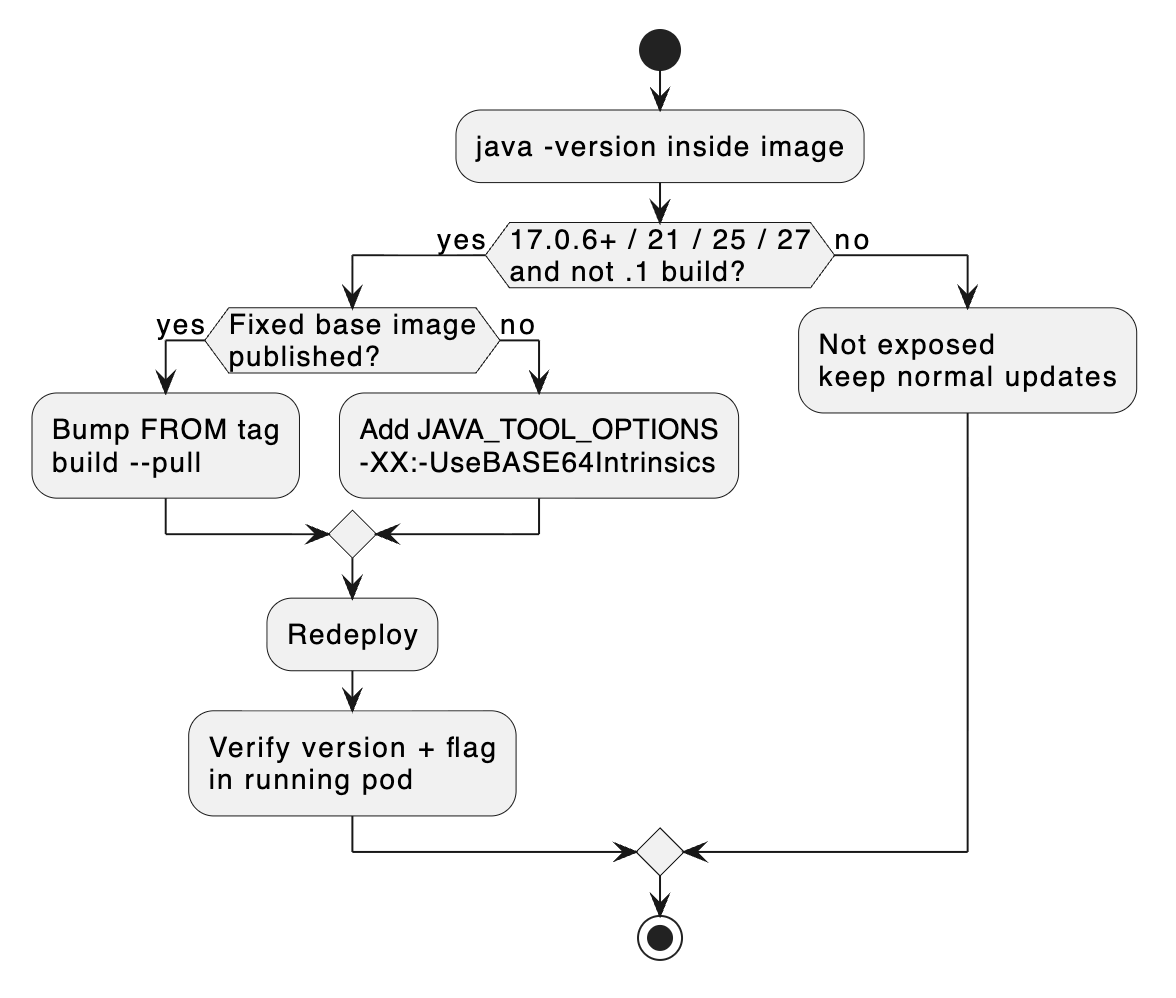
View PlantUML source
@startuml
skinparam shadowing false
skinparam defaultFontSize 14
start
:java -version inside image;
if (17.0.6+ / 21 / 25 / 27\nand not .1 build?) then (yes)
  if (Fixed base image\npublished?) then (yes)
    :Bump FROM tag\nbuild --pull;
  else (no)
    :Add JAVA_TOOL_OPTIONS\n-XX:-UseBASE64Intrinsics;
  endif
  :Redeploy;
  :Verify version + flag\nin running pod;
else (no)
  :Not exposed\nkeep normal updates;
endif
stop
@enduml
Option A: base image with a fixed JDK
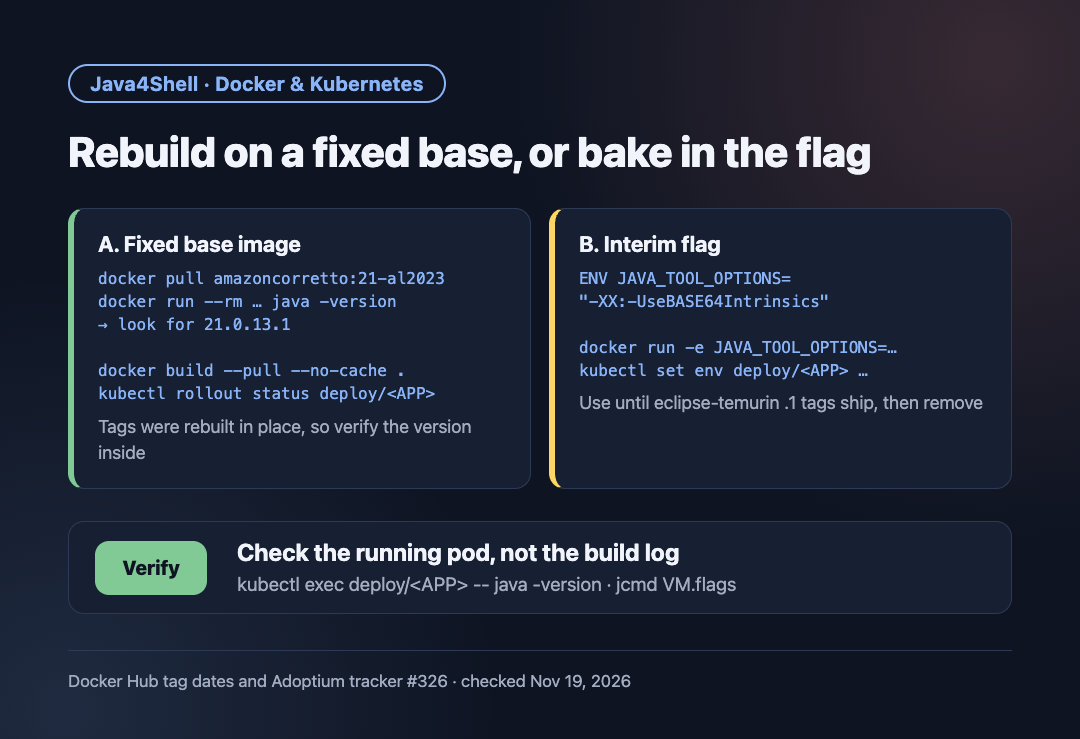
On November 19, the Amazon Corretto Docker Hub tags such as amazoncorretto:21.0.13 and amazoncorretto:21.0.13-al2023 showed a last update of 2026-11-17 23:52 UTC, after the fixed Corretto release. The tag name did not change, so check the version inside before you trust it:
docker pull amazoncorretto:21-al2023
docker run --rm amazoncorretto:21-al2023 java -version
Look for 21.0.13.1 in the output before you rebuild on it.
Then rebuild without cache so the new base layer is actually used:
docker build --pull --no-cache -t <REGISTRY>/<APP>:<NEW_TAG> .
docker run --rm --entrypoint java <REGISTRY>/<APP>:<NEW_TAG> -version
docker push <REGISTRY>/<APP>:<NEW_TAG>
With Compose:
docker compose build --pull --no-cache
docker compose up -d
docker compose exec <SERVICE> java -version
With Kubernetes, update the image tag in your manifest or Helm values, then:
kubectl rollout status deployment/<APP> -n <NAMESPACE>
kubectl exec -n <NAMESPACE> deploy/<APP> -- java -version
If you build on eclipse-temurin, watch the Docker Hub tag list for a tag containing 21.0.13.1 (or your line's .1 build). On November 18 the newest 21 tags were still 21.0.13_9, which is the vulnerable October build. Until the new tags land, use option B.
Option B: mitigation flag baked into the image
JAVA_TOOL_OPTIONS is read by every HotSpot JVM at startup, so it works even when you cannot edit the start script. Add one line to the Dockerfile and remove it after you move to 21.0.13.1 or later:
FROM eclipse-temurin:21-jre
ENV JAVA_TOOL_OPTIONS="-XX:-UseBASE64Intrinsics"
If your image already sets JAVA_TOOL_OPTIONS, append the flag instead of replacing the value. For an image you cannot rebuild today, set it at run time: docker run -e JAVA_TOOL_OPTIONS=-XX:-UseBASE64Intrinsics ..., or in Kubernetes (this overwrites any existing JAVA_TOOL_OPTIONS value on that deployment):
kubectl set env deployment/<APP> -n <NAMESPACE> JAVA_TOOL_OPTIONS=-XX:-UseBASE64IntrinsicsRed Hat's bulletin gives product-specific variables for Keycloak: JAVA_OPTS_APPEND for the server and JDK_JAVA_OPTIONS for the Operator pod. Use the variable your product documents when one exists.
Patch Java4Shell on Linux hosts
Ubuntu and Debian
The distro OpenJDK packages had no fix on November 19. Check again before you mitigate, since a fix could land any time. On Ubuntu, the pro client can also report CVE status:
apt-cache policy openjdk-21-jre-headless openjdk-17-jre-headless
pro fix CVE-2026-114938
If the candidate version is still 21.0.13+... (no .1), you have two choices. Mitigate with the flag (next section), or switch the service to a vendor JDK that is fixed today, such as Corretto from apt.corretto.aws or Temurin from packages.adoptium.net:
sudo apt update
apt-cache policy java-21-amazon-corretto-jdk temurin-21-jdk
sudo apt install java-21-amazon-corretto-jdk   # only if the candidate is 21.0.13.1.x
sudo update-alternatives --config java
Adoptium's tracker still showed the x64 Linux installers for 17, 21 and 25 as in progress on November 18, so the temurin-* apt package may lag the tarball. The tarball from adoptium.net is the fallback. If apt itself is behind on patches on that host, our APT CVE-2026-109518 guide covers that first.
RHEL, Rocky, Alma and Amazon Linux
See whether an advisory for the CVE has reached your repos:
sudo dnf updateinfo list --cve CVE-2026-114938
sudo dnf check-update 'java-*-openjdk*'
When errata appear, sudo dnf upgrade 'java-*-openjdk*' and restart every Java service. On Amazon Linux with Corretto, the package names are java-17-amazon-corretto*, java-21-amazon-corretto* and java-25-amazon-corretto*.
Restart, then verify the running JVM
A package update does not touch a JVM that is already running. Restart each service, then check the live process, not the shell:
sudo systemctl restart <SERVICE>
pid=$(systemctl show -p MainPID --value <SERVICE>)
readlink -f /proc/$pid/exe && "$(readlink -f /proc/$pid/exe)" -version 2>&1 | head -1
If you switched to a new trust store along the way, remember the root changes from October; our eMudhra trust store guide shows how to check cacerts.
If you can't upgrade Java today
Adoptium and Red Hat both document -XX:-UseBASE64Intrinsics as the interim mitigation. Oracle and the OpenJDK Vulnerability Group do not mention any flag, so treat it as a bridge to the patch, not a fix.
| Flag | What it does | Side effect |
|---|---|---|
-XX:-UseBASE64Intrinsics (preferred) | Turns off only the vulnerable Base64 fast path | Slower Base64 decoding |
-XX:UseAVX=2 | Turns off all AVX-512 use | Broader slowdown; JVM fails to start on ARM64 |
For a systemd service, add a drop-in so the flag survives package updates:
sudo systemctl edit <SERVICE>[Service]
Environment="JAVA_TOOL_OPTIONS=-XX:-UseBASE64Intrinsics"sudo systemctl restart <SERVICE>
jcmd $(systemctl show -p MainPID --value <SERVICE>) VM.flags -all | grep -F UseBASE64IntrinsicsThe output should read bool UseBASE64Intrinsics = false.
Apply it to every node, including standby and failover nodes. Red Hat specifically warns that Keycloak clusters must be mitigated on all nodes. Remove the flag after the fixed JDK is in place.
Fix common Java4Shell patch problems
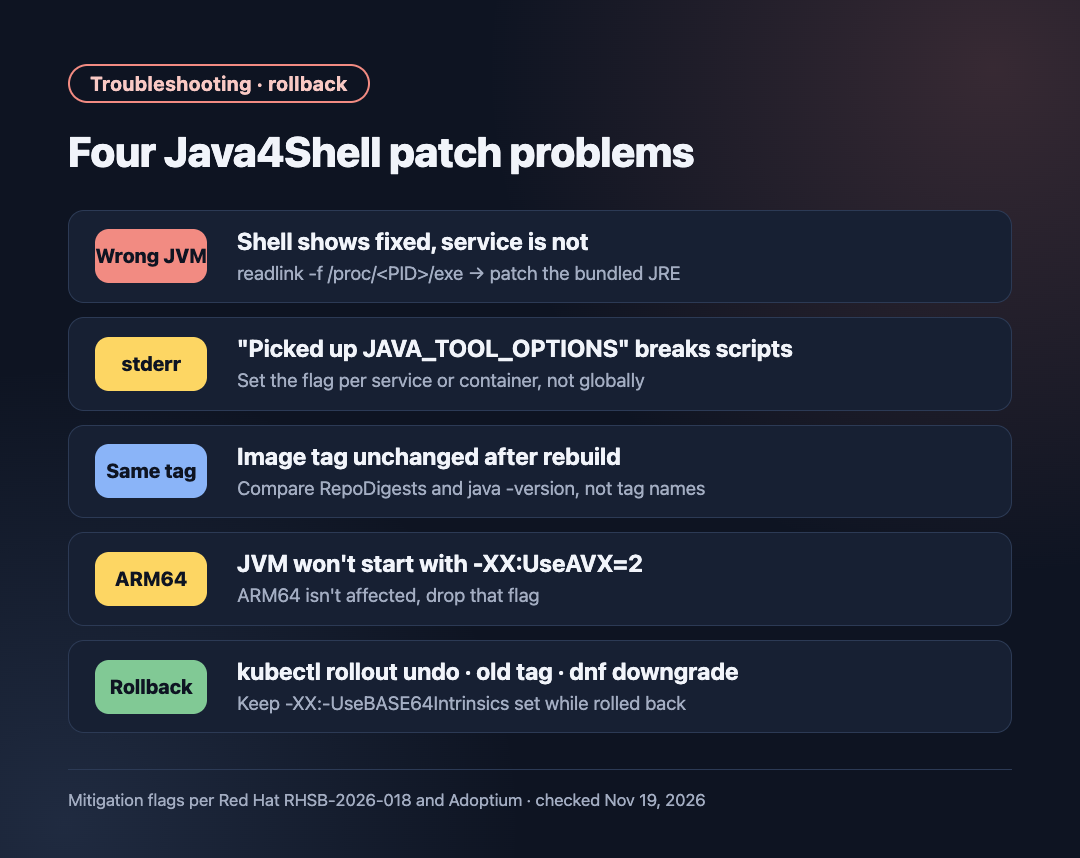
java -version shows the fixed build, but the service is still vulnerable. The service uses a different JDK, often a bundled JRE or a hard-coded JAVA_HOME. Use readlink -f /proc/<PID>/exe to find the real binary and patch that one.
Scripts break after adding JAVA_TOOL_OPTIONS. The JVM prints Picked up JAVA_TOOL_OPTIONS: ... on stderr. Tools that parse java -version output can trip on it. Set the flag only on the service unit or container, not globally in /etc/environment.
The image tag looks the same, so did anything change? Tags like amazoncorretto:21.0.13 were rebuilt in place. Compare digests and versions instead of tag names:
docker image inspect --format '{{index .RepoDigests 0}}' amazoncorretto:21.0.13
docker run --rm amazoncorretto:21.0.13 java -version
JVM won't start after adding -XX:UseAVX=2. You likely deployed to ARM64 nodes. ARM64 is not affected, so drop that flag and use -XX:-UseBASE64Intrinsics where you need a mitigation at all.
Roll back safely
Keep the previous image tag or package version until the new one passes your checks. To roll back, use kubectl rollout undo deployment/<APP>, redeploy the old tag, or sudo dnf downgrade <PACKAGE>. A rollback puts the vulnerable JVM back, so keep -XX:-UseBASE64Intrinsics set while you investigate.
Java4Shell decision table
| Your setup | Action | When |
|---|---|---|
| Internet-facing Java 17.0.6+ / 21 / 25 / 27 on AVX-512 VBMI CPU | Fixed build, or flag now and patch later | Now |
| Keycloak, Jira, Confluence, Artifactory, Jenkins, PingFederate | Same, put these first | Now |
| Internal-only service on an exposed CPU | Fixed build or flag | This week |
| Ubuntu / Debian / RHEL OpenJDK package | Flag now, upgrade when errata ship | Now, then recheck daily |
ARM64, or CPU without avx512vbmi | Normal updates | No urgent action |
| Java 8 (non-perf) or Java 11 | Not affected | No action |
FAQ
Is Java4Shell the same as Log4Shell? No. Log4Shell (2021) was a bug in the Log4j library. Java4Shell is in the JVM itself, in the Base64 decoder fast path, so updating Log4j or any library does not fix it. You need a fixed JDK or the mitigation flag.
Does -XX:-UseBASE64Intrinsics fully protect me? Adoptium and Red Hat present it as the interim mitigation because it disables the vulnerable code path. They also say to move to the fixed builds. Oracle and OpenJDK do not document the flag, so plan the upgrade anyway.
My cloud instances run Graviton. Do I need to do anything? No urgent action. ARM64 systems are not affected according to Calif, Red Hat and Adoptium. Mixed clusters are the trap: check every node pool, because x86-64 pools may have the AVX-512 VBMI flag.
Will my vulnerability scanner find this correctly? Partly. Tenable notes its plugins check the Java version only and do not account for the CPU requirement. Expect findings on ARM hosts that are not really exposed, and no findings for JREs the scanner cannot see inside images.
Why does java -version show 21.0.13 when I just updated? On Ubuntu, Debian and RHEL, the latest package on November 19 was still the October build, which is vulnerable. The fixed version ends in .1 (for example 21.0.13.1). Until your distro ships it, use the flag or a vendor JDK.
References
- OpenJDK Vulnerability Group advisory, November 17, 2026: openjdk.org (checked November 19, 2026; page returned 403 to my fetch, details via vendor pages below)
- Adoptium, "Eclipse Temurin guidance for CVE-2026-114938 java4shell", November 18, 2026: adoptium.net (checked November 19, 2026)
- Adoptium tracking issue #326: github.com/adoptium/temurin (checked November 19, 2026)
- Red Hat Security Bulletin RHSB-2026-018: access.redhat.com (checked November 19, 2026)
- Red Hat CVE page, CVE-2026-114938: access.redhat.com (checked November 19, 2026)
- Ubuntu CVE tracker, CVE-2026-114938: ubuntu.com (checked November 19, 2026)
- Debian security tracker, CVE-2026-114938: security-tracker.debian.org (checked November 19, 2026)
- Amazon Corretto 21 releases: github.com/corretto (checked November 19, 2026)
- Oracle Critical Security Patch Update Advisory, November 2026: oracle.com (checked November 19, 2026)
- Docker Hub,
amazoncorrettoandeclipse-temurinofficial images: hub.docker.com (checked November 19, 2026) - Tenable, "Java4Shell (CVE-2026-114938) FAQ", updated November 18, 2026: tenable.com (checked November 19, 2026)
- Calif, Java4Shell write-up: calif.io (cited by OpenJDK and Adoptium; checked November 19, 2026)
Commands in this guide follow the vendor documents above and standard JDK, Docker and systemd tooling. They were not run against a live affected system for this article. Recheck your distro tracker daily this week, and remove the mitigation flag once every JVM reports a .1 build.