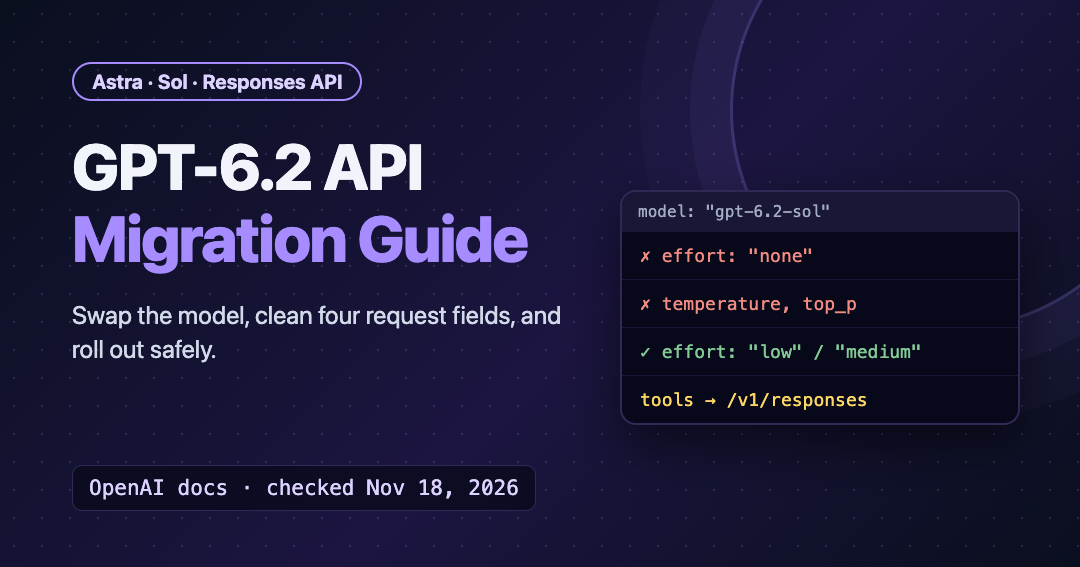
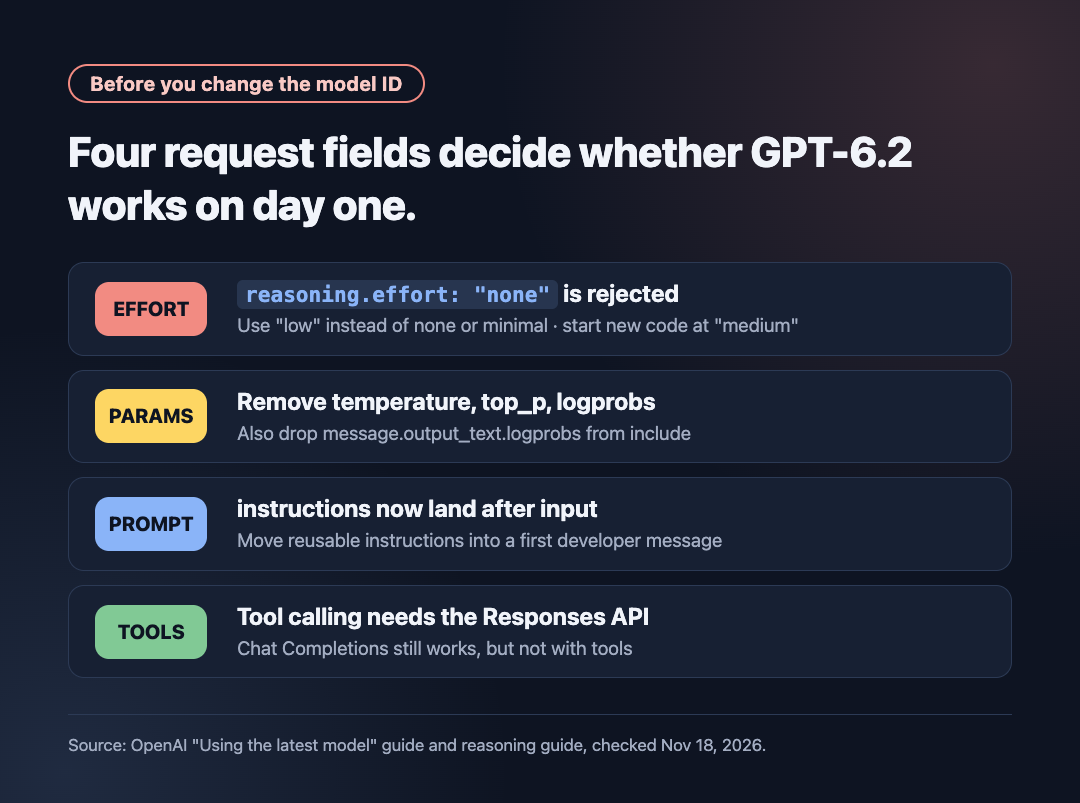
GPT-6.2 API migration is mostly a one-line model swap, but four details can break a working integration: reasoning.effort set to none is now rejected, temperature/top_p/logprobs must go, tool calling needs the Responses API, and top-level instructions now land after your input. OpenAI released gpt-6.2-astra and gpt-6.2-sol on November 17, 2026. Move GPT-6 Astra workloads to GPT-6.2 Astra (20% cheaper per token) and GPT-6.1 Sol workloads to GPT-6.2 Sol (same price), after you run the checks below.
This guide was written on November 18, 2026, from OpenAI's model pages, pricing page and the latest-model guide (all checked the same day). I have not run these requests against a live account. The commands are templates for you to adapt.
What changed in GPT-6.2 Astra and Sol
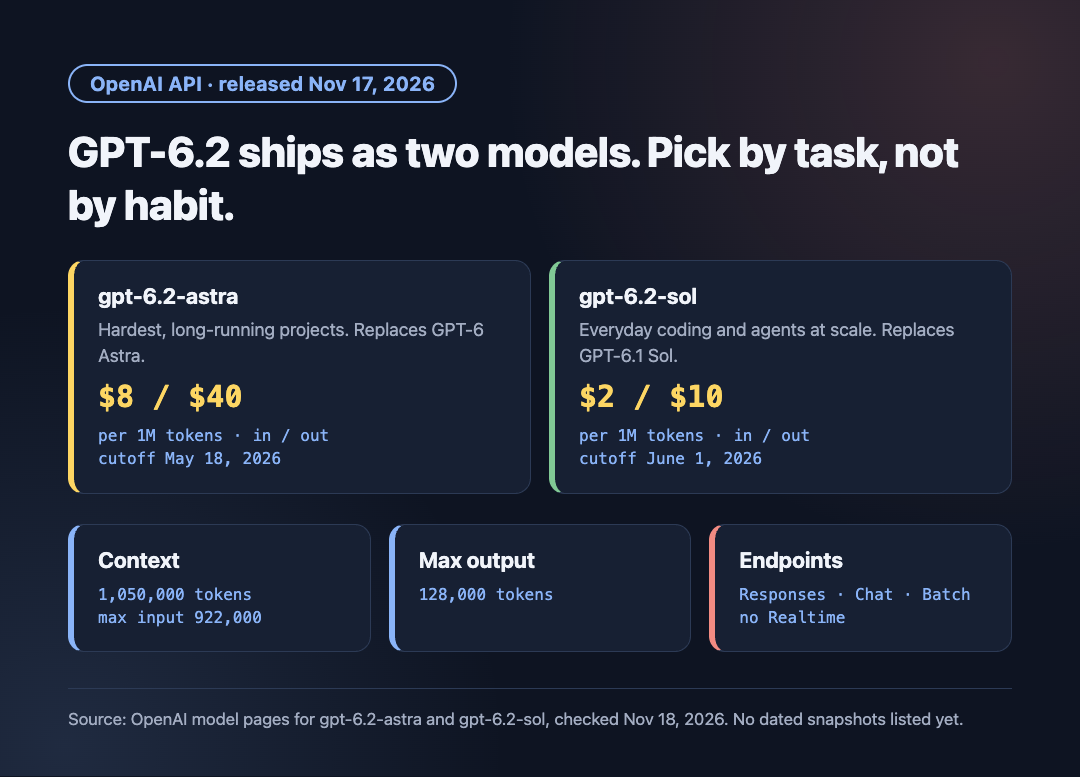
OpenAI ships GPT-6.2 as two models. Astra is the frontier model for the hardest, longest tasks. Sol is the "go-to model for everyday work" and for running agents at scale. Both accept text and image input, return text, and share the same context limits.
| gpt-6.2-astra | gpt-6.2-sol | |
|---|---|---|
| Use for | Hardest, long-running work | Everyday coding, agents at scale |
| Price (in / out, per 1M) | $8 / $40 | $2 / $10 |
| Context / max output | 1.05M / 128K | 1.05M / 128K |
| Knowledge cutoff | May 18, 2026 | June 1, 2026 |
Max input is 922,000 tokens on both. No dated snapshots were listed on either model page on November 18, so you can only pin the alias for now.
OpenAI's launch post says Astra costs "less than a third of the cost per task" of GPT-6 Astra, and that Sol nearly matches Astra on FrontierCode 2.0 at about one-fifth of the cost. Those are vendor benchmarks. Test on your own prompts before you switch production traffic.
Which old model maps to which
The model list on November 18 shows four current GPT-6 family models: gpt-6.2-astra, gpt-6.2-sol, gpt-6.1-terra and gpt-6-luna. GPT-6 Astra, GPT-6 Sol and GPT-6.1 Sol are still priced on the pricing page, and none was on the deprecations page when I checked. Nothing forces you to move today.
| You use now | Move to | Token price change |
|---|---|---|
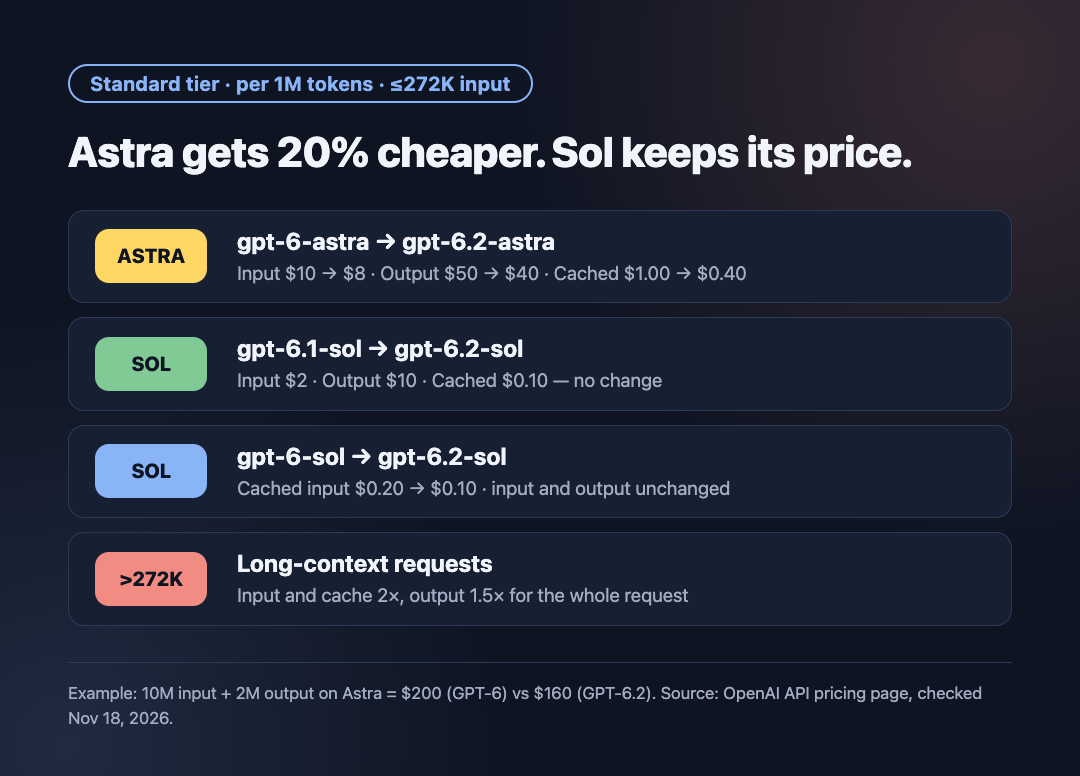
| gpt-6-astra | gpt-6.2-astra | Input $10 → $8, output $50 → $40, cached $1.00 → $0.40 |
| gpt-6.1-sol | gpt-6.2-sol | No change ($2 / $10, cached $0.10) |
| gpt-6-sol | gpt-6.2-sol | Cached input $0.20 → $0.10 |
| gpt-6.1-terra | Stay for now | Cheaper ($1 / $5), OpenAI pitches it for writing and computer use |
| gpt-6-luna | Stay | Still the low-cost option for high-volume tasks |
If you came from GPT-5.6 Terra and followed my GPT-6.1 Terra API migration guide, Terra is still current. GPT-6.2 does not replace it.
Pricing tiers you need to know
The headline prices apply to Standard requests with up to 272K input tokens. Above that, the whole request is billed higher.
| Tier | Multiplier vs Standard | Note |
|---|---|---|
| Batch | 0.5× | Async jobs |
| Fast mode (was Priority) | 2× | Astra $16 / $80, Sol $4 / $20 |
| Ultrafast | 3× until Feb 28, 2027, then 6× | US data residency only |
| Long context (>272K input) | Input and cache 2×, output 1.5× | Applies to the full request |
A worked example with one assumption: a single gpt-6.2-sol call with 300,000 input tokens and 5,000 output tokens, no cache. Input is 0.3M × ($2 × 2) = $1.20. Output is 0.005M × ($10 × 1.5) = $0.075. Total: $1.275. The same call at 250,000 input tokens costs 0.25 × $2 + 0.005 × $10 = $0.55.
For a monthly view, assume 10M input and 2M output tokens on Astra with no caching. GPT-6 Astra: 10 × $10 + 2 × $50 = $200. GPT-6.2 Astra: 10 × $8 + 2 × $40 = $160. That is $40, or 20%, less for the same token count. Your real bill also depends on reasoning tokens, which you pay for as output.
Check your code before the GPT-6.2 API switch
Run these from your repository root. They find the model IDs and the parameters that GPT-6.2 rejects or ignores. Add --exclude-dir=node_modules --exclude-dir=.venv if those folders flood the output.
- Where do you set the model?
grep -rnE "gpt-6(\.1)?-(astra|sol)" .- Parameters to remove or change:
grep -rnE "temperature|top_p|top_logprobs|logprobs|prompt_cache_retention" .- Reasoning effort values that break or need review:
grep -rnE "effort[\"']?\s*[:=]\s*[\"'](none|minimal)" .- Chat Completions calls that may pass tools:
grep -rnE "chat\.completions\.create|/v1/chat/completions" . | head -50How to read the results:
- Step 1 hits are the lines you will change.
- Step 2 hits near a GPT-6.2 call must be removed.
prompt_cache_retentiononly matters if you migrate from GPT-5.5 or earlier. - Step 3 hits are a hard failure. The API rejects
noneon both GPT-6.2 models. - Step 4 hits that also send
toolsneed to move to the Responses API (see below).
Next, confirm your project can see the new models. Rollout depends on account, so do this before you change any code:
curl -s https://api.openai.com/v1/models/gpt-6.2-sol \
  -H "Authorization: Bearer <YOUR_OPENAI_API_KEY>"

curl -s https://api.openai.com/v1/models/gpt-6.2-astra \
  -H "Authorization: Bearer <YOUR_OPENAI_API_KEY>"
A JSON object with "id": "gpt-6.2-sol" means you have access. An error object instead means the model is not enabled for that key's project yet. Check the project's model limits in the dashboard.
Update requests for GPT-6.2 Astra and Sol
Step 1: swap the model and set effort
OpenAI recommends medium effort for a new integration. If you used none or minimal, use low. Effort values are model-dependent, and OpenAI does not publish the full list for GPT-6.2 yet. Stick to low, medium and high until the model page says more.
Python (Responses API):
from openai import OpenAI

client = OpenAI()  # reads OPENAI_API_KEY

response = client.responses.create(
    model="gpt-6.2-sol",
    reasoning={"effort": "medium"},   # was "none" or "minimal"? use "low"
    input=[
        {"role": "developer", "content": "You are a code reviewer. Answer in Markdown."},
        {"role": "user", "content": "Review this diff: <YOUR_DIFF>"},
    ],
)
print(response.output_text)
Node.js:
import OpenAI from "openai";

const client = new OpenAI();

const response = await client.responses.create({
  model: "gpt-6.2-astra",
  reasoning: { effort: "medium" },
  input: [
    { role: "developer", content: "Follow the repo's lint rules. Do not add new tests unless asked." },
    { role: "user", content: "Refactor <YOUR_FILE> to remove duplicate logic." },
  ],
});
console.log(response.output_text);
curl:
curl -s https://api.openai.com/v1/responses \
  -H "Authorization: Bearer <YOUR_OPENAI_API_KEY>" \
  -H "Content-Type: application/json" \
  -d '{
    "model": "gpt-6.2-sol",
    "reasoning": {"effort": "low"},
    "input": [
      {"role": "developer", "content": "Reply with one sentence."},
      {"role": "user", "content": "Say hello."}
    ]
  }'
In Chat Completions, the same setting is reasoning_effort: "medium" at the top level.
Step 2: remove unsupported parameters
| API | Remove |
|---|---|
| Responses | temperature, top_p, top_logprobs, and message.output_text.logprobs in include |
| Chat Completions | temperature, top_p, logprobs, top_logprobs |
If you used temperature: 0 for repeatable output, use structured outputs (a JSON schema) instead. It is supported on both models.
Step 3: move reusable instructions into a developer message
This change is easy to miss. Starting with GPT-6.2, the top-level instructions field is appended after input. OpenAI's guide says to put reusable instructions in a developer message as the first item in input. Keep top-level instructions only for guidance that applies to the current request.
Before:
client.responses.create(
    model="gpt-6-astra",
    instructions=LONG_SYSTEM_PROMPT,
    input=user_text,
)
After:
client.responses.create(
    model="gpt-6.2-astra",
    input=[
        {"role": "developer", "content": LONG_SYSTEM_PROMPT},
        {"role": "user", "content": user_text},
    ],
)
The stable prefix also improves prompt caching. Cached input on Sol costs $0.10 per 1M tokens against $2 uncached. If you migrate from GPT-5.5 or earlier, replace prompt_cache_retention with prompt_cache_options and "ttl": "30m".
Step 4: move tool calls to the Responses API
Both models accept Chat Completions, but OpenAI's guide is explicit: tool calling requires Responses. A Chat Completions request that passes tools to GPT-6.2 is the one to rewrite first.
response = client.responses.create(
    model="gpt-6.2-sol",
    reasoning={"effort": "medium"},
    tools=[{
        "type": "function",
        "name": "get_ticket",
        "description": "Fetch a support ticket by ID",
        "parameters": {
            "type": "object",
            "properties": {"ticket_id": {"type": "string"}},
            "required": ["ticket_id"],
        },
    }],
    input=[{"role": "user", "content": "Summarize ticket <TICKET_ID>"}],
)
Note the flat function format. In Responses, name, description and parameters sit directly on the tool object, not under a nested function key. Your loop then reads function_call items from response.output and sends back function_call_output items.
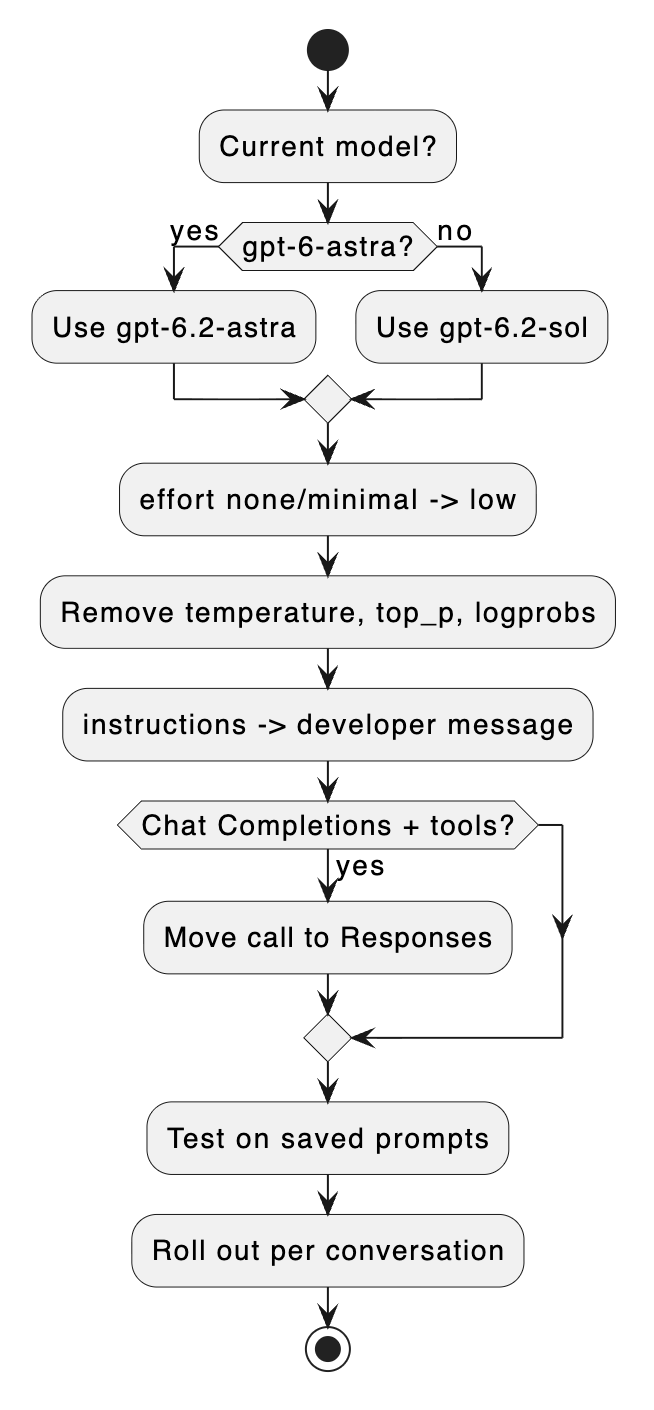
View PlantUML source
@startuml
skinparam shadowing false
skinparam defaultFontSize 14
start
:Current model?;
if (gpt-6-astra?) then (yes)
  :Use gpt-6.2-astra;
else (no)
  :Use gpt-6.2-sol;
endif
:effort none/minimal -> low;
:Remove temperature, top_p, logprobs;
:instructions -> developer message;
if (Chat Completions + tools?) then (yes)
  :Move call to Responses;
endif
:Test on saved prompts;
:Roll out per conversation;
stop
@enduml
Why multi-turn quality can drop after the switch
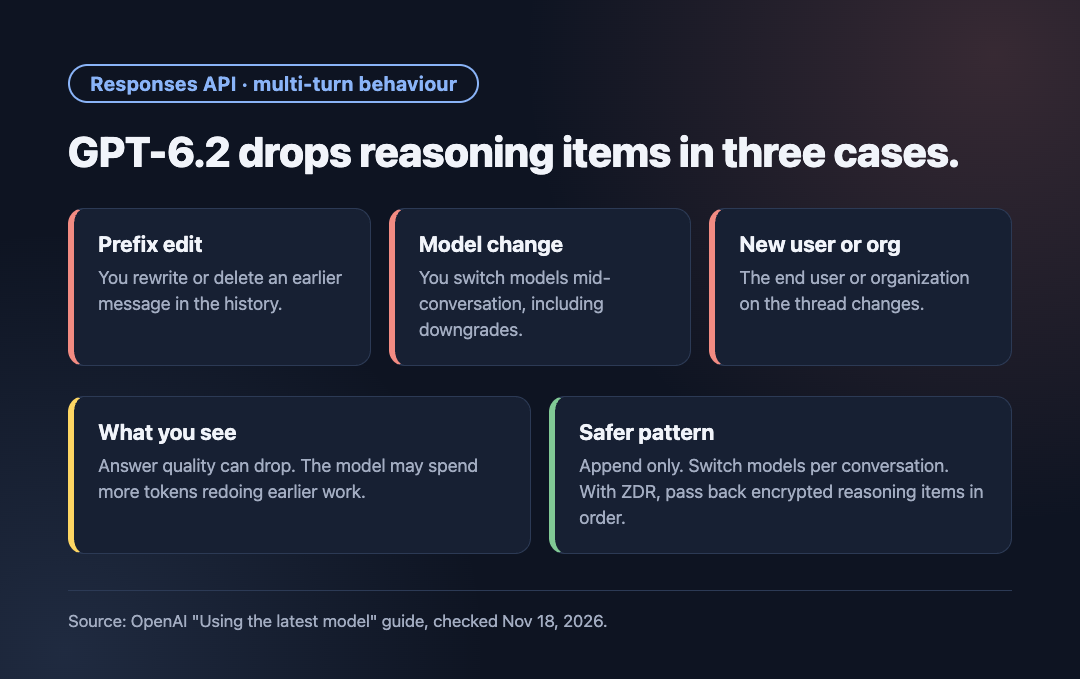
OpenAI's guide flags one behaviour change for multi-turn apps. Starting with GPT-6.2, the Responses API drops reasoning items when:
- you edit earlier messages in the conversation (a "prefix edit"),
- you change the model mid-conversation, including downgrades,
- the end user or organization changes.
When that happens, OpenAI warns that answer quality can decline and the model may spend more tokens repeating earlier work. Three rules follow:
- Switch models at conversation boundaries. Start new threads on GPT-6.2 and let old ones finish on the old model.
- Keep the prefix unchanged when you change settings between turns. Append; don't rewrite history.
- With Zero Data Retention,
storeis treated asfalse. Pass prior output items back in order, including the encrypted reasoning items.
Also expect shorter answers. OpenAI says GPT-6.2 is "more concise and direct by default". If your prompt already says "be concise", you may now get replies that are too terse. Review output length on a sample before rollout.
Test and roll out safely
Run a small A/B test before you flip production traffic:
import json
from openai import OpenAI

client = OpenAI()
prompts = [json.loads(l) for l in open("eval_prompts.jsonl")]

for old, new in [("gpt-6-astra", "gpt-6.2-astra"), ("gpt-6.1-sol", "gpt-6.2-sol")]:
    for p in prompts[:20]:
        for model in (old, new):
            r = client.responses.create(
                model=model,
                reasoning={"effort": "medium"},
                input=p["input"],
            )
            u = r.usage
            print(model, p["id"], u.input_tokens, u.output_tokens, len(r.output_text))
Compare three numbers per prompt: output quality (your own check), total output tokens (reasoning tokens are billed as output), and answer length. Keep the model ID in config, not in code, so a rollback is a config change:
OPENAI_MODEL=gpt-6.2-solTo roll back, set that line in your .env back to OPENAI_MODEL=gpt-6.1-sol (or gpt-6-astra).
Remember the reasoning-item rule when you roll back. Flip the model for new conversations, not in the middle of open ones.
Fix common GPT-6.2 API errors
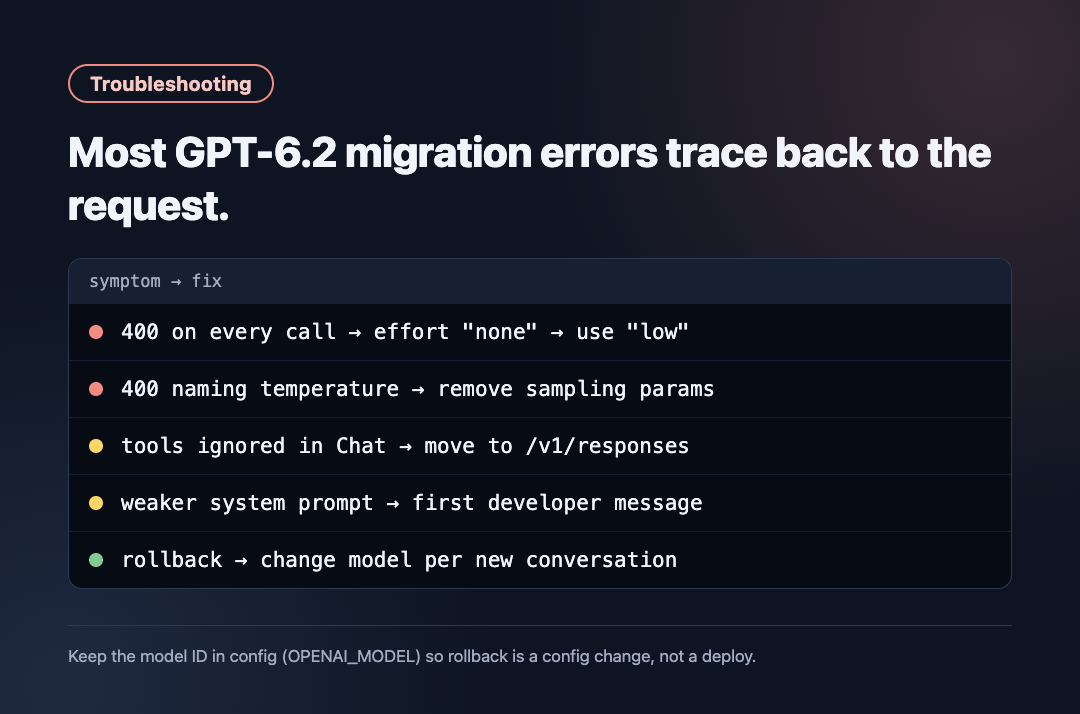
| Symptom | Likely cause | Fix |
|---|---|---|
| 400 error on every request | reasoning.effort is none | Use low |
400 naming temperature or top_p | Unsupported sampling parameter | Remove it; use structured outputs for stable format |
| Tools never called in Chat Completions | Tool calling needs Responses | Move the call to /v1/responses |
| System prompt seems weaker | Top-level instructions now placed after input | Put it in a first developer message |
| Model not found for your key | Rollout or project model limits | Check /v1/models/gpt-6.2-sol, then the project's allowed models |
| Long threads lose context or cost more | Reasoning items dropped after edits or model switch | Append only; switch models per conversation |
If a job uses the Realtime API, Assistants or fine-tuning, stay where you are. Neither GPT-6.2 model supports those endpoints. For ChatGPT users: the forum announcement lists GPT-6.2 in ChatGPT Work and Codex for Plus, Pro, Enterprise and Edu. A forum reply adds that rollout depends on plan and workspace, and that you should update the desktop app and Codex CLI if the models don't show. If you run Codex in CI, also see my note on the Codex exec trust change.
Should you migrate now?
| Your setup | Decision |
|---|---|
GPT-6 Astra on Responses, no none effort | Migrate this week. Same code, 20% lower token price |
| GPT-6.1 Sol or GPT-6 Sol, simple requests | Test now, migrate when quality checks pass. Price is the same or lower |
| Chat Completions with tools | Plan the Responses rewrite first, then migrate |
| Multi-turn agents that edit history | Fix the history handling before you switch |
| GPT-6.1 Terra or GPT-6 Luna | No action. Both are still current |
| Realtime, Assistants or fine-tuned models | No action. GPT-6.2 does not support them |
Image workflows have their own deadline. See the gpt-image-2 deprecation guide for the February 10, 2027 shutdown.
FAQ
Is GPT-6 Astra being shut down? Not as of November 18, 2026. It is still on the pricing page and was not on OpenAI's deprecations page when I checked. Watch that page for a notice.
Is GPT-6.2 Sol more expensive than GPT-6.1 Sol? No. Both cost $2 input, $0.10 cached input and $10 output per 1M tokens at Standard. Compared with GPT-6 Sol, the cached input price halves from $0.20 to $0.10.
Can I pin a dated GPT-6.2 snapshot? Not yet. The model pages listed only the gpt-6.2-astra and gpt-6.2-sol aliases on November 18.
Does GPT-6.2 support the Realtime API? No. Both models support Responses, Chat Completions and Batch only. They also don't support Assistants, fine-tuning or predicted outputs.
Why is my bill higher on some requests? Check the input size. Requests above 272K input tokens pay double for input and cache and 1.5× for output, for the whole request. Fast mode is 2× and Ultrafast 3× (6× from March 1, 2027).
Next, check whether any of your automations still call older GPT-4o or GPT-4.1 snapshots. Those shut down on January 14, 2027.
References
- GPT-6.2 Sol model page — OpenAI, checked 2026-11-18
- GPT-6.2 Astra model page — OpenAI, checked 2026-11-18
- Using the latest model (GPT-6.2 guide) — OpenAI, checked 2026-11-18
- Reasoning models guide — OpenAI, checked 2026-11-18
- API pricing — OpenAI, checked 2026-11-18
- Deprecations — OpenAI, checked 2026-11-18
- Introducing GPT-6.2 Astra and Sol — OpenAI, Nov 17, 2026 (page blocked automated access; contents checked through the forum announcement)
- GPT-6.2 Astra and Sol are now available — OpenAI Developer Community, checked 2026-11-18
- GitHub Changelog: GPT-6.2 Astra and Sol in GitHub Copilot — GitHub, Nov 17, 2026, checked 2026-11-18