The GitHub Copilot model deprecation comes in two waves. Claude Opus 4.8, Claude Opus 5 and GPT-5.6 Terra leave every Copilot experience on November 16, 2026. Six more models follow on December 14, 2026: Claude Fable 5, Claude Haiku 4.5, Gemini 3.8 Flash, Gemini 4 Argon, Grok 4.6 and Kimi K3. If you only pick models in the chat picker, choose a replacement and you are done. If you pinned a model in a prompt file, a custom agent, Copilot CLI settings or a CI script, find those pins and change them now.
Written November 16, 2026. Facts checked on November 16, 2026 (KST) against the GitHub changelog posts of October 15 and November 13, 2026, the GitHub Docs pages on supported models, model access, custom agents and Copilot CLI, and the VS Code prompt files documentation. The search commands below were tested only against dummy files. The other commands and snippets are my own examples, not GitHub templates.
What the GitHub Copilot model deprecation changes
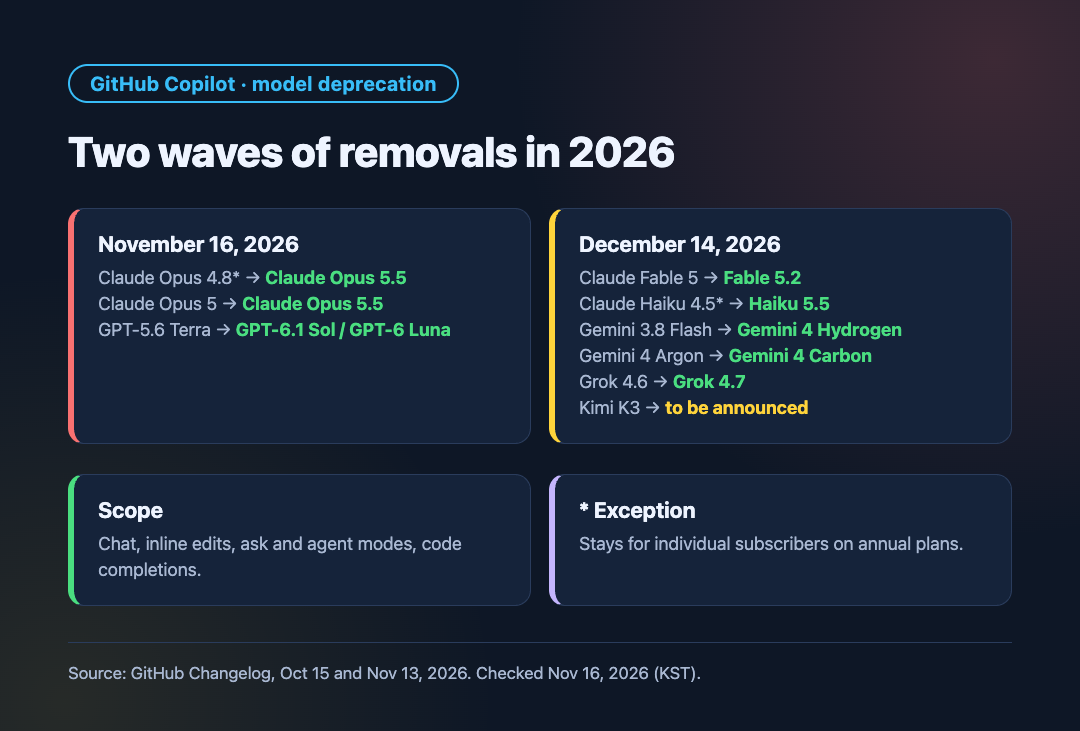
GitHub posted two deprecation notices. Both apply to Copilot Chat, inline edits, ask and agent modes, and code completions.
| Model | Leaves Copilot | Suggested alternative | Exception |
|---|---|---|---|
| Claude Opus 4.8 | Nov 16, 2026 | Claude Opus 5.5 | Stays for individual annual plans |
| Claude Opus 5 | Nov 16, 2026 | Claude Opus 5.5 | None |
| GPT-5.6 Terra | Nov 16, 2026 | GPT-6.1 Sol or GPT-6 Luna | None |
| Claude Fable 5 | Dec 14, 2026 | Claude Fable 5.2 | None |
| Claude Haiku 4.5 | Dec 14, 2026 | Claude Haiku 5.5 | Stays for individual annual plans |
| Gemini 3.8 Flash | Dec 14, 2026 | Gemini 4 Hydrogen | None |
| Gemini 4 Argon | Dec 14, 2026 | Gemini 4 Carbon | None |
| Grok 4.6 | Dec 14, 2026 | Grok 4.7 | None |
| Kimi K3 | Dec 14, 2026 | To be announced | None |
Two details matter for planning:
- Business and Enterprise. Under default model enablement, GitHub turns on the suggested alternatives for you, unless an admin switched off the global default or disabled that model. In that case an admin has to enable them.
- No cleanup needed. GitHub says you do not have to remove the old models yourself after the date.
GitHub did not publish a time of day for either date. Treat the morning of each date (UTC) as the deadline.
This change is only about Copilot. If you call these models directly through the Anthropic, Google or OpenAI APIs, those providers have their own schedules. For example, the Gemini 4 Argon API itself is not part of this notice. See Gemini 4 Argon API: How to Migrate from Gemini 3.x for the API side.
Check where your Copilot models are pinned
A model can be chosen in four places. The picker is easy to see. The other three are files that keep working silently until the model disappears.
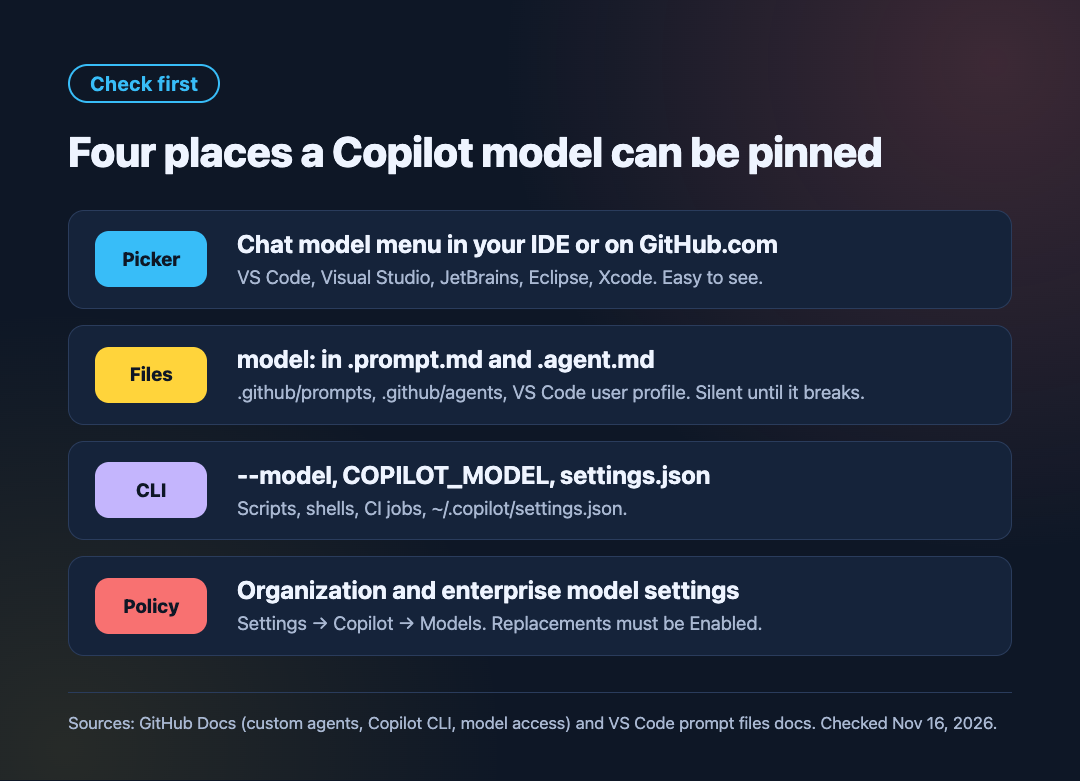
1. The model picker in your IDE
Open Copilot Chat in VS Code, Visual Studio, JetBrains IDEs, Eclipse or Xcode and look at the model name next to the chat input. If it shows one of the nine models above, it needs to change. On GitHub.com, check the model menu in Copilot Chat the same way.
2. Prompt files and custom agents in your repos
VS Code prompt files (.github/prompts/*.prompt.md) accept an optional model field in their YAML header. If you leave it out, the prompt uses whatever model is selected in the picker. Custom agent profiles (.github/agents/*.agent.md) also have a model property. If it is unset, the agent "inherits the default model."
Search every repository you own for the retired names. This pattern matches both display names (Claude Opus 5) and CLI-style strings (claude-opus-4.8), and it does not match the newer versions such as Opus 5.5 or Fable 5.2. The ripgrep version was tested on dummy files:
rg -n -i --hidden \
  'opus[ -]?4\.8|opus[ -]?5([^.0-9]|$)|gpt-?5\.6[ -]?terra|fable[ -]?5([^.0-9]|$)|haiku[ -]?4\.5|gemini[ -]?3\.8[ -]?flash|gemini[ -]?4[ -]?argon|grok[ -]?4\.6|kimi[ -]?k3' \
  .github .vscode scripts 2>/dev/null
Without ripgrep, plain grep takes the same pattern (not separately tested):
grep -rnEi 'opus[ -]?4\.8|opus[ -]?5([^.0-9]|$)|gpt-?5\.6[ -]?terra|fable[ -]?5([^.0-9]|$)|haiku[ -]?4\.5|gemini[ -]?3\.8[ -]?flash|gemini[ -]?4[ -]?argon|grok[ -]?4\.6|kimi[ -]?k3' .github .vscodeOn Windows PowerShell, the same pattern works with Select-String (not tested here):
Get-ChildItem -Recurse -Force -File .github, .vscode -ErrorAction SilentlyContinue |
  Select-String -Pattern 'opus[ -]?4\.8|opus[ -]?5([^.0-9]|$)|gpt-?5\.6[ -]?terra|fable[ -]?5([^.0-9]|$)|haiku[ -]?4\.5|gemini[ -]?3\.8[ -]?flash|gemini[ -]?4[ -]?argon|grok[ -]?4\.6|kimi[ -]?k3'
Example output when something is pinned:
.github/agents/review.agent.md:3:model: Claude Opus 5 (copilot)
.github/workflows/ci.yml:1:run: copilot -p "x" --model claude-opus-4.8
.github/workflows/ci.yml:2:run: copilot -p "y" --model gemini-4-argon
How to read it: any hit in a model: line or after --model is a pin you must change. Hits in README files or comments are just text. Your VS Code user-profile prompt files live outside the repo, so search that folder as well if you keep personal prompts.
3. Copilot CLI settings, environment and flags
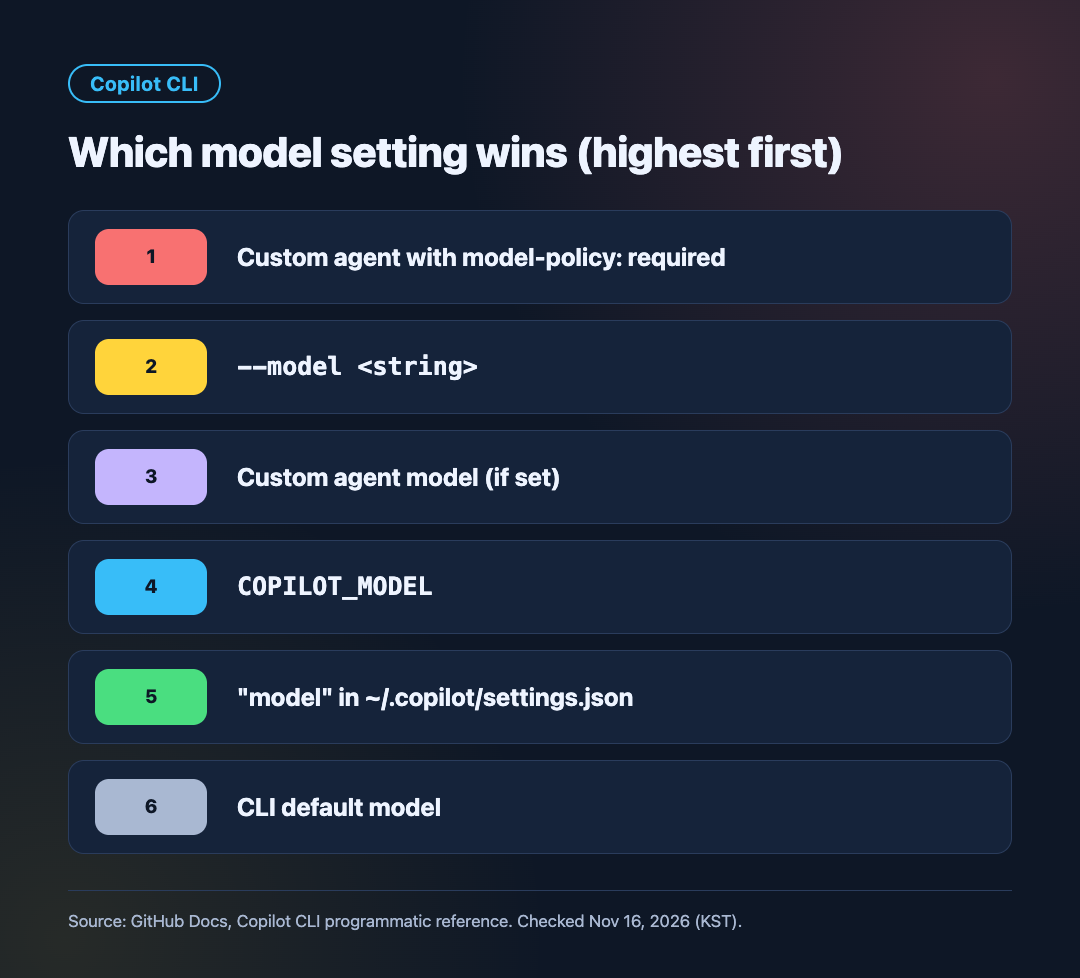
Copilot CLI can get its model from four sources. The Copilot CLI programmatic reference lists them in this order of priority:
- A custom agent's model, when the agent sets
model-policy: required - The
--modeloption - A custom agent's model, if any
- The
COPILOT_MODELenvironment variable - The
modelkey in~/.copilot/settings.json(or$COPILOT_HOME/settings.json) - The CLI's default model
Check each one. On macOS or Linux, these three lines show the shell variable, the persistent setting and any scripts that pass --model:
echo "$COPILOT_MODEL"
grep -n '"model"' "${COPILOT_HOME:-$HOME/.copilot}/settings.json"
rg -n -- '--model' .github scripts 2>/dev/null
On Windows PowerShell:
$env:COPILOT_MODEL
Select-String -Path "$HOME\.copilot\settings.json" -Pattern '"model"'
To see the exact model strings your account can use, run /model inside an interactive copilot session. The docs say choices made there are written to the settings file.
4. Organization and enterprise model policies
If you manage Copilot Business or Enterprise, open your organization, then Settings → Copilot → Models. Each model has an Enabled or Disabled dropdown. Models set to "Delegate to Default Policy" follow the Default availability for released models policy. A shield icon means your enterprise enforces the setting and only an enterprise owner can change it. Enterprise owners manage the list under AI controls → Copilot → Configure allowed models.
What to look for: the replacement models (Claude Opus 5.5, GPT-6.1 Sol, GPT-6 Luna, Claude Fable 5.2, Claude Haiku 5.5, Gemini 4 Hydrogen, Gemini 4 Carbon, Grok 4.7) should be Enabled or covered by an enabled default. If the default policy is off, they will not appear for your users on their own.
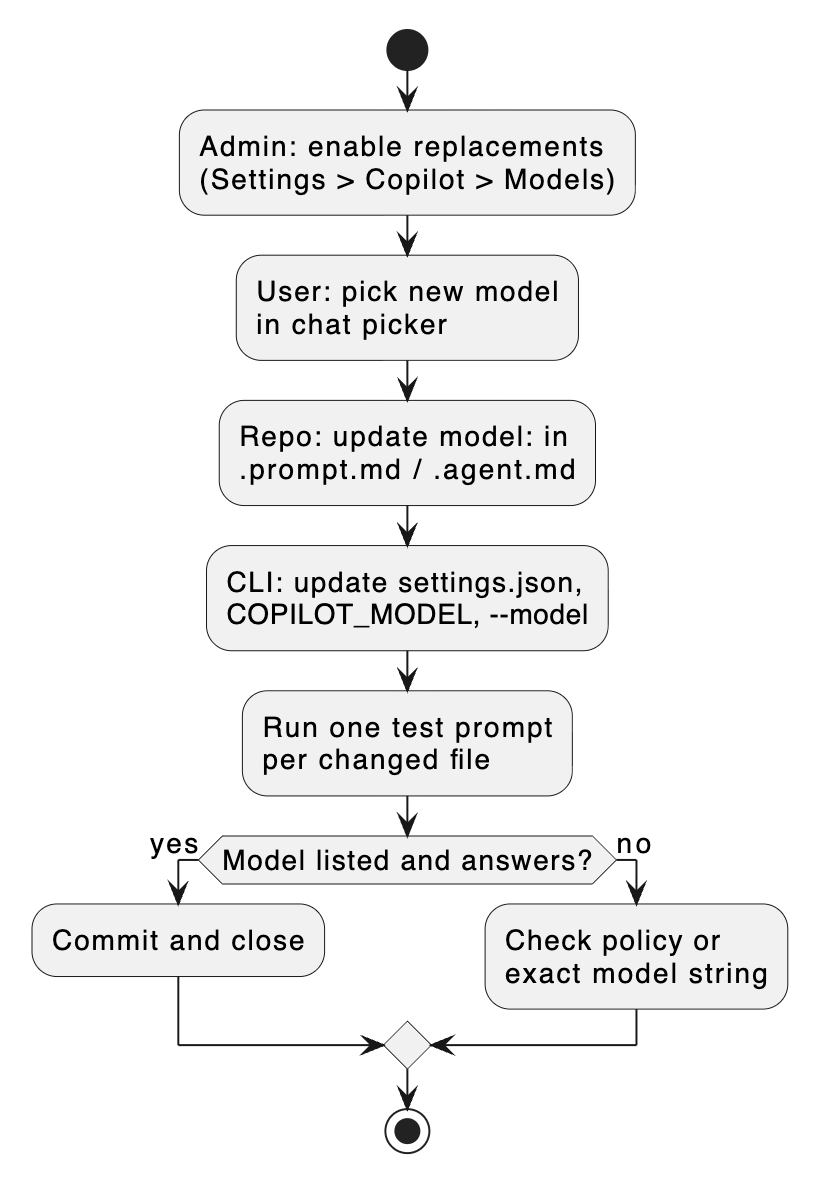
How to switch models before the deadline
View PlantUML source
@startuml
skinparam shadowing false
skinparam defaultFontSize 14
start
:Admin: enable replacements\n(Settings > Copilot > Models);
:User: pick new model\nin chat picker;
:Repo: update model: in\n.prompt.md / .agent.md;
:CLI: update settings.json,\nCOPILOT_MODEL, --model;
:Run one test prompt\nper changed file;
if (Model listed and answers?) then (yes)
  :Commit and close;
else (no)
  :Check policy or\nexact model string;
endif
stop
@enduml
Step 1: Admins enable the replacements first
Do this before anyone edits files, or the new names will not be selectable. In Settings → Copilot → Models, set each replacement to Enabled. If your organization belongs to an enterprise that enforces the model list, ask the enterprise owner. Once a model is enabled, GitHub says it shows up in the Copilot Chat model selector.
Step 2: Change the model in the picker
In each IDE, open the model menu in Copilot Chat and choose the replacement. Use the table above as the default mapping. For GPT-5.6 Terra, GitHub offers two options: GPT-6.1 Sol or GPT-6 Luna. The notice does not say which one fits which task, so test both on a typical prompt from your work before you standardize.
Step 3: Update prompt files and custom agents
Change the model value in each file the search found. Copy the exact name your model picker shows instead of guessing it. For example, a file that had model: Claude Opus 5 becomes:
---
description: Review a pull request for security issues
model: <NEW_MODEL_NAME_FROM_PICKER>
---
If a prompt does not need a specific model, delete the model line. The prompt then follows whatever the user has selected, which means the next deprecation will not break it.
Step 4: Update Copilot CLI and CI scripts
The first line is a one-off run with an explicit model. The second sets the model for the current shell session:
copilot -p "Summarize the open TODOs in this repo" -s --model <NEW_MODEL_STRING>
export COPILOT_MODEL=<NEW_MODEL_STRING>
For a persistent default, edit the model key in ~/.copilot/settings.json:
{
  "model": "<NEW_MODEL_STRING>"
}
Get <NEW_MODEL_STRING> from /model in an interactive session. The official examples use lowercase strings such as claude-haiku-4.5 and gpt-5.3-codex. In GitHub Actions, put the string in one repository variable so the next change is a single edit:
- name: Ask Copilot CLI
  env:
    COPILOT_MODEL: ${{ vars.COPILOT_MODEL }}
  run: copilot -p "Write release notes for this tag" -s
If you run Copilot CLI with local models, the hosted model list does not apply to those runs. See Copilot CLI Ollama Setup.
Step 5: Confirm the change worked
- Run the search from the check section again. It should return no
model:or--modelhits. - Start one chat with each changed prompt file or agent and confirm it runs without a model error and the chat model menu shows the new name.
- In Copilot CLI, run
/modeland confirm the current selection.
If you can't switch yet
GitHub's notices list no grace period, no opt-out and no workaround for Business or Enterprise. The only exception is for individual subscribers on annual plans: Claude Opus 4.8 and Claude Haiku 4.5 stay available to them. Claude Opus 5 and GPT-5.6 Terra get no exception.
Two stop-gaps reduce breakage while you test replacements:
- Remove the pin. Delete
model:lines and--modelflags so prompts and scripts fall back to the user's selection or the CLI default. The side effect: results can change whenever the default changes. - Use Auto model selection. GitHub's supported models page says GPT-5.3-Codex is the long-term support model and is used if no other models are available for Auto. The side effect: you do not control which model answers, and Copilot Free and Student plans only get Auto anyway.
Troubleshooting after the switch
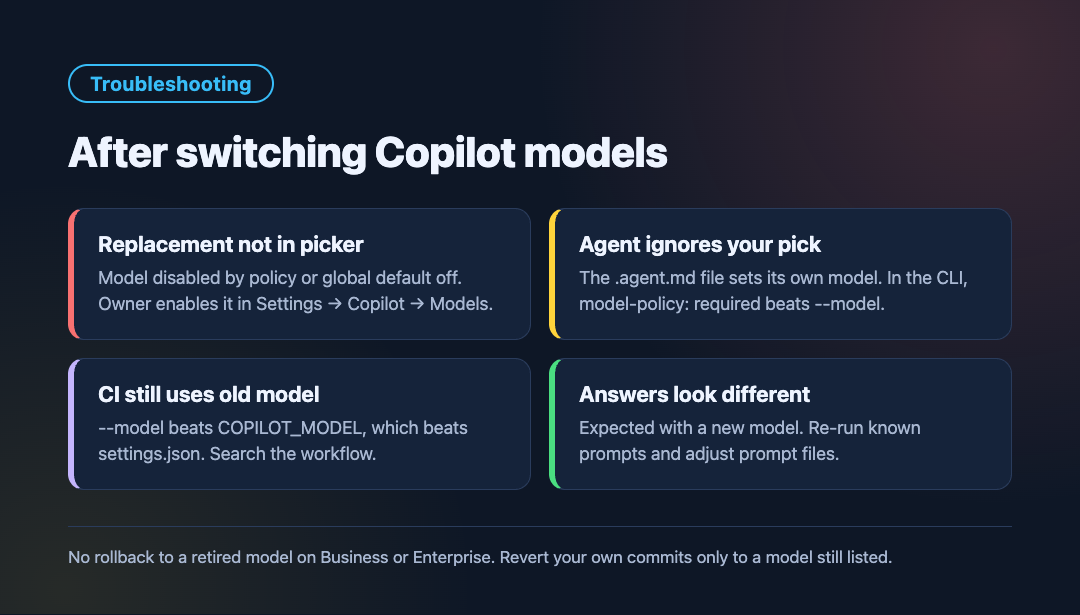
The replacement model is missing from the picker. Your organization's policy has it disabled, or the global default is off. Ask an organization owner to enable it in Settings → Copilot → Models. If you see a shield icon, the enterprise owner has to change it.
A custom agent ignores the model you picked. The agent file sets its own model, which wins over the picker. In Copilot CLI, model-policy: required makes the agent's model beat even --model. Edit the agent file.
A CI job still uses the old model. Check the priority list. A --model flag in the script beats COPILOT_MODEL, and the environment variable beats settings.json. Search the workflow for --model and for COPILOT_MODEL set at the job or step level.
Answers look different. That is expected with a new model. GitHub does not claim the alternatives behave the same. Re-run a few known prompts and adjust prompt files if needed.
Rolling back. There is no rollback to a retired model on Business or Enterprise. You can roll back your own changes, for example git revert <COMMIT_SHA> on the commit that edited prompt files, but only to another model that is still listed. Keep the old value in the commit message so you know what changed.
GitHub Copilot model deprecation: what to do and when
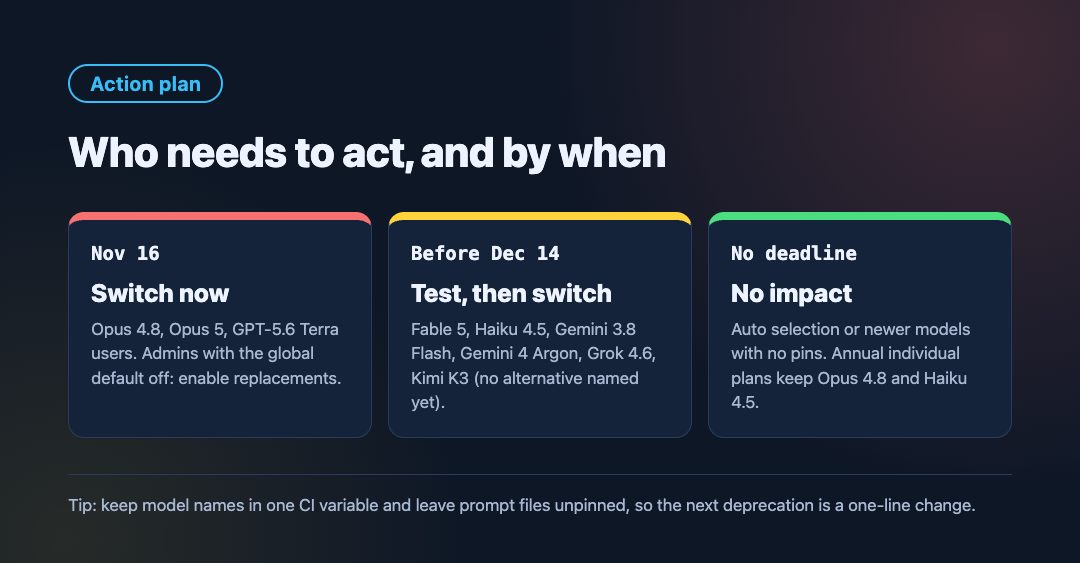
| Your setup | Priority | Action |
|---|---|---|
| Opus 4.8, Opus 5 or GPT-5.6 Terra in picker, files or CLI | Now (Nov 16) | Switch to Opus 5.5, GPT-6.1 Sol or GPT-6 Luna |
| Business/Enterprise admin with global default off | Now | Enable all replacement models |
| Fable 5, Haiku 4.5, Gemini 3.8 Flash, Gemini 4 Argon, Grok 4.6 | This week (before Dec 14) | Test and switch to the listed alternative |
| Kimi K3 | Before Dec 14 | Pick another model; no alternative announced yet |
| Individual annual plan on Opus 4.8 or Haiku 4.5 | No deadline from these notices | Optional; plan your move anyway |
| Auto selection or already on newer models, no pins | No impact | Nothing to do |
If you also call Claude through the API rather than Copilot, the Fable line has its own changes. See Claude Fable 5.2 API: Migrate from Fable 5.1 in 4 Steps.
FAQ
Do I need to do anything if I never change the Copilot model? Probably not. If you use the default or Auto and have no pinned model values in files or scripts, the deprecation should not affect you. Run the search above once to be sure.
What replaces GPT-5.6 Terra in Copilot? GitHub suggests GPT-6.1 Sol or GPT-6 Luna. The notice does not rank them, so test both with your own prompts.
Will Business and Enterprise users get the new models automatically? Yes, under default model enablement, unless an admin turned off the global default or disabled that specific model. Check Settings → Copilot → Models to be sure.
I'm on an individual annual plan. Does this affect me? Partly. Claude Opus 4.8 and Claude Haiku 4.5 stay available to you. Claude Opus 5, GPT-5.6 Terra and the other December models still go away.
What should Kimi K3 users switch to? GitHub has not named an alternative yet. Pick another supported model before December 14 and check the changelog for an update.
The next likely question after this change is how to keep model names out of your files entirely. A single repository variable for CI and unpinned prompt files are the simplest way to make the next Copilot deprecation a one-line fix.
References
- GitHub Changelog, "Upcoming deprecation of selected GitHub Copilot models in December" (Nov 13, 2026): https://github.blog/changelog/2026-11-13-upcoming-deprecation-of-selected-github-copilot-models-in-december (checked Nov 16, 2026)
- GitHub Changelog, "Upcoming deprecation of selected GitHub Copilot models in mid-November" (Oct 15, 2026): https://github.blog/changelog/2026-10-15-upcoming-deprecation-of-selected-github-copilot-models-in-mid-november (checked Nov 16, 2026)
- GitHub Docs, Supported AI models in GitHub Copilot: https://docs.github.com/en/copilot/reference/ai-models/supported-models (checked Nov 16, 2026)
- GitHub Docs, Managing default models for an organization: https://docs.github.com/en/copilot/how-tos/administer-copilot/manage-for-organization/manage-default-models (checked Nov 16, 2026)
- GitHub Docs, Configuring access to AI models in Copilot: https://docs.github.com/en/copilot/how-tos/use-ai-models/configure-access-to-ai-models (checked Nov 16, 2026)
- GitHub Docs, Copilot CLI programmatic reference: https://docs.github.com/en/copilot/reference/copilot-cli-reference/cli-programmatic-reference (checked Nov 16, 2026)
- GitHub Docs, Custom agents configuration: https://docs.github.com/en/copilot/reference/custom-agents-configuration (checked Nov 16, 2026)
- VS Code Docs, Use prompt files in VS Code: https://code.visualstudio.com/docs/agent-customization/prompt-files (checked Nov 16, 2026)