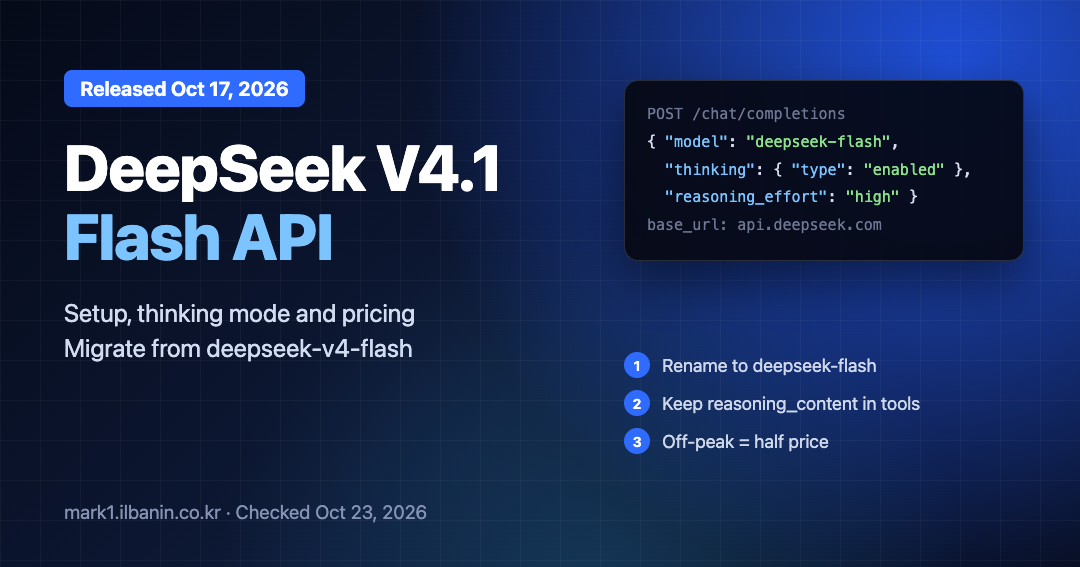
The DeepSeek V4.1 Flash API went live on October 17, 2026. You call it with the model name deepseek-flash on https://api.deepseek.com, using either the OpenAI or the Anthropic request format. If you still send deepseek-v4-flash, your requests already run on the new model, because that name now routes to DeepSeek-V4.1-Flash-1017 at the Flash price. Switch to deepseek-flash anyway, and check two things: thinking mode is on by default, and tool-call loops must send reasoning_content back.
This guide covers the first request (curl and Python), thinking and non-thinking mode, the peak and off-peak price table with a worked cost example, a tool-call loop that avoids the 400 error, and the Anthropic-format endpoint. All facts come from DeepSeek's API docs and the Hugging Face model card, checked on October 23, 2026.
What changed in DeepSeek V4.1 Flash on October 17
DeepSeek calls DeepSeek-V4.1-Flash-1017 a minor update to V4.1 Flash. The release note says it scores higher on benchmarks, finishes tasks faster and writes shorter outputs than the previous version. It is live on the website, the app and the API, and the weights are public under the MIT license.
| Item | deepseek-flash (Oct 23, 2026) |
|---|---|
| Model version | DeepSeek-V4.1-Flash-1017 |
| Context length | 1M tokens |
| Max output | 384K tokens (pricing page limit) |
| Thinking mode | Thinking (default) and non-thinking |
| Formats | Chat Completions, Responses API, Anthropic API |
| Extras | JSON output, tool calls, vision, FIM (non-thinking only) |
| Concurrency limit | 2,500 |
Legacy names deepseek-v4-flash and deepseek-v4-flash-vision-exp still work, but DeepSeek has retired those models. Requests sent to them are served by V4.1-Flash-1017 and billed at the Flash price. The docs say the calling method is unchanged, so most code only needs the new model string.
Benchmarks from the model card
The Hugging Face model card compares the 1017 update with the earlier V4.1 Flash. These numbers are DeepSeek's own reported results, not independent tests.
| Benchmark | V4.1-Flash-1017 | V4.1 Flash |
|---|---|---|
| Terminal-Bench 4.0 | 42.3 | 31.2 |
| DeepSWE v1.1 | 77.0 | 74.2 |
| ProgramBench | 29.1 | 20.3 |
| Automation-Bench v1.0.6 | 60.5 | 54.8 |
DeepSeek V4.1 Flash API pricing: peak vs off-peak
DeepSeek bills per million tokens. Prices change by time of day, and off-peak rates are half of peak rates.
| Token type (per 1M) | Flash off-peak | Flash peak | V4 Pro peak |
|---|---|---|---|
| Input, cache hit | $0.003 | $0.006 | $0.044 |
| Input, cache miss | $0.15 | $0.30 | $1.32 |
| Output | $0.60 | $1.20 | $3.96 |
Peak hours are 01:00–04:00 and 06:00–10:00 UTC, Monday to Friday, except Chinese public holidays. Every other hour, including weekends, is off-peak. DeepSeek says prices can change, so check the pricing page before you budget.
Worked cost example
Assume 1,000 requests per day. Each request sends 20,000 input tokens (no cache hits) and gets 2,000 output tokens back. That is 20M input tokens and 2M output tokens per day.
- Peak: 20 × $0.30 = $6.00 input + 2 × $1.20 = $2.40 output = $8.40 per day
- Off-peak: 20 × $0.15 = $3.00 input + 2 × $0.60 = $1.20 output = $4.20 per day
- Peak, with 15,000 of the 20,000 input tokens hitting the cache: 15 × $0.006 = $0.09 + 5 × $0.30 = $1.50 + $2.40 output = $3.99 per day
The same rule holds at any volume. A stable prompt prefix (system prompt, tool list, long documents first) cuts input cost more than any other change. Batch jobs you can delay are cheapest off-peak.
Step 1: Make your first DeepSeek API call
Create a key at the DeepSeek platform's API keys page, then store it in an environment variable. Never paste the key into source files.
export DEEPSEEK_API_KEY="<YOUR_DEEPSEEK_API_KEY>"Send a test request with curl. This one enables thinking and sets the effort level explicitly.
curl https://api.deepseek.com/chat/completions \
  -H "Content-Type: application/json" \
  -H "Authorization: Bearer ${DEEPSEEK_API_KEY}" \
  -d '{
        "model": "deepseek-flash",
        "messages": [
          {"role": "system", "content": "You are a helpful assistant."},
          {"role": "user", "content": "Explain HTTP 429 in one sentence."}
        ],
        "thinking": {"type": "enabled"},
        "reasoning_effort": "high",
        "stream": false
      }'
The answer is in choices[0].message.content. The model's reasoning comes back in a separate field, reasoning_content, at the same level.
Python with the OpenAI SDK
The API is OpenAI-compatible, so the official openai package works. Change the base URL and the model name. Pass thinking through extra_body, because it is not a standard OpenAI parameter.
import os
from openai import OpenAI  # pip install openai

client = OpenAI(
    api_key=os.environ["DEEPSEEK_API_KEY"],
    base_url="https://api.deepseek.com",
)

resp = client.chat.completions.create(
    model="deepseek-flash",
    messages=[{"role": "user", "content": "Write a regex for ISO dates."}],
    reasoning_effort="high",
    extra_body={"thinking": {"type": "enabled"}},
)

msg = resp.choices[0].message
print(getattr(msg, "reasoning_content", None))  # reasoning text
print(msg.content)                               # final answer
Step 2: Choose thinking or non-thinking mode
Thinking is the default, so a request without the thinking field still reasons first. Turn it off for short, latency-sensitive calls such as classification, tagging or autocomplete.
resp = client.chat.completions.create(
    model="deepseek-flash",
    messages=[{"role": "user", "content": "Label this ticket: 'refund not received'"}],
    extra_body={"thinking": {"type": "disabled"}},
)
When thinking is on, reasoning_effort controls depth. The docs list these values:
| You send | Applied as | Notes |
|---|---|---|
low | low | Also used for minimal |
high | high | Default; also used for medium and xhigh |
max | max | Also used for ultra |
Some sampling settings behave differently in thinking mode. temperature, presence_penalty and frequency_penalty do not raise an error, but they have no effect. On deepseek-flash, top_p only applies in thinking mode, with an effective range of 0.95 to 1.0. Lower values are treated as 0.95, and non-thinking mode fixes it at 1.0. If your old code tuned temperature for deterministic output, it does nothing while thinking is on.
Step 3: Migrate from deepseek-v4-flash without surprises
Most migrations are a one-line change. Use this checklist to catch the rest.
- Replace
deepseek-v4-flashanddeepseek-v4-flash-vision-expwithdeepseek-flashin code, config files and environment variables. - Decide on thinking mode per endpoint. Set
{"thinking": {"type": "disabled"}}where you need fast, short answers. - Remove
temperaturetuning you relied on for thinking calls, or move those calls to non-thinking mode. - Re-check output length limits in your app. The pricing page lists a 384K maximum output, so cap
max_tokensto what your UI and budget can handle. - Run your regression prompts again. The release note says outputs are shorter, so tests that compare full text or length may need new baselines.
- If you use tools, fix the multi-turn loop as shown in the next section.
Since the legacy names already route to the new model, the model behind your app has already changed even if you did nothing. Run your tests now, not after you rename.
If you are moving several providers at once, the same checklist style appears in our Gemini 4 Argon API migration guide.
Step 4: Tool calls in thinking mode without a 400 error
In thinking mode, the model can reason, call a tool, read the result and reason again before it answers. The docs set one strict rule. When the request includes tools, you must send back the reasoning_content from every previous assistant turn, including turns that made no tool call. If you drop it, the API returns a 400 error.
Without tools, the rule is relaxed: earlier reasoning_content is not added to the context, and sending it is allowed but ignored.
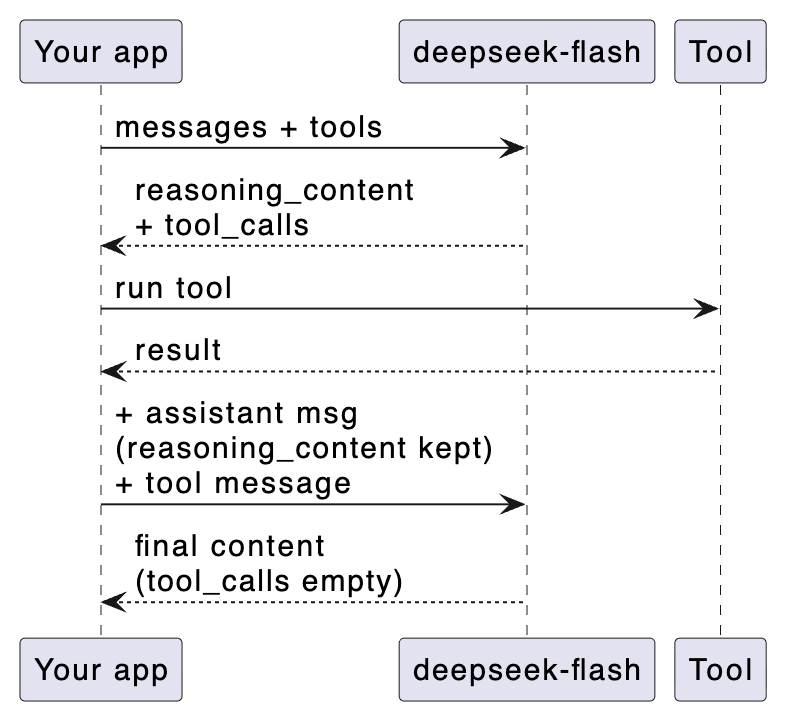
View PlantUML source
@startuml
skinparam shadowing false
skinparam defaultFontSize 15
participant "Your app" as A
participant "deepseek-flash" as D
participant "Tool" as T
A -> D : messages + tools
D --> A : reasoning_content\n+ tool_calls
A -> T : run tool
T --> A : result
A -> D : + assistant msg\n(reasoning_content kept)\n+ tool message
D --> A : final content\n(tool_calls empty)
@enduml
Here is a minimal loop. It copies the assistant message into a plain dictionary so reasoning_content is not lost when the SDK object is serialized.
import json

tools = [{
    "type": "function",
    "function": {
        "name": "get_order_status",
        "description": "Look up an order by ID",
        "parameters": {
            "type": "object",
            "properties": {"order_id": {"type": "string"}},
            "required": ["order_id"],
        },
    },
}]

def get_order_status(order_id):
    return {"order_id": order_id, "status": "shipped"}  # replace with your lookup

messages = [{"role": "user", "content": "Where is order A-1042?"}]

while True:
    resp = client.chat.completions.create(
        model="deepseek-flash",
        messages=messages,
        tools=tools,
        extra_body={"thinking": {"type": "enabled"}},
    )
    msg = resp.choices[0].message
    messages.append({
        "role": "assistant",
        "content": msg.content,
        "reasoning_content": getattr(msg, "reasoning_content", None),
        "tool_calls": [tc.model_dump() for tc in (msg.tool_calls or [])] or None,
    })
    if not msg.tool_calls:
        print(msg.content)
        break
    for tc in msg.tool_calls:
        args = json.loads(tc.function.arguments)
        result = get_order_status(**args)
        messages.append({
            "role": "tool",
            "tool_call_id": tc.id,
            "content": json.dumps(result),
        })
Keep the full messages list for later user turns in the same conversation. The rule applies to all earlier assistant turns, not just the last one.
Use the Anthropic-format endpoint
DeepSeek also accepts the Anthropic Messages format at https://api.deepseek.com/anthropic. This helps if your code already uses the Anthropic SDK.
export ANTHROPIC_BASE_URL=https://api.deepseek.com/anthropic
export ANTHROPIC_API_KEY="<YOUR_DEEPSEEK_API_KEY>"
import anthropic # pip install anthropic
client = anthropic.Anthropic() # reads the two variables above
message = client.messages.create(
model="deepseek-flash",
max_tokens=1000,
messages=[{"role": "user", "content": "Summarize RFC 9110 in 3 bullets."}],
)
print(message.content)Know the limits before you switch. Model names that start with claude-haiku or claude-sonnet map to deepseek-flash, and claude-opus names map to deepseek-v4-pro. In this format, thinking is controlled with an effort setting (none, low, high, max), and budget_tokens is ignored. Fields such as cache_control, mcp_servers, service_tier and top_k are ignored, and content types such as document and search_result are not supported. DeepSeek keeps a separate integration guide for Claude Code. If you run Claude Code in automation, see our guide to running Claude Code headless with n8n.
Search and Fetch APIs launched alongside
DeepSeek launched Search and Fetch APIs on the same day as the model. Each costs $0.75 per 1,000 successful requests. Server-side tool calls made from DeepSeek Harness, Claude Code or Codex are free for now. Billing starts at 00:00 Beijing time on November 1, 2026 (16:00 UTC on October 31). If an agent of yours uses these tools heavily, estimate that cost now, before the free period ends.
Can you run DeepSeek V4.1 Flash locally?
The weights are on Hugging Face as deepseek-ai/DeepSeek-V4.1-Flash-1017, under the MIT license. The model card lists 763B parameters. That is far beyond a single consumer GPU, so treat local serving as a multi-GPU server job. The card shows vLLM and SGLang commands:
pip install vllm
vllm serve "deepseek-ai/DeepSeek-V4.1-Flash-1017"
The card recommends temperature 1.0 and top_p 1.0. The release has no Jinja chat template. DeepSeek ships a Python reference encoder in the repository's encoding folder instead, so check how your serving stack builds prompts before you trust its output.
FAQ
Do I have to change deepseek-v4-flash to deepseek-flash right now? Not to keep working, because the legacy name already routes to V4.1-Flash-1017 at the Flash price. Rename it anyway, since deepseek-flash is the name the docs use and the old models behind the legacy names are already retired.
Why does my tool-calling request return a 400 error? In thinking mode with tools, you must send back reasoning_content from all earlier assistant turns. Check that your code does not drop that field when it rebuilds the message list.
Why does temperature have no effect? In thinking mode, temperature, presence_penalty and frequency_penalty are accepted but ignored. Disable thinking for that call if you need to control sampling.
Is deepseek-flash cheaper at certain hours? Yes. Off-peak rates are half of peak. Peak is 01:00–04:00 and 06:00–10:00 UTC on weekdays, excluding Chinese public holidays.
Does deepseek-flash support images? Yes. The pricing page lists vision support for deepseek-flash, but not for deepseek-v4-pro.
Summary
To use the DeepSeek V4.1 Flash API, set model to deepseek-flash, decide per call whether thinking stays on, and keep reasoning_content in tool-call loops. Then rerun your tests, because legacy names already serve the new model. Schedule heavy batch work off-peak, and check Search and Fetch usage before billing starts on November 1, 2026 (Beijing time). For another provider-specific cost lever, see how Cloudflare Clef runs classification on Workers AI.
Written October 23, 2026. All facts were checked against DeepSeek's official API docs and the Hugging Face model card on October 23, 2026. Prices and limits can change, so confirm them on the pricing page.
References
- DeepSeek API Docs: Your first API call (checked Oct 23, 2026)
- DeepSeek API Docs: DeepSeek-V4.1-Flash-1017 release, 2026/10/17 (checked Oct 23, 2026)
- DeepSeek API Docs: Models and pricing (checked Oct 23, 2026)
- DeepSeek API Docs: Thinking mode (checked Oct 23, 2026)
- DeepSeek API Docs: Anthropic API (checked Oct 23, 2026)
- Hugging Face: deepseek-ai/DeepSeek-V4.1-Flash-1017 model card (checked Oct 23, 2026)
1 thought on “DeepSeek V4.1 Flash API: Setup, Pricing and Migration Guide”