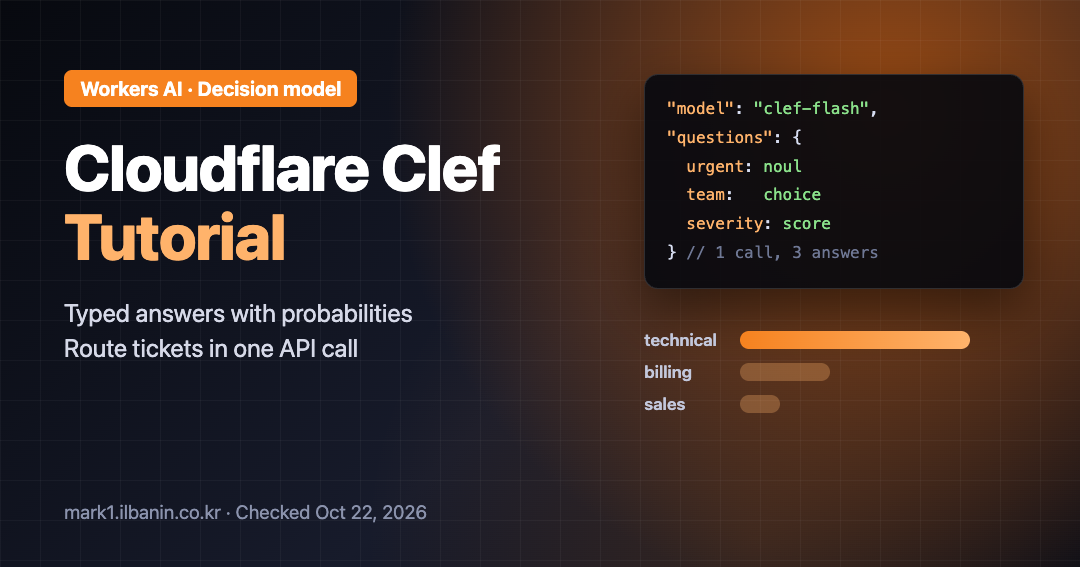
Cloudflare Clef is a decision model, not a chatbot: you send it some data plus typed questions, and it returns a probability for every allowed answer in one pass. On Workers AI you call @cf/cloudflare/clef (27B) or @cf/cloudflare/clef-flash (9B), only input tokens are billed, and the answers come back as JSON you can branch on without parsing free text.
This tutorial builds a small support-ticket router: one curl test, then a Worker that asks Clef three questions (urgent? which team? how severe?) and routes on the probabilities. Everything here is based on Cloudflare's model pages, input/output schemas, changelog and pricing page, checked on October 22, 2026. I did not run benchmarks myself; the speed and accuracy numbers below are Cloudflare's own.
What Cloudflare Clef does differently from an LLM
A chat model writes text, and you then hope it followed your format. Clef never writes text. It reads a state (a string, a JSON object or array, and up to four images) and a set of questions, then scores every option you allowed. Cloudflare launched both models on October 1, 2026, with weights on Hugging Face under Apache 2.0.
| Question type | You send | You get back | Good for |
|---|---|---|---|
noul | instructions (+ optional true/false criteria) | Probability (0–1) that the answer is yes | Spam? Urgent? Needs a human? |
choice | instructions + criteria object (2–255 options) | Top option, probability per option, confidence | Routing, intent, category |
score | instructions + criteria array (2–10 levels, lowest first) | Probability-weighted score, per-level probabilities, confidence | Severity, sentiment, priority |
One request can carry 1 to 64 questions, and they are all answered together. That is the main reason to use it: three LLM calls (or one LLM call plus fragile JSON parsing) become one typed call.
Clef vs Clef-flash at a glance
| Clef | Clef-flash | |
|---|---|---|
| Model ID | @cf/cloudflare/clef | @cf/cloudflare/clef-flash |
| Size | 27B | 9B |
| Context (model page) | 65,536 tokens | 24,576 tokens |
| Input price | $0.24 / M tokens | $0.038 / M tokens |
| Median / p95 latency (Cloudflare) | 209.3 / 238.6 ms | 38.8 / 122.4 ms |
Output tokens are not charged for either model. Note one inconsistency: the October 1 changelog says both models have a 64K context, but the Clef-flash model page lists 24,576 tokens. Plan around the smaller number for Clef-flash until Cloudflare clarifies.
Accuracy is not equal either. On Cloudflare's own CLINC150+OOS result, Clef scored 97.43 and Clef-flash 66.77. Start with Clef-flash for simple yes/no gates and switch to Clef when you have many similar options.
Step 1: Call Cloudflare Clef with curl
You need a Cloudflare account ID and an API token with Workers AI permissions. Then send a test request to the REST endpoint:
export CLOUDFLARE_ACCOUNT_ID="<YOUR_ACCOUNT_ID>"
export CLOUDFLARE_API_TOKEN="<YOUR_API_TOKEN>"

curl "https://api.cloudflare.com/client/v4/accounts/$CLOUDFLARE_ACCOUNT_ID/ai/run/@cf/cloudflare/clef" \
  -H "Authorization: Bearer $CLOUDFLARE_API_TOKEN" \
  -H "Content-Type: application/json" \
  -d '{
    "model": "clef",
    "state": "Checkout has returned 500 errors for every customer since 09:10. We are losing orders.",
    "questions": {
      "urgent": {
        "type": "noul",
        "instructions": "Does this message describe something that needs action within the hour?"
      },
      "team": {
        "type": "choice",
        "instructions": "Which team should handle this ticket?",
        "criteria": {
          "billing": "Invoices, refunds, payment methods, plan changes",
          "technical": "Errors, outages, bugs, integrations",
          "sales": "Pricing questions, demos, new contracts"
        }
      },
      "severity": {
        "type": "score",
        "instructions": "How severe is the business impact?",
        "criteria": ["No impact", "Minor", "Major", "Critical"]
      }
    }
  }'
Two details trip people up:
- The
modelfield in the body must becleforclef-flashand match the model in the URL. - Question IDs (
urgent,team,severity) can use letters, digits,_,.and-, up to 100 characters. The answers come back under the same IDs.
Read the response
The output schema has three top-level fields: model, answers and usage (input_tokens, output_tokens). Each answer has a type key plus fields that depend on the type. The shape looks like this (the numbers are placeholders, not real output):
{
  "model": "clef",
  "answers": {
    "urgent":   { "type": "noul",   "noul": 0.0 },
    "team":     { "type": "choice", "choice": "technical",
                  "probabilities": { "billing": 0.0, "technical": 0.0, "sales": 0.0 },
                  "confidence": 0.0 },
    "severity": { "type": "score",  "score": 0.0,
                  "legend": { "0": "No impact", "1": "Minor", "2": "Major", "3": "Critical" },
                  "probabilities": { "0": 0.0, "1": 0.0, "2": 0.0, "3": 0.0 },
                  "confidence": 0.0 }
  },
  "usage": { "input_tokens": 0, "output_tokens": 0 }
}
The schema confirms the key names. The exact formatting of legend and the score probabilities keys may differ slightly, so log one real response before you write parsing code. score is a weighted average where 0 is the lowest level, so a value like 2.6 means "between Major and Critical, leaning Critical".
Step 2: Build a ticket router Worker with Clef
The flow is short: the Worker receives a ticket, asks Clef three questions in one call, and picks a route from the probabilities.
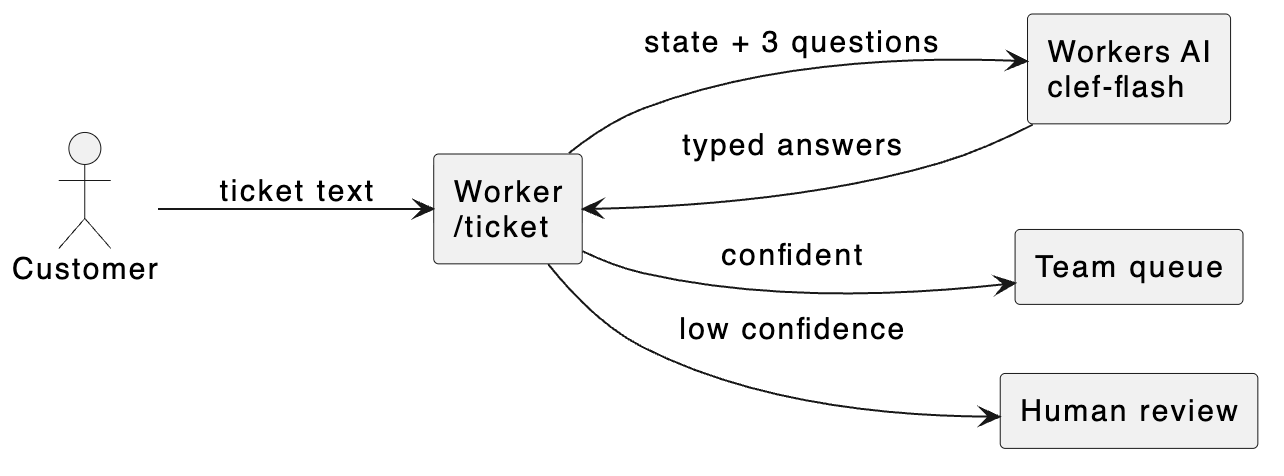
View PlantUML source
@startuml
skinparam shadowing false
skinparam defaultFontSize 15
left to right direction
actor "Customer" as C
rectangle "Worker\n/ticket" as W
rectangle "Workers AI\nclef-flash" as A
rectangle "Team queue" as Q
rectangle "Human review" as H
C --> W : ticket text
W --> A : state + 3 questions
A --> W : typed answers
W --> Q : confident
W --> H : low confidence
@enduml
Create a Worker project and add the AI binding:
npm create cloudflare@latest clef-router
cd clef-router
In wrangler.jsonc, add:
{
  "ai": { "binding": "AI" }
}
Then replace src/index.ts:
export interface Env {
  AI: Ai;
}

const URGENT_MIN = 0.8;     // tune on your own tickets
const CONFIDENCE_MIN = 0.6; // below this, ask a human

export default {
  async fetch(request: Request, env: Env): Promise<Response> {
    if (request.method !== "POST") {
      return new Response("POST a JSON body: {\"text\": \"...\"}", { status: 405 });
    }
    const { text } = await request.json<{ text: string }>();

    const result: any = await env.AI.run("@cf/cloudflare/clef-flash", {
      model: "clef-flash",
      state: text,
      questions: {
        urgent: {
          type: "noul",
          instructions: "Does this message describe something that needs action within the hour?",
        },
        team: {
          type: "choice",
          instructions: "Which team should handle this ticket?",
          criteria: {
            billing: "Invoices, refunds, payment methods, plan changes",
            technical: "Errors, outages, bugs, integrations",
            sales: "Pricing questions, demos, new contracts",
          },
        },
        severity: {
          type: "score",
          instructions: "How severe is the business impact?",
          criteria: ["No impact", "Minor", "Major", "Critical"],
        },
      },
    });

    const { urgent, team, severity } = result.answers;
    const route =
      team.confidence < CONFIDENCE_MIN ? "human-review" : team.choice;

    return Response.json({
      route,
      page_on_call: urgent.noul >= URGENT_MIN && severity.score >= 2,
      severity: severity.score,
      usage: result.usage,
    });
  },
};
If TypeScript rejects the model name because your generated types are older than Clef, run npx wrangler types again or keep the any cast shown above.
Test it locally, then deploy:
npx wrangler devIn a second terminal, send a test ticket, and deploy once the routes look right:
curl -X POST http://localhost:8787 \
  -H "Content-Type: application/json" \
  -d '{"text": "I was charged twice for the October invoice."}'

npx wrangler deploy
The AI binding calls the real Workers AI service even during wrangler dev, so local tests count toward your usage.
Pick thresholds instead of trusting the top answer
The probabilities are the point of Clef, so use them:
- Gate on
confidenceforchoicequestions. A low value means two options were close. Send those tickets to a person rather than guessing. - Use
score, not just the top level, for ordered scales. A 1.9 and a 1.1 are both "Minor" as a label, but they are not the same ticket. - Calibrate on your own data. Run 100–200 past tickets you have already labeled, look at the probability where mistakes start, and set
URGENT_MINandCONFIDENCE_MINthere. The values in the code are starting points, not recommendations from Cloudflare.
Write better questions and criteria
Clef can only pick from what you define, so the criteria are your prompt:
- Describe each option with concrete examples ("refunds, payment methods"), not just a label.
- Keep options mutually exclusive. If "technical" and "integrations" overlap, merge them or explain the boundary.
- Add an explicit catch-all such as
"other": "None of the above fits"forchoicequestions. Otherwise every ticket is forced into a real team. - Order
scorelevels from lowest to highest; index 0 is the lowest. - Pass structured data when you have it.
stateaccepts a JSON object, so you can send{ "subject": "...", "body": "...", "plan": "enterprise" }instead of one long string.
For images, add an images array (max 4, PNG/JPEG/WebP) as data URLs or { "content_type": "image/png", "base64": "<BASE64_DATA>" }. Remote image URLs are rejected. Each image is capped at 1,024 tokens and counts against the context window; if media and questions exceed it, the request fails, while long text state is truncated to fit.
How much Cloudflare Clef costs
Workers AI bills in Neurons. Every account gets 10,000 Neurons per day free, and usage above that costs $0.011 per 1,000 Neurons on the Workers Paid plan. Clef uses 21,818 Neurons per million input tokens and Clef-flash 3,455.
Example, assuming 10,000 tickets a day at 300 input tokens each (ticket text plus the three questions) = 3 million input tokens a day:
| Model | Neurons per day | After 10,000 free | Approx. cost per day |
|---|---|---|---|
| Clef | 3 × 21,818 = 65,454 | 55,454 | 55,454 × $0.011 / 1,000 ≈ $0.61 |
| Clef-flash | 3 × 3,455 = 10,365 | 365 | 365 × $0.011 / 1,000 ≈ $0.004 |
Your real token count depends on ticket length and how long your criteria descriptions are, so check usage.input_tokens on a sample before you budget. If you already compare general LLM APIs on price, the Gemini 4 Argon API migration guide shows the same per-request math for a generative model.
When to use Clef and when to keep an LLM
| Task | Better fit |
|---|---|
| Classify, route, flag, score with fixed options | Clef / Clef-flash |
| Gate an expensive LLM or agent step ("does this need the big model?") | Clef-flash |
| Write a reply, summarize, extract free-form fields | LLM |
| Options change per request and are open-ended | LLM |
A common pattern is to put Clef in front of an LLM: Clef decides the route in tens of milliseconds, and only the tickets that need a written answer reach the generative model. If you run automation outside Cloudflare, the same pattern works from n8n with an HTTP Request node calling the REST endpoint; see running Claude Code headless with n8n for the LLM half of such a pipeline.
You can also self-host. The Hugging Face model card for Clef-flash documents a Transformers path and an SGLang server that exposes a /v1/systemone endpoint, tested on a single H200. Cloudflare also announced a reinforcement learning fine-tuning service, but as of October 22, 2026 it is a design-partner program with no public pricing.
FAQ
Q: Is Cloudflare Clef free to use? Workers AI includes 10,000 Neurons per day at no cost. In the example above that covers roughly 2.9 million Clef-flash input tokens or about 460,000 Clef input tokens per day. Beyond that you need the Workers Paid plan.
Q: What does "noul" mean? It is the yes/no question type name used in Cloudflare's schema and examples. It returns one probability that the answer is yes. You can optionally describe what true and false mean in criteria.
Q: Can Clef read a web page or image URL directly? No. Images must be embedded as base64 or data URLs, and remote URLs are not accepted. Fetch the page or image in your Worker first and pass the content as state or images.
Q: How many questions can I ask in one request? Between 1 and 64. A choice question can have 2 to 255 options, and a score question 2 to 10 levels.
Q: Are my requests used for training? Cloudflare's launch post says it does not read, store or train on Clef requests and responses, but that guarantee does not apply if you use the fine-tuning service.
References
- Cloudflare Workers AI, clef model page — developers.cloudflare.com (checked Oct 22, 2026)
- Cloudflare Workers AI, clef-flash model page — developers.cloudflare.com (checked Oct 22, 2026)
- Clef input schema — developers.cloudflare.com (checked Oct 22, 2026)
- Clef output schema — developers.cloudflare.com (checked Oct 22, 2026)
- Cloudflare changelog, Introducing Clef on Workers AI (Oct 1, 2026) — developers.cloudflare.com (checked Oct 22, 2026)
- Workers AI pricing — developers.cloudflare.com (checked Oct 22, 2026)
- Workers AI bindings — developers.cloudflare.com (checked Oct 22, 2026)
- Cloudflare blog, Introducing Clef — blog.cloudflare.com (checked Oct 22, 2026)
- Hugging Face, Cloudflare/clef-flash model card — huggingface.co (checked Oct 22, 2026)