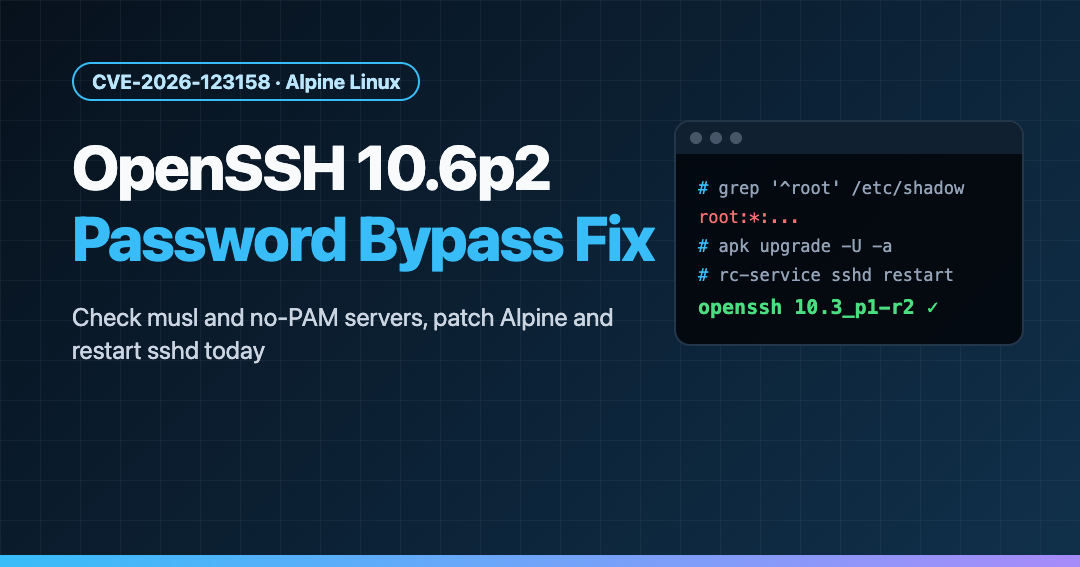
OpenSSH 10.6p2, released November 5, 2026, adds a workaround for CVE-2026-123158, a password authentication bypass in sshd on Linux systems built with musl libc and without PAM. Alpine Linux is the main example. If you run sshd on Alpine with password logins enabled, run apk upgrade -U -a, restart sshd, and check your logs today. Debian, Ubuntu, Fedora and other glibc or PAM-based systems are not affected.
Written November 6, 2026. Facts checked on November 6, 2026 against the OpenSSH 10.6p2 release notes, the OpenSSH fix commit, the Alpine Linux security advisory, the CVE record and the Alpine package index. The commands below are standard Alpine, OpenRC and OpenSSH commands. They were not run on a test machine for this post, so read the output on your own system.
What changed in OpenSSH 10.6p2
OpenSSH 10.6p2 is a portable release on top of 10.6p1 (October 6, 2026). The release notes call the main change a security workaround for "some Linux systems built and run with PAM support disabled". The OpenSSH team says the root cause is outside sshd, but sshd was the way to reach it, so the fix lives there.
| Field | Value |
|---|---|
| CVE | CVE-2026-123158 |
| Affected | OpenSSH before 10.6p2 on Linux, musl libc, no PAM |
| Fixed in | OpenSSH 10.6p2 (commit 4353fdc) and Alpine stable packages |
| CVSS 3.1 | 8.1 High (AV:N/AC:H/PR:N/UI:N) |
| Exploitation status | Public proof of concept; no attack reports found as of Nov 6 |
How the CVE-2026-123158 bypass works
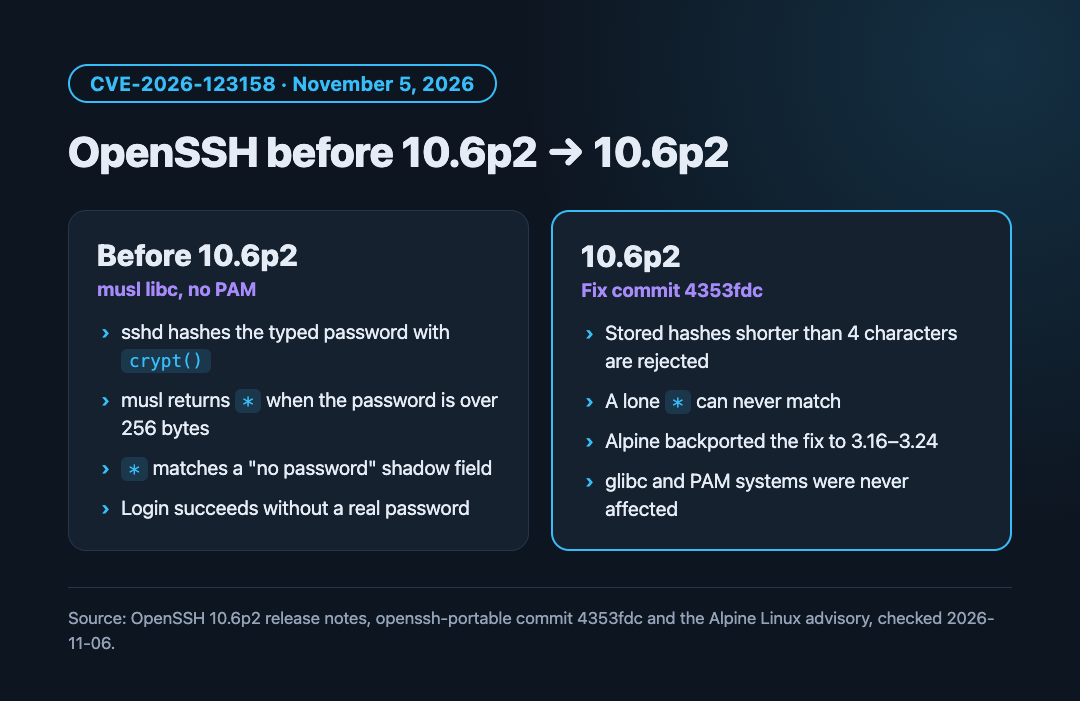
Without PAM, sshd hashes the password you type with crypt() and compares the result with the field in /etc/shadow. musl's crypt() returns the string * when hashing fails, and it fails when the password is longer than 256 bytes. Many accounts store * in the shadow file to mean "no password set". So a very long password can produce *, the comparison matches, and sshd lets the user in.
One more detail makes it worse. Since 2016, sshd runs a hash even for accounts with no real hash, to stop username enumeration (CVE-2016-6210). It borrows the salt settings from another account. Alpine's advisory says one local user with a $5$ or $6$ hash makes every * account reachable.
The fix is small. In auth-passwd.c, sshd now refuses any stored hash shorter than four characters (MIN_PASSWORD_HASH_LEN), so a lone * can never match. The same commit fixes memory handling in xcrypt.c. 10.6p2 also allows the ssh-mldsa44-ed25519 hybrid signature for CAs and fixes a short CPU spin with ChannelTimeout.
Are you affected? Five conditions
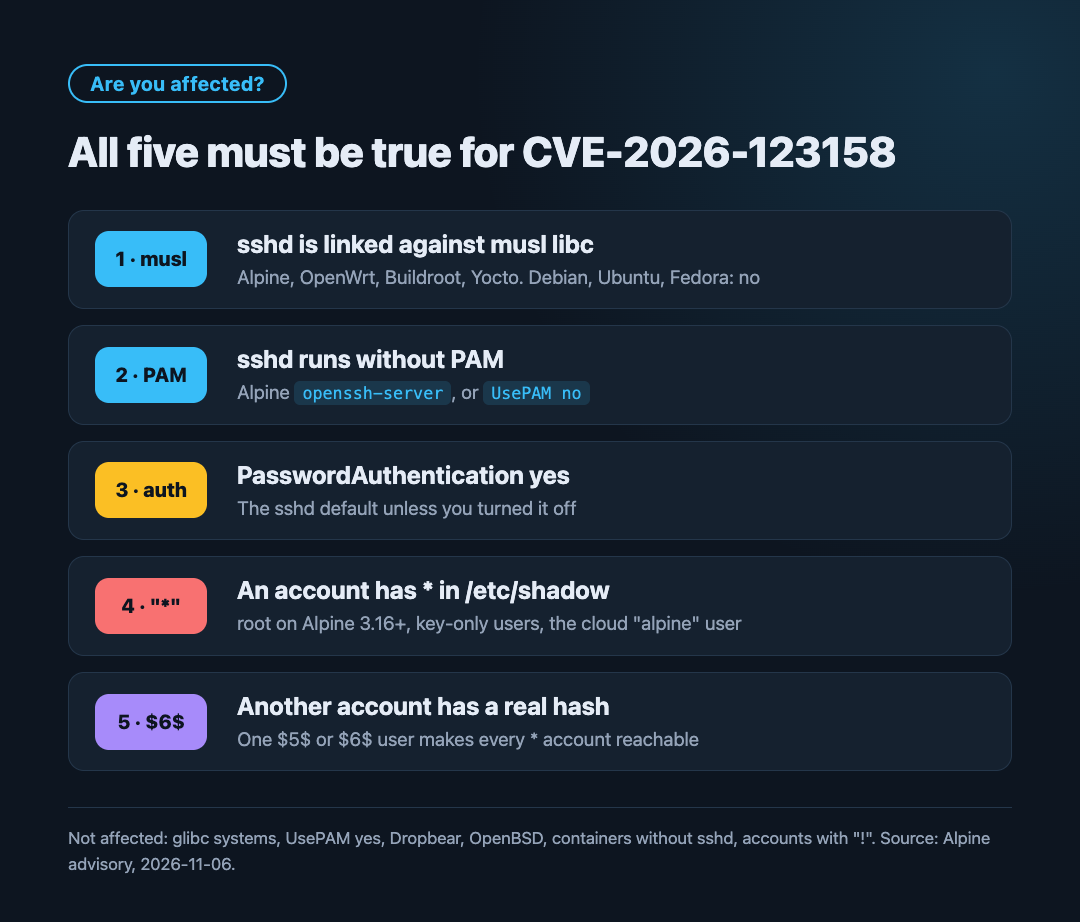
All five must be true. If any one is false, this CVE does not reach you.
| # | Condition | How to check |
|---|---|---|
| 1 | sshd is linked against musl | Alpine, OpenWrt, Buildroot or Yocto builds |
| 2 | No PAM | Alpine openssh-server, or UsePAM no |
| 3 | PasswordAuthentication yes | Default in sshd |
| 4 | An account has * in /etc/shadow | root on Alpine 3.16+, key-only users, alpine cloud user |
| 5 | Another account has a $5$ or $6$ hash | Any user with a real password |
Not affected, according to the Alpine advisory and the researcher's write-up: glibc systems (Debian, Ubuntu, Fedora), openssh-server-pam with UsePAM yes, Dropbear, OpenBSD, containers that do not run sshd, and accounts that use ! instead of *.
Watch the cloud images. Alpine's tiny-cloud images (qcow2, VHD and AMI) from 3.18.11 through 3.24.3 ship an alpine user with * and passwordless doas. They are safe on first boot, but once any $6$ hash exists on the machine, that account becomes reachable, and doas turns it into root. Cloud-init images write PasswordAuthentication no, so they are not affected unless someone changed that.
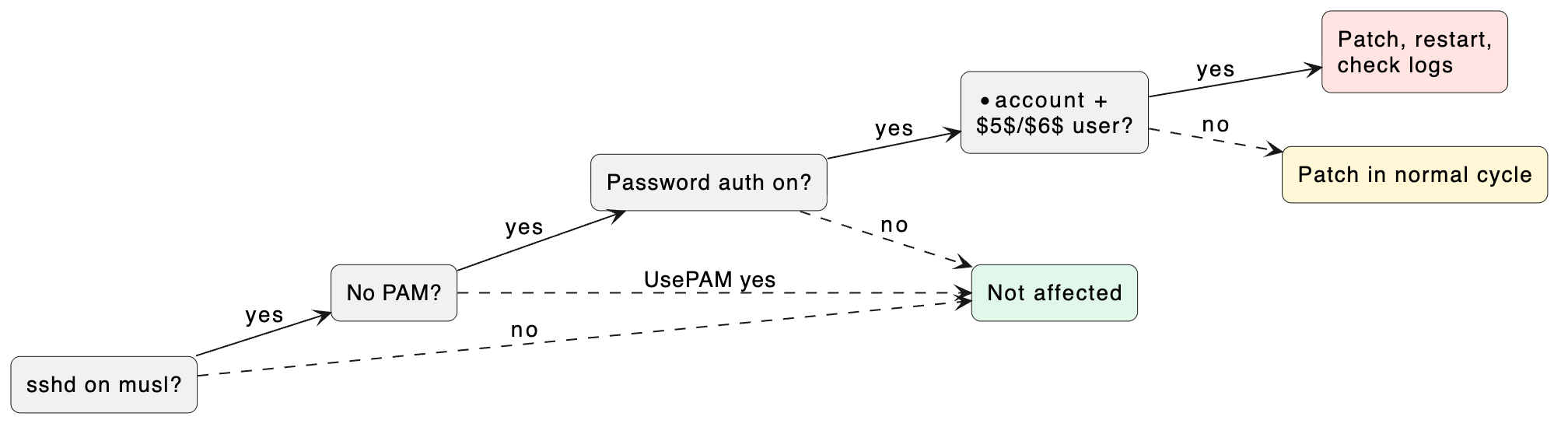
View PlantUML source
@startuml
left to right direction
skinparam shadowing false
skinparam defaultFontSize 14
skinparam rectangleRoundCorner 12
rectangle "sshd on musl?" as A
rectangle "No PAM?" as B
rectangle "Password auth on?" as C
rectangle "* account +\n$5$/$6$ user?" as D
rectangle "Patch, restart,\ncheck logs" as P #FFE4E1
rectangle "Not affected" as N #E0F7E9
rectangle "Patch in normal cycle" as L #FFF7D6
A --> B : yes
B --> C : yes
C --> D : yes
D --> P : yes
A ..> N : no
B ..> N : UsePAM yes
C ..> N : no
D ..> L : no
@enduml
Check your environment
Run these as root on each Alpine host or image that has sshd installed.
Find the OpenSSH package and build
cat /etc/alpine-release
apk list -I 'openssh*'
ldd /usr/sbin/sshd | grep -i musl
If you see openssh-server (not openssh-server-pam), sshd has no PAM. Do not trust ssh -V alone. Alpine stable branches patched older OpenSSH versions, so 10.2_p1-r1 on 3.23 is fixed even though it says 10.2.
Check the effective sshd settings
sshd -T | grep -Ei '^(passwordauthentication|usepam)'sshd -T prints the settings sshd will actually use, after Include files and defaults. If passwordauthentication yes appears, condition 3 is true.
List star accounts and real password hashes
The first command lists accounts with * (no password set), the possible targets. The second lists accounts with a SHA-256 or SHA-512 hash, the "helper" condition.
awk -F: '$2=="*" {print $1}' /etc/shadow
awk -F: '$2 ~ /^\$[56]\$/ {print $1}' /etc/shadow
If the first command prints anything and the second prints at least one name, conditions 4 and 5 are both true.
Update OpenSSH on Alpine Linux
Alpine published fixed packages on November 5, 2026 for every branch from 3.16 to edge, including branches that are already out of support.
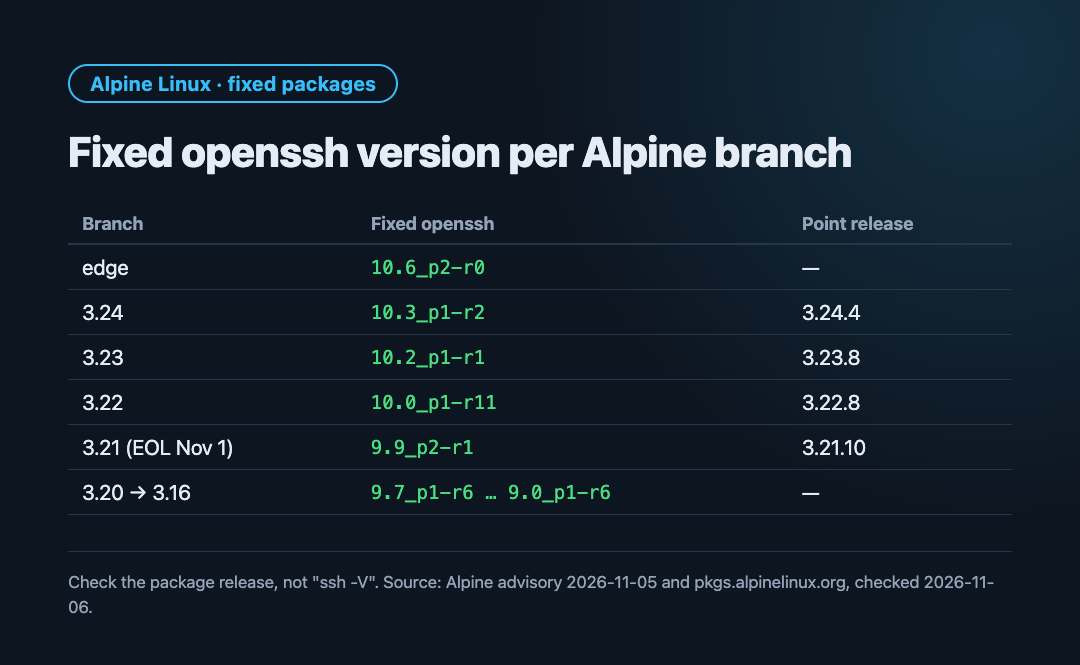
| Alpine branch | Fixed openssh | Point release with fix |
|---|---|---|
| edge | 10.6_p2-r0 | — |
| 3.24 | 10.3_p1-r2 | 3.24.4 |
| 3.23 | 10.2_p1-r1 | 3.23.8 |
| 3.22 | 10.0_p1-r11 | 3.22.8 |
| 3.21 | 9.9_p2-r1 | 3.21.10 |
| 3.20 | 9.7_p1-r6 | — |
| 3.19 | 9.6_p1-r3 | — |
| 3.18 | 9.3_p2-r4 | — |
| 3.17 | 9.1_p1-r7 | — |
| 3.16 | 9.0_p1-r6 | — |
Alpine 3.21 reached end of support on November 1, 2026. It got this fix anyway, but plan the move to 3.23 or 3.24.
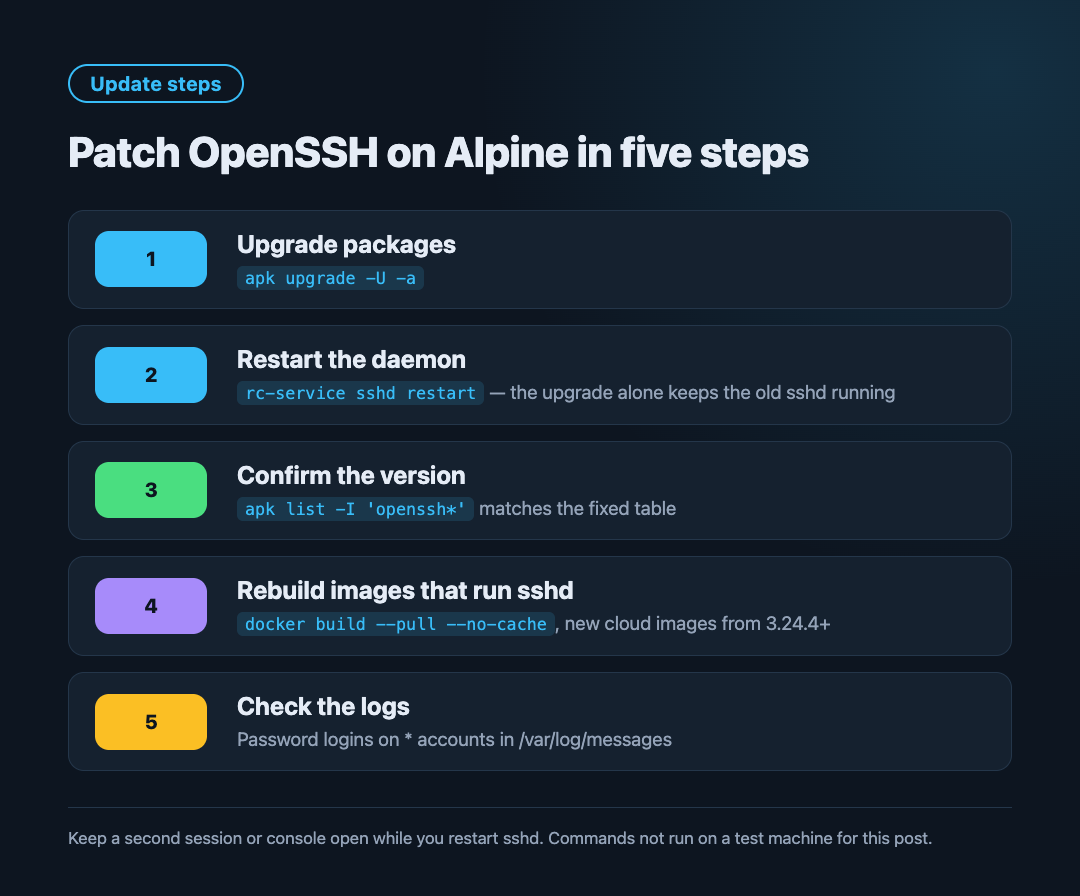
Upgrade and restart sshd
apk upgrade -U -a
rc-service sshd restart
apk list -I 'openssh*'
The restart matters. Alpine's advisory says the package upgrade does not replace the running daemon. Your existing SSH session stays open during an OpenRC restart, but keep a second session or a console ready in case the config fails to load.
Rebuild Docker images that run sshd
Most Alpine containers do not run sshd and are not affected. Images that do (jump hosts, SFTP or Git-over-SSH containers) need a rebuild from a fresh base:
FROM alpine:<YOUR_ALPINE_VERSION>
RUN apk add --no-cache --upgrade openssh-server
docker build --pull --no-cache -t <YOUR_IMAGE>:<TAG> .To find running containers that contain sshd:
for c in $(docker ps -q); do
  docker exec "$c" sh -c 'command -v sshd >/dev/null 2>&1 && echo "$(hostname): has sshd"'
done
OpenWrt, Buildroot and Yocto
These build systems pick their own OpenSSH version and options. OpenWrt uses Dropbear by default, which is not affected. If you added an OpenSSH server package, or you build firmware with Buildroot or Yocto, rebuild with OpenSSH 10.6p2 (or the upstream commit) and check your vendor's notice. We did not find official fixed versions for those projects on November 6.
Can't patch yet? Turn off password logins
Disabling password authentication blocks this CVE completely. First confirm that key login works, and keep your current session open.
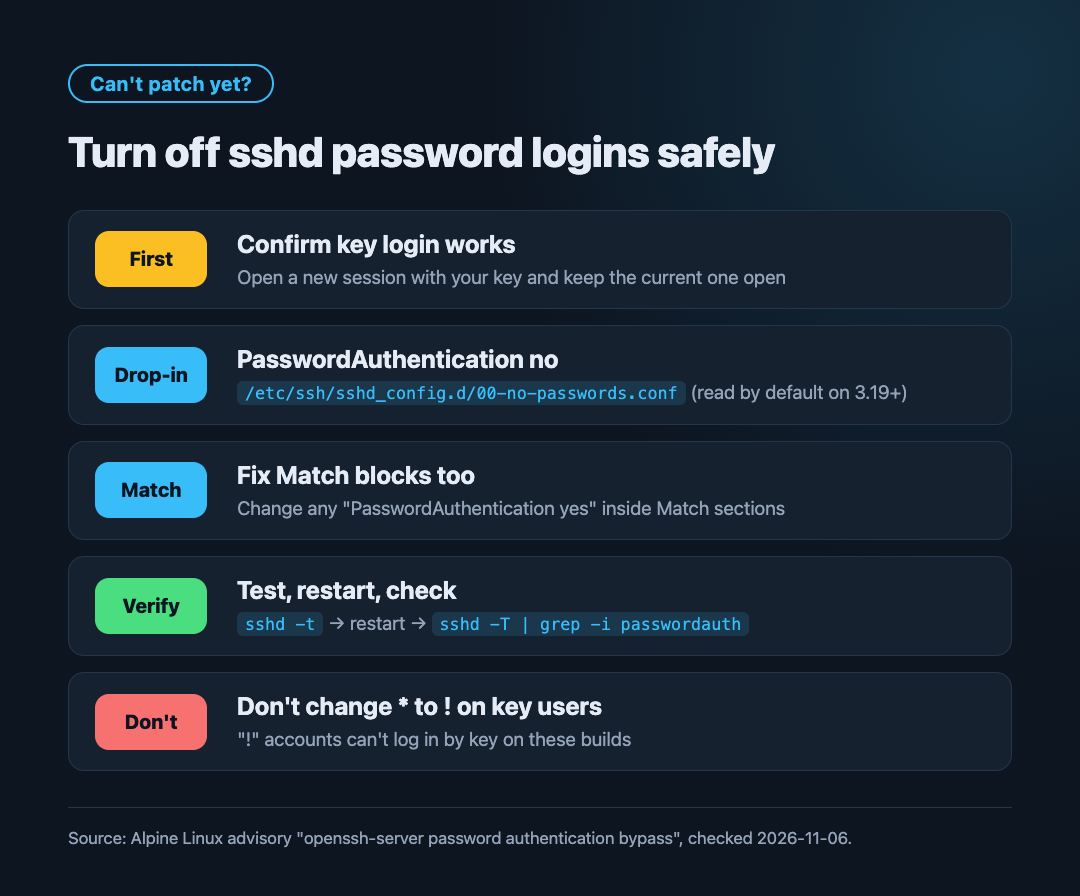
- Make sure
sshd_configincludes the drop-in directory. Alpine 3.19 and later do this by default. - Add the drop-in file.
- Test the config, restart sshd and check the effective setting.
grep -i '^Include' /etc/ssh/sshd_config
echo "PasswordAuthentication no" > /etc/ssh/sshd_config.d/00-no-passwords.conf
sshd -t && rc-service sshd restart
sshd -T | grep -i passwordauthentication
Alpine's advisory also tells you to change any PasswordAuthentication yes lines inside Match blocks in /etc/ssh/sshd_config. Back up the file first. To undo, delete the drop-in and restore the backup.
Do not swap * for ! on key-only accounts as a shortcut. Alpine's advisory notes that ! accounts cannot log in by password or by key on these builds, so you would lock yourself out.
For a wider look at sshd options before your next upgrade, see our OpenSSH 10.6 upgrade checklist.
Check for signs of a bypass login
A successful password login for an account that has no password is the clear sign. On Alpine with the default syslog, sshd logs to /var/log/messages:
grep 'sshd.*Accepted password for' /var/log/messagesCompare the user names with your list of * accounts. Any match for root, alpine or a key-only user means someone got in without a real password.
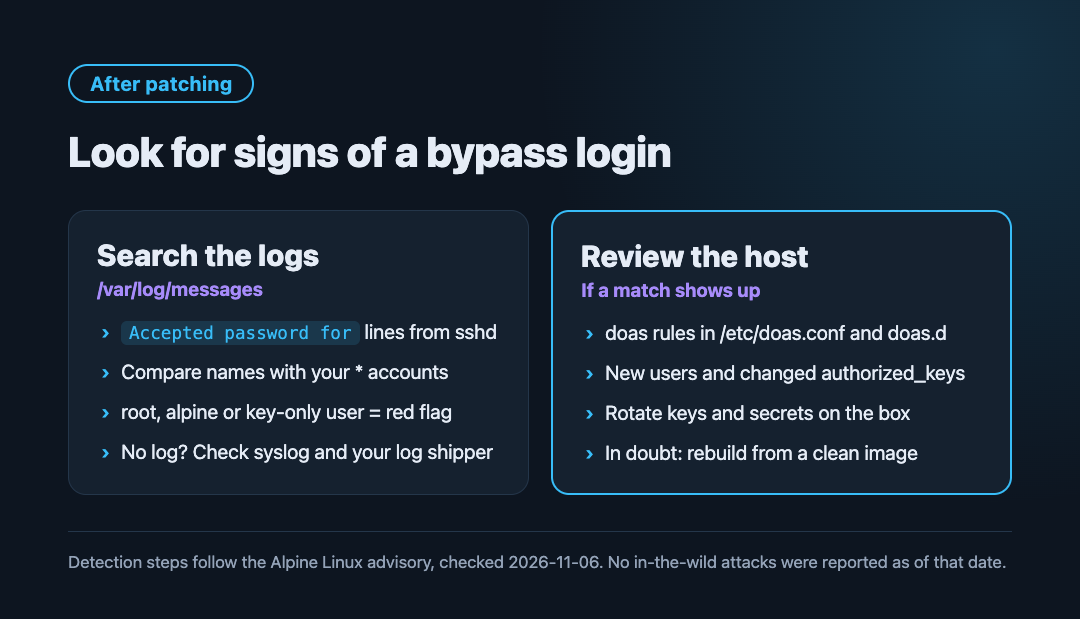
Then review what an intruder would touch:
cat /etc/doas.conf /etc/doas.d/*.conf 2>/dev/null
ls -la /root/.ssh /home/*/.ssh 2>/dev/null
awk -F: '$3 >= 1000 {print $1, $3, $6}' /etc/passwd
If you cannot rule out a bypass login, treat the host as compromised: rebuild it from a clean image, rotate keys and secrets that lived on it, and review what it could reach. Our cPGuard compromise clean-up guide walks through a similar root-level clean-up.
If something goes wrong
| Problem | Likely cause | Fix |
|---|---|---|
apk still shows the old version | Index not refreshed, or a pinned repository | apk upgrade -U -a, then check /etc/apk/repositories |
| Package fixed but logs still worry you | sshd not restarted | rc-service sshd restart |
sshd -t fails after adding the drop-in | Typo, or a conflicting line | Read the error line, fix it, test again |
| Key login stopped working | Account changed to !, or key missing | Restore * in the shadow field from your console |
/var/log/messages is empty | Syslog not running or logs sent elsewhere | rc-service syslog status, check your log shipper |
FAQ
Is CVE-2026-123158 being exploited in the wild? We found no report of attacks as of November 6, 2026. CISA's enrichment of the CVE record lists a public proof of concept, and reproduction labs are on GitHub, so expect scanning soon.
Is Ubuntu or Debian affected? No. Those systems use glibc and PAM. On those systems a failed crypt() call does not return a bare *, and PAM does not compare against a * field.
My Alpine server shows OpenSSH 10.3. Do I need 10.6p2? No. Alpine patched each stable branch. On 3.24, openssh 10.3_p1-r2 or later is fixed. Check the package release, not the upstream version.
I only use SSH keys. Am I safe? Only if password authentication is actually off. Key-only users usually have * in the shadow file, which makes them the target. Run sshd -T | grep -i passwordauthentication to be sure.
Do I need to update Alpine containers that don't run sshd? Not for this CVE. Update them in your normal image rebuilds.
Summary
Patch Alpine hosts and images that run sshd today: apk upgrade -U -a, then rc-service sshd restart. If you can't patch, set PasswordAuthentication no. Then search /var/log/messages for password logins on * accounts. glibc and PAM-based servers need no action for this CVE.
References
- OpenSSH 10.6p2 release notes — OpenSSH project, checked 2026-11-06
- Fix commit 4353fdc: avoid password authn bypass — openssh-portable on GitHub, checked 2026-11-06
- openssh-server password authentication bypass advisory — Alpine Linux, checked 2026-11-06
- CVE-2026-123158 — CVE record (MITRE, CISA ADP), checked 2026-11-06
- openssh package index — Alpine Linux packages, checked 2026-11-06
- sshd_config manual — OpenBSD manual pages, checked 2026-11-06
- *sshole research write-up — Özgün Kültekin, checked 2026-11-06
- OpenSSH flaw lets attackers log into password-disabled Linux accounts — BleepingComputer, checked 2026-11-06