Synology CVE-2026-120382 is a critical (CVSS 9.8) flaw in the DSM OAuth API that lets a remote attacker read or write files on your NAS without logging in. The fix shipped on November 20, 2026: install DSM 7.4.1-90080 Update 2 or DSM 7.3.2-86009 Update 6. On DSM 7.2.x, 7.1 or BeeStation OS, there is no same-branch fix yet, so stop the OAuth Service package today and plan your next step.
This guide is current as of November 23, 2026 (13:30 KST). It is based on Synology security advisories Synology-SA-26:21 and SA-26:20 (both checked on November 23, 2026), the DSM release notes, and security press coverage. I did not install these builds on a test NAS. Menu paths below follow DSM 7.x in English and may differ slightly by model or language.
What CVE-2026-120382 changes for Synology owners
Synology published two advisories on November 19, 2026, and fixed both in the same DSM builds one day later. You need one update, not two.
| Item | SA-26:21 | SA-26:20 (NGINX2Root) |
|---|---|---|
| CVE | CVE-2026-120382 | CVE-2026-123007 |
| Component | DSM OAuth API | Built-in NGINX, HTTP/2 |
| Score | 9.8, no login needed | 8.1, attack complexity high |
| Workaround | Deactivate OAuth Service | Disable HTTP/2 |
The OAuth bug is an argument injection (CWE-88): a request parameter can be read as an extra command-line argument. The vector is AV:N/AC:L/PR:N/UI:N, which means network access is enough. Synology lists the impact as arbitrary file read, arbitrary file write and denial of service. It does not claim remote code execution. As of November 23, I found no public exploit code and no exploitation report, and the CVE is not in the CISA KEV catalog.
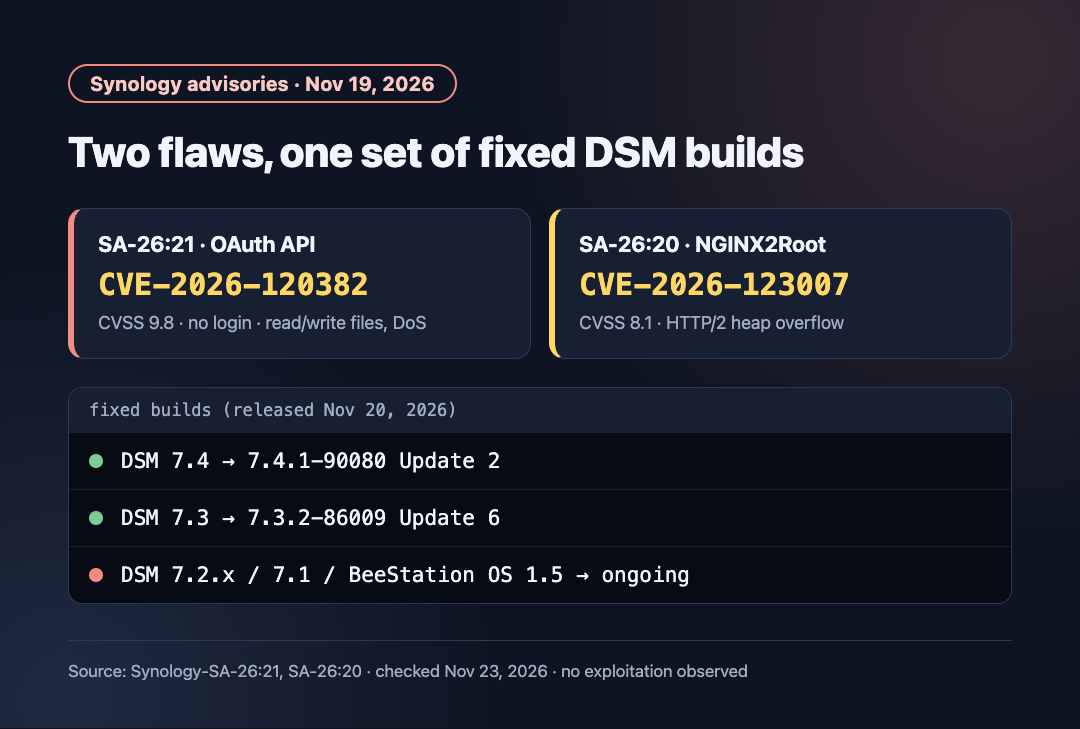
The second advisory is the DSM copy of the NGINX HTTP/2 heap overflow that the nginx project fixed on November 18. It also touches products the OAuth bug does not, such as DSM Enterprise 1.0 and APM.
Is my Synology NAS affected? Three checks
You need three facts: your DSM build, whether OAuth Service is installed and running, and whether DSM is reachable from the internet.
Check 1: DSM build in the web UI
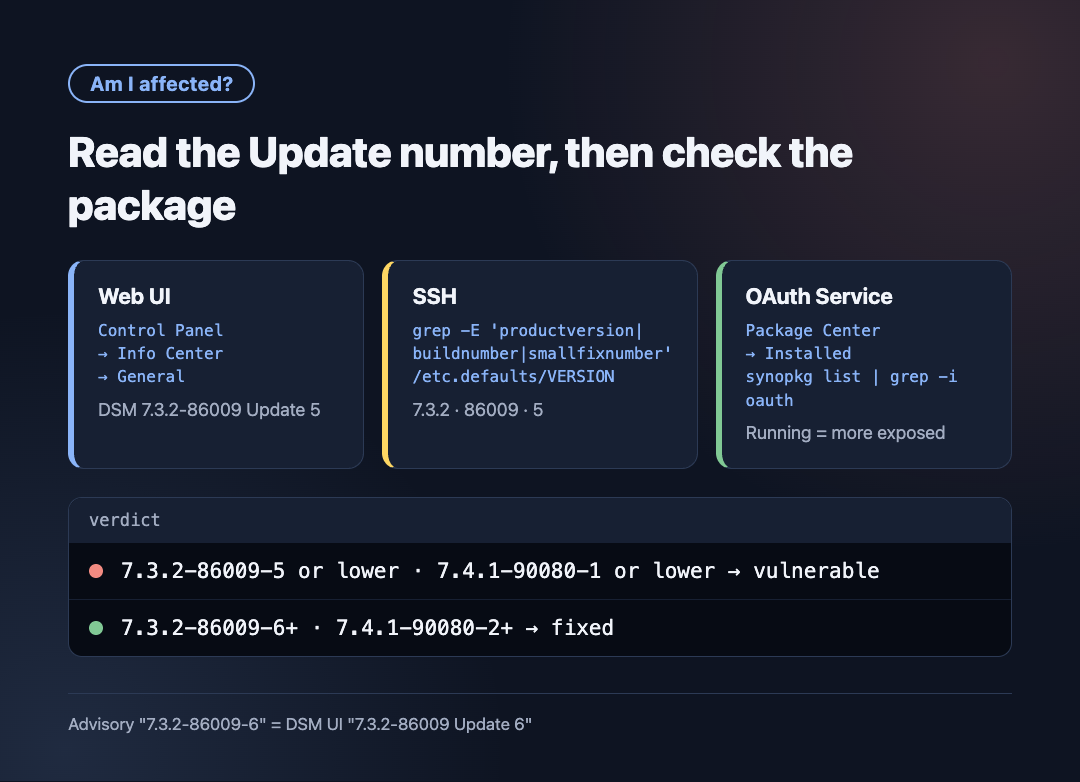
Open Control Panel > Info Center > General. The DSM version line reads like DSM 7.3.2-86009 Update 5. You can also see it in Control Panel > Update & Restore > DSM Update.
Advisories write the same build as 7.3.2-86009-5. The number after "Update" is the last number in the advisory.
Check 2: DSM build over SSH
If SSH is enabled (Control Panel > Terminal & SNMP), this reads the same values from the system version file. Synology does not document this file in the advisory, so use it alongside the UI check.
ssh <ADMIN_USER>@<NAS_IP> -p <SSH_PORT>

grep -E 'productversion|buildnumber|smallfixnumber' /etc.defaults/VERSION
#Example output on a vulnerable NAS:
#productversion="7.3.2"
#buildnumber="86009"
#smallfixnumber="5"
Join the three values: 7.3.2-86009-5. Compare that with the fixed build for your branch:
| Your build | Vulnerable? |
|---|---|
| 7.4.1-90080, Update 1 or lower | Yes |
| 7.4.1-90080 Update 2 or later | No |
| 7.3.2-86009, Update 5 or lower | Yes |
| 7.3.2-86009 Update 6 or later | No |
| Any 7.2.x or 7.1 build | Yes, no download yet |
Check 3: Is OAuth Service installed and running?
In Package Center > Installed, look for OAuth Service. Over SSH:
sudo synopkg list | grep -i oauth
#Use the exact package name from the output:
sudo synopkg status <PACKAGE_NAME>
The advisory does not say whether a NAS without OAuth Service running is safe. Treat a missing package as "less exposed", not "not affected", and still update.
Finally, check exposure. If you forward ports 5000/5001 (or custom DSM ports) on your router, DSM is on the internet. QuickConnect also makes DSM reachable from outside. Both raise the urgency.
How to patch Synology DSM for CVE-2026-120382
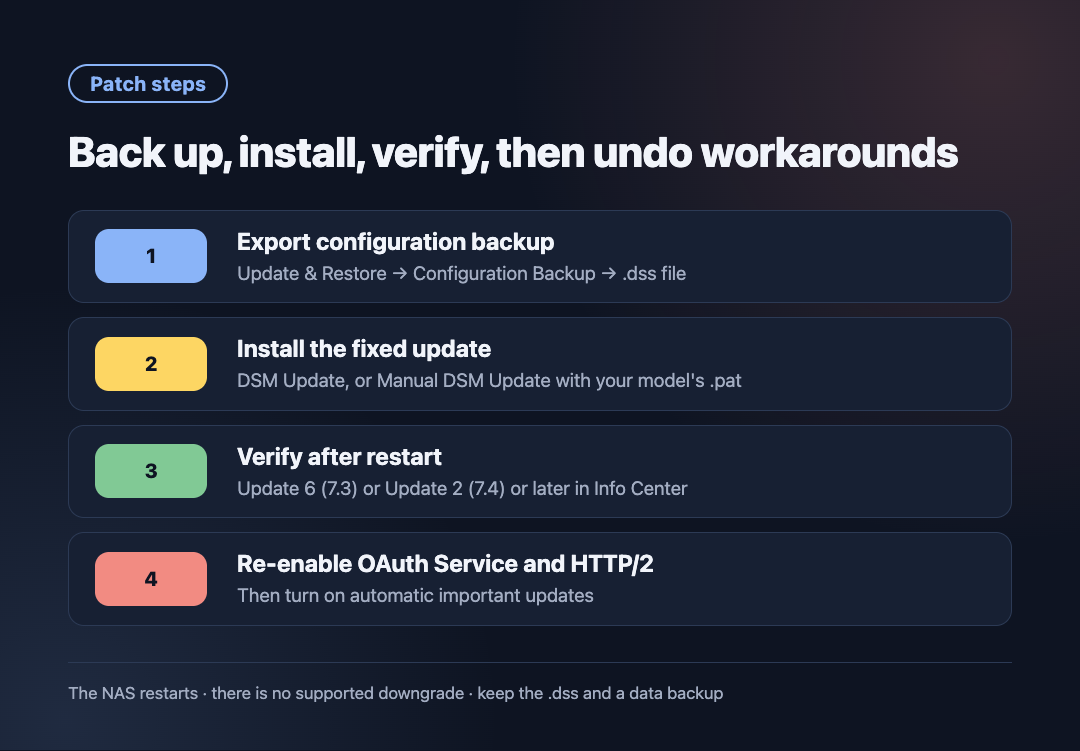
The update restarts the NAS. Shares, backups, Docker (Container Manager) and VMs stop for a few minutes. Plan a short window.
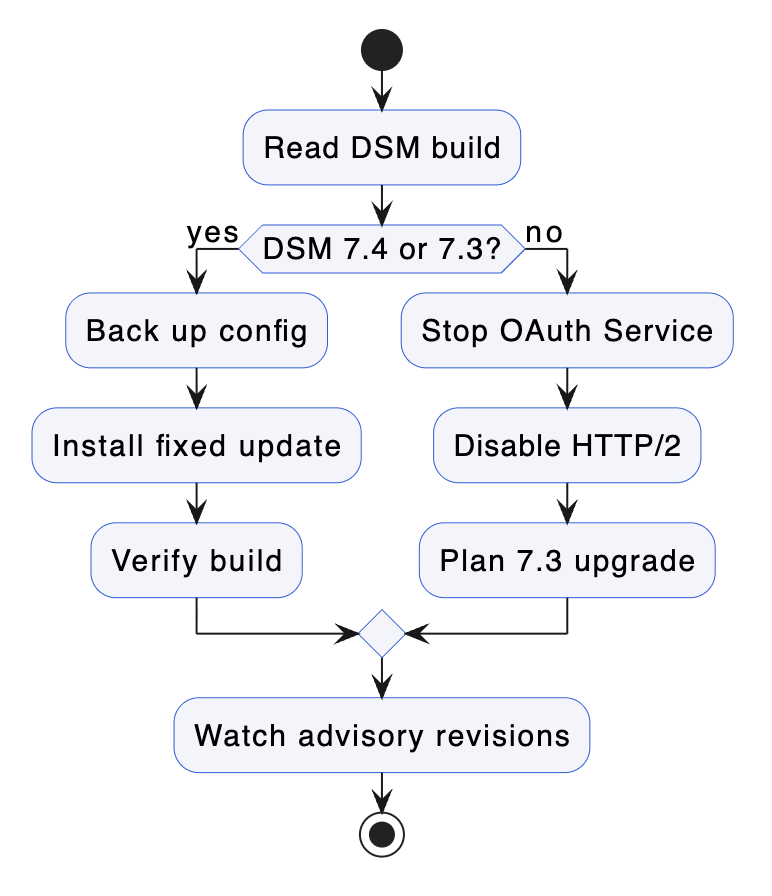
View PlantUML source
@startuml
skinparam defaultFontSize 15
skinparam ActivityBackgroundColor #F3F5FA
skinparam ActivityBorderColor #2D5BD3
start
:Read DSM build;
if (DSM 7.4 or 7.3?) then (yes)
  :Back up config;
  :Install fixed update;
  :Verify build;
else (no)
  :Stop OAuth Service;
  :Disable HTTP/2;
  :Plan 7.3 upgrade;
endif
:Watch advisory revisions;
stop
@enduml
Step 1: Back up the configuration
Go to Control Panel > Update & Restore > Configuration Backup and export the .dss file. It holds users, shares and settings, not data. Confirm your last Hyper Backup or snapshot job finished.
Step 2: Install from DSM Update
In Control Panel > Update & Restore > DSM Update, install 7.4.1-90080 Update 2 or 7.3.2-86009 Update 6 if it appears.
Step 3: Manual install if the update does not show
Synology rolls updates out in stages, so the button may not appear yet. Download the .pat file for your exact model:
https://archive.synology.com/download/Os/DSM/7.4.1-90080-2
https://archive.synology.com/download/Os/DSM/7.3.2-86009-6
Then go to DSM Update > Manual DSM Update and upload it. Check that the model name in the file matches Info Center before you upload.
Step 4: Verify after the restart
grep -E 'productversion|buildnumber|smallfixnumber' /etc.defaults/VERSION
#7.3 branch: buildnumber="86009", smallfixnumber="6" or higher
#7.4 branch: productversion="7.4.1", buildnumber="90080", smallfixnumber="2" or higher
In the UI, Info Center should show Update 6 (7.3) or Update 2 (7.4) or later. After that, you can start OAuth Service again and turn HTTP/2 back on.
Step 5: Turn on automatic security updates
In DSM Update > Update Settings, choose the option to install important updates automatically. Staged rollouts still apply, so keep checking the build for a few days after an advisory.
DSM 7.2.x: upgrade to 7.3 or wait?
For DSM 7.2.2 and 7.2.1, the advisory table says "Ongoing" and recommends upgrading to 7.3.2-86009-6 or later. The CVE text names 7.2.2-72806-11 and 7.2.1-69057-14 as fixed builds, but as of November 23 I could not confirm that they are downloadable. Trust the DSM Update screen, not the CVE text.
A major upgrade is one-way. Before you move to 7.3, check in Package Center that the packages you rely on support 7.3, and read the 7.3 release notes for removed features. If you cannot decide this week, apply both workarounds below first.
Can't update yet? Stop OAuth Service and disable HTTP/2
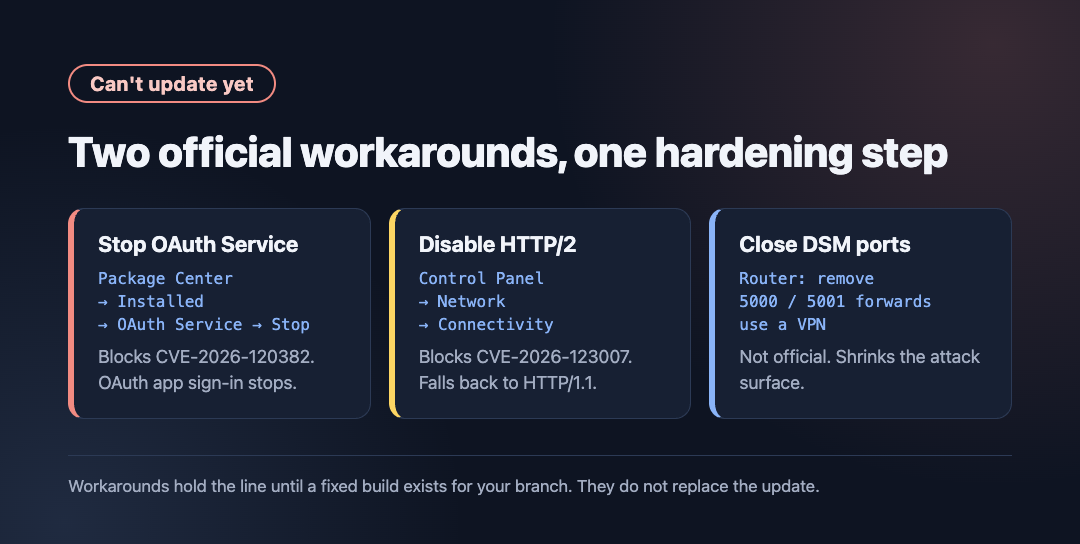
Synology gives one official workaround per advisory. They do not replace each other.
| Workaround | Where | Blocks | Side effect |
|---|---|---|---|
| Deactivate OAuth Service | Package Center > Installed > OAuth Service > Stop | CVE-2026-120382 | Apps that sign in with DSM accounts via OAuth stop working |
| Disable HTTP/2 | Control Panel > Network > Connectivity | CVE-2026-123007 | Web access falls back to HTTP/1.1, slightly slower |
| Close DSM ports (not official) | Router port forwarding, use VPN | Reduces attack surface | Remote access needs VPN |
Over SSH:
sudo synopkg stop <PACKAGE_NAME>
sudo synopkg status <PACKAGE_NAME>
The third row is general hardening from security coverage, not a Synology instruction. If you expose DSM directly, a VPN (WireGuard or OpenVPN through your router, or Synology VPN Server) is the safer long-term setup. Home network devices fail the same way; see the GL.iNet GoodCloud hack checklist for what a cloud management flaw looks like after the fact.
Troubleshooting after the DSM update
| Symptom | Likely cause | Fix |
|---|---|---|
| New build not listed in DSM Update | Staged rollout | Install the model's .pat manually |
.pat file rejected | Wrong model, or a lower build | Match the file to Info Center's model |
| A package will not start | Package needs an update | Package Center > Installed > Update |
| OAuth sign-in fails in an app | OAuth Service still stopped | Verify the build, then start the package |
Rollback: DSM has no supported downgrade. Synology's release notes for these builds say you cannot downgrade to an earlier DSM version after installing. Your safety net is the .dss configuration backup and a data backup, not a rollback. If something breaks, update packages first, then restore settings from .dss, then contact Synology support.
If you run other self-hosted services on Linux next to the NAS, the same "verify the build after patching" habit applies; the Debian 13.8 upgrade guide shows it for apt-based servers.
Decision table: update now, this week, or not affected
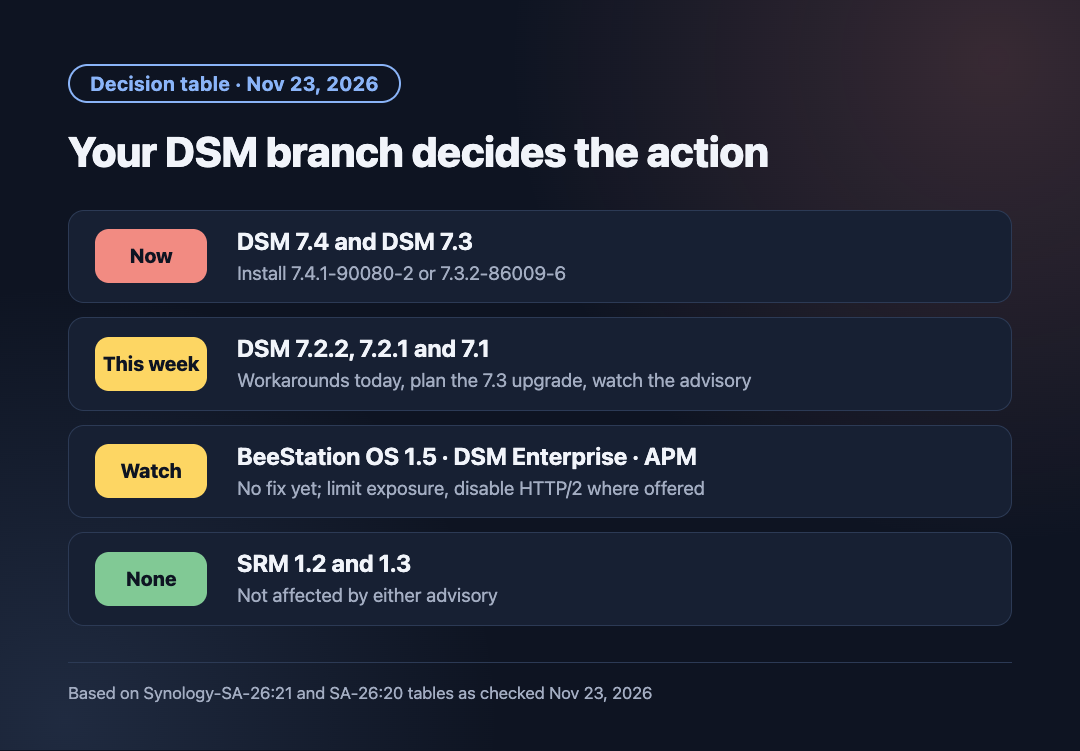
| Product and branch | Status (Nov 23, 2026) | Action |
|---|---|---|
| DSM 7.4 | Fixed in 7.4.1-90080-2 | Update now |
| DSM 7.3 | Fixed in 7.3.2-86009-6 | Update now |
| DSM 7.2.2 / 7.2.1 | Ongoing, 7.3 upgrade advised | Workarounds today, decide this week |
| DSM 7.1 | Ongoing | Workarounds today, watch advisory |
| BeeStation OS 1.5 | Ongoing | Watch advisory, limit exposure |
| DSM Enterprise 1.0, APM | Not affected by OAuth bug; NGINX bug ongoing | Disable HTTP/2 |
| SRM 1.2 / 1.3 | Not affected by either | No action |
FAQ
Is CVE-2026-120382 being exploited? Synology says no exploitation has been observed, and the CVE is not in CISA KEV as of November 23, 2026. Unauthenticated 9.8 bugs on internet-facing NAS devices tend to get scanned soon after disclosure, so do not wait.
I only use QuickConnect. Am I safe? No. QuickConnect still makes DSM reachable from outside, and the advisory makes no exception for it. Install the fixed build.
I installed 7.3.2-86009 Update 5 last month. Do I need another update? Yes. Update 5 does not include these fixes. You need Update 6 or later.
Does the BeeStation need anything? BeeStation OS 1.5 is affected and has no fixed release yet. Keep it updated automatically and avoid exposing it beyond your Synology account sharing until a fix appears.
Will updating delete my data? No, a DSM update keeps volumes and shares. It does restart the NAS, and there is no downgrade, so take a configuration backup first.
References
- Synology-SA-26:21 DSM, BeeStation OS (CVE-2026-120382) — Synology, checked November 23, 2026
- Synology-SA-26:20 NGINX2Root (CVE-2026-123007) — Synology, checked November 23, 2026
- DSM release notes — Synology, checked November 23, 2026
- Synology archive: DSM 7.4.1-90080-2 — Synology, checked November 23, 2026
- CISA Known Exploited Vulnerabilities Catalog — CISA, checked November 23, 2026
- Synology urges users to patch critical bugs in its NAS software now — Yahoo Tech, checked November 23, 2026
Next, if you also run nginx outside the NAS, check your own reverse proxy against CVE-2026-123007 the same way: read the version, patch, then verify.