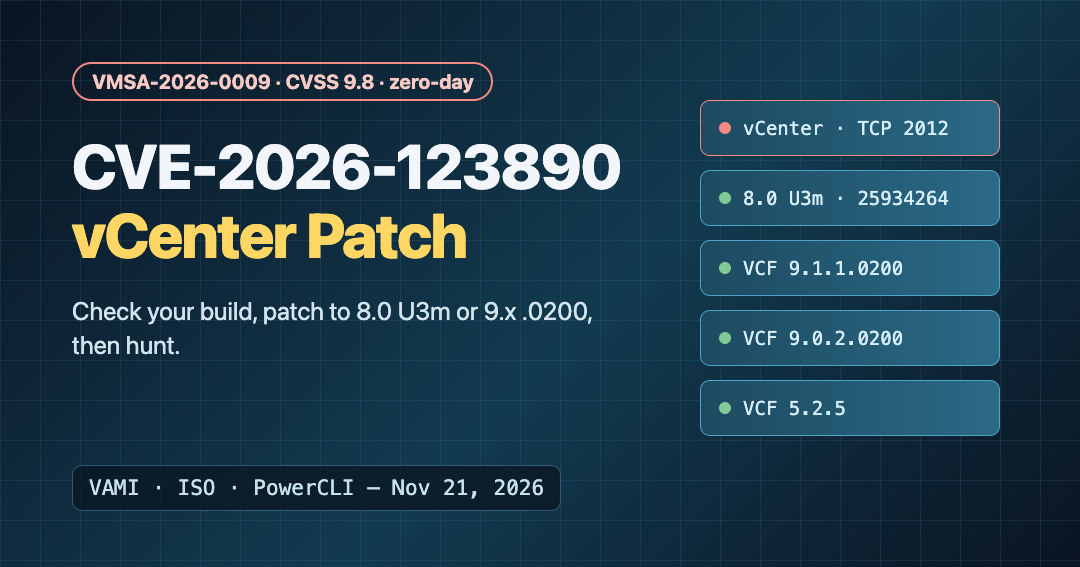
CVE-2026-123890 is a critical (CVSS 9.8) authentication bypass in VMware vCenter's Directory Service. Mandiant says a China-nexus espionage group has exploited it since early September 2026. Broadcom fixed it on November 19 in VMSA-2026-0009: move vCenter 8.0 to 8.0 U3m (build 25934264), and VCF or vSphere Foundation 9.x to 9.1.1.0200 or 9.0.2.0200. There is no official workaround. Until you patch, lock ports 443, 2012, 22 and 5480 down to admin IPs, and check for signs of compromise even after you update.
Written November 21, 2026. The Broadcom advisory (VMSA-2026-0009.1), the Broadcom FAQ on GitHub, the vCenter 8.0 U3m release notes and Mandiant's report were checked on November 21, 2026 (KST). I haven't run these patches on a lab vCenter. The commands come from Broadcom documentation and standard appliance tools.
What VMSA-2026-0009 fixes
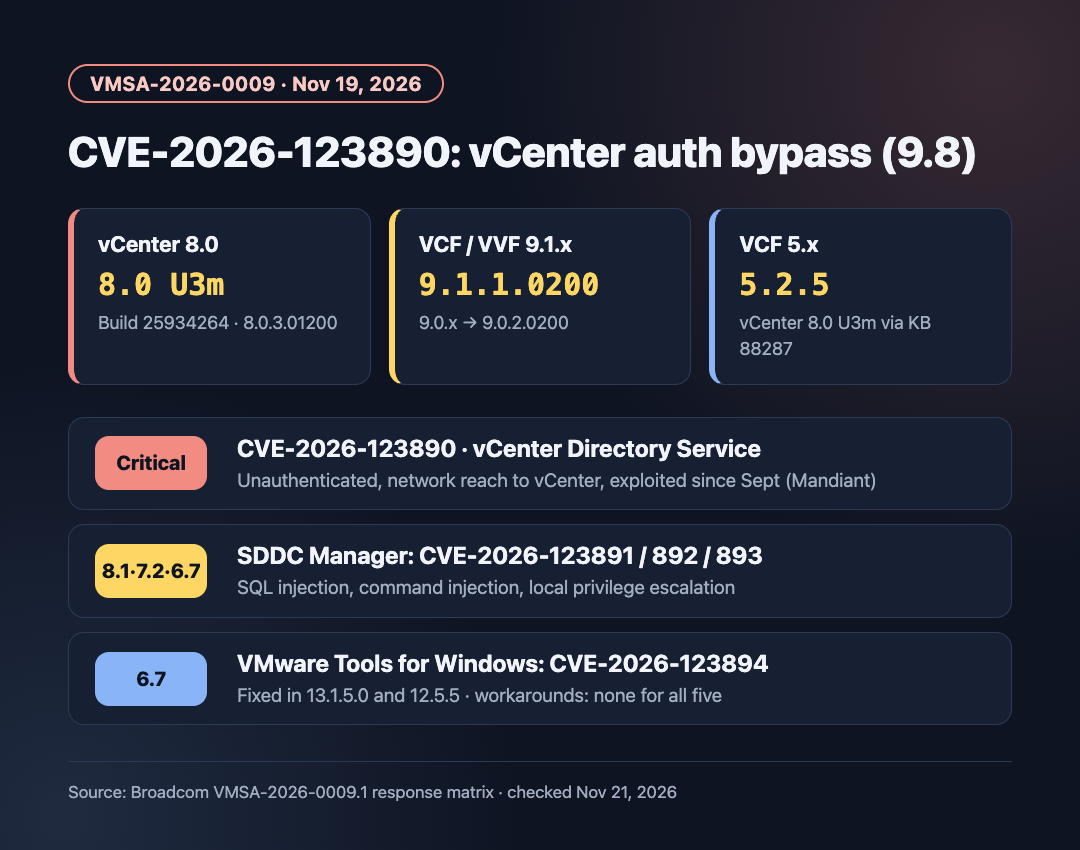
Broadcom published VMSA-2026-0009 on November 19, 2026, and updated it to VMSA-2026-0009.1 on November 20 to clarify the affected VMware Tools versions. It covers five CVEs. Only the first one is remote and unauthenticated, so it is the one that drives the urgency.
| CVE | Product | CVSS v3.1 | What it is |
|---|---|---|---|
| CVE-2026-123890 | vCenter (VMware Directory Service) | 9.8 Critical | Network auth bypass, no credentials needed |
| CVE-2026-123891 | SDDC Manager | 8.1 Important | SQL injection (authenticated) |
| CVE-2026-123892 | SDDC Manager | 7.2 Important | Command injection (high privileges) |
| CVE-2026-123893 | SDDC Manager / VCF Installer | 6.7 Moderate | Local privilege escalation |
| CVE-2026-123894 | VMware Tools for Windows | 6.7 Moderate | SAML token signature bypass inside a VM |
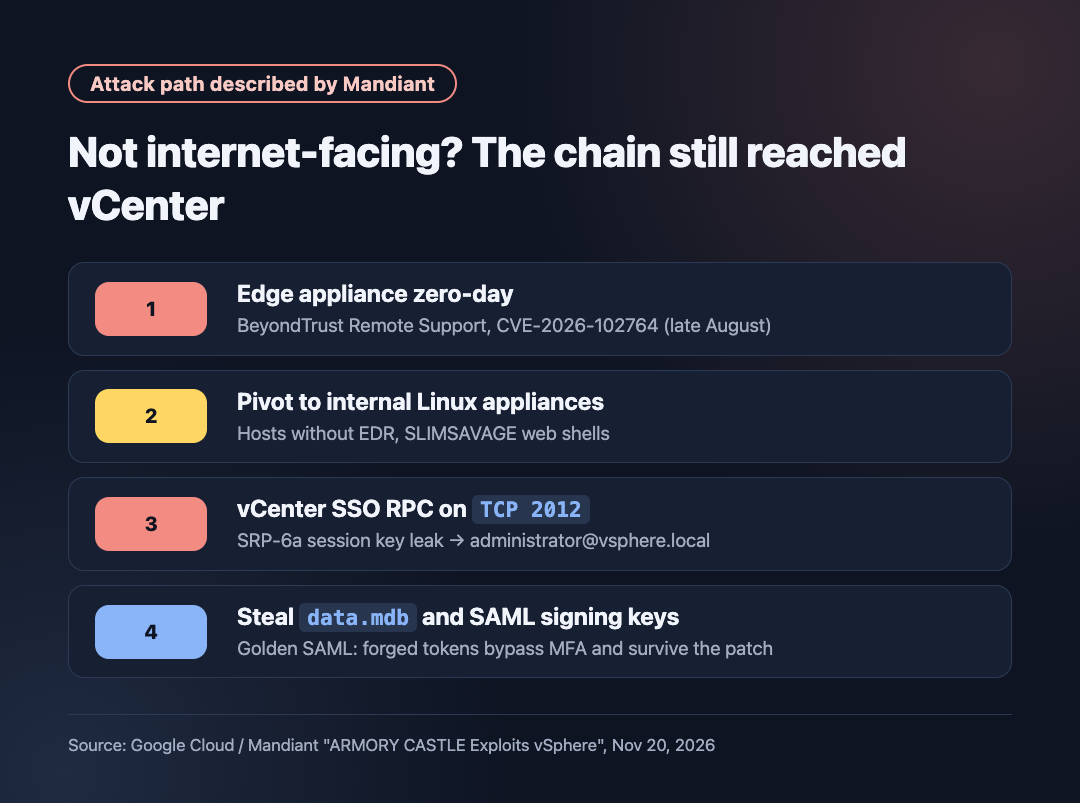
Broadcom's own words: the flaw lets "an attacker with network access to vCenter" bypass authentication and get unauthorized access. Mandiant's report gives the mechanics. The tool sends an unauthenticated request over DCE/RPC on TCP 2012, leaks an SRP-6a session key, and ends up with a session as administrator@vsphere.local. From there, the attackers copied the directory database (data.mdb), pulled SAML signing keys and forged tokens. That is a Golden SAML attack, and it bypasses MFA.
Three facts from the advisory and the Broadcom FAQ change most patch plans:
- Enhanced Linked Mode doesn't matter. The flaw is in vCenter itself, so standalone vCenters are affected too.
- ESX, NSX, VCF Operations and Automation, Workstation and Fusion are not affected. The vCenter patch doesn't touch running VMs.
- vCenter 7.0 is affected too. It reached End of General Support on October 2, 2025. Customers with an extended support contract need to request the fix from Broadcom. Everyone else needs an upgrade path or strong network isolation.
Is your vCenter exposed to CVE-2026-123890?
Exploitation needs network reach to vCenter, specifically the SSO RPC port 2012. In the campaign Mandiant described, the attackers didn't come in from the internet. They first broke into a BeyondTrust Remote Support appliance through a separate zero-day (CVE-2026-102764), then pivoted to Linux appliances without EDR, and only then went after vCenter. So "vCenter is not on the internet" lowers your risk. It doesn't remove it.
| Your vCenter | Fixed version | Action |
|---|---|---|
| vCenter 8.0 (standalone) | 8.0 U3m, build 25934264 | Patch now |
| VCF / VVF 9.1.x | 9.1.1.0200 | Patch now |
| VCF / VVF 9.0.x | 9.0.2.0200 | Patch now (see the 9.1.1 upgrade note below) |
| VCF 5.x | 5.2.5 (vCenter 8.0 U3m via async patch, KB 88287) | Patch now |
| Telco Cloud Platform / Infrastructure | See KB463116 | Patch now |
| vCenter 7.0 or older | No public fix | Extended support request or upgrade; isolate today |
If you also run other self-hosted virtualization management, the same pattern applies. My guide to the Xen Orchestra auth bypass covers the equivalent checks for XCP-ng shops.
Check your vCenter version and build
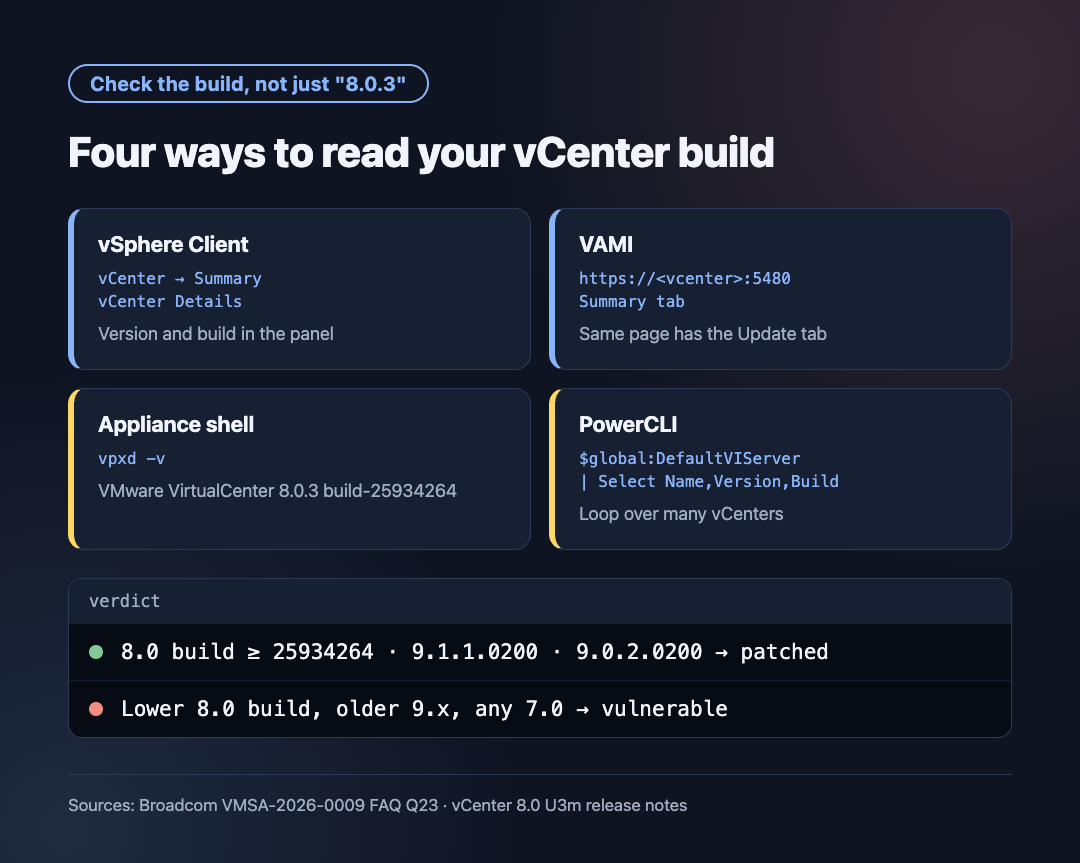
You need the version and the build number. "8.0.3" alone isn't enough, because 8.0 U3m is the fixed 8.0.3 build, and all earlier 8.0.3 patch builds are vulnerable.
vSphere Client and VAMI
- vSphere Client: select the vCenter in the inventory, open Summary. Version and build are in the "vCenter Details" panel.
- VAMI: open
https://<VCENTER_FQDN>:5480, sign in as root, and read Summary. The same page has the Update tab you'll use to patch.
Appliance shell (SSH)
## On the vCenter appliance, from the bash shell
vpxd -v
Example output:
VMware VirtualCenter 8.0.3 build-25934264Not vulnerable means build 25934264 or later on 8.0. Any lower 8.0 build is vulnerable, and so is every 7.0 build.
PowerCLI (many vCenters at once)
The Broadcom FAQ recommends this check:
Connect-VIServer -Server <VCENTER_FQDN>
$global:DefaultVIServer | Select-Object Name, Version, Build
REST API
## Create a session, then read the appliance version
TOKEN=$(curl -sk -X POST -u 'administrator@vsphere.local:<YOUR_PASSWORD>' \
  https://<VCENTER_FQDN>/api/session | tr -d '"')
curl -sk -H "vmware-api-session-id: $TOKEN" \
  https://<VCENTER_FQDN>/api/appliance/system/version
Look at the version and build fields in the JSON. This works well in scripts that loop over a list of vCenters.
How to patch the vCenter zero-day to 8.0 U3m
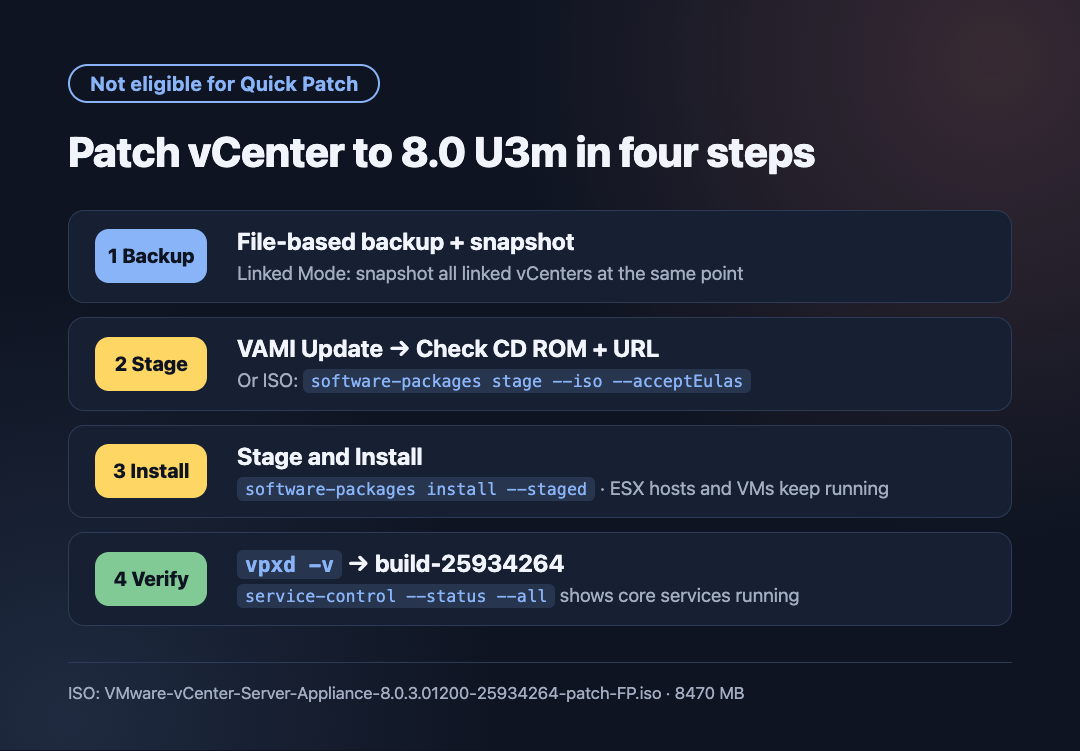
The 8.0 U3m patch is cumulative and includes the VMSA-2026-0008 fixes. Broadcom notes it is not eligible for vCenter Quick Patch, so use a normal VAMI or CLI update. Plan a short maintenance window: vCenter services restart, but ESX hosts and VMs keep running.
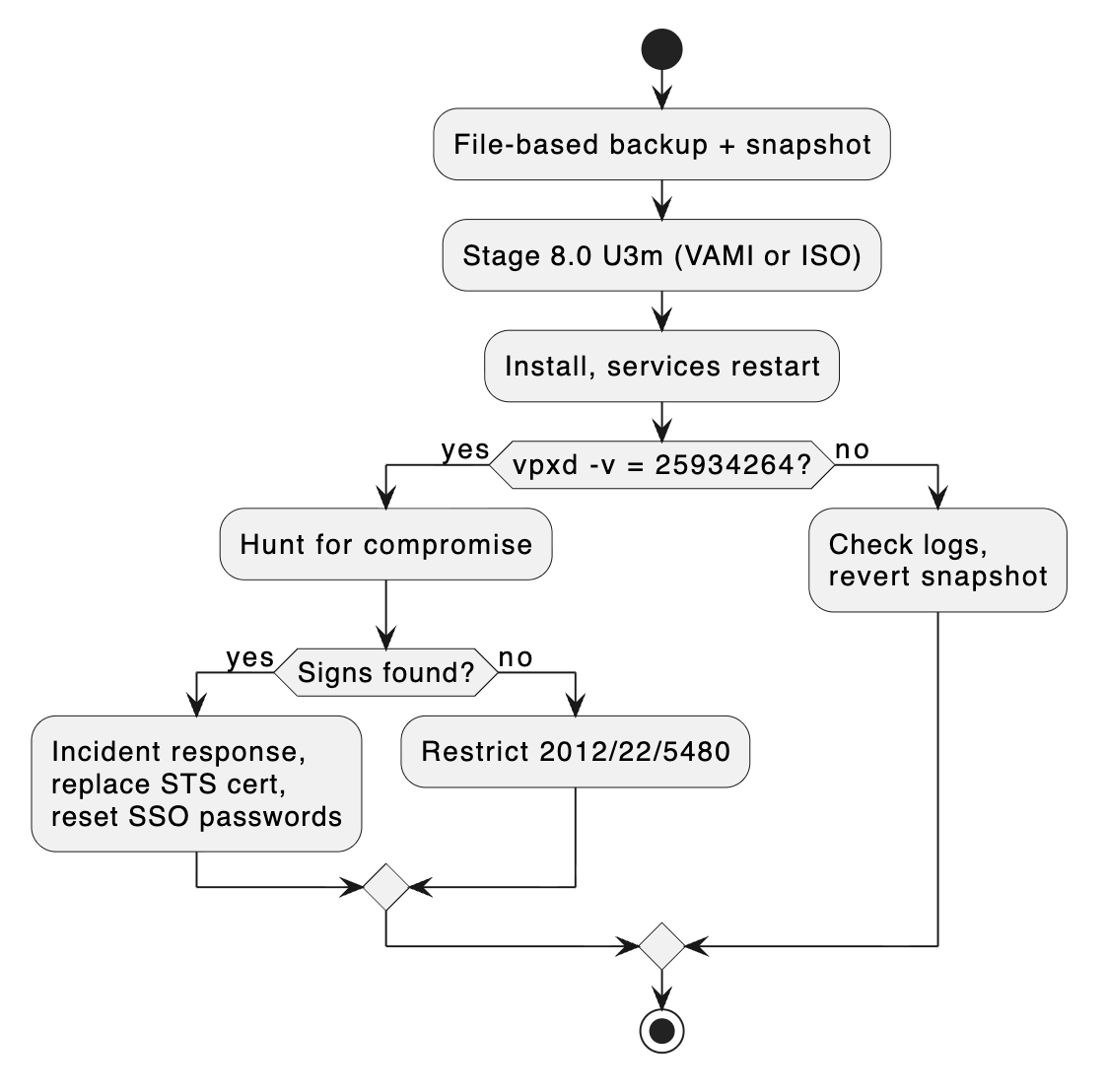
View PlantUML source
@startuml
skinparam shadowing false
skinparam defaultFontSize 14
start
:File-based backup + snapshot;
:Stage 8.0 U3m (VAMI or ISO);
:Install, services restart;
if (vpxd -v = 25934264?) then (yes)
  :Hunt for compromise;
  if (Signs found?) then (yes)
    :Incident response,
    replace STS cert,
    reset SSO passwords;
  else (no)
    :Restrict 2012/22/5480;
  endif
else (no)
  :Check logs,
  revert snapshot;
endif
stop
@enduml
Step 1: Back up first
- Run a file-based backup in VAMI (Backup tab), and confirm the job finishes.
- Take a VM snapshot of the vCenter appliance. With Enhanced Linked Mode, snapshot every linked vCenter at the same point in time. Broadcom's guidance for linked vCenters is to take these snapshots powered off.
- Make sure you know the root and
administrator@vsphere.localpasswords. An expired root password blocks VAMI patching.
Step 2a: Patch from VAMI (online repository)
- Open
https://<VCENTER_FQDN>:5480→ Update. - Click Check Updates → Check CD ROM + URL.
- Select 8.0.3.01200 (build 25934264), run Run Pre-Update Checks, then Stage and Install.
- Wait until VAMI reports success, then sign in to the vSphere Client again.
Step 2b: Patch from the ISO (no internet on vCenter)
Download VMware-vCenter-Server-Appliance-8.0.3.01200-25934264-patch-FP.iso from the Broadcom support portal. Verify the SHA-256 from the release notes, then attach the ISO to the vCenter VM's CD-ROM and run:
## Appliance shell (type "shell" at the Command> prompt first)
software-packages stage --iso --acceptEulas
software-packages list --staged
software-packages install --staged
The release notes list this SHA-256 for the ISO: 0666cff51ee265616022f1bb99f8b9c495caf626dfe2602cf7ddb8a33e7c8c0c.
Step 2c: VCF and vSphere Foundation 9.x
Patch vCenter to 9.1.1.0200 (9.1.x) or 9.0.2.0200 (9.0.x) with your normal VCF lifecycle tooling, or with the vCenter patch files on the Broadcom portal. SDDC Manager has its own fixes: 9.1.1.0200 for 9.1.x, 9.0.2.0100 for 9.0.x and 5.2.5 for 5.x.
Upgrade note (Broadcom FAQ, Q39): vCenter 8.0 U3m and 9.0.2.0200 currently block upgrades to VCF 9.1.1. If you planned to move to 9.1.1 soon, you can upgrade vCenter to 9.1.1 first and then apply 9.1.1.0200. Otherwise, Broadcom suggests waiting briefly for VCF 9.1.2 to restore the path. Don't delay the security patch because of this. A blocked feature upgrade is easier to live with than an open vCenter.
Step 2d: VCF 5.x
VCF 5.x gets vCenter 8.0 U3m (VCENTER: 8.0.3.01200-25934264) through the async patch process in KB 88287. On VCF 5.2 and 5.2.1, KB 88287 says to use the in-product Flexible BOM instead of the Async Patch Tool.
Step 3: Verify
vpxd -v                       # expect build-25934264 on 8.0
service-control --status --all
All core services (vpxd, vmdird, vmware-stsd and so on) should show as running. Then repeat the PowerCLI or REST check from your admin workstation so the inventory record is correct.
Can't patch today? Restrict the vCenter ports
Broadcom lists no workaround for any of the five CVEs. The FAQ also notes that stopping or removing VMware Tools is not a workaround for CVE-2026-123894. The only interim measure is network restriction, and Mandiant recommends a default-deny policy that allows only trusted admin IPs to reach:
| Port | Service | Who needs it |
|---|---|---|
| 443 | vSphere Client, API | Admin workstations, backup and monitoring servers |
| 2012 | SSO / Directory RPC (the exploit path) | Other vCenters in the same SSO domain only |
| 22 | Appliance SSH | Admin jump host only, or off entirely |
| 5480 | VAMI | Admin jump host only |
Practical options, from least to most effort:
- Turn off appliance SSH in VAMI (Access → SSH Login: Disabled) when you're not using it. Side effect: CLI patching and support log collection need it back on temporarily.
- Upstream firewall ACLs on the management VLAN. Allow 2012 only between linked vCenters, and block it from user and server networks.
- Mandiant's VCSA Hardening & Logging Tool (
github.com/mandiant/vcsa-hardening-tool), which applies iptables rules on the appliance and logs dropped traffic. Mandiant itself asks for "rigorous testing and formal change control" before production use. A wrong allowlist can lock out backups, monitoring or a linked vCenter.
These steps reduce exposure. They don't fix the bug, and they do nothing about an attacker who already holds forged SAML tokens.
Check for compromise after you patch
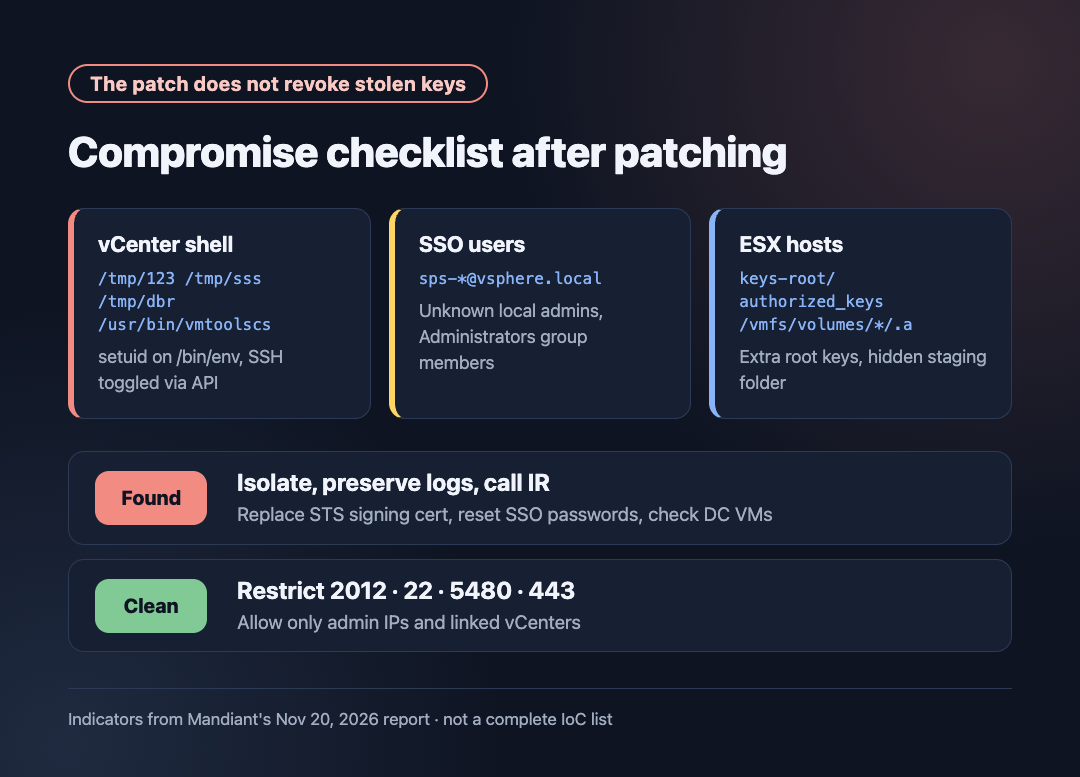
The patch closes the hole. It does not revoke anything an attacker already stole. If the vCenter signing keys left the building, the attacker can keep forging SAML tokens after you update. Run these checks on every vCenter that was reachable from a wider network since September.
On the vCenter appliance
## Files and binaries named in Mandiant's report
ls -la /tmp/123 /tmp/sss /tmp/dbr /tmp/rar /usr/bin/vmtoolscs 2>/dev/null

## Unexpected setuid on env (privilege escalation trace)
ls -l /bin/env /usr/bin/env

## Persistence: unknown systemd units
systemctl list-unit-files --type=service | grep -i -E 'vmtoolscs|tools'

## Was SSH switched on through the API? (VAMI / appliance management logs)
grep -ri "access/ssh" /var/log/vmware/applmgmt/ 2>/dev/null | tail -20
Any hit on those paths is a reason to start incident response, not to delete the file and move on.
In the vSphere Client
- Administration → Single Sign On → Users and Groups → vsphere.local. Look for local admin accounts you don't recognize. Mandiant saw an account named
sps-<random>@vsphere.local. - Groups → Administrators. Review every member.
- Check the vCenter events for SSH enabled and then disabled again shortly afterwards. The attackers turned SSH back off after they stole credentials.
On ESX hosts
## Extra root SSH keys
cat /etc/ssh/keys-root/authorized_keys

## Hidden staging folder used in the campaign
find /vmfs/volumes/ -maxdepth 2 -name ".a" 2>/dev/null
If you find signs of compromise
Treat it as an identity breach, not just a server breach. Mandiant's report and the incident coverage point to the same core steps:
- Isolate the appliance network.
- Preserve the logs and a snapshot for forensics.
- Replace the STS signing certificate (vSphere Client → Administration → Certificates → Certificate Management).
- Reset
administrator@vsphere.localand all SSO and local passwords. - Check whether domain controllers that run as VMs were copied, because NTDS files were exfiltrated in this campaign.
- Patch any BeyondTrust Remote Support appliance.
Bring in Broadcom support or your IR provider before rebuilding.
For a similar "patch, then hunt" playbook on an edge device, see the Citrix NetScaler security update guide.
Troubleshooting the vCenter 8.0 U3m patch
Pre-update check fails on disk space. Staging an 8 GB patch needs free space on the appliance partitions. Run df -h in the appliance shell and clean old support bundles and logs. Broadcom has KB articles for growing a full /storage/log or /storage/core.
VAMI doesn't list 8.0.3.01200. VAMI can't reach the online repository (proxy or firewall), or the ISO isn't attached. Use Check CD ROM after you mount the ISO, or switch to software-packages stage --iso.
Services don't start after the patch. Run service-control --status --all, then service-control --start --all. If vmdird or vmware-stsd keeps failing, collect a support bundle before you change anything else.
Upgrade to VCF 9.1.1 is blocked after patching. This is expected (FAQ Q39). Wait for 9.1.2, or upgrade vCenter to 9.1.1 and patch to 9.1.1.0200 there.
Rolling back. If the patch fails and services won't recover, revert to the snapshot. With Enhanced Linked Mode, revert all linked vCenters to the same point in time, or restore from the file-based backup. Delete the snapshots once the patched system has run cleanly for a few days. Leftover snapshots on vCenter hurt performance.
Decision table: patch now, this week, or not affected
| Situation | Decision |
|---|---|
| vCenter 8.0 below build 25934264, or VCF/VVF 9.x below .0200 | Patch now (today) |
| vCenter 7.0 or older | Isolate now; request the extended-support fix or plan the upgrade this week |
| Any vCenter reachable from user or server networks since September | Patch now and hunt for compromise |
| SDDC Manager below 9.1.1.0200 / 9.0.2.0100 / 5.2.5 | This week (needs authentication) |
| Windows VMs on VMware Tools below 13.1.5.0 or 12.5.5 | This week, through your normal Tools rollout |
| ESX-only hosts, NSX, Workstation, Fusion | Not affected by this advisory |
FAQ
Is CVE-2026-123890 being exploited? Mandiant and Google's threat intelligence group say a suspected China-nexus group, Armory Castle (formerly UNC5221), has exploited it since early September 2026. As of the news coverage on November 19–20, Broadcom hadn't confirmed exploitation itself, and TechRadar reported that CISA had not yet added it to the KEV catalog. Check the KEV list for the current status.
Is there a workaround for VMSA-2026-0009? No. Broadcom lists "None" for all five CVEs. Restricting ports 443, 2012, 22 and 5480 to admin IPs reduces exposure until you patch, but it isn't a fix.
Does the patch reboot my ESX hosts or VMs? No. ESX isn't affected, and the Broadcom FAQ says updating vCenter doesn't affect running workloads. Only vCenter services restart, so plan for a short management outage.
Is this the same bug as CVE-2026-59309? No. Broadcom calls CVE-2026-123890 "a new and distinct issue" from CVE-2026-59309 (VMSA-2026-0006). Mandiant says the exploited server in its case had already been patched for the earlier bug.
Do I need to update VMware Tools on Linux VMs? No. CVE-2026-123894 affects VMware Tools for Windows only (13.x, 12.x and 11.x). The fixed versions are 13.1.5.0 and 12.5.5. On 32-bit Windows, 12.4.10, which ships as part of the 12.5.5 release, is also fixed.
If you manage Windows fleets alongside vSphere, the KB5132061 Windows 11 update guide covers this month's client-side patching. Next, review who can reach port 2012 in your network. That rule will matter again the next time vCenter SSO has a bug.
References
- Broadcom, VMSA-2026-0009.1 security advisory (issued Nov 19, updated Nov 20, 2026; checked Nov 21, 2026)
- Broadcom, VMSA-2026-0009 Questions & Answers (checked Nov 21, 2026)
- Broadcom, VMware vCenter 8.0 Update 3m release notes (checked Nov 21, 2026)
- Broadcom KB 88287, Async Patch for VMware Cloud Foundation (checked Nov 21, 2026)
- Broadcom KB463116, Telco Cloud fix (checked Nov 21, 2026)
- Google Cloud / Mandiant, "ARMORY CASTLE Exploits vSphere" (Nov 20, 2026; checked Nov 21, 2026)
- Mandiant, VCSA Hardening & Logging Tool (checked Nov 21, 2026)
- BleepingComputer, "VMware patches vCenter zero-day exploited in attacks since September" (Nov 19, 2026; checked Nov 21, 2026)
- CISA, Known Exploited Vulnerabilities Catalog (checked Nov 21, 2026)