To upgrade to PostgreSQL 19 from 18, install the 19 packages next to your old server, run the pre-upgrade checks below, then move the data with pg_upgrade (or pg_upgradecluster on Debian/Ubuntu, or a dump and restore in Docker). Most clusters upgrade cleanly, but three things make pg_upgrade stop or break apps: btree_gist indexes on inet/cidr, RADIUS lines in pg_hba.conf, and old dumps made with standard_conforming_strings = off. Fix those on 18 first and the upgrade itself is a short maintenance window.
This guide was written on November 20, 2026, one day after PostgreSQL 19.0 was released (November 19, 2026). Versions, dates, commands and incompatibilities were checked against the official release announcement, the PostgreSQL 19 release notes, the pg_upgrade and pg_upgradecluster docs, and the Docker Hub postgres page on November 20, 2026. We did not run these steps on a production cluster for this post, so rehearse them on a copy first.
What changed in PostgreSQL 19 that affects your upgrade
PostgreSQL 19.0 is a major release, so the on-disk format changes and you cannot just swap binaries. The release notes say a pg_dumpall dump and restore, pg_upgrade, or logical replication is required to move data from any older release. PostgreSQL 19 is supported until November 19, 2031. PostgreSQL 18 (currently 18.7) stays supported until November 14, 2030, so there is no deadline forcing you to move this week.
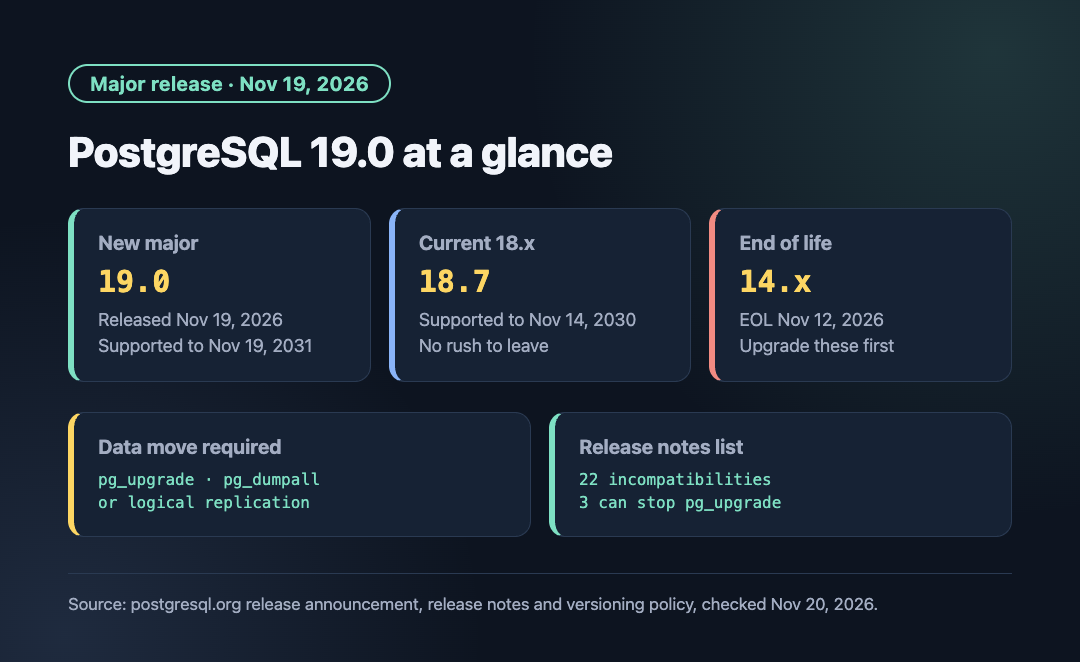
The release notes list 22 incompatibilities. These are the ones most likely to matter in a normal upgrade:
| Change in 19 | Who is affected | What to do |
|---|---|---|
btree_gist inet/cidr index opclasses rejected | Any GiST index or exclusion constraint on inet/cidr built with btree_gist | Rebuild with the core inet_ops before pg_upgrade |
| RADIUS auth removed | radius lines in pg_hba.conf | Move to scram-sha-256, LDAP or cert before upgrading |
standard_conforming_strings always on | Old dumps taken with it off | Dump with the 19 pg_dump/pg_dumpall |
| CR/LF in database, role, tablespace names | Rare, but pg_upgrade refuses | Rename the object first |
| JIT disabled by default | Heavy analytical queries | Turn jit = on back on if you measured a gain |
max_locks_per_transaction 64 → 128, lock sizing changed | Anyone who raised it | Double your old custom value |
io_workers removed | Configs that set it | Use io_min_workers / io_max_workers |
| MD5 login prints a warning | Roles with MD5 hashes | Reset passwords as SCRAM |
MULE_INTERNAL encoding removed | Databases with that encoding | Dump and restore with another encoding |
Other items are smaller but can break queries: json_array() with no rows now returns [] instead of NULL, pg_stat_subscription_stats.sync_error_count was renamed to sync_table_error_count, and READ ONLY transactions can no longer modify rows through postgres_fdw. The default TOAST compression also moves to lz4 on builds with LZ4, and log_lock_waits is now on by default.
If you tested the release candidates, our earlier PostgreSQL 19 RC1 test guide covers the same compatibility list from the pre-release side. This post is the GA procedure.
Should you upgrade now? A quick decision table
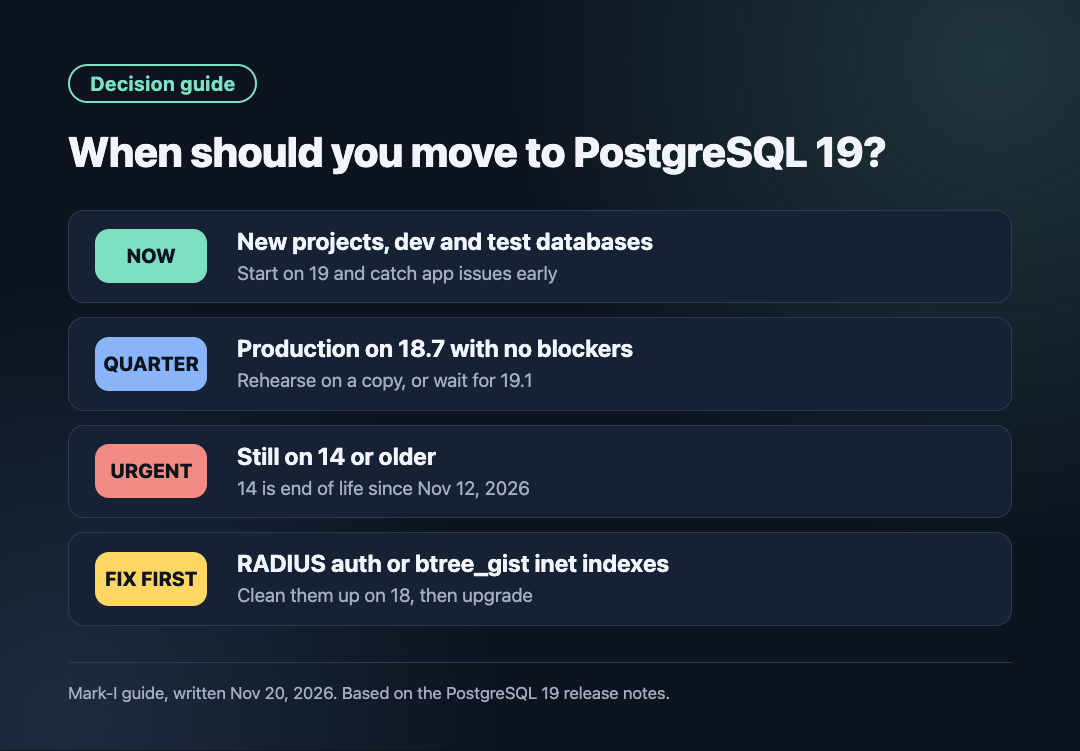
| Your situation | Recommendation |
|---|---|
| New project, or dev/test databases | Upgrade now — start on 19 |
| Production on 18.7, no blockers found by the checks below | Plan it this quarter; wait for 19.1 if you prefer a first minor |
| Production on 17, 16 or 15 | Patch to the latest minor first, then plan a direct jump to 19 |
| Still on 14 or older | Urgent: 14 reached end of life on November 12, 2026 |
Uses RADIUS or btree_gist inet indexes | Fix those on your current version first, then upgrade |
pg_upgrade in 19 supports upgrades from 9.2 and later, so you do not need to step through every major version.
Check your environment before you upgrade to PostgreSQL 19
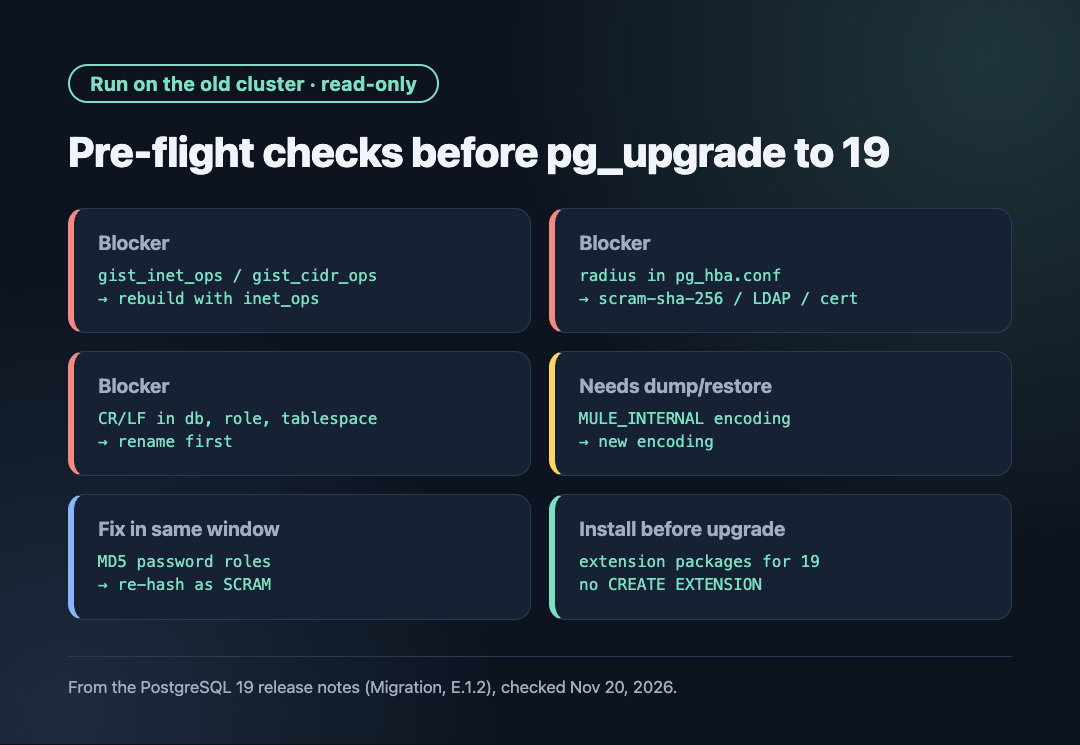
Run these on the old cluster. They are read-only.
1. Find your current version and clusters
psql -U postgres -Atc "SELECT version();"     # any platform with psql access
pg_lsclusters                                 # Debian/Ubuntu: list every cluster
docker exec -it <CONTAINER_NAME> psql -U postgres -Atc "SHOW server_version;"   # Docker
Sample pg_lsclusters output:
Ver Cluster Port Status Owner    Data directory              Log file
18  main    5432 online postgres /var/lib/postgresql/18/main /var/log/postgresql/postgresql-18-main.log
If the version starts with 18, 17, 16 or 15, the steps below apply as written.
2. Look for the blockers
Run each query in every database (the btree_gist check is per database):
-- btree_gist inet/cidr indexes: pg_upgrade to 19 refuses these
SELECT n.nspname, c.relname AS index_name, opc.opcname
FROM pg_index i
JOIN pg_class c      ON c.oid = i.indexrelid
JOIN pg_namespace n  ON n.oid = c.relnamespace
JOIN pg_opclass opc  ON opc.oid = ANY (i.indclass::oid[])
WHERE opc.opcname IN ('gist_inet_ops', 'gist_cidr_ops');

-- RADIUS lines in pg_hba.conf (removed in 19)
SELECT line_number, type, database, user_name, auth_method
FROM pg_hba_file_rules WHERE auth_method = 'radius';

-- Names with carriage return or line feed
SELECT 'database' AS kind, datname AS name FROM pg_database WHERE datname ~ E'[\\r\\n]'
UNION ALL SELECT 'role', rolname FROM pg_roles WHERE rolname ~ E'[\\r\\n]'
UNION ALL SELECT 'tablespace', spcname FROM pg_tablespace WHERE spcname ~ E'[\\r\\n]';

-- Encodings (MULE_INTERNAL is gone)
SELECT datname, pg_encoding_to_char(encoding) FROM pg_database;

-- Roles still using MD5 password hashes (will warn on every login)
SELECT rolname FROM pg_authid WHERE rolpassword LIKE 'md5%';

-- Settings that changed meaning
SELECT name, setting, source FROM pg_settings
WHERE name IN ('jit', 'max_locks_per_transaction', 'standard_conforming_strings',
               'data_checksums', 'password_encryption');
How to read the results: any row from the first three queries is a hard blocker. A MULE_INTERNAL database means you must use dump and restore, not pg_upgrade. MD5 roles and custom max_locks_per_transaction values are not blockers, but fix them during the same window.
3. Fix the blockers on the old version
-- Replace a btree_gist inet index with the core GiST opclass
CREATE INDEX CONCURRENTLY hosts_ip_gist_new ON hosts USING gist (ip inet_ops);
DROP INDEX CONCURRENTLY hosts_ip_gist;
ALTER INDEX hosts_ip_gist_new RENAME TO hosts_ip_gist;

-- Re-hash an MD5 password as SCRAM
SET password_encryption = 'scram-sha-256';
\password app_user
For exclusion constraints that use btree_gist on inet, drop and re-add the constraint with inet_ops in a maintenance window. The release notes call the btree_gist inet/cidr opclasses "broken" because they can skip rows that should be returned, so this fix is worth doing even before you upgrade.
Also list your extensions (SELECT extname, extversion FROM pg_extension;) and make sure each one has a package built for 19. pg_upgrade needs the shared library files installed in the new version, but you should not run CREATE EXTENSION in the new cluster yourself.
How to upgrade to PostgreSQL 19: three paths

View PlantUML source
@startuml
skinparam shadowing false
left to right direction
rectangle "Checks\non 18" as A
rectangle "Fix\nblockers" as B
rectangle "Install 19\n+ extensions" as C
rectangle "pg_upgrade\n--check" as D
rectangle "Stop 18\npg_upgrade" as E
rectangle "Start 19\nvacuumdb" as F
rectangle "Test app\ndrop old" as G
A --> B
B --> C
C --> D
D --> E : passes
D ..> B : fails
E --> F
F --> G
@enduml
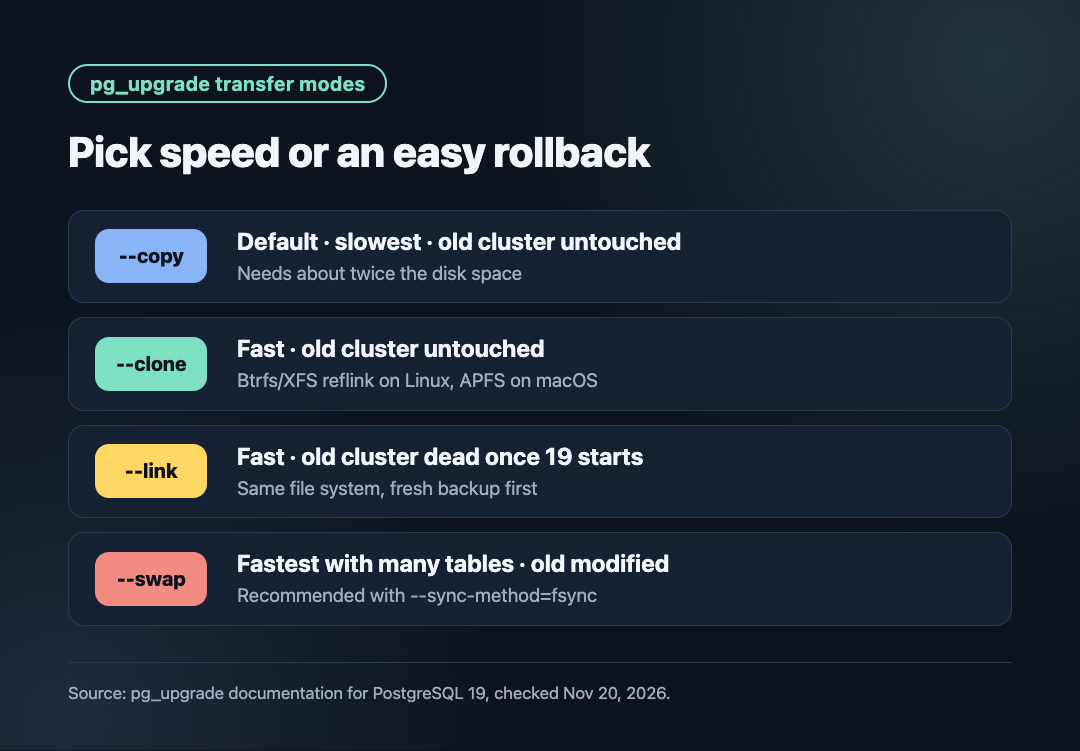
Pick the transfer mode before you start. It decides how fast the upgrade is and whether you can go back.
| Mode | Speed | Old cluster after start | Needs |
|---|---|---|---|
--copy (default) | Slowest | Untouched, can roll back | 2× disk space |
--clone | Fast | Untouched | Btrfs/XFS reflink (Linux) or APFS (macOS) |
--link | Fast | Unusable once 19 starts | Same file system, a fresh backup |
--swap | Fastest with many tables | Modified during transfer | A fresh backup |
| dump/restore | Slow on big data | Untouched | Downtime for the full restore |
Debian and Ubuntu: pg_upgradecluster
The PGDG apt repository carries every supported version. If you have not added it yet, the official setup script does it:
sudo apt install -y postgresql-common
sudo /usr/share/postgresql-common/pgdg/apt.postgresql.org.sh
sudo apt update
apt-cache policy postgresql-19   # confirm a 19.0 candidate is shown
Install 19 and the extension packages you need. On Debian-based systems, installing the server package usually creates an empty 19/main cluster, which blocks the upgrade, so drop it first:
sudo apt install -y postgresql-19 postgresql-19-pgvector   # add your own extension packages
pg_lsclusters                         # if an empty 19 main exists:
sudo pg_dropcluster 19 main --stop
Now run the upgrade. pg_upgradecluster defaults to the dump method, so pass -m to use pg_upgrade. The safe default copies the data, so the old cluster stays usable:
sudo pg_upgradecluster -v 19 -m upgrade 18 mainOn big clusters, take a backup and use -m link instead; on Btrfs/XFS file systems with reflink support, -m clone is fast and keeps the old cluster intact:
sudo pg_upgradecluster -v 19 -m link 18 main
sudo pg_upgradecluster -v 19 -m clone 18 main
Add -j <N> to use several CPU cores. When it finishes, the new 19 cluster takes the original port and the old 18 cluster moves to an unused port and is set to manual start. Check with pg_lsclusters. The old cluster is not deleted automatically.
If you are on a fresh Ubuntu release, our Ubuntu 26.10 upgrade guide explains the stonking codename the PGDG script will use.
RHEL, Rocky, AlmaLinux: pg_upgrade by hand
The distributions ship older majors in their own repos (RHEL 10 ships 16), so production servers usually use the PGDG yum repository. Pick your OS and version 19 in the selector on the PostgreSQL Red Hat download page and run the repo command it prints. PGDG packages install side by side under /usr/pgsql-<VERSION>:
sudo dnf install -y postgresql19-server postgresql19-contrib
sudo /usr/pgsql-19/bin/postgresql-19-setup initdb
The new cluster must match the old one's checksum setting. PostgreSQL 18 turned data checksums on by default for new clusters, but a cluster that was itself upgraded from 17 may still have them off:
sudo -u postgres /usr/pgsql-18/bin/pg_controldata /var/lib/pgsql/18/data | grep checksumData page checksum version: 0 means checksums are off. In that case, empty the new 19 data directory and run initdb for 19 again with --no-data-checksums.
Then stop 18, run the check, and run the real upgrade as the postgres user from a directory it can write to:
sudo systemctl stop postgresql-18
cd /var/lib/pgsql
sudo -u postgres /usr/pgsql-19/bin/pg_upgrade \
  -b /usr/pgsql-18/bin -B /usr/pgsql-19/bin \
  -d /var/lib/pgsql/18/data -D /var/lib/pgsql/19/data \
  --check
If the check ends with "Clusters are compatible", run the real upgrade:
sudo -u postgres /usr/pgsql-19/bin/pg_upgrade \
  -b /usr/pgsql-18/bin -B /usr/pgsql-19/bin \
  -d /var/lib/pgsql/18/data -D /var/lib/pgsql/19/data \
  --jobs "$(nproc)" --clone      # or --link / --copy
Copy your pg_hba.conf and any custom postgresql.conf settings into /var/lib/pgsql/19/data/ (adjusting io_workers and max_locks_per_transaction), then switch services:
sudo systemctl disable postgresql-18
sudo systemctl enable --now postgresql-19
sudo -u postgres psql -Atc "SELECT version();"   # should start with PostgreSQL 19.0
Docker: postgres:19 and the new volume path
The official image now publishes 19.0, 19, 19-trixie, 19-bookworm and 19-alpine tags, and latest points to 19. Since version 18 the image declares its volume at /var/lib/postgresql and keeps data in /var/lib/postgresql/19/docker. Images 17 and older mounted /var/lib/postgresql/data. If you copy an old compose file and keep the old mount path, the new container will start with an empty database.
The simplest container upgrade is a dump with the 19 client tools, which also avoids the standard_conforming_strings problem:
- Dump the running 18 container using the 19 client.
- Start 19 on a new volume.
- Restore and check the version.
docker run --rm --network <NETWORK_NAME> -e PGPASSWORD=<YOUR_PASSWORD> postgres:19 \
  pg_dumpall -h <OLD_CONTAINER_NAME> -U postgres > all-18.sql

docker run -d --name pg19 --network <NETWORK_NAME> \
  -e POSTGRES_PASSWORD=<YOUR_PASSWORD> \
  -v pg19-data:/var/lib/postgresql postgres:19

docker exec -i pg19 psql -U postgres < all-18.sql
docker exec pg19 psql -U postgres -Atc "SHOW server_version;"
The compose equivalent:
services:
  db:
    image: postgres:19
    environment:
      POSTGRES_PASSWORD: <YOUR_PASSWORD>
    volumes:
      - pg19-data:/var/lib/postgresql   # not /var/lib/postgresql/data
volumes:
  pg19-data:
Keep the old 18 volume until the app has run on 19 for a while. The Docker Hub page says the new layout exists so that pg_upgrade --link can work inside one mounted /var/lib/postgresql, but the dump path above is easier to roll back for small and medium databases.
After the upgrade: statistics, reindex and JIT
pg_upgrade in 19 carries over most optimizer statistics, but not extended statistics added by extensions or the cumulative statistics counters. The docs recommend:
sudo -u postgres vacuumdb --all --analyze-in-stages --missing-stats-only --jobs 4
sudo -u postgres vacuumdb --all --analyze-only --jobs 4
Then work through the version-specific items:
- Full text search and
pg_trgmindexes: 19 classifies characters with the database's locale provider instead of libc. Reindex them and recompute storedtsvectorcolumns. fuzzystrmatch: non-ASCII handling changed insoundex(),metaphone()anddmetaphone(). Reindex anything built on them.- Collations: if the OS libc or ICU version also changed, run
REINDEXon text indexes or confirm and useALTER COLLATION ... REFRESH VERSION. - JIT: now off by default. Turn it on only if
EXPLAIN ANALYZEon your heavy reports shows a gain:ALTER SYSTEM SET jit = on; SELECT pg_reload_conf(); - Post-upgrade SQL: if
pg_upgradeprinted a script (for example for extension updates), run it withpsql -f.
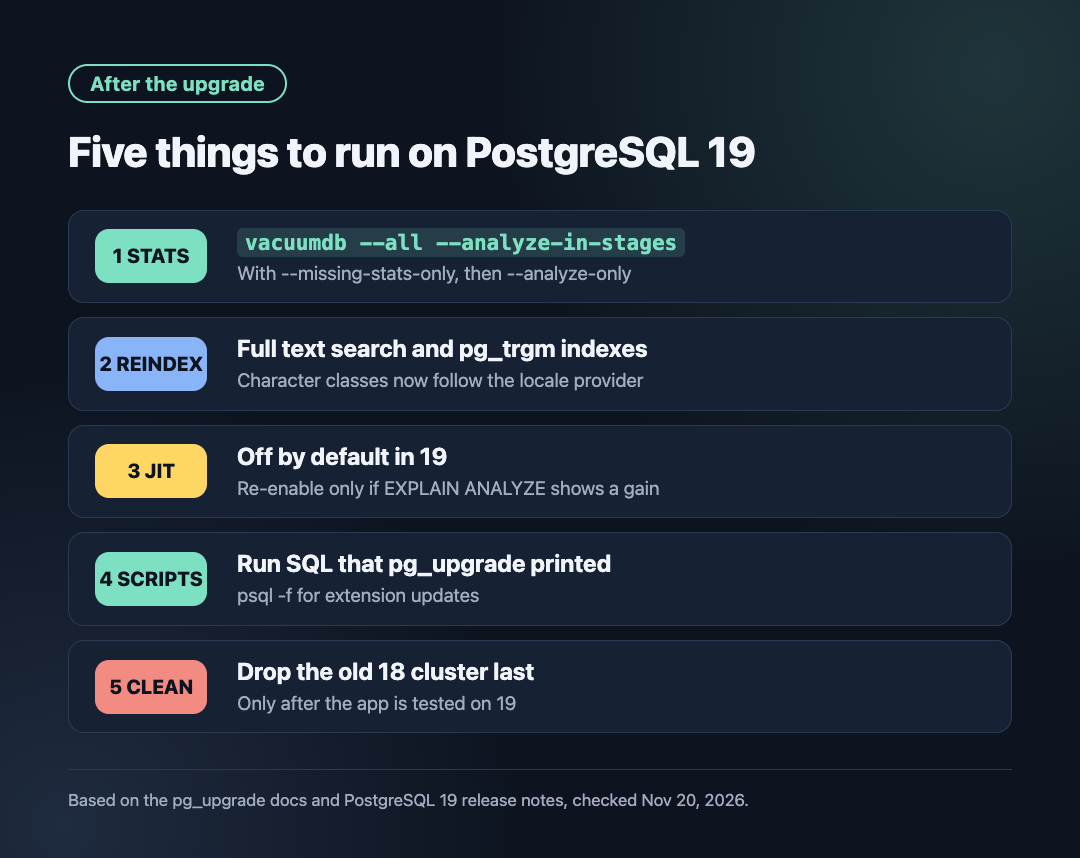
When the application has been tested, remove the old cluster: sudo pg_dropcluster 18 main on Debian/Ubuntu, or the delete script that pg_upgrade printed when it finished.
If you cannot upgrade to PostgreSQL 19 yet
There is no security deadline here. PostgreSQL 18 receives fixes until November 14, 2030, and the latest 18.x is 18.7 from November 12, 2026 (see our PostgreSQL 18.7 security update guide if you are not on it yet). Use the time to remove the blockers on 18: rebuild btree_gist inet indexes, replace RADIUS, re-hash MD5 passwords, and stop taking dumps with standard_conforming_strings = off. Each of those works on 18 today and makes the later upgrade a routine job.
Troubleshooting a PostgreSQL 19 upgrade
| Symptom | Likely cause | Fix |
|---|---|---|
pg_upgrade --check fails on btree_gist inet/cidr | Old opclass in an index or exclusion constraint | Rebuild with inet_ops on 18, run the check again |
19 will not start, error in pg_hba.conf | A radius line copied from 18 | Replace it with another auth method |
| Restore shows errors on backslash strings | Dump taken by an old pg_dump with standard_conforming_strings = off | Re-dump with the 19 pg_dumpall |
could not load library during the check | Extension package for 19 not installed | Install the -19 extension package, rerun |
| Check reports a data checksum setting mismatch | Old cluster without checksums, new one with | initdb again with --no-data-checksums (or enable checksums on 18 first) |
| Docker container starts empty | Volume still mounted at /var/lib/postgresql/data | Mount at /var/lib/postgresql and restore again |
| Queries slower after upgrade | Missing statistics, or JIT was doing work before | Run the vacuumdb commands; compare with jit = on |
Rolling back:
- With
--copyor--clone, the 18 cluster is untouched. Stop 19 and start 18 again (sudo pg_ctlcluster 18 main starton Debian/Ubuntu,systemctl start postgresql-18on RHEL). - With
--link, you can go back only if 19 was never started. The docs explain how to renameglobal/pg_control.oldback to reactivate the old cluster in that case. After 19 has started, restore from backup. - With
--swap, the old cluster is modified once the file transfer begins. Restore from backup. - In Docker, point the service back at the old image tag and the old volume.
FAQ
Can I upgrade straight from PostgreSQL 15 or 16 to 19? Yes. pg_upgrade in 19 accepts clusters from 9.2 and later. Read the "Migration" sections of each skipped release's notes too, because their incompatibilities add up.
Does pg_upgrade keep my query planner statistics now? Mostly. It transfers most optimizer statistics unless you pass --no-statistics. Extended statistics from extensions and the cumulative counters in pg_stat_* views are not carried over, so run the two vacuumdb commands anyway.
Is it safe to set image: postgres:latest? Not for a database. latest now points to 19, so a routine docker compose pull could try to start a 19 server on an 18 data directory, which refuses to start. Pin a major version such as postgres:18 or postgres:19.
Should I wait for PostgreSQL 19.1? For busy production systems it is a reasonable choice. The project usually ships the next minor release in its regular quarterly cycle. Upgrading test and staging now is how you find app issues before then.
Will my app notice that JIT is off? Short OLTP queries rarely used JIT, so most apps will not. Long analytical queries might get slower or faster. Compare EXPLAIN ANALYZE timings with jit on and off before deciding.
References
- PostgreSQL 19 Released! — postgresql.org news (checked Nov 20, 2026)
- PostgreSQL 19 release notes, E.1 Release 19 (checked Nov 20, 2026)
- pg_upgrade documentation (PostgreSQL 19) (checked Nov 20, 2026)
- PostgreSQL versioning policy (checked Nov 20, 2026)
- PostgreSQL apt repository for Ubuntu (checked Nov 20, 2026)
- PostgreSQL downloads for Red Hat family (checked Nov 20, 2026)
- pg_upgradecluster(1) man page, postgresql-common (checked Nov 20, 2026)
- postgres official image on Docker Hub (checked Nov 20, 2026)