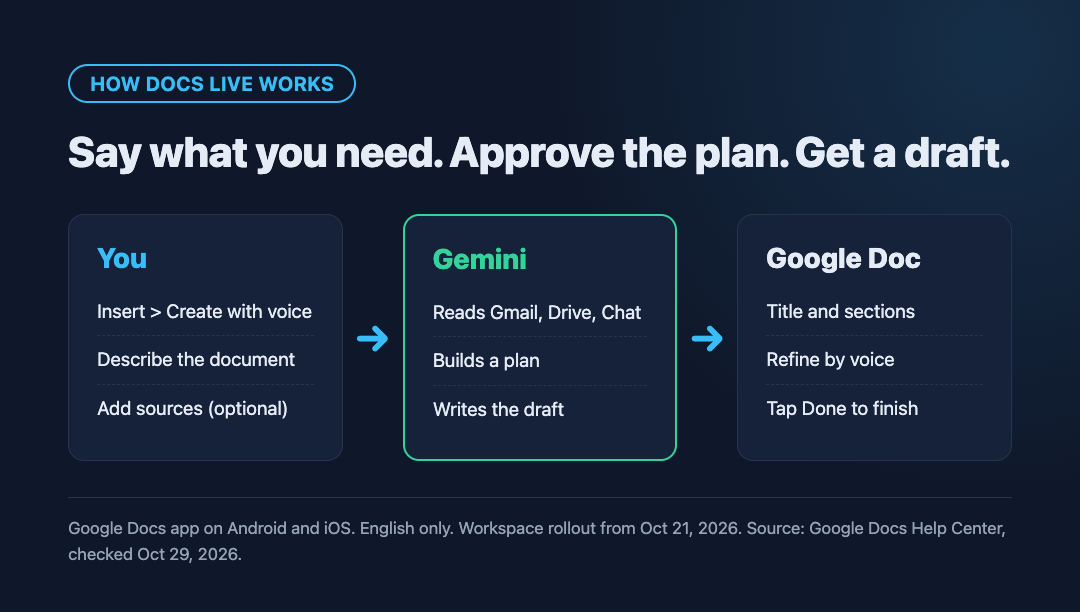
Docs Live lets you create a structured Google Doc on your phone by talking: open the Google Docs app on Android or iPhone, tap Insert, then Create with voice, and describe the document you need. Gemini turns what you say into a plan, then a formatted draft, and can pull details from Gmail, Drive, Chat and the web. Since October 21, 2026, it has been rolling out to Business Standard, Business Plus, Enterprise Standard and Enterprise Plus, on top of Google AI Pro and Ultra subscribers. For now it works in English only.
This guide covers who can use Docs Live, how to start a session, how to steer the plan and the draft, prompts that work, how it differs from classic voice typing, and what to check when the button is missing. It is based on the Google Docs Help Center and Google Workspace Updates, checked on October 29, 2026. It does not describe a hands-on test, so menu names may differ slightly as the rollout continues.
What Docs Live does (and what it is not)
Docs Live is not dictation. Classic voice typing writes down your words one by one. Docs Live listens to what you want, then writes the document for you: title, sections, paragraphs and headings. Google calls it a "hands-free thought partner and co-writer" for first drafts such as project updates, proposals, meeting summaries and presentation talk tracks.
| Item | Detail (as of Oct 29, 2026) |
|---|---|
| Name in the app | Create with voice (under Insert) |
| Where it runs | Google Docs app on Android and iOS |
| Output | A plan first, then a structured draft |
| Context it can use | Gmail, Drive, Google Chat, the web |
| Language | English only |
Google first announced Docs Live on September 3, 2026, alongside Gmail Live and Keep Live, for Google AI Pro and Ultra subscribers. The October 21 Workspace Updates post brought it to paid business plans. If you already use Gmail Live for voice search, the idea is the same: speak naturally, and Gemini does the searching and structuring.
Who can use Docs Live
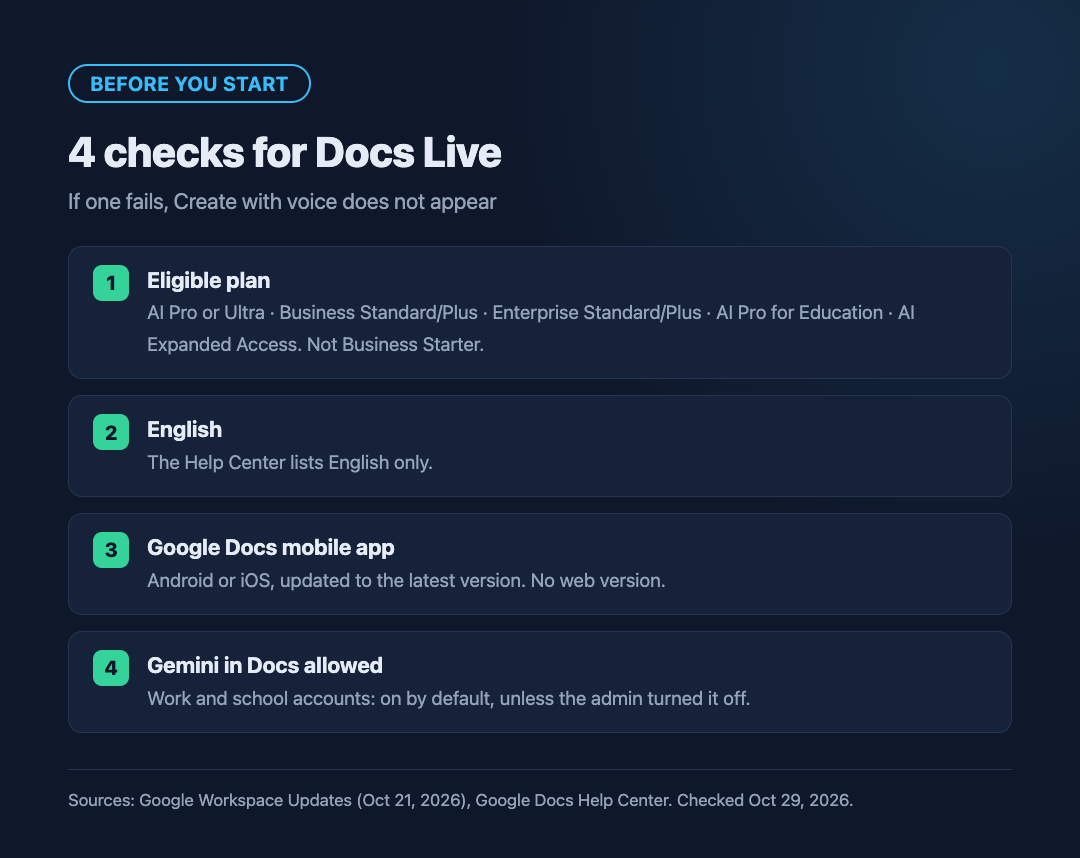
Three things decide whether you see Create with voice: your plan, your language and your device.
| Account type | Eligible plans |
|---|---|
| Personal Google account | Google AI Pro or Ultra, or Google Workspace Experiments |
| Business | Business Standard, Business Plus |
| Enterprise | Enterprise Standard, Enterprise Plus |
| Education and add-ons | Google AI Pro for Education, AI Expanded Access |
Business Starter is not on the list. On top of the plan:
- Language: English only, according to the Help Center.
- Device: the Google Docs mobile app on Android or iOS. The Help Center describes it as a mobile feature, and there is no web version of Create with voice.
- Work and school accounts: Docs Live is on by default for users who have Gemini in Docs. If your admin turned Gemini off for Docs, you will not see it.
The Workspace Updates post lists the rollout as available now for both Rapid Release and Scheduled Release domains. If the option is still missing, update the app first (see the fixes section below).
How to use Docs Live: create a document with your voice
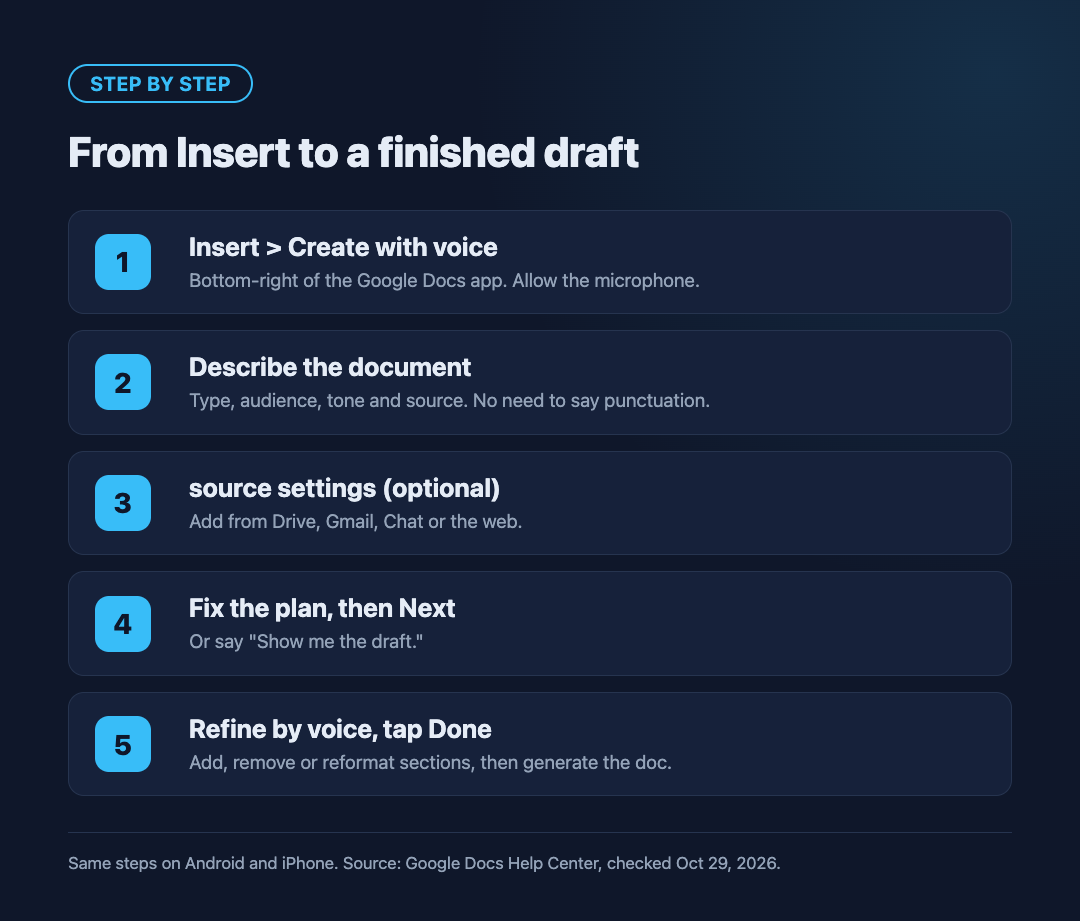
The steps are the same on Android and iPhone.
Step 1: Start Create with voice
- Update the Google Docs app from Google Play or the App Store.
- Open the Google Docs app.
- In the bottom-right corner, tap Insert, then tap Create with voice.
- The first time, allow microphone access.
Step 2: Describe the document
Say what you want, as you would to a colleague. You don't need to dictate punctuation. Be specific about three things:
- Type: project update, proposal, meeting summary, talk track.
- Audience and tone: "for my manager, short and direct."
- Sources: "based on my chat with <COLLEAGUE_NAME> about the Q3 campaign."
Step 3: Add reference files (optional)
To control what Gemini reads, tap source settings at the bottom of the screen, then choose Add from Drive or another location. You can add files from Drive, Gmail, Google Chat or the web. Adding the exact file is more reliable than hoping Gemini finds it.
Step 4: Fix the plan before the draft
Gemini first shows a plan built from your prompts. This is the cheapest moment to change direction. Ask for edits out loud, for example "remove the budget section" or "add a section on risks."
When the plan looks right, tap Next or say "Show me the draft."
Step 5: Refine the draft, then tap Done
Keep talking to change the draft: add or remove sections, rewrite a part, or change heading formats. When you are happy, tap Done. Docs generates the document, and you can edit it like any other Google Doc.
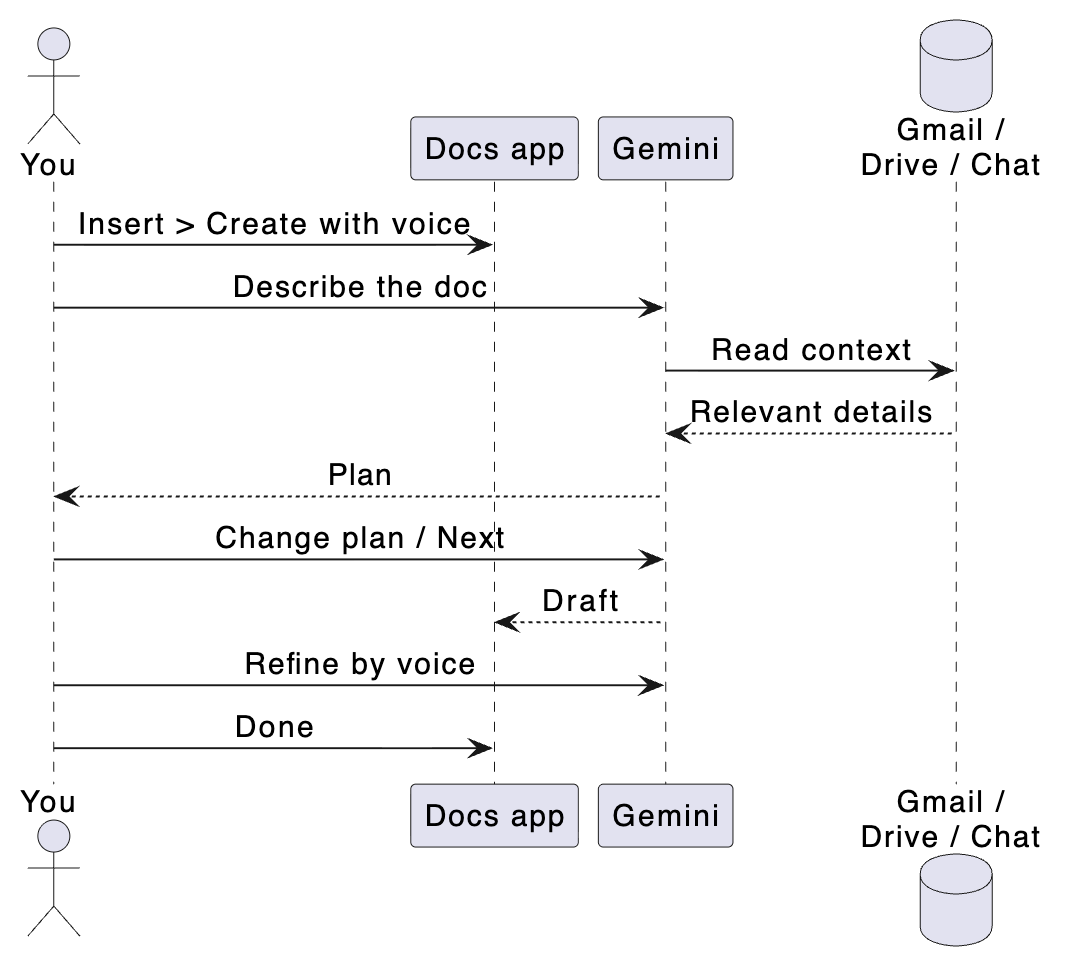
View PlantUML source
@startuml
skinparam shadowing false
skinparam defaultFontSize 15
skinparam sequenceMessageAlign center
actor You
participant "Docs app" as D
participant "Gemini" as G
database "Gmail /\nDrive / Chat" as S
You -> D : Insert > Create with voice
You -> G : Describe the doc
G -> S : Read context
S --> G : Relevant details
G --> You : Plan
You -> G : Change plan / Next
G --> D : Draft
You -> G : Refine by voice
You -> D : Done
@enduml
To rate the result, tap the thumbs up or thumbs down icon on the generated content. For general feedback, tap Help, then Help Docs improve.
Docs Live prompts that work well
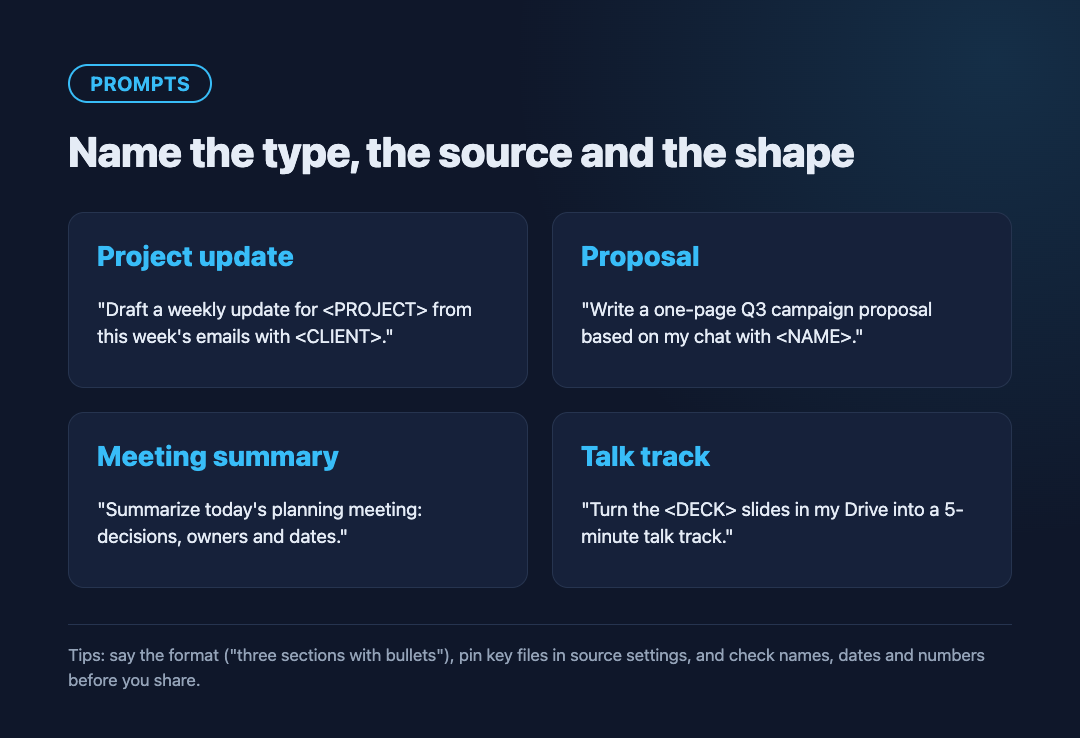
Docs Live works best when you name the document type, the source and the shape you want. Here are prompts in the style of Google's own examples:
| Goal | What to say |
|---|---|
| Project update | "Draft a weekly update for <PROJECT_NAME> from this week's emails with <CLIENT_NAME>." |
| Proposal | "Write a one-page proposal for a Q3 social media campaign based on my chat with <COLLEAGUE_NAME>." |
| Meeting summary | "Summarize today's planning meeting: decisions, owners and dates." |
| Talk track | "Turn the <DECK_NAME> slides in my Drive into a 5-minute talk track." |
| Edit the plan | "Remove the background section and add a risks section." |
A few habits help:
- Say the format. "Three sections with bullet points" gets a cleaner draft than "write something about it."
- Pin the source. Add the file in source settings when one document matters most.
- Check facts before you share. Gemini can make mistakes. Read names, dates and numbers in the draft against the source emails and files.
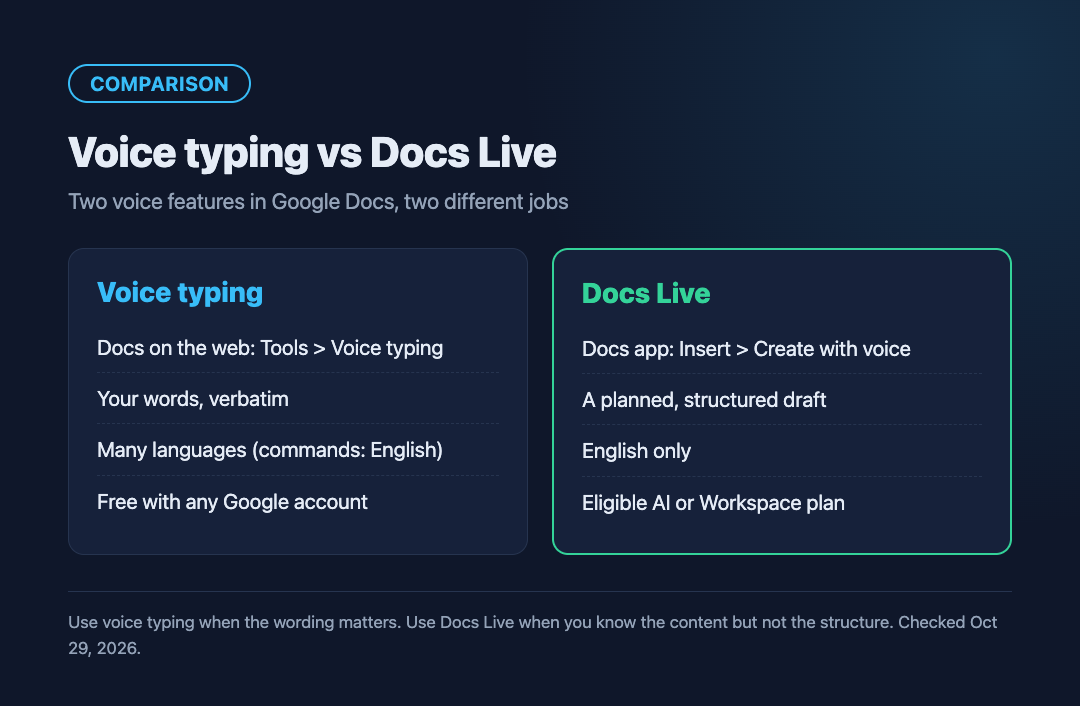
Docs Live vs voice typing in Google Docs
Google Docs now has two voice features, and they solve different problems.
| Feature | Where | What you get | Best for |
|---|---|---|---|
| Voice typing | Docs on the web (Chrome, Edge, Safari) | Your words, verbatim | Writing exactly what you say |
| Docs Live | Docs app on Android and iOS | A planned, structured draft | First drafts from ideas and sources |
Voice typing lives under Tools > Voice typing in Docs on a computer. You click the microphone and your speech becomes text, word for word. It supports many languages, but punctuation and editing commands such as "period" or "new paragraph" work only in English. It is free with any Google account.
Docs Live is the opposite: it does not keep your exact words, and it needs an eligible plan. Use voice typing when the wording matters, such as quotes or notes you will edit yourself. Use Docs Live when you know what the document should cover but don't want to structure it.
For admins: control Docs Live in your domain
Docs Live is on by default for users who have Gemini in Docs. Google's announcement points admins to the standard Gemini access settings:
- In the Google Admin console, go to Menu > Generative AI > Gemini for Workspace.
- Open Feature access.
- Select an organizational unit or configuration group, or leave the top level selected.
- Click Edit next to Drive, Docs, Sheets, Slides, Forms, Drawings, and Vids, choose On or Off, and click Save.
Docs does not have its own row; it shares one setting with Drive, Sheets, Slides and the other editors. As of October 29, 2026, the admin page does not name a separate switch for Create with voice, so turning this row off removes Gemini from all of those apps for that group. Plan the change with the same care as other Gemini automations, such as Workspace Studio flows.
Docs Live not showing? Fixes
Most problems are eligibility, not bugs. Work down the checks in order.
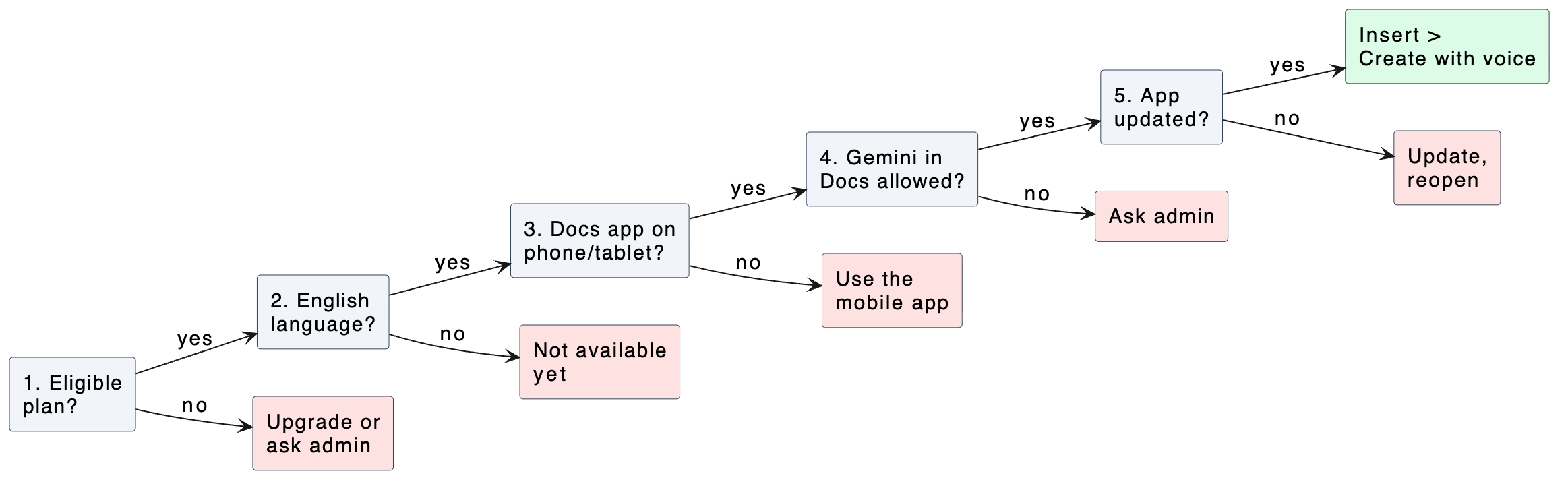
View PlantUML source
@startuml
left to right direction
skinparam shadowing false
skinparam defaultFontSize 15
skinparam rectangleBackgroundColor #F1F5F9
skinparam rectangleBorderColor #334155
rectangle "1. Eligible\nplan?" as A
rectangle "2. English\nlanguage?" as B
rectangle "3. Docs app on\nphone/tablet?" as C
rectangle "4. Gemini in\nDocs allowed?" as D
rectangle "5. App\nupdated?" as E
rectangle "Insert >\nCreate with voice" as F #DCFCE7
rectangle "Upgrade or\nask admin" as A2 #FEE2E2
rectangle "Not available\nyet" as B2 #FEE2E2
rectangle "Use the\nmobile app" as C2 #FEE2E2
rectangle "Ask admin" as D2 #FEE2E2
rectangle "Update,\nreopen" as E2 #FEE2E2
A --> B : yes
B --> C : yes
C --> D : yes
D --> E : yes
E --> F : yes
A --> A2 : no
B --> B2 : no
C --> C2 : no
D --> D2 : no
E --> E2 : no
@enduml| Problem | What to check |
|---|---|
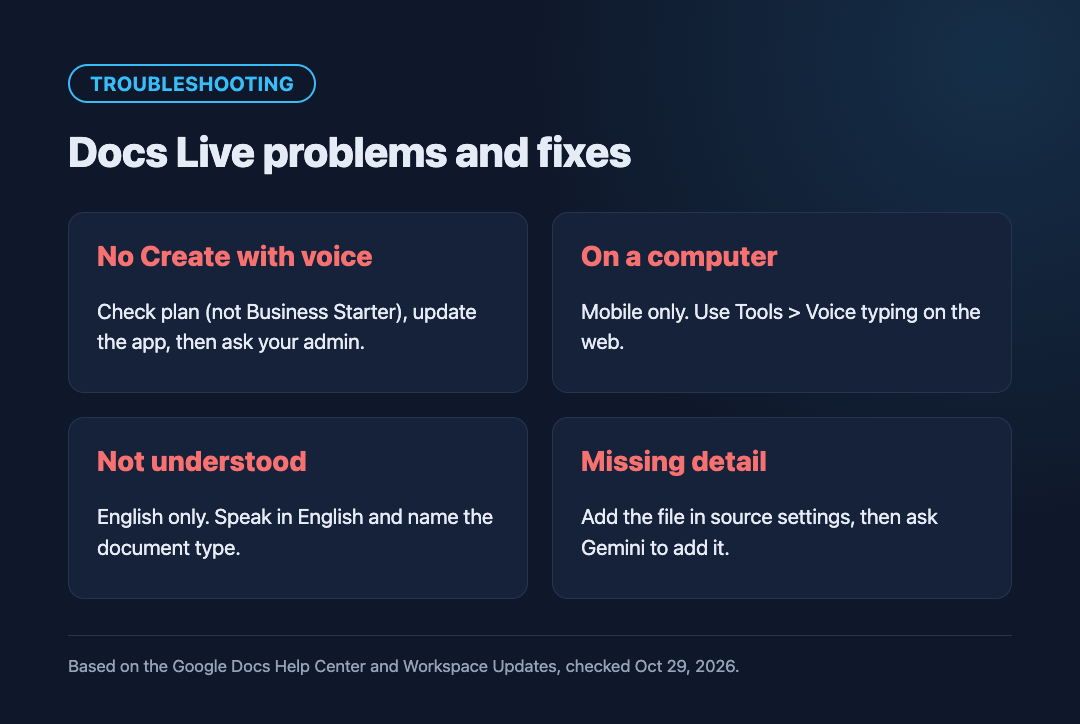
| No Create with voice under Insert | Plan (Business Starter is excluded), app version, then admin settings |
| Option missing on a computer | Docs Live is mobile only. Use Tools > Voice typing on the web instead |
| Gemini does not understand you | It works in English only. Speak in English and name the document type |
| Draft misses a key detail | Add the file in source settings, then ask Gemini to add it |
FAQ
Is Docs Live free? No. It needs Google AI Pro or Ultra on a personal account, or Business Standard, Business Plus, Enterprise Standard, Enterprise Plus, Google AI Pro for Education or AI Expanded Access at work. Personal accounts in Google Workspace Experiments can also try it. Free voice typing on the web is still available to everyone.
Can I use Docs Live on a computer? Not as of October 29, 2026. Create with voice is in the Google Docs app on Android and iOS. On a computer, use Tools > Voice typing for dictation, or Gemini in Docs for typed prompts.
Does Docs Live work in languages other than English? No. The Help Center lists English only for now. Voice typing on the web supports many more languages.
Does Docs Live save a transcript of what I said? The Help Center page for Create with voice does not say. It explains that Gemini builds the plan and draft from your spoken prompts and the sources you allow. If you handle sensitive material, check your organization's Gemini policy before you use it.
Can Docs Live edit an existing document? Google's pages describe creating new documents from Insert > Create with voice. For edits to an existing doc, use Gemini in Docs or edit the generated draft by hand.
References
All links checked on October 29, 2026.
- Google Docs Help: Generate documents with voice in Google Docs (official)
- Google Workspace Updates: Create structured documents using just your voice with Docs Live in Google Docs on mobile (official, October 21, 2026)
- Google Blog: Voice features in Gmail, Docs and Keep (official, September 3, 2026)
- Google Docs Help: Type with your voice (official)
- Google Workspace Admin Help: Manage access to Gemini features in Workspace services (official)
- Google Docs Help: Get started with Google Workspace Experiments (official)
- Android Headlines: Google Docs Live rolls out to Workspace on mobile (October 23, 2026)
Docs Live writes drafts; Gmail Live answers questions about your mail. To search your inbox the same way, see the guide to Gmail Live voice search.