You can now migrate branch protection to rulesets for a whole GitHub repository in one action: open Settings → Rulesets, click Import branch protection rules, review the preview, and click Create rulesets. GitHub added this bulk import on October 20, 2026. The safe order is simple: back up your current rules, import, compare the effective rules on your main branch, and only then delete the old branch protection rules.
This guide covers that order step by step, with gh api commands for the backup and the check. Everything here is based on the GitHub changelog, GitHub Docs and the REST API reference, checked on October 23, 2026. I describe the documented flow; screens in your repository can differ slightly by plan and by rollout timing.
What changed on October 20, 2026
Until now, you had two choices. You could rebuild each classic rule by hand as a ruleset, or use Convert to ruleset on one rule at a time under Settings → Branches (that single-rule converter shipped on August 11, 2026). The new import does the same conversion for every branch protection rule in the repository at once.
| Option | Where | Scope | Added |
|---|---|---|---|
| Manual rebuild | Settings → Rulesets → New ruleset | You recreate each setting | — |
| Convert to ruleset | Settings → Branches | One classic rule | Aug 11, 2026 |
| Import branch protection rules | Settings → Rulesets | All classic rules in the repo | Oct 20, 2026 |
According to the changelog, the import dialog lets you:
- Preview every ruleset that will be created.
- See which classic rules an existing ruleset already covers.
- See when one classic rule turns into more than one ruleset.
- Pick the enforcement status: Active, Evaluate or Disabled.
- Choose which of the proposed rulesets to create.
After you click Create rulesets, GitHub asks whether to keep or delete the original branch protection rules. The feature is available in every repository where rulesets are available.
Why migrate branch protection to rulesets at all?
Classic branch protection still works, so there is no forced deadline in the October 20 announcement. The reasons to move are practical:
- Layering. Only one branch protection rule applies to a branch. Several rulesets can apply at once, and GitHub enforces the most restrictive version of each rule.
- Visibility. Anyone with read access can see a repository's active rulesets. Developers no longer need admin access to find out why a push was blocked.
- Bypass lists. You can let specific roles, teams, GitHub Apps or Dependabot bypass a ruleset, either always or only through a pull request.
- On/off without deleting. A ruleset can be disabled and turned back on later.
- Scale. Organizations on the GitHub Enterprise plan can also set rulesets at the organization level and target many repositories at once.
Plan support matters here. GitHub Docs state that rulesets are available in public repositories with GitHub Free and GitHub Free for organizations, and in public and private repositories with GitHub Pro, GitHub Team and GitHub Enterprise Cloud. A private repository on a Free account cannot use rulesets, so the import button will not help there. The limit is 75 rulesets per repository.
Before you migrate: back up your current rules
The import does not edit your classic rules unless you ask it to delete them. Still, take a copy first, so you can compare settings line by line later.
Branch protection rules can use wildcard patterns such as release/*. The GraphQL API returns the rules with their patterns, which is easier than querying the REST endpoint branch by branch. Run it with GitHub CLI logged in as a repository admin:
OWNER=<YOUR_ORG_OR_USER>
REPO=<YOUR_REPO>

gh api graphql -F owner="$OWNER" -F repo="$REPO" -f query='
query($owner: String!, $repo: String!) {
  repository(owner: $owner, name: $repo) {
    branchProtectionRules(first: 100) {
      nodes {
        pattern
        requiresApprovingReviews
        requiredApprovingReviewCount
        requiresCodeOwnerReviews
        requiresStatusChecks
        requiresStrictStatusChecks
        requiredStatusCheckContexts
        requiresLinearHistory
        requiresCommitSignatures
        requiresConversationResolution
        isAdminEnforced
        allowsForcePushes
        allowsDeletions
      }
    }
  }
}' > branch-protection-backup.json
Also save any rulesets the repository already has, so you know what the import dialog means by "already covered":
gh api "repos/$OWNER/$REPO/rulesets?includes_parents=true" > rulesets-before.jsonThen record the rules that are effective on your default branch today. This endpoint returns only rules from active rulesets (including organization-level ones), so it will be empty if you only use classic protection — that is expected:
gh api "repos/$OWNER/$REPO/rules/branches/main" > effective-rules-before.jsonReplace main with your default branch name. Branch names in this endpoint cannot contain wildcards.
How to migrate branch protection to rulesets step by step
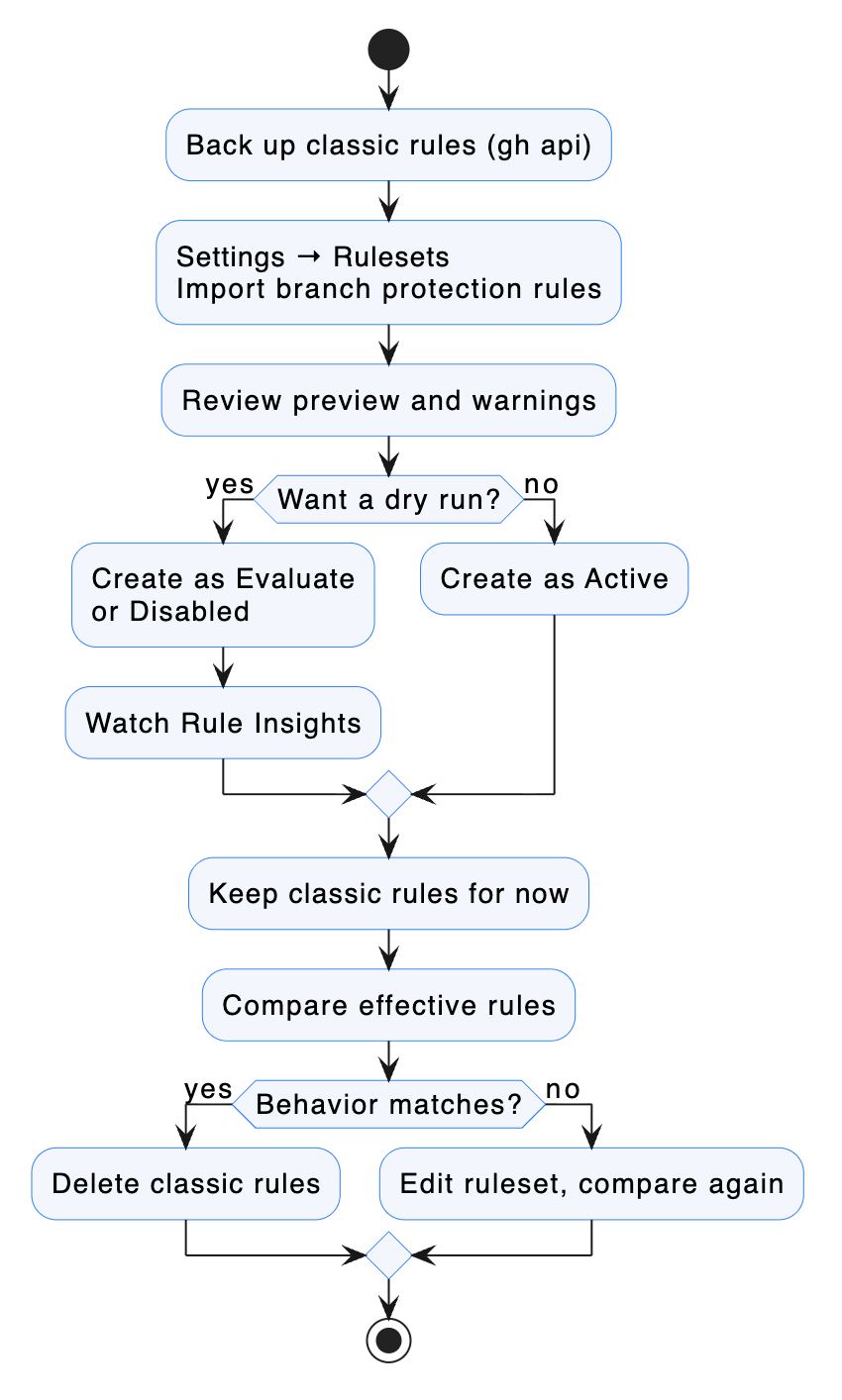
View PlantUML source
@startuml
skinparam shadowing false
skinparam defaultFontSize 14
skinparam ActivityBackgroundColor #F3F7FD
skinparam ActivityBorderColor #2F81F7
start
:Back up classic rules (gh api);
:Settings → Rulesets\nImport branch protection rules;
:Review preview and warnings;
if (Want a dry run?) then (yes)
  :Create as Evaluate\nor Disabled;
  :Watch Rule Insights;
else (no)
  :Create as Active;
endif
:Keep classic rules for now;
:Compare effective rules;
if (Behavior matches?) then (yes)
  :Delete classic rules;
else (no)
  :Edit ruleset, compare again;
endif
stop
@enduml
Step 1: Open the import dialog
- Go to the repository on GitHub and open Settings.
- In the sidebar, click Rulesets (under Rules in the "Code and automation" section).
- Click Import branch protection rules.
You need admin access to the repository to manage rulesets.
Step 2: Read the preview, not just the count
The dialog lists the rulesets it plans to create. Check three things before you continue:
- Split rules. If one classic rule cannot fit in a single ruleset, GitHub proposes more than one. The single-rule docs say behavior changes are shown as warnings before anything is created. Read every warning.
- Already covered. If a ruleset you created earlier already covers a classic rule, the dialog says so. Skip that one rather than creating a duplicate.
- Names. Rename the proposed rulesets to something your team will recognize, for example
main – PR + CIinstead of a pattern string.
Step 3: Choose the enforcement status
| Status | What happens | Use it when |
|---|---|---|
| Active | Enforced immediately, on top of any classic rule you keep | You trust the preview and want protection without a gap |
| Evaluate | Not enforced; results appear in Rule Insights | You want to see what would pass or fail first |
| Disabled | Not enforced, no evaluation | You want to review or edit the ruleset before using it |
Two notes. First, the Rule Insights dashboard is documented for GitHub Team and GitHub Enterprise Cloud plans; if you do not see Evaluate in the dialog, use Disabled, edit, then switch to Active. Second, keeping the classic rules while the new rulesets are Active is safe: both are enforced, and a push or merge must satisfy both.
Step 4: Create the rulesets and keep the old rules for now
Select the rulesets you want and click Create rulesets. When GitHub asks about the original branch protection rules, choose keep on the first pass. Deleting them is a one-click job later, once you have verified the new setup.
Check the new rulesets before deleting anything
Read back what you created and what is now effective on the default branch. The three commands list the imported rulesets, save one ruleset in full (conditions, rules and bypass_actors), and print the rule types that are effective on main from Active rulesets:
gh api "repos/$OWNER/$REPO/rulesets" --jq '.[] | {id, name, enforcement}'

gh api "repos/$OWNER/$REPO/rulesets/<RULESET_ID>" > ruleset-main.json

gh api "repos/$OWNER/$REPO/rules/branches/main" --jq '.[].type'
Rulesets set to Evaluate or Disabled do not appear in the rules/branches output. If the list is empty after an Evaluate import, that is the reason.
Now compare the backup with the new ruleset. GitHub Docs do not publish a field-by-field mapping, so this checklist is my own comparison of the classic settings with the documented ruleset rules. Use it to know where to look, and trust the import dialog's warnings for the final answer.
| Classic setting (backup field) | Ruleset rule to look for | What to check |
|---|---|---|
requiresApprovingReviews, requiredApprovingReviewCount | Require a pull request before merging | Approval count, code owner review, stale review dismissal |
requiresStatusChecks, requiredStatusCheckContexts | Require status checks to pass | Same check names; strict "up to date" setting |
requiresLinearHistory | Require linear history | Repo must allow squash or rebase merging |
requiresCommitSignatures | Require signed commits | New branches: rulesets check only commits not reachable from other branches |
allowsForcePushes: false | Block force pushes | Present and enabled |
allowsDeletions: false | Restrict deletions | Present and enabled |
isAdminEnforced | Bypass list | Who is on it, and "Always allow" vs "For pull requests only" |
The bypass list is the setting most worth a second look
With rulesets, only the actors on the bypass list can skip the rules. Review that list in each new ruleset:
- If your classic rule let admins push directly, make sure that is still what you want, and that it is set on purpose.
- If bots or release tooling push to protected branches, add the specific GitHub App or Dependabot instead of a broad role.
- Use For pull requests only when someone may bypass reviews but should still go through a pull request.
Status checks from a specific app
Rulesets can restrict a required check to a specific GitHub App source. That app must have statuses:write, must have recently submitted a check run, and must be tied to an existing required check. If a check name is produced by more than one workflow or app, pin the source so a different job cannot satisfy it.
Delete the classic branch protection rules
When the effective rules match what you expect and a test pull request behaves correctly, remove the old rules:
- Go to Settings → Branches.
- A classic rule that is fully covered shows "This rule is fully covered by rulesets and can be safely deleted," and a Delete button.
- Delete it. If a rule does not show that message, the ruleset does not cover it fully yet. Go back to the ruleset and fix the gap.
Keep branch-protection-backup.json and the exported ruleset JSON in a safe place. GitHub Docs describe importing a ruleset from a JSON file (New ruleset → Import a ruleset), which also lets you copy a tested ruleset to other repositories.
Common migration problems and fixes
| Symptom | Likely cause | Fix |
|---|---|---|
| No Import branch protection rules button | Rulesets not available on this plan or repo visibility, or no admin access | Check the plan note above and your role |
| Pushes blocked that used to work | New Active ruleset plus old classic rule both apply | Check both; the most restrictive rule wins |
rules/branches/main returns [] | Rulesets are in Evaluate or Disabled | Switch to Active when ready |
| CI never satisfies a required check | Check name or app source differs | Match the exact check name; review the app source setting |
| Classic rule shows no "fully covered" message | One setting has no match in the ruleset | Compare with the backup table and edit the ruleset |
If the repository also runs CI on GitHub Actions, protect the files that control CI as well. Our guide to the GitHub Actions lockfile shows how to make actions.lock changes reviewable and require a verify check — a good candidate for a required status check in your new ruleset.
FAQ
Does the bulk import delete my branch protection rules? Only if you choose to. After Create rulesets, GitHub asks whether to keep or delete the originals. Keep them until you have checked the new rulesets.
Can I run the import more than once? The dialog shows which classic rules an existing ruleset already covers, so a second pass can pick up rules you skipped. Review the preview to avoid duplicates.
Do rulesets work on a private repository with a free account? No. GitHub Docs list rulesets for public repositories on GitHub Free, and for public and private repositories on GitHub Pro, Team and Enterprise Cloud.
Will my existing pull requests be affected? Active rulesets apply from the moment they are created, so open pull requests must meet the new rules to merge. If you are unsure, create the rulesets as Evaluate or Disabled first.
Can I do the bulk migration through the API? The October 20 changelog describes the UI import only. The REST API lets you list, create, update and delete rulesets (/repos/{owner}/{repo}/rulesets), so you can script a rebuild, but there is no documented bulk-import endpoint as of October 23, 2026.
Summary: migrate in one pass, delete in a second
Back up your classic rules with gh api, run Import branch protection rules, read every warning, and create the rulesets while keeping the classic rules. Compare effective rules on your default branch and check the bypass list. Delete the classic rules only when GitHub shows they are fully covered.
If you are reworking repository notifications at the same time, see how to replace GitHub push email notifications with Actions.
Written on October 23, 2026. Facts and screen names come from the sources below as of that date; check them again if you are reading this later.
References
- GitHub Changelog, "Bulk migrate branch protections to rulesets for a repository" (Oct 20, 2026) — github.blog (checked Oct 23, 2026)
- GitHub Changelog, "Automatically migrate branch protection rules to repository rulesets" (Aug 11, 2026) — github.blog (checked Oct 23, 2026)
- GitHub Docs, Converting branch protections to rulesets — docs.github.com (checked Oct 23, 2026)
- GitHub Docs, About rulesets — docs.github.com (checked Oct 23, 2026)
- GitHub Docs, Available rules for rulesets — docs.github.com (checked Oct 23, 2026)
- GitHub Docs, Creating rulesets for a repository — docs.github.com (checked Oct 23, 2026)
- GitHub Docs, Managing rulesets for a repository — docs.github.com (checked Oct 23, 2026)
- GitHub REST API, Rules for repositories — docs.github.com (checked Oct 23, 2026)
1 thought on “Migrate Branch Protection to Rulesets: GitHub Bulk Import”