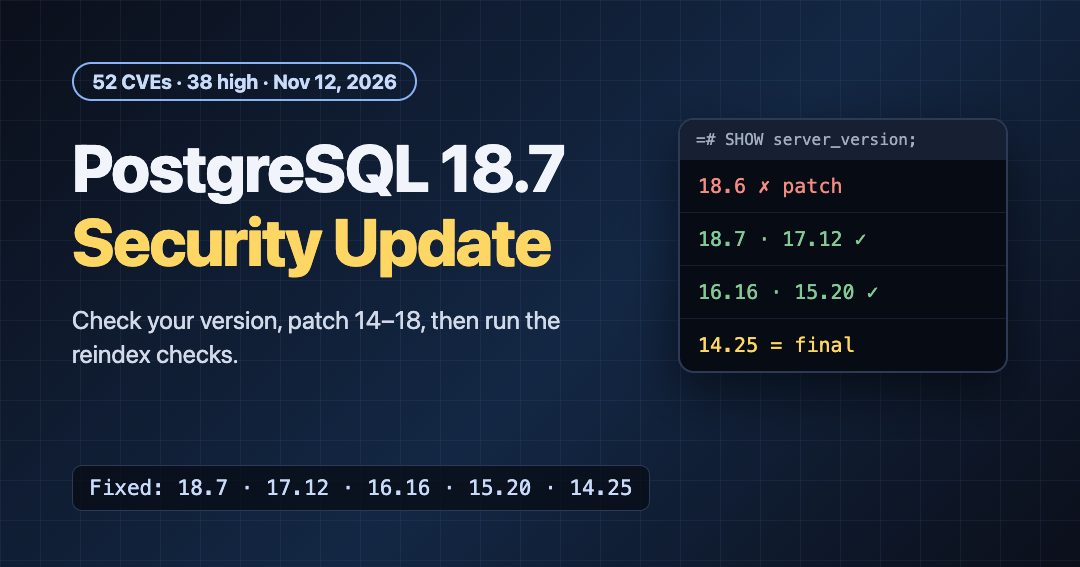
The PostgreSQL 18.7 security update, released on November 12, 2026, fixes 52 CVEs and more than 140 bugs across every supported branch: 18.7, 17.12, 16.16, 15.20 and 14.25. Most of the serious bugs let a database user who can create objects run code as the operating system account that runs PostgreSQL. Install the new minor release for your branch this week (today if untrusted users can create objects), restart, then run the post-update reindex checks. PostgreSQL 14.25 is also the last release of PostgreSQL 14.
Written November 13, 2026, 20:00 KST (11:00 UTC). Facts checked on November 13, 2026 against the PostgreSQL release announcement, the individual advisories on postgresql.org/support/security, the versioning policy page and the Docker Hub tag list for the official postgres image. I have not reproduced any of these bugs or run this upgrade on a specific server for this post. The commands below are standard PostgreSQL, apt, dnf, Homebrew and Docker commands.
What the PostgreSQL 18.7 security update fixes
This is a cumulative minor release. You do not need pg_upgrade or a dump and reload. You stop the server, replace the binaries and start it again.
| Branch | Fixed release | Status after Nov 12, 2026 |
|---|---|---|
| 18 | 18.7 | Supported |
| 17 | 17.12 | Supported |
| 16 | 16.16 | Supported |
| 15 | 15.20 | Supported |
| 14 | 14.25 | End of life (final release) |
Source: postgresql.org release announcement "PostgreSQL 18.7, 17.12, 16.16, 15.20, 14.25, and 19 RC 2 Released!", checked Nov 13, 2026.
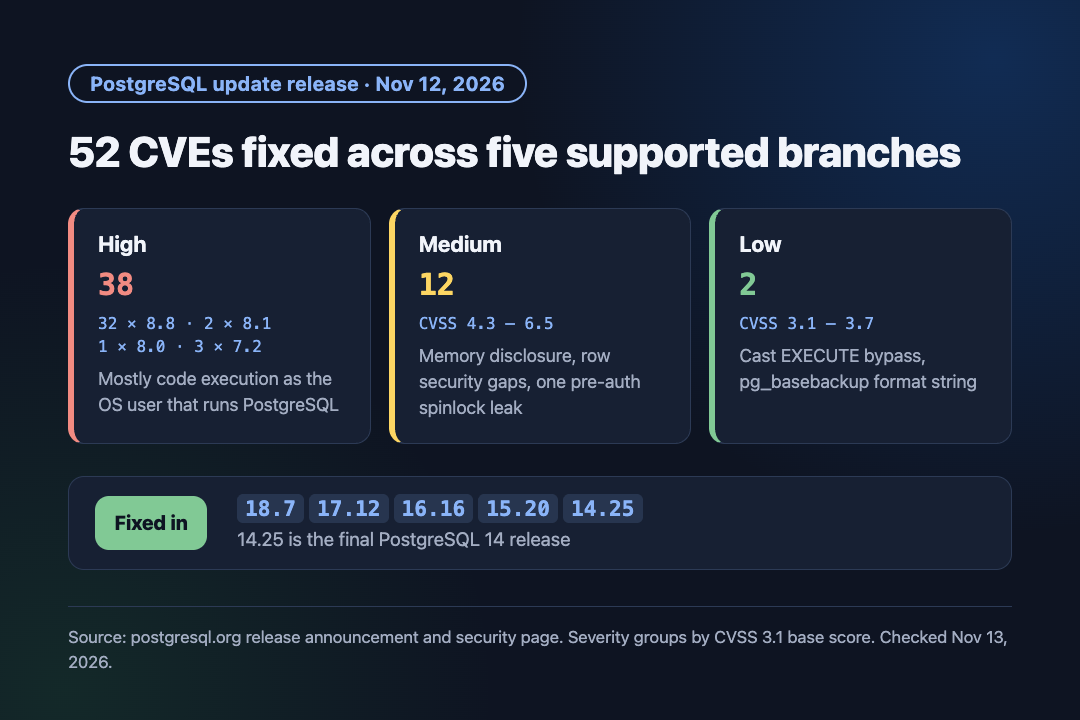
By CVSS 3.1 score, the 52 CVEs break down like this: 38 high (32 at 8.8, two at 8.1, one at 8.0, three at 7.2), 12 medium and 2 low. The project did not mark any as critical, and none is described as exploited in the wild.
The pattern matters more than the count:
- Server code execution needs a logged-in user. The 8.8 bugs, such as CVE-2026-6460 (type confusion after
ALTER ... SET DATA TYPE), have the vectorPR:L: the attacker must be able to log in and create objects. If only your own application role can connect, your risk is lower than the score suggests. If tenants, analysts or third-party tools can create tables or functions, treat these as urgent. - Procedural languages and extensions are a big share. Several use-after-free bugs sit in
plperl(CVE-2026-116307, -116309, -116319, -116320, -116326),pltcl(CVE-2026-116323) anddblink(CVE-2026-120147, CVE-2026-14661). - Client tools are affected too.
pg_dump(CVE-2026-116318, 18.x only, and CVE-2026-116330),pg_restore(CVE-2026-116314),reindexdb(CVE-2026-116325) andvacuumdb(CVE-2026-116313). A malicious object name or dump file can run SQL or code as the user who runs the tool. Patch the machines that run backups, not just the database server. - One bug needs no login. CVE-2026-116322 (CVSS 5.3) lets a pre-authentication cancel request leak a spinlock. That is an availability problem for servers whose port is reachable by untrusted networks.
The advisories I opened (CVE-2026-6460, CVE-2026-116307, CVE-2026-116318) list no workaround. Upgrading is the only documented fix.
Am I affected? Check your PostgreSQL version
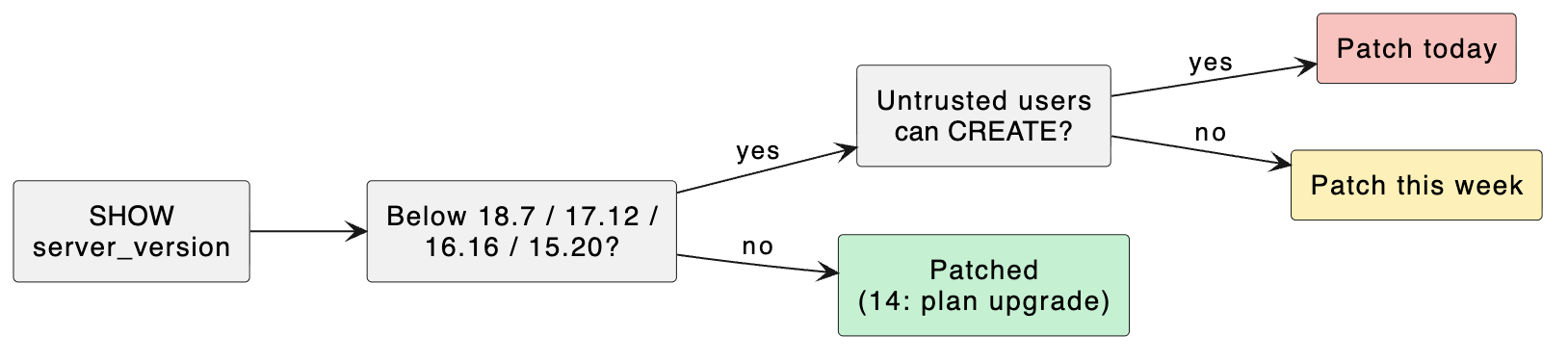
You need the fixed release if your server or client tools are older than 18.7, 17.12, 16.16, 15.20 or 14.25. PostgreSQL 13 and older are already out of support and get no fixes at all.
View PlantUML source
@startuml
left to right direction
skinparam defaultTextAlignment center
rectangle "SHOW\nserver_version" as V
rectangle "Below 18.7 / 17.12 /\n16.16 / 15.20?" as Q1
rectangle "Untrusted users\ncan CREATE?" as Q2
rectangle "Patch today" as P #F8C3BE
rectangle "Patch this week" as W #FDF0B8
rectangle "Patched\n(14: plan upgrade)" as N #C6F0D2
V --> Q1
Q1 --> Q2 : yes
Q1 --> N : no
Q2 --> P : yes
Q2 --> W : no
@enduml
From inside the database (any platform)
-- Exact running version, as the server sees it
SHOW server_version;
-- Example output on an unpatched 18 server:
--  server_version
-- ----------------
--  18.6
18.6 means vulnerable. 18.7 means patched. On Debian and Ubuntu packages the string can look like 18.6 (Debian 18.6-1.pgdg13+1); read the number before the space.
Debian and Ubuntu
## Installed server and client packages
dpkg -l 'postgresql*' | awk '/^ii/ {print $2, $3}'

## What the repository offers now
apt-cache policy postgresql-18 postgresql-client-18

## Client tool versions on backup hosts
pg_dump --version
psql --version
RHEL, Rocky, AlmaLinux, Fedora
## PGDG packages use names like postgresql18-server
rpm -qa | grep -i postgresql
/usr/pgsql-18/bin/postgres --version
Docker, Homebrew and managed services
## Docker: version inside a running container
docker exec <CONTAINER_NAME> postgres --version

## macOS Homebrew
brew list --versions postgresql@18

## Amazon RDS: minor versions the service currently offers
aws rds describe-db-engine-versions --engine postgres \
  --query "DBEngineVersions[].EngineVersion" --output text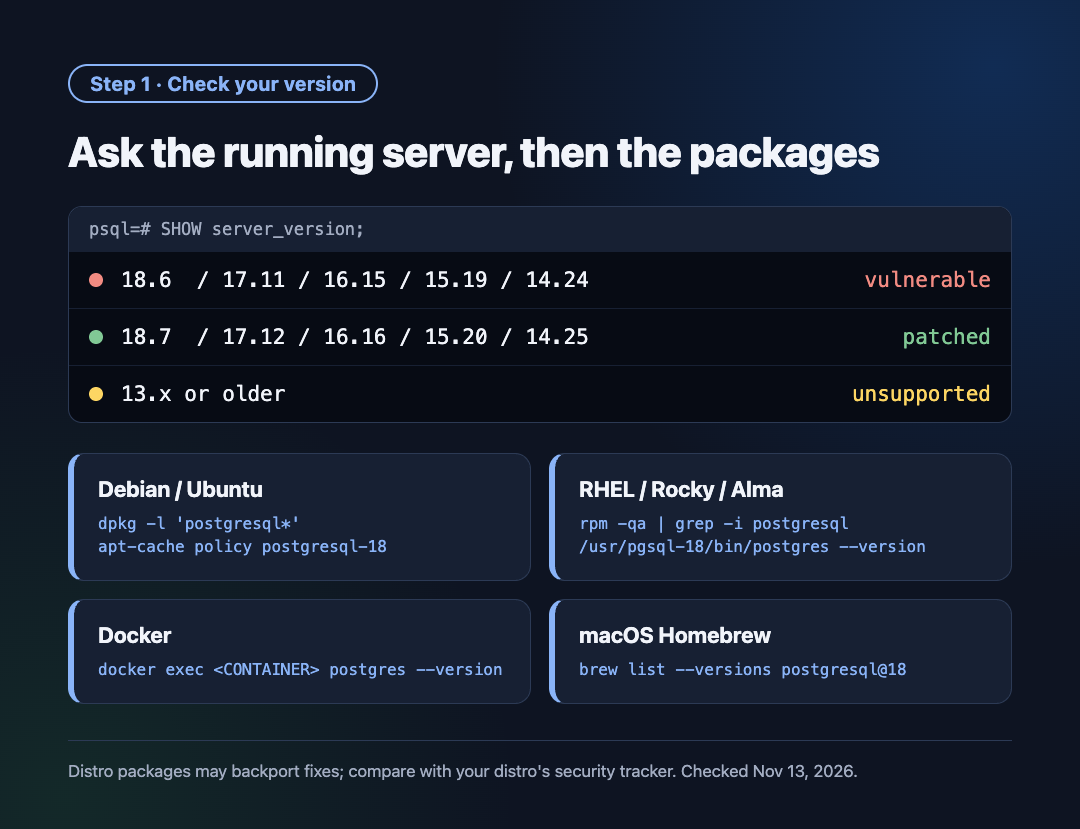
The installed package and the running server can differ. If you upgraded the package but never restarted, SHOW server_version still reports the old number, and the old binary is still running.
Who can create objects?
This decides how urgent the server-side bugs are. Run this as a superuser:
-- Non-superuser roles that can create objects in non-system schemas
SELECT n.nspname AS schema, r.rolname AS role
FROM pg_namespace n
CROSS JOIN pg_roles r
WHERE has_schema_privilege(r.oid, n.oid, 'CREATE')
  AND NOT r.rolsuper
  AND n.nspname NOT LIKE 'pg\_%'
  AND n.nspname <> 'information_schema'
ORDER BY 1, 2;

-- Installed procedural languages and risky extensions
SELECT lanname FROM pg_language WHERE lanname IN ('plperl', 'pltcl');
SELECT extname, extversion FROM pg_extension
WHERE extname IN ('dblink', 'pg_trgm', 'dict_int', 'postgres_fdw');
If the first query lists only roles you fully control, you are in the "patch this week" group. If it lists shared, tenant or read-mostly roles, patch today.
How to install the PostgreSQL 18.7 security update
The steps are the same for every branch. Swap 18 for 17, 16, 15 or 14.
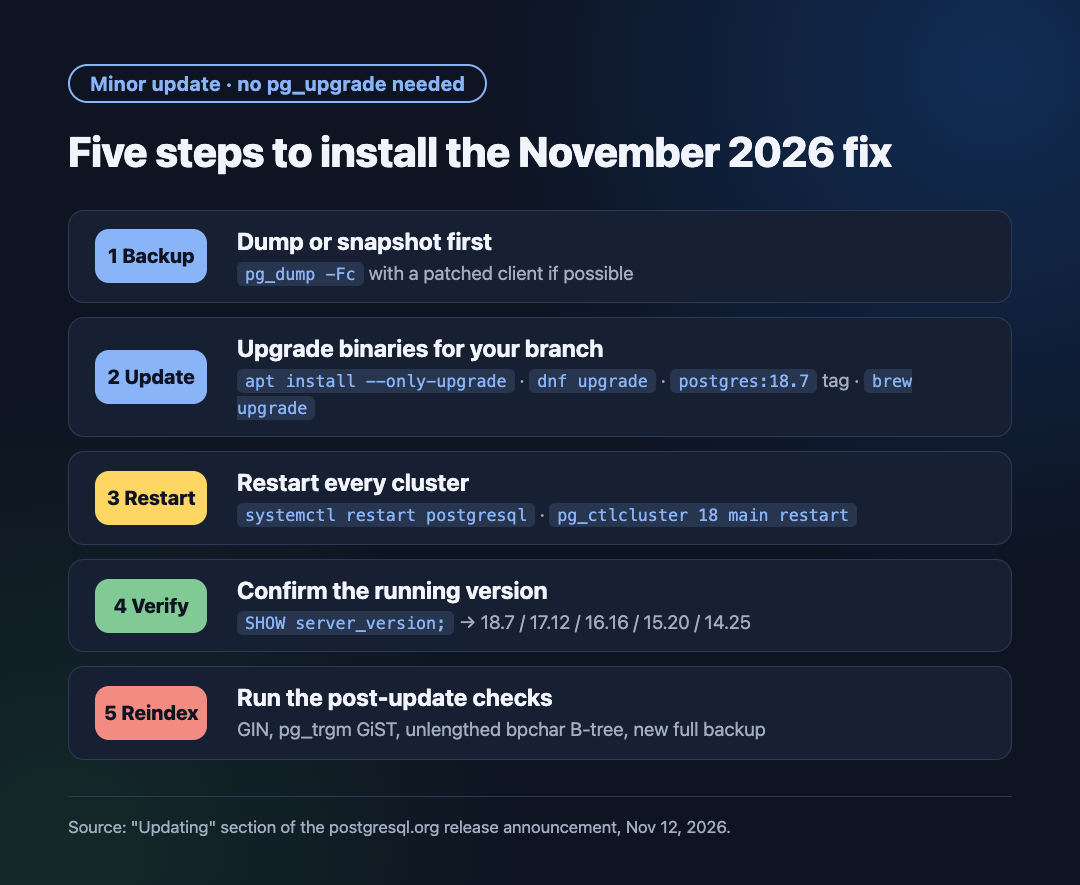
1. Take a backup first
## Logical backup of one database with the NEW client tools if possible
pg_dump -Fc -d <DB_NAME> -f /backup/<DB_NAME>-$(date +%F).dump
Run pg_dump from a patched client when you can. CVE-2026-116318 and CVE-2026-116330 are bugs in the dump itself, so an old pg_dump can write a dump that is unsafe to restore if someone planted a crafted object name.
2. Debian and Ubuntu (PGDG apt repository)
sudo apt update
sudo apt install --only-upgrade postgresql-18 postgresql-client-18
sudo systemctl restart postgresql
sudo -u postgres psql -c "SHOW server_version;"
If you use the distribution's own PostgreSQL packages instead of apt.postgresql.org, the fixed build arrives through the distribution's security channel. Check apt-cache policy and your distro's security tracker. Distros often backport fixes without changing the upstream number.
3. RHEL, Rocky, AlmaLinux (PGDG yum repository)
sudo dnf upgrade postgresql18-server postgresql18 postgresql18-contrib
sudo systemctl restart postgresql-18
sudo -u postgres psql -c "SHOW server_version;"
4. Docker and Docker Compose
The official postgres image published 18.7, 18.7-bookworm, 18.7-trixie and 18.7-alpine tags on November 12, 2026 (UTC). Pin the exact minor tag so you can see what you run:
## docker-compose.yml
services:
  db:
    image: postgres:18.7-bookworm
    volumes:
      - pgdata:/var/lib/postgresql/data
docker compose pull db
docker compose up -d db
docker compose exec db psql -U postgres -c "SHOW server_version;"The data volume stays as it is. A minor tag change on the same major version is safe. Changing the major (for example 17 to 18) is not; that needs pg_upgrade or dump and restore.
5. macOS (Homebrew) and Windows
brew update
brew upgrade postgresql@18
brew services restart postgresql@18
On Windows, download the new installer for your branch from the PostgreSQL download page (EDB builds), run it over the existing installation, and restart the postgresql-x64-18 service in Services.
6. Managed services
Amazon RDS, Aurora, Google Cloud SQL and Azure Database for PostgreSQL roll out minor versions on their own schedule. Check the console or CLI for the new minor version and schedule the minor upgrade in your maintenance window. If it is not listed yet, use the hardening steps below until it is.
After the update: reindex and backup checks
The release fixes several index and backup bugs. The fix stops new damage; it does not repair existing damage. The release announcement lists these steps. The partitioned-table and bpchar items come from the PostgreSQL 18 fixes, so check the release notes for your branch.
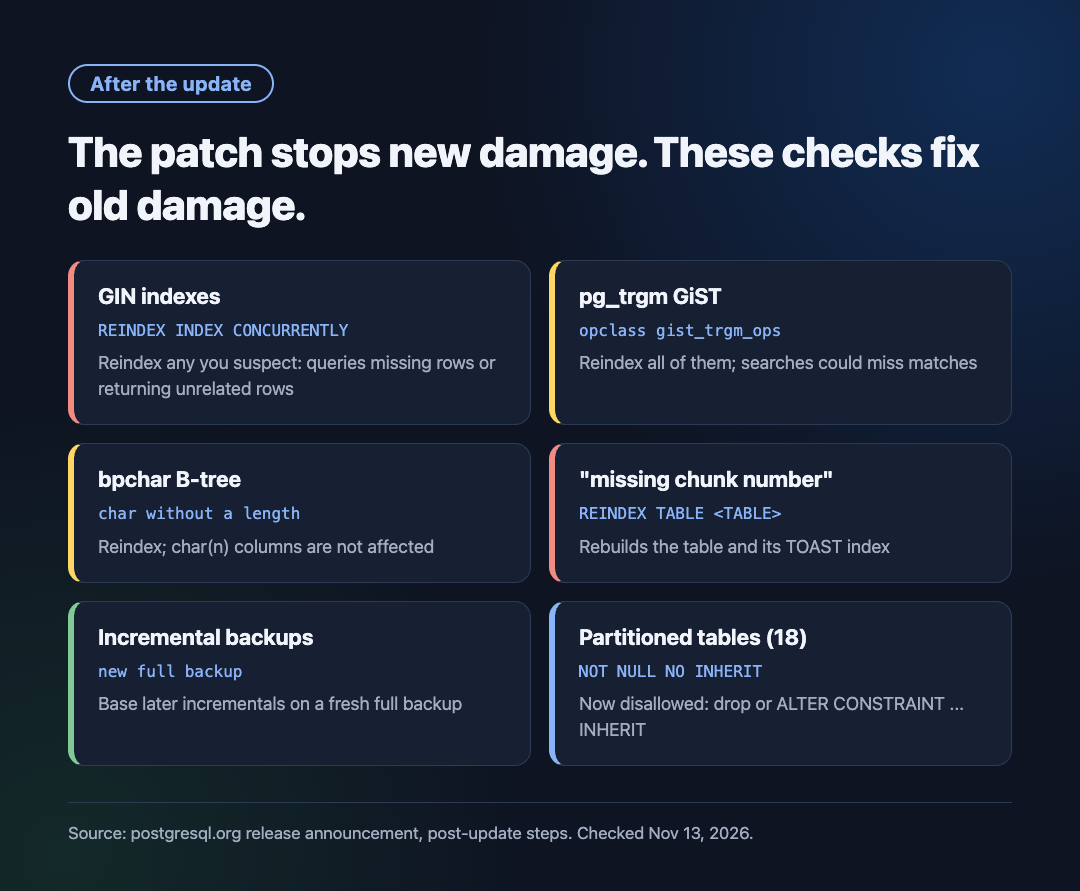
-- 1. pg_trgm GiST indexes (gist_trgm_ops): reindex these
SELECT DISTINCT i.indexrelid::regclass AS index_name
FROM pg_index i
JOIN pg_opclass oc ON oc.oid = ANY (i.indclass::oid[])
WHERE oc.opcname = 'gist_trgm_ops';

-- 2. B-tree indexes on bpchar columns declared without a length
SELECT DISTINCT i.indexrelid::regclass AS index_name
FROM pg_index i
JOIN pg_class c ON c.oid = i.indexrelid
JOIN pg_am am ON am.oid = c.relam
JOIN pg_attribute a ON a.attrelid = i.indrelid
     AND a.attnum = ANY (i.indkey::int2[])
WHERE am.amname = 'btree'
  AND a.atttypid = 'bpchar'::regtype
  AND a.atttypmod = -1;

-- 3. GIN indexes (reindex the ones you suspect: missing or odd rows)
SELECT i.indexrelid::regclass AS index_name
FROM pg_index i
JOIN pg_class c ON c.oid = i.indexrelid
JOIN pg_am am ON am.oid = c.relam
WHERE am.amname = 'gin';
Reindex without blocking writes:
REINDEX INDEX CONCURRENTLY <INDEX_NAME>;
-- Tables that throw "missing chunk number" errors:
REINDEX TABLE <TABLE_NAME>;
On PostgreSQL 18, also look for NOT NULL NO INHERIT constraints on partitioned tables, which are now disallowed:
SELECT conrelid::regclass, conname
FROM pg_constraint
WHERE contype = 'n' AND connoinherit
  AND conrelid IN (SELECT oid FROM pg_class WHERE relkind = 'p');
Drop the ones you do not need with ALTER TABLE ... DROP CONSTRAINT, or keep them with ALTER TABLE ... ALTER CONSTRAINT ... INHERIT (this fails if a partition has NULLs in that column).
If you use incremental backups (pg_basebackup --incremental, PostgreSQL 17 and later), take a new full backup and base later incrementals on it. Several fixed bugs could produce corrupt backups.
If you can't patch right away
There is no official workaround in the advisories I checked. These general hardening steps reduce exposure; they are not from the PostgreSQL advisories and they have side effects.
| Step | What it blocks | Side effect |
|---|---|---|
REVOKE CREATE ON SCHEMA public FROM PUBLIC; | Ordinary users creating objects in public | Apps that create tables at runtime fail |
REVOKE USAGE ON LANGUAGE plperl FROM PUBLIC; (same for pltcl) | Non-superusers writing PL/Perl or PL/Tcl functions | Existing users lose the ability to create new functions in that language |
Restrict pg_hba.conf and firewall to known hosts | Pre-auth cancel request bug from the internet | Remote tools from new IPs can't connect |
| Restore only dumps you created yourself | pg_restore and pg_dump injection bugs | None, but slows ad-hoc data sharing |
-- Grant back only where needed
GRANT CREATE ON SCHEMA public TO <TRUSTED_ROLE>;
GRANT USAGE ON LANGUAGE plperl TO <TRUSTED_ROLE>;
Since PostgreSQL 15, new databases already have CREATE on public revoked from PUBLIC. Databases upgraded from 14 or earlier often still allow it, so run the role query above.
Troubleshooting after the update
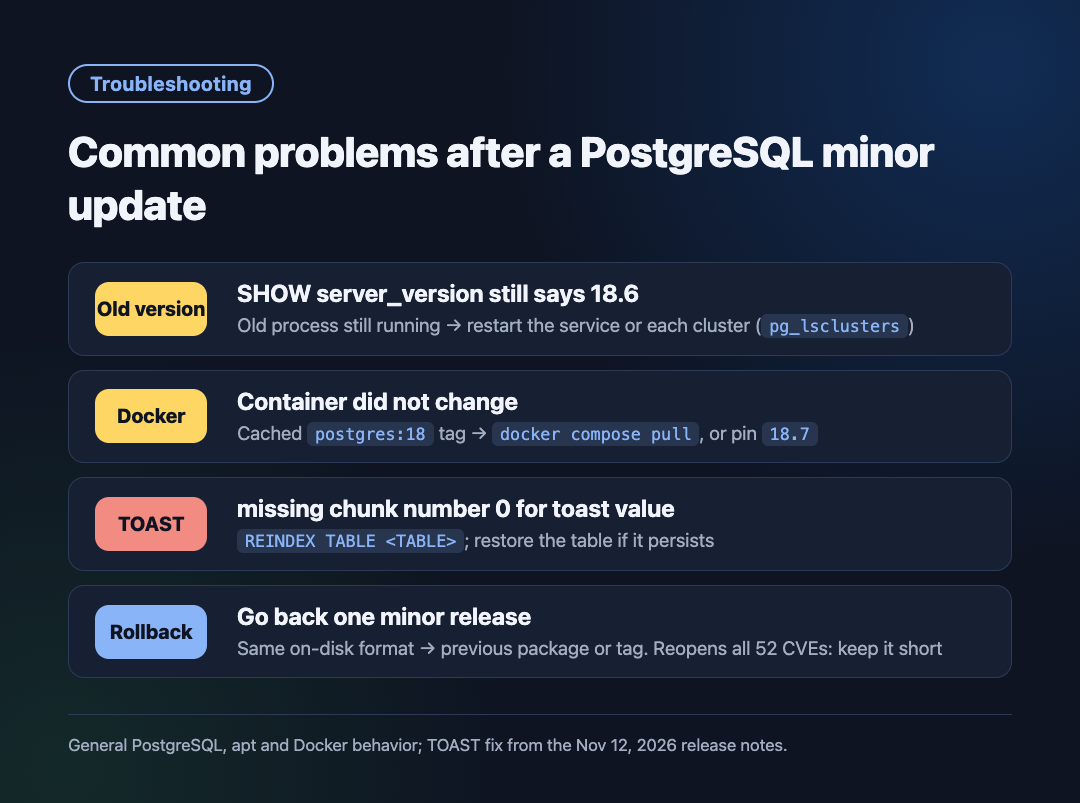
SHOW server_version still shows the old number. The package changed but the old process is running. Restart the service (systemctl restart postgresql or postgresql-18). On Debian and Ubuntu with several clusters, run pg_lsclusters and restart each one: sudo pg_ctlcluster 18 main restart.
The Docker container is still on the old version. A floating tag like postgres:18 was cached. Run docker compose pull before up -d, or pin postgres:18.7. Check with docker image ls postgres.
ERROR: missing chunk number 0 for toast value ... This matches the fixed REINDEX CONCURRENTLY on TOAST bug. Run REINDEX TABLE <TABLE_NAME>;, which also rebuilds the TOAST index. If the error persists, restore that table from backup.
psql scripts with several COPY ... FROM STDIN in one string started failing earlier. The CVE-2026-6464 fix in an earlier release broke this, and this release restores it. Update psql on the client side too.
Rolling back. Minor releases of the same major share the on-disk format, so you can reinstall the previous minor package (for example sudo apt install postgresql-18=<PREVIOUS_VERSION>) or go back to the previous Docker tag. That brings back all 52 vulnerabilities, so treat it as a short stop while you fix the real problem.
Patch now, this week, or plan a major upgrade?
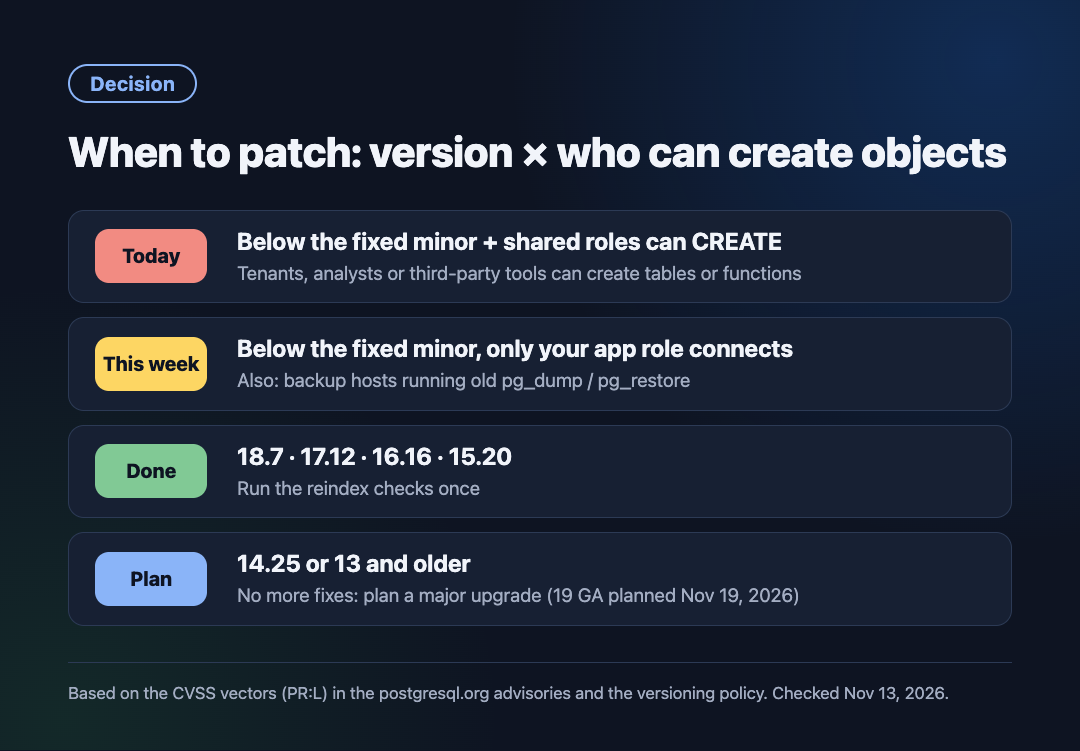
| Your setup | Action | Why |
|---|---|---|
14–18 below the fixed minor, shared roles can CREATE | Patch today | 32 CVSS 8.8 code execution bugs need only object creation |
| 14–18 below the fixed minor, only your app role connects | This week | Same bugs, but the attacker must first own a role |
Backup hosts with old pg_dump/pg_restore | This week | Client tool injection bugs |
| Already on 18.7, 17.12, 16.16, 15.20 | No patch needed | Run the reindex checks once |
| 14.25 | Plan a major upgrade | No fixes after this release |
| 13 or older | Upgrade now | Already unsupported, none of these fixes |
For PostgreSQL 14 users, the next step is a major upgrade. PostgreSQL 19 is at RC 2, with general availability planned for November 19, 2026. If you plan to jump straight to 19, my guide on how to test the PostgreSQL 19 upgrade walks through pg_upgrade --check on a copy. Note that RC 2 reverted JSON_ARRAY() and JSON_OBJECT() over arrays, composite and range types in expression indexes, generated columns and partition keys; drop or redefine any such objects you created while testing RC 1.
If the same host also runs a web front end, the Apache 2.4.71 security update from November 11 is worth doing in the same maintenance window.
FAQ
Do I need pg_upgrade to install PostgreSQL 18.7? No. 18.7, 17.12, 16.16, 15.20 and 14.25 are minor releases. Stop the server, update the binaries, start it again. pg_upgrade is only for moving between majors, such as 14 to 18.
Is the PostgreSQL 18.7 security update exploitable without a password? Most of the high-severity bugs need a logged-in role that can create objects. The one pre-authentication issue, CVE-2026-116322, is a spinlock leak scored 5.3 that affects availability rather than allowing code execution.
Does PostgreSQL 14 still get security fixes? No. 14.25, released November 12, 2026, is the final PostgreSQL 14 release. Future vulnerabilities will not be fixed in 14. Plan an upgrade to 17, 18 or 19.
Do I need to update pg_dump on my backup server? Yes. Several CVEs are in pg_dump, pg_restore, reindexdb and vacuumdb. Update the client package (postgresql-client-18 on Debian and Ubuntu) on every host that runs these tools.
How long does the reindex step take? It depends on index size. REINDEX INDEX CONCURRENTLY runs without blocking reads and writes but takes longer than a plain REINDEX. Run the queries above first so you only rebuild the indexes the release notes call out.
References
- PostgreSQL 18.7, 17.12, 16.16, 15.20, 14.25, and 19 RC 2 Released! — postgresql.org, checked Nov 13, 2026
- PostgreSQL security information (CVE list) — postgresql.org, checked Nov 13, 2026
- CVE-2026-6460 advisory — postgresql.org, checked Nov 13, 2026
- CVE-2026-116318 advisory (pg_dump) — postgresql.org, checked Nov 13, 2026
- PostgreSQL versioning policy — postgresql.org, checked Nov 13, 2026
- PostgreSQL release notes — postgresql.org, checked Nov 13, 2026
- Official postgres image tags — Docker Hub, checked Nov 13, 2026
- PostgreSQL security update fixes 52 vulnerabilities, ends support for PostgreSQL 14 — Help Net Security, Nov 13, 2026