The next Node.js security release lands on or shortly after Wednesday, November 11, 2026, with new 26.x, 24.x and 22.x builds that fix at least one HIGH-severity issue on every line. The details stay private until release day, so you can't patch yet. What you can do this week is list every Node runtime you run, move anything on an end-of-life line to a supported one, and get your update path ready so the patch goes out in hours instead of weeks.
Written November 5, 2026. Facts checked against the Node.js advance notice (published November 3, 2026), the Node.js release schedule on GitHub, and the official release index at nodejs.org/dist on November 5, 2026. The commands are standard Node.js, version-manager, Docker and GitHub Actions commands; they were not run on a test machine for this post, so check the output on your own system.
What the November 2026 Node.js security release notice says
The Node.js project posts an advance notice about a week before each security release. The November 11, 2026 notice is short, and that is on purpose: the issue list stays private until fixed builds ship.
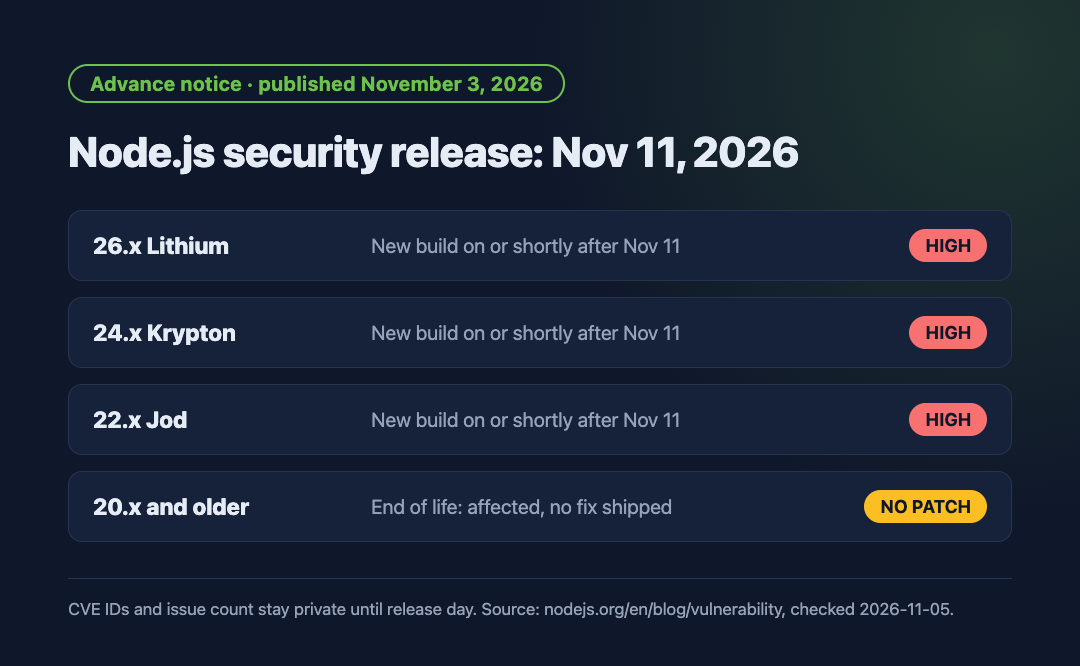
| Item | What the notice says |
|---|---|
| Release date | On or shortly after Wednesday, November 11, 2026 |
| Lines that get new builds | 26.x, 24.x, 22.x |
| Highest severity | HIGH on each of the three lines |
| CVE IDs and count | Not published yet |
| End-of-life versions | "Always affected" when a security release occurs |
Two points matter for planning. First, the HIGH rating applies to all three supported lines, so no supported version is off the hook. Second, end-of-life lines such as 20.x and 18.x get no fix at all. If you still run them, this release is your deadline to move.
How it compares with the October release
The last Node.js security release, on October 21, 2026, fixed 10 CVEs: four HIGH (including the Brotli decoder bug CVE-2026-111497), three MEDIUM and three LOW. It shipped as v26.12.1, v24.22.1 and v22.23.4, with dependency updates to c-ares, Undici, OpenSSL and others. That gives a rough idea of what a "HIGH" release looks like, but nobody outside the security team knows the November list yet, so don't guess at the bugs. If you missed the October patch, read the CVE-2026-111497 Brotli patch guide first, because that one is already public.
Which Node.js versions are supported right now
This is the state of the release index on November 5, 2026. The November builds will have higher patch numbers than the "Latest" column.
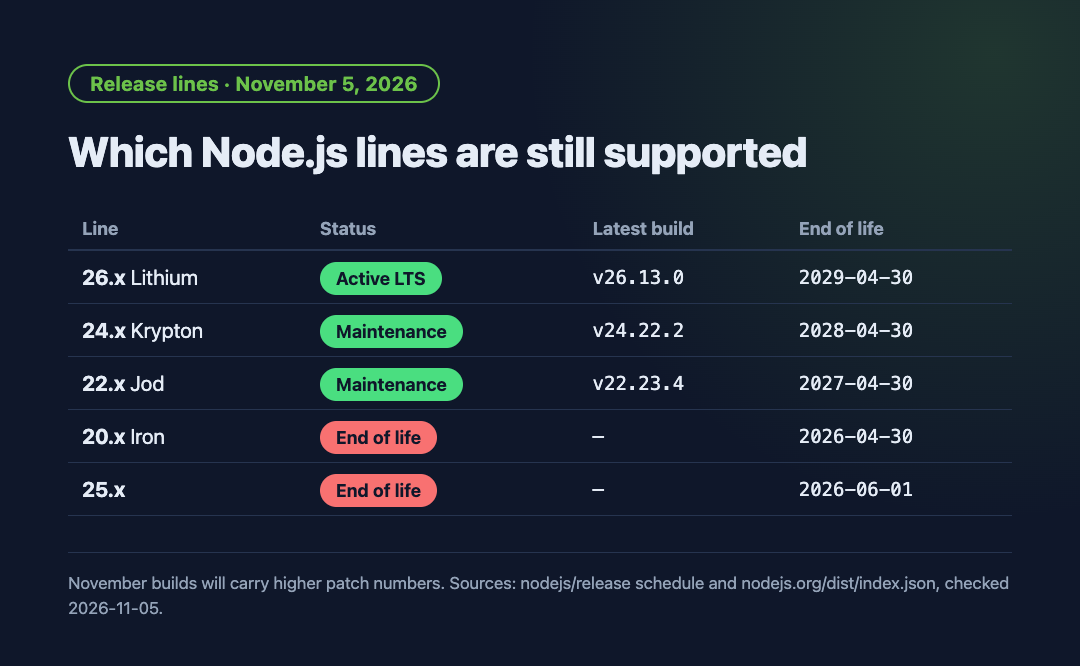
| Line | Status | Latest (date) | End of life |
|---|---|---|---|
| 26.x Lithium | Active LTS | v26.13.0 (Oct 28) | 2029-04-30 |
| 24.x Krypton | Maintenance LTS | v24.22.2 (Oct 27) | 2028-04-30 |
| 22.x Jod | Maintenance LTS | v22.23.4 (Oct 20) | 2027-04-30 |
| 20.x Iron | End of life | — | 2026-04-30 |
| 25.x | End of life | — | 2026-06-01 |
Node 27 exists only as an alpha (October 29, 2026) and is not a production target. If you are on 20.x or 25.x, the realistic move is 24.x or 26.x. The Node.js 26 LTS upgrade checklist covers the breaking changes from 24 to 26.
How to check your Node.js version everywhere
Most teams have more Node runtimes than they think: laptops, CI runners, Docker base images, serverless functions and the odd cron box. Find all of them before release day.
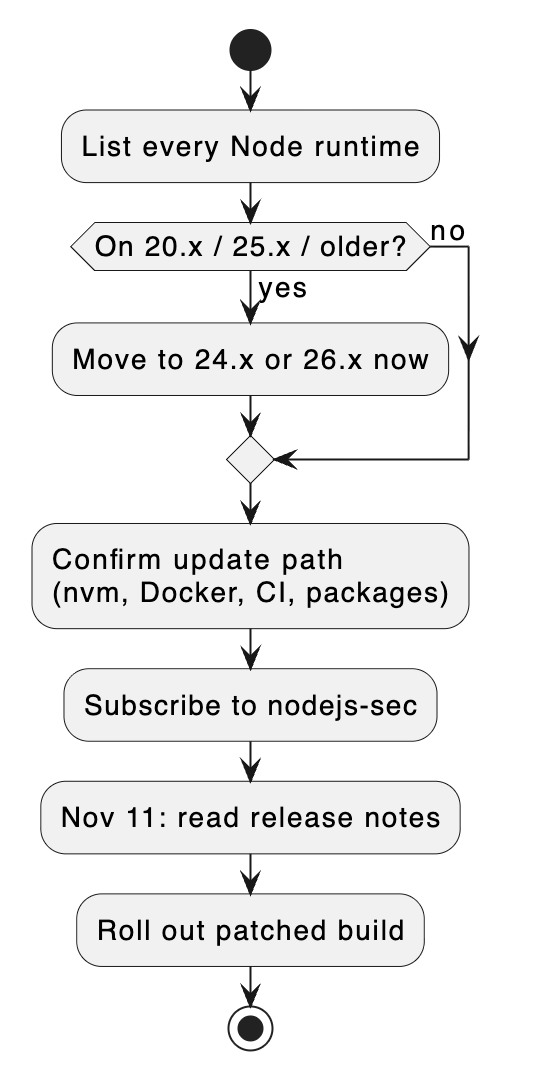
View PlantUML source
@startuml
skinparam shadowing false
skinparam defaultFontSize 14
start
:List every Node runtime;
if (On 20.x / 25.x / older?) then (yes)
  :Move to 24.x or 26.x now;
else (no)
endif
:Confirm update path\n(nvm, Docker, CI, packages);
:Subscribe to nodejs-sec;
:Nov 11: read release notes;
:Roll out patched build;
stop
@enduml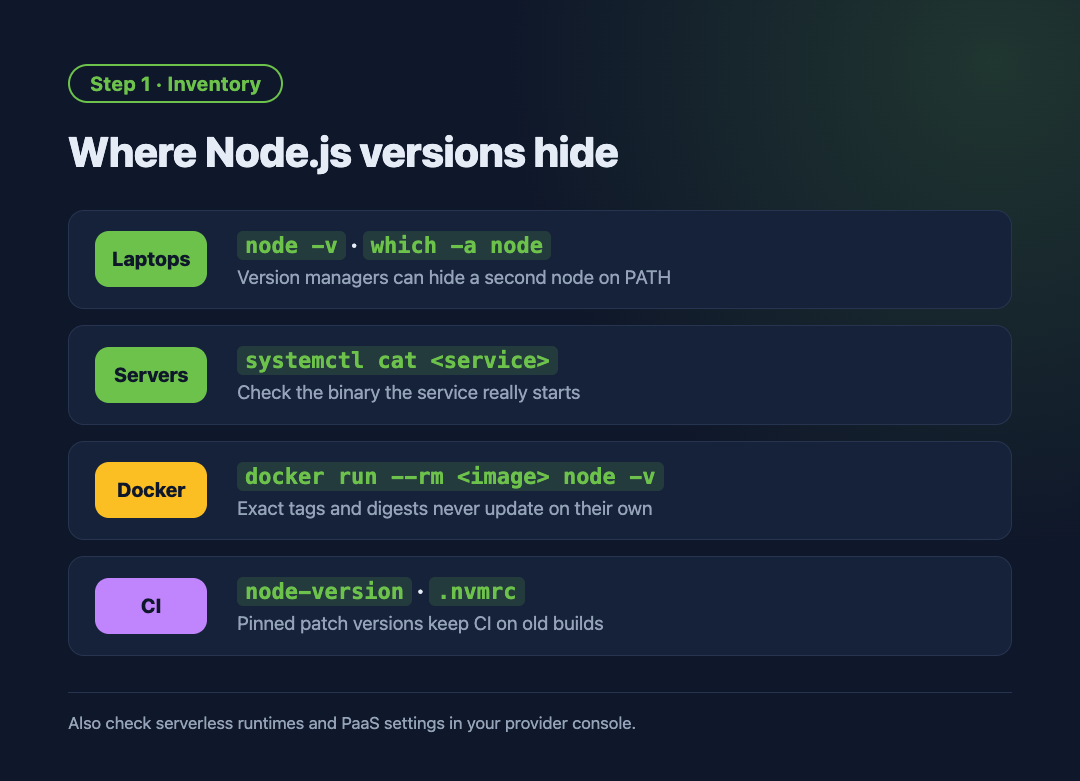
Local machines and servers
node -v
npm -v
which -a node
which -a node shows every node on your PATH. A Homebrew or distro build can hide behind a version manager, and the one that runs your service may not be the one you see in your shell.
On a Linux server that runs Node through systemd, check what the service actually starts:
systemctl cat <YOUR_SERVICE> | grep -i exec
/usr/bin/node -v
Docker images
Check the version inside the image you deploy, not the one on your laptop:
docker run --rm <YOUR_IMAGE>:<TAG> node -v
grep -rn "FROM node" --include="Dockerfile*" .
If a Dockerfile pins an exact patch tag or a digest, it will not pick up the November fix until someone changes it. Floating tags like node:26-bookworm-slim get the fix once the official image rebuilds, but only after you pull and rebuild your own image.
CI and GitHub Actions
grep -rn "node-version" .github/workflows/
cat .nvmrc .node-version 2>/dev/null
grep -n '"node"' package.json
An .nvmrc with 26.12.1 pins CI to an old build. A value like 26 or lts/* resolves to the newest release, as long as the runner cache does not hold an older copy.
Check against known vulnerabilities
The Node.js project maintains is-my-node-vulnerable, which compares the running version with the published security database:
npx is-my-node-vulnerableIt only knows about disclosed issues. Before November 11 it can flag a missing October patch, but it can't see the November issues yet. Run it again after release day.
Prepare your update path before November 11
The goal is that on release day, updating Node is one small change per environment, already tested.
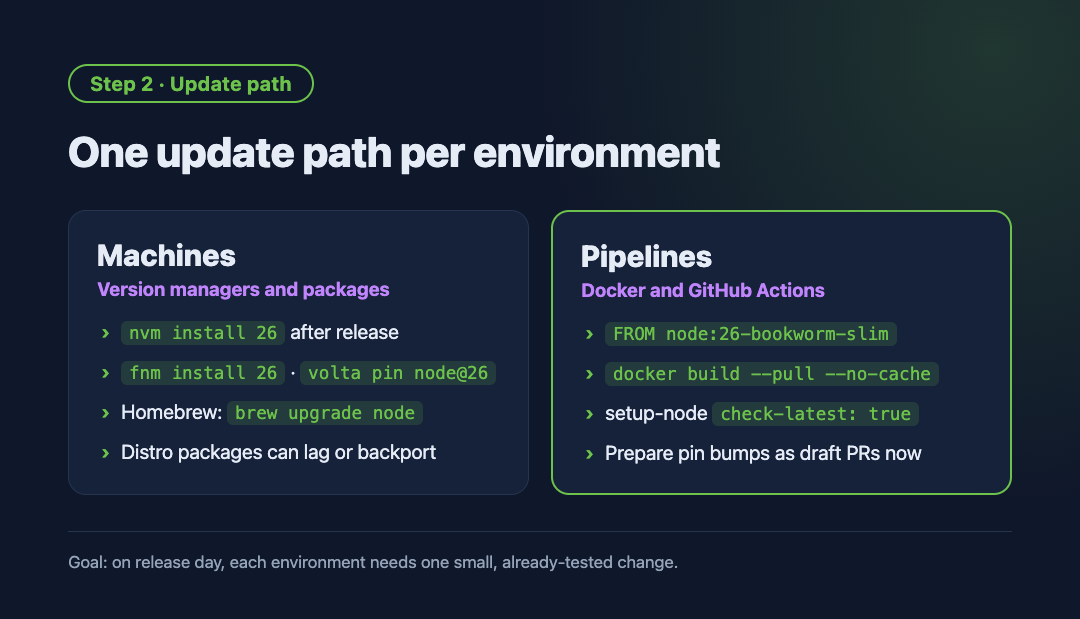
Version managers (nvm, fnm, Volta)
With nvm:
nvm install 26 --reinstall-packages-from=current
nvm alias default 26
With fnm:
fnm install 26
fnm default 26
With Volta (pinned per project):
volta pin node@26nvm install 26 installs the newest 26.x available at that moment. Run it again after the release lands.
Docker
Use a floating minor tag, and rebuild without cache on release day so the new base image is pulled:
FROM node:26-bookworm-slimdocker pull node:26-bookworm-slim
docker build --pull --no-cache -t <YOUR_IMAGE>:<TAG> .
docker run --rm <YOUR_IMAGE>:<TAG> node -vIf your policy requires exact pins, prepare the pull request now and only change the version or digest once the patched tag exists. If your images ship many small changes, it also helps to have the basics in order, like Docker log rotation limits, so a rebuild-and-redeploy day stays boring.
GitHub Actions
- uses: actions/setup-node@v4
  with:
    node-version: 26
    check-latest: true
check-latest: true asks setup-node to look for the newest matching release instead of using a cached version on the runner. Use the setup-node major you already run; the inputs are the same.
OS packages and installers
| Install type | How the fix arrives | What to do |
|---|---|---|
| Official installer (macOS, Windows) | New .pkg / .msi on nodejs.org | Download and install the new build |
Homebrew (node, node@24, node@22) | Formula update after release | brew update && brew upgrade node |
| NodeSource or distro packages | Package rebuild, can lag | Watch the repo; apt update && apt install nodejs |
| Serverless or PaaS runtimes | Provider rolls the runtime | Check the provider's runtime notes |
Distro packages (Debian, Ubuntu, RHEL) may backport fixes under their own version numbers, so compare against the distro security tracker, not the upstream version alone.
Subscribe so you hear about it first
Join the announcement-only nodejs-sec mailing list or watch the Node.js vulnerability blog. The fixed version numbers and CVE list appear there on release day.
What to do on November 11 (Node.js security release day)
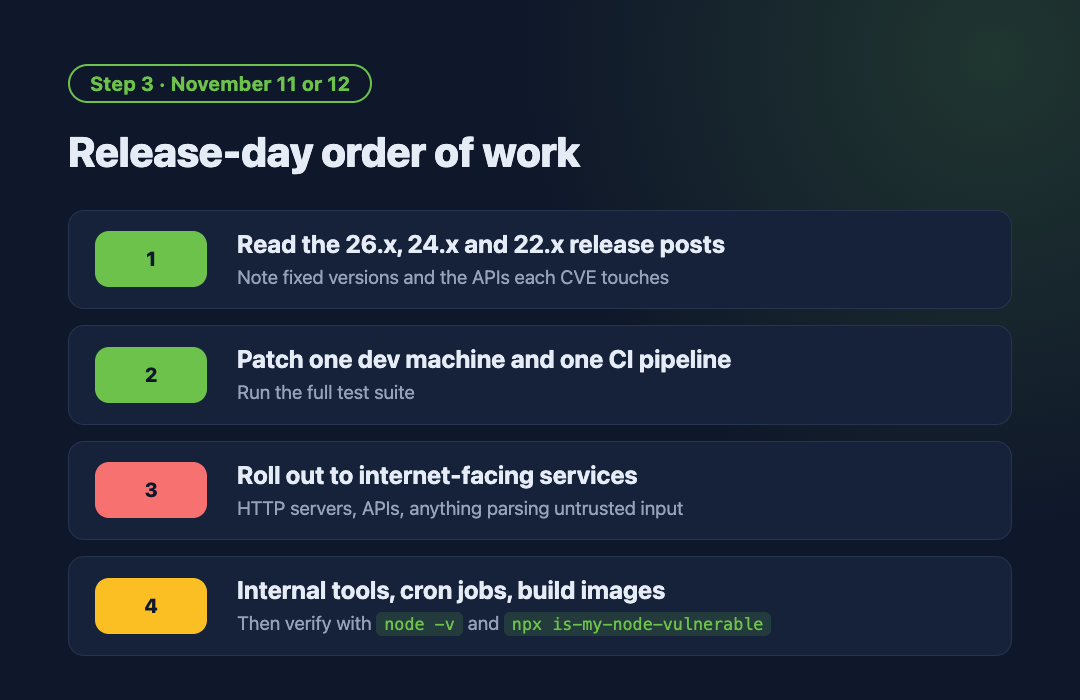
- Read the release posts for 26.x, 24.x and 22.x. Note the fixed versions and which CVEs touch the APIs you use (HTTP, TLS, DNS, zlib, the permission model and so on).
- Update a development machine and one CI pipeline first. Run your test suite.
- Roll out to internet-facing services next: HTTP servers, API gateways, anything that parses untrusted input.
- Then internal tools, cron jobs and build images.
- Verify every environment with
node -vand, once the database is updated,npx is-my-node-vulnerable.
The release can slip a little ("on or shortly after"), so plan for November 11 or 12 and check the blog rather than assuming a time.
If something breaks after the Node.js update
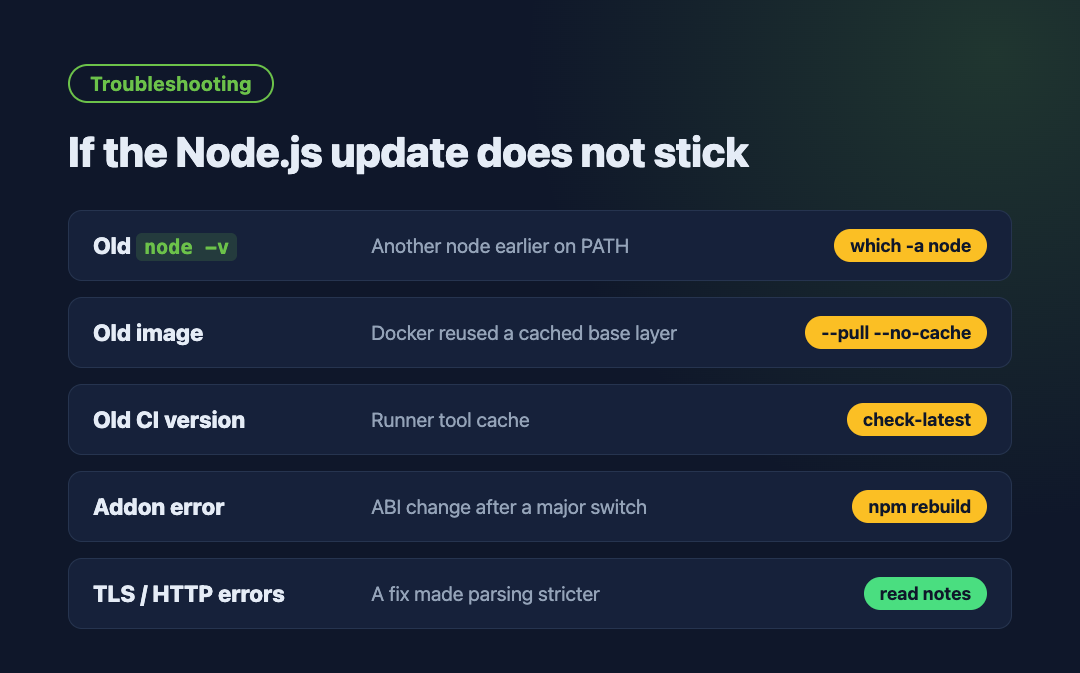
| Symptom | Likely cause | Fix |
|---|---|---|
node -v still shows the old build | Another node earlier on PATH | which -a node, remove or reorder |
| Image still runs the old version | Docker reused a cached base layer | docker build --pull --no-cache |
| CI uses the old version | Runner cache | check-latest: true or clear the cache |
| Native addon fails to load | ABI mismatch after a major switch | npm rebuild or reinstall node_modules |
| New TLS or HTTP errors | A security fix made parsing stricter | Read the release notes; fix the client or input |
Patch releases inside one line keep the same native ABI, so npm rebuild is usually only needed when you also move from 20.x or 22.x to a newer major. If npm itself changes when you jump lines, see the guide on npm 12 blocked install scripts; the Node 26 line still bundles npm 11, but teams that upgrade npm separately hit that change.
FAQ
Can I patch the November 2026 Node.js issues before November 11? No. The fixes and CVE details are not public until the release. You can only move off end-of-life lines and prepare your update path now.
Is Node.js 20 affected by the November 11 security release? Node.js 20 reached end of life on April 30, 2026. The Node.js project says end-of-life versions are always affected when a security release occurs, and it does not ship fixes for them. Move to 24.x or 26.x.
Does v26.13.0 include the October security fixes? Releases within a line are cumulative, and v26.13.0 (October 28) came after the v26.12.1 security release (October 21). It does not include the November fixes, which are not out yet.
Which line should I choose if I am upgrading anyway? 26.x is the Active LTS line and is supported until April 30, 2029. 24.x is in maintenance until April 30, 2028. New projects should target 26.x.
How do I know when the patched builds are out? Watch the Node.js vulnerability blog or the nodejs-sec mailing list. The release posts list the exact fixed versions for each line.
Summary
The November 2026 Node.js security release fixes HIGH-severity issues on 26.x, 24.x and 22.x, and it lands on or shortly after November 11. Use this week to find every Node runtime, retire 20.x and other end-of-life lines, and make the update a one-line change in each environment. On release day, read the notes, patch internet-facing services first, and verify with node -v.
References
- Wednesday, November 11, 2026 Security Releases — Node.js blog (checked 2026-11-05)
- Wednesday, October 21, 2026 Security Releases — Node.js blog (checked 2026-11-05)
- Node.js release schedule — nodejs/release on GitHub (checked 2026-11-05)
- Node.js release index — nodejs.org/dist/index.json (checked 2026-11-05)
- Node.js security policy (checked 2026-11-05)
- is-my-node-vulnerable — nodejs on GitHub (checked 2026-11-05)
- actions/setup-node — GitHub (checked 2026-11-05)
1 thought on “Node.js Security Release Nov 11, 2026: How to Prepare Now”