Flowise CVE-2026-119978 lets a signed-in user run OS commands on the server, and no official patch is coming because the project is archived. Check whether ALLOW_BUILTIN_DEP is true, save any evidence, then turn it off and take Flowise off the public internet. After that, plan your move to a maintained fork or another tool.
Written 2026-11-01. Facts come from the CVE record, VulnCheck's advisory, the Flowise announcement and the Flowise 3.1.4 source code, checked that day. I did not install Flowise, run these commands or reproduce the flaw. The mitigation steps are my reading of that source, because neither the CVE record nor the advisory lists an official fix.
What CVE-2026-119978 changes for Flowise users
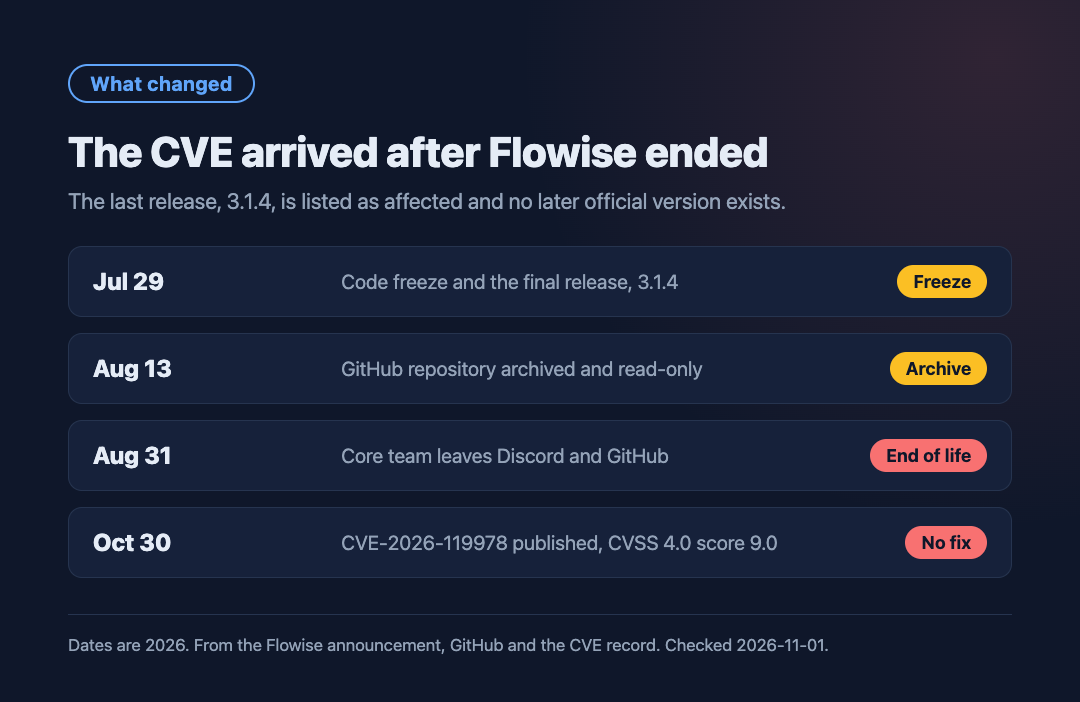
VulnCheck published the CVE record on October 30, 2026. It covers every Flowise release through 3.1.4, which is also the last release.
| Item | Detail |
|---|---|
| Affected | Flowise through 3.1.4 |
| Fixed version | None listed |
| Score | 9.0 Critical (CVSS 4.0), 8.5 High (CVSS 3.1) |
| Who can attack | A signed-in user who can reach /api/v1/node-custom-function |
| Required setting | ALLOW_BUILTIN_DEP=true |
| Result | OS commands run as the Flowise process user |
Flowise runs custom JavaScript inside a sandbox, a restricted environment meant to keep that code away from the server. With the flag on, VulnCheck's advisory says two allowed packages, langchain and mammoth, can be combined to escape it. The source shows why the flag matters: it adds about 60 packages to the list that custom code may load.
Why no Flowise patch is coming
The maintainers froze the code on July 29, 2026, and wound the project down. GitHub shows the repository as archived on August 13. The sunset page had planned August 10. The core team left on August 31.
The code stays available under Apache 2.0, and the team tells users to fork it. The CVE record carries the tag unsupported-when-assigned. Pulling flowiseai/flowise:latest again won't help, because no newer official release exists.
Is it being exploited?
I found no report of attacks as of November 1. The CVE record has no CISA data block, and CVE Brief's October 31 list doesn't mark it as a known exploited flaw. The public advisory does describe the method, so don't treat that as lasting comfort.
Don't confuse this with CVE-2026-73483, a different escape through Puppeteer that was fixed in 3.1.3. VulnCheck links to that advisory as related, but its patched version doesn't apply here.
Check your Flowise version and settings
Start with the version. This endpoint needs no login in 3.1.4:
curl -s http://localhost:3000/api/v1/version
npm ls -g flowise --depth=0  # npm installs
Then read the flag. For the official Docker Compose setup, run this from the docker folder:
docker compose exec flowise sh -c 'env | grep -E "^(ALLOW_BUILTIN_DEP|TOOL_FUNCTION_EXTERNAL_DEP)="'For an npm install on Linux, read the variables from the running process:
PID=$(pgrep -f 'flowise start' | head -1)
sudo tr '\0' '\n' < "/proc/$PID/environ" | grep -E '^(ALLOW_BUILTIN_DEP|TOOL_FUNCTION_EXTERNAL_DEP)='
In the 3.1.4 source, only the exact value true turns the flag on, so an empty or missing value counts as off. The Flowise .env.example shows it commented out as false.
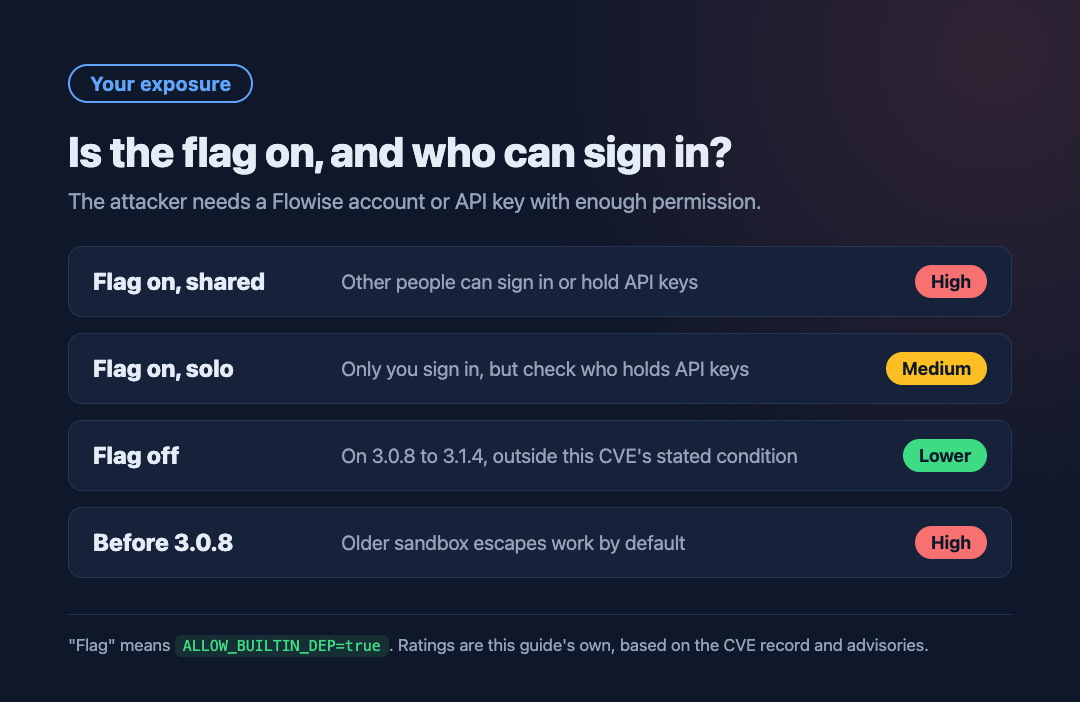
| What you find | Your exposure | Do this |
|---|---|---|
Flag is true, others can sign in | High | Every step below, starting with evidence |
Flag is true, only you sign in | Medium | Same steps, and review who holds API keys |
Flag is off, langchain and mammoth in TOOL_FUNCTION_EXTERNAL_DEP | Likely the same | Remove them, then treat it as flag on |
| Flag is off, on 3.0.8 to 3.1.4 | Lower | Limit access and plan your exit |
| Version older than 3.0.8 | High | Older escapes work by default, so move to 3.1.4 first |
The third row is my own inference. The source adds TOOL_FUNCTION_EXTERNAL_DEP to the same allowed list, so those two packages would load with the flag off. The advisory doesn't discuss that setup.
Save evidence before you restart Flowise
Do this first. Changing an environment variable makes Compose recreate the container, and that discards the changes inside the old one.
docker diff lists files changed since the container was created. The advisory says the attack writes a file into the mammoth package, so look there:
CID=$(docker compose ps -q flowise)
docker diff "$CID" > flowise-diff-$(date +%F).txt
grep -i mammoth flowise-diff-$(date +%F).txt
An A or C line under mammoth is a bad sign. For an npm install, list files newer than the package's own package.json. This check is rougher and can show false matches:
M=$(find "$(npm root -g)/flowise" -type d -name mammoth -not -path '*/@types/*' | head -1)
find "$M" -type f -newer "$M/package.json"
Next, search your reverse proxy logs for the endpoint:
sudo zgrep -h 'node-custom-function' /var/log/nginx/access.log* | tail -n 50Your editors can call this endpoint during normal work, so a match proves nothing by itself. Look for unknown IP addresses, odd hours and API keys nobody recognizes. Short log retention limits how far back you can look, as the Docker log rotation guide explains.
Three limits apply:
- No official list of attack traces exists, so a clean result proves nothing
docker diffdoesn't cover mounted volumes such as~/.flowise- An attacker with shell access can delete the file they wrote
If you find a suspicious file, stop the container with docker stop and keep it. Don't run docker compose down, which removes it. Rebuild on a clean host and rotate everything listed further down.
Turn off ALLOW_BUILTIN_DEP in Flowise
Set the flag in docker/.env, or wherever your service reads its environment:
ALLOW_BUILTIN_DEP=falseApply it and confirm:
docker compose up -d
docker compose exec flowise printenv ALLOW_BUILTIN_DEP
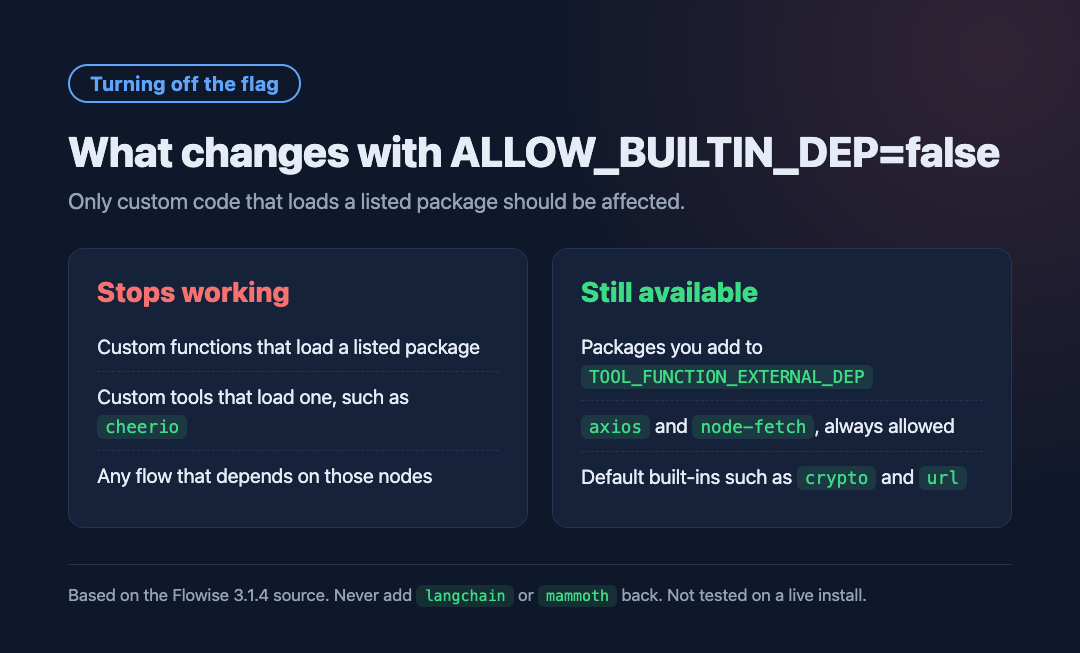
Custom functions that load a listed package will now fail. Add back only what you use, and leave out langchain and mammoth:
TOOL_FUNCTION_EXTERNAL_DEP=cheerio,lodashThose two package names are examples. Each one you add widens what custom code can reach, so review your Custom Function and Custom Tool nodes before you add anything.
This closes the path in this CVE, and other problems remain. Flowise's advisories page lists High-severity authorization flaws published on August 31 and September 10, after the final release, and doesn't show a patched version in the list view.
Take Flowise off the public internet
Published Docker ports can skip your host firewall. Docker's documentation warns that traffic reaches the container before ufw rules apply. Bind the port to loopback in docker-compose.yml:
    ports:
        - '127.0.0.1:${PORT}:${PORT}'
Reach the editor through a VPN or an SSH tunnel:
ssh -L 3000:127.0.0.1:3000 user@<YOUR_SERVER>If a public chatbot depends on this server, keep the reverse proxy and block the endpoint there:
location = /api/v1/node-custom-function {
    return 403;
}
Treat that block as a partial measure. It stops one route, and I didn't confirm whether someone who can edit flows could reach the same sandbox by running a flow. In the 3.1.4 source, this route requires chatflow or agentflow create or update permission, so also remove accounts and API keys that don't need to edit.
Rotate secrets if the flag was on
Rotate if the flag was on and anyone you don't fully trust could sign in or use an API key. Code running as the Flowise process could read its environment and files.
- LLM and other API keys saved as Flowise credentials
- Database passwords and any secrets in the Flowise
.env - Flowise API keys and user passwords
- Vector database and cloud tokens used by your flows
Create the new credential, update Flowise, revoke the old one, then read the provider's usage log. The Claude Code extension backdoor guide covers the same rotation habit after a harsher incident.
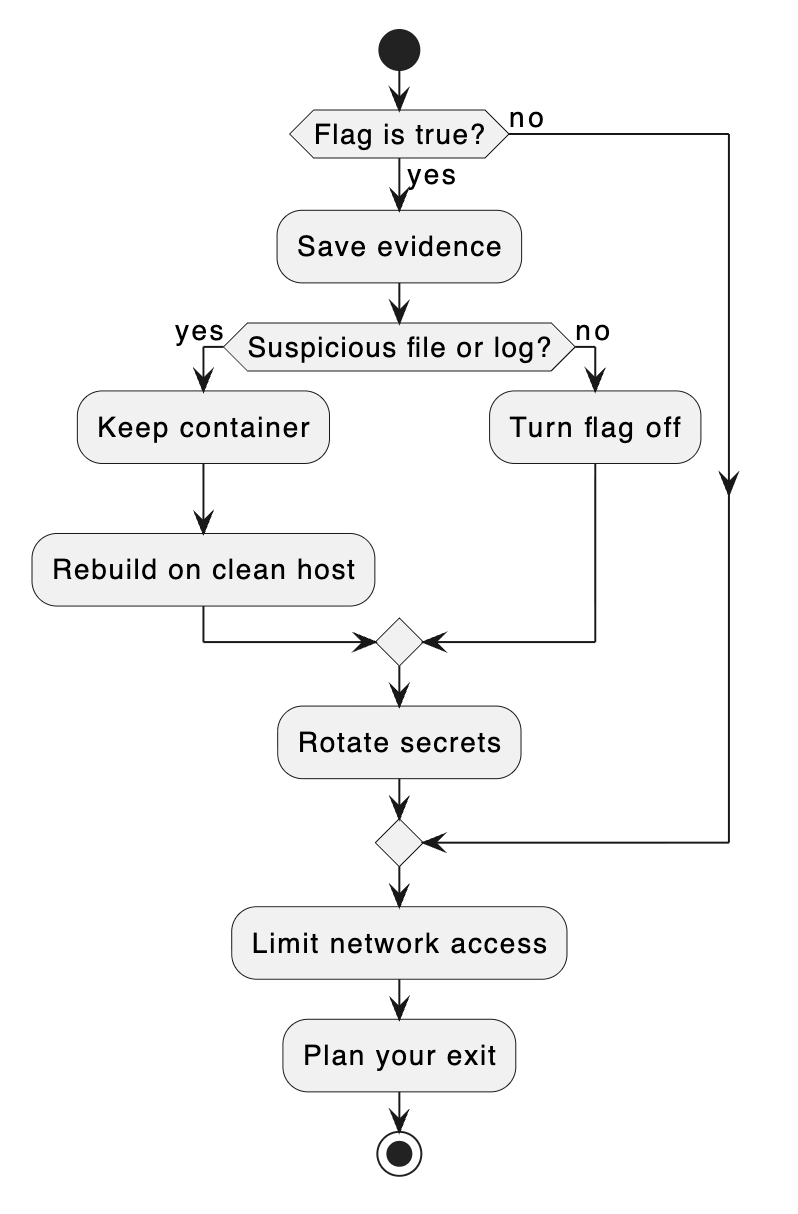
View PlantUML source
@startuml
skinparam shadowing false
skinparam defaultFontSize 14
start
if (Flag is true?) then (yes)
  :Save evidence;
  if (Suspicious file or log?) then (yes)
    :Keep container;
    :Rebuild on clean host;
  else (no)
    :Turn flag off;
  endif
  :Rotate secrets;
else (no)
endif
:Limit network access;
:Plan your exit;
stop
@enduml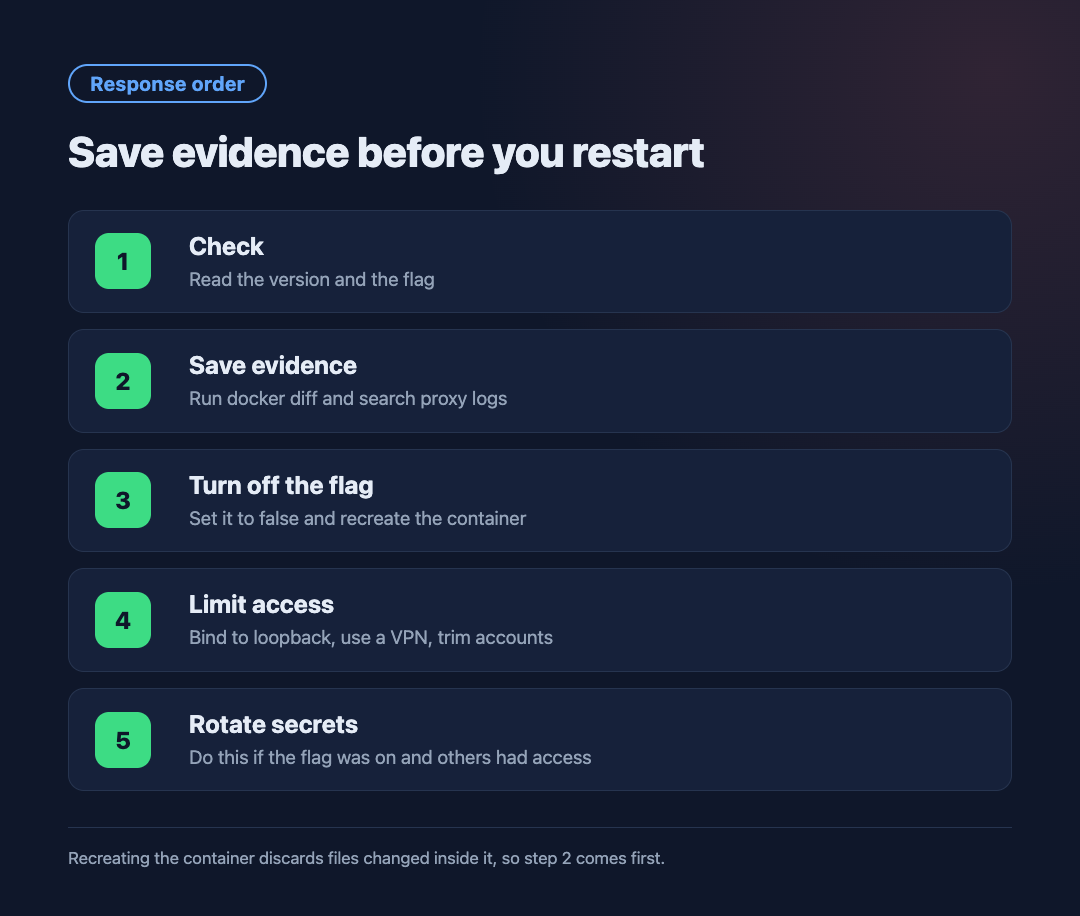
Plan your exit from Flowise
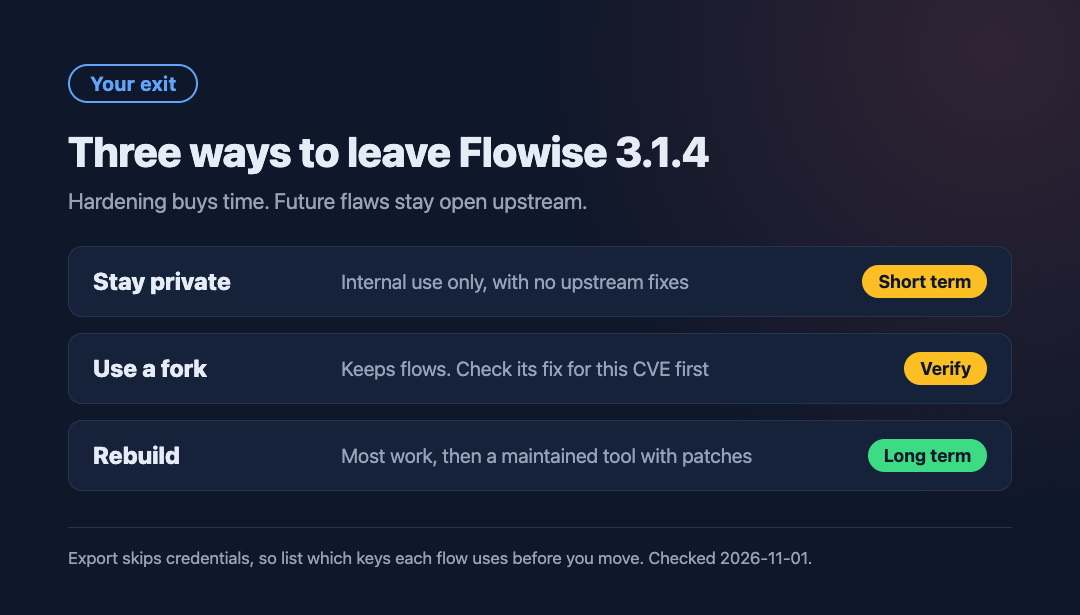
Hardening buys time. Every future flaw in 3.1.4 stays unpatched upstream, so set a date to leave.
| Option | Good for | Watch out for |
|---|---|---|
| Stay on 3.1.4, private | Internal tools with few users | No upstream fixes |
| Keelflow fork | Keeping existing flows | Young, third-party project |
| Your own fork | Teams that can maintain Node.js code | You own every security fix |
| Rebuild elsewhere | Flows you plan to keep for years | Manual rebuild |
Keelflow 3.2.0 says it starts from Flowise 3.1.4 and moves vm2 to 3.12.2 to close sandbox escapes. Those are the project's own claims. Its notes for 3.2.0 and 3.2.1 don't mention CVE-2026-119978, so ask the project or test it before you rely on the fork.
If you rebuild, a third-party guide calls Langflow the closest visual match, though it can't run Flowise flows directly. n8n is another self-hosted option, and it needs regular patching too, as the n8n security update guide shows.
Back up your Flowise flows
Open Settings, then Export, and tick what you need. The 3.1.4 export covers chatflows, agentflows, assistants, document stores, tools, variables and chat history. Credentials aren't in the export, so record which keys each flow uses and enter them again after import.
Also copy the data folder, which holds the SQLite database by default. The docs give the encryption key a separate default location (SECRETKEY_PATH), so back that up too. Store both as you would a password file:
tar czf flowise-backup-$(date +%F).tgz -C "$HOME" .flowise
chmod 600 flowise-backup-$(date +%F).tgz
If something goes wrong with the Flowise fix
| Symptom | Likely cause | Fix |
|---|---|---|
| Custom function reports a missing module | Flag is off and the package isn't listed | Add that one package to TOOL_FUNCTION_EXTERNAL_DEP |
printenv prints nothing | Variable isn't set or Compose doesn't pass it | That counts as off. Check environment: if you expected a value |
no configuration file provided | Wrong folder | Run Compose from the folder with docker-compose.yml |
| Version endpoint returns nothing | Different port, or Flowise isn't running | Check PORT in .env, then docker compose ps |
| Editor stops loading after the port change | Now bound to loopback | Use the SSH tunnel and open http://localhost:3000 |
| Imported flow fails on its first run | Credentials weren't exported | Create them again and reselect them in each node |
FAQ
Does updating to Flowise 3.1.4 fix CVE-2026-119978?
No. The record lists 3.1.4 as affected, and no official later version exists. Moving up from an older release is still worth doing, because 3.1.4 includes fixes for earlier flaws.
Am I safe if ALLOW_BUILTIN_DEP was never set?
You're outside the condition this CVE describes, as long as you also didn't list langchain and mammoth yourself. The other published flaws in 3.1.4 still apply, so keep access limited.
Does an E2B API key protect me?
I can't confirm that. The 3.1.4 source sends sandboxed code to E2B, a hosted sandbox service, when E2B_APIKEY is set, but I didn't trace this endpoint through that path. The stock Compose file doesn't pass the variable either. Turn the flag off regardless.
Does the official Docker image run as root?
The 3.1.4 Dockerfile ends with USER node, while the older advisory says root. Older images may differ, so check yours with docker compose exec flowise id. A non-root user still reaches Flowise's data and environment.
Is Flowise Cloud affected?
I couldn't confirm that. The announcement covers the open-source project and doesn't state the Cloud service's status. Move your flows out and contact Flowise if you still depend on it.
References
All checked 2026-11-01.
- CVE-2026-119978 record
- VulnCheck advisory for CVE-2026-119978
- The Future of Flowise, discussion #6727
- Flowise sunset page
- Flowise repository and releases
- Flowise security advisories
- Flowise 3.1.4
utils.ts - Flowise environment variables
- GHSA-9gvv-qjj3-2p6g, CVE-2026-73483
- Docker packet filtering and firewalls
docker container diffreference- Keelflow releases
- Flowise alternatives guide, Dev Tool Lab
- CVE Brief, October 31, 2026