The Genie 4 API lets you stream a playable, 720p AI-generated world into your own app: you describe a scene, Genie 4 renders it at 24 fps with audio, and your code steers it with W/A/S/D, arrow keys and text prompts. You need a paid-tier Gemini API key, the Interactions API on v1beta and the model ID models/genie-4. Sessions stop at 120 seconds and cost about $0.10 per second, so always end them with complete().
This guide was written on November 20, 2026, one day after Google made Genie 4 generally available in the Gemini API (November 19, 2026). Every model ID, field name, limit and price below was checked against Google's Gemini API docs, model page, rate-limit page and launch post on November 20, 2026. The code follows the official samples. We did not run it against a paid account for this post, so treat it as a starting point and check the docs if a field name changes.
What the Genie 4 API gives you
Genie 4 is a world model, not a video model. A video model renders a fixed clip. Genie 4 keeps generating frames as long as the session is open and reacts to your input within about 0.2–0.5 seconds for keys and 1–2 seconds for text prompts.
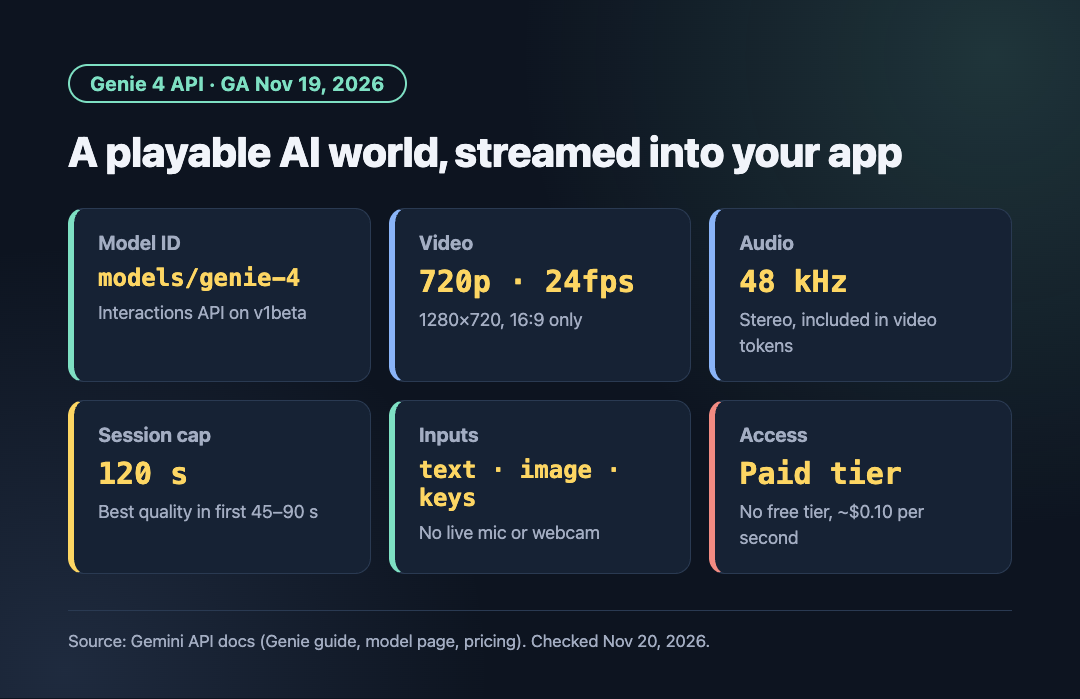
| Item | Genie 4 API value |
|---|---|
| Model ID | models/genie-4 (also accepts genie-4) |
| Status | Generally available (stable), served on v1beta |
| Output | 1280×720, 16:9, 24 fps, 48 kHz stereo audio |
| Session length | Hard cap of 120 seconds; best quality in the first 45–90 s |
| Inputs | Text prompt, one 16:9 reference image, key events |
| Transport | WebRTC (browser, JS only) or WebSocket (Python, Node, browser) |
What it does not support is just as important. Genie 4 is not available on the Live API (live.connect, which is for Gemini 3.8 Live) and the samples never use generateContent. Google's model page also lists no Batch API, Flex or Priority inference, context caching, function calling, structured outputs, grounding or session resumption. It does not accept live microphone or webcam input. Every output carries a SynthID watermark.
If you already call Gemini text models, the client setup will feel familiar. Our Gemini 4 Argon API migration guide covers the standard google-genai setup and key handling.
Check your environment before the first session
Three things block most first attempts: an old SDK, a free-tier key and a missing environment variable.
1. Check your SDK versions
Google's docs say to install the latest SDK but do not name a minimum version. Check whether your installed SDK has the Interactions client at all:
Python:
python3 --version
python3 -m pip show google-genai | grep -i version
python3 -c "from google import genai; c = genai.Client(http_options={'api_version': 'v1beta'}); print(hasattr(c.aio, 'interactions'))"
Node.js:
node --version
npm ls @google/genai
If the Python check prints False or raises AttributeError, upgrade:
python3 -m pip install --upgrade google-genai
npm install @google/genai@latest
2. Confirm your key is on a paid tier
Genie 4 has no free tier. Open Google AI Studio, go to the API keys page and check that the key's project shows a paid usage tier (Tier 1 or higher). A free-tier key will be rejected. Google's pages do not publish the exact error text, so check the tier first if the very first interactions.create call fails.
3. Export the key
export GEMINI_API_KEY="<YOUR_API_KEY>"The Python client reads GEMINI_API_KEY from the environment. Never ship this key to a browser. Browser clients get a short-lived token instead (covered below).
How a Genie 4 API session works
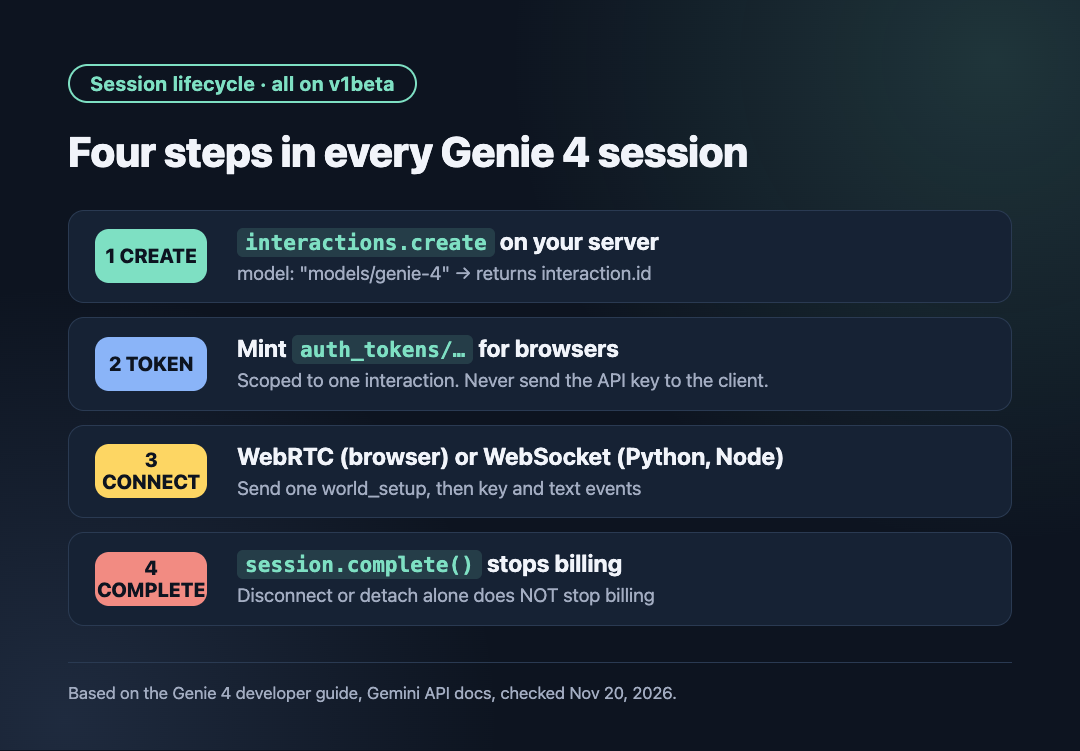
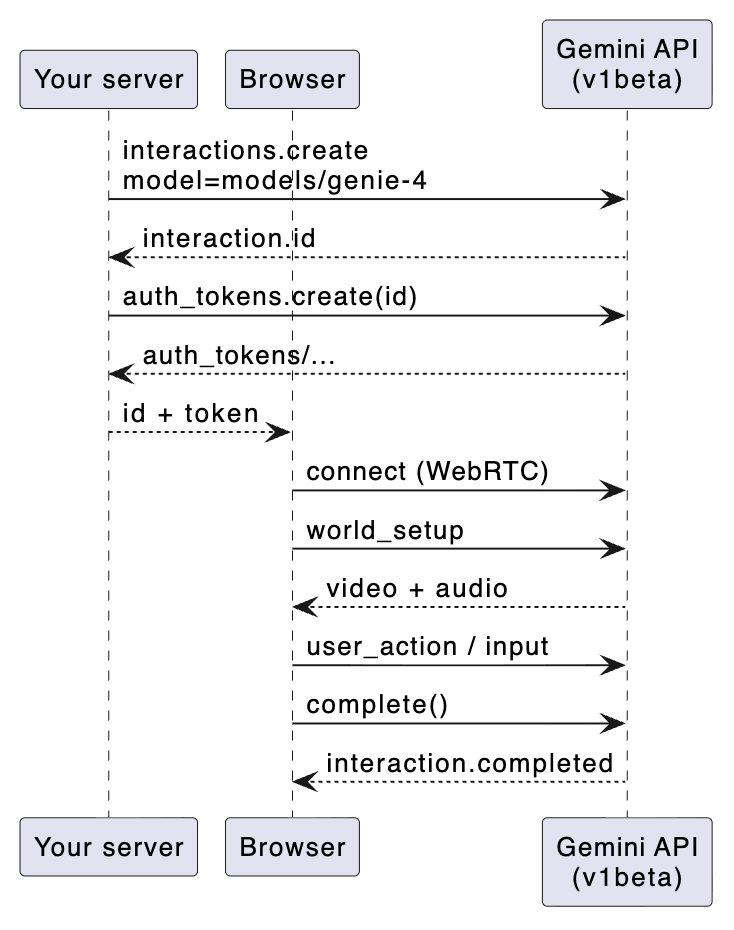
Every session has the same four steps, all on v1beta.
View PlantUML source
@startuml
skinparam shadowing false
skinparam defaultFontSize 13
participant "Your server" as S
participant "Browser" as B
participant "Gemini API\n(v1beta)" as G
S -> G : interactions.create\nmodel=models/genie-4
G --> S : interaction.id
S -> G : auth_tokens.create(id)
G --> S : auth_tokens/...
S --> B : id + token
B -> G : connect (WebRTC)
B -> G : world_setup
G --> B : video + audio
B -> G : user_action / input
B -> G : complete()
G --> B : interaction.completed
@enduml- Create the interaction on your server with
model: "models/genie-4". The response has anid. - Mint a short-lived token (browser apps only). The token looks like
auth_tokens/...and works for that one interaction. - Connect with
transport: "webrtc"or"websocket". WebRTC is recommended in browsers. Python uses WebSocket. - End the session with
complete(). This stops generation and billing and sends a finalinteraction.completedevent.
The REST version of step 1 (create the interaction on your server):
curl -s -X POST "https://generativelanguage.googleapis.com/v1beta/interactions" \
  -H "x-goog-api-key: $GEMINI_API_KEY" \
  -H "Content-Type: application/json" \
  -d '{"model": "models/genie-4"}'
Then mint a browser token for that interaction:
curl -s -X POST "https://generativelanguage.googleapis.com/v1beta/interactions/<INTERACTION_ID>/auth_tokens" \
  -H "x-goog-api-key: $GEMINI_API_KEY" \
  -H "Content-Type: application/json" \
  -d '{}'
The first response contains id, the second contains auth_token. Each interactions.create call counts as one request against your daily quota.
Genie 4 API Python quickstart: save a frame and the audio
This script follows the structure of Google's WebSocket sample. It builds a world from a text prompt, saves the first frame as a JPEG, walks forward, sends a weather prompt after about 2 seconds and ends the session at about 6 seconds. It then writes the audio to a WAV file. Save it as genie_quickstart.py.
import asyncio
import base64
import wave

from google import genai

WORLD_PROMPT = (
    "First-person view walking down a narrow cobblestone street in a small "
    "harbor town at dusk. Warm window lights, fishing boats, light fog. "
    "Audio: distant gulls, soft waves, footsteps on stone."
)


async def send_text_impulse(session, text: str, repeats: int = 10):
    # Genie reads text at 4-frame step boundaries, so repeat it for ~1.5 s
    for _ in range(repeats):
        await session.send(text)
        await asyncio.sleep(0.15)


async def main():
    client = genai.Client(http_options={"api_version": "v1beta"})  # uses GEMINI_API_KEY
    interaction = await client.aio.interactions.create(
        model="models/genie-4", api_version="v1beta"
    )

    pcm_chunks: list[bytes] = []
    frames = 0

    async with client.aio.interactions.connect(
        interaction.id, api_version="v1beta"
    ) as session:
        await session.send(
            {"event_type": "world_setup", "world_prompt": {"text": WORLD_PROMPT}}
        )

        async for event in session.receive():
            if event.event_type == "step.delta":
                delta_type = getattr(event.delta, "type", None)

                if delta_type == "video" and event.delta.data:
                    frames += 1
                    if frames == 1:
                        with open("first_frame.jpg", "wb") as f:
                            f.write(base64.b64decode(event.delta.data))
                        await session.send(
                            {"event_type": "user_action", "action": "key_down", "input": "key_w"}
                        )
                    if frames == 48:   # ~2 s at 24 fps
                        asyncio.create_task(
                            send_text_impulse(session, "Light rain starts to fall")
                        )
                    if frames == 144:  # ~6 s at 24 fps
                        await session.send(
                            {"event_type": "user_action", "action": "key_up", "input": "key_w"}
                        )
                        await session.complete()  # stops generation and billing

                elif delta_type == "audio" and event.delta.data:
                    pcm_chunks.append(base64.b64decode(event.delta.data))

            elif event.event_type == "interaction.completed":
                break
            elif event.event_type == "error":
                print("Genie error:", getattr(event, "error", event))
                await session.complete()
                break

    if pcm_chunks:
        with wave.open("world_audio.wav", "wb") as wav:
            wav.setnchannels(2)      # stereo
            wav.setsampwidth(2)      # 16-bit PCM
            wav.setframerate(48000)  # 48 kHz
            wav.writeframes(b"".join(pcm_chunks))

    print(f"Received {frames} video frames")


asyncio.run(main())
Run it:
python3 genie_quickstart.py
open first_frame.jpg        # macOS; use xdg-open on Linux
Expect about 5–9 seconds before the first frame. At 144 frames, this run bills roughly 6 seconds of video plus the time before you call complete().
Start from an image instead of text
Add a 16:9 JPEG as reference_image. It sits at the top level of the event, not inside world_prompt:
with open("street_1280x720.jpg", "rb") as f:
    image_b64 = base64.b64encode(f.read()).decode()

await session.send({
    "event_type": "world_setup",
    "world_prompt": {"text": WORLD_PROMPT},
    "reference_image": {"mime_type": "image/jpeg", "data": image_b64},
})
Google suggests 1280×720 or 640×360. Over WebRTC, keep the JPEG under 48 KB because data-channel messages max out at 64 KB. Use WebSocket for larger images.
Controls: keys, camera and text prompts
You send exactly one world_setup event, then any number of user_action and input events.
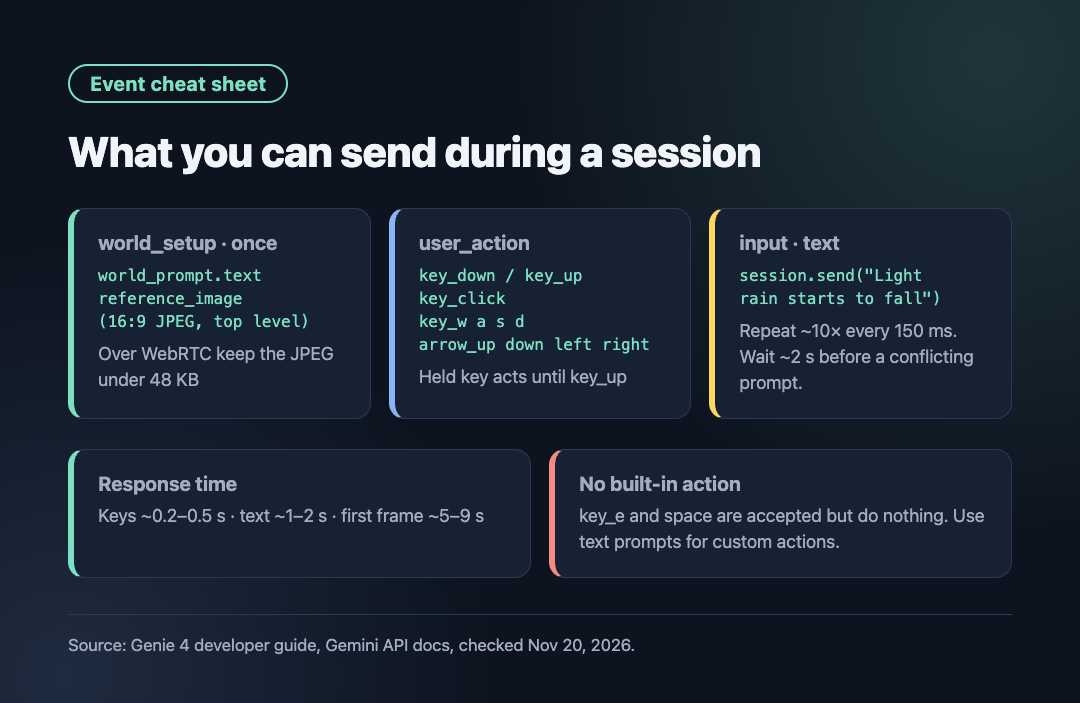
| Event | Fields | What it does |
|---|---|---|
world_setup | world_prompt.text, optional reference_image | Builds the world. Send once. |
user_action | action: key_down / key_up / key_click, input: key | Moves or turns. A held key keeps working until key_up. |
input | content: [{"type": "text", "text": "..."}] | Changes the world mid-session. session.send("text") wraps it for you. |
Built-in keys:
- Movement:
key_w,key_s,key_a,key_d - Camera:
arrow_up,arrow_down,arrow_left,arrow_right key_eandspaceare accepted but do nothing by default. For custom actions (jump, open a door), send a text prompt instead.
Prompt tips from Google's guide:
- Send each text prompt about 10 times at 150 ms intervals. The model reads text only at 4-frame step boundaries.
- Wait about 2 seconds before sending a prompt that conflicts with the last one.
- Put character dialogue in quotation marks.
- Objects can change if you look away for 8+ seconds or turn 360°. Do not build gameplay that depends on perfect object permanence.
Browser apps: never expose the API key
In a browser, use WebRTC with the short-lived token. Passing a raw AIza... key to the browser WebSocket transport throws a usage error by design. A minimal Node.js token endpoint:
// server.mjs (Node.js 20+, npm install @google/genai express)
import express from "express";
import { GoogleGenAI } from "@google/genai";

const ai = new GoogleGenAI({ apiKey: process.env.GEMINI_API_KEY, apiVersion: "v1beta" });
const app = express();

app.post("/genie/session", async (_req, res) => {
  const interaction = await ai.interactions.create({ model: "models/genie-4" });
  const token = await ai.interactions.authTokens.create(interaction.id, { api_version: "v1beta" });
  res.json({ interactionId: interaction.id, token: token.auth_token });
});

app.listen(3000);
The browser then creates its own client with the token as apiKey, calls interactions.connect(interactionId, { transport: "webrtc", api_version: "v1beta" }) and attaches the video with session.transport.setVideoElement(videoElement). Add your own login check and per-user limit to /genie/session. Anyone who can call it can spend your money.
We used a similar server-mints-token pattern in our OpenAI prompt-to-voice guide, which also streams media over WebRTC.
Genie 4 API pricing and rate limits
Video output costs $17.50 per 1M tokens. Each frame is 240 tokens, so one second at 24 fps is 5,760 tokens:
5,760 tokens × $17.50 ÷ 1,000,000 = $0.1008 per second
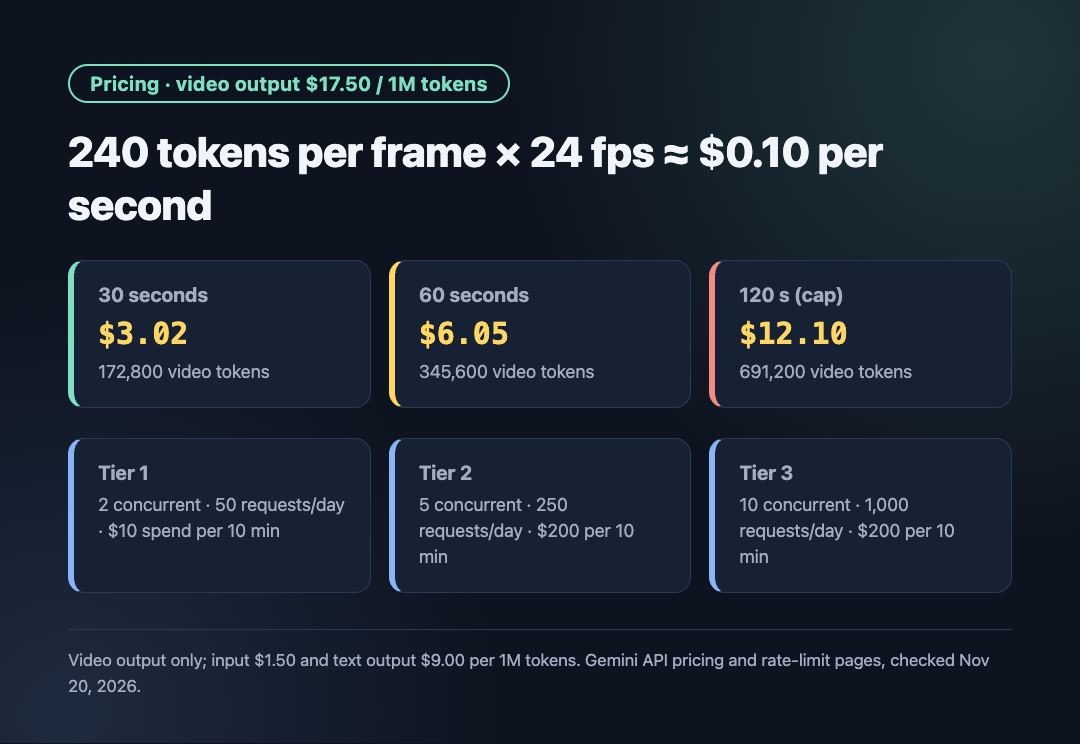
| Session length | Video tokens | Approx. cost |
|---|---|---|
| 10 s | 57,600 | $1.01 |
| 30 s | 172,800 | $3.02 |
| 60 s | 345,600 | $6.05 |
| 120 s (cap) | 691,200 | $12.10 |
Text and image input cost $1.50 per 1M tokens and text output $9.00 per 1M tokens, which is small next to video. These figures assume video output only and come from Google's pricing page as checked on November 20, 2026.
| Usage tier | Concurrent sessions | Requests per day |
|---|---|---|
| Free | Not supported | Not supported |
| Tier 1 | 2 | 50 |
| Tier 2 | 5 | 250 |
| Tier 3 | 10 | 1,000 |
Key events and text prompts inside a session do not use extra request quota. The general spend limits per 10 minutes still apply: $10 on Tier 1, $200 on Tiers 2 and 3. By our arithmetic, one full 120-second session (about $12.10) costs more than the Tier 1 ten-minute limit, so on Tier 1 plan for shorter sessions. A spend-limit hit returns 429 RESOURCE_EXHAUSTED.
The biggest billing trap: leaving the Python async with block, or calling detach(), only sends interaction.disconnect. That does not stop billing. Only complete() (or cancel(), which aborts at once) stops it. Wrap your session in try/finally and call complete() in the finally block.
Troubleshooting common Genie 4 errors
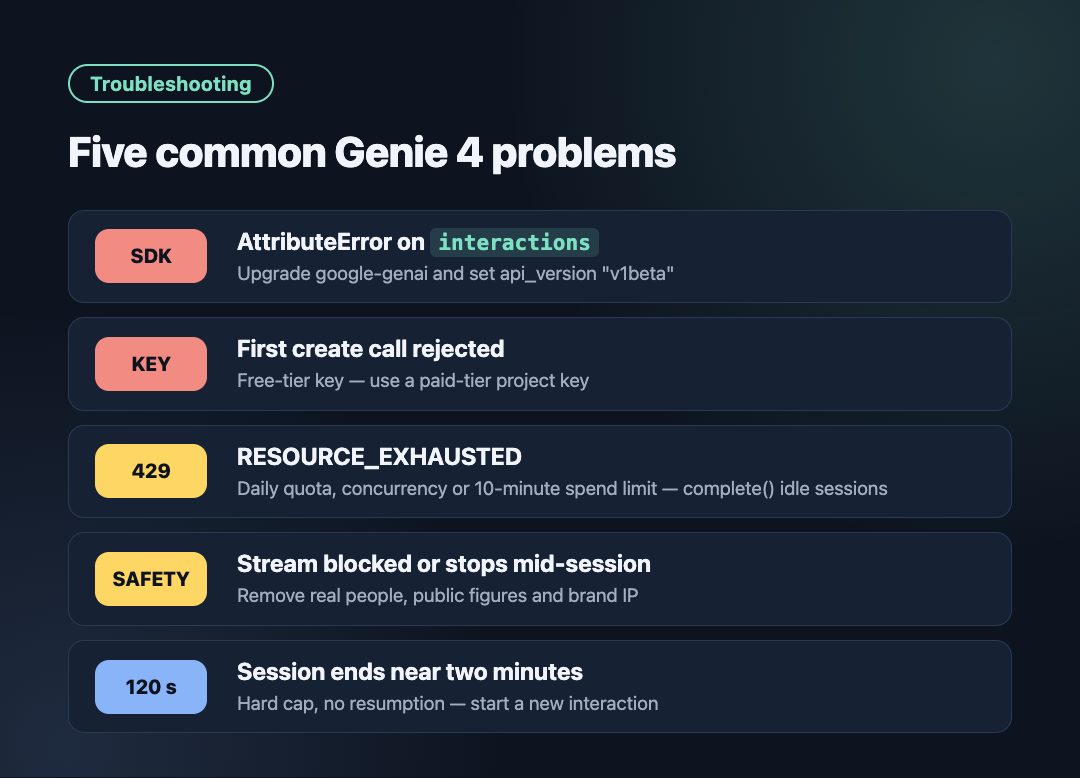
| Symptom | Likely cause | Fix |
|---|---|---|
AttributeError: ... 'interactions' | Old google-genai | pip install --upgrade google-genai and set api_version to v1beta |
First create call rejected | Free-tier key | Use a key from a paid-tier project |
429 RESOURCE_EXHAUSTED | Daily session quota, concurrent sessions or 10-minute spend limit | Close idle sessions with complete(), shorten sessions, request a higher tier |
| Stream stops or never starts with a scene | Safety block | Remove real people, public figures and brand IP from the prompt or image |
| Session ends around 2 minutes | 120-second hard cap | Start a new interaction. Session resumption is not supported |
| Usage error in the browser | Raw API key on browser WebSocket | Mint an auth_token on your server |
Two more checks:
- No frames but no error: you may have two
receive()loops. Only one active receive iterator is allowed per connection. - Choppy video outside the US, Europe or East Asia: Genie 4 is served from the US, Western Europe and Japan. Google says latency outside those regions is higher and frame rate may drop. Use WebRTC rather than WebSocket in the browser.
If you have older Gemini Live or TTS preview models in the same codebase, also check our note on the Gemini preview shutdown and the move to 3.8. Genie 4 does not replace those models; it runs on a different API.
Should you use the Genie 4 API now?
| Your situation | Recommendation |
|---|---|
| Prototype, game jam, interactive demo | Try it now with 10–30 s sessions on Tier 1 |
| Public web app with many users | Wait until you have auth, per-user limits and Tier 2+ |
| Long walk-through (over 2 minutes) | Not a fit today: 120 s cap, no resumption |
| Voice or camera-driven experience | Not supported: no live mic or webcam input |
| Pre-rendered marketing video | A video generation model is simpler and cheaper |
FAQ
Is the Genie 4 API free to try? No. Genie 4 requires a paid-tier Gemini API key. The free tier has no Genie 4 access and no free quota.
Why does Genie 4 use v1beta if it is generally available? The model is GA, but it is served through the Interactions API, which Google's docs call on the v1beta API version. Set api_version="v1beta" in the client and in each call.
Can I use Genie 4 with generateContent or the Live API? No. Genie 4 works only through interactions.create and interactions.connect. The Live API is for Gemini 3.8 Live.
Can I record a Genie 4 session as an MP4? The WebSocket transport gives you each frame as a base64 JPEG and audio as 48 kHz 16-bit stereo PCM. You can save them and combine them with a tool like ffmpeg. Outputs carry a SynthID watermark.
How do I stop paying for a session that hangs? Call complete() or cancel(). Disconnecting alone does not stop billing. Put the call in a finally block so it runs even when your code crashes.
The next step after this quickstart is a key-mapping layer for a browser client. Start with the WebRTC sample on Google's Genie guide and add your server-side token endpoint from above.
References
- Genie 4 developer guide – Gemini API docs (checked Nov 20, 2026)
- Genie 4 model page – Gemini API docs (checked Nov 20, 2026)
- Gemini API pricing (checked Nov 20, 2026)
- Gemini API rate limits (checked Nov 20, 2026)
- Gemini API changelog, Nov 19, 2026 entry (checked Nov 20, 2026)
- Genie 4 now available through the Gemini API – Google blog (Nov 19, 2026, checked Nov 20, 2026)